Brought to you by the makers of Mixed in Key, Platinum Notes (PN) is the tool you need to put that extra polish on your mp3s to make them really sizzle in the clubs. Some of the things you can expect are:
- Automatically adjust the tracks volume, so that every track has the same perceived loudness.
- Repair clipped peaks
- Adjust the dynamics of the music if needed
- Adjust the pitch of the tracks if needed, to make perfect harmonic mixes.
So, does it work as advertised? I’ve tried the software on numerous tracks, like Beatport MP3, ripped CDs, and on various musical genres, from pumping techno to disco. Let’s take those features one by one:
Continue reading ‘Review: Platinum Notes (Mac)+ Give Away’

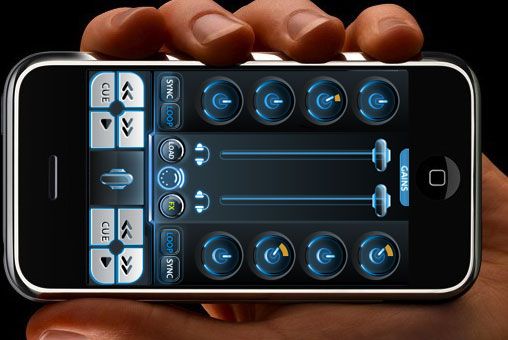
There is currently a heated debate about the use of the Sync button. Some say it’s cheating, some say: as long as it sounds good for the audience, it’s ok… I think that everyone is missing the point. Learning to beatmatch by hand is a skill that any DJ should learn. The only reason he should learn it is to have at his disposal a broader way to express himself artistically.
There is absolutely nothing wrong with using the sync button. It saves time and allows you to do something else, it can also be a lifesaver when you have lost it while in a mix. I’m really glad to have that function at hand, and I use it often, even if I’m able to beatmatch two records by ear in a short amount of time. So, what’s the big deal with learning to do it by hand? Well, I think that the perfect mix in term of phase and speed doesn’t really exist. It is all a matter of what you want to express artistically. Hand beatmatching techniques can be used to breath life and spontaneity into your mixes, and have been used this way by all the best DJs since the beginning. And it sounds really different from automated matching. No judgment of value, there, both can be useful.
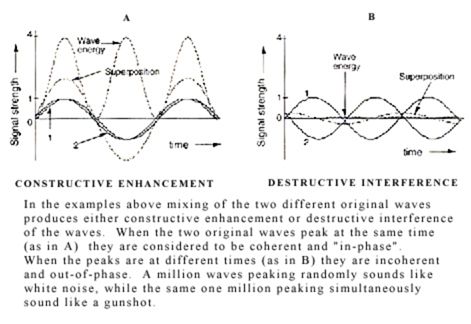
I now need to show you a trick to prove my point. It’s a very old and cool trick, which has a lot of practical applications, among them being able to teach you how to beatmatch by hand, or get better if you already know how.
Continue reading ‘Phasing - Old school beatmatching for all’

You need a lot of little tools to setup, play, organize your various musical activities. Here are some of my favorites, they are all great pieces of software that do the job well, and in an elegant way. Best of all, they are free!
Continue reading ‘Some freewares I can’t live without (Mac)’

Last month BentoSan posted a great tutorial about routing Traktor audio into Live in Windows. It’s here and I recommend you at least skim his article if you haven’t already read it, it has plenty of relevant links. Here is how to do exactly the same thing on a Mac, using free software.
What to expect:
- Routing of the audio of each Traktor deck into Live.
- MIDI clock sync from Traktor to Live. Allows to use Live VST beat synced. Allows to start armed clips in Live on the beat.
- Record your set in audio directly in Live.
- Low latency and excellent stability.
This has been tested on OS X 10.5.2, with Traktor 3.2.2 and Live 7.05. Hardware is a 2.14 GHz Dual Core iMac
What you need:
Continue reading ‘Smart Mixing Traktor into Ableton - 4 Mac’
Readers are Saying