Tag Archive for 'Tks'

VCI-300 Patch Released

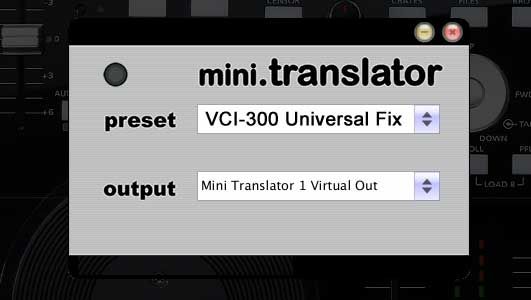
We are proud to announce the anticipated mini.Translator program and its first patch which allows the VCI-300 to work with programs other than Serato Itch. Even after converting to midi we were able to keep the jog wheels and pitch faders high resolution so they will still be very precise. The best part though is that its free for you to try.

Enter your email bellow and you will receive links to mac and windows versions as well as updates on when the newest patches are available. This is the first beta release and there may be minor bugs, so please report them or post questions here. We are working on a full preset for the VCI-300 and Traktor that includes effects mapping and a matching TKS file.

Continue reading ‘VCI-300 Patch Released’

Re-Use Your Jog Wheel- 4 Fx.

A jog wheel may be good for cuing up a song but the top does not serve much of a purpose after that. So why not double assign it to another function that works when you hold down a shift key? Its a logical conclusion but finding something that actually works well with the jog wheel’s pitch bend type message is another story. Last week I may have found something that fits perfectly.

Continue reading ‘Re-Use Your Jog Wheel- 4 Fx.’

Traktor TKS files for Controllers

ni_traktor_ready_logo.jpgThis is where you can find a central collection point for TKS files (Traktor midi settings) from around the web and Dj Tech Tools. This post WILL get updated and the following list is just a starting point. If you also want to contribute to this list send me an email to ean @ eangolden.com or post something here in the comments. I will then update the post with the files and a link to your site.

Continue reading ‘Traktor TKS files for Controllers’

Oxygen 8 Controllerism Layout

Oxygen 8 controllerism juggle routines

The manufacturers don’t want you to know this, but the truth is you don’t have to plop down $1,500 for the latest Allen & Heath mixer or $3,000 on a JazzMutant Lemur to do creative things with MIDI and DJ software. Sure, having a brand new DJ controller with all kinds of bells and whistles will get you excited about trying new ideas, but you might get more mileage out of something at a fraction of those prices. There are many inexpensive two-octave keyboards that offer mappable controls in a small footprint. Perhaps you still have an M-Audio Oxygen 8 ($149.95 for the Oxygen 8 V2; www.m-audio.com) lying around from your first foray into music production. Take it out and imagine how you might DJ with it. Think of how each knob and slider might best control two or more songs on the fly. It’s actually a lot more realistic than you might imagine, so let’s turn the zillion-selling Oxygen 8 into a controllerist’s dream rig. Continue reading ‘Oxygen 8 Controllerism Layout’

Ean Golden’s personal VCI-100 layout for Traktor

img_1263.jpg

VERY IMPORTANT UPDATE**** 1/29/08

Editors note: It has recently come to light that the first run of VCI-100’s that were sent out had a completely different mapping layout than all the subsequent “Firmware V2″ VCi-100. You can find out which version you have by holding down both jog wheel buttons at the same time. If the jog wheel lights turn off and your pitch bend no longer works then you have the NEW firmware and my layout will NOT work with your VCi-100. Your new vci firmware is sending out completely different note values and they will result in NOTHING working as I designed. if you have the OLD firmware then by all means enjoy the layout bellow. Otherwise wait until march when you can get your hands on a VCI-100 that ships with these performance mods already installed

After 2 months of intense button pushing, code twisting and testing, I think its almost done. Here is the near final version of my programming for the VCI-100. In the coming months you will be able to get your hands on a limited edition set of plates (hopefully gold and black) that match this exclusive layout. What is different? Almost everything, but the general idea is to give you hands on immediate access to do really cool things without looking at a screen. This is the testing phase so only people with a Macintosh computer will be able to use the layout. Once the controls are finalized Vestax will make available a firmware update that will give the VCI all of this functionality without any extra programs.

So if you have a Macintosh follow the instructions bellow and PLEASE give me feedback here on this post.

If you have a WIN machine you can try out this patch for BOME Midi translator.

Continue reading ‘Ean Golden’s personal VCI-100 layout for Traktor’