Mixing in key is one of the best ways to create a smooth mix that resonates from track to track, increasing or decreasing energy in a way that makes sense to the ears of your audience. But did you know that you’re able to manually adjust the key of a track in some DJ software to match it to the playing track? Read on to learn when this is possible and how to make it work with key detected tracks. Continue reading Mixing In Key: When And How To Change Track Key In DJ Software
Author Archive
Records Made Of Wood, Chocolate, Or 3D Printed!
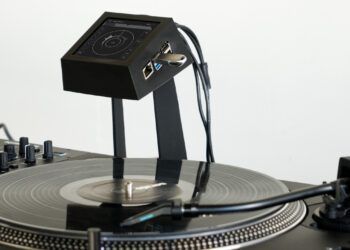
In the DJTT mailbag this morning was a link to a brand new project featured in the Daily Mail that’s worth sharing – laser-cut wooden records by Amanda Ghassaei (from our own town of San Francisco!). The records are surely aren’t the best for your needles, but they look pretty awesome.
The Daily Mail notes:
Ghassaei created a digital waveform file from the MP3 and converted into a PDF.
Because the resolution of the laser is thicker than the vinyl record presses so Ghassaei had to make the grooves twice as larger as they would be on a vinyl record. This means that a wooden record can only fit around three minutes of song onto one side, and this means the song becomes more distorted as the needle moves towards the centre of the record because the sampling rate decreases.
Watch the wooden wax Radiohead track play out below:
PRINT ME A RECORD!
Amanda has also previously made records from a 3D printer that were a buzz a few months back – which although it suffers a similar issue with quality, is most certainly a sign of music purchasing (or pirating!) of the future:
Want to try either of these designs on your own?
Amanda has posted instructions on Instructables for her laser-cut record and the 3D printed record.
DIDN’T YOU SAY CHOCOLATE?
We decided to throw this awesome video in this news article as well – a throwback to September of last year of a custom run of Breakbot records printed on 74% dark chocolate. They only have a few limited plays before the sound quality degrades beyond recognition, but after that, they’re delicious!
BT On Mentoring/Promoting Porter Robinson
We’ve got a lot of readers who are young producers looking for (or who might have) an older mentor also in the production game, so when producer BT went on a long tiarade about his experience mentoring and helping Porter Robinson in his rise to popularity this morning, it seemed poignant. It’s a very interesting read and cautionary tale on how quickly relationships can disappear when fame and success come into play.
As is often easiest with a large volume of tweets, we’ve compiled them into a Storify story, below:
More: Watch our interviews with BT and Porter Robinson.
Moving A DJ Library From Serato Into Traktor
We’re constantly being asked by Serato DJs who have recently discovered Traktor and want to give it a shot about the best way to easily move their library across without having to start all over with cue points, BPM information, and so on. The good news is that moving your library to Traktor is relatively simple. Watch today’s video inside and learn how to make it happen!
Continue reading Moving A DJ Library From Serato Into Traktor
MixVibes Cross 2.4: 4 Decks + HID Control
MixVibes continues to close the gap between its DJ software and the other big players in the industry, and the release of Cross 2.4 is no exception. The new version of Cross features four decks in the software, the bottom two of which can be switched between sample and player mode, similar to Traktor’s Remix Decks / Track Decks (note that there are still only 4 slots in the sample modes – it’s not Remix Deck sized in that respect).
Each of the decks can also now be controlled via HID devices, an advancement which will allow Pioneer CDJ users (not just the Nexus, as some other outlets have reported) to use a Sync Link workflow where each deck follows a master- but master status is attributed automatically based on what the primary playing deck is. Have a look at how this HID control works in the video below:
Additionally, the new version of MixVibes also incudes controller mappings for a few key intro-style models, including the Numark MixTrack/2/Pro2, Denon SC2900, and Pioneer DDJ-WeGO.
Will Cross become a staple in DJ booths overnight? Probably not – but if they continue to build a feature set that brings them into alignment with all of the other offerings, there’s a chance that they could make a move at the market fairly easily with a few forward-thinking features.
Learn more about Mixvibes Cross on their official site.
Video: DJ Shiftee Analyzes DJ Shiftee’s Kontrol Z2 Routine
Unless you’re deep into the DMC scene, it’s not that common to see in-depth analysis of other DJ’s performances, tricks, and routines – but today our friends over at DubSpot have done just that. Except instead of someone else analyzing a routine, DJ Shiftee is looking at his own routine on the Kontrol Z2 mixer – with the help of a pint-size version of himself, Little Shiftee.
It’s a great behind the scenes of how Shiftee uses the Z2 and Traktor’s Cue Points, Remix Decks, and his own Maschine mapping to build a performance. The video also clears up a lot of speculation – he is not controlling the additional Remix Deck slots with the Maschine MK II via some secret Maschine firmware.
Shiftee is offering the mapping he used for the Maschine MKII for free on Facebook in return for a Like.
If this video makes you keen on some of the gear in it, check out the Kontrol Z2 or the Maschine MKII in the DJTT webstore.
Mixify Adds Live Video Streaming to DJ Streams
We wrote about Mixify at their launch as a great solution for DJs looking for a Turntable.FM-style online streaming solution – and yesterday they announced a new feature that’s worth writing about – live video streams. The video streaming works using embedded Google Hangouts into their chatroom (which features a number of redesigned visual elements thanks to DJTT reader feedback).
Check out what the streaming video events look like below:

The feature is only available for Mixify Pro subscribers, which is usually $9.99/month or $99/year, but there’s a special on that knocks that down 40% for the first three months. Read more about the streaming video feature and special here.
Read Next: Getting Started Live Streaming Your DJ Sets
Mad Zach + Michael Mitchell at Converge SF
As an active San Francisco company, DJTT staff make the rounds through a number of local conferences and events. Last week’s Converge SF is a great example – where Michael Mitchell (the product designer behind the Midi Fighter series) and Mad Zach were invited to give a presentation.
First check out Mike’s presentation on the history of DJ technology and how it leads into the beginning of DJ TechTools and the first Midi Fighters. It’s a great half-hour watch that captures most of the story of the background of DJTT and the Midi Fighter in one presentation:
Then Mad Zach gave a quick explanation and multiple demos of his approach to finger drumming on the Midi Fighter:
Thanks to Converge SF for hosting us! Learn more about their organization here – or follow them on Twitter.