DJ TechTools
  • Blog
    • DJ Gear
      • DIY Projects
      • Gear Reviews
      • New Products
      • Controllerism
    • Techniques + Tips
      • Beginner DJ
      • Advanced DJ
      • Producer
      • Finger Drummer
    • News + Culture
      • Editorials + Opinions
      • Artist Interviews
      • Performances + Routines
      • How I Play
    • DJ Software Tutorials
      • Serato Tips
        • Traktor Tips
      • CDJ Tips
      • Ableton Live Tips
  • Store
    • Run by real DJs, not a corporation
    • DJ Controllers
      • Midi Fighter Twister
      • Midi Fighter Spectra
      • Midi Fighter 64
      • View All
    • Accessories
      • Chroma USB Drive for DJs
      • Chroma Caps
      • Chroma Cables Audio
      • Chroma Cables USB-A
      • Chroma Cables: USB-C
      • DJTT Gift Card
      • Midi Fighter T-Shirt
      • Keyboard Covers
      • Earplugs by V-Moda
    • Production Gear
    • Soundcards & Mixers
  • Community
    • Popular Forums
      • General Discussion
      • Buy & Sell
      • Reviews
      • Mixes
      • Music Production
      • Show Your Setup
      • Off Topic
    • Handy Links
      • New Posts
      • Private Messages
      • Register
      • Search
    • Midi Maps
      • Traktor
      • Ableton
      • Serato DJ
      • Midi Fighter 3D
      • Midi Fighter Twister
      • Midi Fighter Spectra
  • Midi Fighter
  • Chroma
No Result
View All Result
DJ TechTools
  • Blog
    • DJ Gear
      • DIY Projects
      • Gear Reviews
      • New Products
      • Controllerism
    • Techniques + Tips
      • Beginner DJ
      • Advanced DJ
      • Producer
      • Finger Drummer
    • News + Culture
      • Editorials + Opinions
      • Artist Interviews
      • Performances + Routines
      • How I Play
    • DJ Software Tutorials
      • Serato Tips
        • Traktor Tips
      • CDJ Tips
      • Ableton Live Tips
  • Store
    • Run by real DJs, not a corporation
    • DJ Controllers
      • Midi Fighter Twister
      • Midi Fighter Spectra
      • Midi Fighter 64
      • View All
    • Accessories
      • Chroma USB Drive for DJs
      • Chroma Caps
      • Chroma Cables Audio
      • Chroma Cables USB-A
      • Chroma Cables: USB-C
      • DJTT Gift Card
      • Midi Fighter T-Shirt
      • Keyboard Covers
      • Earplugs by V-Moda
    • Production Gear
    • Soundcards & Mixers
  • Community
    • Popular Forums
      • General Discussion
      • Buy & Sell
      • Reviews
      • Mixes
      • Music Production
      • Show Your Setup
      • Off Topic
    • Handy Links
      • New Posts
      • Private Messages
      • Register
      • Search
    • Midi Maps
      • Traktor
      • Ableton
      • Serato DJ
      • Midi Fighter 3D
      • Midi Fighter Twister
      • Midi Fighter Spectra
  • Midi Fighter
  • Chroma
No Result
View All Result
DJ TechTools

Recording Kick Drums For Use In Electronic Productions

Ean Golden by Ean Golden
January 26, 2016
in Production Tips
Reading Time: 2 mins read
0
Recording Kick Drums
54
VIEWS
Post on FacebookTweet thisUpvote on Reddit

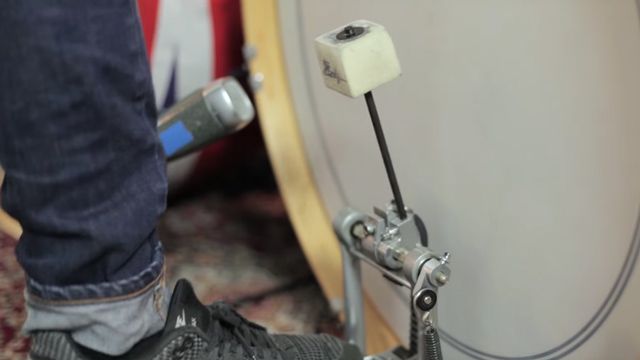
Continuing with our series of live instrument tutorials from Riverside Studios, this tutorial from Henne Müller is focused around recording kick drums. The technique is a bit different than traditional kick recording, and Henne shows off how to capture a few unique angles for use in your productions. Watch the full thing inside.

Recording Kick Drums

  • Choose the right instrument – different kicks work better depending on what type of sound you want to capture.
  • For this style of recording, use a Shure Beta 52 inside the kick ($189 on Amazon) or an ElectroVoice RE20 if you prefer a cleaner sound ($449 on Amazon)
  • Try different angles of recording the kick – if there’s no hole in the kick, point it towards the bottom middle of the rear skin. Recording different angles means you have more options!
  • Use a subkick microphone – essentially a speaker turned around in front of the kick drum – to record the lower frequencies.
  • Also consider adding a room microphone, Henne uses a Thomann t.bone RB-500 ribbon microphone – about $100. Do a few different angles here as well to capture what the kick sounds like in the room.

Having these options recorded when going into the studio and making a track means you have a lot of options to build a unique kick. As Henne enumerates in the video, you won’t like every angle you record kick drums from, so move the mic around and listen to it to find out what works best.

Hear Tracks From Searching For Abby

As mentioned in the video, Henne plays drums for Searching For Abby – listen to some of their tracks in the Soundcloud widget below.

Want more great production tutorials? See the links below, or click here to see all the tutorials in this Riverside Studios series. Our thanks to the Riverside crew for letting us film on location with their artists.
Tags: electronic musicHenne Müllerkick drumsmicrophonesrecordingriverside studios
ShareTweetShare
Previous Post

Rekord Buddy 2.0 Beta + Code Giveaway

Next Post

Mixvibes Set To Launch iOS Looping App

Related Posts

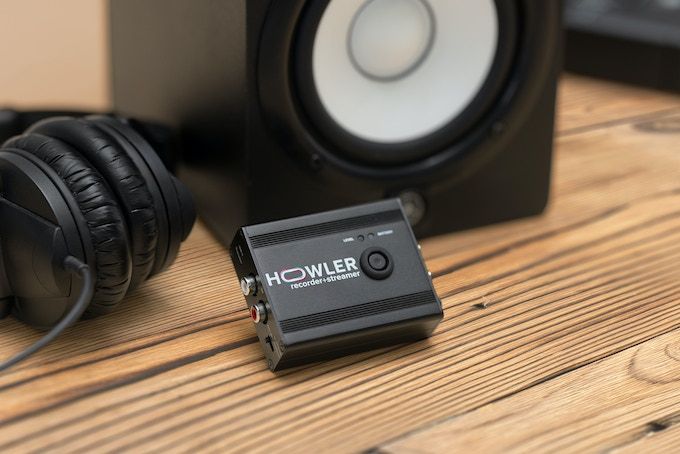
Meet Howler, a 2-in-1 device that records + livestreams high-quality audio from any source
News

Meet Howler, a 2-in-1 device that records + livestreams high-quality audio from any source

November 4, 2022
Push Turn Move
News + Culture

Push Turn Move: An Ultimate Tome Of Music Gear Design

December 15, 2017
Artist Spotlight: DJ Tennis Interview
Artist Features

Artist Spotlight: DJ Tennis Interview

June 30, 2017
Load More
Next Post
Mixvibes iOS App

Mixvibes Set To Launch iOS Looping App

Want to reach DJTT's audience here?

Shoot an email to advertising@djtechtools.com

DJTT ads
DJTT newsletter
Midi Fighter
Chat with us
  • ABOUT DJTT
  • CONTACT
  • PRIVACY
  • MIDI FIGHTER HELP
  • ABOUT DJTT
  • JOBS
  • CONTACT US
  • ADVERTISE
  • PRIVACY POLICY
  • ACCESSIBILITY STATEMENT

© 2024 DJ Techtools all rights reserved by DJ TechTools on all content unless otherwise noted.

No Result
View All Result
  • Blog
    • DJ Gear
      • DIY Projects
      • Gear Reviews
      • New Products
      • Controllerism
    • Techniques + Tips
      • Beginner DJ
      • Advanced DJ
      • Producer
      • Finger Drummer
    • News + Culture
      • Editorials + Opinions
      • Artist Interviews
      • Performances + Routines
      • How I Play
    • DJ Software Tutorials
      • Serato Tips
      • CDJ Tips
      • Ableton Live Tips
  • Store
    • Run by real DJs, not a corporation
    • DJ Controllers
      • Midi Fighter Twister
      • Midi Fighter Spectra
      • Midi Fighter 64
      • View All
    • Accessories
      • Chroma USB Drive for DJs
      • Chroma Caps
      • Chroma Cables Audio
      • Chroma Cables USB-A
      • Chroma Cables: USB-C
      • DJTT Gift Card
      • Midi Fighter T-Shirt
      • Keyboard Covers
      • Earplugs by V-Moda
    • Production Gear
    • Soundcards & Mixers
  • Community
    • Popular Forums
      • General Discussion
      • Buy & Sell
      • Reviews
      • Mixes
      • Music Production
      • Show Your Setup
      • Off Topic
    • Handy Links
      • New Posts
      • Private Messages
      • Register
      • Search
    • Midi Maps
      • Traktor
      • Ableton
      • Serato DJ
      • Midi Fighter 3D
      • Midi Fighter Twister
      • Midi Fighter Spectra
  • Midi Fighter
  • Chroma

© 2024 DJ Techtools all rights reserved by DJ TechTools on all content unless otherwise noted.

This website uses cookies. By continuing to use this website you are giving consent to cookies being used. Visit our Privacy and Cookie Policy.