DJ TechTools
  • Blog
    • DJ Gear
      • DIY Projects
      • Gear Reviews
      • New Products
      • Controllerism
    • Techniques + Tips
      • Beginner DJ
      • Advanced DJ
      • Producer
      • Finger Drummer
    • News + Culture
      • Editorials + Opinions
      • Artist Interviews
      • Performances + Routines
      • How I Play
    • DJ Software Tutorials
      • Serato Tips
        • Traktor Tips
      • CDJ Tips
      • Ableton Live Tips
  • Store
    • Run by real DJs, not a corporation
    • DJ Controllers
      • Midi Fighter Twister
      • Midi Fighter Spectra
      • Midi Fighter 64
      • View All
    • Accessories
      • Chroma USB Drive for DJs
      • Chroma Caps
      • Chroma Cables Audio
      • Chroma Cables USB-A
      • Chroma Cables: USB-C
      • DJTT Gift Card
      • Midi Fighter T-Shirt
      • Keyboard Covers
      • Earplugs by V-Moda
    • Production Gear
    • Soundcards & Mixers
  • Community
    • Popular Forums
      • General Discussion
      • Buy & Sell
      • Reviews
      • Mixes
      • Music Production
      • Show Your Setup
      • Off Topic
    • Handy Links
      • New Posts
      • Private Messages
      • Register
      • Search
    • Midi Maps
      • Traktor
      • Ableton
      • Serato DJ
      • Midi Fighter 3D
      • Midi Fighter Twister
      • Midi Fighter Spectra
  • Midi Fighter
  • Chroma
No Result
View All Result
DJ TechTools
  • Blog
    • DJ Gear
      • DIY Projects
      • Gear Reviews
      • New Products
      • Controllerism
    • Techniques + Tips
      • Beginner DJ
      • Advanced DJ
      • Producer
      • Finger Drummer
    • News + Culture
      • Editorials + Opinions
      • Artist Interviews
      • Performances + Routines
      • How I Play
    • DJ Software Tutorials
      • Serato Tips
        • Traktor Tips
      • CDJ Tips
      • Ableton Live Tips
  • Store
    • Run by real DJs, not a corporation
    • DJ Controllers
      • Midi Fighter Twister
      • Midi Fighter Spectra
      • Midi Fighter 64
      • View All
    • Accessories
      • Chroma USB Drive for DJs
      • Chroma Caps
      • Chroma Cables Audio
      • Chroma Cables USB-A
      • Chroma Cables: USB-C
      • DJTT Gift Card
      • Midi Fighter T-Shirt
      • Keyboard Covers
      • Earplugs by V-Moda
    • Production Gear
    • Soundcards & Mixers
  • Community
    • Popular Forums
      • General Discussion
      • Buy & Sell
      • Reviews
      • Mixes
      • Music Production
      • Show Your Setup
      • Off Topic
    • Handy Links
      • New Posts
      • Private Messages
      • Register
      • Search
    • Midi Maps
      • Traktor
      • Ableton
      • Serato DJ
      • Midi Fighter 3D
      • Midi Fighter Twister
      • Midi Fighter Spectra
  • Midi Fighter
  • Chroma
No Result
View All Result
DJ TechTools

Traktor + Serato DJs: Switching DJs on 1 Soundcard

Ean Golden by Ean Golden
February 15, 2015
in Basic DJ Tips, DJ Techniques / Tips
Reading Time: 2 mins read
0
Traktor + Serato DJs: Switching DJs on 1 Soundcard
74
VIEWS
Post on FacebookTweet thisUpvote on Reddit

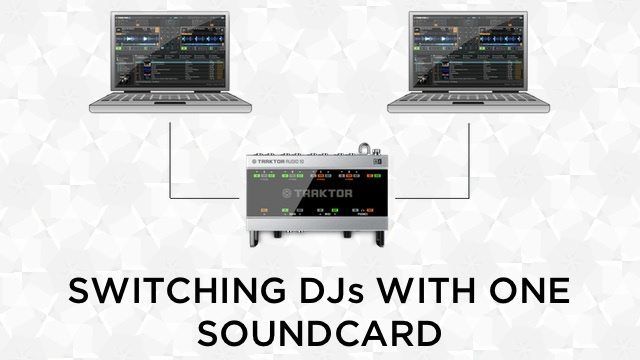
One of the challenges for Traktor and Serato DJs sharing the same soundcard is seamlessly transitioning between laptops with only one soundcard or mixer. This isn’t an issue for DJs that use CDJs or Rekordbox since the other DJ can mix in on the other player. Ean Golden has a simple trick that makes switching between DJs on 1 soundcard super easy using the Roll effect commonly found on club mixers like the Pioneer DJM 900.

The BeatRoll DJ Switch Trick

Club mixers, such as the Pioneer DJM 800 or DJM 900, have a built-in FX section with a variety of selectable FX. The effect that we’ll be using is the Roll/Beat Roll effect, which is very similar to Traktor’s Beatmasher effect. The Roll effect can be used to create little glitches or loop rolls to throw into a mix. However this effect has a more utilitarian use that can help transition between DJs that need to share the same soundcard.

By setting a high beat/loop count (8/1, 4/1) DJs can create a seamless loop that’s playing right inside the mixer. This loop will continue to play until the Roll effect is turned off. Once the loop is set, the current DJ can unplug from the mixer or soundcard and the loop roll will continue to play from the mixer. This allows the other DJ to plug their laptop into the soundcard or mixer and mix out of the beat roll loop without any interruptions in the music.

There’s a lot of other important things to consider when switching DJs, be sure to know “basic DJ etiquette”.

Bonus Tip: Applying Color FX

If the transition is taking too long, the loop can start to sound really repetitive. DJs can apply FX overtop the loop such as the color FX of the DJM 800/900 to add some flavour to it. Another cool trick that can be used for transitions is shortening the loop roll length and applying color FX (such as echo) to create a dramatic build out.

Looking for more ways to transition between DJs?

6 Clever Ways To Easily Transition Between Multiple DJs

Tags: dj étiquettedj soundcardsDJM effectsean goldeneffectspioneer djm-800pioneer DJM-900seratoserato DJsoundcardsswitching djsTraktor Tipstransitions
ShareTweetShare
Previous Post

History of Raves: Anjuna Beach + Goa Trance

Next Post

helloLIVE: A Week Living On An Island, Learning Ableton, and Surfing

Related Posts

The DJM-V5 from AlphaTheta: 3 channels, 4-band EQ, V10 sound – no Beat FX or crossfader.
Breaking News

The DJM-V5 from AlphaTheta: 3 channels, 4-band EQ, V10 sound – no Beat FX or crossfader.

January 20, 2026
66% of Serato just got bought: but not by AlphaTheta
Breaking News

66% of Serato just got bought: but not by AlphaTheta

April 1, 2025
“No Deal”: New Zealand’s ComCom denies clearance for AlphaTheta’s Serato acquisition
Breaking News

“No Deal”: New Zealand’s ComCom denies clearance for AlphaTheta’s Serato acquisition

July 17, 2024
Load More
Next Post
helloLIVE: A Week Living On An Island, Learning Ableton, and Surfing

helloLIVE: A Week Living On An Island, Learning Ableton, and Surfing

Want to reach DJTT's audience here?

Shoot an email to advertising@djtechtools.com

DJTT ads
DJTT newsletter
Midi Fighter
Chat with us
  • ABOUT DJTT
  • CONTACT
  • PRIVACY
  • MIDI FIGHTER HELP
  • ABOUT DJTT
  • JOBS
  • CONTACT US
  • ADVERTISE
  • PRIVACY POLICY
  • ACCESSIBILITY STATEMENT

© 2024 DJ Techtools all rights reserved by DJ TechTools on all content unless otherwise noted.

No Result
View All Result
  • Blog
    • DJ Gear
      • DIY Projects
      • Gear Reviews
      • New Products
      • Controllerism
    • Techniques + Tips
      • Beginner DJ
      • Advanced DJ
      • Producer
      • Finger Drummer
    • News + Culture
      • Editorials + Opinions
      • Artist Interviews
      • Performances + Routines
      • How I Play
    • DJ Software Tutorials
      • Serato Tips
      • CDJ Tips
      • Ableton Live Tips
  • Store
    • Run by real DJs, not a corporation
    • DJ Controllers
      • Midi Fighter Twister
      • Midi Fighter Spectra
      • Midi Fighter 64
      • View All
    • Accessories
      • Chroma USB Drive for DJs
      • Chroma Caps
      • Chroma Cables Audio
      • Chroma Cables USB-A
      • Chroma Cables: USB-C
      • DJTT Gift Card
      • Midi Fighter T-Shirt
      • Keyboard Covers
      • Earplugs by V-Moda
    • Production Gear
    • Soundcards & Mixers
  • Community
    • Popular Forums
      • General Discussion
      • Buy & Sell
      • Reviews
      • Mixes
      • Music Production
      • Show Your Setup
      • Off Topic
    • Handy Links
      • New Posts
      • Private Messages
      • Register
      • Search
    • Midi Maps
      • Traktor
      • Ableton
      • Serato DJ
      • Midi Fighter 3D
      • Midi Fighter Twister
      • Midi Fighter Spectra
  • Midi Fighter
  • Chroma

© 2024 DJ Techtools all rights reserved by DJ TechTools on all content unless otherwise noted.

This website uses cookies. By continuing to use this website you are giving consent to cookies being used. Visit our Privacy and Cookie Policy.