DJ TechTools
  • Blog
    • DJ Gear
      • DIY Projects
      • Gear Reviews
      • New Products
      • Controllerism
    • Techniques + Tips
      • Beginner DJ
      • Advanced DJ
      • Producer
      • Finger Drummer
    • News + Culture
      • Editorials + Opinions
      • Artist Interviews
      • Performances + Routines
      • How I Play
    • DJ Software Tutorials
      • Serato Tips
        • Traktor Tips
      • CDJ Tips
      • Ableton Live Tips
  • Store
    • Run by real DJs, not a corporation
    • DJ Controllers
      • Midi Fighter Twister
      • Midi Fighter Spectra
      • Midi Fighter 64
      • View All
    • Accessories
      • Chroma USB Drive for DJs
      • Chroma Caps
      • Chroma Cables Audio
      • Chroma Cables USB-A
      • Chroma Cables: USB-C
      • DJTT Gift Card
      • Midi Fighter T-Shirt
      • Keyboard Covers
      • Earplugs by V-Moda
    • Production Gear
    • Soundcards & Mixers
  • Community
    • Popular Forums
      • General Discussion
      • Buy & Sell
      • Reviews
      • Mixes
      • Music Production
      • Show Your Setup
      • Off Topic
    • Handy Links
      • New Posts
      • Private Messages
      • Register
      • Search
    • Midi Maps
      • Traktor
      • Ableton
      • Serato DJ
      • Midi Fighter 3D
      • Midi Fighter Twister
      • Midi Fighter Spectra
  • Midi Fighter
  • Chroma
No Result
View All Result
DJ TechTools
  • Blog
    • DJ Gear
      • DIY Projects
      • Gear Reviews
      • New Products
      • Controllerism
    • Techniques + Tips
      • Beginner DJ
      • Advanced DJ
      • Producer
      • Finger Drummer
    • News + Culture
      • Editorials + Opinions
      • Artist Interviews
      • Performances + Routines
      • How I Play
    • DJ Software Tutorials
      • Serato Tips
        • Traktor Tips
      • CDJ Tips
      • Ableton Live Tips
  • Store
    • Run by real DJs, not a corporation
    • DJ Controllers
      • Midi Fighter Twister
      • Midi Fighter Spectra
      • Midi Fighter 64
      • View All
    • Accessories
      • Chroma USB Drive for DJs
      • Chroma Caps
      • Chroma Cables Audio
      • Chroma Cables USB-A
      • Chroma Cables: USB-C
      • DJTT Gift Card
      • Midi Fighter T-Shirt
      • Keyboard Covers
      • Earplugs by V-Moda
    • Production Gear
    • Soundcards & Mixers
  • Community
    • Popular Forums
      • General Discussion
      • Buy & Sell
      • Reviews
      • Mixes
      • Music Production
      • Show Your Setup
      • Off Topic
    • Handy Links
      • New Posts
      • Private Messages
      • Register
      • Search
    • Midi Maps
      • Traktor
      • Ableton
      • Serato DJ
      • Midi Fighter 3D
      • Midi Fighter Twister
      • Midi Fighter Spectra
  • Midi Fighter
  • Chroma
No Result
View All Result
DJ TechTools

Take Your Scratch Technique Into Orbit

Dan Leach by Dan Leach
January 22, 2015
in Advanced DJ Tips, DJ Techniques / Tips, Turntablism Tips
Reading Time: 4 mins read
0
Take Your Scratch Technique Into Orbit
195
VIEWS
Post on FacebookTweet thisUpvote on Reddit

It was 1998 in a club called the Unit in Sheffield, UK, when I first witnessed live scratching. Like many I was transfixed. I didn’t have a clue who the DJ was, but I remember how utterly amazing the noise sounded and how the fingers would move so fast they appeared to dance around the fader often in a ‘pinching’ motion. It was bemusing, fantastic, and mysterious all rolled into one.

Before the time of YouTube it took many years to understand why the hands and fingers moved the way they did. Partly by trial and error and partly by scanning a VHS tape of the 1998 DMC world championships and a Vestax Prime Cuts tutorial, I worked out that the key to it all was the ‘orbit’ scratch.

What is the Orbit Scratch?

The orbit was invented by DJ Disk, a member of the influential DJ crew Invisibl Skratch Picklz which also included DJ QBert and Mixmaster Mike, with the technique since becoming one of the bedrocks of the scratch DJ’s arsenal.

It is made up of two halves: first, with the crossfader open, the DJ moves the record forwards and at the same time closes the fader twice to chop the sound into three. If you do the same when you pull the record back, then you have six sounds.
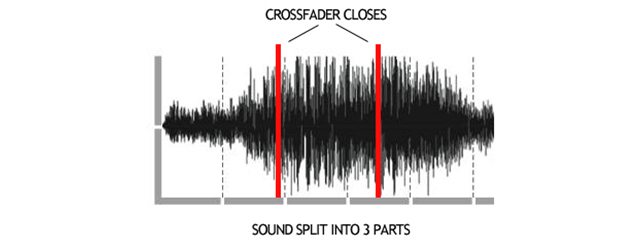
crossfader-closes

It’s also known as the 2-click flare because the DJ closes the fader twice on the forwards motion and twice back – two clicks on each. It’s exactly the same as the 1-click flare but with an extra ‘click’. The advantage is that you are getting six sounds for the effort of only four clicks.

This might sound simple, but to do it at high speed is not. If you tried to grab the fader and move it rapidly with your whole forearm your muscles would tire very quickly and would most likely incur some sort of strain.

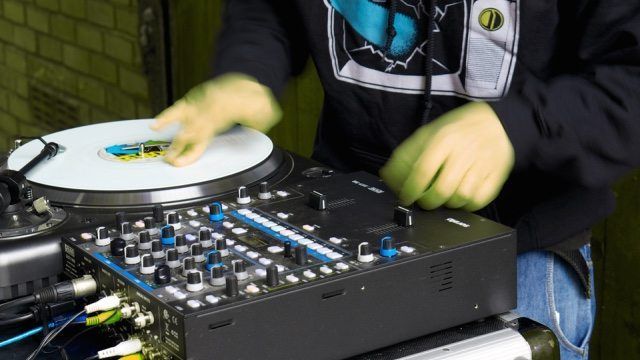
Instead, the fader is only gripped for one of the clicks. For the other click the hand opens, the wrist pivots, and the forefinger punches it to the other side. As the wrist pivots back, the thumb sends it the other way to close the sound off. This opening and closing of the hand creates the ‘pinching’ motion that is so fascinating to watch. To see this in action check out the video below of DJ Woody, filmed at 400 frames per second so you can see the movements.

For more DJ Woody, check out his interview focused on visual turntablism.

The correct terms for what the wrist is doing are pronating and supinating, according to Anthony Redmond, Professor of Clinical Biomechanics at Leeds University in the UK. When I asked him to analyze the above footage from a scientific point of view, he was surprised to see this motion, expecting mainly side-to-side movement – radial and ulnar deviation.
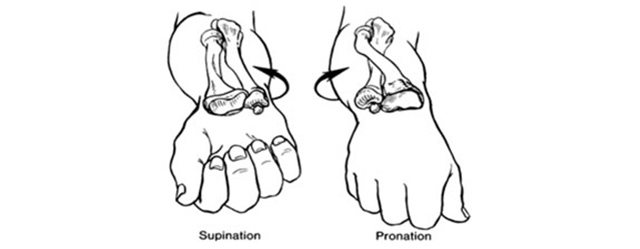
supination-pronation

He said:

“This is consistent with two principles: (1) that fast movements require minimisation of inertia and so are done by the smallest segments and (2) that rotation is less susceptible to having to overcome inertia than translation (side-to-side).”

This means the speed is created by the fingers (the smallest segments) and then maintained by the hand/wrist rotation.

Firstly, because it is an open-fader scratch (ie. it begins and ends with the fader open) it can combine easily with other elemental open-fader techniques such as the 1-click flare and Jazzy Jeff’s chirp. This allows you to flow from one scratch technique to the next – so important to this improvisational artform.

Secondly, the two-click motion is the same as a number of other advanced scratches including the boomerang, aquaman, O.G. flare, and prism. All of these techniques require 2-clicks of the crossfader in the same rhythm, it’s the record movement alone that makes the difference between these sounds.

The orbit is one of the reasons scratching is so fascinating, but if you’re just starting out, make sure you get the basic techniques down first. As 2011 WTK world freestyle scratch champ DJ Chile says:

“The process is a lot like learning a new language, so if we first focus on understanding the most used words and phrases (baby motions, tears, chirps, transforms, 1 click flares, etc.), later on we can embed the more complex words into the basic sentence structures we understand well.”

Further Reading:

  • Online DJ Scratch Schools Comparison
  • Watch A Shure M44-7 Cartridge Dropped At 500 Frames Per Second

Adapted from Macho Zapp‘s immersive multimedia article on the fascination of scratching – read Scratch Obsession here
Tags: dj qbertDj Tipsdj woodyFlareorbitorbit scratchScratchscratch tipsturntablism
Share2Tweet1Share
Previous Post

NAMM 2015: Logic Pro X 10.1 Major Update From Apple

Next Post

NAMM 2015: Pioneer’s HDJ-2000MK2 Headphones

Related Posts

Breaking writer’s block: A producer’s guide to sparking inspiration
DJ Techniques / Tips

Breaking writer’s block: A producer’s guide to sparking inspiration

October 9, 2023
DJ Pro Tips for Digital Crate Digging on Beatport, Bandcamp, Soundcloud, Spotify, Juno Download, and QoBuz
DJ Music Library Tips

DJ Pro Tips for Digital Crate Digging on Beatport, Bandcamp, Soundcloud, Spotify, Juno Download, and QoBuz

February 24, 2023
Stanton returns, launches STX: the only portable scratch turntable with an Innofader crossfader
DJ Gear

Stanton returns, launches STX: the only portable scratch turntable with an Innofader crossfader

February 21, 2023
Load More
Next Post
NAMM 2015: Pioneer’s HDJ-2000MK2 Headphones

NAMM 2015: Pioneer's HDJ-2000MK2 Headphones

Want to reach DJTT's audience here?

Shoot an email to advertising@djtechtools.com

DJTT ads
DJTT newsletter
Midi Fighter
Chat with us
  • ABOUT DJTT
  • CONTACT
  • PRIVACY
  • MIDI FIGHTER HELP
  • ABOUT DJTT
  • JOBS
  • CONTACT US
  • ADVERTISE
  • PRIVACY POLICY
  • ACCESSIBILITY STATEMENT

© 2024 DJ Techtools all rights reserved by DJ TechTools on all content unless otherwise noted.

No Result
View All Result
  • Blog
    • DJ Gear
      • DIY Projects
      • Gear Reviews
      • New Products
      • Controllerism
    • Techniques + Tips
      • Beginner DJ
      • Advanced DJ
      • Producer
      • Finger Drummer
    • News + Culture
      • Editorials + Opinions
      • Artist Interviews
      • Performances + Routines
      • How I Play
    • DJ Software Tutorials
      • Serato Tips
      • CDJ Tips
      • Ableton Live Tips
  • Store
    • Run by real DJs, not a corporation
    • DJ Controllers
      • Midi Fighter Twister
      • Midi Fighter Spectra
      • Midi Fighter 64
      • View All
    • Accessories
      • Chroma USB Drive for DJs
      • Chroma Caps
      • Chroma Cables Audio
      • Chroma Cables USB-A
      • Chroma Cables: USB-C
      • DJTT Gift Card
      • Midi Fighter T-Shirt
      • Keyboard Covers
      • Earplugs by V-Moda
    • Production Gear
    • Soundcards & Mixers
  • Community
    • Popular Forums
      • General Discussion
      • Buy & Sell
      • Reviews
      • Mixes
      • Music Production
      • Show Your Setup
      • Off Topic
    • Handy Links
      • New Posts
      • Private Messages
      • Register
      • Search
    • Midi Maps
      • Traktor
      • Ableton
      • Serato DJ
      • Midi Fighter 3D
      • Midi Fighter Twister
      • Midi Fighter Spectra
  • Midi Fighter
  • Chroma

© 2024 DJ Techtools all rights reserved by DJ TechTools on all content unless otherwise noted.

This website uses cookies. By continuing to use this website you are giving consent to cookies being used. Visit our Privacy and Cookie Policy.