Many DJs find themselves counting in their heads when mixing – but do you ever find yourself counting backwards? Today we’re featuring a guest video tip from forum member peedot, who explains how using a little-known feature in Traktor could make make your mixes that much better. Watch the video and learn more about the feature inside.

USING BEATS TO CUE

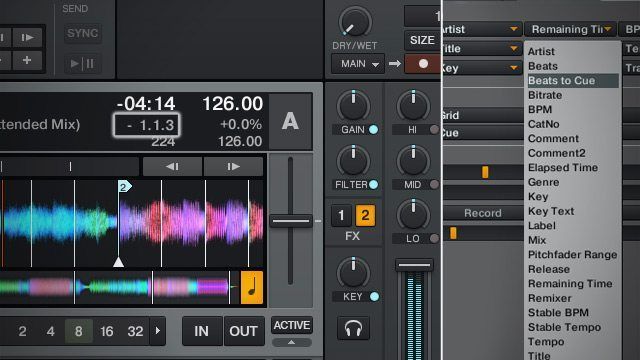
One of the first points to make here is that this feature is only useful if you’ve got your tracks well prepared, ideally with cue points that allow you to jump around between different major sections of the track. Beats To Cue shows three numbers in its field, which are (from left to right) phrase, bar, and beat. In the below image, there’s 2 phrases, 1 bar, and 3 beats until the next cue marker in James Blake’s “The Wilhelm Scream”.
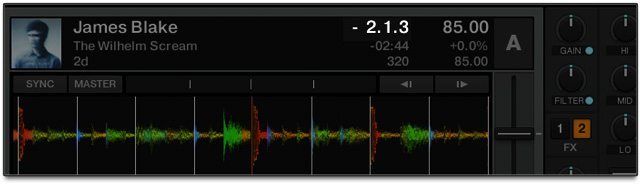
If you bring the “Bars Per Phase” (located in Preferences>Transport) down to 0 bars (as shown in the video above), the Beats To Cue field will only show Phrases and Beats – no bars. This simplifies the readout a bit.

If there’s no upcoming cue marker, the field will display a countdown to the final beat of the track.

IDEAL USES

As peedot notes in the video, having this feature enabled is extremely helpful for beginner DJs and veteran DJs alike who want to perfect their phrasing abilities – not to use as a crutch, but instead to reinforce how your mind should be thinking about tracks as you’re mixing them. This is best used with dance music that’s mostly structured in familiar 8 or 16 bar counts – you’ll find other genres are often way less predictable. 

Read More: A more in-depth exploration on how phrasing structure works in Ean’s 2009 article.

What other uncommonly-used Traktor features have you discovered and used to improve your mixing style and/or skill? Let us know in the comments and we could feature them here. 
I Loved This Article >


  • http://www.facebook.com/ShalomSalam Ben Otter Paul

    Maaaan I learned to count bars the hard way. Had no idea this was even possible in TP2. Great tip!

  • http://twitter.com/RobertWulfman Robert Wulfman

    This could be really useful with tracks with intros that aren’t divisible by 8 bars

  • http://www.ali.dj Hedgehog

    That’s a very nice tip. Thank you DJTT (and peedot) for pointing it out. Please have more articles like that. That’s what in the early days made DJTT what it is today.

  • http://www.facebook.com/profile.php?id=1421799050 Andreas Bührer

    Thanx DJTT and peedot! Nice Trick :)

  • metalgearrr

    This might be the best tip I’ve seen in months. excited to use this.

  • lauti

    don’t want to sound arrogant, but if you really can’t distinguish phrases and need to use this, then why are you mixing? it’s like having no connection at all with the music you’re playing. I’m all for the digital helps, sync and shit, but not this tendency to “I want to dj without having to hear the music”

  • UGLi

    that helps ! Appreciated !

  • DJ Vintage for Canada

    Thank’s DJTT! cool feature! As an old DJ we used to do it intuitively! it getting easer and easer to be a DJ! LOL ……good for you guys! Ciao!

  • Brian Foster

    I kind of get what you’re saying. I thought distinguishing phrases and counting bars of musical time was a general DJ skill. I won’t use this, but it’s cool if it’s helpful for some.

  • tr4gik

    Totally agree. I would rather give the tip to listen and listen to music again and again counting out loud in your head, it eventually becomes natural after a while, without having to look at no number.

  • batman

    agree completely. There comes a point when you either know how to play music or not… .all the handicaps in the world can’t help you, might as well program an AI at that point lol

  • Keeb

    Agreed. At this point I’ve looked at the waveform stripe so many times I can eyeball it pretty accurately for phrasing (really more as a visual reminder of the song’s structure than a mix-by-numbers system) but this a useful tip for those who didn’t know about it and for those just getting into phrasing.

  • Keeb

    If nothing else, it can help even experienced DJs learn the structure of their new songs faster. Just because the tool is there it doesn’t mean you have to use it as a crutch.

  • Sam Parker

    Oh my lord Thank you! I was trying to figure out all kinds of ridiculous ways to accomplish this and it was under my nose the whole time.

  • http://spencerthayer.tumblr.com Spencer “Thunderball” Thayer

    An example why this could be useful; Mixing in a track you’ve never heard before because the club owners new 14 year old girlfriend wants to hear it.

  • http://spencerthayer.tumblr.com Spencer “Thunderball” Thayer

    This article helps me realize I need to get back into Traktor. Bought an SL1 a couple months ago and haven’t touched T2 since. Lots of fun using new kit but 2.6 is out now.

  • ayo

    For those who need help with phrase mixing and cue’ing up properly. here’s a free e-book by Mixed In Key to help you out

    http://www.mixedinkey.com/Book/

  • http://twitter.com/ismynamemoose ithinkmynameismoose

    I play the occasional wedding (usually as a favor to a friend) and this happens all the time.

  • DJ Freeze

    nice tip, good to know, i has already in my min, you have explained it

  • kraal

    as everyone says learn to do it by ear. the point is as a working dj you are being distracted. little things like this help keep your focus

  • gt

    I do something similar. I didn’t see the point in displaying both the length of a song and the time remaining so I changed the total time for beats and changed the bars to phrase to 16 because this is more in keeping with the style of music I play. It doesn’t count down like the above method but it’s far more useful than displaying the total time imo.

  • http://www.facebook.com/thomas.hosker Tom Hosker

    This is a cool feature for drum and bass DJs when double dropping tracks

  • http://www.facebook.com/jitrospanayi Alex Jitromilos Panayi

    Am I the only one that thinks this method is just completely useless? come on people, if you don’t know what a phrase is, stop djing, just stop.

  • MichielyGil

    When this feature was added I tried it for a good 5 minutes but thought it was way to distracting to be useful. I like to mix by ear and gut feeling, even if I don’t know the song very well. Focussing on a counter didn’t add anything to that, quite the opposite. But if it helps for your workflow, good for you. Nice of pointing it out DJTT!

  • Lineypirate

    This same feature is on the CDJ2000 Nexus, it’s obviously useful to someone other than new DJ’s.

  • KIO

    So how do you expect that to work? Option one would be that you actually have this track that the 14 y.o. wants to hear on your laptop, but since you have never listened to it, which cue points do you expect that this feature would be counting off to? The other option would be that this 14 y.o. provides you this track and just happens to have sets cue points before she handed the track to you?

  • http://twitter.com/DannyByrne29 Danny Byrne OBE

    Thats right make it even easier for any fool to mix …love traktor but I hate to say it but this industry’s ruined .. !

  • Patch

    The whole point of this is that you DON’T have to “focus” on the counter. You just take a quick glance, and make the normal calculations in your head. Someone has said it before – this is a tip that appeals to experienced DJ’s because it’s something that we’ve learned to do over time WITHOUT visual indicators.

    Great article!

  • Patch

    Probably.

    Just because you’ve learned what a phrase doesn’t qualify you to tell others to stop DJ’ing.

  • http://www.facebook.com/Gavintech Gavin Varitech

    Bingo.

  • Kevin Harris

    The

  • http://twitter.com/djrobticho DJ Rob Ticho,Club mU

    If your style is mostly to mix deck A into deck b, then yes you probably don’t even need to use this. I’d say that once I throw a third deck into the mix and I doing a lot more live remixing or creating new vocal phrases with a Capellas, something like this would be very useful.

  • ZxZDeViLZxZ

    This is meh I think using war display and minute markers are far more predictable if you have a basic idea of music structure. If you can’t grab an unheard track an get it even 90% correct by just the wave display you need some help.. Not to sound condescending but come on remaining time minute marker see when war form changes loop 32 bar see what your working with and go for it

  • theconsole

    I don’t mean to sound arrogant either but this has got to stop. Come on, it’s 4/4 dance. After practicing on your decks, the idea of phrasing should start to come to you.
    After learning to beatmatch tons of records and listening(key word here) to tons of dj mixes,
    I got it. I did not have a software to rely on.
    There is just too much of this let traktor do this and traktor do that . Listening, phrasing and mixing go hand and hand.
    It’s musical and you need to listen to what is going on in order to make good transitions between tracks or good builds. Not rely on traktor.
    If you want to dj this stuff is basic.

  • Udyan Sagar

    hahaha

  • http://twitter.com/droxpopuli Droxpopuli

    Or just…listen to the song like regular?

  • Linzmar

    I’m normally careful about not being negative in comments but yes. You should stop dj’ing, unless you’re using this as a beginner. In which case I still think this system is a bad idea. My god. It’s dj’ing, not watch the clock computer aided mixing. Feel something!

  • http://www.facebook.com/sballent Sean Ballent

    Sometimes in electronic music there is a long run or bridge that isn’t always 32 or 64 beats long and you want to bring in a new track so that the bass drops for both tracks on exactly the same beat. For my style of djing (deep/underground) I like to always have tracks layered and slowly mix them in. This is a great tool so you never drop bass of one track while the other is still building, especially if you are 3 decks deep.

  • http://www.facebook.com/sballent Sean Ballent

    Sometimes on the fly phrases can differ at different points of track.

  • http://twitter.com/tonyt3rry tony terry ?

    what a really good tool, would take forever marking all my tracks but still good

  • xorchiptune

    exactly! i will turn that on and even if i don’t look at it, it will be there. i’m sure the one time i’m in a hurry doing a double drop, it will save me from screwing up. no need to hate on it.

  • Crazyfeel

    Thank you for this tip!

  • http://www.facebook.com/tierre0123 Steven Mortier

    great tip.thx

  • http://www.facebook.com/jitrospanayi Alex Jitromilos Panayi

    If you’re going to DJ you HAVE to know what a phrase is, so I learned what a phrase is.

    Yes, this does qualify me to tell others to shut up if they’re trying to find gimmicks to excuse learning what a fucking phrase is

  • http://www.gimbei.de/dj-tools/traktor-deck-headers-customizing-your-decks-huds/ Traktor Deck Headers: Customizing Your Decks’ HUDs – DJ AgeGee

    [...] is the pure amount of information available to you about a playing track – from BPM, to key, to beats left until the next cue point. In Traktor, the deck headers are completely customizable. In today’s video, learn how they can [...]

  • http://www.djtechtools.com/2013/04/17/traktor-deck-headers-customizing-your-decks-huds/ Traktor Deck Headers: Customizing Your Decks’ HUDs | DJ TechTools

    [...] the pure amount of information available to you about a playing track – from BPM, to key, to beats left until the next cue point. In Traktor, the deck headers are completely customizable. In today’s video, learn how they [...]

  • http://www.tokisolutions.com/live-and-on-demand-ip-streaming-made-easy-with-theplatform/ Live (and on-demand) IP streaming made easy with thePlatform | Toki Solutions

    [...] fact, while the live event is airing, the media file and its associated cue points for ads, chapter breaks, and associated metadata are automatically saved and archived within mpx [...]

First Time?

This site is dedicated to digital DJs. We develop performance tools and teach cutting edge techniques that enable creative expression. Visit tutorial videos on youtube, equipment reviews in the blog and a very helpful community in the forum. New articles every Mon, Wed, Fri.

RSS DJ TechTools Forums

DJ History: Spring 1979′s Issue of D.J. International

Read More...