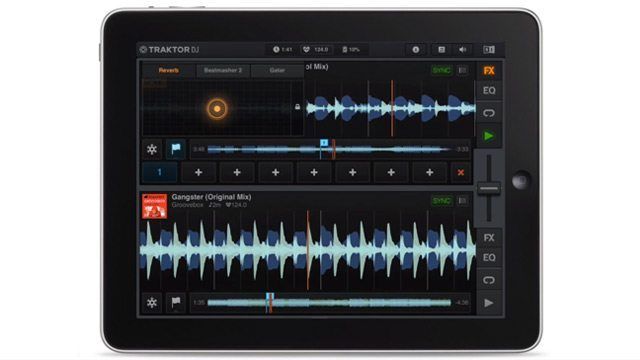
We’ve known that Traktor DJ, the Native Instruments iPad app was coming since it was teased just before NAMM – but today the official news is out. Traktor DJ is an app originally conceived as a two-deck touchscreen version of Traktor Pro, but also packs solid track preparation features that are synced via Dropbox back to your collection. Check out the exclusive videos inside to get a better idea of what Traktor DJ is all about and how well it performs.

Just here for the giveaway? Click here to jump to it.

App: Traktor DJ
Manufacturer: Native Instruments
Availability: Now in the iTunes App Store
Pricing: $19.99 / €17.99 / ¥1700
Requirements: At least an iPad 2 (or newer) running iOS 6.
Battery Life: about 4-5 hours on an iPad 3

What It Is: Traktor-on-the-go for both two deck mixing and track preparation.

What It Isn’t: Full-featured Traktor Pro software – no MIDI mapping or Traktor hardware integration, limited effects

EAN’S TRAKTOR DJ FEATURE WALKTHROUGH

Ean was allowed a sneak preview of the app prior to launch, so to give you all a better understanding of exactly how the app works and what it feels like, he filmed a quick talk/walkthrough of the application. Check it out and then read the full feature set and discussion in the rest of the article below.

MAJOR FEATURES
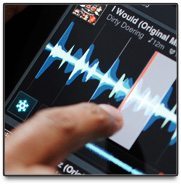
Freeze Mode - Press on the snowflake icon for access to instant cuepoints and resampling across the entire waveform in the deck at the moment – the track keeps playing unless you’re in loop mode, when the playing loop stays on the screen. It’s pretty fun to play with, and the quantization can be set in the preferences.


Collection Synchronization - Everyone who has ever wanted a way to get their collection up to snuf with beatgrids, cue points, and loops on the go will be happy to know that NI seems to have this figured out with Traktor DJ. Using synchronization of collection data via Dropbox, you can make changes on your iPad or your computer and the changes will sync up. It’s just passing collection data (.NML files) – you still have to import your playlists across to the iPad via iTunes.
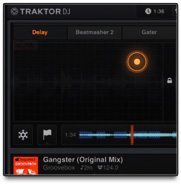
X/Y Effects + Filters - This one’s kind of a no-brainer on iPad DJing apps, but Traktor DJ has done it well. Both the EQ/Filter pane and the Effects pane smoothly slide out over the playing track, making it relatively easy to control both at the same time. They both feature a hold/lock setting, which is very helpful when you’re limited to touch controls – and Traktor has included all of the basic effects from Traktor Pro like Reverb, Beatmasher, and Gater.

Key Detection - Right along side of Traktor’s update, Traktor DJ comes wrapped with the same key detection system. It’s likely being used to power the feature below.
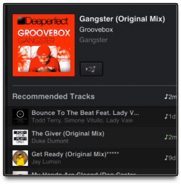
Track Suggestion – Traktor DJ clearly has a slight bit of a simpler vibe to it, meaning that beginner DJs will be able to download the app and just play. This likely is part of the reason for Traktor building a track suggestion feature into the software, which uses key and tempo to determine a set of potential matches for the next track. If you’re a big stickler on making sure you mix in key, this feature might help you find just the right track that much faster.


RICHIE HAWTIN DEMO VIDEO

The video above shows both intended use cases with Richie Hawtin during a day’s span – yes, he really did play a gig on the app. This brings up a question of stability- and the software seems rock solid in our tests. The app is smart enough to stop the iPad from sleeping – allowing the screen to dim slightly but not all the way.

EXTERNAL HARDWARE

While the Traktor app does allow you to do traditional iPad split-cueing for audio out (meaning your stereo headphone jack is split into two mono outputs for the cue and the master out respectively), you can use an CoreAudio-enabled soundcard with the software. Audio interfaces that can be used must be Core Audio ready, and must have their own power supply as the iPad cannot power a soundcard. NI writes:

Because of the powerful Core Audio engine built into iOS, TRAKTOR DJ also offers ultra-low latency playback, manipulation and recording while also supporting professional class compliant hardware audio interfaces, such as the TRAKTOR AUDIO 6 and 10, something currently not possible on any other mobile platform. DJs can connect these and other devices to their iPad using the iPad Camera Connection Kit™ for optimum audio quality and pre-listen and cue functionality, or to a splitter cable with dedicated cue and master controls.

At launch there’s no MIDI control, or integration with any of Traktor’s products like the Kontrol Z2. Also to note- the Audio 6 and 10 drivers were just updated to become Core Audio complient, so grab those over in NI’s downloads center.
LEARN HOW TO USE IT

Not every single control is exactly as you might expect on iOS – with some looping and zooming related gestures feeling different from Traktor and other iOS applications – but no application is without a learning curve. In our conversation with NI, they mentioned the balance that they had to achieve when designing such an app:

 ”We believe that Traktor DJ strikes a balance between instant, fun usability and advanced, professional features. While the gesture-based interaction around the waveform should be intuitively familiar to users of the iOS platform, we concede that there is somewhat of a learning curve to use loops and freeze mode to their fullest potential.”

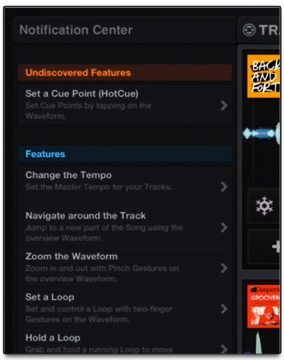
That being said, they’ve done a solid job of addressing the learning curve by putting a handy notification center (pictured at right) into the app that will allow users to learn how to use each control and feature of the application. The notification center even reminds you about features you haven’t used yet.

WHAT’S MISSING / FUTURE FEATURES

We spoke at length with Native Instruments about some of the features that were missing from this release  - like Remix Decks, full external mixing, etc – and they clarified that there’s plenty in the pipeline that still needs development for future releases:

“With Traktor DJ, our goal was to create a complete solution for DJs of all backgrounds and skill levels, and offer the core feature-set, in the most intuitive, and fun way possible. This is of course a 1.0, so it doesn’t stop here…”

With this in mind, it seems like Traktor is finally filling their gap in mobile development – allowing DJs to play a set on a moments notice with an iPad and prep new tracks on the commute home.  If you’re a heavy-duty Traktor user who owns an iPad already, this might be

Will the other big guns in DJ software development (Serato DJ on iPad, anyone?) respond in kind? We’ll certainly find out soon.

WIN A COPY OF TRAKTOR DJ!

We’re excited about this app – but if you can’t justify spending the $20 just yet, we’re running a content to give a copy away – use the widget below to enter! Winner chosen! Jongsu Lee, check your email :)

a Rafflecopter giveaway

I Loved This Article >


  • http://www.jayveedj.nl/ Jayvee

    Hmm, I’d hoped for MIDI-support at least…

  • gordon_strange

    This is great and all, but I personally would like to see an app dedicated to track prepping, that I could use on my iPhone. A smaller, versio, no DJing, just prepping.

    I have my X1, and my K2, and a laptop, and don’t intend on buying an iPad (I have a N7 already), so, for me at least, I won’t (can’t) buy it.

    But Kudos for being the first big name to go iOs

  • zer04l1v3

    it’s possible sync two ipads for get 4 decks???

  • mixt

    Question: I back up my audio and collectiondata (.NML files) on an Apple Time Capsule. Can I connect my collection to my Ipad and the app Traktor DJ (eg without itunes and dropbox)?

  • http://www.facebook.com/xeniusmedia David Halford

    Doesn’t look like it, since you need some common ground both your iPad and computer can access (ie. Dropbox). I’d like to see DJTT offer some info on the Dropbox-part though; what can be synced, if there are alternatives, if iTunes is really needed, that kind of stuff.

  • http://www.facebook.com/GrooveboxHouse Groovebox Gb
  • http://www.facebook.com/sherpajohn John SherpaPsy Grasett

    Wow, great news…any recommendations on a *small* Core Audio compatible sound card?

  • http://www.facebook.com/maurolips Mauro Djlips Grassano

    should be possible to controll/ connect with the traktor s2 controller??

  • Anonymous

    How do you plug in a USB / Firewire soundcard into your ipad?

  • Paco Loco

    Looks really goo. I am disappointed though that it doesn’t have any kind of pitch bend – not all genres of music are suitable to be beatgridded perfectly.

  • Dee

    what about key matching in Traktor iOS App?

  • http://www.facebook.com/profile.php?id=100000531686375 Futureglue Musik

    This looks like a great app for some after-party, on the plane or vacation fun.

    Great job on the design of this app. No it won’t replace Traktor but I wasn’t expecting it to.

  • Hervé

    Well it seems that if you choose the pro-sound option of usb camera kit and audio dj 6 or 10, you have to use the ipad on the battery …

    Would you use you laptop on battery while perfoming live with Traktor ??

    Sure not.

  • http://www.facebook.com/J.E.Algarin Joshua Algarin

    iPad camera kit $29.99

  • http://www.facebook.com/sherpajohn John SherpaPsy Grasett

    I think you can get splitting cable which allow you to plugin the ipad and a usb device. Actually its a passthrough device..http://www.cablejive.com/products/dockStubz.html – I’m looking for one that’s compatible with lightning connector. I am wondering if a powered USB hub would work as well.

  • http://www.facebook.com/rmccluskey Ryan McCluskey

    Get the Camera Connection Kit from Apple or something similar from ebay/amazon. I bought mine used on ebay for $10. The apple kit includes a 30-pin to usb adapter. Plug the the usb cable from your soundcard into the connector. It’s pretty sweet.

  • Toontown

    Great intro to mobile, NI! Welcome to the party! No need for anyone to scoff at this–I’m sure many more features are to come in future versions. For one, I’d love to see support for the Alesis iO dock, especially with its MIDI capabilities.

    I’m a little confused about Dropbox – are full tracks able to be pulled in from Dropbox or just metadata? I haven’t explored the new version of Traktor yet.

  • Bas

    Glad they did not waste time on a resizable controller editor window and windows midi clock stability! Why try to set up an elaborately mapped piece of performance hardware when you can just get on stage and look like you are reading up on DJTTblog on an Ipad. People WILL buy that ticket to see you! If Traktor takes a turn and makes a run for the bedroom DJ market, I sure hope some manufacturers will jump into the vast void they create for professional users. Some of us used to marvel about Richy hawtin’s setup. Now everybody allready has the same setup as richy…

  • Toontown

    Seems like no. The way I’d do that is to set the master BPM on each iPad to the same tempo and stutter, nudge appropriately.

  • Anonymous

    Griffin imic

  • http://www.facebook.com/christiaan.gombert Christiaan Gombert

    Why not bring a laptop with you, if you do have a midicontoller with you?

  • tr4gik

    Loving the Freeze mode ..

  • Anonymous

    Next week i upgrade my S2 to an S4 and after watching this awesome app, I wondered if it would be worth it to just buy an iPad and start mixing above it.

    Lately the free time is what it is for my gigs but maybe it’s better to wait for better integration with controllers such as the s2 and s4 on Traktor Dj for iPad … It would be great to mix with those on it!

  • Gábor

    Native Instruments has just created a very nice DVS sound card for DJ Player, with the firmware update of the Audio 6/10. :-)

    So if you want timecode control + Audio 6 + iPad, then use DJ Player.

  • jay416

    can u use it only for fx along with your laptop? can this sync up to whats playing out of the laptop?

  • Anonymous

    Gave it a go. Really nice app. Will work perfect for trips or something where you want to play at a small get together but don’t need to lug gear. I really like it for that. Been waiting for something like this.

  • hardcoreplur

    I want this as windows 8 app! The wide screen on the MS Surface would be perfect and allow for more onscreen features (instead on popup or hidden menus)

  • http://www.facebook.com/Gavintech Gavin Varitech

    I like this a lot for what it means for the future. If I had an iPad I would totally buy this for $20USD, but I’m sure as hell not buying an iPad for this.

    However as things progress I’m looking forward to deejaying using a tablet in place of the notebook. Once this progresses we’ll be able to show up to a club with just a tablet, plug in via USB, and go. I think that is still a couple years away, but this is an exciting clue to how that is going to work!

  • Zazi Beats

    Though this looks cool but, I would have liked (and would still like) to
    see an app that is primarily for complementing Traktor. They started to
    get there with the track prep stuff but, they should really make an s4
    status app that perfectly compliments the mobile needs of Traktor.
    Someting that can do full track preperation and playlist making, control
    the remix decks or play on the large amount of features that traktor
    offers. Just saying.

  • Stéphan Vuylsteke

    I know you’re the developer of DJ Player so you know what you’re talking about, but have you actually tried pairing an Audio 6/10 with DJ Player yourself? I’m about to buy an iPad just for this, so it’s quite important for me.

  • http://www.mustachecat.com/tech/traktor-dj-on-ipad-exclusive-first-look-dj-techtools/ Traktor DJ on iPad: Exclusive First Look | DJ TechTools – Mustache Cat

    [...] via Traktor DJ on iPad: Exclusive First Look | DJ TechTools. [...]

  • Gábor

    I don’t have them, but if a sound card is USB Class Compliant (this is what the latest firmware for the Audio 6/10 does), then there is no way to limit them to specific apps only. They will work with all iOS apps made to handle USB audio.

  • Gábor

    Many DJs are already doing this. It’s not the future, but the present.

  • http://www.facebook.com/jabbajams Stephen Gagnon

    What are the chances that the we will see the Midi Fight 3d setup so you can connect it to an IPad.

  • Hayden

    I think they need to add the freeze mode to the new touch screen laptops

  • Gábor

    The MIDI Fighter 3D works well with the iPad. Just use a DJ app with MIDI mapping functionality.

  • chris g

    I noticed the article says the app helps pick tracks by Key… does this mean Traktor is getting into the Key detecting game when we analyze new tracks? and does this app do that?

  • http://my360stats.com/LeiChat.htm Richard

    @facebook-1641747793:disqus Congrats. Any chance you’ll be porting this to Windows 8 so it can run on Microsoft Surface please? (Not that I have one… yet)

  • Anonymous

    Behringer uca202 is pretty decent and does not require extra power when connected to the CCK.

  • Guest

    NI last app was lame…. was noting like the real thing. ill pass

  • http://www.facebook.com/PenguinsDoom David Smereski

    the maschine app was a bummer…. so im not going to even give this a try… and you can tell me how disappointing this app is

  • Anonymous

    I tested it on Z2. Works (audio part).

    If it does on Z2, it will most likely work with A6/10. Especially since NI say so.

    Pity, but Z2 cannot enter midi mode if not connected to a computer with controller manager, so Z2 is not really a good choice controller for iPads yet. No controller functions, just Audio card. Yet, that may change …

  • Anonymous

    S4 is a no go. Afaik, it’s firmware is not USB upgrade-able to become class compliant.
    S2 can be updated, but I’m not sure it’s capable.

    I my self sold an S4 to get a VCI400 and use it with Gabor’s app (DJ Player). Very happy with both.

    The Traktor app is great, and I will use it a lot standalone. but for now DJ Player has more features, especially the MIDI and map-ability features. It’s also proven as very solid and stable.

  • Anonymous

    My iPad is running 7-8 hours with DJPlayer on battery and vci400 for controller.

  • Anonymous

    Thanks. I guess it’s only usb soundcards not firewire then? Is there a list of which soundcards work and which don’t anywhere?

  • http://www.facebook.com/commeercial Comme Erçial

    It’s already resizeable…

  • Gábor

    http://imect.com/djplayer/hardware.html

    Near the end of the page.

  • http://www.facebook.com/Gavintech Gavin Varitech

    ‘Ritchie’

    And no, not too many people are rocking two MacBook Pros, a Xone 92 or DB4, two X1s, an F1, and Maschine (not to mention the CDJ2000′s I saw him playing on last time he was in SF).

  • Anonymous

    Thanks. Oh No Though! Are NI seriously going to shaft me for having an Audio 8 DJ rather than the newer 6 or 10 soundcard?!! I fucking hope not!

  • Bernardo

    every idiot can be a dj now…wow…thx native

  • Bijanstein

    Awsome! It will be nice if you can play songs from spotify collection! I think I’m asking for too much lol

  • http://twitter.com/mixmaster_jdub DJ JDUB

    I agree with Gordon_stange, I would never use an ipad to dj as my full hardware interface is portable enough to justify the inconvenience… A track prepping tool with the ability to set cue points, set grids, and operate as a music player is what I wanted/expected

  • http://twitter.com/neiloughton Neil Oughton

    There is a ‘how to sync’ video on the NI website – I have set this up and it works quite nice, you set the ipad up, connect it dropbox, do the same within Traktor on your laptop and then there you go – track meta data stays in sync.

    I will mainly use this for setting que points and loops on the ipad for when i dont want to be sat at the laptop – this only works if you have your playlists in itunes and transferred over to the ipad.

  • http://www.facebook.com/nileshricciparmar Nilesh Parmar

    Can this be used whilst using a traktor s2 and laptop at the same time? Freeze feature is great, would be great if the ipad had the remix deck sampler touch buttons too as a separate app…

  • http://www.facebook.com/nileshricciparmar Nilesh Parmar

    i agree with you on the prepping iPhone / android version :)

  • http://www.facebook.com/orlando.cervantes Orlando Gotha

    So you can split the ipad signal to the 1 & 2 mixer channels?

  • http://www.facebook.com/antony.davies1 Antony Davies

    Version 2.6.1 Released this week, where have you been ;-)

  • JizzKhalifa

    Is the freeze effect similar to the beat slicer in serato?

  • Slak Jaw

    I’m super impressed with this app especially considering it’s only the first iteration. I’ve been a Traktor Pro user for several years. I’ve purchased almost every DJ app out there hoping to find a great portable solution for when I’m travelling. DJ Player and CrossDJ came close, but they were both lacking in one way or another. NI has nailed it. It has everything I was hoping for and more. The Freeze function is very fun and works well. The Traktor library integration is flawless.
    I’m looking forward to MIDI controller functionality, more Traktor Pro FX and some more flexible audio routing options like DJ Player.

  • Slak Jaw

    Any chance the NI Audio 2 DJ sound card will get a firmware update like the NI 6 & 10? For an ultra portable solution this makes the most sense.

  • Pablo A.

    I was kind of hoping it would offer some way of using your Ipad as a controller for Traktor software on your computer….. I know there’s Lemur or touchOSC but I feel if there was one made by NI it would offer better functionality with the software…. I’d personally rather use my Ipad as an extension to my set up instead of an alternative to my setup.

  • Zach

    But not every “DJ” is musically inclined. A true artist will pursue their art with passion, wishy washy trend DJs will fade with the times

  • Guest

    and maybe remix deck creation too using loops from your phone and a built in loop recorder

  • http://twitter.com/RobertWulfman Robert Wulfman

    and maybe remix deck creation too, using loops from your phone and a built in loop recorder

  • rafiq

    If you have lemur, check out my mapping and template which does the same thing as the “freeze” feature and more within native Traktor Pro :)

    https://maps.djtechtools.com/mappings/1120

  • rafiq

    Freeze feature is great…for those looking to be able to do this natively in Traktor Pro on their laptops, check out my Lemur mapping and template which emulates the same functionality using cue points.

    https://maps.djtechtools.com/mappings/1120

  • Forevernow

    Hoping Native will provide a direct app for syncing metadata. Dropbox is great if you happen to be online, but this doesnt work well were i live and internet is not available everywhere.

    Still, setting up now and will see how well it can be used for prepping cue points etc..

    fyi – RME babayface is now also class compliant, so should work well as pro level sound card option if your brave enough to use this for real gigis ( no way for me)

  • Guest

    ya def

  • Forevernow

    After a quick an painless lion upgrade, and with view to only using this to prep tracks for use in the full version find that :-

    1) you cant set the cue point type ( ie load, grid etc)
    2) when in beat grid mode you cannot zoom into the waveform ( wheres you can in the normal playmode) – HUGE oversight imo.
    3) No metronome/click track so you can’t fine tune the grid
    4) dropbox sync only (mentioned above)
    5) no Editing of tags, comments etc

    These features not being available make its pretty useless for me at the moment, though have faith in NI to see that these are key features for some users and would lead to increased sales..

    I think ideally the ios app would have two modes..

    Performance ( the existing setup)
    Preperation ( the features above)

  • http://www.facebook.com/brikha Emil Beatsnatcher Brikha

    This is what I was thinking too… First of all, they should have made the iPad app free for Traktor users, and secondly… what’s the point of releasing an app that doesn’t come close to the leading DJ iPad app in the world?

  • NoNameToday

    “What I say is true – anyone can cook… but only the fearless can be great.”
    Gusteau, Ratatouille

  • DAniel

    It is also working with the NI Komplete Audio 6!

  • DJ Narrah

    I think it s cool that the larger competitors are starting to take notice of what the other is implementing and gauging response from the punters, then using this to further develop there own product, it appears we are getting better momentum as far as useful and practical ideas being implemented.

  • http://www.facebook.com/fredje.vanneste Frederic Vanneste

    I agree with you on that… a native instruments “rekordbox” would be most usefull…

  • http://www.facebook.com/piopro James ‘Pioneer’ Burkill

    a ok start yo the pp development but I would like to see a midi hardware integration like to a z2 or s4 nomore laptop

  • http://www.facebook.com/piopro James ‘Pioneer’ Burkill

    full traktor works on the surface tablet….

  • http://www.facebook.com/skulpture Graham Thorne

    I really like it. For £14 I am happy. Was playing with it on the train this morning and once you get used to it it’s a blast. I could easily turn up to a small house party and plug this in and mix.

  • polocorp

    Wow the video demo is a total joke !! Like Richie Hawtin is really going to play his set at one of the major festivals with an iPad on day 1 of testing the app… Come on, that would just be disrespectful to his fans. I don’t believe Hawtin got where he is by compromising… and am pretty sure he requires professional tools to perform. This DJ fairytale video is more of a video editing demo aimed to fool beginners.

    How about asking Tiger woods to play the PGA tour with a wooden stick blindfolded ? I’m sure he’d love that too. lolz

  • Anonymous

    Doesn’t work for me. App doesn’t detect my dropbox tracks through the sync, and it’s no better trying to manually add tracks through iTunes. Not impressed so far – i can’t even load my music into the actual app. On the other hand, Traktor won’t register my Itunes installation so sync between TraktoriTunes is broken (for no apparent reason).

    I feel like NI is starting to become more and more apple like in their product design, in that I buy all these pieces of soft/hardware that are supposed to have great synergy, but the reality isn’t like that at all. Look at what Ableton does NI, how hard can it be? Read the forums and feedback?

    Sure I bought this app, but only to check out how far NI have actually gotten with their mobile prep tools (which should have been around for ages now). There’s no real options for customizing the app, midi mapping, Lemur/TouchOSC-like features, using the table as the browser and thus freeing up laptop screen estate. Jesus, there are so many possibilities, but NI screwed it up by making another half-ass app (looking at you iMaschine, what about an iPad update anyone?) that doesn’t do anything radically novel or different from all the other crappy “DJ apps” out there.

  • http://www.facebook.com/DJBlofeld Ond?ej ‘Blofeld’ Posolda

    preparing tracks on the way to the gig-studio or anywhere while not at home? im sold…. now, just where to get this ipad thingy :D

  • http://gianpaj.com/ Gianfranco Palumbo

    Does anybody know a cheap soundcard that would work with this app via the iPad Camera Connection Kit?

  • http://www.facebook.com/takizawa.dai Dai Takizawa

    I’m Japanese.
    I tested audio 2 before but it didn’t work.
    So I guess it means that 6/10 won’t work too. But, if 6/10 will work properly, that would be great and people around the world will be willing to use DJ PLAYER. So would you check if 6/10 works or not and release official comment about it on your twitter or website?

  • Gábor
  • rafiq

    Yes, the inability to modify cue point types and zoom in on the waveform when beatgridding essentially kill an otherwise amazing app. Inability to edit comment fields and tags also kills it since the only system I have of knowing whether I’ve “processed” a track is to put a little tag in the comment field. Then I can sort by comments and see what still needs to be processed. Thus, not only can I not properly beatgrid or set load markers/grid markers with this app, I can’t flag my tracks to know whether I’ve already processed them or not. Really hope NI fix these two issues asap. I really only want this for preparation and brainstorming mixing ideas in my spare time, but it simply is not up to speed for track prep…yet

  • rafiq

    There are a few key issues which kill this app’s ability to be used for track prep, iPad or otherwise. A dedicated iPhone app for track prep would be absolutely clutch, assuming they address the following.

    1. Inability to zoom in on waveform when beatgridding…you can zoom in during play back, but not zoom in while beatgridding??!! Pretty inexcusable and backwards considering beatgridding is the only time I actually DO zoom in all the way in on my waveforms.
    2. Modify cue point types – This is huge…I put load markers, grid markers, and fade in/out markers on all my tracks. Not being able to edit these in app makes it useless for me. It is also critical to be able to set markers without assigning them to hot cues. When I set load markers or fade markers in traktor pro, I often have them set WITHOUT being assigned to Hot Cue 1-8, freeing up hot cue slots for me.
    3. Inability to edit tags/comments – The only system I have for knowing whether I’ve actually “processed” a track is by putting a little blurb in the comment field. Then, I can sort by comment and see what still needs to be processed. Not only does this app not let me beatgrid or set cues properly, but I have no way of flagging my tracks to know whether they’ve been processed.

    I have faith NI will address these issues (and hopefully have them fixed for an iPhone version), but until they do…these shortcomings essentially kill the utility of an otherwise amazing app. I never had intentions of using this for live play, but track prep and brainstorming mix ideas in my spare time are what I would like to be able to get out of it.

  • Slak Jaw

    Try reading the detailed instructions included with the Traktor 2.6.1 update. Worked flawlessly for me.

  • Enay

    This is great! But in terms of track prepping there are missing some functions:

    1. No Cue point types except for loops

    – I always have load marker and sometimes I need multiple grid markes for bpm shifts

    2. No tick/metronome

    – I like to grid my tracks on tick, by the sound not by looking the waveform

    I guess these don’t not matter for most people, but for me they’re essential. Otherwise they’ve really taken the best out of the ipad’s properties.

  • http://gianpaj.com/ Gianfranco Palumbo

    you can make cue points, but just normal ones (i think). and sync those with you main Traktor setup via dropbox.
    This is version number 1, so i’m pretty sure NI have a lot of features they wanted to add but just couldn’t put all at the time of release

  • Heresy

    A killer solution would be just to have traktor pro 2.6.1 on dell xps convertible running on windows8; you’ll have something like an ipad that’s 2 1/2 lbs. heavier with no touch features or freeze effect just yet, but you’ll have the full functionality of traktor without having to re-learn another software.

  • Marks

    The app is really really cool but the fact that its syncs the tracks over Dropbox makes it a bit pointless for sync purposes.. I hardly imagine I would put all my music library on Drobpox, especially when you have to pay a fee for having more than 4GB plus it´s messy to sync and I imagine that the whole mp3 file (might) get updated when you make a single change in any of the MP3 tags …. I think that NI should start their own Traktor Cloud in the coming years so that this app and DJing it´s taken to the next level. That would be amazing, although should they want to go into that route and face all the liability issues?

  • http://twitter.com/keilmillerjr Keil Miller Jr

    Sweet! It looks like an awesome, clean app! I just hope that I can use it with my kontrol S2 in a future update. That would make it awesome. Replace the computer with an iPad. Touch to load tracks. Mix with physical controls.

  • http://twitter.com/Jelomu Jelomu

    Very impressed by the app, all the features that work by touching the soundwave look great.

    Not something I would personally use though.

    You can’t seriously consider EQing with this, and the dropbox sync sounds like a lot of work.

    I would rather use something more complementary to my current setup.

  • djerikt

    I used Traktor DJ at a bar this eve. With the Traktor Audio 6 I was able to do external mixing. The main out was 3&4, and the headphone cue out was 5&6 outputs on the front next to the headphone out. So deck A was mixer channel 1 with the crossfader up, and deck b was mixer 2 with the headphone cue enabled. It sounded pretty darn good.

  • Rich Moog

    How would you connect the iPad to the uca202 as there is no USB on the iPad? Also what do you mean by CCK?

  • Anonymous

    Through CCK, yes. CCK = Camera Connection Kit. It’s a USB adapter for the iPads.

    The uca202 is just of the less power hungry devices, requiring no extra power.

    But it became apparent that in this version of Traktor DJ, NI do not support output across the built-in + USB adapter, nor with Bluetooth.

    It will come soon, I believe.

  • Anonymous

    I wrote it above – uca202 by Behringer. It doesn’t even need external power.

    But traktor cannot output across two devices yet. With other apps, I can have the master on external device, while the headphones can be on the ipad itself.

    I also have a USB creative live 24, which has 3 stereo outs and also works and is class compliant, but needs to be connected to a powered USB Hub. With it, the two out channels work well on traktor.

  • http://gianpaj.com/ Gianfranco Palumbo

    uca202 by Behringer has two distinct outputs right? so you have plug headphones and speakers to it.

  • http://www.stevencooperdj.com/?p=1763 The future or gimmick? ‹ Steven Cooper

    [...] See this Knowledge Base article for details. Look its one of our favorite DJ tech genius people, Ian Golden giving it a test drive IFRAME Embed for [...]

  • http://www.facebook.com/scott.atkin.39 Scott Atkin

    Hi all after connecting to an audio 8, can you then connect the output to a mixer channel? The setup examples I have seen don’t show that.

  • http://www.facebook.com/djBrianDowling Brian Dowling

    looks amazing. Wonder if serato has any answer for that

  • http://www.facebook.com/robortenzi Rob Ortenzi

    Has anyone tried this with the Alesis IO Dock? It’d be awesome if cueing works with it rather than buying an Traktor Audio 6 or 10.

  • http://www.facebook.com/d3rjo Der Jo

    same question..

  • http://www.facebook.com/AdamSeckel Adam Seckel

    After syncing my Traktor Pro metadata with Dropbox and my iPad I realized that TraktorDJ allows for “loop points” and “load points” but I can’t find a way to create these different sorts of points in the app itself! Have I just missed something?

  • http://www.facebook.com/AdamSeckel Adam Seckel

    I half figured it out for myself, at least for loops. For anyone else who’s having trouble you activate a loop where you want it, then tap the “flag” button, followed by the waveform. Unfortunately there is no way to choose which hotcue slot this will take.

  • Lee Ant

    Great app downloaded it a couple a days ago. What isn’t clear in any tutorial or your article is how to export a recorded mix. Is this possible and if so how?

  • Anonymous

    No, its stereo in, stereo out. But iOS allows to use the builtin out together with a usb device.

  • http://twitter.com/SinSentidocomun Sin Sentido Comun

    XOne k2 is class compliant, anyone has tried it?

  • http://www.facebook.com/profile.php?id=1137292039 Ronald Edwards

    Now that Native Instruments is making programs for the iPad, maybe next they can make them for the Google Chromebook? I don’t want all the features of a regular laptop, I just want to DJ. At $250, it’s hard to find a better deal.

  • Gábor

    I have many users using it successfully (with DJ Player). So yes, it works great with the iPad.

  • http://twitter.com/shazeeishak Al-Muhammad Ishazee

    My Komplete Audio 6 can’t work with it. Anyone else facing the same problem?

  • felixosebold

    where is that how to sync video? i dont find it … hope you know

  • coma

    you need to run the driver update on your interface

  • coma

    It should work as long as it’s a core audio device

  • coma

    I love it so far. It doesn’t have every feature of course because it’s a version 1 release designed for beginning dj’s. I tried to split the output so i could connect my ipad to a dj mixer but that didn’t work by either using a splitter out of the headphone jack and also by using my audio 6 and using the main out as one channel and the headphone out as the other but I couldn’t separate the audio from the decks. Hopefully we’ll see more functionality in a later release.

  • et

    The controller editor became resizable in one of the last updates.

    Ritchie will not actually be using this app to DJ with but he will appear in promo videos because despite being rather skinny the guy needs to eat at the end of the day.

  • http://www.facebook.com/joseph.a.ruel Joseph A. Ruel

    Ive done a good research on that, and so far the cheapest good choice seems to be the scarlet from Focusrite. Altough they have brand new models that are fully compatible with ipad, you still can use some older scarlett as they are “class complient”, wich mean compatible with any class complient tablet. That’s a standart that give you 8 audio in/out and 1 Midi in/out. If you have a big budget, there is the new RME UCX that is also fully compatible with the ipad. And, of course, every other class complient soundcard… Roland did release a new soundcard gully compatible as well, might be interresting. I usually prefer focusrite preamps, tough.

  • http://www.facebook.com/joseph.a.ruel Joseph A. Ruel

    Thanks for the app, but too little fonctions for the price. Can’t even send outputs to different soundcard outputs for use with a real DJ mixer. I can understand you didn’t put every fonctions yet, but no choice of output for a pro music app, really? Can’t be serious. Really looking foward for the real thing, and the ability to map a midi controller. In the mean time, that’s just a very expensive toy that can’t do much but beatmatch.

  • http://www.facebook.com/joseph.a.ruel Joseph A. Ruel

    Ive done a good research on that, and so far the cheapest good choice
    seems to be the scarlet from Focusrite. Altough they have brand new
    models that are fully compatible with ipad, you still can use some older
    scarlett as they are “class complient”, wich mean compatible with any
    class complient tablet. That’s a standart that give you 8 audio in/out
    and 1 Midi in/out. If you have a big budget, there is the new RME UCX
    that is also fully compatible with the ipad. And, of course, every other
    class complient soundcard… Roland did release a new soundcard gully
    compatible as well, might be interresting. I usually prefer focusrite
    preamps, tough.

  • Gábor

    For flexible routing options and MIDI mappings please consider checking DJ Player. http://djplayerapp.com

  • http://www.facebook.com/joseph.a.ruel Joseph A. Ruel

    Maschine app is meant to be sync with the real Maschine. You can then produce quick beat on the go in the bus then continue the song @ home. For the price, can’t go wrong, it’s well built and efficient… I actually can produce usefull beat in 10 minutes, about 5-6 an hour. Pretty usefull when it gets boring around…

  • http://www.facebook.com/d3rjo Der Jo

    when will the contest winners be announced?

  • http://edopeno.com/traktor-dj-making-magic-on-your-ipad/ Traktor DJ | Making Magic on Your iPad | EDOPENO.COM

    [...] DJ also syncs to TRAKTOR PRO 2 for shared track data: beat grids, BPM counts, and cue points. DJ Tech Tools has put together a great walkthrough of the new Traktor DJ app. Check it [...]

  • monoaural

    Thanks Ean & DJTT Team, for this first impression. Informative and impartial as always.
    Highly appreciated!

  • Chip LoadUp

    Just read the Beatport review. They compared it to the SL1200, ie a gamechanger! Don’t think so!
    I am all for technology moving my love of music to new levels but that comment is one too far!

  • preset

    No playlist sync !!!!!!!!!!!!!!!!

  • rafiq

    This doesn’t sync music through dropbox. It only syncs a metadata database file (tiny) over dropbox which keeps tags, cuepoints, grids, etc. synced between the two programs.

  • Rudib831

    Im a new user (ipad). Seems impossible to fingertip control length of samples–just snaps to way ahead or behind the point I want it to end or begin. What gives?

  • http://www.facebook.com/Robertomelogno RobyTouchdj Melogno

    ragazzi anche dopo l aggiornamento della scheda native audio A6 non funziona bene.. vede solo il canale 1-2!!

  • http://www.facebook.com/chris.villanova.98 Chris Villanova

    Ok so how does the collection syncing work? from what ian says it goes thru itunes or something, and I dont sync itunes up with traktor on my laptop in fact disabled it, so anyways would it be possible to hook up my external hard drive to the ipad just like my laptop and have it work the same way and just pass off the nml files? btw dont own an ipad and seems like there a little lag loading tracks so does it take forever to load aiff files? and is there a keylock function? seriously considering getting this so I can work on stuff with my down time at work

  • Victor

    Hello some barry now if this app work on ipad 1?
    All good

  • Eric

    Tried it out, the app is pretty good but I would love to see s2/s4 support which would make this a complete game changer

  • http://www.facebook.com/hoejgrav Peter Tousgaard Højgrav Rasmus

    A great tool to prepare your tracks and set the mood for an upcoming event. I travel a lot and I enjoy having the opportunity to “feel” my tracks on the go. Just yesterday I jammed in front on my collegues enjoying a beer, getting the basic feel of the tracks in terms of order and groove. The app does everything it promises to do.

  • Juan

    Right on,,,I use load markers to point out the start and end of vocals in a track

  • Anonymous

    Sucks that it needs external power source so I can’t use this with Audio2. Behringer UCA202 doesn’t have power either, will I need to buy Audio 6?

  • http://www.facebook.com/vj.los VJ Carlos E

    is there a way to export mixes from the app. to souncloud or mixcloud ?

  • http://my360stats.com/LeiChat.htm Richard

    Thanks but I don’t want to run full tractor I want to use Traktor DJ to manage my collection etc.

  • http://www.facebook.com/exechapur Exe Chapur

    i’ve read that traktor S2 has an Audio 6 dj inside, so traktor s2 will works at least in “audio card mode”?

  • BernadoMcFly

    I will build a time machine for you, so you can go back and stop the advancement of creativity in a field whose core is art, to honor your request.

  • JD

    Hi!
    i’ve just downloaded the app and it looks nice, i wonder if i can externally mix with a dj mixer using the Griffin dj cable? have anyone tried this?

  • Junior Pops

    I must say that Traktor DJ is the best experience I have so far with Dj Apps on the iPAD, and trust me I have used them all .
    This is only version 1 and I am quite sure that NI would address some key missing features and add more in the next version.

  • http://gianpaj.com/ Gianfranco Palumbo

    I bought this and it actually doesn’t work because it has only 1 outputs but two connectors. so it’s only stereo! even the DJ player app doesn’t work with it

  • http://gianpaj.com/ Gianfranco Palumbo

    no it doesn’t work with this Traktor DJ app (as you said before)

  • http://twitter.com/szantog Gabor Szanto

    It works great with DJ Player. One stereo output on the Behringer, the other on the iPad. You need iOS6.

  • http://gianpaj.com/ Gianfranco Palumbo

    Sorry i think i got confused. it does work with the DJ Player. but not with Traktor DJ app

  • http://www.facebook.com/madmike.brown.5 Mad Mike Brown

    not very clearly explained how do i connect it to my audio 10 and use separate channels

  • http://twitter.com/JonasGessner Jonas Gessner

    I’d love to see support for MIDI controllers like the Traktor S2!

  • http://www.gimbei.de/dj-tools/video-comparing-key-lock-on-ios-dj-apps/ Video: Comparing Key Lock on iOS DJ Apps – DJ AgeGee

    [...] Native Instruments’ Traktor DJ (review) [...]

  • http://www.djtechtools.com/2013/03/28/video-comparing-key-lock-on-ios-dj-apps/ Video: Comparing Key Lock on iOS DJ Apps | DJ TechTools

    [...] Native Instruments’ Traktor DJ (review) [...]

  • http://www.djtechtools.com/2013/04/04/video-shiftee-rocks-traktor-dj-freeze-mode-mastery/ Video: Shiftee Rocks Traktor DJ; Freeze Mode Mastery | DJ TechTools

    [...] more info about Traktor DJ, watch Ean Golden’s review or learn more on the iTunes App Store   utmx_section("Related Content List") /* [...]

  • http://www.vincentcox.com/video-shiftee-rocks-traktor-dj-freeze-mode-mastery/ Video: Shiftee Rocks Traktor DJ; Freeze Mode Mastery | DJVC | Vincent Cox

    [...] more info about Traktor DJ, watch Ean Golden’s review or learn more on the iTunes App [...]

  • Fiderman

    Is there a way to set a track as the master tempo like in the traktor software? Or do you have to set it yourself?

  • Fiderman

    My guess is that you would connect it to iTunes and go to the apps tab under the ipad and scroll down. There should be a window that has something that says “Documents” Or “Files”. I know other apps allow the import and export of files through this window.

  • Laminr

    A perfect back up to the CDJ’s incase of failure…

  • http://www.djtechtools.com/2013/05/02/traktor-dj-comes-to-iphone/ Traktor DJ Comes To iPhone | DJ TechTools

    [...] Instruments is making a play for iOS dominance, which started with the launch of Traktor DJ for iPad over two months ago, and continues today with a second version of the app with a clever [...]

  • Frank Stjerne

    Nice car – but what about the most important part: The Road.

    Why is dropbox the only supported cloud disk? Where are all the others. I have all my music in Google Drive and I use my Traktor Pro with it. Do I have to move more than 80 GB of music to dropbox to use the iPad version??

  • http://www.mymemedia.com/djignishun/traktor-dj-comes-to-iphone/ Traktor DJ Comes To iPhone | DJ IGNISHUN

    [...] Instruments is making a play for iOS dominance, which started with the launch of Traktor DJ for iPad over two months ago, and continues today with a second version of the app with a clever [...]

  • http://www.djjoeysantos.com/a-week-at-work-25-hours-in-amanpulo-and-composing-underwater/ A Week at Work, 25 Hours in Amanpulo and Composing Underwater | DJ Joey Santos

    [...] waiting for our flight, I messed around a bit with Traktor DJ for the iPhone. While it can be a bit difficult mixing between two songs at first, it becomes [...]

First Time?

This site is dedicated to digital DJs. We develop performance tools and teach cutting edge techniques that enable creative expression. Visit tutorial videos on youtube, equipment reviews in the blog and a very helpful community in the forum. New articles every Mon, Wed, Fri.

RSS DJ TechTools Forums

DJ History: Spring 1979′s Issue of D.J. International

Read More...