DJ TechTools
  • Blog
    • DJ Gear
      • DIY Projects
      • Gear Reviews
      • New Products
      • Controllerism
    • Techniques + Tips
      • Beginner DJ
      • Advanced DJ
      • Producer
      • Finger Drummer
    • News + Culture
      • Editorials + Opinions
      • Artist Interviews
      • Performances + Routines
      • How I Play
    • DJ Software Tutorials
      • Serato Tips
        • Traktor Tips
      • CDJ Tips
      • Ableton Live Tips
  • Store
    • Run by real DJs, not a corporation
    • DJ Controllers
      • Midi Fighter Twister
      • Midi Fighter Spectra
      • Midi Fighter 64
      • View All
    • Accessories
      • Chroma USB Drive for DJs
      • Chroma Caps
      • Chroma Cables Audio
      • Chroma Cables USB-A
      • Chroma Cables: USB-C
      • DJTT Gift Card
      • Midi Fighter T-Shirt
      • Keyboard Covers
      • Earplugs by V-Moda
    • Production Gear
    • Soundcards & Mixers
  • Community
    • Popular Forums
      • General Discussion
      • Buy & Sell
      • Reviews
      • Mixes
      • Music Production
      • Show Your Setup
      • Off Topic
    • Handy Links
      • New Posts
      • Private Messages
      • Register
      • Search
    • Midi Maps
      • Traktor
      • Ableton
      • Serato DJ
      • Midi Fighter 3D
      • Midi Fighter Twister
      • Midi Fighter Spectra
  • Midi Fighter
  • Chroma
No Result
View All Result
DJ TechTools
  • Blog
    • DJ Gear
      • DIY Projects
      • Gear Reviews
      • New Products
      • Controllerism
    • Techniques + Tips
      • Beginner DJ
      • Advanced DJ
      • Producer
      • Finger Drummer
    • News + Culture
      • Editorials + Opinions
      • Artist Interviews
      • Performances + Routines
      • How I Play
    • DJ Software Tutorials
      • Serato Tips
        • Traktor Tips
      • CDJ Tips
      • Ableton Live Tips
  • Store
    • Run by real DJs, not a corporation
    • DJ Controllers
      • Midi Fighter Twister
      • Midi Fighter Spectra
      • Midi Fighter 64
      • View All
    • Accessories
      • Chroma USB Drive for DJs
      • Chroma Caps
      • Chroma Cables Audio
      • Chroma Cables USB-A
      • Chroma Cables: USB-C
      • DJTT Gift Card
      • Midi Fighter T-Shirt
      • Keyboard Covers
      • Earplugs by V-Moda
    • Production Gear
    • Soundcards & Mixers
  • Community
    • Popular Forums
      • General Discussion
      • Buy & Sell
      • Reviews
      • Mixes
      • Music Production
      • Show Your Setup
      • Off Topic
    • Handy Links
      • New Posts
      • Private Messages
      • Register
      • Search
    • Midi Maps
      • Traktor
      • Ableton
      • Serato DJ
      • Midi Fighter 3D
      • Midi Fighter Twister
      • Midi Fighter Spectra
  • Midi Fighter
  • Chroma
No Result
View All Result
DJ TechTools

Creating An Isolator Effect Mapping In Traktor

Dan White by Dan White
January 7, 2013
in Advanced DJ Tips, DJ Software Tips, DJ Techniques / Tips, Featured User Mapping, Traktor Tips
Reading Time: 4 mins read
0
Creating An Isolator Effect Mapping In Traktor
947
VIEWS
Post on FacebookTweet thisUpvote on Reddit

In DJTT HQ, many of our staff have grown to love the Pioneer RMX-1000 for its dynamic and expressive isolator effects. But even in our initial review of the unit, readers pondered if Traktor could be made to emulate this style of effect – and finally one of our own DJTT community members has succeeded at building a mapping that does exactly that using a secondary deck. Read on to learn more!

ISOLATION EFFECTS IN USE

First off, major congratulations and thanks to DJTT member Stewe are in order for pioneering this advanced performance technique in Traktor. It’s an impressive feat to map out a new performance style, even it if is a well-known type of effect used on the Pioneer RMX and many of the high-end Xone mixers. If you’ve never had a chance to use isolation effects before, their premise is simple: they’re used to apply an effect on just one isolated frequency of the mix (in this case, highs, mids, or lows). This is great for smooth buildups, as well as creating interesting transitions and breakdowns.

Let’s dive right in, and first take a look at Stewe’s video demonstrating the isolation effect (he’s using T3 Delay in this example) being used with his mapping for the Livid CNTRL:R:

THE EFFECT PROCESS

“In video you have seen I’ve used T3 delay, but this principle can be applied to any of other effects and that’s the beauty. Imagine dropping echo-freeze on mids and reverb-freeze on lows and highs right on a transition, love it.” – Stewe

It wasn’t completely clear in the video, so we reached out directly to Stewe to learn exactly what’s going on in this mapping and how he achieved this effect. The cliff-notes version of it is that he’s using the fourth deck (Deck D) as the source for  affected sound. The mapping duplicates the deck in focus to deck D and as the effect knobs are moved clockwise past 12 o’clock three things happen:

  • the main playing deck turns on EQ kill for the frequency being affected
  • Deck D turns off EQ kill for that same frequency
  • the effect is turned on (and increases in intensity/wetness as the knob continues to be turned clockwise)

All things considered, it’s a pretty elegant solution, and for those Traktor users who never venture past Decks A + B, the mapping finally presents an intelligent use of that fourth deck.
THE MAPPING

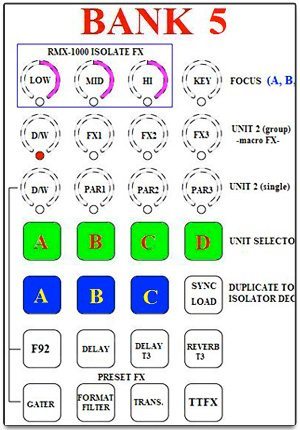
Stewe has uploaded the mapping to Maps.DJTechTools.com – meaning that it’s a free download for anyone with a free myDJTT account. At right is the basic layout of his Isolator Effects section – which actually loads in as its own device mapping in the Controller Editor’s dropdown menu.

On building the mapping, Stewe writes:

The idea [behind the mapping] is to map a modifier that can toggle between two different values, but to make this value change at rotary pot center (12 o’clock) giving me value ‘0’ at one side and value ‘7’ at other. I managed to map this using encoder-relative in modifier settings. […] To be honest, it took a while to find correct modifier settings to achieve RMX-1000 result.

Check out Stewe’s mapping on maps.djtechtools.com.

Of course, if you’re not packing one of Livid’s CNTRL:R units in your setup, you won’t be able to use this mapping out of the box without a bit of tweaking – read on for the plan of attack.

WHAT’S NEXT

Based on the initial feedback that we’ve already seen on the forums, we’re pretty sure that you all will be equally as excited as us to try a version of the isolation effect for your own controllers.

Before we tap the likes of mapping wizards Flashflooder or Beaubryte to take on this mapping challenge, we wanted to gather feedback from the community about what controller and type of isolator effect workflows you’re interested in. Here are some prompts to get you started in the discussion – be sure to read what’s been written so far and vote up the ideas you like!

  • What controller would you most like to use an isolation effect mapping with? (Kontrol S2/S4, VCI-400, DDJ-SX, etc)
  • How would you prefer to trigger isolation effects? (EQs on the active deck, effects knobs, jogwheel or fader FX, etc)
  • Do you need multiple concurrent isolation effects? (two delays on different playing tracks)
  • Do you ever use decks C + D? (these mappings might interrupt workflows using those decks)

We’ve written about isolation-related techniques in the past – read our Introduction To Mixing With DJ Isolators.

Tags: djing with isolatorseq killisolation effectsisolator effectslivid cntrl:rMappingsstewetraktor effectsTraktor Tips
Share8Tweet5Share
Previous Post

Glow In The Dark Faders + Chroma Cap-tion Contest Winners

Next Post

CES 2013: Ion’s “Scratch 2 Go” Stick-On iPad Controls

Related Posts

traktor-pro plus 3.8 pattern player controls
Dj and Production Tutorials

Review: Traktor Pro Plus 3.8 – After 8 months, is the subscription worth it?

April 20, 2023
Traktor Pro 3.6 releases, as well as a feature roadmap…
Breaking News

Traktor Pro 3.6 releases, as well as a feature roadmap…

August 19, 2022
Traktor Pro 3.6 beta and iZotope's Ozone Maximizer side by side
NAMM 2022

Traktor’s new beta cycle has begun: 3.6 to include iZotope products, maybe NKS support?

May 30, 2022
Load More
Next Post
CES 2013: Ion’s “Scratch 2 Go” Stick-On iPad Controls

CES 2013: Ion's "Scratch 2 Go" Stick-On iPad Controls

Want to reach DJTT's audience here?

Shoot an email to advertising@djtechtools.com

DJTT ads
DJTT newsletter
Midi Fighter
Chat with us
  • ABOUT DJTT
  • CONTACT
  • PRIVACY
  • MIDI FIGHTER HELP
  • ABOUT DJTT
  • JOBS
  • CONTACT US
  • ADVERTISE
  • PRIVACY POLICY
  • ACCESSIBILITY STATEMENT

© 2024 DJ Techtools all rights reserved by DJ TechTools on all content unless otherwise noted.

No Result
View All Result
  • Blog
    • DJ Gear
      • DIY Projects
      • Gear Reviews
      • New Products
      • Controllerism
    • Techniques + Tips
      • Beginner DJ
      • Advanced DJ
      • Producer
      • Finger Drummer
    • News + Culture
      • Editorials + Opinions
      • Artist Interviews
      • Performances + Routines
      • How I Play
    • DJ Software Tutorials
      • Serato Tips
      • CDJ Tips
      • Ableton Live Tips
  • Store
    • Run by real DJs, not a corporation
    • DJ Controllers
      • Midi Fighter Twister
      • Midi Fighter Spectra
      • Midi Fighter 64
      • View All
    • Accessories
      • Chroma USB Drive for DJs
      • Chroma Caps
      • Chroma Cables Audio
      • Chroma Cables USB-A
      • Chroma Cables: USB-C
      • DJTT Gift Card
      • Midi Fighter T-Shirt
      • Keyboard Covers
      • Earplugs by V-Moda
    • Production Gear
    • Soundcards & Mixers
  • Community
    • Popular Forums
      • General Discussion
      • Buy & Sell
      • Reviews
      • Mixes
      • Music Production
      • Show Your Setup
      • Off Topic
    • Handy Links
      • New Posts
      • Private Messages
      • Register
      • Search
    • Midi Maps
      • Traktor
      • Ableton
      • Serato DJ
      • Midi Fighter 3D
      • Midi Fighter Twister
      • Midi Fighter Spectra
  • Midi Fighter
  • Chroma

© 2024 DJ Techtools all rights reserved by DJ TechTools on all content unless otherwise noted.

This website uses cookies. By continuing to use this website you are giving consent to cookies being used. Visit our Privacy and Cookie Policy.