

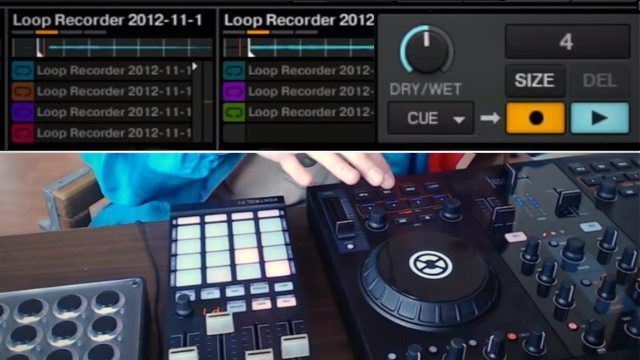
Last week Mad Zach showed off how to build remix routines in Maschine, but with our Traktor users in mind, he made this new tutorial for a different style of remixing. Watch and learn how to use the Loop Recorder as the main tool to build quick and powerful Remix Deck Sets. Check out the video inside, and grab a free download of the Remix Set!

MAD ZACH’S TRAKTOR PREFERENCES

For this to work well, there are a few tweaks that I recommend making to Traktor’s preferences to get everything dialed:

  • Audio Setup>Latency: as low as you can go without overloading your CPU (mine’s at 192)
  • Transport>Loops: Set Auto Detect Size @ 0 seconds
  • Transport>Cue Play Mode: Instant
  • Loop Recorder>Record Latency: 3ms, or as low as possible without CPU overload

ADDITIONAL TIPS TO MAKE YOUR REMIX SETS ROCK!

Although you probably don’t want to turn Quantize on when you’re recording into the loop recorder, it helps to have it on when you launch the loop recording. This will help make sure your loop recording starts precisely on the first beat. My solution was to map a button right below my “start loop” button to momentarily turn on Quantize. I would press it just before I start the loop recorder, and then let go once I start recording my cue point juggling. Use the EQ and effects to make your loops sit well together in the mix. For example, I cut the bass out of hihats, acapellas, etc. You can also use trailing effects like Delay to extend the length on short blips. Tune your loops and samples to fit together in the same key by using your tempo pitch bend. Remember, you can also resample multiple tracks from the Remix Decks down to one clip/remix deck slot using this same loop recorder technique.

Check out Ean’s tutorial on how to use the Midi Fighter 3D to create and perform with Remix Decks.

FREE DOWNLOADS!

Download the Remix Deck yourself and play with it: Mad Zach “Sandman Murder Pyramid” Remix Set
(if you haven’t already, you’ll need to make a quick and painless myDJTT username to download)



  • bidders

    Hi,

    I’d like to edit my cc note messages for my korg Nano controllers and
    Roland hardware to match the midi notes sent out by the kontrol F1.

    i’ve tried looking online for a diagram or pdf already but can’t find out what notes the F1 sends out.

    i’m hoping that if i can edit the notes to match the F1 i can hopefully get some use of the remix sets in traktor.

    obviously this will be without the colour co-ordination but i’m not bothered about that.

    Any help would be greatly appreciated and obviously if i can get his to
    work i’d be happy to share my results with the wider community.

    thanks

  • Wojzilla

    AFAIK to control the remix decks F1 sends out NI’s HID messages not MIDI. I may be wrong though

  • Jote Yo

    is there anyway to make moving from the loop recorder fast specifically not having to stop one before starting the other?

  • Jote Yo

    faster*

  • http://www.facebook.com/chrismjennings Chris Jennings

    I replied to your thread on the forum. :)

  • http://www.facebook.com/chrismjennings Chris Jennings

    Nice, I use the loop recorder and remix decks when I’ve got a loop going on a track deck that I want to put in a remix deck slot so that I can kill the track deck, but still play the loop.

    Nice vintage Descente jacket by the way. :)

  • yourboyvic

    cool jacket Zach

  • JuanSOLO

    killer tutorial

  • Mad Zach

    yeah it will automatically continue to record layers indefinitely or you can just hit undo and keep going :)

  • Whitebrain

    Zach, How do you use F1 and MIDI Fighter together?

    Both are for Remix deck? or Each has different special role?

  • MANnnn

    hes using the midi fighter for the looper record… did you not watch the video??

  • http://spencerthayer.tumblr.com Spencer “Thunderball” Thayer

    Cool routine. I’m still not convinced it’s better to use than Ableton. One could certainly setup these samples a lot quicker in Ableton and then just drag them to Traktor. *WELL* I suppose if you already own Ableton and know how to use it.

  • tr4gik

    keep them coming Zach .. these tutorials are awesome thanks.

  • Mad Zach

    its funny because thats what I did at first and then everyone at the office was like, you just did your whole traktor tutorial in Ableton! lol

  • http://spencerthayer.tumblr.com Spencer “Thunderball” Thayer

    How long did this take you to make in Traktor V. Ableton? It would be an interesting comparison.

  • Mad Zach

    the main difference is that in traktor you have to play everything in yourself, you can’t write in patterns and automation. In ableton, I had grabbed snippets, put them in a drumrack and was doing midi loops with lots of processing and programming. Much more detailed

  • http://www.facebook.com/profile.php?id=1137292039 Ronald Edwards

    This is definitely a new realm for DJs to tread upon, it’s got lots of space to explore.

  • DJ TeeOh

    I’ve heard so many djs talk about using this…but have yet to see anyone do it live. I know guys like Ean do videos with it and all. So if this is used at home or studio, I guess it’s pretty cool but I prefer Ableton or my Maschine.

  • lakatta

    very cool! love the instructional videos. Made my life a heck of a lot easier doing the beats with a loop recorder instead of using audition

  • JuanSOLO

    I have been using Ms Pinky to do this live input looping in Ableton, (recording loops to DVS TT manipulation). However Ms Pinky is not working in the latest Live. I saw this tut and it sparked my interest again in using Tracktor routed through Ableton, and capturing Live in Traktors Input for the Loop Recorder. However this is kinda complex and I have not dove in just yet.
    Question, do you think its possible to sync the 2 programs, use midi mapping to fire off a quantized rec loop in Traktor and then when the recording is done, it puts it directly to spinning vinyl for playback? Basically a 1 button push “quantized” that allows you to record a loop and automatically resume playback via DVS?

  • drizzt

    Super glad to have found this… been waiting for someone else to do all the work!! Any way you could post a .tsi of your midifighter mapppp?

  • gigglekey

    Thanks dude! This tut and the one about Maschine were really great!

  • Suho Lee

    Got ya. But not in video, in general how they can along with together?

  • http://www.facebook.com/Meph.One Devin Merlini

    this is still good to know even if it’s easier in ableton. however this is sooo much easier in ableton lol. about two mouse clicks and every sample from your audio track is edited across your pads for you to fine tune. and it’s beatmapped. toss it into traktor afterwards or into a drumrack for live playing. remember you can do the whole pad linking in ableton drum racks as well and it puts both samples on one pad instead of just linking them giving you way more flexibility.

  • http://www.facebook.com/alex.kies.731 Alex Kies

    do i see glow in the dark fader caps on your F1 mad zack?
    when can i get some?!

  • http://www.facebook.com/corey.cordobes Corey Cordobes

    shit any way you want… for example I have a beat on deck A, F1 controlling oneshots on B, which i use to scratch. I then use my MidiFighter with the instant gratification mapping to throw effects on the beat ( which can be locked) switch decks on the midi fighter over to B to throw effects on my sample. The F1 can also shift quickly to A , If you want it to be a remix deck and you can choose which channels have FX. This works well if your drums are separate (e.g.. beatmash just the snare)
    so if you have bass and leads they can go unaffected or just them get an effect, which is triggered live by the Midifighter

  • http://www.facebook.com/marcusklaymusic Marcus Klay

    Hi Zach! Can you explain please, how to get the correct sound levels for the recordings with the loop recorder? I am recording the parts of the tracks through the loop recorder (Cues selected as source) but after loading them to slots on the F1, they sound way too loud or sometimes not loud enough. The recording from the loop recorder should be as loud as when it plays in the slot or am I wrong? Oh and btw, I had the gain of the deck and F1 channel set to the same level. Any help is appreciated. Thanks!!

  • http://traktortips.com/making-vs-buying-traktor-remix-sets/ Making or Buying Traktor Remix Sets – Traktor TipsTraktor Tips

    [...] [...]

  • Alan

    Some good skills from MAd Zach…..

  • Anonymous

    What happened to the Ableton version of this tutorial? Complete the trinity, man! :-)

  • http://www.facebook.com/joao.dematos.5 João de Matos

    How much of a genious are you?

  • http://www.djtechtools.com/2013/02/15/building-traktor-remix-decks-into-your-dj-workflow/ DJ TechTools  |  Building Traktor Remix Decks Into Your DJ Workflow

    [...] Ma_kmq.push(["trackClickOnOutboundLink","link_511e8fa6a2b49","Article link [...]

  • Kill John Connor

    Mad Zach your tutorials are freaking awesome!!

  • http://twitter.com/psyOPs_ psy/OPs

    awesome vid. I thought it was cool what i was able to map of the remix deck functionality to my Maschine controller but man .. this just brings it all together. I’ma grab an F1 right now :)

  • Dj-Gil

    Will the midi fighter work also with the free Traktor remix deck packs as well?

  • http://n-tropic.com/fffff/2013/05/traktor-remixing/ Traktor Remixing | The Music and Audio Composer Blog…

    [...] Besides preparing for some upcoming DJ gigs I’ve been learning about the Loop Recorder and Remix Decks. I was surprised how fun these tools are for remixing songs on the fly. You have a lot more control [...]

First Time?

This site is dedicated to digital DJs. We develop performance tools and teach cutting edge techniques that enable creative expression. Visit tutorial videos on youtube, equipment reviews in the blog and a very helpful community in the forum. New articles every Mon, Wed, Fri.

RSS DJ TechTools Forums

Review: Hot Hand USB Wireless MIDI Controller

When it comes to MIDI controllers, physical motion can be a hard type of input to understand and access - especially when it's completely disconnected from a physical controller. What if there was a controller that simplified motion - not quite as complex as Read More...

