

You might be one of the top rising DJs in your town, but if you don’t have a portfolio of professional-sounding mixes, you’re just not going to land the gigs you want. We’ve had a number of new DJs asking us to go over the basics of recording a mix, so today we take a closer look at why recording great DJ mixes is extremely important. We’ve also put together some tips on how to make the process of recording those winning mixes simple and efficient.

WHY RECORD YOUR MIXES?

A few weeks ago in our weekly email, we included a tip that strongly encouraged recording every single mix that passes through your DJ equipment. While it might sound like overkill, we live in an era of extremely cheap data storage (cheaper by the minute), so there’s virtually zero cost associated with recording your mix session.

What’s the value of pressing record on every single one of your mixes? Your intentions for recording mixes should be multifaceted – we’ve split up the potential uses for recording mixes into three tiers for easy dissection:
1) Review and critique: Forcing yourself to re-listen to your DJ practices and performances offers a unique opportunity to make assessments as to your skill set from the viewpoint of a listener. Many different types of artists use this trick all the time (especially instrumentalists and dancers!) to see and hear exactly what the audience is experiencing.

Don’t be afraid in this process to take notes and set goals for yourself. This especially comes in handy when you’re trying new techniques – from perfecting those basic transition styles to practicing new styles of buildups - and want to assess how well those techniques worked in the mix. You’ll sometimes be surprised, for better or for worse, at what it sounds like when you’re not behind the decks.
2) Share the mix: Your fans and friends know that you’re a DJ, and in a media-saturated digital world full of content creators, sharing new content is the best way to remind them that you’re still in the game (and available to play their next house party). Online mixes tend to stick best if you’re also breaking new tracks or revealing deep cuts on them – this is the time to show off your digging prowess.

Not every mix makes it past the previous step of reviewing and critiquing – so use your good judgement here and only let quality favorites trickle down this list for you to dominate Soundcloud with. You never know where these mixes will get played – from long roadtrips to late-night work sessions, you want to makes sure the listener feels like rocking your mix was worth it.
3) Create an online brand: For many DJs, mixes are the best equivalent to a résumé and portfolio for potential gigs. While DJTT has written plenty in the past about crafting your online DJ brand, the mixes are often the core meat and potatoes that promoters and potential clients look at. While we’ve all heard stories of the promoters who just look at Facebook likes when considering booking a DJ, but if you don’t have a solid catalog of a few mixes, most club owners won’t even look twice at you.

This is again an even higher level of quality of mix that should enter this tier – these are the mixes you’ll feature and link to the most, so make sure only the most technically clean and solid mixes you make are used here.

YOUR MIX RECORDING OPTIONS

Let’s talk about how to record your mixes. If you’re like many DJs who don’t record regularly, during the actual mix it sounds amazing – but when you record them and listen back to them you find you sound worse than what you heard. Whether the recording is a low quality, levels are off or peaking, or even that you didn’t have the right inputs selected, there’s nothing more frustrating than having a great session and not having the taped version deliver the same level of quality.

Having a solid and consistent technical solution to recording your sessions makes sure that you never have that experience. Here are the three common forms that recording mixes often take:

  • To CD/Tape: These are archaic media, and we recommend not recording to these formats unless you’re an extreme purist. Even then, remember that you’ll have to digitize these recordings – and seriously, who even owns a tape/CD recorder anymore?
  • Digital Audio Recorder: These are typically found in higher end installations and studios, and there are portable versions that start at about $200 and allow you to record to an SD card and then extract the digital recording from that. (We’re partial to the Zoom H4 recorders) After recording, you then copy your mix to your computer, run it through your audio editing software to trim any dead air and then dump it onto your favorite MP3 player or DJ mix sharing site. We find that using an external recorder like this is ideal for recording shows where you don’t want to have anything else to worry about on your computer.
  • Straight To Computer: Recording directly to your computer is the most sensible and simplest solution. This can be slightly more complicated to setup initially depending on your DJ workflow of choice, and provides you the flexibility to send your mixes anywhere and quicker.

Let’s take a closer look at how to make a great recording into your computer.

RECORDING AN EXTERNAL MIX
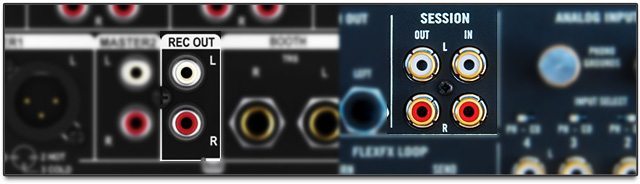
If you’re mixing externally, you’ll need to route the audio back into your computer before you can start recording your mix. Your specific setup will cause this vary, but for most typical digital DJ setups a simple male/male RCA cable or male/male RCA to 1/8″ cable will suffice. Check the back of your mixer to choose the best output for these cables – on Pioneer and Allen and Heath mixers, you’ll want to choose the Record Out. On Rane mixers, you’ll often find a Session Out.

For a number of newer and more expensive digital DJ mixers, like the Allen & Heath DB series, you’re actually able to route a Record Out signal back through the built-in soundcard and into your computer or DJ software.

The reason you want to use a record out or equivalent signal is because the normal master output on many mixers sends line level output which is tied to the output that you’re sending to the speakers. You also might, in the course of a gig, make dramatic adjustments to this master gain, but record/session outs are independently controlled and will maintain a level signal.

Case in point: the first time I tried to record my mix through a PC, it sounded horrible. I plugged my master out into my sound card and started a test record using Audacity. When I played it back, I noticed that the sound was clipping. I reduced the master volume on my mixer and tried again. The sound continued to clip, but not as drastically. I also tried reducing the record volume within Audacity to compensate, but no matter what setting I tried, the sound was unusable. The source of the problem: the signal I was sending from my mixer was too much for my PC’s sound card to handle. I was sending a powerful line-level output from my mixer into a a mic-level input on my soundcard and destroying the recording.

There’s only one way to make sure you’re capturing great recordings – testing and checking your recordings. We’ll get to that in a minute.

RECORDING INTERNALLY IN YOUR DJ SOFTWARE
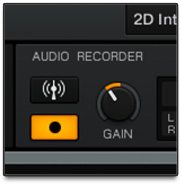
For those of us who mix completely internally, great news! You’re probably already aware, but recording an internal DJ set is significantly less work in terms of wiring and getting everything sorted out. Here’s the rule – as long as all of your audio goes through your DJ software and is output in one master channel, your DJ software will be able to record just final performance audio. Nothing fancy to worry about here – but you’ll still want to test the recording and check your final audio and waveforms in Audacity (see below) to make sure you’ve got all the levels right.

TEST YOUR MIX & WATCH THE WAVEFORMS
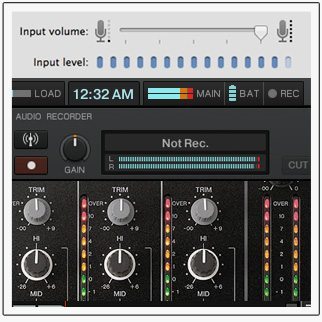
Taking a few seconds to test your recording setup and check how it sounds and what the recorded files looks like always pays off – especially when you’re first setting up your recording process. One of the key tricks when setting up your recordings is to follow the signal path and make sure that nowhere along the line is your mix peaking – watch for your master signal in your DJ software, on your mixer, and in your audio input settings – and make sure that it’s not in the red or peaking at any step of the way. The image on the right shows what peaking looks like in many different forms, avoid it at all costs.

Not everyone is aware of what good-looking waveforms look like, so I’ve put together a series of screenshots from the above story for a quick crash course in waveform analysis. The following graphics demonstrate what the waveform looks like under different circumstances. These graphics are copied out of Audacity and represent the +/- voltage strengths of the signal that was recorded, and under each graphic is the recorded sound. Both right and left channels are shown.
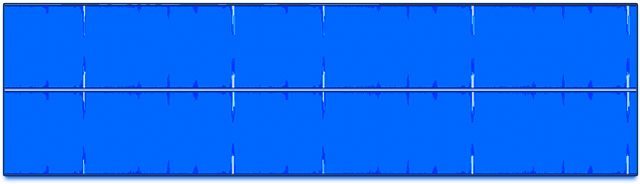


The above was my first attempt at recording. Notice that the sound signal consumes the entire area. I was basically throwing too much signal at the port and it translated there is full volume of a really poor quality sound almost 100% of the time.
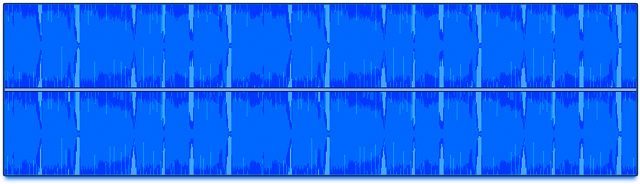


After reducing the master volume down to 10% of capacity and recording again, the above waveform was produced. This is better as we actually see grey space (less than 100% volume) but the peaks are all at maximum, so clipping is still occurring.
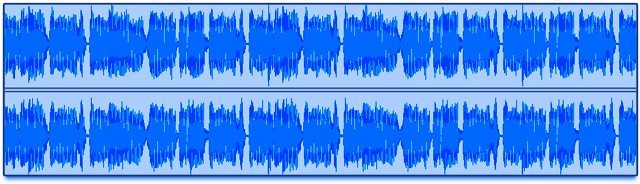


The above picture shows you what happens when your recording setup is done properly. Notice that the waveform never hits maximum volume. There are distinct peaks and valleys but the signal is clean and is not clipping.

CAN YOUR COMPUTER HANDLE IT?
Now let’s ask the question “if I use a computer in any way in my DJ kit setup, do I need a second computer to record my mixes?” This is a difficult question to answer because of a number of different variables. Can your computer handle the processing load of both playing and recording music? Do you have enough free USB ports for connecting your controller, USB hard drive (possibly) and an audio interface? Is there going to be contention for disk resources when you are reading MP3s for playback and writing the recording of your set?

For a lot of DJs who don’t necessarily have newer and better-performing computers, the answer might sometimes be that your computer can’t handle both DJing and recording simultaneously. For DJs and live performers who simply don’t want to have the risk or have additional computer-focused activities going on while performing (Mad Zach falls into this category), you might also avoid doing both. Instead of buying a second computer, this is where we would actually recommend purchasing a digital audio recorder. You would only need to maintain one computer and you’ll be able to have a standalone unit dedicated to just recording mixes. Handy!

NAIL IT EVERY TIME

Finally, here’s one key tip that will make your future recordings a breeze every time: set up the levels and inputs and outputs how you will have them when recording and take notes of where all of your levels are at. Even consider writing them down, and make sure that you can easily duplicate this setup in very little time. Getting set up to record should only take about two minutes tops – you want there to be as little barrier as possible to you being able to press the record button and start making your next big mix-tape.

More Info:

How do you record your mixes? Experienced veterans, what tips do you have for the DJs who’ve never recorded a mix before? 



  • http://www.gimbei.de/dj-tools/recording-dj-mixes-how-to-do-it-right-and-why-it-matters/ Recording DJ Mixes: How To Do It Right and Why It Matters – DJ AgeGee

    [...] You might be the one of the top rising DJs in your town, but if you don’t have a portfolio of professional-sounding mixes, you’re just not going to land the gigs you want. We’ve had a number of new DJs asking us to go over the basics of recording a… Read more [...]

  • Solomix

    A mix I made on air, listened to it many times to catch flaws and what not… http://m.soundcloud.com/dj-solomix/weci-sample-mix-5

  • Ruben daCosta

    I use VirtualDj to record my mixes, but only for personnal relistening, for sharing and promotion i recommend using a digital audio recorder..

  • Q

    The new Pioneer DJM-350 allows to record directly in .wav format on a USB device, it’s making my life so much easier compared to when I had to record via RCA to a computer or another recording unit. Once recorded, it’s just a matter of importing into Garageband or Logic then compressing in MP3. The entire process only takes minutes – excluding the time spent recording of course :)

  • beardslap

    Tips? Make sure you plan it so that you’re not in the mix at 45 minutes – it’s difficult to set it up the same when you turn the cassette over…

    ;-)

  • http://www.facebook.com/peterokarma Pete O’Karma

    I know you guys are Traktor gurus, but can you explain how to record Serato thru the Bridge?

  • http://twitter.com/realjuicy DJ Real Juicy (WFGC)

    I should really record more often.

  • Anonymous

    Tip #1 helped me in a big way but I sort of tweaked it a bit. This may sound weird but I treated the recorder as my audience. At the time I was not playing in front of anyone, not even friends and so visualizing the recorder in Traktor as my audience made me focus a lot more when mixing. When I made mistakes I actually felt embarrassed even if I was alone. After a while I began to take a closer look at the decisions I was making while the recorder was on and this lead me to get my game up progressively. Not only was I able to catch mistakes and less than appropriate decisions I had taken during the mix (like mixing in a track prematurely or late) but it also gave me confidence to start going out to play. When I was finally at a venue I still felt the jitters but only before I pressed play, after that it felt like I was just recording another mix at home. Needless to say I was able to eliminate the mistakes I had when setting my frequencies in the mixer. My transitions became a lot more seamless even without the use of filters and it became second nature to me. After that I was then concentrating on using effects to make bigger build-ups and aid my transitions even further. Recording your mixes is something every DJ should be doing!

  • tr4gik

    What about recording your mix in parts? From song A to song B … from song B to song C. Or 3 songs then the other 3 songs. Then at the end gluing all together with ableton or audacity? Its easier this way, especially for promotion mixtape, you dont want to be doing an hour mix and then make a mistake at minute 50 … ouch.

  • Utunga

    If you’re going to go down that road, why not just build the “mix” in DAW to begin with? Why bother with manual mixing at all?

    For me a promotion mixtape that doesn’t have a single mistake anywhere is usually a sign of a person who is not ready for live playing. Other option is that the mixtape is from someone who does not need to promote themselves ;)

  • campark43

    Good luck! Anyone want to argue why serato sucks? Dont bother.

  • http://www.facebook.com/donovan.aenslaed Ðonova? ??gustu? Ænslae?

    Many would say that’s the deal with a “mixtape” (nowadays better called a “mixfile”)… If you glue and fix your mix then it will not showcase your actual skills. I know how I feels to screw up a mixtape at the last moment, and then record it all again, but otherwise you won’t be up to par with expectations your mix can generate…

  • http://www.facebook.com/andrew.peek2 Andrew Peek

    new?! where have you been for the last few years

  • Play!Doh

    I send the master output from my mixer to one of these, http://tascam.com/product/dr-100mkii/ It’s the best (<$500) option I could find, and the audio quality is perfect.

  • Justin Milla

    I have recorded a mix just practicing or an hour out of a live set and even though I didnt think it was perfect I posted it up and got a bunch of plays. People like to hear new music.
    Also I think you need to plan out a mix but not overthink it. As Dj’s we are ahead of the curve musically so something you think isnt mixtape worthy or “new enough” might just be someones new favorite jam. Also a nice throwback in a mixtape is refreshing.

  • Roger Johnson

    Hi Guys, gr8 bit of info.
    All i would lie to add,as a veteran is.

    “Record,Record,Record”

    Nuff Respect

    Roger Johnson.

    1985 Dmc World Mix Champion.

  • http://facebook.com/djdomas Domas

    Creating podcast is a great way to put pressure on yourself and do more mixes. Also keep you on your toes digging for new music.
    In my case it also landed me a residency on Digitally Imported’s Tech House channel. :)

    Recording tip: Leave EQ’s alone as much as possible. The music your are recording has already been mastered. Dropping out the bass and creating buildups, for transitions etc. is obviously ok! Just don’t crank it to much. People are most likely listening with headphones…

  • http://twitter.com/iamscenic Scenic

    I am really glad to see information on clipping and appropriate levels. I’ve seen amateur DJ’s pride themselves on the meters “turning red” because that’s what they see around them. I personally set my master volume in Traktor at about -4db to -6db when recording because there’s compounded energy when blending multiple sources of audio that could cause you to clip. Afterwards, I’ll drop the mix into a DAW and add some moderate use of mastering plugins like the Waves SSL Compressor, L2, or Izotope Ozone. The L2 will bring you right back up to 0db and preserve a good sound (if you use it right!)

  • http://lastminutedisco.net/recording-dj-mixes-how-to-do-it-right-and-why-it-matters/ Recording DJ Mixes: How To Do It Right and Why It Matters | Last Minute Disco: Your deep house, funk, soul & disco home.

    [...] You might be the one of the top rising DJs in your town, but if you don’t have a portfolio of professional-sounding mixes, you’re just not going to land the gigs you want. We’ve had a number of new DJs asking us to go over the basics of recording a… Read more [...]

  • http://twitter.com/djnyce DJ Nyce

    if you want to record you should use serato’s built-in record feature. if you have the bridge you could also record using the bridge’s mixtape feature. if you really want to record inside ableton live, you’ll need to run a cable from your mixer to your computer’s line in.

    You could also use a 2nd soundcard or 2nd usb feature of the rane 62/68.

  • http://www.facebook.com/pieter.passmann Pieter Paßmann

    Get it setup at home and leave it like that so you can mix on the fly and record. Got this from practising electric guitar. You always keep it ready so you can just press record and rock out without the hassle of setting up.

    Also try to go a bit lower than 0 dB on your mix – you can always boost and compress it a bit if the signal is to weak but if it is too loud or you have some nasty peaks you’re screwed.
    I always go for -6 to -3 dB when recording and afterwards put my recorded wave (please always save in a lossless format for quality’s sake) in ableton and do a little compression so it sounds nice on Hi-Fi.
    I think this is pretty neat to do because it can make up small level mistakes and also people at work, in the office for example, get a nice listening experience too, as it just has a bit more of a punch through small headphones/earbuds.

    For more advanced stuff as preplanned mixtapes and what not I suggest trying to route all channels seperately into a recording device. This gives great control over every channel in your mix (jackRouter is good on PC and Mac for routing Audio out of Traktor or Serato and into a DAW of choice)

    Last tip for today: When in Ableton – turn of the Warp on your recording. I sometimes forget and end up rendering it again and that is a real pain in the bum :>

  • Pitch Master

    First of all, thank you for this great article. It reminded me the importance of recording a mix.

    Now let me tell you how I approached this subject. When I installed my setup, I connected the “Booth” output of my mixer to the “Line In” input of my PC. On the PC side I installed Wavelab. On the mixer side I adjusted the “Booth” volume knob and never touched that knob again. Now, every time I want to record a mix, I simply open Wavelab and click on the rec button. Simple as that.

    Tip 1: use the louder part of a song to adjust the levels
    Tip 2: never let the waveform touch the top or bottom of the window
    Tip 3: when editing the mix, push the gain a few db over 0db and then use a compressor

  • http://twitter.com/iamscenic Scenic

    Pushing the gain over 0db would cause clipping, which should be avoided “at all costs.” Use a compressor on the low-level audio first. If you want your levels hot, crank the output gain, post-compression, and throw a limiter on the master.

  • antidouche

    no need to be a douchebag campark43.. recording on serato depends on what you are trying to accomplish. heres their own detailed explanation
    http://serato.com/thebridge/howto

  • http://swiftrhythm.com/ SwiftRhythm

    DJM-350 is a great way to go… solid state
    recorders with less functionality cost more…

  • http://www.facebook.com/people/Alexio-Beez/1466215280 Alexio Beez

    About the point nr 3. :onesheet.com will no longer be free…that sucks big time!

  • Pitch Master

    You’re right. If we push the gain up first it will clip and will ruin the sound. The compressor must be activated FIRST and then we can work on the gain. Thank you.

  • douchebag43

    Your right. Usually just being funny. That was douche. My apologizes.

  • Chris Green

    Hey guys, some great comments, keep them coming!

  • http://www.facebook.com/RotemAyalon Rotem Ayalon

    In the past 4 years Iv’e recorded every single set Iv’e played live.

  • http://twitter.com/psyOPs_ psy/OPs

    those are some expensive plugins you use to just compress your dj mixes. do you produce as well? ;D

  • http://www.facebook.com/ray.hemopo Ray Odtoxd Hemopo

    http://soundcloud.com/odtoxd333/meth-n-redman-tear-da-roof-off i have just started using the remix decks on traktor and loving it still adjusting to new mapping but good advise record everything

  • VitaminB6

    I’ve been finding it tough to come up with a system to record audio out of my S2 when paired with Maschine. Internal recorder only ever picks up what the S2 pumps out without the Maschine fills and loops, etc…

  • http://www.facebook.com/andrew.northern Andrew Northern

    DA REAL JUICY! Respect!

  • Lee Netana

    I used to mix live on a webcast years ago using Winamp’s shoutcast and plugins. The format of our broadcasting changed to a pre-recorded shows. To achieve this I recorded to my PC / hard disk using Soundforge. I used to test all my levels using a combination of tools that came with my external sound card (creative audigy), the windows mixer and level meters within soundforge and of course the recording output levels on my mixer (Pioneer DJM-600) until I had a consistent and audible level. I used to use a Behringer Composer Pro compressor/limiter/expander gate but removed this from the equation as I could clean up the audio with soundforge

  • http://www.onlinedj.nl/dj-mixes-opnemen-hoe-doe-ik-het-goed-en-waarom-is-het-belangrijk/ DJ Mixes Opnemen: Hoe Doe Ik Het Goed en Waarom Is Het Belangrijk – OnlineDJ

    [...] artikel is origineel verschenen op DJ TechTools, onder de kop “Recording DJ Mixes: How To Do It Right and Why It Matters”. Geschreven door Chris [...]

  • http://www.facebook.com/pitchcruzerdjs Pitchcruzers Wkris

    Hi guys,

    i have a stupid Mix setup problem : traktor (last version), 2 cdj 900 as controller playing on the cdj’s soundcard and a audio8dj card for the recording. I playing wtih an external mixer

    My problem is in the configuration : when I select cdj900 in taktor for my sound card i can not select the second cart (audio8dj) for the recording

    What is the solution ?

    Thanks

    Kris

  • http://www.facebook.com/mike.kapski Mike Kapski

    Hey y’all! This is my first post, long time reader. I am getting to the point that I want to start recording my mixes and have had very little luck with Audacity. I tried using the Rec Out from the back of my Numark Mixdeck but got almost 0 volume even with the mic gain all the way up in audacity. I then tried the Booth Out with the Booth gain turned down very low so as not to clip, but the sound is terrible. It sounds like a light phaser is being applied to the highs and the lows only just come through. This is leading me down the road of an external recording option. I know that the article recommends the Zoom H4n but I have been looking into the H1 (as it is a lower cost alternative). Does anyone have any experience with this recorder? Does anyone have any advise for my Audacity problems? HELP!

  • http://swiftrhythm.com/ SwiftRhythm

    if u are using an external mixer, just use the rec/line out of the mixer to the audio8dj. Use what ever recording software is your fav. and test, test, test until you get the volume right.

  • http://monimega.com/blog/2012/10/16/reloops-tape-official-details-emerge/ NUTesla | The Informant » Reloop’s Tape: Official Details Emerge

    [...] guy might be a great addition to a lot of DJ’s bags, especially if you’re in the habit of recording every single mix. The Reloop Tape is set to be in stores in January 2013, and initial estimates of price have at $ [...]

  • http://www.djtechtools.com/2012/10/15/reloops-tape-official-details-emerge/ DJ TechTools  |  Reloop’s Tape: Official Details Emerge

    [...] might be a great addition to a lot of DJ’s bags, especially if you’re in the habit of recording every single mix_kmq.push(["trackClickOnOutboundLink","link_5081d004ec25c","Article link [...]

  • Mugen

    jaja, i have got around 250 dj mixes in my computer…. trust me, is the most valuable thing I did for my DJing, could be confused in a while, specially if you record a lot (I mean 3 or 4 mixes per week) is normal to make them quite alike, but this is something to pay attention to avoid monotony and of course, everything labeled, titled, dated, commented and stuff

  • http://www.grooveschool.co.uk/?p=1237 GrooveSchool – Recording DJ Mixes

    [...] How To Do It Right And When It Matters [...]

  • http://www.djtechtools.com/2013/01/09/the-best-podcasts-and-livestreams-for-djs/ DJ TechTools  |  The Best Podcasts and Livestreams For DJs

    [...] you’re ready to start a podcast? Get started recording DJ mixes_kmq.push(["trackClickOnOutboundLink","link_50f3cb355256b","Article link clicked",{"Title":"Get [...]

  • http://www.soundcloud.com/kroniked kronike d

    Hey cool advice man, I am starting and have recorded a few sets, in front of a wall :] ..going to start using the visualization exercise from now, sounds like a lot of Fun. Thanks for the useful article djjt! Cheers

  • Anonymous

    I’m glad you found some use in my comment as well as the DJTT article. I know this method might not be for everyone but in my case it worked wonders. Fun is the right term you should associate with mixing, have a blast!

  • http://www.facebook.com/profile.php?id=593473275 Mario Zamarripa

    You should be able to use the CDJs as controllers even if you select audio 8 on traktor. Do you plug them directly to the computer through the USB? If you are using the MIDI interface as opposed to the control CDs it should work, at least it does for me with CDJ 400s. Then just plug the rec out from the mixer into one of the input channels on the soundcard…

  • http://twitter.com/Nogui Nogui

    Traktor to Audacity via the rec out on the mixer. Loop the intro 16 or 32 beats for a cleaner, smoother mix. Some mixers kill eqs much broader than others, so get a feel for your bass kills, and faders when mixing.

  • http://www.facebook.com/profile.php?id=753224018 Michal Pardus

    HI. I am looking for advice. I have Ecler Nuo4, Old PC with EMU1212Card and I use Wave Lam currently for recording (best IMO). Now, I use booth out XLR to Jack in my PC sound card (balanced) to keep sound best possible. I have separate volume knobs for speakers and booth (booth out volume is at 80%). All levels are as they should be and everything look fine (no peaks). When I play back it sounds simply weak. I mean lifeless. Like radio or bad mp3. I tried to add more volume but I am just getting clipping sound. I tried Rec Out output from mixer but more less results are the same. I record using 96KHz 24Bit and I was expecting no difference between what I hear in speakers (clear punchy sound). After playing playback sound is loud and all but like the life was sucked out of music. Weird. Is is mastering issue or my setup is wrong? I am suspecting my sound card settings to be wrong (i am using default EMU settings for line record). I was planning actually set it up (record) for balanced recording on my EMU but this soft is way too complicated for me. Can anybody help me? Is it problems with my choice of using booth out for recording or my EMU sound card settings? Or simply sets just sound flatter after recording compered to playing mp3 form traktor and needs to be mastered after?

    PS> My friend was recording his set in local radio station and sound was just amazing! I want that sound! How to do it? Please help!

  • http://www.facebook.com/MikeBlades Michael G Blades

    Its better to record the mix at a lower volume and the edit in in software to make it louder (amplify) than recording it loud and clipping.

  • http://www.facebook.com/samuel.bankston Samuel Eric Bankston

    What to do if your using a cheap mixer with no rec out? Master is a given no no but splitting the booth turning it only half way and usin a master speaker as your booth? Still sounds a little distorted what are my options?

  • djmarkee2002

    Hi guys, can anyone help please…

    I recorded my mixes using Traktor Pro 2s internal recorder and controlling Traktor in HID mode with CDJ 900s and DJM 900 Nexus (using DJM as the sound card).

    However, I don’t understand what level meters and buttons/knobs to use. For example, do I use the UV meters and EQ on my actual mixer to solely record how the mix sounds, or do I set the gains and master on Traktor and use just the EQ and volume faders on the mixer??

    Also, when in the mix I can never seem to get the transition volumes right. For example, (after making sure the gains are the same volume)when the master track is playing at volume level 10, when i bring the second track in up to 7, it sounds like they are at the same volume, but when fading out the master and when the second track kicks into the breakdown it sounds really low… how come? Also, if I continue to increase the volume on the second track to the same level or just under of the masters, it sounds far too loud on playback through speakers. How can i solve this problem? Can this be ironed out when mastering? (if the second track seems too low when kicked in).

    Any help would be great guys

    Adam

  • Chris

    I just go from my DJM-900 mixer Record out through a Behringer Audio Interface connected through USB into my Mac and then I either us Logic Pro 9 or Audacity to record the final mix…but yes make sure to check you levels on the mixer…the master, the individual channel gains and the input volume in your DAW

  • http://www.facebook.com/lies.vandenbroeck.75 Lies van den Broeck

    Hey
    We have a problem with recording our dj-set. We’ve done it before and everything sounded fine but recently our recording sound is really weird. It sounds like we’re under water and there is almost no bass. First we thought it was our amplifier but we tried with a second one and we had the same problem.Then we tried using two computers but that didn’t help either. Now we were wondering if it could be the cable or is there anything else we are overlooking..? Thanks, Greetz Kaesar & Pingu

  • jiggywiggy

    thanks rog, ‘ppreciate the love

  • http://twitter.com/LatestArtists Andrew+Deb O’Malley

    After researching the H4 recorder recommended by this article, I found several references stating that the H4 doesn’t properly record line level signals, so I went w/ a Sony PCM-M10 and have been really happy w/ it:

    http://www.amazon.com/Sony-Portable-Condenser-Microphones-High-Speed/dp/B002R56C4O/

  • http://www.djtechtools.com/2013/05/17/10-essential-mixes-for-aspiring-djs/ 10 Essential Mixes For Aspiring DJs | DJ TechTools

    [...] all been there — standing at your DJ setup ready to record a mix, but for some reason the inspiration just won’t come. For times like these, it can be [...]

First Time?

This site is dedicated to digital DJs. We develop performance tools and teach cutting edge techniques that enable creative expression. Visit tutorial videos on youtube, equipment reviews in the blog and a very helpful community in the forum. New articles every Mon, Wed, Fri.

RSS DJ TechTools Forums

Review: Hot Hand USB Wireless MIDI Controller

When it comes to MIDI controllers, physical motion can be a hard type of input to understand and access - especially when it's completely disconnected from a physical controller. What if there was a controller that simplified motion - not quite as complex as Read More...
