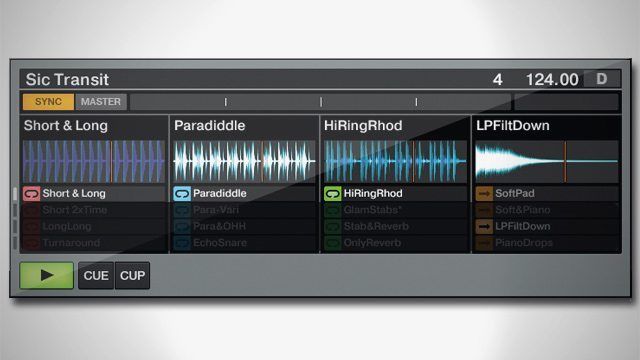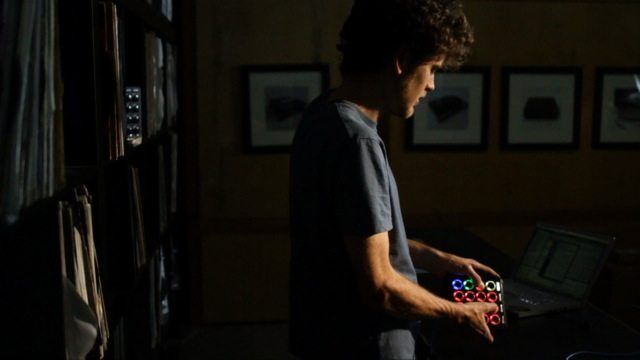
When designing the Midi Fighter 3D, we discovered the advanced multi dimensional control really shines in a diverse performance environment like Ableton Live. One of our employees, Mad Zach, developed a unique template for Ableton and the 3D that brings out the expression through powerful drum racks packed with great drums and synths. While designed specifically for the Midi Fighter 3D, it can be mapped to work with all controllers – so click through to watch his demo and for a free download of the template and soundpack.


How Does The Ableton Template Work?

The Template and Soundpack

Like all DJTT mappings, we will be offering this Ableton template for free on our new MIDI mapping site. Big thanks to Mad Zach himself who has single-handedly championed the 3D on Ableton with the support and encouragement of the entire DJTT team. Here’s Mad Zach’s explanation of how the template works!

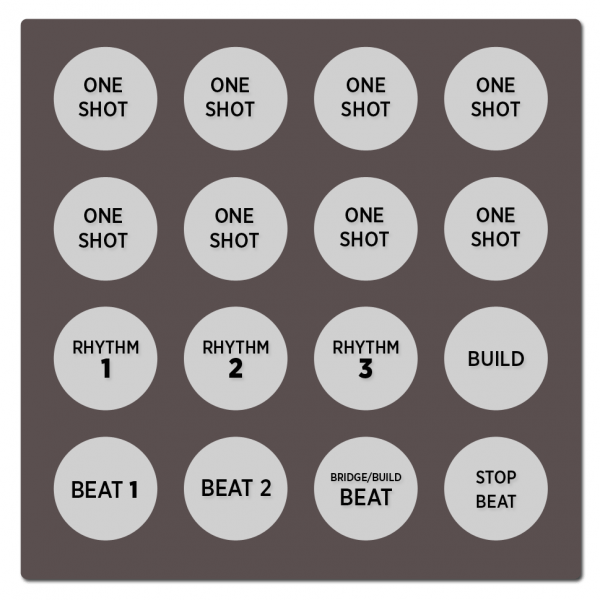
The template is a combination of MIDI drum loops and one shots. Each bank contains three stages of beat, which typically vary from primary and alternate, to build/fill. There is also a stop beat button on each bank. Above the bottom row of beat control are three independent percussion/rhythm MIDI loops which can also be used to enhance or strip your mix. Each bank also contains a build button, which is responsive to motion control, and can be used to create epic builds on the fly. The one shots are both samples and synth patches. Most of them are responsive to the 3D’s motion. If you tilt the 3D to the left, it will activate a beat repeat, and tilting forward applies a master low pass filter to the mix.
Download the project file for this Midi Fighter 3D template on our Maps site.
One note about compatibility- this version is for Ableton Live 8 only, and requires Operator. Future versions will incorporate Ableton 7 support!

Stay tuned for updates and more content for this template, as well as more official mappings for the Midi Fighter 3D

Here is one final performance that just showed up on You-Tube, a sick live remix of Korn using the 3D.


I Loved This Article >


  • http://www.facebook.com/thecrayon Christopher Crayon White

    DUDE I AM SO FUCKING STOKED TO GET ONE OF THESE!!! Cant wait to do a live dubstep set. 

    Is there a way we can get a longer blue usb cord?

  • http://twitter.com/KameronC Kam Coolidge

     The Blue USB is pretty long man. Unless you’re going to be flipping around like an idiot, you’ll be fine,

  • Anonymous

    Nice job Zach.

    scamo 

  • DJ Captcha

    This looks sick but there’s no option for the Ableton software preset in my Midifighter utility when my 3D is plugged in! Please help!

  • http://www.facebook.com/profile.php?id=100000531686375 Futureglue Musik

    Good job guys. I’m impressed.

    Best of luck with this product.

  • http://www.facebook.com/people/Matthias-Debernardini/100000159096584 Matthias Debernardini

    does it work with mfp’s??

  • Madzach

    its not currently pre-mapped to midi fighter pro but can easily be re-mapped to work by using the mfp’s knobs/faders instead of the 3d’s motion, also the mf pro does not currently have the bank navigation feature used to switch between groups of sounds. I’ll work on making a version that is pre-mapped for mf pro.

  • http://www.r2thespecialist.com/ R2thespecialist

    They sell 25 footers at normal office stores but sometimes I add a USB extension cord and tape them together

  • Mad Zach

    That’s because you my friend have a MF3D before anyone else so the file is not up yet, but when we start shipping them today, the new Utility + configuration file will be uploaded and it will work seamlessly.

  • Mad Zach

    that’s because you my friend have one before we have technically even begun shipping them (contest winner), when they start to ship later today, there will be an updated utility and a preset file for the mf3d that will make it all work seamlessly :)

  • sidetrakd

    This mapping is so much fun!! My compliments to the chef!!

  • sidetrakd

    Could you export your Mf utility settings to make it easier for people to load the same colours?

  • Quine

    Awesome Job Mad Zach!

    I think that videos like Bandesnaci’s are going to be what truly launches the MF3D, by showing what amazing things it’s capable of. This kind of performance is *exacyl* what I’m looking to do with the 3d. Can’t wait for mine to arrive!

  • Michael

    The Utility settings file will be supplied with all mappings

  • Michael

    The updated Utility just went up

  • Quine

    err….exactly.

  • DJ Captcha

    So excited.

  • Darrellbrianking

    I can only wish to be half as talented as this kid…  Dude, what ever you are paying him double it!

  • guywithknife

    This mapping is awesome! I’m having a lot of fun with it – thanks!

  • Lightrefraction

    Damn, that was so clean. Great work Mad Zach

  • Dubyabee2

    Ok Dumb ass here…RTFM…follow that last step…otherwise you’ll post that it doesn’t work…Awesome work!!!

  • Anonymous

    Getting error with this live pack. I am unable to install it :( Getting an error ‘The document was created in a more recent version!’ I have Ableton Live Suite 8

  • Madzach

    you’ll have to download the most recent iteration (its free if you already have Live SUITE 8) I made it in 8.2.6

  • Lakshmielectro1

     MULTI -AXIS MOTION CONTROLLERS

    Lakshmielectro is an authorized dealer of GIVI Measure Products, Sew Eurodrive GMBH, Delta Tau (Switzerland), Weicon (Germany) Wire Stripping Tools and Machine Tool Retrofits with Fanuc/Siemens.

    http://www.lakshmielectro.com/index.htm

  • Chandler Newell

    hey, man. can you make a demonstration of how to make a pack of our own? i want to assign my own sounds to my MF3D as well as effects using the tilting feature. however, im very new to ableton. your packs are great, id just like to expand on my own and im sure im not the only one with this problem. if you could help, thatd be awesome. thanks :)

First Time?

This site is dedicated to digital DJs. We develop performance tools and teach cutting edge techniques that enable creative expression. Visit tutorial videos on youtube, equipment reviews in the blog and a very helpful community in the forum. New articles every Mon, Wed, Fri.

RSS DJ TechTools Forums

DJ History: Spring 1979′s Issue of D.J. International

Read More...