

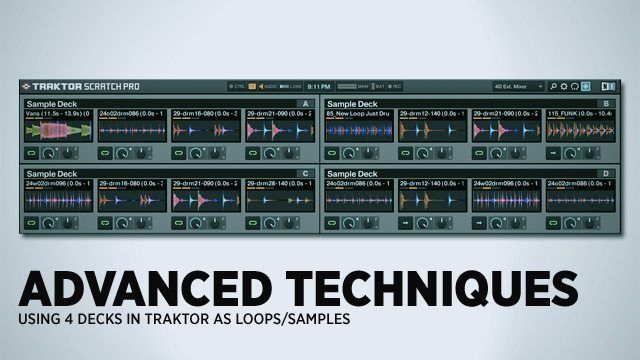
As some of you probably know, Traktor offers the ability to change any of its decks into 4 sample/loop players. What would happen if you switched all 4 decks into loop players? In this article I’m going to explore the concept, and feasibility, of running all four decks in sample mode, allowing for on the fly remixing and building tracks from the ground up in a live situation and trying to push the sample decks into being more than an auxillary tool.

Sample Decks Overview
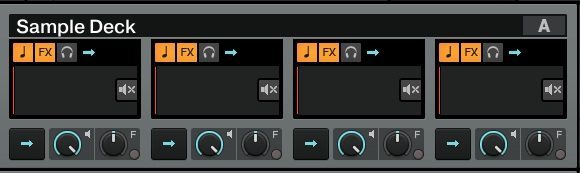
The decks themselves are simple enough to get to grips with, and very similar to a stripped back track deck.

Looking at the screenshot you can see we have key correction, effects assign and monitoring options along the top, and basic controls for start/stop, volume and filter along the bottom. The only thing missing to make that into a basic four deck mixing layout is individual EQs – luckily they still exist on the mixer controls for the channel.

Each group of sample decks can also be controlled as a group just like a deck. They can be stopped, started, scratched and manipulated just like a individual song. 

Possible Performance Methods

Juggle –  Look at your collection at the moment- how many of your tracks have loops saved in them? Or a cue point that you use as a one shot? Now consider the possibility of being able to play those loops at the same time as well as juggle them, while dropping that one shot cue, and still having the other three decks free. Sounds messy, the point is that by chopping the tracks down into loops and loading them into a deck – or two depending on the amount of loops – you now have the ability to not only change the arrangement of a track, but layer bits up, and manipulate more ‘tracks’ than you can in a standard layout.

Layer – stop buying tracks, and buy sample packs. This method is based around loading a drum, bass, lead and vox/hook loop into each slot, then jamming out a new tune on the fly. Then loading loops on the other side and doing the same, fading between the two new creations. An additional dimension can be brought in by using external sources via the loop recorder – think Dub FX or Beardyman – and dropping that loop into a sample slot.

Most of you have probably realized that these are two sides of the same coin, and the obvious thing would be to use loops from tracks, and season with loops from sample packs. This is the method I’ve been playing with-  I have also found that treating A/C and B/D as A and B works easier, as there are only two sides to a crossfader.
I’ve also found that (if you’re using the spectrum waveform view) it helps to have different ‘coloured’ loops loaded in each slot. This gives a more dynamic ‘sonic range’ for you to move around in.

Mapping

The basic controls
Besides the obvious mixer mappings, assuming you’re using internal mixing, you’re going to need to map the sample decks up. These are all found under ‘Sample Decks’ in the list of mapping functions.

  • Deck Play; same as on a normal deck, but instead of ‘device’ being a, b, c or d it will apply to the slot in the sample deck.
  • Load From List; again, the sample slot equivelent to loading a track from the browser.
  • Volume; controls the slots volume.
  • Filter On/Off & Filter Amount; same as the ones used when mapping the mixer, but per slot.
  • Phase Sync; helps keeps the grids of each sample better locked to master clock, i recommend mapping this to each play button – if you use it.
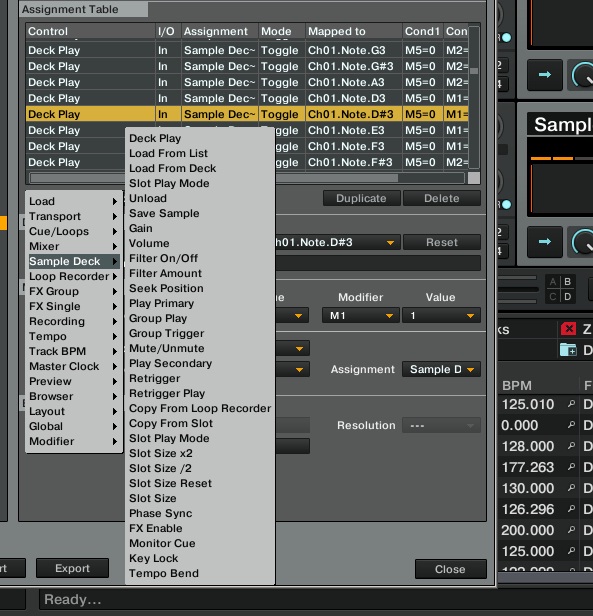
This basically equates to 16 buttons to control playback and 16 for loading, plus the same amount of knobs for volume & filter, unless you use modifiers.

As an example, I’m using a VCI for this. The buttons at the bottom control transport/loading for either deck A/C on one side and B/D on the other, depending on modifier state. To be honest a VCI isn’t the best choice, and something like a K2, APC40 or even Midi Fighter Pro - basically anything with a grid of buttons and a few knobs/faders – would work better. (These controllers are all available for purchase online. See links at the end of this article)

Extra Controls

As mentioned at the start, there is an option for enabling/disabling a slot from the FX. The normal mapping for effects on to a track deck still applies, but you can go deeper by putting in the option to stop a slot from being affected, or being the only one affected – running Beatmasher on only a drum loop for example, and leaving everything else normal. This is the FX Enable option.

Copy From Loop Recorder is an option I haven’t used much in this concept personally, but used heavily when running 3 decks and 1 sample deck, messing with the effects while ‘plooping’  then copying the resulting sound into a sampe slot. You can also use this function for recording in from outside sources.

MASSIVE TIP: > I have found previewing through multiple samples to be a laborious task, so I’ve mapped load to preview deck and preview deck start to the same buttons I use to move up down the browser list, but using invert, so that when I stop on a sample it instantly previews. The preview stops playing when i load a track or switch back from browser view.

Prepping Loops (AKA: The Boring Bit)

So now that we have the basics of using all four sample decks outlined, we need to look at the prep side of things. Nothing fancy in terms of mapping is required here, but I have found that having a hotkey for save sample comes in very handy – I set mine to deck C, slot 1. Keep in mind that samples fall victim to bad grids/analysing the same way that a full track does, I’ll talk about this further down.

Creation of a sample from an existing track is simple enough, set a deck to ‘track deck’, load a track, set a loop, copy it to a sample deck, save it. Et voila. Rinse and repeat for every loop you need. If you’ve been using the sample decks already, you will be aware that Traktor saves all the samples you’ve made into a folder. You can link this folder into the favorites bar in the browser for easy access – check in the file management section of the settings for the location of this folder.

To import a sample pack, locate the files using Traktor’s browser, highlight them and select import to collection as loop/one shot.
Now that the samples are present in your collection, we need to check that they ‘behave’ properly. As I mentioned above, loops require an accurate grid. Unfortunately there is no quick way to correct bad grids, you’ll have to do it the same way as a normal track. Even a loop taken from an existing, perfectly gridded track can still end up up with a botched one after Traktor has analyzed it.
There are enough threads in the forum and a classic article relating to gridding, so I won’t go into detail here.

A Couple of Annoyances

Sample packs will import with hardly any of the BPMs correct, as well as the grid marker being placed improperly. A quick fix;
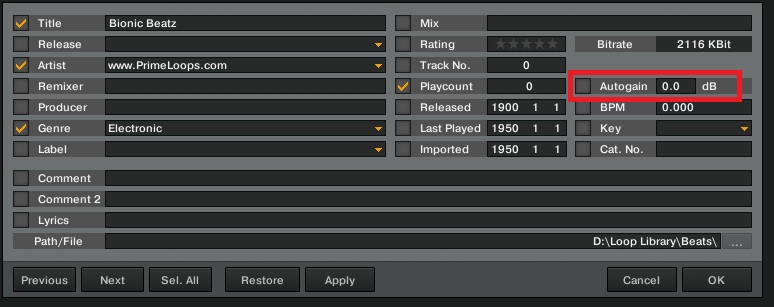
All loops in these packs have the bpm in the folder name or file name, so you can edit each tracks BPM field to match. Highlight multiple tracks in Traktor that have the same BPM, right click, select edit.
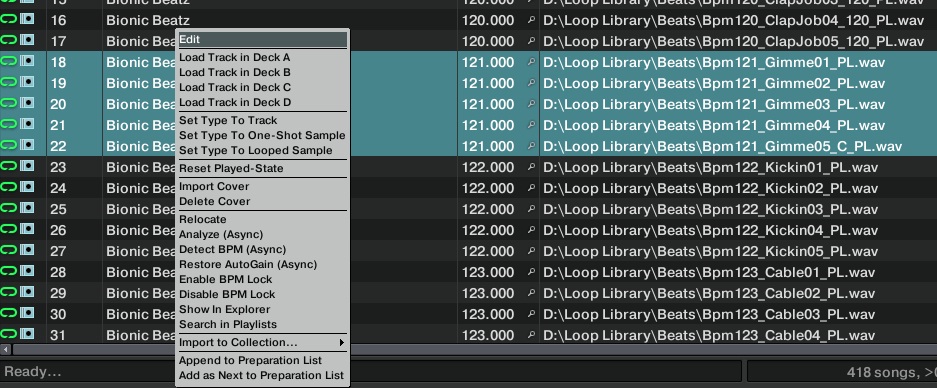
You can now change the BPM field, and this will be applied over all selected tracks, the same can be done with the auto gain.
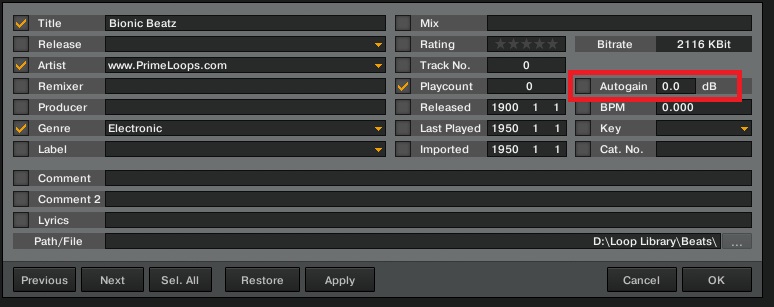
Auto Gain is another thing that Traktor can mess up in analysis on some tracks, I’ve found samples from the same the track with different values. Also different sample packs are mastered at different levels, so these won’t always match up out of the box. Here’s a tip; always use the same track/loop to benchmark sound settings to keep things even.

Bottom Line

While the sample decks have become more usable than they were back in the S4 days, they still have a little way to go. Playing with all four decks in sample mode is relatively simple and fun, bringing new creative flow to any routines that you already have, and allowing more layering options than just four track decks, or a 2×2 layout. For people looking for something like Ableton but with DJ flexibility, this is a realistic option.

There are still some large drawbacks to the sample decks, especially in terms of prepping loops. Loops are frequently out of time and it’s challenging to get set up with proper grids – we’re hoping Native Instruments will do a little more work on getting beat grids working right in loops.

One option that would make loop DJing in Traktor really work is group loading of samples into one deck. 

The Concept in Action

BradCee Driven Loopy by BradCee Here is a six minute mix of Katy B – Lights On and Sidney Samson – Riverside, performed in Traktor Pro 2 with nothing but loops in the sample decks.
14 Loops juggled in all, three from Katy B and five from Sidney Samson, seasoned with six from a couple of sample packs (the extra drums, basslines and percussion) and garnished with some Beatmasher.

Download the loops and try it out for yourself here. Post your results in the comments!

This is a simple example of the sample slots in action. In Decks C and D I ran the extra drum/bass/perc loops, and in Decks A and B I ran the loops from the tracks.

Want to purchase one of the controllers we used for this article and try this setup on your own? Check out these links: Midi Fighter ProK2APC40VCI-400

We also mentioned Beardyman earlier in the article… check out some of his music for sale here.

Read more about this topic in this DJTT Forum thread.


  • Movieland2

    another great / impressive / informative article, you guys continue to be my inspiration ! 

    cheers to mixing till 6 am and having to be @ work by 7 :)

  • Movieland2

    another great / impressive / informative article, you guys continue to be my inspiration ! 

    cheers to mixing till 6 am and having to be @ work by 7 :)

  • Movieland2

    another great / impressive / informative article, you guys continue to be my inspiration ! 

    cheers to mixing till 6 am and having to be @ work by 7 :)

  • Movieland2

    another great / impressive / informative article, you guys continue to be my inspiration ! 

    cheers to mixing till 6 am and having to be @ work by 7 :)

  • Mitchamytosis

    Why no video, even a screen capture would have helped a lot! Not trying to detract from what is an amazing article (& the recording is killer) but I can’t see any reason not to add a video when it’s obviously going to add a extra dimension to the article?

  • Mitchamytosis

    Why no video, even a screen capture would have helped a lot! Not trying to detract from what is an amazing article (& the recording is killer) but I can’t see any reason not to add a video when it’s obviously going to add a extra dimension to the article?

  • http://diskjockeyblog.com/how-to-run-traktor-like-ableton-with-only-loops.html How to run Traktor like Ableton with only Loops | Disk Jockey Blog

    [...] How to run Traktor like Ableton with only Loops November 21st, 2011 As some of you probably know, Traktor offers the ability to change any of it’s decks into 4 sample/loop players. What would happen if you switched all 4 decks into loop players? In this article I’m going to explore the concept, and feasibility, of… Read more [...]

  • Eddierolando

    this is awesome i’d love to see a video of someone rocking the 4 sample decks with maschine

  • D Holling

    the blog posts are becoming increasingly forum inspired…

  • http://www.abletonsupport.com/?p=39879 Ableton Support » DJ TechTools | How to run Traktor like Ableton with only Loops

    [...] Original post: DJ TechTools | How to run Traktor like Ableton with only Loops [...]

  • http://www.djayggregator.com/2011/11/21/how-to-dj-in-traktor-with-only-loops-and-sample-decks/ How To DJ In Traktor With Only Loops and Sample Decks | Djayggregator

    [...] loop players? In this article I’m going to explore the concept, and feasibility, of… Read more Go to Source Share this on: Mixx Delicious Digg Facebook [...]

  • Si Siddy

    thumbs up!

  • http://twitter.com/koningwoning Eric Woning

    Great piece… thanks!
    Will be trying out some chops of this myself (if I actually dare :-)

  • http://twitter.com/koningwoning Eric Woning

    Great piece… thanks!
    Will be trying out some chops of this myself (if I actually dare :-)

  • Dennis

    Seems like a lot of work instead of just using Ableton? What would be the benefits over an Ableton setup (besides the price point)?

  • Dennis

    Seems like a lot of work instead of just using Ableton? What would be the benefits over an Ableton setup (besides the price point)?

  • Dennis

    Seems like a lot of work instead of just using Ableton? What would be the benefits over an Ableton setup (besides the price point)?

  • Dennis

    Seems like a lot of work instead of just using Ableton? What would be the benefits over an Ableton setup (besides the price point)?

  • Dennis

    Seems like a lot of work instead of just using Ableton? What would be the benefits over an Ableton setup (besides the price point)?

  • http://www.facebook.com/brikha Emil Beatsnatcher Brikha

    Yet another reason to get the Novation Twitch with it’s magical 16 button layout.

  • Sava Tasev

    i was about to post the same opinion +1

  • Sava Tasev

    i was about to post the same opinion +1

  • Sava Tasev

    i was about to post the same opinion +1

  • Sava Tasev

    i was about to post the same opinion +1

  • Guest

    this is cool but at that point i’d be looking at Ableton and an APC40 instead of Traktor

  • Mylestec

    one reason would be the simplicity of switching between standard two or three deck mixing and live remix… could be useful for extended sets where you really can’t be remixing live for 6 hours.

  • Mylestec

    one reason would be the simplicity of switching between standard two or three deck mixing and live remix… could be useful for extended sets where you really can’t be remixing live for 6 hours.

  • http://www.langsman.com Marc Langsman

    This is definitely inspiring me to dust off my S4 ! 

  • koffa

    I’d +1 on this really needing a video to be explained. And with all this prepwork being required, I’d also say that I’d probably prefer a ableton setup. But show me a video of someone rocking out on it and I might just change my mind! :)

  • R3Production

    Wow impresieve. I have just changed my set up from previous running ableton into deck 3 audio through and now i am running  Traktor in Ableton. Using Looper and beat repaeters over the audio input. On the fly copying loops from looper to other tracks and layering synth or base lines or percussion over some other tracks creates endless opertunity of remixing on the fly….
    But i will try your tricks..Maybe prep the loops and samples in Ableton and copy in Traktor will be a faster way creating a play format. Variation and creativity is the key to new style dj-ing. Regardless all comments we receive from CDJ and Vinyl dj’s, i like to explore all methodes and so far i can be more creative with laptop & controllers than on a pair of CDJ’s. Never the less i respect every style and methodes. 
    DJTT Thanks for your always impressieve articles…

  • http://www.facebook.com/darakelyan Dave Ruff

    REALLY GREAT ARTICLE:) ONLY QUESTION I HAVE IF YOU HAVE IT MIDI MAPPED FOR MY LAZY BUTT.

  • http://www.facebook.com/darakelyan Dave Ruff

    REALLY GREAT ARTICLE:) ONLY QUESTION I HAVE IF YOU HAVE IT MIDI MAPPED FOR MY LAZY BUTT.

  • Jasonmd2020

    I’ve actually been toying with this for performing my own material. If you have a track you’ve written yourself, save the tracks/stems as individual files and load ‘em as loops in Traktor. I found using two sample decks, one turntable/cdr controlled deck, and one as an audio input for a synth works great for improving.

  • Jasonmd2020

    I’ve actually been toying with this for performing my own material. If you have a track you’ve written yourself, save the tracks/stems as individual files and load ‘em as loops in Traktor. I found using two sample decks, one turntable/cdr controlled deck, and one as an audio input for a synth works great for improving.

  • BradCee

    Unfortunately my laptop is too beaten and old to run video capture software at the same time as traktor – did try but was too jumpy.
    maybe if i owned a mac…

  • BradCee

    Apologies for lack of vid, my laptop is too old and battered to run screen capture, without the end result being too jumpy. and i’ve found that just pointing a camera at the screen doesn’t get the best result…

  • Mmclau14

    if you have a mac, i use this app:
    http://screenyapp.com/
    it’s pretty sweet, you can then just put a recording of you talking over your video.

  • http://aggoman.allergiesaid.com/2011/11/21/sound-decks/ Sound decks | Aggoman

    [...] How To DJ In Traktor With Only Loops and Sample Decks [...]

  • Dennis Parrott

    BradCee  – You da man! Awesomely inspiring. 

    Seriously, this in interesting to me because I am in one of those funks where I don’t try things because I just can’t quite visualize how things fit together and will work out. (yes, I can be a bit OCD/anal about this stuff…) Now I have an example to deconstruct and text to explain it.  For that, I have to say thanks!

    Now here’s the $64 dollar question:  if I have all 4 decks tied up doing samples, how do i transition out of that sort of thing back to just mixing?  I can see where I’d do a routine like this but want to switch back to just mixing songs when finished. (I am a mobile DJ…) It seems to me that you couldn’t just switch layouts and load a song seamlessly…

    I guess I’d have to play a song from the iPod which means I need some extra gear beyond my Mac, S4, and PA… 

    Time to head out to the woodshed….

    dp

  • Abletom

    “One option that would make loop DJing in Traktor really work is group loading of samples into one deck.”

    Although it might be a bit of a headache to set up, I think if you combine the earlier article on ‘string theory’, this could be possible by using one midi button press to trigger other subsequent midi notes at set time intervals. 

    Eg. 
    (with browser open and top sample of a group of 4 selected)
    ch1 cc1 note – button press
    (would then trigger)
    ch10 cc1 – load selected sample deck 4 slot 1
    (10ms later)
    ch10 cc2 – move down list once(10ms later)
    ch10 cc3 – load selected sample deck 4 slot 2(10ms later)
    ch10 cc4 – move down list once

    and so on…

  • Spacecamp

    Butts aren’t MIDI-compatible :( 

  • Spacecamp

    Butts aren’t MIDI-compatible :( 

  • Spacecamp

    Butts aren’t MIDI-compatible :( 

  • Spacecamp

    Butts aren’t MIDI-compatible :( 

  • http://twitter.com/SamBenDavid SamBenDavid aka DJew

    If you are going to DJ in Traktor with just Loops and Samples….you may as well use Ableton?

  • Adelmur

    I have been thinking about mixing only with sample deck since the beginning of those decks.
    I love Looptastic on the ipad it works a bit on the same concept. my idea would be to produce basses, leads samples and vox on the Machine or Live and load them in Traktor. 
    Use : 
    - Deck A basses. 
    - Deck B leads 
    - Deck C samples 
    - Deck D voices. 
    Some effects works better on basses. some on the lead or samples .. this way it is easier to preload your samples with the dedicated preselected effects. 
    My main problem now is to get a dedicated controller. There is noting available on the market right now. maybe we can use the Akai pad drum controller. this means 2 controller per deck …
    I am a designer. so I have designed a Controller that mimic traktor S4 Style. and get some stuffs from an APC40 (infinite LED knobs) see the image below. the layout is pretty simple and efficient. my idea would be to have those controllers as add on to the existing S2 or S4. it is the same length. 
    To be more specific, I would like to design some kind of lego based traktor controller.
    one main controller for the sound card a USB HUB and the basic controls The center of a S4 is fine. then add-on controllers deck in regards of your style. 
    - Platers deck for scratching, 
    - Trigger desks for controlerists. 
    - Sampler decks for looping and sampling. 
    Those deck could be purchased separately. and when plugged to the main mixer via some kind of USB hub or even better use wifi or RFID to avoid cables. the interface on the screen change to adapt to your needs. 
    does it look interesting for you ? would you like to get something like that ? 
    I don’t know who ask to build this. 
    maybe native instrument maybe someone else ?  any help ? 

  • Chrisross

    could it be done in kontrol s2??

  • http://www.facebook.com/profile.php?id=100001227092920 Vincent Perrone

    Still confused as to how to map properly. 

  • Chris

    You could always use the loop recorder to a 16-beat loop of whats playing, then turn the dry/wet up to 1. This would free up your sample decks, so you can then turn some (or all) of them into track decks. Just click on the decks icon and select “track deck”

  • Chris

    You could always use the loop recorder to a 16-beat loop of whats playing, then turn the dry/wet up to 1. This would free up your sample decks, so you can then turn some (or all) of them into track decks. Just click on the decks icon and select “track deck”

  • Chris

    You could always use the loop recorder to a 16-beat loop of whats playing, then turn the dry/wet up to 1. This would free up your sample decks, so you can then turn some (or all) of them into track decks. Just click on the decks icon and select “track deck”

  • http://SHIGGA.com SHIGGA.com

    wow, gotta try this when i get back to my cave!!

  • Itsbentheboy

    glad to see a great article on here again… i was a bit concerned with the recent content, but my faith has been restored. Also, this can be an inspiration who dabble in Ableton as well as Traktor. im thinking of making a 8 track A channel and 8 track B channel to dj with and crossfade between. :)
    i love articles like this that can spark ideas in many new forms

  • http://www.facebook.com/people/Eugene-Whocares/660072149 Eugene Whocares

    “if I have all 4 decks tied up doing samples, how do i transition out of that sort of thing back to just mixing?”

    it shouldn’t be much of a problem to switch one of the sample decks to a regular deck, load track, and proceed as you would with a regular mix.  i seriously doubt that many people would have 16loops going all the time where they cant sacrifice 4sample decks to switch into deck view.

    also, its been a while since ive messed around with tpro, but, can’t you load a full track into the sample deck?  youd obviously give up quite a bit of controls, but it should be workable enough to at least transition from samples to decks.

  • Stighharris

    However if you do not only dj with loops and samples and does not want to spend 350$ extra on Ableton live 8

  • Anonymous

    Nice article, but theoretically, you can only do this with loops. Ean said he could get one shots in sync with some mapping on the S2. I am still waiting for that explanation.;)

    scamo

  • Stefanomdj

    Nice post, only difficult things: find nice loops to play!

  • Mitchamytosis

    Bahaha, well played, Sir :)

  • Mitchamytosis

    Bahaha, well played, Sir :)

  • Mitchamytosis

    Bahaha, well played, Sir :)

  • Dabizarone

    nice tut i ve been thinking about doing this but never got around to it because i also use able ton .now since i got all my loops prepped in live it should be alot easier to just import the over
    i ll let yall
     know how it turns out

  • Dj Kizouk Kizouk

    Vestax VCM600 

  • Dj Kizouk Kizouk

    Maybe Vextax VCM600 is what u lookin’ for

  • Jukebox

    I was just willing that mix to go into Prodigy Firestarter.. It never :-(

  • Anonymous

    Great article from Brad, brilliant use of the sample slots. On the subject of BPM detection for sample NI have a workaround:

    This is just a workaround for versions 2.1.x – the detection for short samples will be properly integrated into the analysis in the next version of Traktor and a more detailed explanation will be available in the Traktor FAQ on the Support website very soon.

    BPM Detection for Samples

    ==

    Due to a bug in version 2.1.x, the tempo detection when loading samples usually fails to determine the correct tempo, as it triggers the regular tempo detection which must fail on such sort samples.

    Here is a workaround for achieving the correct result, when importing new samples (which generates a sample length based BPM value) .

    Please note that when you do this for several files at once, you should only use files which have the same tempo range.

    - Before even importing the new samples, turn off the option Preferences > File   Management > “Analyze new imported tracks”

    - Import the new samples into a new playlist (verify that the BPM column shows 0.000)

    - Select the entire playlist and select “Enable BPM Lock” in the context menu for all samples.

    - Then Analyze the entire playlist by selecting “Analyze” in the context menu for all samples at this point all samples have a grid but their BPM should still be 0.000

    - Leave the BPM Lock in place

    - Set the Master Clock to a typical tempo of the imported loops

    At this point  the algorithm will find a BPM value as close as possible to the current Master Clock tempo when dragging the new sample into a slot for the first time

    Hope this helps,

    Karlos

  • Rebourne

    any chance you can post a link for more sample downloads? :) the soundcloud page reached the capacity for downloads and i would love to hop in on this :D

  • Dannybyrne

    download linit reached..!

  • Cazcoronel

    DJTT give this man a new laptop!

  • Oscar Peñas

    amazing tips! can’t wait to try them in my setup soon as i can!

  • Pato_ucb

    Got the S2 yesterday And today I had the same idea and here is the confirmation that it works! Thank you for the great article!

  • http://www.eastendlideejay.com/DJNews/archives/37 How To DJ In Traktor With Only Loops and Sample Decks | The DJ Daily Insider

    [...] As some of you probably know, Traktor offers the ability to change any of its decks into 4 sample/loop players. What would happen if you switched all 4 decks into loop players? In this article I’m going to explore the concept, and feasibility, of… Read more [...]

  • http://www.facebook.com/people/Guilherme-Müller/1504366995 Guilherme Müller

    The ideia is cool but the “Concept in action” the loops are to distance from each other, not the key but the mastering and mixing feeling… It’s hard to make many loops playing together live looks like a finished track, cause Traktor doesn’t have mastering effects…
    Sorry for my English…

  • Kristopher Lingo

    Adelmur- I have been through this and am working with some companies in Europe and asia to produce this product.  We should talk.  I just setup a show for the Emulator here in LA.  email me at kristopher.lingo58@gmail.com

  • Jdreau

    Sure you could do it, but why not use ableton with something along the lines of the novation launchpad, thats what madeon did, http://www.youtube.com/watch?v=lTx3G6h2xyA  and its freakin amazing, why not just spend 150 and get a super sweet piece of equipment, ableton, 64 freakin leds, and not have to sacrifice your time, energy, and s4? seems like a no brainer, unless you want to just to do it for the fun of remapping stuff and teaching youself stuff, which i always enjoy (no sarcasm intended).

  • http://www.djtechtools.com/2011/12/19/dj-software-options-for-beginners-from-free-to-99/ DJ TechTools  |  DJ Software Options for Beginners: Free to $99

    [...] edition with 8 sample decks that sync up to your master decks. This enables Ableton-style loop-based DJing, which is only possible in more expensive versions of most other software. The step up from this [...]

  • http://www.blenheimdj.co.nz/how-to-dj.htm DJ Kiwi

    Thanks for showing how to DJ with traktor using only loops and samples. Prepping the loops info was very helpful.

  • BradCee

    Loops should be downloadable again

  • http://djgustavov.wordpress.com/2012/04/18/dj-software-options-for-beginners-free-to-99/ DJ Software Options for Beginners: Free to $99 « DJ Gustavo V

    [...] edition with 8 sample decks that sync up to your master decks. This enables Ableton-style loop-based DJing, which is only possible in more expensive versions of most other software. The step up from this [...]

  • shim

    i want to buy mixer pioneer djm t1 with TRAKTOR™ SCRATCH 2 DJ
    any one can help?

  • Natusiek

    Look here
    http://www.lucidsamples.com

    There is a good samples for DJs :)

First Time?

This site is dedicated to digital DJs. We develop performance tools and teach cutting edge techniques that enable creative expression. Visit tutorial videos on youtube, equipment reviews in the blog and a very helpful community in the forum. New articles every Mon, Wed, Fri.

RSS DJ TechTools Forums

Review: Hot Hand USB Wireless MIDI Controller

When it comes to MIDI controllers, physical motion can be a hard type of input to understand and access - especially when it's completely disconnected from a physical controller. What if there was a controller that simplified motion - not quite as complex as Read More...

