


String Theory for DJs

stringtheory

Don’t run off! We’re not actually going to give you a physics lecture. That said, you might need to put your thinking caps on, because I’ve been working on a concept that’s designed to sidestep some of the limitations of DJ software and open up a whole new world of power, but it’s a little bit complicated.


Why string theory? Well, to really accomplish magical things in DJ software, some events need to happen in a string, one after another.

One of the biggest limitations in DJ software is that certain actions, despite in theory being able to be part of the mapping of your dreams, just don’t play well together. Whether it’s wanting to skip forward a certain amount of beats, lay cues and loops separately, or maybe activate an effect and change its function all in one press, some things just don’t play fair. The solution I’ve been working on – perhaps workaround is more accurate –involves using some intermediary software to catch our MIDI commands and transform them from single messages into strings of sequential messages, so that the software recognises a single press as two or three separate commands inputted in quick succession. Clever, huh?

In this guide I’m going to be focusing on Traktor Pro, as it’s no secret that the Traktor mapping engine creates massive possibilities. I’m also going to be using the free OSX application MidiPipe, but you can also achieve results with Bome’s Midi Translator (Pro edition only, unfortunately) – and you may also be able to work something else with MidiOX, the free MIDI translator for Windows. I’m also using a Midi Fighter, so you should be able to just load up the example .tsi below and go if you have a Midi Fighter – if not a quick look at the commands to remap to your controller should be simple.

The practical example I’m going to use is a way to get track slicing, like that seen in Novation’s Twitch controller, into Traktor Pro. I’m not going to focus on totally aping the functionality, as the special function in Itch has quite a lot going on, but the general premise – eight buttons that correspond to 8th notes in the track for instant remixing – is surprisingly easy to knock up with a little outside-the-box thinking.
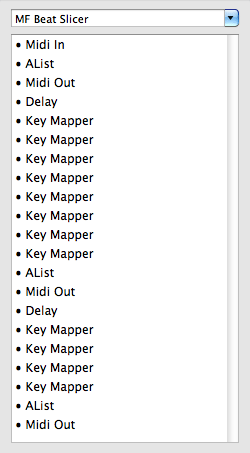
The issue we need to sidestep is Traktor’s unwillingness to do two things at exactly the same time; in this case we need to jump to a reference cue and then jump to another beat from it, and so to make that happen we need to use a string.

In Midi Pipe, we need to define the Midi In, and for our first output we can just go straight out with a Midi Out. Doing this doesn’t really do anything to the MIDI message we send, and Traktor will receive it as if nothing ever happened. The key, though, is to select ‘pass through’ in the Midi Out. This will allow the MIDI message to continue through our string as well as being sent out, allowing us to morph it into something else – but first we need to delay the signal slightly.

It seems that three really is the magic number, as in order to get 100% accuracy with no dropped hits, we need to set a delay of at least 3ms between the two MIDI messages being sent. We’ve spoken about latency a few times in the past here at DJ TechTools, and whilst no latency is better than any latency 3ms is acceptable in most setups – if you’re already pushing the boundaries in other areas and planning on creating strings with three or four steps it may start to become noticeable though, so bear in mind your mileage may vary. You may also want to consider bumping up the delay on some of the strings to make sure that all of your buttons have the same feel; if you need two delay commands in one string but only one in another, setting the latter to 6ms will ensure the feel is consistent.

Once we’ve set up the delay, we can then set up a Key Mapper. This will take our note message and change it into another one, and using another Midi Out afterwards will send that message to Traktor a mere 3ms after the first. This process can be repeated as many times as you like, but as mentioned earlier beware of the latency creep.
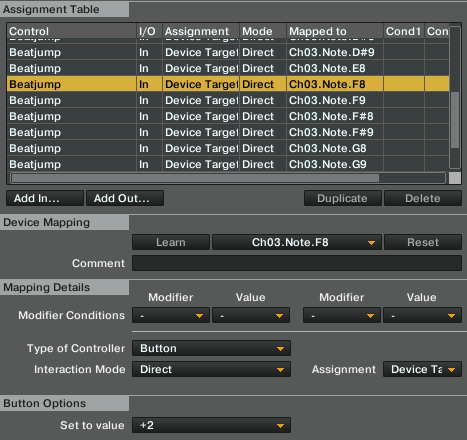
When we’re in Traktor, all we now need to do is set up our commands. In this basic example, I have used the top left button on the Midi Fighter to drop a cue and loop, and the one next to it to simply drop a cue. To get our track to jump around on beat, all we need to do is set up eight buttons – the bottom two rows in the case of the example – to all jump to the active cue when they’re pressed by the first message in the string. The second message can then be set to a beat jump which corresponds to the different note lengths. In order to get some of the beats you will need to combine two messages; to get the third 8th you will need one beat jump of +1/4 and another of +1/8. You’ll see in the screen shot and example file there’s a third set of commands in Midi Pipe, and they’re for this exact reason.


As if to make matters a bit more difficult to follow, I came across a bizarre issue in Traktor whereby the beat jump values needed to be doubled for the second half of the bar… I’ve no idea why this happens, but at least the example works.

This may sound a bit complicated, and that’s because it is, really – but once you get your head around it and the switching between two pieces of software to create your mapping, you’ll start to realise there are a ton of new possibilities. Here’s a zip file which contains both the Traktor Pro .tsi and a Midi Pipe file that I created for this guide, so that you can open them up and see the functionality in action: hopefully this will make things a little clearer.

Slicer

There are huge possibilities for this method, and we’re beavering away behind the scenes to bring you something special but we’d also love to see what you can come up with, so have at you!

  • Snack

    How would this concept work in sera to scratch live?

  • Snack

    How would this concept work in sera to scratch live?

  • Brinx

    This is genius Chris! Thank you! 
    I will experiment with this alot this weekend, could really do amazing things when building a new routine.

  • Bascurtiz

    omfg… could anyone make this work with the Novation Twitch controller for Traktor?

  • al

    cool id been working on a max/msp patch for this exact reason
    got the output from traktor to max/msp to lpd8 leds working

    cycling through the 8 pad leds where ever u are in the song
    on a per beat or half beat

    its the seek position input thats the problem
    lpd8 ouput to max/msp is working
    max/msp to traktor is working
    the problem is with traktors seek position 
    it starts to drift after maybe the first ten beats

    i dont know if if its the size of the track or bpm
    id been using a short 128 beat track
    as midi cc has a value from 0 -127
    but tried with different bpms but it still drifts

    any ideas

  • al

    cool id been working on a max/msp patch for this exact reason
    got the output from traktor to max/msp to lpd8 leds working

    cycling through the 8 pad leds where ever u are in the song
    on a per beat or half beat

    its the seek position input thats the problem
    lpd8 ouput to max/msp is working
    max/msp to traktor is working
    the problem is with traktors seek position 
    it starts to drift after maybe the first ten beats

    i dont know if if its the size of the track or bpm
    id been using a short 128 beat track
    as midi cc has a value from 0 -127
    but tried with different bpms but it still drifts

    any ideas

  • Brononymous

    Has anyone here played WoW? .mel scripts made 50% of that game – if we could have some sort of scripting/macro platform inside of our programs to handle MIDI messages, that would open up a world of possibilities.

  • Brononymous

    Has anyone here played WoW? .mel scripts made 50% of that game – if we could have some sort of scripting/macro platform inside of our programs to handle MIDI messages, that would open up a world of possibilities.

  • http://twitter.com/protocollie protocollie

    Lua actually, just being totally pedantic

  • http://twitter.com/protocollie protocollie

    Lua actually, just being totally pedantic

  • http://twitter.com/protocollie protocollie

    Lua actually, just being totally pedantic

  • http://twitter.com/protocollie protocollie

    Lua actually, just being totally pedantic

  • YuraDee25

    Virtual DJ software allows scripst instantly out of a box!

  • YuraDee25

    Virtual DJ software allows scripst instantly out of a box!

  • Djanubus

    Really great article and video Chris.  Its this kind of forward thinking that will usher in the next generation of top level DJing and encourage people to do more than press play.

  • Zestoi

    sounds like a job for midimasher to me – also free ;)

  • Zestoi

    exactly what my midimasher allows http://midimasher.djism.com/

  • zestoi

    i had a full slicer mostly working on my lpd8 a while ago, may have broken that code in a recent midimasher update. i’ll have to go back and look at it again… http://midimasher.djism.com/lua/lib/slicer.lua

  • zestoi

    i had a full slicer mostly working on my lpd8 a while ago, may have broken that code in a recent midimasher update. i’ll have to go back and look at it again… http://midimasher.djism.com/lua/lib/slicer.lua

  • Chris Cartledge

    Ooh, I’ll have to look a little further into MidiMasher!

  • Chris Cartledge

    Many thanks DJ Anubis, I do my best!

  • Chris Cartledge

    That sounds very interesting! The drifting could potentially just be problems with MIDI beat clock’s accuracy – it’s not exactly known for its stability. It could also be something else though and there are people knocking about who are much better placed to answer technical questions than muggins here ;)

  • Chris Cartledge

    That sounds very interesting! The drifting could potentially just be problems with MIDI beat clock’s accuracy – it’s not exactly known for its stability. It could also be something else though and there are people knocking about who are much better placed to answer technical questions than muggins here ;)

  • Chris Cartledge

    That sounds very interesting! The drifting could potentially just be problems with MIDI beat clock’s accuracy – it’s not exactly known for its stability. It could also be something else though and there are people knocking about who are much better placed to answer technical questions than muggins here ;)

  • Chris Cartledge

    Cheers! I think there are really cool possibilities here for both routines and party rocking, make sure you post up what you get up to!

  • Chris Cartledge

    Cheers! I think there are really cool possibilities here for both routines and party rocking, make sure you post up what you get up to!

  • Chris Cartledge

    Cheers! I think there are really cool possibilities here for both routines and party rocking, make sure you post up what you get up to!

  • Chris Cartledge

    Cheers! I think there are really cool possibilities here for both routines and party rocking, make sure you post up what you get up to!

  • Chris Cartledge

    Cheers! I think there are really cool possibilities here for both routines and party rocking, make sure you post up what you get up to!

  • Chris Cartledge

    Cheers! I think there are really cool possibilities here for both routines and party rocking, make sure you post up what you get up to!

  • Chris Cartledge

    Cheers! I think there are really cool possibilities here for both routines and party rocking, make sure you post up what you get up to!

  • Chris Cartledge

    Cheers! I think there are really cool possibilities here for both routines and party rocking, make sure you post up what you get up to!

  • Chris Cartledge

    I’m going to be poking around to see what I can make Scratch Live do over the next few weeks!

  • Chris Cartledge

    I’m going to be poking around to see what I can make Scratch Live do over the next few weeks!

  • Chris Cartledge

    I’m going to be poking around to see what I can make Scratch Live do over the next few weeks!

  • Chris Cartledge

    I’m going to be poking around to see what I can make Scratch Live do over the next few weeks!

  • Chris Cartledge

    I’m going to be poking around to see what I can make Scratch Live do over the next few weeks!

  • Chris Cartledge

    I’m going to be poking around to see what I can make Scratch Live do over the next few weeks!

  • Chris Cartledge

    I’m going to be poking around to see what I can make Scratch Live do over the next few weeks!

  • Chris Cartledge

    I’m going to be poking around to see what I can make Scratch Live do over the next few weeks!

  • Chris Cartledge

    I’m going to be poking around to see what I can make Scratch Live do over the next few weeks!

  • Chris Cartledge

    I’m going to be poking around to see what I can make Scratch Live do over the next few weeks!

  • zestoi

    cool ;) i already coded twitch-slicer-emulation into midimasher but it isn’t reliable enough at the moment. i think i’m going to steal your idea of first jumping to a hotcue before then sending the beatjump as currently it *hopes* it knows where it is based on the beat phase but often gets it wrong (due to traktor quantize i think) and ends up jumping too far or not enough. it does animate the pads which is nice but i’m sure i can still do that with your method. code is here and is the worst code in midimasher at the moment due to all the debug+comments etc http://midimasher.djism.com/lua/lib/slicer.lua

  • zestoi

    cool ;) i already coded twitch-slicer-emulation into midimasher but it isn’t reliable enough at the moment. i think i’m going to steal your idea of first jumping to a hotcue before then sending the beatjump as currently it *hopes* it knows where it is based on the beat phase but often gets it wrong (due to traktor quantize i think) and ends up jumping too far or not enough. it does animate the pads which is nice but i’m sure i can still do that with your method. code is here and is the worst code in midimasher at the moment due to all the debug+comments etc http://midimasher.djism.com/lua/lib/slicer.lua

  • zestoi

    cool ;) i already coded twitch-slicer-emulation into midimasher but it isn’t reliable enough at the moment. i think i’m going to steal your idea of first jumping to a hotcue before then sending the beatjump as currently it *hopes* it knows where it is based on the beat phase but often gets it wrong (due to traktor quantize i think) and ends up jumping too far or not enough. it does animate the pads which is nice but i’m sure i can still do that with your method. code is here and is the worst code in midimasher at the moment due to all the debug+comments etc http://midimasher.djism.com/lua/lib/slicer.lua

  • zestoi

    cool ;) i already coded twitch-slicer-emulation into midimasher but it isn’t reliable enough at the moment. i think i’m going to steal your idea of first jumping to a hotcue before then sending the beatjump as currently it *hopes* it knows where it is based on the beat phase but often gets it wrong (due to traktor quantize i think) and ends up jumping too far or not enough. it does animate the pads which is nice but i’m sure i can still do that with your method. code is here and is the worst code in midimasher at the moment due to all the debug+comments etc http://midimasher.djism.com/lua/lib/slicer.lua

  • zestoi

    cool ;) i already coded twitch-slicer-emulation into midimasher but it isn’t reliable enough at the moment. i think i’m going to steal your idea of first jumping to a hotcue before then sending the beatjump as currently it *hopes* it knows where it is based on the beat phase but often gets it wrong (due to traktor quantize i think) and ends up jumping too far or not enough. it does animate the pads which is nice but i’m sure i can still do that with your method. code is here and is the worst code in midimasher at the moment due to all the debug+comments etc http://midimasher.djism.com/lua/lib/slicer.lua

  • zestoi

    cool ;) i already coded twitch-slicer-emulation into midimasher but it isn’t reliable enough at the moment. i think i’m going to steal your idea of first jumping to a hotcue before then sending the beatjump as currently it *hopes* it knows where it is based on the beat phase but often gets it wrong (due to traktor quantize i think) and ends up jumping too far or not enough. it does animate the pads which is nice but i’m sure i can still do that with your method. code is here and is the worst code in midimasher at the moment due to all the debug+comments etc http://midimasher.djism.com/lua/lib/slicer.lua

  • http://twitter.com/NotSoSiniSter NotSoSiniSter

    ahh this would be useful for using IG FX and having a change the effect AND enable it AND set the value. Delay the the enable by a bit. And you don’t have the problem we all know and love… :D 

  • http://twitter.com/NotSoSiniSter NotSoSiniSter

    ahh this would be useful for using IG FX and having a change the effect AND enable it AND set the value. Delay the the enable by a bit. And you don’t have the problem we all know and love… :D 

  • http://twitter.com/NotSoSiniSter NotSoSiniSter

    ahh this would be useful for using IG FX and having a change the effect AND enable it AND set the value. Delay the the enable by a bit. And you don’t have the problem we all know and love… :D 

  • Anonymous

    Hehehe…nice Article Chris. I have to laugh because, I’ve been working on a mapping for jog wheel combo effects for the S4 and I have a lot of experience with PLC programming and I said to myself just the other day, “Damn, why can’t Traktor have a more PLC like programming language for mapping or actually manipulating control signals?” Your idea is quite similar. However, I really think working around the software is not as productive or as effective as if the software producer would improve their “way of mapping”. I really think since controllerism is getting more and more popular, with more and more different controllers coming out on the market, the software producers will have to come up with better ways to be able to actually program how the controllers work with the software. I’d love to see an API for controller mapping, which includes a plethora of typical programming functions. That would be a dream come true for me.;)

    scamo

  • Anonymous

    Hehehe…nice Article Chris. I have to laugh because, I’ve been working on a mapping for jog wheel combo effects for the S4 and I have a lot of experience with PLC programming and I said to myself just the other day, “Damn, why can’t Traktor have a more PLC like programming language for mapping or actually manipulating control signals?” Your idea is quite similar. However, I really think working around the software is not as productive or as effective as if the software producer would improve their “way of mapping”. I really think since controllerism is getting more and more popular, with more and more different controllers coming out on the market, the software producers will have to come up with better ways to be able to actually program how the controllers work with the software. I’d love to see an API for controller mapping, which includes a plethora of typical programming functions. That would be a dream come true for me.;)

    scamo

  • Anonymous

    Hehehe…nice Article Chris. I have to laugh because, I’ve been working on a mapping for jog wheel combo effects for the S4 and I have a lot of experience with PLC programming and I said to myself just the other day, “Damn, why can’t Traktor have a more PLC like programming language for mapping or actually manipulating control signals?” Your idea is quite similar. However, I really think working around the software is not as productive or as effective as if the software producer would improve their “way of mapping”. I really think since controllerism is getting more and more popular, with more and more different controllers coming out on the market, the software producers will have to come up with better ways to be able to actually program how the controllers work with the software. I’d love to see an API for controller mapping, which includes a plethora of typical programming functions. That would be a dream come true for me.;)

    scamo

  • http://www.facebook.com/pdxmicah Micah C’Leste

    Stray clip at the end of the video….

  • http://www.BOW-tanic.de BOW-tanic

    I don’t get it: what is this different here to just set some cue-points and hit the corresponding buttons to create a rhythm. I do this with Traktor 3 (still!) and a launchpad having 2 pads for each cue-point. One pad plays from the point, the other pad additionally pauses the track when I release it. So I have 12 pads to play with and that gives plenty of slicing possibilities, even though I’m restricted to 6 available cue-points in T3.

    So maybe someone can explain the advantages of this method.

  • proben

    This is a way to do it on the fly without having your cuepoints preselected and without jumping to preset destinations; you automatically create a preset rhythm based on the beatgrid alone.  That’s not currently possible in traktor without other software.

  • Spacecamp

    Thanks for letting us know! sorted. 

  • Spacecamp

    Thanks for letting us know! sorted. 

  • http://www.BOW-tanic.de BOW-tanic

    ah okay, this is the point I missed – sorry…

  • http://diskjockeyblog.com/string-theory-for-djs.html String Theory for DJs | Disk Jockey Blog

    [...] String Theory for DJs November 10th, 2011 Don’t run off! We’re not actually going to give you a physics lecture. That said, you might need to put your thinking caps on, because I’ve been working on a concept that’s designed to sidestep some of the limitations of DJ software and open… Read more [...]

  • Bascurtiz

    w00t :o I hope u take the effort to convert your lpd8- into Twitch config!

  • zestoi

    most configs aren’t “controller specific” anyway in midimasher. each controller has a “devices” file which maps the midi messages onto “events”. so most configs will work on any controller with minimal tweakage. 

  • Dsa

    yeah…how ironic. my software comes with key mapping already. nice try though

  • Dsa

    yeah…how ironic. my software comes with key mapping already. nice try though

  • Dsa

    yeah…how ironic. my software comes with key mapping already. nice try though

  • Obvious Alias

    Grrr…  I found this video and article really cool and decided to give it a try to create my own beatslicer effect using my Maschine controller (I have several spare pad pages available and was going to use one of the pages for the effect).  I went through the example .tsi and midipipe file and for the most part, most of it worked, but now, when sending midi data through the pipe, some of the responses in Traktor are unusual.  It seems that when I try to scroll up or down within a playlist, it no longer just scrolls one track at a time, but now in uniform groups of 4 (although if I hold the button to scroll, due to the autorepeat I’m assuming, it scrolls sequentially and one at a time, although at a rate too fast to be able to accurately land on the song desired).  Also, I run into the problem that the buttons designated for deck Play/Pause no longer function correctly…  Also, the hotcue state on a different pad page now seems to exhibit erratic behavior, working sometimes, and not others.  Any ideas on what I could have missed?

  • Obvious Alias

    Grrr…  I found this video and article really cool and decided to give it a try to create my own beatslicer effect using my Maschine controller (I have several spare pad pages available and was going to use one of the pages for the effect).  I went through the example .tsi and midipipe file and for the most part, most of it worked, but now, when sending midi data through the pipe, some of the responses in Traktor are unusual.  It seems that when I try to scroll up or down within a playlist, it no longer just scrolls one track at a time, but now in uniform groups of 4 (although if I hold the button to scroll, due to the autorepeat I’m assuming, it scrolls sequentially and one at a time, although at a rate too fast to be able to accurately land on the song desired).  Also, I run into the problem that the buttons designated for deck Play/Pause no longer function correctly…  Also, the hotcue state on a different pad page now seems to exhibit erratic behavior, working sometimes, and not others.  Any ideas on what I could have missed?

  • Obvious Alias

    Grrr…  I found this video and article really cool and decided to give it a try to create my own beatslicer effect using my Maschine controller (I have several spare pad pages available and was going to use one of the pages for the effect).  I went through the example .tsi and midipipe file and for the most part, most of it worked, but now, when sending midi data through the pipe, some of the responses in Traktor are unusual.  It seems that when I try to scroll up or down within a playlist, it no longer just scrolls one track at a time, but now in uniform groups of 4 (although if I hold the button to scroll, due to the autorepeat I’m assuming, it scrolls sequentially and one at a time, although at a rate too fast to be able to accurately land on the song desired).  Also, I run into the problem that the buttons designated for deck Play/Pause no longer function correctly…  Also, the hotcue state on a different pad page now seems to exhibit erratic behavior, working sometimes, and not others.  Any ideas on what I could have missed?

  • Obvious Alias

    Grrr…  I found this video and article really cool and decided to give it a try to create my own beatslicer effect using my Maschine controller (I have several spare pad pages available and was going to use one of the pages for the effect).  I went through the example .tsi and midipipe file and for the most part, most of it worked, but now, when sending midi data through the pipe, some of the responses in Traktor are unusual.  It seems that when I try to scroll up or down within a playlist, it no longer just scrolls one track at a time, but now in uniform groups of 4 (although if I hold the button to scroll, due to the autorepeat I’m assuming, it scrolls sequentially and one at a time, although at a rate too fast to be able to accurately land on the song desired).  Also, I run into the problem that the buttons designated for deck Play/Pause no longer function correctly…  Also, the hotcue state on a different pad page now seems to exhibit erratic behavior, working sometimes, and not others.  Any ideas on what I could have missed?

  • Obvious Alias

    Grrr…  I found this video and article really cool and decided to give it a try to create my own beatslicer effect using my Maschine controller (I have several spare pad pages available and was going to use one of the pages for the effect).  I went through the example .tsi and midipipe file and for the most part, most of it worked, but now, when sending midi data through the pipe, some of the responses in Traktor are unusual.  It seems that when I try to scroll up or down within a playlist, it no longer just scrolls one track at a time, but now in uniform groups of 4 (although if I hold the button to scroll, due to the autorepeat I’m assuming, it scrolls sequentially and one at a time, although at a rate too fast to be able to accurately land on the song desired).  Also, I run into the problem that the buttons designated for deck Play/Pause no longer function correctly…  Also, the hotcue state on a different pad page now seems to exhibit erratic behavior, working sometimes, and not others.  Any ideas on what I could have missed?

  • al

    cheers for reply chris yeah the drifting is a weird issue
    as im using seperate cc msgs for for every value using seek position
    even used wav files so im getting an absolute 0.000 value for the very start of a track
    second beat would be 0.001
    third would be 0.002 and so on
    its when u get to the 10th beat 0.009
    that it start to drift just on the the beat or just off it by a few ms
    id set up the mapping for the first 32 beats  just as a start ing point

    if this could get fixed we could near enough have unlimited cue points
    aswell as cue sequencers and stuff 

    cheers
    al. 


  • al

    cheers for reply chris yeah the drifting is a weird issue
    as im using seperate cc msgs for for every value using seek position
    even used wav files so im getting an absolute 0.000 value for the very start of a track
    second beat would be 0.001
    third would be 0.002 and so on
    its when u get to the 10th beat 0.009
    that it start to drift just on the the beat or just off it by a few ms
    id set up the mapping for the first 32 beats  just as a start ing point

    if this could get fixed we could near enough have unlimited cue points
    aswell as cue sequencers and stuff 

    cheers
    al. 


  • al

    cheers for reply chris yeah the drifting is a weird issue
    as im using seperate cc msgs for for every value using seek position
    even used wav files so im getting an absolute 0.000 value for the very start of a track
    second beat would be 0.001
    third would be 0.002 and so on
    its when u get to the 10th beat 0.009
    that it start to drift just on the the beat or just off it by a few ms
    id set up the mapping for the first 32 beats  just as a start ing point

    if this could get fixed we could near enough have unlimited cue points
    aswell as cue sequencers and stuff 

    cheers
    al. 


  • al

    cheers for reply chris yeah the drifting is a weird issue
    as im using seperate cc msgs for for every value using seek position
    even used wav files so im getting an absolute 0.000 value for the very start of a track
    second beat would be 0.001
    third would be 0.002 and so on
    its when u get to the 10th beat 0.009
    that it start to drift just on the the beat or just off it by a few ms
    id set up the mapping for the first 32 beats  just as a start ing point

    if this could get fixed we could near enough have unlimited cue points
    aswell as cue sequencers and stuff 

    cheers
    al. 


  • Piet

    damn just try to match up two tracks nicely and play them together well… this “beatjuggling” sounds like shit… your crowd will be thankfull.

  • http://www.facebook.com/people/PaulHolland-DoubleDutchdj/100001027166218 PaulHolland DoubleDutchdj

    I’m trying the same thing with Maschine controller as well, I’m a complete newb with midipipe, I can’t get it working without it conflicting with my other maps, so frustrating!

  • Obvious Alias

    The advantage is that this method doesn’t unnecessarily waste any Hotcues and doesn’t require having the cue points placed in advance.  While a track is playing, just set an active (volatile) cue point/Loop In point (white triangle on bottom of wave form) and then each of the 8 pads/buttons assigned on your controller jump back to that point (in the case of Pad/Button 1) or back to that point plus forward an 8th note, thus allowing a remash of that bar of music on the fly.

  • Obvious Alias

    So far, I’ve had it work correctly in all regards save the issues that I cited above, and the last 2 pads (7 and 8) for each deck doesn’t jump the correct distance.  I’ve been going through my MidiPipe setup to try to find where the key map translations go awry, and then try to adjust the beatjump amount in Traktor, but so far, no luck.  I may give up on it for now, as I’ve spent about 4 hours on it so far, and if the Play/Pause button in my mapping no longer works, then I’ve got a major problem!

  • http://www.facebook.com/chrismjennings Chris Jennings

    Someone on the forum has been working on this exact thing. Is it you Zestoi? I’ll see if I can find a link. Great article by the way. 

  • http://www.facebook.com/chrismjennings Chris Jennings

    Someone on the forum has been working on this exact thing. Is it you Zestoi? I’ll see if I can find a link. Great article by the way. 

  • Chris Cartledge

    Hm, that sounds strange! I have a Maschine here that I’ll have a fiddle with when I get a chance. Are you, possibly, sending messages multiple times – either by having duplicate buttons set up to the same note/CC on the Maschine controller, or by having multiple tsi files loaded that are grabbing input from the Maschine controller? 

  • Chris Cartledge

    Hm, that sounds strange! I have a Maschine here that I’ll have a fiddle with when I get a chance. Are you, possibly, sending messages multiple times – either by having duplicate buttons set up to the same note/CC on the Maschine controller, or by having multiple tsi files loaded that are grabbing input from the Maschine controller? 

  • Chris Cartledge

    Hm, that sounds strange! I have a Maschine here that I’ll have a fiddle with when I get a chance. Are you, possibly, sending messages multiple times – either by having duplicate buttons set up to the same note/CC on the Maschine controller, or by having multiple tsi files loaded that are grabbing input from the Maschine controller? 

  • Chris Cartledge

    Hm, that sounds strange! I have a Maschine here that I’ll have a fiddle with when I get a chance. Are you, possibly, sending messages multiple times – either by having duplicate buttons set up to the same note/CC on the Maschine controller, or by having multiple tsi files loaded that are grabbing input from the Maschine controller? 

  • Anonymous

    I have a Maschine too and I can also attest to the fact that if you have multiple TSIs, but all being used by the Maschine, then strange things do happen. It is also why I’ve given up trying to be creative with mappings on the machine. I think it is just too much controller for Traktor.;)

    scamo

  • Obvious Alias

    There is a chance that I could accidentally have some overlap on note messages, although I’ve checked through once or twice using the AList feature and didn’t notice anything out of place on a cursory test.  I will try again in a bit, and hopefully get it sorted out.

    I think it is unlikely that I have an overlap of CC messages as I have only been working with the pads (which are set to send notes) and have not messed with any other controls (which are all set to CC and work fine in the mapping once I remove Midipipe from the equation).

  • Obvious Alias

    There is a chance that I could accidentally have some overlap on note messages, although I’ve checked through once or twice using the AList feature and didn’t notice anything out of place on a cursory test.  I will try again in a bit, and hopefully get it sorted out.

    I think it is unlikely that I have an overlap of CC messages as I have only been working with the pads (which are set to send notes) and have not messed with any other controls (which are all set to CC and work fine in the mapping once I remove Midipipe from the equation).

  • Obvious Alias

    There is a chance that I could accidentally have some overlap on note messages, although I’ve checked through once or twice using the AList feature and didn’t notice anything out of place on a cursory test.  I will try again in a bit, and hopefully get it sorted out.

    I think it is unlikely that I have an overlap of CC messages as I have only been working with the pads (which are set to send notes) and have not messed with any other controls (which are all set to CC and work fine in the mapping once I remove Midipipe from the equation).

  • Obvious Alias

    There is a chance that I could accidentally have some overlap on note messages, although I’ve checked through once or twice using the AList feature and didn’t notice anything out of place on a cursory test.  I will try again in a bit, and hopefully get it sorted out.

    I think it is unlikely that I have an overlap of CC messages as I have only been working with the pads (which are set to send notes) and have not messed with any other controls (which are all set to CC and work fine in the mapping once I remove Midipipe from the equation).

  • Joey

    oh man this is the most frustrating process of all. Ableton is easy, and fun, probally not as complex with is good and bad. Traktor, on the other hand is a monster. I currently have a korg zero 4 and Akai MPD 24, i have it basically setup but it could be so much better, and forward for djing.
    If anyone is reading this and has a TSI file for the akai mpd please let me know i could use it !
    cheers

  • Julynessi

    Traktor Beatphase output is 15 msg/beat –> this msg is relate to beatgrid and tempo of the track. Seek Position Msg is static interval around 30 ms. (refer to Midi Clock not cpu clock,ticks)

  • Obvious Alias

    Ok, one area that is probably causing issues with pad behavior is that I for some reason have my note data in Control Editor starting at a lower note (C-2) than either Traktor or MidiPipe recognize.  I’m going to change that and see how that affects the pad behavior.  I have this on the back-burner because of the Play/Pause behavior and the track scrolling behavior.  But this could be a good start in someone (hopefully) getting this functionality working on a Maschine Controller.

    I use the Xtreme Mapping app so it is very easy to set up a .tsi to just work on the specific project at hand and then simply drag and drop it into my full .tsi, so I will work just on the Beat Slicer trick first, and once I get it working on its own, I will pull it into my current performance .tsi and start to troubleshoot the 2 other issues that MidiPipe seems to bring up.

  • zestoi

    yep, pretty much what i’ve been working on. the midimasher code is stable now. i’ll be creating a new thread this weekend (hopefully) with a complete launchpad config to show off what it can do.

  • Ricardo Ferro

    Hi Chris. 
    “Clever, huh?” 
    - Yes, a lot!
    Kind of of topic, but I’ve noticed the microKorg behind you. What clever tricks do you do with it?

  • al

    thanks Julynessi
    so x 8 would be 480 ms
    meaning 125 bpm
    but im sure the actual length of the track
    could screw this up
    could make a wav with sounds 30 ms long
    more like a sound kit
    to test
    cheers
    al.

  • http://www.funkyhousemusic.com/2011/11/11/string-theory-for-djs/ String Theory For DJs | Funky House Music | FHMDC

    [...] Source: DJ TechTools [...]

  • Yuradee25

    Not just key mapping but with Script Language Support!

  • Obvious Alias

    Ok, as a heads-up to anyone following this conversation, I have found that when using Maschine, it is A LOT easier if you switch the pads to send CCs instead of notes for the pad page that you select as your BeatSlicer controls.  I tested it with just the Beatslicer .tsi as well as with the Beatslicer mapping copied into my master Maschine mapping.

    When using MidiPipe with my full template, I have found that *most* of the functionality works as previously, but with a few small exceptions.  Now, my supercombos don’t work (it seems that the inc amount is multiplied by a factor of 3 rather than the sequential increase that occurs when not using MidiPipe, and the inverse function doesn’t work either).  My button that turns on my Delay effect (advance mode) seems to do nothing now.  Also, my button that turns on my Gater (within a chained FX unit) no longer works.  I think that these problems are all related and involve the unusual Mod value behavior as the supercombos use the Delay and Gater buttons.

    I also have a knob that controls the FX amount for 2 separate chained FX which no longer works.  Last of all, I am still experiencing the track scroll up and track scroll down buttons jumping by 4 tracks at a time rather than one, although as before, when holding either up or down will still scroll through the playlist sequenctially.

    As it stands, I think that I will keep the BeatSlicer as a part of my mapping (and MidiPipe as well, due to its necessity to the effect), as I think that with a little elbow grease and patience, the issues brought on by the use of MidiPipe can probably be ironed out once I trace them back to their source.

  • Obvious Alias

    Ok, as a heads-up to anyone following this conversation, I have found that when using Maschine, it is A LOT easier if you switch the pads to send CCs instead of notes for the pad page that you select as your BeatSlicer controls.  I tested it with just the Beatslicer .tsi as well as with the Beatslicer mapping copied into my master Maschine mapping.

    When using MidiPipe with my full template, I have found that *most* of the functionality works as previously, but with a few small exceptions.  Now, my supercombos don’t work (it seems that the inc amount is multiplied by a factor of 3 rather than the sequential increase that occurs when not using MidiPipe, and the inverse function doesn’t work either).  My button that turns on my Delay effect (advance mode) seems to do nothing now.  Also, my button that turns on my Gater (within a chained FX unit) no longer works.  I think that these problems are all related and involve the unusual Mod value behavior as the supercombos use the Delay and Gater buttons.

    I also have a knob that controls the FX amount for 2 separate chained FX which no longer works.  Last of all, I am still experiencing the track scroll up and track scroll down buttons jumping by 4 tracks at a time rather than one, although as before, when holding either up or down will still scroll through the playlist sequenctially.

    As it stands, I think that I will keep the BeatSlicer as a part of my mapping (and MidiPipe as well, due to its necessity to the effect), as I think that with a little elbow grease and patience, the issues brought on by the use of MidiPipe can probably be ironed out once I trace them back to their source.

  • Obvious Alias

    Ok, I’ve figured out “why” the problem exists -> All of the midi messages from the controller pass through the pipe and come out at each Midi Out point in the midi pipe.  In other words, the reason why the mod behavior is strange is because I press the button once, but because the message comes out 3 times and the button increases the Mod value with each press, it is essentially getting pressed 3 times in 6ms.  The buttons that toggle on/off or are set to behave as momentary buttons (i.e. hold) are not effected in the same way as pressing a toggle 3 times will leave it at the same state as if it were pressed only once (i.e. On->Off->On or vice versa) and a button set as hold receives the midi command continuously until the button is no longer being pressed.

    Also, after some experimentation, I have found that this midi out at each point on the midi pipe also explains why the beatjump values need to be doubled for the second half of the bar.

    Now, I wonder if there is a way to have only the desired midi data continue passing through the pipe after the first Midi Out point and all of the other midi data exits at the first Midi Out…  I have tried to turn off the Pass Through for the second and third Midi Out in the midi pipe, but alas, this doesn’t seem to resolve all of the issues, and it brings the beatjump value oddity into the forefront.

  • Obvious Alias

    SOLVED!

    /thread

  • Obvious Alias

    SOLVED!

    /thread

  • Obvious Alias

    SOLVED!

    /thread

  • Chris Cartledge

    Hi Ricardo! The MicroKontrol was a production workhorse for me for some time, but over time (and modifications) I managed to snap every fader stem out of the unit. Real shame, I still love it. For DJing I never really used it, but I’m sure there’s potential there too!

  • http://truczksterz.org Serdimnsz

    Sources…

    [...]check below, are some totally unrelated websites to ours, however, they are most trustworthy sources that we use[...]……

  • http://www.facebook.com/nkavounidis Nick Kavounidis

    so wouldnt this be like getting vdj’s beatgrid mode in traktor?

  • Dj2hearts

    Does this mapping work with an mf classic?

  • Dj2hearts

    nevermind.  got it going.  now how to get the loop twice as big and each button a 1/4 note and a switch deck button going…

  • Dj2hearts

    nevermind.  got it going.  now how to get the loop twice as big and each button a 1/4 note and a switch deck button going…

  • Dj2hearts

    nevermind.  got it going.  now how to get the loop twice as big and each button a 1/4 note and a switch deck button going…

  • http://blogfeliciasz.org Felicia

    Websites worth visiting…

    [...]here are some links to sites that we link to because we think they are worth visiting[...]……

  • Djwc101

    CAN ANYONE TELL ME THE SONG NAME TOWARD THE END OF THE VIDEO??

  • http://www.bestpreworkoutsupplement.co.uk/top-rated-pre-workout-supplements.php top rated pre workout supplements

    Check this out…

    [...] that is the end of this article. Here you’ll find some sites that we think you’ll appreciate, just click the links over[...]……

  • technicaltitch

    If you only need two events mapped in sequence, djdoraemon has discovered a far far simpler way, using the hidden Invert option to trigger events on button release as well as press. (For some reason the tickbox is hidden when Direct is selected, but it still works under the bonnet.)

    http://www.native-instruments.com/forum/showthread.php?t=154951

  • technicaltitch

    I’ve posted a loop out function using this option here:
    http://www.traktorbible.com/freaks/mappingview.aspx?id=323

  • technicaltitch

    I’ve posted a ‘loop out’ function that uses this option here:
     http://www.traktorbible.com/freaks/mappingview.aspx?id=323

  • Anonymous

    it’s not a newly discovered feature but it is very handy. we also discussed it on the djtt forum. i just hope they add that option to the gui in future releases as opposed to removing the invert option from trigger mode.

  • Djamesburke

    hi has anyone made a traktor mapping for twitch yet? im dying to get creative with it as the official one is lacking :)

  • http://www.fishingonline.us/uncategorized/5-hydroxytryptamine-a-state-of-mind happiness and serotonin

    Recommeneded websites…

    [...]Here are some of the sites we recommend for our visitors[...]……

  • ehlen85

    anybody have a pic or pdf where i can see the channels of the buttoms from the midi fighter pro? because i would like to use this mapping for my nanopad2. Thanks a lot for your help.

  • Obvious Alias

     Ok, so I solved my initial issues by using a channel filter and using channel 2 midi out for the messages for the beat slicer effect, but ended up jettisoning the whole project as I found that each of my chosen pads, while beatjumping correctly, suffered from the side effect of hearing a short clip of the initial sound (the temp cue point) before switching to the beatjump point.  So needless to say, after all of that hard work, I was a little miffed…

    But I kept the idea on the backburner, and thought about how to implement it without having multiple repeating midi messages at each out point, and using the channel filter idea from earlier, I came up with a much more streamlined and elegant solution by using the channel router and channel filter rather than the key mapper.  so instead of having a total of 11 key mapper uses, I have 2 channel filters and 2 channel routers to accomplish the same goal. 

    And as an added bonus, because there are now no longer any repeating midi out messages due to the delay and the same message exiting at each out, there is no longer the issue of hearing the temp cue point and beatjump point with each button press.  So SUCCESS!!!

  • Djamesburke

    I dont suppose anyone has made a mapping to do loop roll or beat slice with Twitch/Traktor? That would be awesome!

  • Djamesburke

    Thats exactly what I would love and looproll!

  • http://www.facebook.com/Livewyr3 Justin Turner

    Ok, how many people at DJTT smoke? Because that picture of “string” looks a lot like Hemp Wick.

First Time?

This site is dedicated to digital DJs. We develop performance tools and teach cutting edge techniques that enable creative expression. Visit tutorial videos on youtube, equipment reviews in the blog and a very helpful community in the forum. New articles every Mon, Wed, Fri.

RSS DJ TechTools Forums

Review: Hot Hand USB Wireless MIDI Controller

When it comes to MIDI controllers, physical motion can be a hard type of input to understand and access - especially when it's completely disconnected from a physical controller. What if there was a controller that simplified motion - not quite as complex as Read More...

