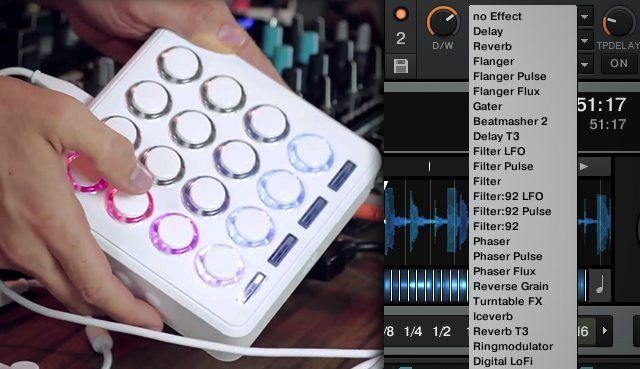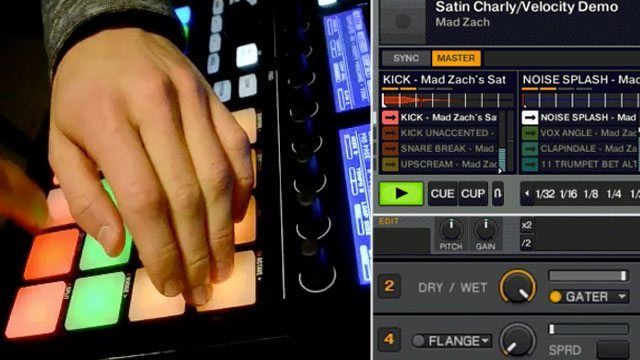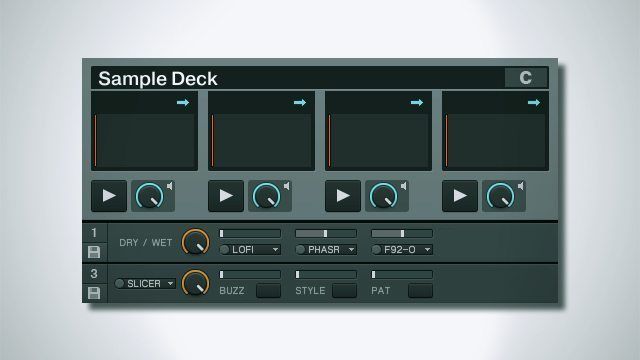
The Beatslicer and Beatmasher are some of the most useful effects in Traktor Pro. They can be used subtly to create fills that sound almost like they’re part of the original track, or so boldly that  it disrupts the mix completely beyond recognition, and all the gradations in between. After a while, chopping up a beat can not only get repetitive but also disrupt the dance floor. Many producers will often chop-up a song momentarily and at the same time introduce a rhythmic loop to maintain the groove before snapping back to the original song. Fortunately for you , the same result can be achieved with a clever mapping trick that will produce studio quality fills in DJ software. 

The reason Beatslicer’s so great for fills is because it messes with the rhythm of the track you put through it, but over sustained periods that rhythm might not keep your audience’s dancing feet glued on. The solution? Bring in a new drum loop, supplied by the sample deck, at the same time to compensate.

INSTANT REMIX
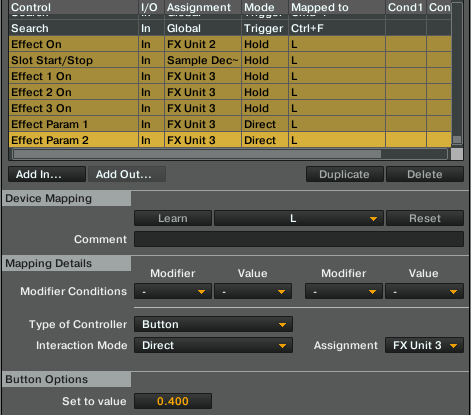
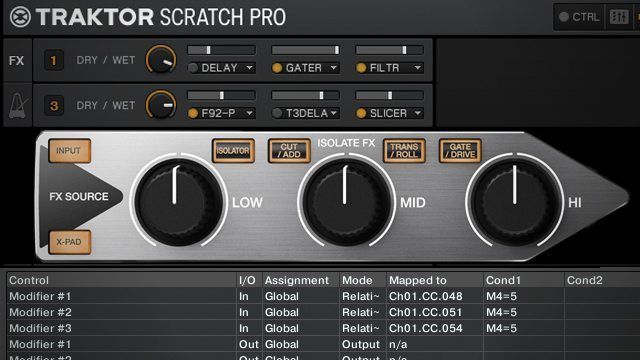
Decide on a button – or ideally a set of a few buttons – that you’re going to use for your ‘instant remix’ controls. Go to the controller manager and set up a New In for the following:

• Effect On on the beat slicer
• Slot Start/Stop on the sample deck

Depending on what you’re going for you might want to engage the instant remix when you’re holding a button and disengage when you let go, in which case you should set the above controls’ Interaction Mode to ‘hold’, or you may want to toggle it on and off: you guessed it, ‘toggle’.

That’s it! Kidding. In a nutshell, though, that’s the concept. There are huge amounts of possibilities with this ‘instant remix’ idea. Listen to these two examples, one of a subtle reworking effect on an already four on the floor track and the other a more pronounced remix of an R&B tune into drum and bass:

house (original track: Muteknight – Heavy Indulgence)

monicadnb (original track: Monica – So Gone)

THE EFFECTS

Let’s reaquaint ourselves with the beat slicer controls to see how it shapes the sound:

• Buzz turns each slice into a mini loop, which can add a little extra bounce to the sliced loop at small settings and turn the loop into one big glitch at large settings.
• Style and Pattern change how the loop is shuffled around. Style and Pattern set to 1 create a simple loop, and things get crazier from there.
• The second button is a gater. The gater is an either/or choice with Buzz, though.
• The third button makes beat slicer take a two bar loop instead of one.
• The first button resets all parameters, be careful!

For each of your instant remix buttons, you can set a different style of beatmasher. Simply set the Type of Controller to ‘button’, and the Interaction Mode to ‘direct’, then choose your value in the Button Options section at the bottom. The options are all divisions of 1, so .6 corresponds to style 3 and so on. Do this for each of your controls and you’ll be able to instantly trigger the different styles. Be mindful of the fact that if you want to be able to toggle your instant remix and change it without switching it off that you’ll need to get a bit more in depth with your mapping. The easiest way to make all your buttons turn the instant remix effect on but not off is to set them up as we’ve already discussed, except instead of toggle setting the Interaction Mode to ‘direct’ and setting to 1. Then just map an off button that sets the same settings to 0.

If you’re ready to get really deep, you can start to add other effects to the mix. This is where experimentation really pays off as there’s so much scope for an interesting sound bed when we’ve got our sample player drum loop to keep the rhythm danceable (or at least head noddable), but I had a lot of fun with a group effect consisting of Digital Lofi, Phaser, and Filter-92 LFO to create a dubsteppy rhythm that gets even cooler when modulating the speed of the LFO. Just remember that in Traktor the effects banks work in series, so your beat slicer will have to be before any effects you want it to put it through.

DRUMS
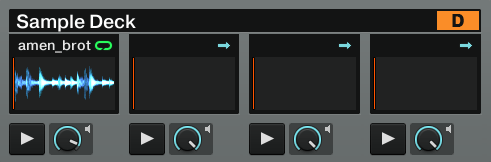
Finally, I hear you asking what you’re supposed to do for drum loops. Well, you may well already have some in your favourite tracks; if a track has a loop of drums unspoiled by any instrumentation then you can simply create a loop out of it in a deck and then drag it into a sample deck. If not, then there are thousands of drum loops available online, both for free and from various sample pack providers. To get you started, though, here are three loops: a housey four on the floor, a dubsteppy skip, and a drum and bass style high tempo break.

house

dnb

dubstep

Now get remixing!


  • http://www.djayggregator.com/2011/10/21/instant-remixing-with-traktor%e2%80%99s-beatslicer/ Instant Remixing With Traktor’s Beatslicer | Djayggregator

    [...] track, so crazily that it disrupts the mix completely beyond recognition, and all the… Read more Go to Source Share this on: Mixx Delicious Digg Facebook [...]

  • http://twitter.com/Some_dj Some Dj

    i would prefer to see a demo

  • utune

    I agree. This article could benefit from a how to video.

  • utune

    I agree. This article could benefit from a how to video.

  • http://www.facebook.com/people/PaulHolland-DoubleDutchdj/100001027166218 PaulHolland DoubleDutchdj

    Admitently I was expecting a video to be lurking in the article some where, but the audio clip does plenty to demo the concept. But if your still struggling listen to the audio clip again and try to imaging a finger pressing a button when it goes glitchy ;)

  • http://www.facebook.com/people/PaulHolland-DoubleDutchdj/100001027166218 PaulHolland DoubleDutchdj

    Nice! love how some of the best ideas are often the simplest, of course you can take this in a few other directions with different drum fills and build ups in each slot, while at the time having different slice automations mapped to each slot on hit.

  • http://twitter.com/DigitalQw3rty Yaakob Williams

    i’ve actually been using the beatslicer a lot lately. it goes pretty well with the beatmasher and grater when you’re mixing dubstep. creates a lot of energy. 

  • http://www.djayggregator.com/2011/10/21/traktor-tricks-double-up-effects-with-a-loop-for-a-cleaner-build/ Traktor Tricks: Double up effects with a loop for a cleaner build. | Djayggregator

    [...] part of the original track, or so boldly that  it disrupts the mix completely beyond… Read more Go to Source Share this on: Mixx Delicious Digg Facebook [...]

  • Ronnin1987

    It gonna try it this morning thanks ean!

  • Facebook User

    I just wanna say- I really love these articles which teach us on how to tweak and utilize some over the features glossed over in Traktor. I have yet to drop the beatmatcher or beatslicer well into my sets, but it is thanks to this tutorial that I think I will.

  • Krooklyninaa

    get 2 beat slicers going on two different decks, and link to chained banks for some great results. two 2-bar loops can go a really long way.

  • Anonymous

    Although the tricks are explained quite extensively, some people just prefer to watch tutorial video’s vs reading text.
    DJ TT should always take this into account whenever they publish tutorials, especially on the more technical subjects like mapping and effects.

  • DJ Mateo

    demo please!!!!!!!!!

  • DJ Mateo

    demo please!!!!!!!!!

  • http://www.facebook.com/djbassbitzsg Farhan Tahir

    Just tried this, and it’s not too bad really, if you guys want, i can make a video the next day explaining about this

  • Mylestec

    Dope article…… no vid required.

  • Mylestec

    eh.. this tut was by Chris, no?

  • G-Sep

    Now there’s something I can map to my Dicers that I like, well, until the Xone K2 comes out.

  • G-Sep

    Now there’s something I can map to my Dicers that I like, well, until the Xone K2 comes out.

  • DJCBZ

    Yes whats up with a demo!!!!!!d@mn!!!!!!!

  • Dandyrandy88

    i would love a video please :P haha

  • Jiffmode

    I have got the newest Version of TP2, but there is no option to add in “Slot Start/Stop” in the controller manager. Someone else facing this problem?!

  • Anonymous

    I agree, this could have been better with a video. But just the article has opened up quite a few ideas for me, which is the goal. Thanks!!!

    scamo

  • http://www.facebook.com/people/Gordon-J-Montana/100000435676474 Gordon J. Montana

    video!! :D

  • http://www.facebook.com/profile.php?id=889370654 David De Garie-Lamanque

    that’s quite an interesting technique. although i think it’s a bit ironic that the author warns against using the effect too much and disrupting the mix because the effect seems quite disruptive in the audio examples he showed…but yeah, when used to transition between tracks or to introduce a new part in a mash-up it could definitely rock the house

  • Bad azz

    Same here…no solution tho

  • Bad azz

    Same here…no solution tho

  • Bad azz

    Same here…no solution tho

  • Bad azz

    Same here…no solution tho

  • Bad azz

    Same here…no solution tho

  • Bad azz

    Same here…no solution tho

  • Bad azz

    Same here…no solution tho

  • Bad azz

    Same here…no solution tho

  • Bad azz

    Same here…no solution tho

  • Bart Gyurkovics

    it is renamed in DECK PLAY

  • Eyesballs

    Great article! Don’t think it needs a video, its explained well.

    Is the point not to try it yourself and come up with something new??

  • Eyesballs

    Great article! Don’t think it needs a video, its explained well.

    Is the point not to try it yourself and come up with something new??

  • Eyesballs

    Great article! Don’t think it needs a video, its explained well.

    Is the point not to try it yourself and come up with something new??

  • Anonymous

    I kind of like not having a video: it forces me to actually do this if I want to see it in action ;) If not making videos means you guys can pump these tutorials out faster, I’m all for skipping the video.

  • Pieterc

    instant remix /= remix. what’s the remixing part about hundreds of people using the same effects/builds/loops on different tracks? just don’t call it a remix.

  • AVaughn

    did you make a video?

  • http://haxorroxor.com Haxor of Haxor & Roxor

    This inspired me to create new Dicer mapping – based on the good old DJTT Dicer mapping. Mapping is now available at http://haxorroxor.com/post/11867455838/dicer-mapping-for-traktor-scratch-pro-2 – enjoy!

  • Alex

    Found you get off time loops at low bpms with slicer. i just double the bpm and it works great. Like your work, keep em comming

  • http://www.facebook.com/djbassbitzsg Farhan Tahir

    by this weekend , i promise, had something to hold me up

  • http://www.facebook.com/djbassbitzsg Farhan Tahir

    http://www.youtube.com/watch?v=OkfXzEiMge4

    hey there dj techtools, here’s the video as promised, do check it out :) 

  • http://www.facebook.com/djbassbitzsg Farhan Tahir

    http://www.youtube.com/watch?v=OkfXzEiMge4

    hey there dj techtools, here’s the video as promised, do check it out :) 

  • http://www.facebook.com/djbassbitzsg Farhan Tahir

    http://www.youtube.com/watch?v...

    hey there dj techtools, here’s the video as promised, do check it out :) 

  • http://www.facebook.com/djbassbitzsg Farhan Tahir

    http://www.youtube.com/watch?v...

    hey there dj techtools, here’s the video as promised, do check it out :) 

  • http://goryzblogzter.org Goryz

    Superb website…

    [...]always a big fan of linking to bloggers that I love but don’t get a lot of link love from[...]……

  • http://www.thisjobsforyou.com/phpBB3/viewtopic.php?f=2&t=8048 Joan Brownfield

    ablating…

    Ask a cop….

  • http://www.bestpreworkoutsupplement.co.uk/top-10-pre-workout-supplements.php top pre workout supplements

    Recommeneded websites…

    [...]Here are some of the sites we recommend for our visitors[...]……

  • Jere

    Have some problems !
    1. I’m using 2 FX Decks, and have my mappings in the same row(slicer on FX1, fx group on FX2) as dj techtools, but when i push the L, only beatslicer goes on !
    2. First everything worked with the sample, but then i changed to toggle, and then back to hold. Now the sample doeasn’t start any more when i push the L ! But when im going to start it with the sample button on my S4, pushing the L make it stop!

    Anybody an idea? Thanks a lot !

  • http://www.djtechtools.com/2011/12/29/top-ten-best-djtt-articles-of-2011/ DJ TechTools  |  Top Ten Best DJTT Articles of 2011

    [...] that can be used to shape mixes and create on-the-fly remixes, which is why this article on the intricacies and uses of the Slicer was a no-brainer top ten for [...]

  • http://www.djtechtools.com/2012/04/01/eans-tips-5-traktor-preferences-you-need-to-know-about/ DJ TechTools  |  Ean’s Tips: 5 Traktor Preferences You Need To Know About

    [...] Combine Beatslicer Effects and Loop Decks for Instant Remixes in Traktor [...]

  • Calkutta

    very cool,thanks djtt’s.you guys in ‘frisco really help out in the ‘traktor’ game.ean being the ‘ambassador’ of glitch…very cool.

  • Phil Kershaw

    Hiya

    Are you able to post a new link – the previous one doesn’t work :-)

  • Fitry

    how to make a backspin efx with traktor pro.. TQ

First Time?

This site is dedicated to digital DJs. We develop performance tools and teach cutting edge techniques that enable creative expression. Visit tutorial videos on youtube, equipment reviews in the blog and a very helpful community in the forum. New articles every Mon, Wed, Fri.

RSS DJ TechTools Forums

Review: Hot Hand USB Wireless MIDI Controller

When it comes to MIDI controllers, physical motion can be a hard type of input to understand and access - especially when it's completely disconnected from a physical controller. What if there was a controller that simplified motion - not quite as complex as Read More...