

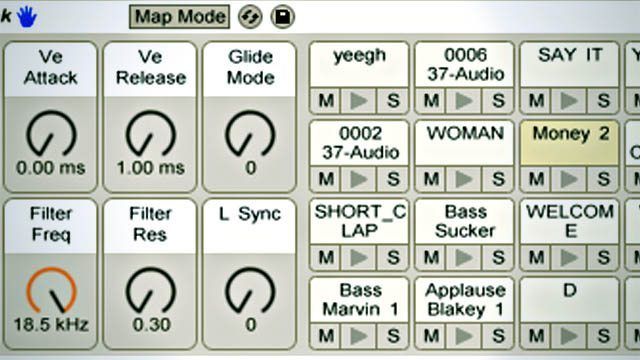
On the surface, Ableton Live’s drum racks seem to be surplus to a DJ’s requirements with clips being able to deal with everything we need. Look a little deeper, though, and that’s not the case; let’s look at where we can use drum racks to our advantage.

One of the biggest advantages to using Ableton Live is its flexibility. Whilst it can’t quite boast the straight to business simplicity of Traktor, Torq, Itch, and the like, it’s got a clear lead when it comes to setting things up how you want; there’s so much choice that sometimes knowing what tools to use where can be a bit confusing, and drum racks are definitely one of the more specialised tools.

Clips

There are advantages to using clips, and there are also advantages to using drum racks. First off, let’s look at what using clips is perfect for anyway.

• Available in all versions of Live
• Great for full tracks and loops
• Good for quantising

Clips are a lot more flexible than you may have realised. Despite defaulting to the global quantise settings and acting like loops, clips can be set to be more or less independent. To use a clip as a one shot, simply go to its launch settings and turn both quantisation and warp off. In doing this, you can set some clips up to play tracks, others to play loops, and throw one shots into the mix as well.
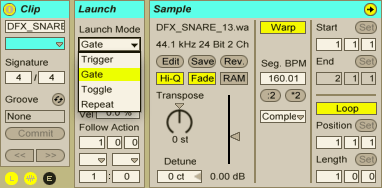
There are some important limitations to consider when using clips, though, that by using drum racks we can overcome:

• Only one clip can play in a track at a time
• Clips between different tracks can’t ‘interact’
• One shot clips can’t be put into MIDI loops
• Editing options for audio clips are limited

Drum Racks

Drum racks are included in all versions of Live 8, but they are only editable in the full version. That caveat aside, let’s take a look at the pros of drum racks.

• Great for single hits and kits
• Can have a MIDI clip assigned to them for sequencing
• Simpler and sampler are more capable for editing than audio clips

Because only one clip can play simultaneously in a track, setting up a bunch of one shots to trigger will spread across your clip view quite quickly. This is not only messy, and a bit of a waste of precious screen real estate, but can also be a bit of a puzzle because of the ambiguity about what’s controlling what on your controller. In reality, a drum rack is just a container for audio/instrument tracks, and the rack can be expanded to show them as such (although MIDI clips can’t be stored within individual rack tracks), but the grid view that the rack uses is much easier to align with pads and buttons of controllers.
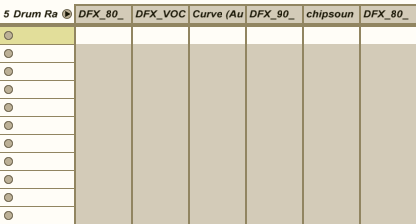
Another advantage to using a drum rack to trigger samples is that MIDI clips can be recorded into the main track, allowing all the samples and devices in a rack to become one big instrument – this is something that can’t be done if you use clips to trigger sounds.
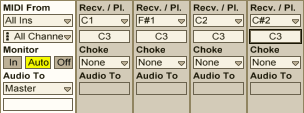
Drum racks default to triggering instruments at C3, which may not be what you want. To change this setting, expand the drum rack track to show all of the tracks within, and you’ll see the receive/play section, which you can alter as you see fit. You’ll also notice a choke setting; 16 flexible choke groups are another advantage to using drum racks.

Hot Tips

• Although it may seem like a bottomless pit of expenditure, to get real control over your samples you’ll need to get hold of Sampler, Ableton’s ‘step up’ sample player from the bundled Simpler device. Simpler’s still plenty powerful enough for the majority of tasks, but one thing it can’t do is set samples to one shot. The workaround? Increase the release time on your sample to ensure it plays out fully.

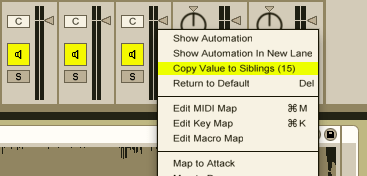
• When you’re working on your sounds, rather than tiresomely doing the same thing over and over again you can right click on a device control and select ‘copy to siblings’ to copy the setting across to all the other drum pads that share the same instrument.
• The name drum rack is slightly misleading: don’t feel restricted to drums! Whilst the drum racks are by nature a percussive tool, loading in instruments, perhaps combined with MIDI effects like arpeggiator, can give you a handful of different sounds all on one MIDI track that you can dip into with much more flexibility than an audio track.

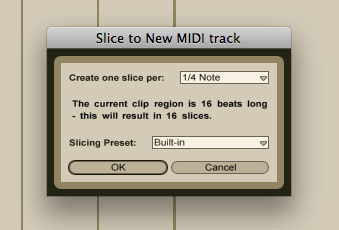
• Want to chop up a sample, MPC style? Instead of using clips and editing the start points manually (which can take forever!), take advantage of a not quite hidden, but not front of stage feature of drum racks. Simply right click an audio clip and choose Slice to New MIDI Track to bring up a dialogue box that will allow you to use timing or warp marker info to chop a sample up in a drum rack of Simplers. Simple!
The most important thing to glean from this article is that the best way to use Ableton Live is to mix and match its myriad features into something that works for you! Clips will almost certainly be your workhorse tool for the structure of a Live set, but the strengths of drum racks can take your performance to the next level. When mapping your controller, consider working your clip launch MIDI around a grid of MIDI notes and making sure that you always use those notes in drum racks so that when you switch between them everything stays a finger press away. This way you’ll get to have your cake and eat it too. Good luck!


  • http://pulse.yahoo.com/_6W52HBZ5LFFA64C4U2L4QGXMTI John Durbin

    DrumRacks can also have “DrumRacks” in the cells, giving you access to in depth routing and send capabilities. Some of the better examples I’ve seen of that are with the Purmagnetik acustic drum kits. That method could be used to trigger multiple/random samples in the nested drumRack from a single cell in the hosting Rack, and on the hosting cell you can have your processing FX. This also allows you to MAP “sends” to the nested racks macros from within the DrumRack.  

  • http://pulse.yahoo.com/_6W52HBZ5LFFA64C4U2L4QGXMTI John Durbin

    DrumRacks can also have “DrumRacks” in the cells, giving you access to in depth routing and send capabilities. Some of the better examples I’ve seen of that are with the Purmagnetik acustic drum kits. That method could be used to trigger multiple/random samples in the nested drumRack from a single cell in the hosting Rack, and on the hosting cell you can have your processing FX. This also allows you to MAP “sends” to the nested racks macros from within the DrumRack.  

  • http://pulse.yahoo.com/_6W52HBZ5LFFA64C4U2L4QGXMTI John Durbin

    DrumRacks can also have “DrumRacks” in the cells, giving you access to in depth routing and send capabilities. Some of the better examples I’ve seen of that are with the Purmagnetik acustic drum kits. That method could be used to trigger multiple/random samples in the nested drumRack from a single cell in the hosting Rack, and on the hosting cell you can have your processing FX. This also allows you to MAP “sends” to the nested racks macros from within the DrumRack.  

  • jprime

    Serato + Ableton Bridge with a drum rack – seriously….the best of both worlds;  turntablist and controllerist meet in a heaven of button pushing platter scratching mayhem.  Topped off with Ableton’s FX suite.    Pure win.

  • jprime

    Serato + Ableton Bridge with a drum rack – seriously….the best of both worlds;  turntablist and controllerist meet in a heaven of button pushing platter scratching mayhem.  Topped off with Ableton’s FX suite.    Pure win.

  • jprime

    Serato + Ableton Bridge with a drum rack – seriously….the best of both worlds;  turntablist and controllerist meet in a heaven of button pushing platter scratching mayhem.  Topped off with Ableton’s FX suite.    Pure win.

  • http://twitter.com/reillysteel Reilly Steel

    Great article. Makes me want to start using Ableton for DJing.

  • Passion At Play

    I think that you can actually use MIDI clips as one-shots… just set the follow up action to “Stop” right where the sample ends
    it’s not that versatile as using an audio clip, but it could do the trick.

  • doclvly

    Already doing half of this which is reassuring. Other half, I dropped my jaw for. Who the hell calls other pads siblings!

  • doclvly

    Already doing half of this which is reassuring. Other half, I dropped my jaw for. Who the hell calls other pads siblings!

  • SmiTTTen

    This is a great article Chris. I am personally not a huge fan of the DJ aspect of Ableton right now (that may change) but the drum rack is an amazing tool. I use it in conjunction with the velocity sensitive pads on the Vestax Pad-One. There are also some great drum kits in Live that can yet you up and running very quickly. The potential with midi slicing is amazing. Take a short loop; slice, re-arrange, assign to your pads and go to town. 

    More of this please. 

  • SmiTTTen

    This is a great article Chris. I am personally not a huge fan of the DJ aspect of Ableton right now (that may change) but the drum rack is an amazing tool. I use it in conjunction with the velocity sensitive pads on the Vestax Pad-One. There are also some great drum kits in Live that can yet you up and running very quickly. The potential with midi slicing is amazing. Take a short loop; slice, re-arrange, assign to your pads and go to town. 

    More of this please. 

  • SmiTTTen

    This is a great article Chris. I am personally not a huge fan of the DJ aspect of Ableton right now (that may change) but the drum rack is an amazing tool. I use it in conjunction with the velocity sensitive pads on the Vestax Pad-One. There are also some great drum kits in Live that can yet you up and running very quickly. The potential with midi slicing is amazing. Take a short loop; slice, re-arrange, assign to your pads and go to town. 

    More of this please. 

  • Itsbentheboy

    this seems like a very good article to mention a midifighter in. i know it gets really old on this site hearing about the midifighter, but it really is the best thing to use in abletons drum rack. in 4 banks mode you get 48 buttons to use in abletons drum rack.  if you want to use live as a performance tool, this is a great way to breakaway from just playing clips and standing, you can actually get up there and play something live, make yourself more than just a robotic button pusher. with this you can actually PLAY it

  • McCloud

    This is cool. I’m currently mixing traktor, maschine, and kore into ableton for mixing and fx. So articles about routing through ableton are bangin’ for me.

  • http://xfader.com/blog/?p=60 xfader.com »

    [...] Live Drum Racks Tutorial at DJ tech Tools. Ableton Drum Racks Ableton Live [...]

  • http://www.abletonsupport.com/?p=38544 Ableton Support » DJ TechTools | Ableton Live: Drum Racks?

    [...] Here is the original post: DJ TechTools | Ableton Live: Drum Racks? [...]

  • http://twitter.com/Sonof8Bits JordyVision®

    2 free Ableton Drumracks to get y’all started. Roland TR-505 & TR-606 sampled as cleanly as possible: http://jordyvision.net/Roland506drumracks

    Wouldn’t “spam” the TT comments normally, but I think this will serve quite a few Ableton Live powered DJ drumming needs.

  • http://rnbbeatsspot.net/articles/dj-tips-scratching-samples-drum-beats-dj-tips-working-with-samples/ DJ Tips: Scratching Samples & Drum Beats : DJ Tips: Working With Samples |

    [...] if (titleincell == 'yes') {document.getElementById('splittitletext').style.display = '';} } DJ TechTools  |  Ableton Live: Drum Racks? body { background-image: [...]

  • http://www.tawagorn.com/webboard/index.php?topic=838.new#new Oren Guttman

    abiding…

    I have been looking for a blog like this, I will recommend it as it’s been super helpful. Thanks!…

  • http://www.moneyalerts.co.uk samsung vouchers

    voucher offers…

    Its hard to find informative and precise information but here I noted…

  • http://www.freebie-articles.com/ newspaper articles

    Its hard to find good help…

    I am regularly saying that its hard to get good help, but here is…

  • http://psychics-readings.org/ psychic interactive

    psychic kids…

    I saw someone talking about this on Tumblr and it linked to…

  • http://anti-aging-information.com/ Anti Wrinkle

    Anti Wrinkle…

    I saw someone writing about this on Tumblr and it linked to…

  • http://goodeater.org/?p=33 More Information

    Its hard to find good help…

    I am constantnly saying that its difficult to get good help, but here is…

  • http://augustcarr410.newsvine.com/_news/2011/11/16/8837695-discount-office-equipment-from-authorised-dealers-with-70-reductions discount office equipment

    While I was {browsing|surfing} {today|yesterday} I {saw|noticed} a {great|excellent} {post|article} {about|concerning}…

    I like to look in various places on the internet, regularly I will go to Digg and follow thru…

  • http://www.discountofficesuppliesuk.co.uk/ricoh-aficio Ricoh Aficio

    Yahoo results…

    While searching Yahoo I found this page in the results and I didn’t think it fit…

  • http://www.financeland.co.uk finance for bad credit rating

    compare rewards cards…

    I was reading the news and I saw this really interesting info…

  • http://londonphotocopiers33.tumblr.com/post/12479293278/why-select-serviced-offices london photocopiers

    Yahoo results…

    While searching Yahoo I discovered this page in the results and I didn’t think it fit…

  • http://www.webpagerankchecker.de/ Fake PageRank

    Yahoo results…

    While searching Yahoo I found this page in the results and I didn’t think it fit…

  • Rusty Megwan

    My main issue with the bridge is you can’t use ableton effects on tracks that are loaded in scratch. Does anyone know if they will allow you to use ableton effects on both ur set and tracks just loaded in serato in the future? That would really make me use the bridge more than I currently do.

  • http://www.facebook.com/people/Max-Bladel/1311385570 Max Bladel

    HOLY SHIT^ you can DO that? I always thought that was the biggest drawback of being an ableton dj… no freedom of the wicky wicky… fuck me, maybe I’ll learn to scratch one day…

First Time?

This site is dedicated to digital DJs. We develop performance tools and teach cutting edge techniques that enable creative expression. Visit tutorial videos on youtube, equipment reviews in the blog and a very helpful community in the forum. New articles every Mon, Wed, Fri.

RSS DJ TechTools Forums

Review: Hot Hand USB Wireless MIDI Controller

When it comes to MIDI controllers, physical motion can be a hard type of input to understand and access - especially when it's completely disconnected from a physical controller. What if there was a controller that simplified motion - not quite as complex as Read More...

