Review: Xtreme Mapping App

Xtreme-Mapping-App

To many, MIDI mapping in Traktor is a dark world full of confusion and endless frustration. In this complex world, it seems like only the truly worthy are able to unlock the mysteries of TSI files and use Traktor to its full potential. The reason for all of this heartache boils down to primarily one thing: Traktor’s ridiculously small and unyielding mapping window (the Controller Manager). There you’ll find no use of the arrow keys, no hot keys, and no cut and paste functionality; in other words, none of the things that the modern computer user has come to take for granted nowadays.

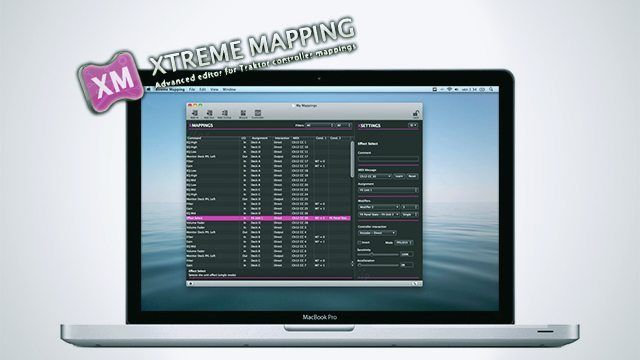
However, one brave soul has taken the torch for the righteous and sought to do something about this problem. Enter Extreme Mapping, a new Mac-only app that promises to make the long and extenuating mapping sessions a thing of the past.

Product Reviewed: Xtreme Mapping

Price: $5.99 launch price

Platform: Mac OSX 10.6 (only available in the Apple App Store), and at least Traktor 1.2.4 or any version of Traktor 2

THE GOOD

  • Full keyboard support.
  • The ability to drag and drop between different .tsi files.
  • Descriptions of modifiers and parameters.
  • Filters for the different mapping commands.
  • Resizable and customizable user interface.
  • A mapping wizard for common mappings.
  • Allows you to use learn for MIDI out commands.

THE BAD

  • Dragging between two .tsi’s brings all of the info over except the CC#’s (A bug that has been fixed and the update is just awaiting approval from Apple).
  • Odd behavior has been reported with MIDI out from some users.
  • Some have also reported that dragging a known good .tsi file into the app, saving, then loading the Xtreme Mapping version into Traktor did not work quite the same.
  • Can’t view or sort by comment in the main mapping window.
  • The biggest downside at this point though is it does not work with Traktor’s NHL mappings so forget doing complicated S4 or X1 mappings; however, on that subject one of the developers has said “who knows what’s gonna happen”.
  • Currently only available for Mac users.

THE BOTTOM LINE

If you’re new to MIDI mapping in Traktor, this app will make the basic mapping tasks a breeze. For the more experienced user, the app can help tame complicated .tsi files and perhaps provide the inspiration needed to finish that ambitious mapping project you’ve been continually putting off until you really “get it”.

OVERVIEW
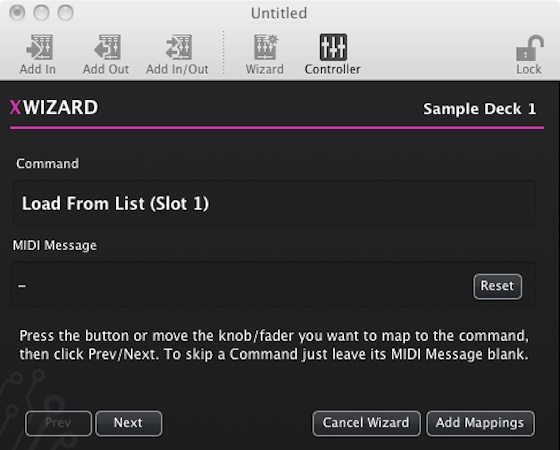
Most people who just want basic controls to work can get away with using the intuitive mapping wizard. You simply set your controller in the app and tell the wizard what you want to map. Your options in the mapping wizard are:

  • 2 and 4 deck mixer
  • Decks A, B, C, and D
  • Sample Decks 1, 2, 3 and 4
  • Four FX units in either Group or Single mode
  • Loop Recorder

Once you make your selection a window pops up telling you to move the knob, fader, or button you want to control the specific task. Doing so connects that MIDI CC#/Note to that command.  Then you simply hit next to get to the next control, skipping over the things that you may not want to map. When you’re done, click “add mapping” and whamo! You now have a mapping complete with MIDI In and Out commands where relevant.

I was able to map the four channel mixer section of my Denon DNX1600 mixer in just a few minutes. It’s a significant improvement even though this was a simple task that would have taken maybe 15 minutes using Traktor’s mapping window, which in the scheme of MIDI mapping in Traktor is still a quick job.
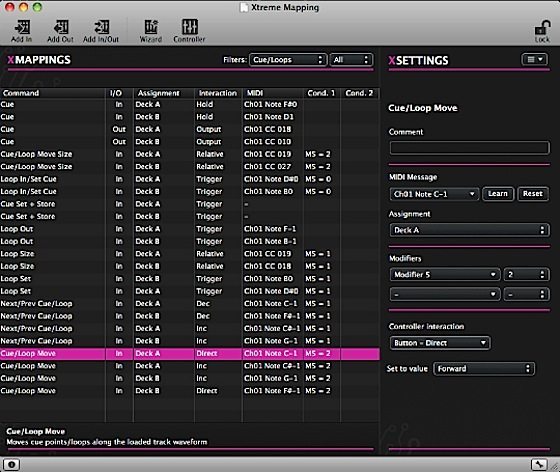
For the more ambitious user you still have full control of the Add In and Add Out functions. As a nice bonus you’re provided with handy textual descriptions of each command. The keyboard control is also a huge advantage especially when it comes to arrowing (i.e., navigating) through large mappings and duplicating commands, not to mention the support  for undo and redo commands. I can’t remember how many times I’ve accidentally deleted an important command when bulk deleting stuff while editing older .tsi files. Oh how I wished for an undo button then.

Even with the (current) slight bugginess, the app is a huge step forward in the Traktor mapping world. Being able to filter specific commands in complicated MIDI mappings can be a huge learning tool for people new to mapping  and could potentially spark creativity from other more experienced mappers.

With the promised updates coming from the developer, the Xtreme Mapping app has the potential to be that shinning torch, lighting the way through the dark and mysterious world of Traktor mapping. If you’ve tried out the app let us know how it worked for you in the comments.

A Note from our Mapping Engineer, Chris Lim (flashflooder)

I was ecstatic to learn about Xtreme Mapping because it offers a much-needed service by making MIDI mapping in Traktor more readable, understandable, and easy to navigate (and the window is scalable!). It’s built-in Wizard is a great tool that not only takes a lot of the time out of the mapping work, but also provides an easy way to map MIDI In and Out signals in one fell swoop (MIDI Out can sometimes be a bit more complicated, especially with Traktor lacking a learn function).

With that being said, there are a few things which I would like to see improved that I think would add a lot of value to the product. The first is the addition of the Comments section as a column (they currently show up in the side bar when you select a command). The other main quibble is the inability to edit a mapping in Xtreme Mapping while having it loaded in Traktor so you can troubleshoot bugs or issues while simultaneously making changes. This is often how I work through bugs or weird unexpected behavior when mappings start to get a bit more complex with modifers, MIDI Out controlling LEDs, etc. This ties into the fact that while the software is great at explaining the new Traktor parameter modifiers (e.g., FX Panel state, Slot state, Is In Loop, etc) in easy to understand textual values, it does not really demystify the common modifier (i.e., M1 to M8) if that is still a foreign concept to you. Lastly, the software is currently exclusive to Mac users, which is understandable but not ideal for all of the Windows users out there (including myself).

  • Itsbentheboy

    i have wanted this sooo badly… but i use windows/Ubuntu linux.

    maybe this will inspire a windows spinoff.
    if i had this, i would have many controllers remapped, its the small and hard to navigate window that hinders me. i cant stand the thing…

  • http://www.djpc3.com DJ PC3

    Doesn’t controller editor do this already? 

    After mapping my original VCI-100, I have never taken the time to actually map out anything else…

    Although I am dying to get a combo mapping on my X1, with one layer being the default effects, etc and the other side being a sample deck controller…

    Does anyone have that or know how to at least effectively map the a toggle button between the chained and advanced effects?

  • http://profiles.google.com/djsteveboy Steve Boyett

     I’d add “Mac Only” to the list of “The Bad.”

  • http://www.ali.dj Hedgehog

    You can win 20 copies of Xtreme Mapping on the traktorbible-website currently http://www.traktorbible.com/de/review_xtreme_mapping.aspx

    I’m also considering making a Windows-version.

  • anonymous

    What DJ does not use a Mac for mixing?

  • DoubleDutchDj

    After 2 months of constant mapping I wish this app came out in time for T2′s release. Mad love for the team behind this, in the world of traktor mapping on mac, this equals game changer!

    I harbour a small amount of hate towards NI for only adding a modifier viewer and duplicate buttons since Traktor Pro’s first release, how hard would it be to just in large the view window and add learn for midi out!? Plus I totally agree with the need for an undo button!

  • FUFR

    Damn apple users :)

  • Emile Vrijdags

    The earlier versions of traktor had learn for midi out, so not that hard. Technically its almost the same as learn for midi in, so it wouldnt even be that much work..

    But I suspect NI keeps the mapping process cumbersome so they can sell their own premapped products more!

  • http://www.facebook.com/brikha Emil Beatsnatcher Brikha

    In the same way that I realized that it’s not children I dislike, but parents. I have come to realize it’s not Apple I dislike, it’s their users and the arrogance that comes with them.

    Assuming that all DJ’s use Mac is, well, arrogant, over 90% of the personal computer market is still dominated by Windows OS so it’s borderline insulting to have such an amazing piece of software being released only for Mac.

  • http://www.facebook.com/profile.php?id=573361178 Matías J. Padilla

    Waiting for NHL support before buying (if it ever comes)

  • howitzer

    Me. I would buy this in a heatbeat on a windows platform.
    Youre cutting out at least a 3rd of your user base by releasing mac only.
    If I see this released for the windows platform in two months time for £25 after the trial period has ended, and they eventually release it. I wont bother picking it up as i’ll feel ripped off.

  • catraxx

    What do you mean MAC ONLY ?! This has got to be a joke !

  • catraxx

    You know, judging by the number of negative replies to this, i’d say there’s quite alot of us out here. Besides, NI would never bother to make a windows version if it did not pay off.

  • http://www.facebook.com/profile.php?id=100001768084621 Rolf Ski

    When you think of it, it’s actually pretty amazing that no one has thought of this before, great initiative!

    I agree with the comments here: The fact that it is MAC only is a serious drawback for a lot of DJTT members and should be added to the “Bad” bullet points.

    Other them that, nice article. Maybe add a video to it for readers to see it in action.

  • http://www.facebook.com/profile.php?id=1849951878 Arim Nguyen

    Wolfgang Gartner, he uses a Windows machine. And he is good.

  • zzzuperfly

    the amazing thing is that someone can make money out of the fact NI is totally lacking a usability expert. How the hell can they release version after version with that crappy interface?

  • Anon

    I don’t think it is arrogance, who knows what the programmers staff is like? They may only be versed to program for a Mac. Ever try just making a website compliant to IE and safari. An f’in nightmare, so I can only imagine what it would take to program and work out the bugs to work cross platform. Why not say congrats on actually doing something productive then ripping someone down. If it’s such an issue figure learn how to code, and let us know how easy it is. FYI I am a cross platform user and there are + and – to both platforms. This is the small kind of thinking that makes stupid polarized thought. So vs saying bad or good, it’s not available on windows and either this programmer or someone else will make a windows version, but to flat out whine like a bunch of bitches about platforms is getting real f’in tiresome.

  • matthew.gamespy@gmail.com

    Guys what does NHL support stand for?

  • Ant

    Why is everyone up and arms about it being Mac only? That’s just the way it goes. Logic is also Mac only and you don’t hear people complaining about that.

    There are plenty of windows only programs that Mac users wish they had. But you don’t hear them bitching about it.

    Get over it.

  • http://www.facebook.com/profile.php?id=100001048670875 Johnathon Robert Flores

    Nationally Hotkey league XD

  • http://www.facebook.com/profile.php?id=100001048670875 Johnathon Robert Flores

    National HotKey League XD 

  • djerikt

    my review:  I downloaded this software and it made finding the line in needed to change in the Denon SC2000 tsi really easy.  great software. -e

  • Misleadkidsformoney

    regurgitated forum posts and Shoddy video-less gear reviews this website might as well djdeals.com with a forum. Whatever this frat party experiment is. It is definitely not “Ean Goldens Blog”

  • http://www.facebook.com/LeeZerUK Lee Grace

    I think i’ve just had another mac-gazm. hope further builds works further add and improve features. I think it’s worth the try now even just for support

  • Spacecamp

    Controller editor does this. It does it horribly. 

  • amidoinitrite

    If it were free..  sure.
    Traktor is kind of tedious. But not enough to justify buying another app to map stuff..  just my opinion.
    Great article tho.  It’d be nice if traktor takes some notes from this!

  • Anonymous

    Padi’s mapping provides great control over decks C&D & FX 3&4. You can switch the upper section of the X1 to either control volumes/filters for sample slots or the FX units. For deck control, it works with both track & sample deck mode and allows on the fly mode switching.

    check it out: http://www.traktorbible.com/freaks/mappingview.aspx?id=199

  • Anonymous

    I’ve done this and I think it’s pretty straight forward… if the control isn’t where you think it is, look for it in the global section…

  • Anonymous

    Dude, fuck yes, this is the best news I’ve had in a long time, I’m so happy right now.  I’m bummed for my PC brethren, but this is so gangster, I’m incredibly happy.

    I seriously can’t believe they put out Traktor Pro 2 with so many cosmetic changes (waveform styles etc) without addressing the mapping system *at all.*

  • http://www.facebook.com/chrismjennings Chris Jennings

    Native Hardware Library

  • http://twitter.com/jaredfmylife Jared F

    Doh bought it and didn’t realize it didn’t support the native HID whatever stuff.. My bad for not reading more. Can’t wait for an update to support the S4/X1.

  • Scaper7

    Ridiculous that NI can ignore their silly little cluttered interface for so long that third parties sell special apps as workarounds … mapping in Traktor is a tedious bad joke that would be best addressed by NI updating the controller manager. NI should fix it’s own mess ….

  • http://pulse.yahoo.com/_PKE5KPVRFVPWKFGMGTKOBHS4ZM G00FiE

    while obviously a great idea for an app, the way this one is done leaves a bit to be desired.  ideally such an app should have an extensive visual component, a visual representation of the controller which could be mapped by clicking on the controls in the picture.  of course that means it would be quite a bit more painful to code since youd have to obtain and code controls for each controller separately, but that could easily be made as a plug-in, and the community would provide support for the various controllers.  that would truly be a useful app.

    personally though, ive never had any issues with the default traktor mapping interface.  and the mapping im currently running is pretty crazy, utilizing both my bcd3k and axiom25, and gives me control of every single function that i could think of… i havent had to touch kb/mouse while playing in ages.

  • Zac Kyoti

    There’s a command for effect unit type, use that on your toggle, then when adding fx controls, condition each control with the modifier “effect unit type”, and the value (0 or 1). I don’t remember the exact terminology though, I’m not at my production machine. I believe the values are 0 for chained, 1 for advanced. That’s the cleanest way to handle different fx controls on the same set of knobs/buttons, plus it saves you a regular modifier.

  • Anonymous

    You know it takes time and work to port something to a different OS, right?

  • Anonymous

    Native hardware library… it allows traktor to have an extra special higher level of communication with native instruments hardware like the X1 and the S4

  • Kraal

    or assume that the person that made that is a  MAC developer and doesn’t know how to develop for WINDOWS. What is insulting is blaming this developer for the fact that no one developed it for windows

  • Louie V

    Seriously people, some of you need to understand that its much easier to make programs for mac. Also, just because its only for mac (right now) don’t mean it will never be for PC.

    The developer was right to make it just for 1 os first (to make sure that people would take a liking to the software) before making it for all operating systems. It also helps that Apple has one central hub for distribution of software “Mac App Store”. 

    Nonetheless, this software is pure genius!

  • G Money

    I couldn’t agree with you more. NI should fix the damn mapping. It shouldn’t be that difficult anyway. MIDI mapping on any other program is so simple.

  • Dj EN-VEE

    A 3rd of dj’e are bedroom dj’s only pro’s will ever use a mac for it’s stable reliability have had i macbook pro for two years and not once it has crashed on me have owned four high end pc they have either  crashed on me on a gig or slowed right down just to add my 2cents in lol =)

  • http://twitter.com/NotSoSiniSter NotSoSiniSter

    They REALLY need to add folders, so you can collapse things so you don’t have a mess to scroll though, you can have a FXUNIT1 folder and keep all your crap in there. :D

  • Eno

    I’m trying to download the App on Itunes and its telling me its not available in the US.

    Whats up with that?

  • Eno

    Had to Google the app and link from a separate site.

  • Anonymous

    Pretty sure this is a Mac App Store app, so you would need to open the App Store on the Mac (not iTunes) to download. Could also be avail from another source judging by your follow-up comment

  • http://profiles.google.com/djsteveboy Steve Boyett

    The narrow-mindedness and assumption behind  the question are enough to dissuade me from the direct and obvious answer.

  • http://www.facebook.com/people/Will-Marshall/532287403 Will Marshall

    As a software developer…

    The margins on OSX are much higher. OSX users tend to pay for software, and pay more: the distribution systems are better, the dev environment is faster to work in, and it’s generally a win financially and technically.

  • Aallen94

    when I tried to buy the app, it said “currently not available in U.S app store”. why does it say this? is there any other way I could possibly get this app?

  • Anonymous

    Too bad the software isn’t made for windows too. Looks pretty interesting.

    What I don’t understand is why NI doesn’t improve its controller editor. All they’d have to do is load up the command library from Traktor and add it to the assign tab. That would be friggin incredible.:)

    And for those with non-NI hardware, NI could also include templates for those controllers. (like the midi-fighter). Or even make is customizable so such templates can be made by anyone. Wow, then it would be perfect. Hey Ean. You probably have some good conections at NI. Why not give-em that idea?;)

    scamo

  • John Matrix

    NI stands for “Not Intuitive” 

  • catraxx

    *applauds* Good for you, though my windows machine never crashed on me either.

  • catraxx

    Making a website for Safari and IE is just as difficult as making a website for any other OS. Besides they could have simply done it in a cross platform enviroment such as java.

  • catraxx

    I beg to differ i hear them whining all the time. But making a program that is for another program that is multi platform a single platform one is plainly stupid.

  • Tom_flynn

    The list of bad points puts me off this i’m afraid.

  • http://claimid.com/bartl Bart

    I think that’s not really feasible because all midi controllers allow remapping of the control to midi signals. And sometimes you simply have to change this mapping because of conflicts either with other controllers, or even within one controller, for example in the Akai LPD-8.

  • ddt88

    I’d also like to see them fix the navigation so it works like Serato

  • dutty (illstep)

    so #2 here. man, best app ever!

  • http://twitter.com/jeremysexton Jeremy Sexton

    You assume that they know Java… Perhaps they only have experience with the Mac programming.

  • http://www.facebook.com/profile.php?id=100000531686375 Futureglue Musik

    Maybe it’s to keep their advantage on their HID controllers.

    Havng said that, midi mapping in Traktor is much more complete than say Ableton where there is no ‘shift’ modifiers

  • http://www.facebook.com/profile.php?id=100000531686375 Futureglue Musik

    Aside from the ‘comment’ not being a column, I would add a search box- a la OSX- type anything, cc, comment, command, and get all the relevant results.

    Also, What about that crappy logo eh?  not very inspiring (Sorry I have acute design syndrome).

    Of course i rushed to buy it as soon as it appeared on the forum.

  • http://djgadgets.de/xtreme-mapping-app-tsi-traktor/ Die Xtreme Mapping App soll das erstellen von TSI – Files für Traktor erleichtern

    [...] Ich selbst habe das Programm noch nicht testen können (Windows). Allerdings gibt es bei djtechtools.com bereits eine Review. [...]

  • Spacecamp

    Forum traffic is a tiny portion of our overall traffic. Concise dissemination of information is not the same thing as regurgitating a forum post. 

  • deejaesnafu

    yah mac only is a big mistake imo.

  • http://dadizajn.net Tomislav Simi? ToS

    Yeah, go buy a Mac, it suits you obviously.
    And thank you for the wisdom.

  • http://dadizajn.net Tomislav Simi? ToS

    I have a list of crappy interface “improvements”.

    Like DJ SuicideDive said: good thing there is that large orange letter near each deck or I would forgot which is which.

  • http://dadizajn.net Tomislav Simi? ToS

    waveform style is not cosmetic, it was serious work.

  • http://dadizajn.net Tomislav Simi? ToS

    erm…in your face NI.

  • http://www.facebook.com/piopro James ‘Pioneer’ Burkill

    ANOTHER ESSENTIAL TOOL MISSED OUT BY WINDOWS USERS I HAD A MAC UNTIL STOLEN FROM A GIG NOW BACK ON PC… NOT JEALOUS… JUST AWARE TO MANY GOOD TOOLS ARE MAC BASED BUT NOT EVERY1 CAN AFFORD A MAC BUDGET, FOR EVERY TOOL SO FAIL…

  • http://traktorbible.com TraktorBible

    You can win a free copy of Xtreme Mapping. Check this out:
    http://traktorbible.com/en/review_xtreme_mapping.aspx

  • Chaomocha

    So it would appear everyone is upset about this being mac only.  I’m a PC guy too, and I am also incredibly upset, but as appose to caps locking whoring this comment, I’d really like to know if there’s a similar program for PC, or a soon to be a similar program, or even this program, for windows and what not.

  • catraxx

    Perhaps.

  • sk24

    I am SOO stoked on this new app.. Oh and i DO have a MAC :DDDD

  • TokenAsianGuy

    I was excited to get the Traktor Bible and teach myself midi mapping until I read this article and the comments talking about how difficult it is.

  • http://www.facebook.com/chrismjennings Chris Jennings

    The update has hit the app store. 

  • TeknoGR

    your suspicion make it certainty

  • aermel

    if this works, I’m going to throw a party! too bad that even after a thousand emails to NI from myself alone, they still couldn’t be arsed to have a look at this abomination of a “controller manager” and we all have to pay extra to make it work. but hey, at least someone came to rescue us after all those years.

  • Anonymous

    Ok, now that I’ve actually started using this, I’m a little bit disillusioned as one of the main features I was excited about does not work as expected.  

    A selling point for me was that you could select multiple mappings at once.  What I did not realize was that you couldn’t edit those mappings all at once.  For example, say I went through a lot of work and made a complex mapping for deck A: I want to be able to duplicate those mappings, select all of them, and set them to deck B.

    You can’t do this… as soon as you select multiple mapping entries, all the modification tools get greyed out.  That’s really too bad.

    That said, having keyboard shortcuts is really, really nice, and it’s surprising how much a resizable window helps.

  • Rufus White

    Me.

  • Tdennis1

    anyone try this with the ableton launchpad? do the lights work with it? I would love to set up some cue points and full midi fighter for 2 decks on the launchpad

  • Tdennis1

    anyone try this with the ableton launchpad? do the lights work with it? I would love to set up some cue points and full midi fighter for 2 decks on the launchpad

  • HennoLV

    Because Logic has many alternatives on Win machines, while this app doesn’t

  • http://www.digitaldjtips.com/2012/02/review-xtreme-mapping-1-2-software-for-traktor/ Review: Xtreme Mapping 1.2 Software For Traktor | Digital DJ Tips

    [...] the first release of the software, but there are reviews over on the Traktor Bible website and on DJ Tech Tools if you want to read more about what I summarise [...]

First Time?

This site is dedicated to digital djs. We develop performance tools and teach cutting edge techniques that enable creative expression. Visit tutorial videos on youtube, equipment reviews in the blog and a very helpful community in the forum. New articles every Mon, Wed, Fri.
Subscribe with one million others

Featured Article

DJ TechTools Traktor Kontrol S4 Mapping

The long awaited Traktor S4 Mapping is here and totally FREE. Continue reading for a full video and the download link.

Categories:

RSS DJ TechTools Forums

  • Drake - Take Care 2nd Preview
    Second preview of my first production on Ableton Its slowly getting there Views and opinions? please ... […]
  • traktor s2 and midi fighter question
    hi, i want to add a midi fighter classic to my traktor s2, is this possible. and how would it be setup? thanks […]
  • elusive effects assistance
    is there any way to duplicate some of the effects that Hawtin, Carola and Dubfire use in their sets with just traktror&S4? most specifically the... […]
  • Good stand to hold up my S2??
    Anyone know of any really sturdy "laptop" stands. A stand that I can tilt the face downward a bit so I don't have to lean over and one that I can... […]
  • Which Stylus/Cartridge?
    I have just bought my self a single Technics 1210 Mk II turntable. I am looking to use this deck to record my vinyl onto my HDD and potentially in... […]