DJ TechTools
  • Blog
    • DJ Gear
      • DIY Projects
      • Gear Reviews
      • New Products
      • Controllerism
    • Techniques + Tips
      • Beginner DJ
      • Advanced DJ
      • Producer
      • Finger Drummer
    • News + Culture
      • Editorials + Opinions
      • Artist Interviews
      • Performances + Routines
      • How I Play
    • DJ Software Tutorials
      • Serato Tips
        • Traktor Tips
      • CDJ Tips
      • Ableton Live Tips
  • Store
    • Run by real DJs, not a corporation
    • DJ Controllers
      • Midi Fighter Twister
      • Midi Fighter Spectra
      • Midi Fighter 64
      • View All
    • Accessories
      • Chroma USB Drive for DJs
      • Chroma Caps
      • Chroma Cables Audio
      • Chroma Cables USB-A
      • Chroma Cables: USB-C
      • DJTT Gift Card
      • Midi Fighter T-Shirt
      • Keyboard Covers
      • Earplugs by V-Moda
    • Production Gear
    • Soundcards & Mixers
  • Community
    • Popular Forums
      • General Discussion
      • Buy & Sell
      • Reviews
      • Mixes
      • Music Production
      • Show Your Setup
      • Off Topic
    • Handy Links
      • New Posts
      • Private Messages
      • Register
      • Search
    • Midi Maps
      • Traktor
      • Ableton
      • Serato DJ
      • Midi Fighter 3D
      • Midi Fighter Twister
      • Midi Fighter Spectra
  • Midi Fighter
  • Chroma
No Result
View All Result
DJ TechTools
  • Blog
    • DJ Gear
      • DIY Projects
      • Gear Reviews
      • New Products
      • Controllerism
    • Techniques + Tips
      • Beginner DJ
      • Advanced DJ
      • Producer
      • Finger Drummer
    • News + Culture
      • Editorials + Opinions
      • Artist Interviews
      • Performances + Routines
      • How I Play
    • DJ Software Tutorials
      • Serato Tips
        • Traktor Tips
      • CDJ Tips
      • Ableton Live Tips
  • Store
    • Run by real DJs, not a corporation
    • DJ Controllers
      • Midi Fighter Twister
      • Midi Fighter Spectra
      • Midi Fighter 64
      • View All
    • Accessories
      • Chroma USB Drive for DJs
      • Chroma Caps
      • Chroma Cables Audio
      • Chroma Cables USB-A
      • Chroma Cables: USB-C
      • DJTT Gift Card
      • Midi Fighter T-Shirt
      • Keyboard Covers
      • Earplugs by V-Moda
    • Production Gear
    • Soundcards & Mixers
  • Community
    • Popular Forums
      • General Discussion
      • Buy & Sell
      • Reviews
      • Mixes
      • Music Production
      • Show Your Setup
      • Off Topic
    • Handy Links
      • New Posts
      • Private Messages
      • Register
      • Search
    • Midi Maps
      • Traktor
      • Ableton
      • Serato DJ
      • Midi Fighter 3D
      • Midi Fighter Twister
      • Midi Fighter Spectra
  • Midi Fighter
  • Chroma
No Result
View All Result
DJ TechTools

Super Combos – Controllerism Meets Street Fighter

Ean Golden by Ean Golden
February 7, 2011
in Controllerism, DJ Controllers, DJ Equipment / Accessories, How-To Video Tutorials, Midi Fighter, Traktor Tips
Reading Time: 3 mins read
0
Super Combos – Controllerism Meets Street Fighter
622
VIEWS
Post on FacebookTweet thisUpvote on Reddit

We are always working deep in the DJTT labs on new ideas that push the limits of DJing while staying within the bounds of what might be useful in a live set. Today, I am proud to introduce a new concept that has been in development for several months: super combos. A super combo is just like the Street Fighter game, where you use a few basic controls in a very specific sequence to produce different and remarkable results. Everyone knows that with the right flick of the wrist, a simple punch gets turned in a fireball in the Street Fighter series. It’s also no secret that the Midi-Fighter is inspired by that classic game, so it seemed absolutely natural to build on the concept of using secret combos in the world of DJ controllers. Continue reading for a video demo of the new “Instant Gratification” mapping for the S4, which contains super combos, free Street Fighter sound packs and a new mix contest!

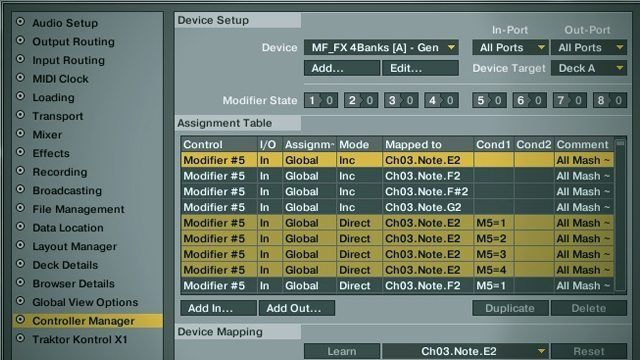
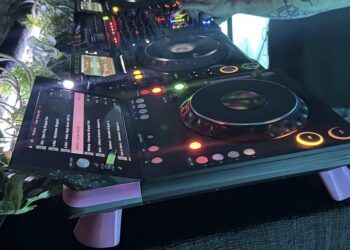
This was designed for use with the S4 but can be used in a lot of other contexts. The primary requirement was instant aural destruction of any audio source with zero opportunity for messing up a song (all buttons are mapped to instant FX). This mapping takes advantage of the brand new 4 banks mode (4 banks is included in the newest firmware update), which allows the top 4 buttons to switch between 4 banks of notes. Here are the basics:

  • Each bank controls one of the four decks, A/B/C/D
  • Each button loads, activates and routes a specific effect to that deck
  • The effects are chained (from bottom to top) so you can build on them producing almost endless sonic possibilities
  • They are designed to be played in combination, similar to my original “cue point chord” concept
  • There are 5 super combos hidden in the mapping
  • Each combo kicks in when a specific sequence of events happen
  • They are all designed to be used musically in a 4, 8 or 16 count sequence.

Download it for free here

GET YOUR MIDI FIGHT ON!


To celebrate the mapping release and see what you can do with it, we are running a contest and providing free Street Fighter samples. Use these samples, in conjunction with any beat of your choice and a Midi-Fighter, to create your own personal brand of sonic mayhem. Create a video of the results and you can win $200 credit towards anything in the web store. Here are the steps:

  1. Download the samples here
  2. Download the Instant Gratification mapping (Midi-Fighter required for this one)
  3. Pick your own beat (the simpler the better!)
  4. Mix the 2 together in a creative way using the mapping
  5. Make a video of the results
  6. Add it as a video response to THIS VIDEO
  7. The winner will be announced in the forum in 30 days (March 7th)

Some recommendations would be:

  • Sequence the samples together in a unique way (as shown in this article)
  • Use another controller, like the S4 or Midi-Fighter, to launch or loop the samples over a beat.
  • Take advantage of the mapping to break down the samples and the beat
  • Find the super combos and show your skills!

LEARN HOW TO BUILD THIS MAPPING YOURSELF WITH ANY CONTROLLER

That’s great, you might be thinking, but I don’t have a Midi-Fighter so how can I use this concept?  Don’t worry, our resident mapping expert, Chris Lim, will be showing you how to track multiple button conditions using complex modifier techniques in just 2 days. Get plenty of rest and don’t forget your vitamin B kids, because this stuff is not easy!

Tags: ControllerismeasyFXinstantmappingmidiMidi FighterNIs 4S4Traktor Tips
Share5Tweet3Share
Previous Post

How to Beat Grid Hip Hop in Traktor

Next Post

Tracking Super Combos With Advanced Modifiers

Related Posts

Use your Midi Fighter Twister as an Audio-Reactive Visualizer
Ableton Live Tips

Use your Midi Fighter Twister as an Audio-Reactive Visualizer

June 23, 2025
Control an entire studio with Midi Fighter Spectra (like Mad Zach)
Finger Drumming

Control an entire studio with Midi Fighter Spectra (like Mad Zach)

May 9, 2025
Midi Fighter Utility 2.90
Finger Drumming

Midi Fighter Utility 2.90 Released

June 27, 2024
Load More
Next Post
Tracking Super Combos With Advanced Modifiers

Tracking Super Combos With Advanced Modifiers

Want to reach DJTT's audience here?

Shoot an email to advertising@djtechtools.com

DJTT ads
DJTT newsletter
Midi Fighter
Chat with us
  • ABOUT DJTT
  • CONTACT
  • PRIVACY
  • MIDI FIGHTER HELP
  • ABOUT DJTT
  • JOBS
  • CONTACT US
  • ADVERTISE
  • PRIVACY POLICY
  • ACCESSIBILITY STATEMENT

© 2024 DJ Techtools all rights reserved by DJ TechTools on all content unless otherwise noted.

No Result
View All Result
  • Blog
    • DJ Gear
      • DIY Projects
      • Gear Reviews
      • New Products
      • Controllerism
    • Techniques + Tips
      • Beginner DJ
      • Advanced DJ
      • Producer
      • Finger Drummer
    • News + Culture
      • Editorials + Opinions
      • Artist Interviews
      • Performances + Routines
      • How I Play
    • DJ Software Tutorials
      • Serato Tips
      • CDJ Tips
      • Ableton Live Tips
  • Store
    • Run by real DJs, not a corporation
    • DJ Controllers
      • Midi Fighter Twister
      • Midi Fighter Spectra
      • Midi Fighter 64
      • View All
    • Accessories
      • Chroma USB Drive for DJs
      • Chroma Caps
      • Chroma Cables Audio
      • Chroma Cables USB-A
      • Chroma Cables: USB-C
      • DJTT Gift Card
      • Midi Fighter T-Shirt
      • Keyboard Covers
      • Earplugs by V-Moda
    • Production Gear
    • Soundcards & Mixers
  • Community
    • Popular Forums
      • General Discussion
      • Buy & Sell
      • Reviews
      • Mixes
      • Music Production
      • Show Your Setup
      • Off Topic
    • Handy Links
      • New Posts
      • Private Messages
      • Register
      • Search
    • Midi Maps
      • Traktor
      • Ableton
      • Serato DJ
      • Midi Fighter 3D
      • Midi Fighter Twister
      • Midi Fighter Spectra
  • Midi Fighter
  • Chroma

© 2024 DJ Techtools all rights reserved by DJ TechTools on all content unless otherwise noted.

This website uses cookies. By continuing to use this website you are giving consent to cookies being used. Visit our Privacy and Cookie Policy.