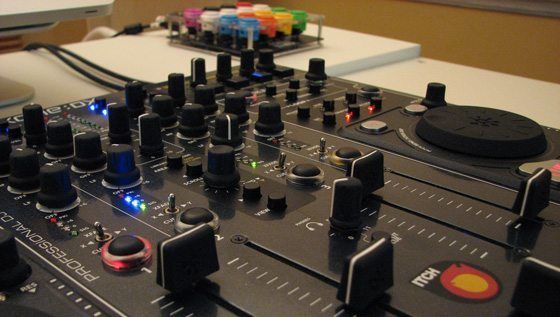
Serato Itch is well known for its tight controller/software integration, but this comes at the price of having no externally mappable functions. With its fixed controller layouts, many have longed to have at least cue point juggling from a controller that is better laid out for that purpose, like the Midi Fighter.  Using a couple of simple tools, I will show you how to do just that, and more.


The How-To

As Itch does not have any midi-mappable functions, all that we can make use of is it’s keyboard mapping.  This can be done by routing any midi controller through a midi translator and have it output keystrokes.  The available keystroke commands in Itch are not exhaustive but do give us some interesting options.
For the purpose of this example, we will map the keystrokes for hot cue points 1 to 4 for two decks, as well as the Find and Record buttons, to a Midi Fighter. To map these functions, we will need a midi-to-keystroke translator and possibly a midi watcher application to read the actual notes from our midi device, if they are not already known. The Midi Fighter notes are well documented, but I’ll show you this method so you can adapt it to any midi controller.

The Simple Path

For an easy and free conversion, I’ll use midiStroke for the translator and Midi Monitor for the watcher application.

Using the watcher, I read the Note-On for the lower left button on the Midi Fighter to be note 36 on channel 3 (you will need to set “decimal” for the note output in Midi Monitor preferences to see the note as 36 and not as note C2).
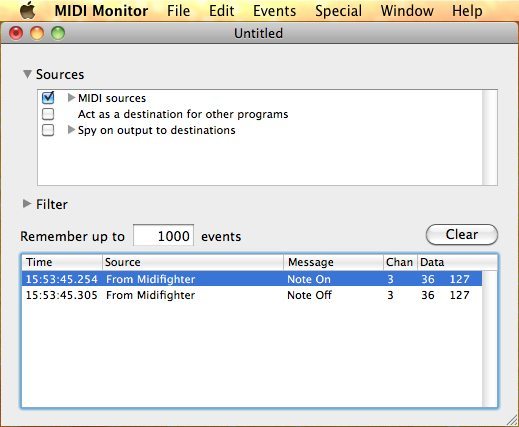
Creating a new entry in the left screen of midiStroke, set “num” to 36 and the “chn” to 3, leaving the “value” blank (this is only needed for CCs).
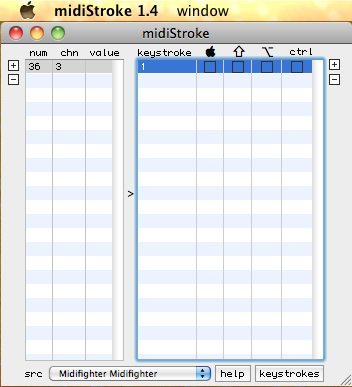
Now with our new left column entry still highlighted, create a new entry for it in the right column by clicking on the right “+”. Enter 1 in the “keystroke” column (leave the rest blank, but if you have the “use shift” enabled in Itch you will need to click the shift radio box beside the 1 you just entered). Repeat the process for the other buttons.

For the Find and Record functions, make sure you check off the Apple key box for the F and N respectively.

Choose MidiFighter as the source at the bottom of the midiStroke window.

Attached below is the midiStroke application and the mapping (start and close midiStroke, then paste the mapping into user>Library>Application Support>midiStroke to replace the default blank mapping, now start midiStoke again and select MidFighter as the source):

midiStroke (application and mapping)

With the mapping complete and the translator running, start up Itch. You will now be able to play your hot cues as mapped and have dedicate Find and Record buttons on your Midi Fighter. Note that Itch will need to be the program in focus, as keystrokes will apply to whichever application is in focus.

You will notice that you cannot play-from-hotcue with these buttons as midiStroke does not support key repeat, but you can juggle the cues (and set them if they are not already assigned) with a song that is already playing.

The Advanced Path

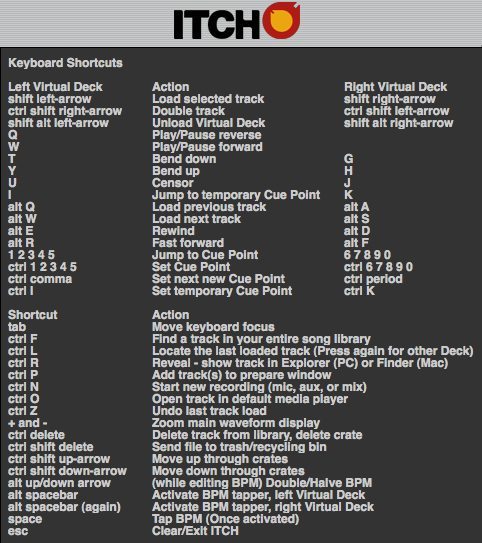
Armed with a more advanced midi translator, there are even more features we can exploit. Loops, tempo bending and moving cue points on the fly are all now available to us as well as play-from-hotcue. There are keyboard shortcuts that are not listed in the Itch documentation, a couple of which are employed in this mapping.

In this example, I’ll uses Bome’s Midi Translator (not a free application). Without getting into Bome’s programming, I have included a mapping file that has the following layout.
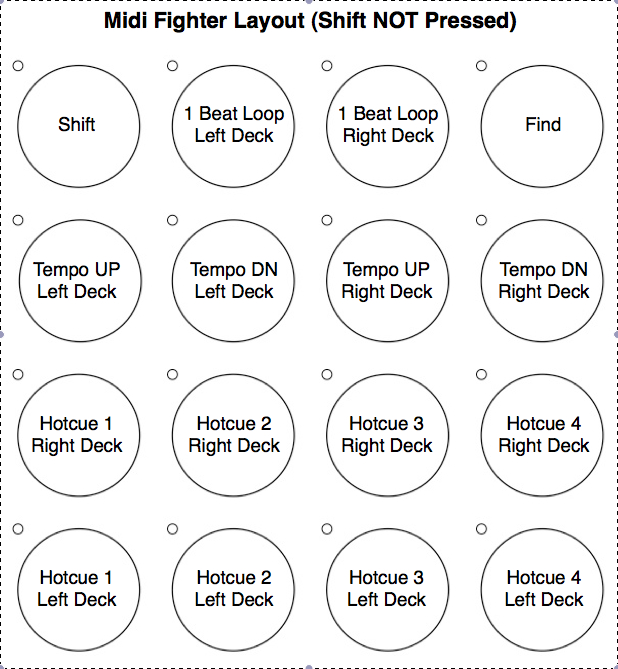
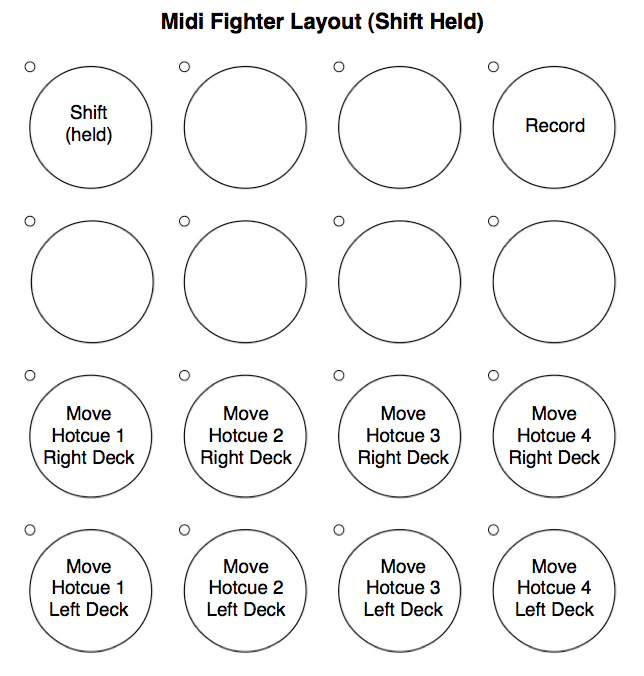
Bome’s Map for Midi Fighter

As can be seen from the layout, loop functions are available from the keyboard. ALT+5 to ALT+1 will provide loops from 1 beat down to 1/32 beat on the left deck, and ALT+0 to Alt+6 for the right deck. I mapped the 1 beat (ALT+5 and ALT+0) for this example on the middle top buttons.

There is another keystroke loop trick in Itch, ALT+T for the left deck or ALT+G for the right, that will give an automated descending loop length from 2 beats down to 1/128 beats.  It works a little strange in that it takes that last two beats that played as opposed to the next two beats as for all other loop functions.  Also it can only be released from the loop off button on the main Itch controller. Try it on the keyboard first and add it to the mapping if you like.

Going Further

The two attached mappings above are only the beginning of possibilities. Exploiting all 5 of Itch’s possible hot cues and adding more loop functions are just two obvious expansion directions.  With some creativity and a little keystroke mapping, layouts to suit your individual needs are not too far away, and – most importantly – on the controller of your liking!


  • http://www.myspace.com/grizu Grizu

    Thanks for sharing this info!
    Cuepoints, loops and looprolls on a 2nd controller are all that I missed untill now. Looks like I have some work to do today.

  • MMK

    AND FOR WINDOWS? :( I WANT USE MY FIGHSTICK WITH SANWA BUTTONS FOR CUE POINTS.

  • http://churchonthewaythere.com/489/residual-income-products/ Residual Income Products | Church On The Way There

    [...] Using Multiple Controllers With Itch [...]

  • http://www.ali.dj Ali

    @MMK: Either use Novation’s AutoMap-software or Bome’s

  • http://www.digitaldjtips.com Phil Morse

    Daft question, but how do you get Itch to show you that keyboard shortcut screen?

  • MMK

    Thanks Ali i try whith Bome’s but it is rare, i mapping a cue point 1 but when I press nothing happens just when song is playing works, and i have another Problems, before to hotcue 1 press “1″ in keyboard but now I must pres shift+1, if anyone knows of these Please tell me things will thank you very much. Thank you.

    I use a ns7, windows xp, and i try configure a fighstick for xbox 360, i successfully configure this joystick with traktor but with itch is difficult for me. :(

  • http://www.bentosan.net BentoSan

    The free edition of bomes should work plenty fine for this :)

    More advanced mappings may require the pro version however, but you can get plenty far with just the free version – in fact you can do more with the free version than the mac program mentioned in this article will allow you to do )

  • http://www.bentosan.net BentoSan

    Oh i forgot to mention for the keyboard keys to work you to have serato selected as your active window, otherwise the keyboard commands wont work. It doesnt work like midi where it doesnt matter what you have as the active window it will work – perhaps thats your problem ?

  • Yarik

    Hi what about map for VCI-100 SE and ITCH

  • pilmat

    [quote comment="32284"]Daft question, but how do you get Itch to show you that keyboard shortcut screen?[/quote]
    To see the keystrokes as shown just click on the “?” (this turns on Tool Tips) and then hold the mouse over the”?” and the window pops up.
    [quote comment="32292"]The free edition of bomes should work plenty fine for this :)

    More advanced mappings may require the pro version however, but you can get plenty far with just the free version – in fact you can do more with the free version than the mac program mentioned in this article will allow you to do )[/quote]
    There is a Bome’s mapping attached to the article and it should work fine in the free version ;-)
    And thanks for highlighting that Itch must be the active window, my description of “the program in focus” was not as descriptive.
    [quote comment="32304"]Hi what about map for VCI-100 SE and ITCH[/quote]
    Yarik, you will always need a certified Itch controller to be used, all that we do here is use an ADDITIONAL controller. But if you would like to use your VCI-100SE as that additional controller, that would be possible.
    @MMK: the easiest way I can think to get you up and running quickly in Bome’s is to use the attached map for the Midi Fighter and then re-assign the midi notes to your controller. Bome’s has midi learn, so it should not be too difficult. Let us know if you need more help!
    ..
    Phil.

  • f0tif0

    Oki the question is can i trigger fx with a different controller beside vfx1?

  • Anonymous

    I don’t think can use another controller for effects or to use two decks in Itch. The dedicated controllers are what triggers those functions to turn on. Only what you can control with a keyboard I think is accessable by another controller.

  • http://www.home-audiospeakers.com/floorstanding-speaker-question floorstanding speaker question!!? | Home Audio Speakers

    [...] Using Multiple Controllers With Itch [...]

  • CatchMeIfYouCan

    I like itch, but the lack of MIDI mapping is what’s keeping me from using it. Traktor really does have the strongest MIDI mapping across the board and no one else seems to care so much.

  • BlackShoePolish

    I want you guys to know you rock man. For novices to professionals never let anyone under mind the time it take to help the world out.
    Respect

  • athtsak

    Good stuff!

  • mike

    Great article, but I’d also like to know about using Novation’s Automap software for this. You were telling about this in the previous article.

  • MMK

    THANKS FINALLY I CAN MAPPED MI MIDI FIGHTER, I USED MIDI BOME’S + REJOICE + MAPLE VIRTUAL MIDI CABLE. WORK FINE THE UNIC PROBLEM IS WHEN THE TRACK IS NOT PLAYING THE CUE BUTTONS DONT WORK, JUST WHEN THE SONG IS PLAYING. SOME IDEA? WHELL MANY THANKS FOR ALL PEOPLE OF THIS WONDERFULL PAGE.

  • Fyoog

    Great video phil, really easy to follow!! My friend has a DX and he was wondering this the other day, I have already linked him the article this morning and I got an excited email back asking what he could use as an excuse to get out of work!! Lol

  • RafaelGorski

    Very good , now I ‘m ordering if midifighter could be used with VCI 300 instead Vestax FX1.
    You are the experts and do you see this possibility ? I understand that you are not hacking vestax comercial staff but will be? very usefull.
    Another problem is itch recognize midi fighter as FX1.

    I will apreciate your comments.

    Thanks from Curitiba, Brazil…

  • pilmat

    [quote comment="32306"]Oki the question is can i trigger fx with a different controller beside vfx1?[/quote]
    And also for Rafael Gorski:
    This method will NOT replace an Itch FX controller. The FX controllers make a proprietary handshake with Itch and this method can’t do that (nor is it intended to!)
    All this tutorial shows is how to employ Itch’s keyboard mapping through a midi translator. As FX are not (yet?) available through the keyboard, this method can’t trigger FX.
    My apologies if the article created false hopes.
    ..
    Phil.

  • http://www.dj-nvidia.com/ Dj Nvidia

    Really cool, I personally don’t like itch because it is so constricted on what you can do with it, but this is a really big argument for using it…

  • Sjaak

    Am i the only one who’s hungering for a article about using different effects in Traktor Pro? I really wonder what kind of combo’s you guys prefer and give the best results!

  • minimal

    Hi,

    Is it possible to convert keystrokes to midi-out?

    I know the PC version of Bome’s does this but it seems the Mac version doesn’t.

    If anyone knows of a software that can do this please share.

    Cheers,

    fg

  • RandyC

    Guys, I appreciate the help and all, but can you PLEASE start putting up Windows versions of these tips as well?

    Mac is great for audio production and all, but the vast majority of users are Windows.

  • David

    What is the windows equivalent of the midi software?

  • pilmat

    Guys, I’ve looked around for a freeware like midiStroke for WIndows and come up with nothing. The only thing that might have worked is Midi Yoke, but has known conflicts with Itch (its documented on the Serato site).
    You can get the free Bome’s Classic and try the mapping above. Please let me know if it works in Classic as I am on a Mac and can’t test it.
    ..
    Phil.

  • @Phil

    You still didn’t tell us how the same is able to be done with Novation’s Automap software and any controller. But in the teaser article it was mentioned that this aomehow should be working.
    Don’t leave as alone. Maybe it’s easy, but not all of us are computer specialists who deal with stuff like that.

  • pilmat

    Sorry, for the Automap and a few other ideas, I started a thread in the forum. Come join me there and we can develop this further!
    http://www.djtechtools.com/forum/showthread.php?t=15436
    ..
    Phil.

  • http://www.djtechtools.com/2010/07/05/itch-vs-traktor/ DJ TechTools  |  Itch vs. Traktor

    [...] mappable functions in Itch and the configuration is locked into each of the available controllers (there is one small exception). The other big drawback is initial cost, the collaboration between Serato and the hardware [...]

  • http://www.kraftgear.com/traktor-vs-itch/ Traktor VS Itch « KraftGear: Music Production.

    [...] mappable functions in Itch and the configuration is locked into each of the available controllers (there is one small exception). The other big drawback is initial cost, the collaboration between Serato and the hardware [...]

  • http://best-house-music.co.uk/traktor-vs-itch/ » Traktor VS Itch best house music

    [...] mappable functions in Itch and the configuration is locked into each of the available controllers (there is one small exception). The other big drawback is initial cost, the collaboration between Serato and the hardware [...]

  • Noah

    can i use NI Maschine for mapping the shorcuts?

    thanks.

  • pilmat

    @Noah
    Haven’t used a Maschine yet, but if it outputs midi it will work through a translator. As for using the Maschine software, I don’t know if it can output keystrokes (don’t think so), you will have to look in the manual or ask in the forum.
    ..
    Phil.

  • ARun713

    This post was very much needed for the itch folks. Only problem i have is that when the track is not playing the hot cues dont work unless the track is playing. but when i hit numbers 1-0 on my keyboard they work. i would like to use my midi controller and hit the cues with out my track playing. especially for those one shot cue beats. please help. thanks and keep pushing djtech!

  • Henderman312

    Could you please reupload your Bomes mappings?  The links are not working.  Thanks.

  • http://www.deejayforum.de/36-dj-software/65251-itch-2-0-stammtisch-15.html#post6430917 ITCH 2.0 Stammtisch – Seite 15 – DJ – Deejayforum.de

    [...] [...]

  • Djkenji305

    Im trying to use midistroke to map out my AXIOM 25 M-AUDIO but it doesn’t work. please help.

  • Djkenji305

    Im trying to use midistroke to map out my AXIOM 25 M-AUDIO but it doesn’t work. please help.

  • Banchie

    has anyone gotten this to work in ITCH 2.0

  • Banchie

    has anyone gotten this to work in ITCH 2.0

  • http://www.sexyplanet.com.ar/foro/viewtopic.php?f=5&t=8602 Everett Kuarez

    abrade…

    moncler mens coats salewarm in non-pressurized planes at high altitudes.cheap moncler womens coats sales…

  • Matelanasta

    yes, I got it to work with an korg nanopad2. my only problem is that i can get key repeat. :(

First Time?

This site is dedicated to digital djs. We develop performance tools and teach cutting edge techniques that enable creative expression. Visit tutorial videos on youtube, equipment reviews in the blog and a very helpful community in the forum. New articles every Mon, Wed, Fri.
Subscribe with one million others

Featured Article

DJ TechTools Traktor Kontrol S4 Mapping

The long awaited Traktor S4 Mapping is here and totally FREE. Continue reading for a full video and the download link.

Categories:

RSS DJ TechTools Forums

  • Using S2 with Ext. Mixer
    Currently Im using a ddm4000, (yeah i know. not the best, but hey its affordable) And im very seriously considering buying a S2. I would love to use... […]
  • RIP Whitney Houston
    http://abcnews.go.com/Entertainment/wireStory/whitney-houston-superstar-records-films-dies-15565063 http://www.youtube.com/watch?v=q_bP1SiZltg […]
  • Konvection 16: Dark Progressive Techno and Electronica
    A 100 minute progressive journey through techno heaven and hell. I love putting this kind of mix together; taking the time to choose the right tracks... […]
  • Audio/Recording in Ableton
    Hey guys Just got a copy of Ableton, have it installed, now trying to hook it up to my studio monitors with my Audio 8 sound card. In... […]
  • How to do a remix
    Hey guys just wondering how a remix is done? Do u have to get all the individual parts separate like the kick etc? thanks […]