

3 Hidden Tricks in Itch

The boys from Auckland are notoriously cheeky fellows and love to throw ‘easter eggs’ into their software for a good laugh. One of my favorites was the addition of pong to Serato Scratch and several other hidden features that required a bit of trickery to unlock. Sticking to this theme, there are also a few nice easter eggs in Itch that we will uncover in this article, along with an answer to the pressing question: “How can I midi-assign a controller in a software that does not support it?”
HIDDEN SUPER FILTER
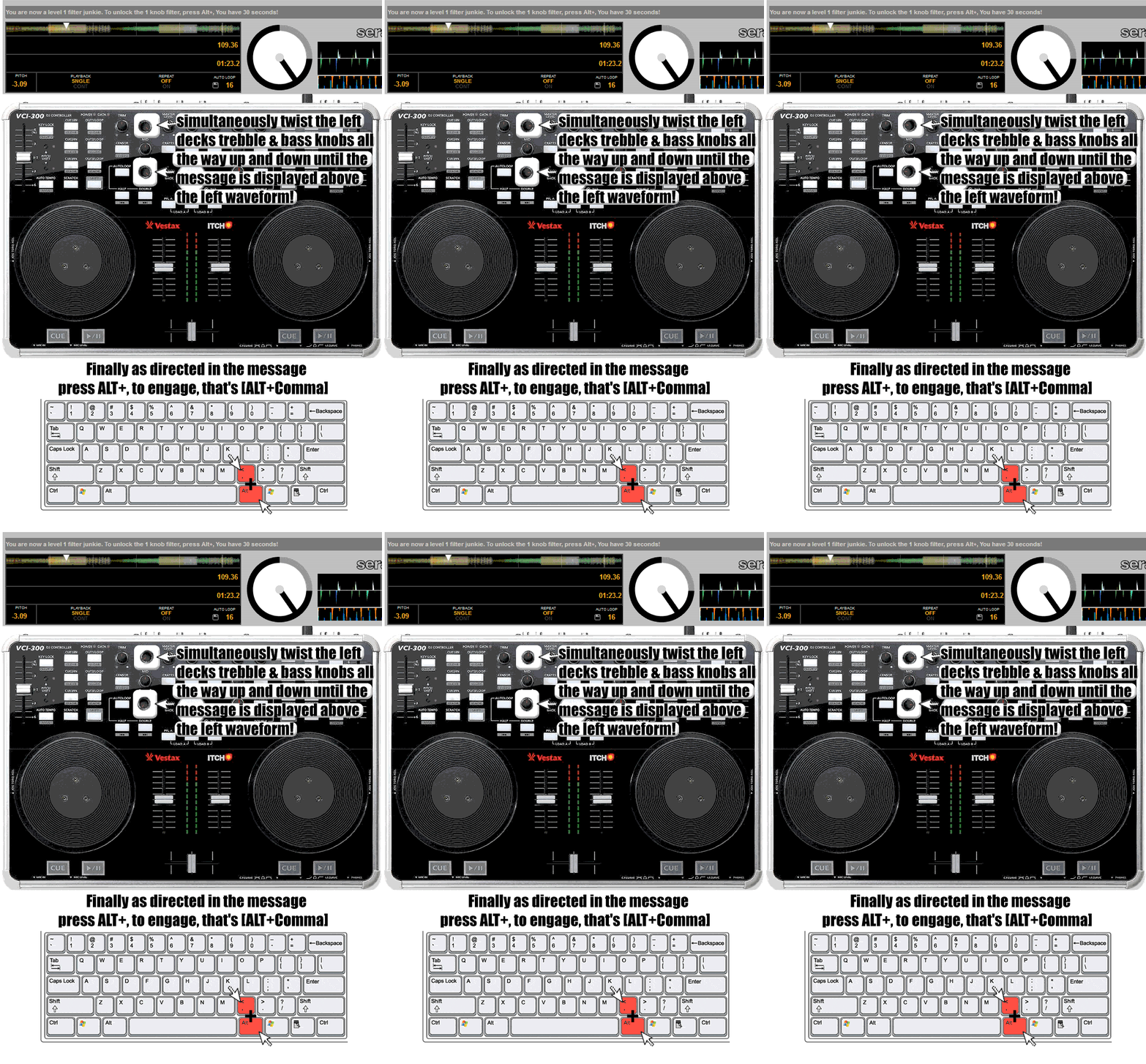
DJTechTools first introduced a super filter in controller land on our VCI-100SE and it was subsequently built right into Traktor. A super-handy tool, the super filter is a high pass and low pass filter combined in one knob — turn the knob to the right to cut the bass, and turn it to the left to cut the highs. Serato allows you to convert your bass EQ on the VCI-300 (and possibly other hardware) into a super filter by following these simple steps:
Twist the bass and treble knobs from 0-100% like a madman until a little message pops up on your screen.
DJ AM MODE
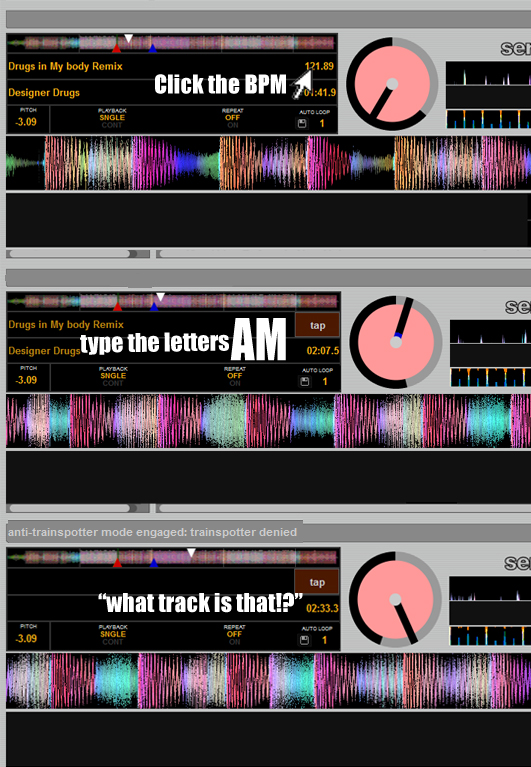
Tired of trainspotters ripping off that super rare remix that you ripped off your buddy, who ripped it off from hypem, which took it from a blog, which took it from the artist? Then fight back against the injustice and enable DJ AM MODE! This easter egg also exists in Serato Scratch and basically hides the track listing from peering eyes.
MIDI MAP IN ITCH
Our very own Pilmat turned heads last week when he claimed to have mapped external controllers (like the midi-fighter) to Itch, which only supports “approved” (translation-license fees paid) controllers. His secret? Terribly simple. He used Novation’s auto map software to convert midi signals into hotkeys and YES — you’re thinking ahead — Itch does support custom mapping of hotkeys. Bingo. Houston, we have lift-off.
To be honest, this inclusion is a bit of a tease. Phil is working on a complete article on how to pull off this trick using freeware midi-to-hotkey translation software and a full video walkthrough, which he will post on DJTechTools next week. In the mean time, keep mashing your buttons and twiddling those knobs. This is Ean von GoldenBurger signing off from Shuttle TechTools.
PS. Big ups to Steve Alois who provided the information for this article and the rad graphics explaining these tips!






June 9th, 2010 at 10:43 am Quote
nice! keep the serato tips coming
June 9th, 2010 at 10:49 am Quote
Does the super filter only work on the VCI-300? How about the NS7?
June 9th, 2010 at 10:55 am Quote
Not a trick as such, but I like the workaround for using all 5 cue points per track in ITCH with the VCI-300 (which you can only use to set and trigger the first 3). You can use these by setting cue points 4 and 5 using ctrl + 4 and ctrl + 5, and trigger the cue points by pressing 4 & 5 (l/h deck) / 9 & 0 (r/h deck).
June 9th, 2010 at 10:58 am Quote
i like the way of easter eggs, hope someone have more easter eggs reports.
how does the trick with pong works at serato scratch.
the dj am mode: this means the artist, track etc. information is not shown at the top player ?!?!
greetz
June 9th, 2010 at 11:25 am Quote
Does the current edition of the VCI-100 SE have the super filter knob?
June 9th, 2010 at 11:42 am Quote
sure does! right bellow the bass eq.
June 9th, 2010 at 12:14 pm Quote
SUPERR!!!!!!
June 9th, 2010 at 12:48 pm Quote
Nice job Ean!
June 9th, 2010 at 1:09 pm Quote
Some more tipps & tricks in ITCH can be found here:
http://www.youtube.com/watch?v=ytHM-tCk4jQ
Can’t wait for the article on midimapping other controllers.
Great work like alllways, Ean!
June 9th, 2010 at 1:13 pm Quote
Nice.!!!
thanks 4 the trick.!
June 9th, 2010 at 1:14 pm Quote
Nice, makes me want to give itch a try just so I can check out the easter eggs.
June 9th, 2010 at 1:35 pm Quote
Recently started using Itch and I feel much more at home on it. Itch is currently my new weapon of choice. The layout is user friendly, simple to use, awesome platter response and has everything I need. I feel it’s a great blend between real decks and controllers. **wish it had sampler though**
June 9th, 2010 at 1:41 pm Quote
I CANT WAITH FOR THE TUTORIAL, AND PLAY WITH MY NS7 AND CUE POINT WITH AKAI MPD :)
June 9th, 2010 at 2:10 pm Quote
good news, cant wait.
June 9th, 2010 at 5:12 pm Quote
hopefully that superknob will make it into ssl.
June 9th, 2010 at 6:44 pm Quote
Wow that filter is so cool.
So does that mean you could use other midi controllers to unlock the effects?
June 9th, 2010 at 7:01 pm Quote
Like Haze I too have become an Itch convert…The VCI-300 is the closest thing to 2 cdj’s and a mixer you can fit in a bag period. The unit is surprisingly amazing, I just ordered some Rane TTM knobs and faders for the unit…I’ll post my results on the forum once they come in.
Plug & Play, Vinyl Feel, One Box!
June 9th, 2010 at 9:29 pm Quote
So how do you turn the Super Filter off?
June 10th, 2010 at 12:03 am Quote
I just tried “Super Filter” with the NS7, no love.
June 10th, 2010 at 12:09 am Quote
All tricks work with the NS7
the Rane Sixty-Eight has dedicated knobs for it, so id count on it.. ;)
[ALT+Comma] to turn it on, then [ALT+Comma] again to turns it off
June 10th, 2010 at 1:43 am Quote
totally agree!!!!
Where did you order the TTM knobs?
:)
June 10th, 2010 at 2:54 am Quote
Another itch convert here, & for exactly the same reasons. …it’s just a very natural intuitive system.
I’m a bit annoyed about the filter being a hidden Easter egg though. I brought the VFX1 fx unit a few months ago, & all I really wanted it for was a good filter which I was missing (coming from traktor)
…..anybody want to buy a vfx1?
June 10th, 2010 at 3:01 am Quote
I am after some also :)
June 10th, 2010 at 3:22 am Quote
how much you wanting for the VFX1
June 10th, 2010 at 3:46 am Quote
Hey guys, there’s another trick, the loop roll for example with the VCI-300 is not supported (with the V7 just hit shift+loop lenght) but there’s a trick to do it also with the VCI’s version ITCH.
let me know if could be interesting… ;)
June 10th, 2010 at 4:17 am Quote
Sounds interesting Cash…
I can’t seem to get the super filter trick to work. my fingers are about to drop off from mad twiddling!
June 10th, 2010 at 4:55 am Quote
It would be cool if we could go stealth w/ that “DJ AM mode” in Traktor Pro
June 10th, 2010 at 5:27 am Quote
Don’t you need a supported soundcard or controller or you only get the one deck working? or was that Serato Live?
Be interested to see this next week
June 10th, 2010 at 5:40 am Quote
Thisisisan – how much for the VFX-1. Hit me up on PM here.
Cash – tried the looproll with the keyboard – but felt a bit awkard. Any tips? Lets hear’em.
June 10th, 2010 at 5:46 am Quote
typically how long are people cranking the bass and high to get the super filter on the go?
tried it a number of times now but to no avail…
pish
June 10th, 2010 at 8:48 am Quote
Does it work with the Xone DX? DX is incredible! Saw it being used last weekend in Chicago with 4 decks and Itch..amazing!
June 10th, 2010 at 9:03 am Quote
I could not get them to work in Itch 1.6 on my DX. Hopefully they will be working in Itch 1.7 that is due out any time now.
Who did you see in Chicago using the DX? I would love to compare notes!
..
Phil.
June 10th, 2010 at 11:55 am Quote
You don’t have to crank the eq. Just push Alt + , .
For those in the UK at least, it works pressing the Alt button on the left handside of the spacebar.
June 10th, 2010 at 1:05 pm Quote
It was Dj Jose Romerez @ Hydrate
June 10th, 2010 at 1:22 pm Quote
That on a Mac.
June 10th, 2010 at 1:36 pm Quote
Sorted, had to update to Itch 1.5
June 10th, 2010 at 10:00 pm Quote
Same in the US. For super filter all you have to do is press alt and the comma button. This is on a Mac running the latest version 1.6 of Itch. Thanks DJTT for this hidden feature.
June 11th, 2010 at 11:42 am Quote
Did anyone try the super filter but had your right channel cut out??? This happened with my VCI-300…
June 11th, 2010 at 4:22 pm Quote
on the serato.com site other people have had that problem with the super filter
June 11th, 2010 at 5:25 pm Quote
Hey I cant get the super filter to work at all. Been twisting the hell out of my knobs and nothing. I’m starting to think you made this up.
June 12th, 2010 at 1:51 am Quote
To have the loop roll active you to create a new crate and call it:
this is how i roll
suddenly will appear a message “loop roll active” and with the keyboard you will have the loop roll, the combination of the keys are the numbers (on mac) + one of the keys like cmd, alt or ctrl, sincerly you have to try it because in this moment I can’t try it….but trust me it works ;)
June 12th, 2010 at 6:58 am Quote
All I need is effects plus four decks unlocked as they are in Xzone DX. I have this baby for soo long finally it will come out of the hood ! EAN thanks for this boost :)
June 13th, 2010 at 12:31 pm Quote
Got the filter to work, but after I finished the session and started a new one the filter no longer works. Tried to unlock it again and no dice!!
June 13th, 2010 at 12:32 pm Quote
The trick is to make sure you turn them completely from end to end.
June 14th, 2010 at 2:18 pm Quote
THIS WORK FOR NS7, AND WORK PERFECT. THANKS
June 16th, 2010 at 8:05 am Quote
Still waiting for the Midimap In ITCH article.
June 16th, 2010 at 10:40 pm Quote
I have done that many times, both fast and slow. I cant get the filter to work at all, unless you mean all the tweaking of the highs and lows, therefore you have a filter already. lol
June 17th, 2010 at 11:42 am Quote
Hello everyone,
Once a big thank you for the great and helpful tips for ”Itch”.
Have tried the AM function, so clicked on BPM display and the letters ”am” written but the songs can be seen in spite of everything still.
Have you perhaps because you explain why it does not work?
June 17th, 2010 at 11:57 am Quote
Hello everyone,
Once a big thank you
for the great and helpful tips for “Itch”.
Have tried the AM function,
so clicked on BPM display and the
letters ”am” written but the songs can be
seen in spite of everything still.
Have you perhaps because
you explain why it does not work?
June 18th, 2010 at 7:30 am Quote
Yip. me too!
June 18th, 2010 at 9:31 am Quote
oh god yes, yes yes yes yes, I hope this works out how I want it to, I’ll never have to use traktor again
June 28th, 2010 at 9:03 pm Quote
What ’s a great trick?
Thanks for sharing
June 29th, 2010 at 12:24 am Quote
Hi guys!
Filter worked like a charm on my VCI-300!
Note two thinks:
1. After you activate the filter, you can then easily turn it on/off at any time by pressing “Alt + ,”
2. When filter is on, the MID EQ becomes LOW EQ (which is a great thing!) so then your EQs becomes HI-LO-FILTER. When you press “Alt+,” and switch filter off, EQs becomes HI-MID-LOW (normal state).
Ean, you rock, men! Too many thanx!!!
June 29th, 2010 at 6:44 pm Quote
I tried superfilter with ns7fx and it works fine: now i can have 3 filters in one deck :D
July 21st, 2010 at 6:27 pm Quote
For those of us on Mac trying to get auto-filter, use the option key, not the command key.
Confirmed this works on NS7… just look for the tiny messages telling you “looks like you’re on to something” and keep twisting past the next message encouraging you to keep going until it finally says “you’re a filter junkie… press alt , you have 30 seconds” and you’re good to go.