How to Map LEDs in Traktor

LEDS_MApping

Intro by Ean Golden

Not that long ago, it was somewhat far-fetched to expect a DJ to understand custom midi-mapping, let alone do any. These days, with the controller market expanding rapidly, most DJs are aware of the concept and have dabbled with a custom mapping here or there. You probably have discovered that although it is easy to map a button to anything in Traktor, it is a bit more challenging to make the button light up in a meaningful way. This involves understanding the second, lesser-known side of midi-mapping – sending midi OUT messages from the computer to your controller. In this article, Brad Cousins will show you how to control the LEDs on your controller using Traktor Pro, and will provide several excellent examples of how to use this technique, including how to show cue point states with multicolored buttons.

MIDI-OUT FUNDAMENTALS
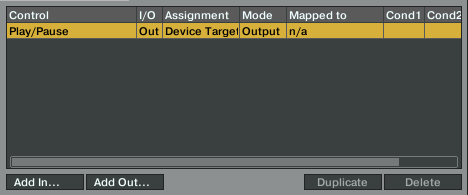
Some buttons light up on their own when pressed, but most need to get a message from the software that says: “HEY BUTTON DUDE, something just happened, quick – light up!”  The button will stay lit until the software sends another message along the lines of “OK, everything’s over now, you can go home.” You, the grand midi-mapping maestro, get to determine what events send those messages to the buttons. These are midi-out mappings, and in Traktor Pro you can add one by clicking the ‘Add Out’ button.  You then insert the event that will trigger the message, like ‘Play/Pause’ in the image above, assign it to a button, and voila – when play/pause is active, the button will light up.

One REALLY ANNOYING THING IN TRAKTOR PRO THAT SHOULD BE FIXED IMMEDIATELY, is the fact that you can’t ‘learn’ midi-out to a button, so you have to know what note the LED receives on and then manually select it from the list. This is usually the same note that the button sends out, so map it to something or use a midi-monitor software like midi-pipe.

GETTING INTO THE GOOD STUFF

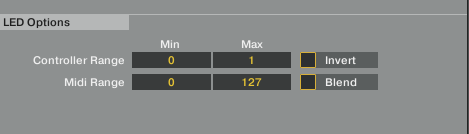
Getting buttons to light up in interesting and more creative ways, such as using multiple colors to display various states, is a powerful trick you need to know. In my opinion the ‘Controller Range’ and ‘Midi Range’ are the main things you need to understand, as these tell Traktor and the LED how to interact with each other.
Controller Range

Despite the name, this is Traktors side of the equation. The ‘Min’ and ‘Max’ boxes basically control what state the function (for example, Play/Pause) needs to be in for when the LED is on (max) and off (min). With a lot of functions you’ll just get a range of 0 to 1, so the obvious thing to do here is set min to 0 and max to 1.

However, with some functions, ‘Hot Cue State’ for example, a wider range is available; in this case -1 to 4. Here, a simple on/off approach doesn’t always work, as setting the min to 0 and, say, the max to 2 would result in Traktor trying to output for the 3 states (0, 1, 2) across this range, leading to erratic LED behavior. In these cases I find it best to put the same number in the min and max, which gives nice solid on/off behavior.

The thing to remember is that each value directly relates to a state for that function; some of them are obvious and some will relate to a drop down menu on the GUI in exactly the same order. One complex example would be FX: you can choose a particular effect by selecting the number corresponding to where that effect sits in the group.

Midi Range

This relates to your controller’s side of things. In most cases I’ve come across you’ll see a range of 0 to 127. 0 would be off, and 1 upwards is on, with varying degrees of brightness (depending on the controller).

A lot of controllers have two LEDs under each button (the VCI 100, for example) so 0 would be the ‘off color’ and 1 upwards would be the ‘on color’. For a basic on/off output set the min to 0 and the max to 127.

Without getting too complicated, some controllers have more than the normal two states. The APC40 has seven: off, and then green, red and orange, in both solid and flashing states. So if you wanted an LED to be solid green for on and flashing green for off, the min would be 1 (flashing) and the max would be 2 (solid).

From here on, it’s time to decide if you need to check the invert and blend boxes.

Invert

  • Does what it says on the tin; checking this swaps the output around so that the LED turns on and off the opposite way.

Blend

  • This is used for controls like faders and knobs where you want the LED to get brighter/dimmer the closer you get to either end of the control’s range of travel.
  • For this you would use a wide controller range (say 0 > 64, with a matching midi-range) and the range will blend into one smooth signal.
  • If you want an on/off effect, either with a button or a knob/fader working as a ‘switch’, you don’t need this!

Assignment

This works the same as when mapping an input. However, in cases where it can only be assigned as ‘global’ but can be used across all decks (Deck Focus, for example), the range would be 0 to 3, in the order of deck A to D. This is similar to the drop-down on an input when you set it to ‘direct’.

You should now be able to easily map simple stuff like play/pause. But just to consolidate all this information, here are some examples.

Modifiers
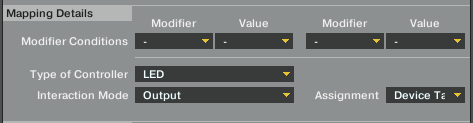
The modifier section works exactly the same for standard mappings. To learn more about this subject check out our article on modifiers!

REAL-LIFE EXAMPLES!

Deck Focus

Let’s say you have four lights you want to use as a quick visual reference for viewing which deck is in focus. As I (conveniently) mentioned above, focus can only be assigned as ‘global’ – not to a specific deck.

  1. For this you would set the controller range min/max to:
  2. Deck A – 0/0
  3. Deck B – 1/1
  4. Deck C – 2/2
  5. Deck D – 3/3
  6. Midi range min/max for all would 0/127, and also uncheck invert and blend

APC40 cues

There are several threads relating to this on the forum, so for convenience I’ll put an example in. This gives a red LED when a cue isn’t set and green one when there is. For this the controller, the range min/max need to the same because of the ‘wide range’ of states for this function, as I mentioned earlier.

  1. Set an OUT for ‘Hot Cue State [X]‘
  2. Assign it to the relevant note
  3. Set the controller range min/max both to -1 (cue in drop down list of advance panel)
  4. Set midi range min to 4 (red)
  5. Set midi range max to 2 (green)
  6. Uncheck invert and blend

Modifier State

This is something I personally found very handy as my jog wheels have four functions, so I set up a couple of LEDs to show when they are in ‘browse’ mode and ‘C & D scratch’ mode.

  1. Set an OUT for ‘Modifier [X]‘
  2. Assign it to an LED
  3. Set the controller range min/max to 0/1
  4. Set the midi range min/max to 0/127
  5. Uncheck invert and blend

This example is based on the one modifier being used to switch between two functions, in which one mode is active when the modifier is off and the other when the modifier is on.

As you can only map two conditions on an input I have modifiers 2 and 5 linked to my jog modes, both with ranges of 0–2. I then mapped both my LEDs for modifier 5 with control ranges of 1/1 (C & D scratch) and 2/2 (browse) in line, again, with the ‘wide range’ method.

Flashing LED on a controller that only has on/off states (such as the VCI 100)

This is a cool technique I found in the forum, courtesy of bassmeekens

  1. Set up the Play/Pause output as normal, but under the modifier conditions, set ‘is in loop’ and 0
  2. Now create an output for beat phase meter
  3. Map it to the same LED
  4. Set the controller range min/max to 0/0.1 (the phase meter range moves up in decimals from 0 to 1)
  5. Set midi range min/max to 0/127
  6. Set modifier to ‘is in loop’ and 1
  7. Uncheck invert and blend

Now when you hit the loop button on that deck, it changes the ‘loop mod’ state to 1 and this output map overrides the play/pause one, making your button flash!

WOW, THAT WAS LONG

Hopefully this has helped to shed some, er… light on how to map an LED, and has made things a bit clearer for you.

Thanks for reading, and have fun mapping your outputs!

About the writer: Brad Cousins is a Traktor DJ and writer who has his own blog on DJing- check it out here


  • http://www.myspace.com/bestlegsinhd jorge muniz

    good article. i’m switching to traktor soon so this helps a lot!

  • http://www.celtic-dj.com celtic-dj

    so many times i am working on something in traktor and DJTT puts an article on the subject…wicked !

    (am trying to get the leds work on my old crappy bcd2000 with traktor pro,having it as a second controller alongside the “reloop digital jockey”,both as midi controllers !)

    i agree that NI should change the way you map your leds a.s.a.p and maybe give you an option to get that small mapping window bigger – it makes me claustrophobic ..lol

    very useful article IMO,,,

    thanks alot bradcee.

  • http://www.soundcloud.com/sivesgaard Sivesgaard

    Great article on a complicated subject, it can be quite daunting to try editing the DJTT custom mapping to your specific needs, this does help a bit! Good work, as usual.

  • http://www.djtechtools.com/forum/showthread.php?t=11964 Double DutchDj

    Nice work Bradcee!, Its great to finally have this subject broken down properly. I’m guessing there’s many others who like me didn’t find it that hard to learn a bit about midi out in Traktor, but the midi and controller range was pretty obscure to understand. Hmmmm, I wonder if it’s pos to make the vci jogs flash when in fader fx mode?! I often have fader fx left on all the time, so there has been a couple of embarissing, oh shit I should of checked faderfx mode moments, as thanks to my stupidity and scratch mode being active, the music has stopped, doh!

  • http://www.boijeaniusonline.com Boi Jeanius

    Awesome, thanks for the continued coverage on TRAKTOR, i just switched and I am constantly looking for tutorial videos on how to use this beast of a program. im glad i started out with SERATO cause if it had been the other way around i would have been rather disappointed!

    again thanks!

  • http://www.funksinatra.com eyal goldman

    very very good article…just might add some lights to my mapping lol

  • http://www.kilakituclothing.com bART

    double dutch… great idea – let me know if u manage to get the jogwheels flashing when in faderfx mode on Ean’s VCI100 tsi. That would be really cool!

  • Abyrne7

    Great Article! Deffinitly something I need to tinker with more when I have time.

  • http://www.monstamusic.co.uk Monsta

    Thanks, I’ll be hitting this stuff soon when my custom controller starts coming together!

  • piopro

    About time, although a little late… lol,just finished led mapping for ddm4000 and traktor… OMG!!! the long night sat at the computer and my mixer.
    This is a subject that has been burning on the NI many other forums for a very long time with very little help.
    now for anyone that is a digital DJ, I say Look at djtechtools.com if you can’t find your answer there it ain’t worth knowing.
    thanks Ean =)

  • pilmat

    Nice article, sheds light on a confusing subject!
    ..
    Phil.

  • http://vladimir.prie.to vladimir prieto

    nice article!

    got a doubt….

    scenario:

    i’m using BCD3000, and asign some buttons to effects (the tops ones) and with another button (wich is a modifier) i use the same buttons for mixer stuff.

    problem:

    i put some led light on, then switch modifier to 1, and use the same button (with its led) for another thing and led get off. when i go back to modifier 0 the led does not turn on by default.

    so how can i send a massege to a led with a modifier in order to turn on/off light depending on an event that was made before?

  • http://djgeekdout.com/ DJG33KD0UT

    hell yeah, thanks guys! this is the tutorial I needed to get my ass back on the controllerism grind. I remember Ean highlighting how to do this before, but despite the fact I’m pretty good and mapping special macros and controllers, I could never figure out how to get my LED lights working the way I wanted. good lookin sonnnnnnnnn!!!!!!!!

  • Priscilla

    Nice work Brad. So precise. Half way through i was thinking “am I reading the Traktor bible” thanks for the detailed writings. I will be archiving this one in my references.
    -
    Thanks

  • BradCee

    Thanks for the positive feedback guys :D

    [quote comment="31284"]
    i’m using BCD3000, and asign some buttons to effects (the tops ones) and with another button (wich is a modifier) i use the same buttons for mixer stuff.

    problem:

    i put some led light on, then switch modifier to 1, and use the same button (with its led) for another thing and led get off. when i go back to modifier 0 the led does not turn on by default.

    so how can i send a massege to a led with a modifier in order to turn on/off light depending on an event that was made before?[/quote]

    do you mean the mod button LED or the LEDs of the control (fx/mixer) buttons?

    for the mod button just map it to the modifier using the example above. if it’s the control buttons i think you’d need to use send monitor state to force the leds back on, or apply mod conditions to the outputs if you haven’t already?

  • http://www.dj-nvidia.com/ Dj Nvidia

    Great explanation!!! I learned how to do most of this the “hard” way, but this approach makes more sense and actually learned a few things I didn’t know…

  • atticus18244fsas

    Slightly complicated but I’ll take a few hours one day to fix up the LEDs on the crippled mapping Hercules provided.

  • Carnage

    Hey there,

    seems as if my english is not the best or I just don´t understand it right… Now.. here´s my problem:

    I got an Akai LPD8 and want the buttons to show, if a loop or FX is on or off… How do I have to map this? the LED only blinks when it is pressed but the it´s off… I want to stay it shining, when the loop or FX is on and switch off, when the loop or FX is off!

    Could you PLEASE help me???

    THX

  • http://www.jl-producciones.iya.es/ DJ SATIRO

    HOLA.MUY INTERESANTE EL TEMA
    PERO YO PROVE CON EL PIONEER SEP C1 Y TRACKTOR SCRATCH PRO
    Y ES UN POCO COMPLICADO DE MAPEAR
    EL PROGRAMA SOLAMENTE DETECTA UN LADO DEL CONTROLADOR
    Y LAS LUCES(LEDS)NO SE ENCIENDEN
    SALUDOS

  • http://www.google.com/images?client=safari&rls=en&q=pimp&oe=UTF-8&um=1&ie=UTF-8&source=og&sa=N&hl=en&tab=wi jdog667jkt

    Aaaaah thank you so much!

    Great explanation. Now I just have to stop being a lazy ass and fix up my LED’s.

  • BradCee

    [quote comment="31320"]Hey there,

    seems as if my english is not the best or I just don´t understand it right… Now.. here´s my problem:

    I got an Akai LPD8 and want the buttons to show, if a loop or FX is on or off… How do I have to map this? the LED only blinks when it is pressed but the it´s off… I want to stay it shining, when the loop or FX is on and switch off, when the loop or FX is off!

    Could you PLEASE help me???

    THX[/quote]

    when you select output to map what does the midi range show in min and max?

  • http://soundcloud.com/livefast LIVEFAST AKA STEPHEN

    Awesome article Brad! Time to update my VCI300 TSI! **found in the djtechtools forum**

  • http://vladimir.prie.to vladimir prieto

    [quote comment="31292"]…i think you’d need to use send monitor state to force the leds back on…[/quote]

    that was the solution! thanks man!

  • Carnage

    “when you select output to map what does the midi range show in min and max?”

    The midi-range shows 0 to 127!

  • BradCee

    [quote comment="31389"]“when you select output to map what does the midi range show in min and max?”

    The midi-range shows 0 to 127![/quote]

    ok, never used/mapped an lpd so not sure if a solid on is doable as the buttons appear to flash as some kind of default.
    but the map would be

    select add out, go to effects (chained or advanced, whichever you need).
    select effect on, in the assignment select the fx unit.

    controller range min @ 0 max @ 1
    midi range min @ 0 max @ 127

    uncheck invert/blend.

    assuming the lpd supports solid leds, it should stay shining when on.

  • http://web.me.com/jasonking8/J450N_N4ME/MU51C/MU51C.html J450N N4ME

    I am totally taking credit for this article. I suggested this in the “suggest an article” section that NOBODY ever visits. It sat there for like 8 months and only got the 3 initial votes that I gave it. You guys are so AWESOME! You said in a prior article that you were trying to preserve the record shop feel because digital distribution killed that niche AND YOU HAVE DONE IT ONCE AGAIN! Thank you so much for keeping this little piece of our culture going. You are a light in the ether DJTT.

  • http://www.deadmanzkassette.com jasonmd2020

    I can now glance at my MidiFighter and know which deck is in focus without staring at the screen. Thank you, Thank You THANK YOU!

  • Anbuzan

    Thanks, this is exactly what I needed to know, I was working on this exact thing.

  • Muzikizum

    THANK YOU DJTT!!!

  • tom

    thanks a lot!!!

  • A-Dag-Io

    [quote comment="31390"][quote comment="31389"]“when you select output to map what does the midi range show in min and max?”

    The midi-range shows 0 to 127![/quote]

    ok, never used/mapped an lpd so not sure if a solid on is doable as the buttons appear to flash as some kind of default.

    assuming the lpd supports solid leds, it should stay shining when on.[/quote]

    Well, the LPD does, only when you touch them very soft. The velocity-sensitive pads just accept tenderness ;-), tried it out!
    But I have a similar problem with a Korg Nanocontrol – seen the solid LEDs work, at least i noticed someone using them in ableton. First thoughts were this is an intelligence test from NI that I’m constantly failing, so maybe you have ideas to cheat? Backlits could be great support for play/pause, loops, sync and deck monitor, for example…
    Keep up the great work –
    best wishes

  • BradCee

    [quote post="6134"]seen the solid LEDs work, at least i noticed someone using them in ableton[/quote]

    maybe that’s native to ableton? remember my nanopads box being crammed full leaflets about live 8.

  • A-Dag-Io

    agreed – but why can’t I lite them up in Traktor? What’s my bloody fault?

  • BradCee

    [quote comment="31484"]agreed – but why can’t I lite them up in Traktor? What’s my bloody fault?[/quote]

    i take it you’ve tried mapping them?

    send me a pm in the forum with detail of what you’ve done/tried and i’ll have a look from there

  • BradCee

    [quote post="6134"]Hmmmm, I wonder if it’s pos to make the vci jogs flash when in fader fx mode?! I often have fader fx left on all the time, so there has been a couple of embarissing, oh shit I should of checked faderfx mode moments, as thanks to my stupidity and scratch mode being active, the music has stopped, doh![/quote]

    i don’t think it is possible to map them like that, looked in the back of the vci manual ages ago at the midi map for it, and tried everynote linked to it with no joy.

    i think the LEDs on jogs are a pure internal vci system thing. As even if there aren’t any OUTs linked to scratch mode/pitch bend/whatever else is jog related, the LEDs still swap between blue and red when you touch them.

    the only way i can think of to accomplish this is to sacrifice a couple of buttons, extend some thin wire from behind them* to under the jogs, remove the existing ones and then map up the new ones to behave as the originals and use a mod for the flashing (most likely the fader fx mod on same condition number).

    does the fader fx button not flash then? could remap it up using the last example from the guide to make it flash, just change ‘is in loop’ mod to be the mod that turns on fader fx

    *extended a couple of LEDs for my jog mode leds, wasn’t a big deal to me as, ironically, all my buttons have stickers over them for my map, so all my outputs have been rendered pointless, lol

  • RVN

    can i make the led of korg nanopad or the kontrol work with the led mapping technique above has anyone tried it…

  • Julynessi

    Super!!!
    Thanks you a lot

  • BradCee

    [quote comment="31688"]can i make the led of korg nanopad or the kontrol work with the led mapping technique above has anyone tried it…[/quote]

    on the nanopad do you mean the ‘scene’ led? if so, no it’s not midi. the kontrol should be mappable. but i would suggest using the korg editor software to switch the button behaviour from momentary to toggle

  • RVN

    [quote comment="31740"][quote comment="31688"]can i make the led of korg nanopad or the kontrol work with the led mapping technique above has anyone tried it…[/quote]

    on the nanopad do you mean the ‘scene’ led? if so, no it’s not midi. the kontrol should be mappable. but i would suggest using the korg editor software to switch the button behaviour from momentary to toggle[/quote]

    i’m not talkin abt the scene led i’m talkin abt the led below the buttons, with the control editor i can only adjust it to toggle or momentary if i want it to respond to the phase meter like the above given example then how ??

  • Dj Divine justice

    Hey, great post! I’ve been working on trying to get my padkontrol to mimic the hotcue page on my Kontrol X1, I haven’t been able to get any led response mapping “hotcue state” output so I mapped “select/set+store hotcue” to a pad on my KP that is sending a midi note, not a CC. Doing that I only get the pad on the KP to light up when I play the cue point on the X1. I want the KP to mirror the X1 and show me which cue points are active.

    Thanks to Ean and the whole djtt fam. I find this site to be crazy informative.

    Check out my video on the X1!!

    http://www.youtube.com/watch?v=OxQx6vU4yFg

  • http://www.deepmovements.com Manuel-M

    Hello guys !
    I’ve got just a problem when i map the leds of my Padkontrol.The information is sended , but the led just blink one second , they don’t stay On.
    Can anyone has got a solution ?
    Thanks a lot for this useful website !

    M-M

  • http://www.deepmovements.com Manuel-M

    And also is there any thing/stuff to have the bpm info on Led?(like a metronom ?)

  • BradCee

    [quote comment="32509"]And also is there any thing/stuff to have the bpm info on Led?(like a metronom ?)[/quote]

    see the flashing led example at the bottom of the article, take the beat phase monitor settings and apply them to an LED

  • Jack

    Can someone help me please, i have a novation pad and mapped all the leds and they work how i want but whenever i load a new track to a deck while the other is playing traktor glitches and makes a weird noise at the same time the cue point leds light up on my novation pad

  • http://www.djtechtools.com/2010/09/02/how_to_map_dicer-led-midi-mapping/ DJ TechTools  |  Multi Colored Dicer LED Mapping

    [...] different LED colours is straight forward.  After following our LED programming article, you should be familiar with the process.  The only little twist at the end here is that the MIDI [...]

  • http://www.alessiomonizza.com/blog/2010/09/multi-colored-dicer-led-mapping/ NuTesla | The Informant »tecnologia-informatica-audio digitale-domotica-energie rinnovabili- politica-economia-informazione libera

    [...] different LED colors is straight-forward.  After following our LED programming article, you should be familiar with the process. The only little twist at the end here is that the MIDI [...]

  • http://plate.pp.ua/multi-colored-dicer-led-mapping/ Multi-Colored Dicer LED Mapping » Dj tech tools » plate.pp.ua

    [...] different LED colors is straight-forward.  After following our LED programming article, you should be familiar with the process. The only little twist at the end here is that the MIDI [...]

  • http://pbpm.net darko

    visual feedback is a must in the dark booths. so spending some time getting your controller properly setup is mandatory.

  • G

    I’m mapping led buttons for loop size and just want the light to flash on then off quickly each time I press the button. At the moment I can just get the lights to turn on but they stay on. Anyone got any advice on how to do this? Cheers

  • Nikdijkema

    Hello, I have question about the mapping for the DJ-Tech DJM-101,
    I have everything mapped accept for the master level led’s and the PFL level led’s (they use the same two rows of leds with a switch to switch between the two modes), but the problem is that I don’t know the mappings for those led’s since they are only leds without button and I can’t get anything from the use manual either, please help me

  • Nikdijkema

    Hello, I have question about the mapping for the DJ-Tech DJM-101,
    I have everything mapped accept for the master level led’s and the PFL level led’s (they use the same two rows of leds with a switch to switch between the two modes), but the problem is that I don’t know the mappings for those led’s since they are only leds without button and I can’t get anything from the use manual either, please help me

  • http://www.djtechtools.com/2011/02/08/tracking-super-combos-with-advanced-modifiers/ DJ TechTools  |  Tracking Super Combo’s With Advanced Modifiers

    [...] How to Map LEDs in Traktor Tweet [...]

  • Dmitry Ponder

    My VMS4 LED’s don’t light up no matter what I set the ranges for.  Can you please help?

  • Dmitry Ponder

    My VMS4 LED’s don’t light up no matter what I set the ranges for.  Can you please help?

  • Vasil

    (Dj Papi (BULGARIA)) Hello, sorry for bad English. Pioneer cdj 350 I have two pieces, can make mapping led & display in Midi mode (Traktor)?
    Thank you.

  • Vasil

    (Dj Papi (BULGARIA)) Hello, sorry for bad English. Pioneer cdj 350 I have two pieces, can make mapping led & display in Midi mode (Traktor)?
    Thank you.

  • http://synteknik.com/korg/microkorg/microkorg-vox-humana-thwarted-again/ microKorg Vox Humana – thwarted again.. | Synteknik

    [...] = ''; } Korg Midi Cable – Günstig kaufenDJ TechTools  |  How to Map LEDs in Traktor body { background-image: [...]

  • Neveride

    i am trying to achieve the following:
    play/pause button ON when deck is playing and OFF when it is not
    play/pause button FLASHING when deck is playing and song is finishing.i tried out for beat phase monitor, track end warning and play/pause, but i cannot combine it. i do not think it is possible. any ideas?

  • http://www.facebook.com/people/Manoel-Nunes/100000014780837 Manoel Nunes

    I have remapped the hotcue buttons on my DN-MC6000 (Decks C & D) to load and play samples. But no matter what ranges I set in the output mapping, I can’t get the leds to light up. Can u help me?

  • http://www.facebook.com/people/Manoel-Nunes/100000014780837 Manoel Nunes

    Actually I had it all sorted out. It’s all on page 21 of the MC 6000 user manual (Reception commands), with the difference that the commands are in Hexadecimal and in traktor settings they are decimal. For example:
    - Slot state/out/sample deck 3 slot 1/output/ch02.CC.074 + control range 1 – 1 + midi range 0 – 17 = (cue1 led lit when track is loaded to sample deck 3 (B) slot 1);
    - Slot state/out/sample deck 3 slot 1/output/ch02.CC.075 + control range 0 – 0 + midi range 0 – 17 = (cue1 led off when track is empty on sample deck 3 (B) slot 1);
    - Slot state/out/sample deck 4 slot 2/output/ch04.CC.076 + control range 2 – 2 + midi range 0 – 19 = (cue2 led blinking when track is playing on sample deck 4 (D) slot 2);
    Note: CC.074= led on: CC.075= led off: CC.076= led blinking;
            control ranges for sample deck slot: 0=empty slot, 1=loaded slot, 2=sample playing.
    You have to find the ranges for each particular event but I think this will help how to figure it out.

  • http://wyborowi.host22.com/viewtopic.php?f=6&t=6490 Fidel Knabe

    aborters…

    What about job titles or interests by themselves; for example: .a list showing the name in one column then their title or interest in another .Name Title/Role .David Smith Business Analyst .Jane Doe Internal Stakeholder .Ian James Project Sponsor .Mary…

First Time?

This site is dedicated to digital djs. We develop performance tools and teach cutting edge techniques that enable creative expression. Visit tutorial videos on youtube, equipment reviews in the blog and a very helpful community in the forum. New articles every Mon, Wed, Fri.
Subscribe with one million others

Featured Article

DJ TechTools Traktor Kontrol S4 Mapping

The long awaited Traktor S4 Mapping is here and totally FREE. Continue reading for a full video and the download link.

Categories:

RSS DJ TechTools Forums

  • laptop for TSP2...will it be enough??
    hi there... im buying this laptop http://www.notebookcheck.net/Review-Lenovo-ThinkPad-Edge-E320-i3-2310M-Subnotebook.60200.0.html only... […]
  • $120 / E100 voucher from NI for S2 owners
    have received an email form NI offering a voucher for their store due to buying the S2 just before the new price. anyone else got this? "Today we... […]
  • DNS 3700 and time code
    Last night was the first night I have ever djed using these decks and cd timecode and I can honestly say that is was the most disappointing... […]
  • Rain / Filter Tip - (drip-hop)
    Here are a couple of tracks I have been working with on and off for about two years. Recently acquired my own pair of studio monitors, so finally got... […]
  • Blogging for DJ MAG CANADA!
    Hey guys. I've got a semi weekly bit blogging for DJ MAG CANADA! The blog is gonna be on Mondays and Thursdays! If you know any Canadian DJs or... […]