

New to Serato?…

Being a Dj, event producer and, most recently, a contributing writer to this fine blog, I run into djs on all different levels of experience and expertise. Believe me when I say, when it comes to technology, the two are not directly related. Understanding just a few essential functions in every software will make your sets better. Here are a few things, which if you do not already, you must know in Serato. Trakor and Ableton Essentials are coming soon.

An Accurate Estimation
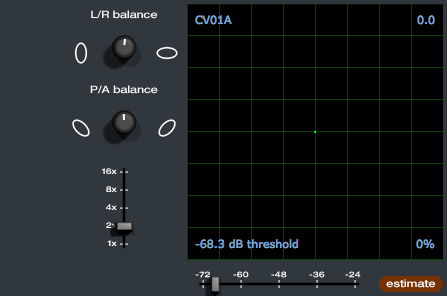
Sometimes the bass feedback working back into the turntables can cause problems in Serato. To fix this problem,  its important to get an accurate threshold before each set. Setting the threshold will calibrate Serato the amount of noise in the room, allowing it to ignore feedback and noise from the turntable.

  • Navigate to the “Set Up” window.
  • Turn up the sound system to a peak level you will be playing.
  • Play a track from the other deck in internal mode.
  • Put the needle on the record with the turntable stopped and click the “estimate” button.
  • Adjust the threshold slider to the left until you get some tracking information in the bottom right corner then ease back to the right until that stops.

You should now have a good balance of good tracking and low noise. Repeat this process for each deck. This is to be done prior to making your tracking circles nice and round. See: how to calibrate scratch live for more info on that process.

Its all Relative
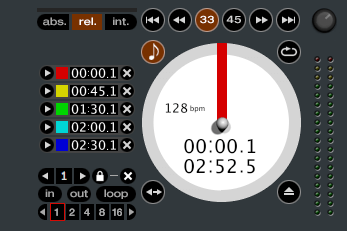
Not to neg-out too much but if you are not rocking relative mode you might as well not use Serato. “Relative Mode” is what makes DVS Systems unique by combining the tactile control of the record and turntable with the non linear nature of the laptop dj set up. Outside of “Relative Mode” almost all of the features that make using Serato advantageous are disabled including Looping, Cue points, and Instant doubles just to name a few.

Relative mode is the exact opposite of Absolute mode where the absolute position of the needle is always locked to that part of the song, resulting in an un-natural amount of wear on the first part of the record.

Beats Per Minute

If your tracks dont contain a BPM value (Beats Per minute), you are missing out on some cool features in Serato. Auto Loop, Loop Roll and the effects on the ttm57sl use the tempo of the track and wont work without a bpm value. To make things easy, Serato can be set to automatically detect the BPM of tracks when importing. If you select “set auto bpm” and choose your range your tracks will automatically get “BPM’ed” when you load them to a playing deck. For challenging tunes that Serato does not analyze correctly the BPM can be set manually by clicking the “TAP” icon next to the track name when loaded into a deck.

Undo Stress
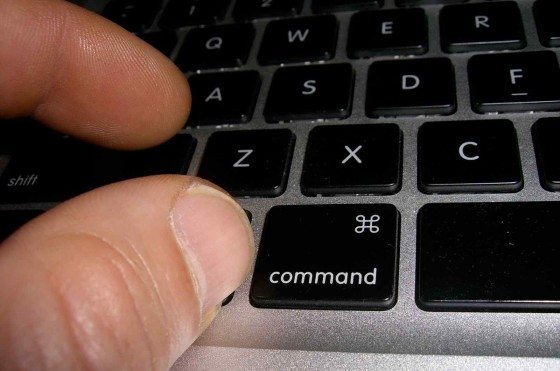

During a heated mix or while distracted by a persistent request, its inevitable that you’ll load a song on the playing deck accidentally. When this happens to you, don’t loose your cool, just hit “ctrl+Z” and it’ll bring the tune back to exactly where you left it off and keep playing said track. Hit the sampler with the dance hall air horn and act like you meant to do it.

Censor/Backwards mode:
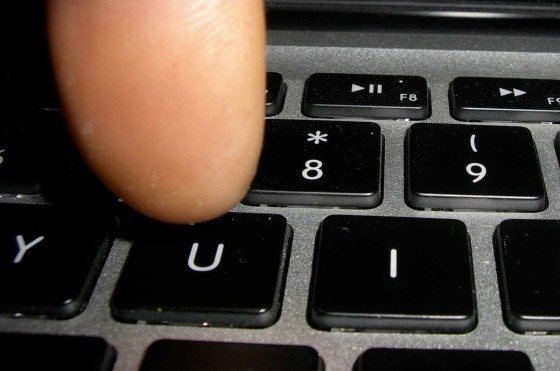

If you press “U” (left deck) or “J” (right deck) the track will play backwards. When you let go of the key will leave you off in the track as if it was still playing all the while. Designed for censoring cuss word but can be used for artistic effect as well.

Recording Your Set
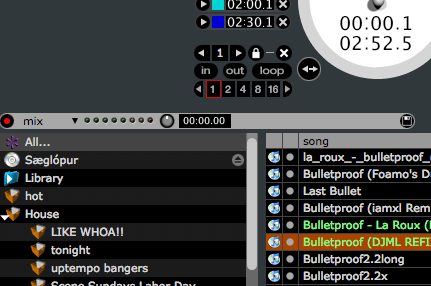
Recording live sets is ideal for self critique and also a very powerful form of promotion. With the serato TTM-57SL mixer or the new SL3 its very easy to record yourself. With the usb plugged in, select mix from the record drop down menu, click the red button and now you are recording. Remember to stop the recording, save and name the mix before unplugging the usb or quitting serato.

Exporting your set list
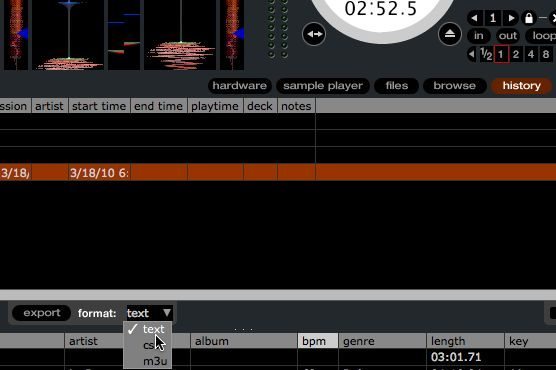
If the set you end up recording is the killer, You’ll want to put if out there for some peeps to hear. Do everyone a favor and publish a track list with the mix. People are more likely to download or listen to your mix if they like the included tracks. When you select a particular session under the history tab an “export” button comes up. Click export and a file will be created in the directory:  ”Music/ScratchLive/History Export”

THE WRAP

by Ean Golden

I realize that these tips may seem obvious to some, but you would be suprised how many people actually have no idea how to do the most basic functions in Serato. Next month Mei-Lwun will break it down further and go into some more complicated tricks for the advanced digital djs.  Serato users out there, let us know your reading in the comments and we will continue to work more Scratch Live content into our monthly calender of articles.  Mei-Lwun is a professional dj who has been rocking the turntables for over 15 years! He plays in San Francisco and around the world.  You might also like his article on protecting the turntables aimed at controllerists.

88 Responses to “New to Serato?…”

  1. DJ Resistor

    April 7th, 2010 at 12:38 am Quote

    Needs a break in the article body ;)

  2. Rhett

    April 7th, 2010 at 12:52 am Quote

    Really useful article, thanks.

    Any chance of one on video-sl?

  3. ocd

    April 7th, 2010 at 12:58 am Quote

    Serato user here! As much as most of this info is redundant for me, I appreciate it and support the inclusion of more Scratch Live relate articles on DJTT!

    <3

  4. Jacob Lysgaard

    April 7th, 2010 at 1:10 am Quote

    1up @ocd, I know all this already, but it’s nice to cater to the noobs too. And I like that it’s not all about traktor all the time!

  5. JunKSter

    April 7th, 2010 at 1:13 am Quote

    It would appear that you’re not aware that you can lock the decks in the options so you never load a track into the playing deck by mistake.

  6. ss714ss

    April 7th, 2010 at 1:43 am Quote

    good stuff!!

  7. TJ

    April 7th, 2010 at 2:17 am Quote

    Planning on dropping some Sigur Ros in your set? ;)

  8. opey

    April 7th, 2010 at 2:20 am Quote

    Love the serato articles, although I already knew the information from this article, its nice to see your not leaving us in the dust! Any one from djtt get ahold of the rane sixty eight mixer?

  9. Leoparder

    April 7th, 2010 at 2:28 am Quote

    You should talk about Torq a little bit more, this software is so awesome that more people need to know about it !
    I could do an article for you if you want ;-)

  10. Shane

    April 7th, 2010 at 3:18 am Quote

    I’d like to know more about SSL since a lot of DJs use it and I don’t see why unless they are scratch DJs. It seems like Traktor and Itch are easier to use, faster to beatmatch even if you don’t use sync, cheaper on equipment, less shit to lug around, and you can set your beatgrids perfectly in Traktor instead of using tap. The only reason I can think why is that the TT makes the DJ “look sexy”. lol

  11. JunKSter

    April 7th, 2010 at 3:48 am Quote

    Here’s a link for a handy set of key stickers for Serato. Bloody useful. ;-)

    http://www.editorskeys.com/serato-scratch-live-keyboard.html

  12. BentoSan

    April 7th, 2010 at 3:50 am Quote

    Needs a break in the article body ;)

    Fixed !

  13. And what of it?

    April 7th, 2010 at 4:41 am Quote

    I wish Traktor had some of these features

  14. me

    April 7th, 2010 at 5:55 am Quote

    appreciate more articles bout serato!! :-)

    keep on doing

  15. Cozmic023

    April 7th, 2010 at 6:16 am Quote

    Nice article on Serato Mei, some great tips for newbs.

    I’d like to see more articles on SSL, it’s my main choice of DVS.

    Cheers

  16. Vinícius Hoffmann

    April 7th, 2010 at 6:39 am Quote

    I’m not a Serato user because I’m really into Traktor right now, but is good to know more about other options as I know nearly to nothing about Serato, well now I know some basic stuff.
    Keep them comming Mei-Lwun!

  17. Dj thots

    April 7th, 2010 at 6:53 am Quote

    im a serato user!

    Nice set of tips, greate to see some serato stuff on this site!

    love this site and am a fan of Mei-Lwun too been listening to him since “sooo loooovely” ..go check soulstice.. and his rmx is dope too

  18. Bang the DJ

    April 7th, 2010 at 7:22 am Quote

    I’ve been wanting to get into Serato for sometime, the problem is that without the hardware you can’t properly demo the software, this makes it hard to evaluate without shelling out the 500 bucks for the kit.

    So for me this article is ideal

  19. JoeSnug

    April 7th, 2010 at 7:54 am Quote

    I really believe that serrato is playing catch up with Traktor except that in its early days serrato was well promoted!!! Soon everyone will catch on!

  20. Michael

    April 7th, 2010 at 7:55 am Quote

    pls do one for Traktor! =D

  21. DJ MAP

    April 7th, 2010 at 7:58 am Quote

    Yes! ive been djing with serato for over 6 months and i never knew about the ctrl+z function! i cant tell you how many times this has happened to me when i am being pestered for a request.

  22. Dj Nvidia

    April 7th, 2010 at 8:25 am Quote

    Great Column guys… I have been trying to get into Serato for a very long time. With addition of effects in 2.0, I think Serato really will be a competitor for Traktor.

    But I agree can you do something like this for Video SL?

  23. stino

    April 7th, 2010 at 8:31 am Quote

    is the “accurate estimation” process also necessary when using cdj’s (2000) or only when u use vinyl?

    Thanks!

  24. n2hf1st

    April 7th, 2010 at 8:31 am Quote

    LIKE WOAH!!!

  25. KJærbo

    April 7th, 2010 at 9:27 am Quote

    LOL at the ‘girls who are apparently new to Serato’ :)

  26. robbie jacobs

    April 7th, 2010 at 9:55 am Quote

    great article! can’t wait for the in depth look at ableton! Lot’s to cover there!

    -Robbie

  27. Hoot

    April 7th, 2010 at 10:17 am Quote

    Awesome, keep the Serato features coming!

  28. lala

    April 7th, 2010 at 10:22 am Quote

    what about serato itch??

  29. Some_Dj

    April 7th, 2010 at 10:24 am Quote

    yeah think ill stick to traktor ;)

  30. DJ Mista Cham

    April 7th, 2010 at 10:37 am Quote

    I see more articles on here regarding traktor than i do SSL… nothing against Traktor or TORQ im sure they are all excellent programs, and they all have excellent reputations. Furthermore a lot of the concepts and functions carry over so im not at all mad… But, kudos to Ean & Dj Mei-Lwun for actually discussing the program that over half of the DJs in the US and across the world use… id love to see more…

  31. PowerOnPlay.com

    April 7th, 2010 at 10:38 am Quote

    Good article on Serato Scratch Live

  32. DJ DEKS

    April 7th, 2010 at 10:39 am Quote

    I use ITCH with my NS7 but this kind of stuff is really helpful nevertheless. Keep it up

  33. do 4 love

    April 7th, 2010 at 11:02 am Quote

    thanks, a 3rd up for a video-sl side-salad please.

  34. PowerOnPlay.com

    April 7th, 2010 at 12:18 pm Quote

    Things I wish Traktor Pro had from Serato Scratch Live:

    • Ctrl+Z Genius

    • Censor Edit the F-Word out! Why hasn’t Traktor added this simple feature? Using Effects is ghetto. Why hasn’t Scratch Live or Traktor added REVERSE?

    • Loop Roll I love this feature. In Traktor, you have to use effects and it’s not very accurate.

    • DJ-FX In Traktor Chained FX mode, you can only control 1 Parameter. In SSL, you can not only assign 3 or 6 per channel, but you have full blown parameters for each effect. However, the Effects in Traktor are AWESOME!

    • Good HID Support In SSL, you can have display support without forcing you to use 15ms latency.

    • The Bridge Control Ableton Live and make editable Mixtapes. Can’t wait for the Sixty-Eight.

    • Video-SL I heard NI was looking for programmers on video a few years ago. How are things coming?

    • Visual Beat Matching Although SSL doesn’t have SYNC, you can easily beat match to songs visually. In Traktor, you have to setup your beat grids which is time consuming.

    • SP-6 Sampler Almost like having 6 Virtual Decks. Plus, Air-Horn FTW!!!!

    • Live Feed Stream your Microphone or AUX input straight to the virtual deck. A ton of possibilities with this 1 feature.

    • Color Waveforms Easily see your highs and lows

    • Visual Beat Match Easily align your tracks visually. In Traktor, you have to make sure your grid is setup properly which is time consuming. I starting using SYNC and I hate myself for it.

    Don’t take this post the wrong way. I love NI Traktor but I want to make it better. It slaughters SSL in MIDI, Key Lock, Effects, BeatJump, and customizing.

  35. DJ Pep

    April 7th, 2010 at 12:43 pm Quote

    Bring on the Traktor article please, Ian?

  36. Linz&Mars

    April 7th, 2010 at 12:47 pm Quote

    Love djtt. More ssl articles would be great.

  37. Steve

    April 7th, 2010 at 1:06 pm Quote

    Great response PowerOnPlay. I hope NI is reading this somewhere and tries to include those features. Although air horn/lazer effects can get redundant and cheesy, they are great for mixing.

    DJTT please include same style of article for Traktor and Ableton.

  38. Sean G

    April 7th, 2010 at 1:15 pm Quote

    Serrato user here. Great article. Would love more of these.

    Thanks!

  39. DJ Sean P

    April 7th, 2010 at 2:17 pm Quote

    Serato user here and frequent lurker. Thanks for the tips on the Undo Stress and Backward mode!

  40. Shane

    April 7th, 2010 at 3:33 pm Quote

    In Traktor, you have to setup your beat grids which is time consuming.

    HAHA! It takes 15 seconds!

  41. Mikhah

    April 7th, 2010 at 4:06 pm Quote

    Serato and Traktor a different, each having pros and cons. Great article about serato basics, can’t wait for the bridge!

  42. The Reverand

    April 7th, 2010 at 4:16 pm Quote

    I am an Itch user myself. Keep up the good work. I’d love to see more SSL or even Itch content here.

  43. Anonymous

    April 7th, 2010 at 4:24 pm Quote

    The Hot blond chick is wearing Dr Dre Headphones…they cost more than the new Pioneers, but are plastic and sold in best buy….shes still hot though

  44. GReddy

    April 7th, 2010 at 4:49 pm Quote

    great article.. would love more on serato

  45. Ross

    April 7th, 2010 at 5:22 pm Quote

    The Hot blond chick is wearing Dr Dre Headphones…they cost more than the new Pioneers, but are plastic and sold in best buy….shes still hot though

    The Hot Blonde chick is Lady Gaga sir!

  46. Wes Wunder

    April 7th, 2010 at 5:41 pm Quote

    Great start if you’re getting into SSL! I look forward to more of these!

  47. music1

    April 7th, 2010 at 5:41 pm Quote

    Mei-Lwun awesome article although i knew some of the features in serato there were a couple i did’t know.Definately post more serato articles in the future.I know that DJ Techtools writes mostly about Tracktor.It would be cool if there was a section just for SSL.I would like to say i have been visiting DJ Techtools for a few years now and have learned a great deal from this site about digital djing in general and the entire staff of writers here do a great job..keep up the good work!

  48. n:deuce

    April 7th, 2010 at 6:25 pm Quote

    nice article. i’m an ssl user but have interest and respect for all kinds of gear. it would be kewl to do an article on 2.0 features. you can now tracklists to the internet while playing live.

  49. clnbdwy

    April 7th, 2010 at 7:12 pm Quote

    Awesome article. I definitely like seeing some serato stuff on here because I feel like a lot of the articles on here are either about the VCI100 or are about, or utilize something in tractor neither of which i use. I guess this is a tech (controllers) blog so its expected and a lot of stuff on here is super helpful but im using a cdj and turntables and serato and theres not a lot of stuff about them on here.

  50. Djay Rage

    April 7th, 2010 at 9:04 pm Quote

    a lot of DJs use it and I don’t see why unless they are scratch DJs.

    The reason for me using Serato is actually pretty simple. When I spin at clubs most of them already have Serato pre-setup & do not allow you access to the mixer to plug in anything else. Using Serato allows me to show up with my headphones, some vinyl (or CD’s), my needles, my laptop & an external & I’m ready to rock.
    Shout to DJTT for showing us Serato users some love…

  51. JesC

    April 7th, 2010 at 9:10 pm Quote

    big ups on the article, new serato user here. hate using my keyboard during my set, but i had to learn how to use ssl, being that must clubs dont have room to setup a midi controller.

  52. PowerOnPlay.com

    April 7th, 2010 at 9:27 pm Quote

    Scratch Live 2.0 Released!
    This is a cutting edge version of Scratch Live which contains many new features including: DJ FX, 3 decks for SL 3, Serato Playlists, Display Modes, Library Views, Smart Crates and much more.
    What’s new in Scratch LIVE 2.0?

    * A choice of 2 or 3 decks with supported Rane hardware.
    * Built-in DJ FX with an assignable “Super Knob” for quick live tweaking.
    * Brand new Display Modes with a range of screen layouts to suit your performance style.
    * Enhanced Album Art browsing for quick identification of your music.
    * “Smart Crates” which allow you to easily live-update crates using keywords from your music library.
    * The ability to export your track plays and share them online with “Serato Playlists”.

    http://www.scratchlive.net/downloads/scratchlive
    http://www.scratchlive.net/forum/discussion/247676
    http://www.youtube.com/watch?v=4MVNMRvCwUk

  53. WilliamVII

    April 7th, 2010 at 9:49 pm Quote

    First, to Anonymous, that “Hot blond chick” is Lady Gaga and I question her use of the studio beats as well, even though she apparently was a DJ before she became… whatever she is now. Also, has anyone gotten to try the “Spin” Beats DJ cans yet? The HDJ-2000s are pretty tough to beat, but I digress:

    Thank you Mei-Lwun so much for these tips. I also really enjoyed the article about some more secret Serato features, like the DJ AM mode, and have actually been able to help out some other DJs here in Austin that regularly use Serato as a result, even though I’m an Ableton man meself.

    That may be changing soon though with the arrival of the Bridge and Serato 2.0, especially since my friend just bought an SL1, so I look forward to more information as this amazing collaboration of technology progresses. I was considering getting Deckadance as a DVS VST, but I agree with PowerOnPlay.com that I would ideally like to integrate Traktor into Live, but could that ever happen? I’ve always thought of NI and Ableton as being rivals for some reason, I guess because they’re both based in Berlin, but they don’t even make any competing software. Does anyone know what their relations are really like?

  54. jorge muniz

    April 7th, 2010 at 10:00 pm Quote

    this is great! ive never used ssl only itch/ableton. good to see a simple guide like this. keep up the good work guys

  55. tony corless

    April 7th, 2010 at 10:43 pm Quote

    nice article,
    I like the idea of serato trouble is if you dont use turntables you have to use cd players with a vinyl mode,alot of venues over here still have the twin denon players with no vinyl mode.

    So that would mean taking my cdjs everywhere plus a laptop
    Without vinyl mode cd players you cant properly set cue points in serato.
    Plus all the loop and other features can only be used in rel mode which means that you end up djing off a laptop keyboard.
    Or am I missing something?

  56. Jordan

    April 7th, 2010 at 11:37 pm Quote

    MORE SERATO ARTICLES

  57. Sqyquest

    April 7th, 2010 at 11:53 pm Quote

    As a Traktor Pro user, it’s good to know these basic things about Serato. While the CTRL+Z feature is cool and would come in handy, does Serato not have a active deck locking feature like Traktor? JunKster makes a good point as this stops the active deck being loaded with a new track and negates the need for such a feature.
    PowerOnPlay, Traktor does have visual beatmatching in the sway bar above the waveform reader. Unless you mean something else?

  58. Abyrne7

    April 8th, 2010 at 4:03 am Quote

    I never liked the look of serato interface really. Since I am more a house DJ, Trakor is where it’s at and just makes sence no matter if most people use it or not, it doesn’t mean that it suits my needs better. I agree that the waveforms could be more indicative like the serato ones. I’m not much of a hot key guy either but some of those tips could be useful!

  59. miller

    April 8th, 2010 at 4:48 am Quote

    What about Torq?

  60. Anonymous

    April 8th, 2010 at 5:16 am Quote

    that’s hot

  61. charo

    April 8th, 2010 at 6:01 am Quote

    these i’m a house dj so i should use traktor, and you’re a scratch dj so you should use serato are silly generalizations that IMO don’t have any real bearing in the real world. ask people about their real world experiences and you’ll find people using serato that mix all sorts of music. same with traktor. let’s leave this blog entry for tricks and tips on serato, not some space to share opinions on what makes the better software, cause that’s in the eye of the beholder….to answer the person’s question on why non-scratch djs use serato (and from my experience many many many non scratch djs use serato) is that it works like it should and offers what they need.

  62. Fyoog

    April 8th, 2010 at 6:32 am Quote

    I think at the end of the day Serato has some wicked features and being a Traktor user would love to see the things listed above (excellent article by the way, can you do one similar for Traktor as I’m worried I have missed anything now!!!!) appear in the next version of Traktor whenever that may be.
    I think it solely depends on what you prefer as to what you use. I have a mate who mixes dance music (EDM) and uses Serato because he loved using vinyl as the control surface where as I wanted consolidation of everything into a unit hence getting traktor with VCI etc, I still like using both and would feel happy on either.

  63. NUJAK

    April 8th, 2010 at 8:21 am Quote

    In regards to your screen shot

    I just downloaded all remixes of La Roux also and are sifting through them. Likin the Midfield General so far and original. They should of had Fred Faulk or thin white duke bust some out. Nice SERATO article though.

  64. Steven Matos

    April 8th, 2010 at 9:44 am Quote

    Wow, this was super helpful. I don’t use Traktor but i still read every article you guys publish cause i find i can apply it to all sorts of mixing. But this helps specifically with Serato (the DVS i use)

    Thanks. More Serato articles pleaseeee!

  65. thegodsend

    April 8th, 2010 at 11:18 am Quote

    yay, more SSL content please! while it’s possible to use a lot of your Traktor tutorials to improve working with Serato, too – I would like to read more of this!

    a feature on how to use the new SSL 2.0 features – especially software FX – would be awesome. I think everyone would agree :)

  66. jasonmd2020

    April 8th, 2010 at 12:01 pm Quote

    I’m actally looking into switching to Serato for two things. 1. The NS7 would make life easier for band setup & teardown and, 2. THE BRIDGE. The other guys in my group use Live and integrating the DJ system with their midi/audio system would make jamming & songwriting a ton faster than throwing files at each other.

    After you nail an Ableton Essentials, please Please PLEASE, do an indepth on The Bridge.

  67. logikal

    April 8th, 2010 at 1:07 pm Quote

    great coverage of serato basics! DJTT is the best resource for DJs

  68. Joe Lanzon

    April 8th, 2010 at 1:51 pm Quote

    Love the Serato articles! Keep em comin!

  69. TABS

    April 8th, 2010 at 2:22 pm Quote

    thats lady gaga and paris hilton, u people must live in a cave.

  70. poolpartypizza

    April 8th, 2010 at 3:00 pm Quote

    I am an Itch user myself. Keep up the good work. I’d love to see more SSL or even Itch content here.

    Same boat here!

  71. Peter Morgan (The DJ Podcast)

    April 8th, 2010 at 3:11 pm Quote

    Scratch Live is great. I have yet to try out v2, but hope to do so soon.

  72. Anonymous

    April 8th, 2010 at 6:01 pm Quote

    “The Hot Blonde chick is Lady Gaga sir!”

    Look up a picture of Lady Gaga without sunglasses…. classic butter face

  73. DJ MAP

    April 9th, 2010 at 7:15 am Quote

    I have been using serato for months, and i never knew about the ctrl+z feature. i cant tell you how many times i end up getting distracted and loading onto the playing deck. This is awesome, and one of the main reasons i love djtt. I always learn something new

    keep the serato articles coming!

  74. Jay Dawg

    April 9th, 2010 at 9:59 am Quote

    I also had no idea about the Control + z shortcut. Keep the Serato articles comin’!

  75. Anonymous

    April 9th, 2010 at 3:30 pm Quote

    yes: lady gaga —–> butter face all the way!

  76. Agidj

    April 9th, 2010 at 4:45 pm Quote

    Lady “subliminal” gaga = Poke-her face! Is This music?Bleah!
    (sorry for the O.T.)

  77. Bis

    April 11th, 2010 at 2:55 am Quote

    I tried a bunch of options to help me with my keyboard shortcuts, then I started using http://www.SHORT-KUTS.com stickers and I was set. Highly recommended for professional use.

  78. theradness

    April 11th, 2010 at 4:15 pm Quote

    no mention of the “drop to absolute position” option in relative mode?

    also no mention of the “lock playing deck” option so you don’t get those awkward loading wrong deck situations.

    Bit basic IMO…

  79. bleeps

    April 12th, 2010 at 5:19 am Quote

    Great to see some SSL love on the blog. Can be a little Traktor heavy on here at times.

    Keep it up!

  80. George Brazil

    April 12th, 2010 at 11:20 am Quote

    I use both, and love both for various reasons. However, I’ve noticed that when one platform grows, the other grows, also…

  81. DJ Terry Moran

    April 12th, 2010 at 11:47 am Quote

    great article and insight, Mei-Lwun! Some I knew of, some I forgot about. I’d love for someone to break this down for video SL!
    -T

  82. DJ ShonkyBoy

    April 12th, 2010 at 3:40 pm Quote

    I am an Itch user myself. Keep up the good work. I’d love to see more SSL or even Itch content here.

    yeah im with you on that one – im new to itich (from traktor as I got a Xone DX recently ) and getting to grips with itch is a bit tricky at the mo – some more itch content would be very much appreciated – one feature i havent found yet is a kind of spinback effect if anyone knows how tp do this.

  83. audiomontana

    April 15th, 2010 at 7:22 am Quote

    “During a heated mix or while distracted by a persistent request, its inevitable that you’ll load a song on the playing deck accidentally. When this happens to you, don’t loose your cool, just hit “ctrl+Z” and it’ll bring the tune back to exactly where you left it off and keep playing said track. Hit the sampler with the dance hall air horn and act like you meant to do it.”

    <3 <3 <3

    i love this so much.. hahaha

  84. W.T.

    April 15th, 2010 at 3:23 pm Quote

    Great article!
    I’d like to add my 2 cents worth on certain things.
    Relative mode is the bomb..but to say the other 2 modes aren’t useful and that you can’t utilize loops and cues isn’t necessarily true. Internal mode is used when you are running HID devices like the CDJ400s with SSL, and you actually get a cleaner beatmatch and mix as it doesn’t have the slight drift you find on timecode signals or wow & flutter etc. You can also utilize cues & loops in this mode. You can also trying clicking to internal mode and try holding on to the keys ‘T’ & ‘Y’ for the left deck, ‘G’ & ‘H’ for the right. What it does is to speed up or slow down the pitch bends on the music, and can be used for a race car-like dramatic sounding effect. =)

  85. B-Matty

    April 22nd, 2010 at 11:11 am Quote

    that ctrl-z function is probably the best thing you’ve awakened me to in Serato. Thank-You!!

  86. Shagz

    April 22nd, 2010 at 11:22 am Quote

    Serato user representing, thumb’s up for more Serato articles! Love your site regardless, keep up the great work!

  87. djfeedme

    April 27th, 2010 at 2:12 pm Quote

    Thanks for the read. Looking forward to the more advanced features review as well as the Ableton article.

  88. nicmac

    August 27th, 2010 at 4:54 pm Quote

    never knew about the ctrl+z, thanks for sharing

Leave a Reply

  1. Quote selected text

First Time?

This site is dedicated to digital djs. We develop performance tools and teach cutting edge techniques that enable creative expression. Visit tutorial videos on youtube, equipment reviews in the blog and a very helpful community in the forum. New articles every Mon, Wed, Fri.
In the Store
 

Categories:
Follow us:
You're going to need Flash 8+ and JavaScript to use this site. How'd you get this far without it?

Dig through the Crates

Readers are Saying

  • Grizu: Ha, ha, didn’t know Damion Davis is working at Fritz. Somehow I completely missed out this event and didn’t...
  • Sanje: @ EanGolden So what you’re sayin’ is that the MC6000 is a “pass” in these regards because it...
  • Ean Golden: The only way to get CDJ quality scratching out of a controller is to have a direct connection from the Software to...
  • Sanje: @ dj johnny aftershock Lookin’ for advice here. I need a midi/mixer with analog mic ports, good sound (sound...
  • EDM.ZEN: [quote comment="29996"]And ive found this guy. very good to protect yo VCIs in any bag, i think. didnt buy it yet(...

RSS Hot Topics in the Forum
