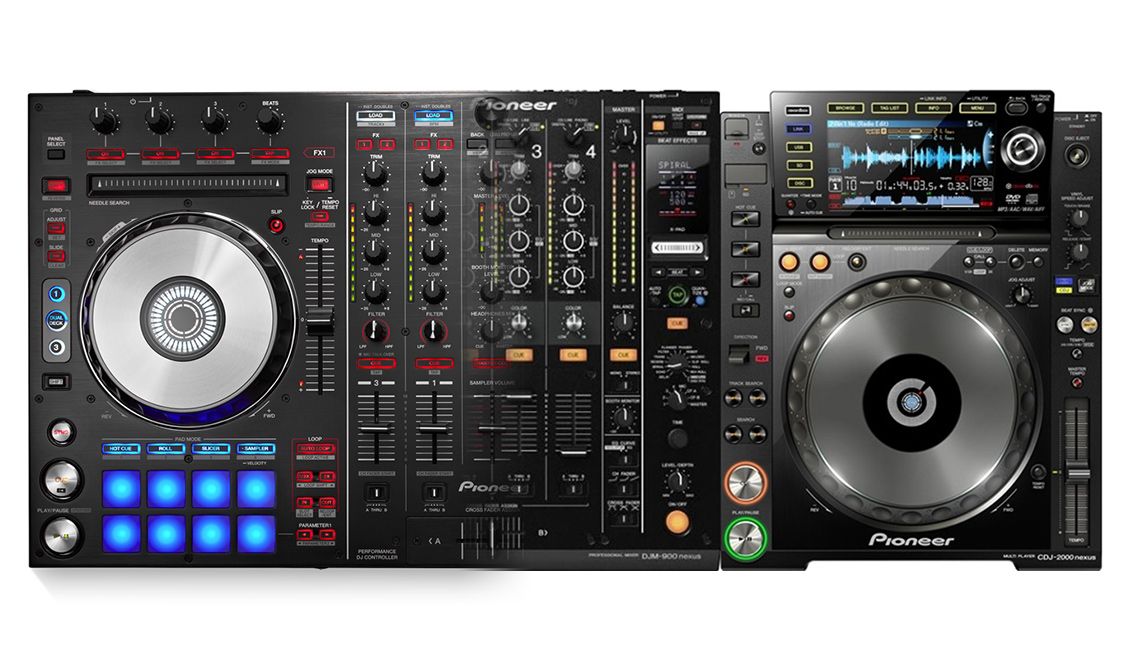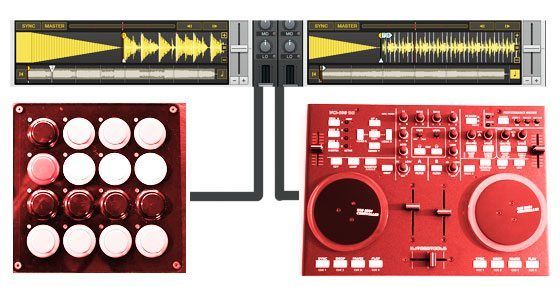
It was not that long ago that even the thought of a single controller sent DJs running into the mountains with fear. Now that many of our readers have successfully embraced and conquered their first controllers, you are probably thinking about adding a 2nd controller to your rig. This raises the legitimate question: “How do I set up multiple controllers in Traktor? Won’t they conflict?” In this article I will show you some great new features in Traktor Pro that enable anyone to easily use multiple controllers

TSI FUNDAMENTALS

TSI

The TSI file is a map that connects your controllers’ physical knobs and buttons to Traktor’s virtual controls. We publish a few carefully maintained TSI files on our mapping page, and in the forum there are large amounts of user files that demonstrate many different ways that a person can use their controller. Importing the TSI file will set up all the connections for you, so the new DJ can get started on the road to Controllerism without a huge learning curve.

USING MULTIPLE TSI FILES

You have searched through the forums and found a TSI file for both controllers you have or possibly even built a few of your own. Chances are there might be a few conflicts between the files where each controller sends out similar MIDI messages, triggering the wrong functions. There is a simple way to fix this issue: You just need to know how to import the files.

The first time you import a TSI file, it’s a good idea to use the large import button:
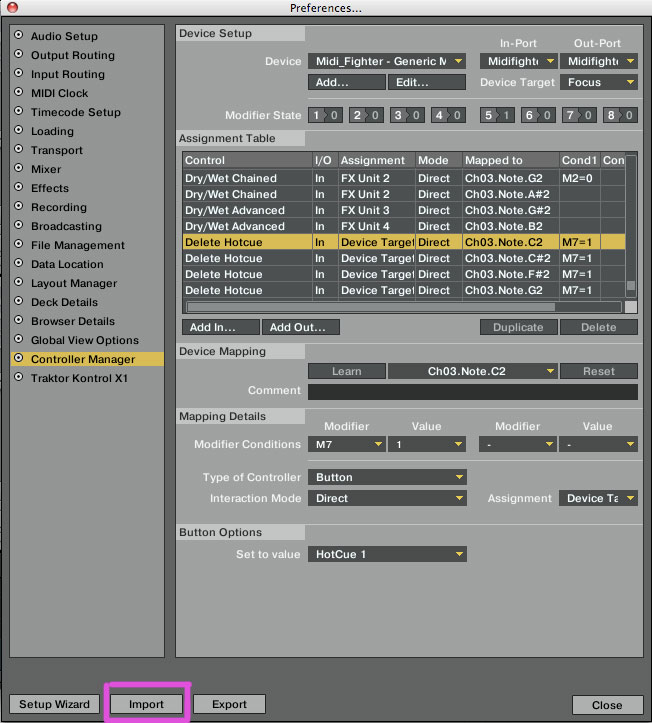
LArge-importbutton

Using the large import button allows you to bring in more than just the controller settings, including things like FX, layout, and Traktor settings that the mapping designer may require for everything to work perfectly. If you bring in a mapping using this button, it will overwrite all other mappings.

To bring in your 2nd TSI file you need to use the smaller import option:
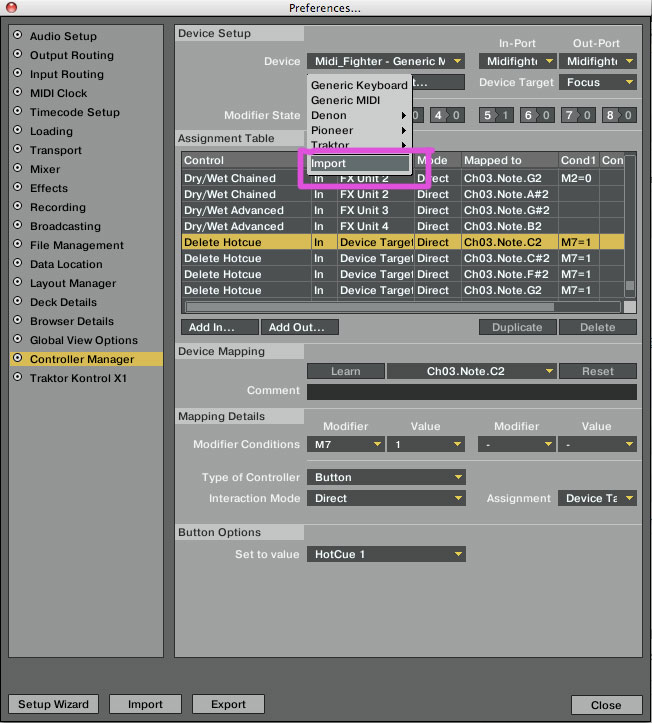
2nd-import

This option will only add the mapping to the pre-existing mapping list and won’t overwrite anything. You can only bring the mapping settings in using this button. No other settings will be imported.

To avoid conflicts between controllers, you need to specify what controller will be routed to each mapping. This will separate the controller from the others avoiding any conflicts. The Controller must be plugged in to show in the list.  Make sure to select the controller for both IN and OUT ports.
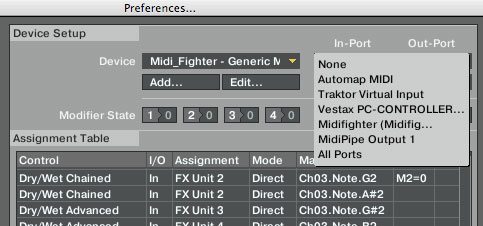
seperate-mapping

Congratulations! You have successfully loaded 2 TSI files- add as many more as you see fit.


  • Dave B

    Phew!! Just bought the midi-fighter to go alongside my vci-100se and was worried that some major tweaking would be on the cards. Panic over, just need the midi-fighter to arrive now to get straight into it, cheers

  • http://www.behance.net/cmster Cmster

    After reading this i just have to order the Midi fighter

  • LordPain

    Thank you so much for this. When you posted the midi fighter mapping, I asked for this. I will be ordering a midi fighter as soon as I get my income tax check! When are you getting more arcade button colors thou? You ran out of all the of my favorite colors.

  • junejhunkie

    almost just in time, although not really what i was looking for. i have 2 controllers. X1 and an mpd32. been having fun with it since i got the X1 last weekend. with X1 controlling it’s own function and i just added decks C & D mapped to the mpd32 with hot cues and basic function with the main function of it as my loop section and A & B as the play decks. and effects can be routed to any deck. although having problems with switching from bank to bank on the mpd32, as the parameters on an effect or knob or fader spikes up. hope that someone can solve this anomaly. so i’m limited to one bank for the faders and can’t use the full potential of this wonderful controller.

  • http://www.djmilk.com DJ Milk

    Just n the verge of adding an Otus to a X1, you could not have posted this at a more perfect time. Thanks!

  • Kawnee

    Hy, Ean
    i realize, that now, I can buy the midi fighter, because I be confuse before; Thank, your Greaaat!!!!!

  • Anonymous

    I thought this was pretty self explanatory. I had no idea this was an issue. I guess more information is a good thing though.

  • Brian

    Just bought a Kontrol x1 to use with the VCI-100, you rock!

  • deco

    just waiting for my tpro upgrade – i’ll be mapping an xsession pro and x1 so this is perfect timing. i’ll have to scower the forums to find an xsession pro mapping – or create my own. never mapped in traktor yet so i’ll have some homework once i upgrade

  • http://www.youtube.com/watch?v=lOCHxKRyPsM DJSAMMYIFICATION

    (L) , just bought me a midi fighter, and had no clue how i was going to set it up
    lifesaver Ean !
    thanks man !

  • Slater

    Just so you all know, you can buy the same arcade buttons online. I just ordered a pack of 24 white ones to go with my new midifighter and they were like 1.70/ea + 9 bucks shipping for the whole lot of them (although it’s from Korea).

    But I was definitely running into problems importing multiple controllers, the small import button is what I needed all along… doh

  • http://www.celtic-dj.com celtic dj

    wow,,,was working all day (yesterday) setting up my reloop controller with m-audio’s trigger finger and was amazed how simple it is,,,

    great article,,,

    thanks !

  • Pieter

    I have problems when I use more than 1 controller in ableton, on the same midi channel, any solutions for this??
    You would help me a lot!

  • a.d.j.

    You guys never cease to amaze me with your mind reading skills. I love this blog.

  • jaysum

    does a modifier from one tsi affect others? e.g. is the shift on midifighter usable as a shift globably, or will each tsi have it’s own 8 modifiers? anyone…..

  • http://tos.network.in.rs ToS

    Pieter, you can use some MIDI replicator software and MIDIyoke.
    Try “MusicLab MIDI Connection Center”.

  • http://www.myspace.com/tiotcmusic tiotc music

    Totally amazing yet again DJTT come up with the goods !! Just gotta order my midi fighter when the buttons come back in stock !! :)

  • Joe

    please please please test this sort of hardware in torq.

  • Fyoog

    This article was perfect timing as I’m just starting to build my digi set up so thanks guys, sterling work. VCI SE and Midi Fighter were on the hit list.
    Just one (possibly stupid) question, if i am using the SE mapping 3.0 and also connect the Midi Fighter with Ean’s mapping for Traktor from the forum does it mean that all of the functions will work on the SE and the MF, ie I have a PLAY & CUE button on the SE and MF, I have the option of the 8 cue points on each etc?

  • http://www.frechefruchte.com SysteMattiK

    I will be using Otus (with Boogiepimps Mapping) & Midifighter and they really compliment each other. Midifighter is absolutely priceless when it comes to triggering hot-cues & having fun.

    Just need to fix the root-key issue with midifighter as I think my son managed to mangle the settings in the editor mode. doh!

    Nice feature article, this is exactly how it gets done. : )

  • Dan

    Just wondering if DjTTs has plans for a killer standardized Midi Fighter mapping to go along with the pre existing 3.3 SE mapping?

  • Michiel y Gil

    RTFM people…

  • Pieter

    [quote comment="27714"]Pieter, you can use some MIDI replicator software and MIDIyoke.
    Try “MusicLab MIDI Connection Center”.[/quote]
    Thanks a lot!! I’ll try it out immediately

  • Marvelous Mixin Miguel

    junejhunkie I used akai pad controllers in the past with Traktor. Check out page 16 in the mpd32_reference_manual_v1_02

    Hope this helps.

    Miguel

  • jasonmd2020

    “does a modifier from one tsi affect others? e.g. is the shift on midifighter usable as a shift globably, or will each tsi have it’s own 8 modifiers? anyone…..”

    I think the modifiers are global. A shift on one device should affect all controls you have set to the same modifier.

  • http://turntablepoetry.com/blog dj professor ben

    MIDI fighter and VCI-100SE play very well together though there is some duplication obviously (extra “Play” button, sync, etc). But the dupe doesn’t get in the way, and there doesn’t seem to be any added latency — pressing Sync on the VCI immediately lights up the corresponding light on the MF, for example. As long as your USB bus can handle it, you can have multiple devices thanks to traktor pro’s MIDI routing — there’s no confusion because the program isn’t trying to listen to different ports for the same signals. I’ve been messing around with 5 controllers at once now with no problems (yet) — VCI, MF, m-audio x-session (for volume faders and EQ for decks C+D), Trigger Finger (mostly for cue jumps and some effects), and my latest toy, a crazy video game flight stick that I got on Amazon for $25 and I am triggering effects with. The latter is a ton of fun btw, I will probably share the mapping once I get it all ironed out.

  • djhaze_mtl

    This is cool but if i have a second vci-100 my first is set up with the latest TSI techtools SE (Traktor pro). If i want the second vci-to control the deck C and D for everything and for loading track but I want the first one to be controling the effects for all 4 deks ??. Right now the second VCI sends the same Midi messages as the first.

  • Zac Kyoti

    [quote comment="27733"]I think the modifiers are global. A shift on one device should affect all controls you have set to the same modifier.[/quote]
    Modifers are NOT global. If you need to use global functions you need to set up separate modifiers in each controller (they can have the same name though, for ease of programming). Traktor sends info to all the connected controllers though, so as long as you have say, an “FX on” output mapped in both controllers, turning it on on one controller will give feedback on the second.

  • Liveperformerz

    thanks alot
    Damn Ean , i swear u guys read minds

  • Pete

    I gave up on modifiers long ago…instead i just buy more controllers! More button more knobs. Anyway …

    I may have mentioned this before…since we are now using mult controllers you notice the wave of slim line or nano or portable contorllers (you did a whole article on korg vs akai)…the biggest problem is the mini usb connections. They fall out a lot, they break…they are just unreliable. What can DJTT do about this…I own two of your USB Cables. You nailed it with those ( gold plates, double ferrits, short length, and solid fit connection. PLEASE make these for MiniUSB…or even get a head start on 3.0 or micro USB. I think you would profit well. Unless there is a reason.

  • http://www.deadmanzkassette.com jasonmd2020

    Me: “‘I think the modifiers are global. A shift on one device should affect all controls you have set to the same modifier.’”

    Zac Kyoti: “Modifers are NOT global. If you need to use global functions you need to set up separate modifiers in each controller (they can have the same name though, for ease of programming). Traktor sends info to all the connected controllers though, so as long as you have say, an “FX on” output mapped in both controllers, turning it on on one controller will give feedback on the second.”

    Thanx for the clarification Zac. I’m still wrapping my noggin around programming the modifiers myself.

  • Mario V

    Good article Ean!

    When I was trying to figure out how to get my VCI and Kore 2 controller working in tandem, I simply mapped the Kore rotaries individually. I had no idea each channel TSI import could be done separately. Kore 2 works out great for dedicated FX and freeing up The VCI’s track arrow for other functions.

  • http://thereverand.com The Reverand

    WOW Excellent. I can start working on a TSI for the VFX-1. Even though I really don’t have any interest in using Traktor with my VCI-300/VFX-1 setup.
    The challenge of getting good TSIs for the combo is just too enticing.

  • wax

    I just added a korg nanopad to my trigger finger and its transformed my digital set… looking forward to adding one more to really go to town

  • deejaygee

    This was such help it is not funny.New to digital djing this was a god send got my midifighter and all is working well .The things im doing is beyound my expectations love it thaks djtechtools and Ean you guys are the best . Caint wait for the firmware upgrade kit to come back in stock then i will be set .

  • JoeJaguar

    Just incorporated my iPhone into my set with this tip. Thanks djtt!

  • http://www.myspace.com/popnfreshproductioons PopNFre$h

    you can also do this with midi-ox
    can be useful for other software that doesn’t have this option.

  • http://www.myspace.com/popnfreshproductioons PopNFre$h
  • Dom

    how did you get the funky red colour?! surely cant have been spray paint as this would make the arcade buttons stick together?

  • Gabriel Lima

    MANY MANY MANY MANY THANKS EAN !!!!
    YOU ARE THE MAN!

    OBRIGADO!!!
    GABRIEL FROM BRAZIL

  • Marius Martin

    omg…how could the small import button escape my notice that long?
    makes adding my controller to my buddy’s setup much easier. ^^
    thanks for the advice!

  • TimoDawson

    I was really wondering if it is possible to have a ‘shift+’ function assigned to a button in Serato?

    I am using the midi fighter to trigger my hotcue’s on 3 decks and I would like to have a shift button so I can add a ‘delete cue/write new’ to the same buttons I use for playing a specific cue by pressing a general shift button.

    Feedback would be GREATLY appreciated….

    I wrote an Ipad app for using all the other major Serato functions but for cue’s I prefer zero latency so I would really like to have my midi fighter working like it should. I know it is possible in traktor but that is also ‘regular’ midi and not native support so I figure it can be done? I just don’t know how.

    I use Osculator with my Ipad to translate midi signals so perhaps I can do it using that program?

  • DJ FiL

    Hi. This is a great idea. I am trying to do but i didnt found the “smaller import option”. Is this possible to all versions of traktor? I am using Traktor Scratch pro ver. 1.1.1.001. Is this the problem? 

    Thanks a lot!

  • EntroP

    can u also use one controller and the computers keyboard?

  • EntroP

    can u also use one controller and the computers keyboard?

  • EntroP

    can u also use one controller and the computers keyboard?

  • EntroP

    can u also use one controller and the computers keyboard?

  • EntroP

    can u also use one controller and the computers keyboard?

  • EntroP

    can u also use one controller and the computers keyboard?

  • http://www.toefltestsuccess.com/forum/viewtopic.php?f=4&t=28268 Deon Birkhimer

    abbe…

    Hey guys love the blog I will add this site to my favorites and visit again .. :)…

  • DJGusOKeeffe

    why isn’t this working for me :( I’m using a Korg Nanopad and I had to install 3 different .tsi files, I’ve done all the ins and outs, but it’s not working, can anyone help me with this?

  • DonmecZ

    step 1) Read the article in it’s entirety twice.
    step 2) Plug nano via usb
    step 3) Launch traktor and go to preferences/controller manager
    step 4) Select your device from the drop down menu (Korg nano pad)
    Step 5) Select the in-port and out-port (Korg nano pad)
    Step 6) Click the add button. select option “import” from drop down menu
    Step 7) Locate the .tsi file of your choice
    Step 8) Load a track into any deck, hit play, blast the line fader up.
    step 9) Load 2nd track on opposite deck and beat match. cut of fade.
    step 10) Lather, Rinse, Repeat. The cops should be at your door in 10-15

    Cheers :)

  • DonmecZ

    Ideed!

  • DonmecZ

    I tried on both v 2.0.1 and v1.2.4 and I had success… maybe you need to upgrade? not sure….

    Good luck man!

    Cheers!

  • Ray

    Can you use a midi fighter and a kontrol S 2 together????

  • Andrew

    Hi, how exactly do you  ”specify what controller will be routed to each mapping” ?. and which controller has to be selected for both IN and OUT ports. Thank you! 

  • Andrew

    Hi, how exactly do you  ”specify what controller will be routed to each mapping” ?. and which controller has to be selected for both IN and OUT ports. Thank you! 

  • http://www.djtechtools.com/2012/09/23/review-keith-mcmillen-quneo-3d-pad-controller/ DJ TechTools  |  Review: Keith McMillen QuNeo 3D Pad Controller

    [...] browsing and track loading controls, I liked to use it with a second controller. (Here’s how to set up multiple controllers in Traktor Pro_kmq.push(["trackClickOnOutboundLink","link_50635125cea1a","Article link clicked",{"Title":"how to [...]

  • Noe

    I have a Kontrol S2 and I wanna use the Midi Fighter to control effects (with the instant gratification TSI) So which one need to load first??? I connect my S2 first and it works perfectly, then i use the little import button to add the Midi Fighter but this little button dont load the fx settings What i’m doing wrong? Anyone can help me. A youtube video would be helpful for new users like me.

  • SpinDoctor D’Ville

    I’m trying to setup a Numark 4Trak and a Numark NDX900 on Traktor (1 Laptop) and Im having a hard time. Can anyone help?

  • http://twitter.com/Antifmradio Antifmradio

    Seems there is a problem when trying to have two devices that control REMIX DECKS attached to traktor at the same time. I have an F1 and a MF3D with mapping for remix decks. Anything i plug in the F1, its unresponsive and this is a problem in Traktor. It has nothing to do with the units. If i remove the mapping for the MF3D and unplug it, i can use the F1 with no problems at all

  • Mike

    Hey does your setup works now , i have the Same

First Time?

This site is dedicated to digital DJs. We develop performance tools and teach cutting edge techniques that enable creative expression. Visit tutorial videos on youtube, equipment reviews in the blog and a very helpful community in the forum. New articles every Mon, Wed, Fri.

RSS DJ TechTools Forums

Review: Hot Hand USB Wireless MIDI Controller

When it comes to MIDI controllers, physical motion can be a hard type of input to understand and access - especially when it's completely disconnected from a physical controller. What if there was a controller that simplified motion - not quite as complex as Read More...