Melodyne Editor’s Direct Note Access for DJs

After more than a year of big-time hype, Celemony’s Melodyne Editor software with Direct Note Access (DNA) is here. So… should you have believed said hype? DNA promised to allow Melodyne Editor users to manipulate the pitch, length and timing of individual notes within polyphonic material. In the case of this version of the software, that polyphonic material is meant to be chords played on a piano, synthesizer, guitar, other stringed instruments, etc. However, it’s tempting to get one’s hopes up about Melodyne Editor as the be all and end all of isolating vocals and instrument parts from stereo mixes, so that DJs and remixers could have carte blanche to any part of any track they desire. After the jump, we explore and the can-dos and the can’t-dos of Melodyne Editor.

Let’s Get Ready to Jumble

Melodyne began as a unique audio editor that could not only correct the pitch of audio material such as a lead vocal or guitar solo, but also gave the user unprecedented manipulation of the length, timing and pitch of each note of a piece of monophonic audio. With Direct Note Access (DNA), Melodyne Editor moves deeper into polyphonic audio editing.

The implication that this advance has for digital DJs, especially as four-deck DJ software becomes more widespread, is that we will have greater ability to rip individual parts out of songs, edit their notes and keys, and run them as loops or tracks in a third or fourth deck during a set. Remixers will also have a world of new options for working with stems of songs if they’re available, and greater flexibility to remix without stems.

Test: Manipulating Single Notes Within Chords
SynthChords

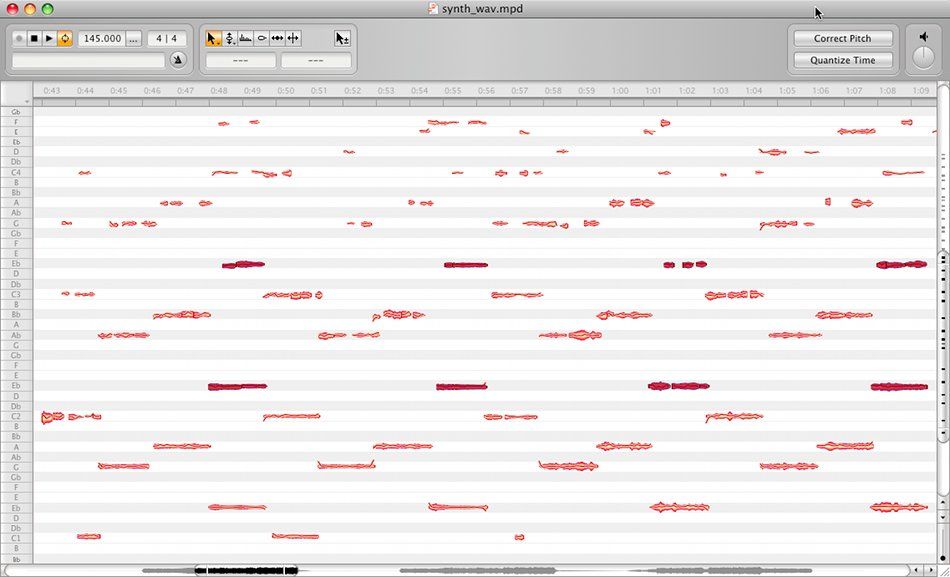
DNA’s stated purpose is to open up each individual note within a chord so that you can edit its placement, note length and pitch, giving you the ability to construct virtually any chord you want out of the original. In my tests, Melodyne Editor did this just about perfectly.

If you have access to a song’s stems, or you have a track where chords or even vocal harmonies are played back by themselves in the mix, it’s easy to take control over the notes in those chords and make them do your bidding. Just drag the audio in the Melodyne Editor window and make sure the Algorithm menu is set to Polyphonic.

The software arranges “blobs” of audio notes in rows according to the pitch of each note. You can edit note freely, or choose a scale so that Melodyne will  restrict  the movement of the blobs to only notes within that scale. You can also choose to lock in the notes’ timing with sophisticated quantization meant to preserve the musicality of a performance.

The only problem with using DNA is that Melodyne often detects notes that are actually just overtones of other notes. However, the manual and Celemony’s online videos show you how to deactivate those false notes and merge their audio with the proper notes before you edit them. In my opinion, DNA is a huge advantage and creative oasis for remixers and DJs looking to manipulate music in new ways.

VERDICT: Success.

Test: Pulling Instrument Parts Out of Full Stereo Mixes

TrackParts

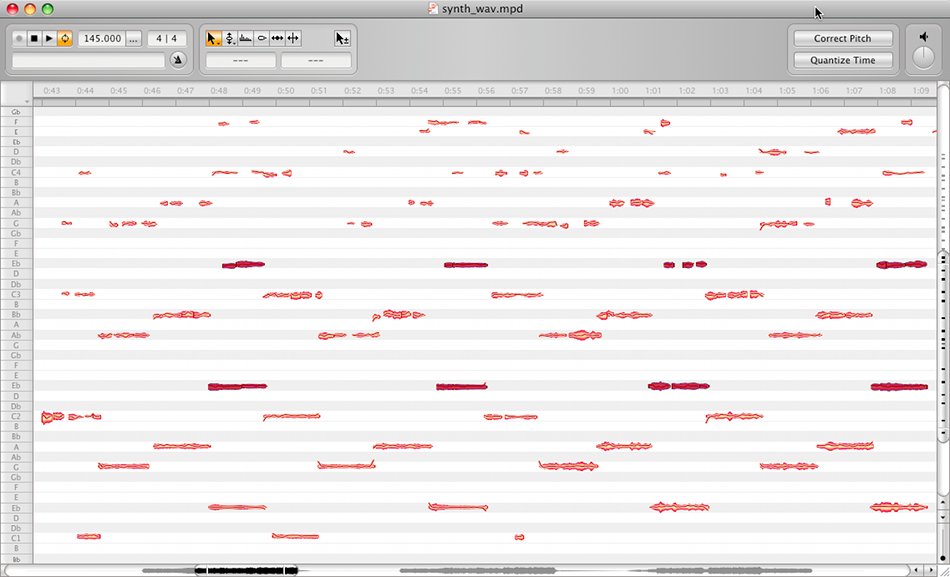
Here we’re getting into territory that stretches the limits of Melodyne Editor’s power. Celemony doesn’t claim that you can use this software to pull individual track parts out of fully mixed stereo music files. However, when the conditions are right, you definitely can do it.

In the recent Remix Without Stems article, we describe how to use EQing to isolate parts of tracks to be used in a remix and used Miike Snow’s “Animal” as an example. With the benefit of Melodyne Editor, it’s possible to isolate track parts that are far and away cleaner that what you can achieve with only EQs. You’ll have the best results with songs or breakdowns of tracks where only drums and one or two other instruments are playing at once. Using “Animal” again, we were able to isolate certain melodic parts entirely. Once a part is isolated, you can edit it within the context of the rest of the track, or delete all the other audio and use those parts on their own (see the accompanying video).

This is another fantastic tool for remixers and DJs, but don’t expect this to work across the board. With very dense mixes or when vocals are present, the results are less – or not at all – useful.

VERDICT: Partial success.

Test: Ripping an A Cappella Vocal from a Song
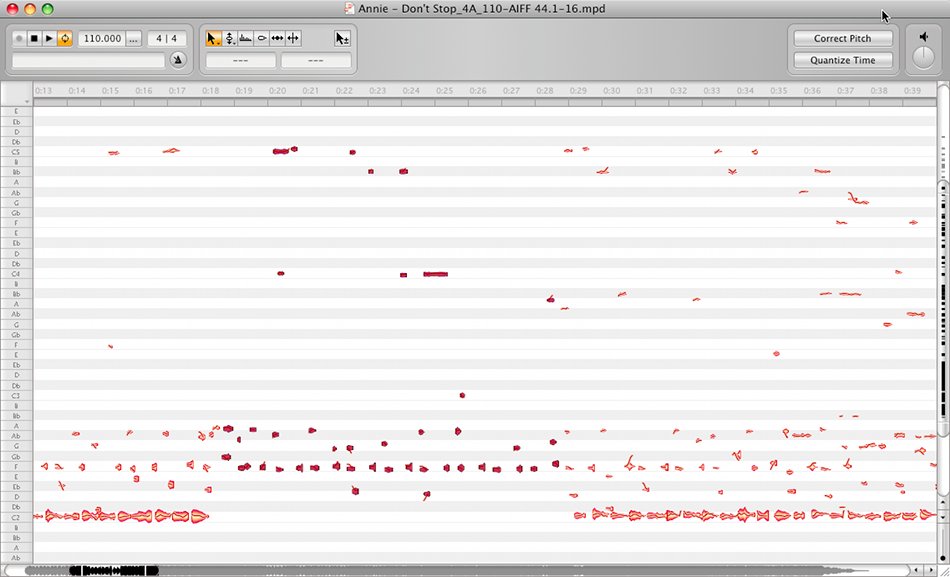
Vocal

Bootleg remixers will be able to claim total victory when a piece of software is magically able to pluck a vocal out of a song for them to do with as they please. I emphasize “when.” While the signs are there that someday we’ll have the technology at our fingertips to pull vocals and any other part out of a stereo mix at will, Melodyne Editor is not there yet. The exception of course is if you have a simple monophonic vocal playing over just some drums or maybe a simple bassline. But for the majority of songs where the vocal sits amidst a complex bed of music, don’t count on Melodyne Editor being able to salvage a clean vocal for you (see the video).

Next software update perhaps? It took Celemony more than a year from the announcement of DNA to ship the finished version of Melodyne Editor, so the next big advancement may be a ways off, but DO get your hopes up for the future.

VERDICT: Not in this go-round.

Further Details

• Street price: $299 US

• Operates as stand-alone software or a plug-in (VST, AU, RTAS)

• Compatible with WAV, AIFF, SND and SDII audio formats. Not compatible with MP3 or AAC

• Exports audio arrangements as MIDI files

• Manual or automatic pitch and timing correction

• Transposition, pitch-shifting and time-stretching

• Edit melodies, harmonies, rhythms, note volume and vibrato

• OS X/Windows
37 Responses to “Melodyne Editor’s Direct Note Access for DJs”

  1. KIDHACK

    February 17th, 2010 at 2:40 am Quote

    uhh, what happened to the video?

  2. markkus

    February 17th, 2010 at 3:12 am Quote

    It’s back. There was a brief delay as I added an updated video.

  3. Double DutchDj

    February 17th, 2010 at 3:32 am Quote

    Awesome! I now understand why my producer buddy has been banging on about melodyne software. Hmmmmm the possibilities.
    ++++
    I’m loving these production orientated posts that are popping up, I’m only a beginner, so having the different aspects of production you’ve covered so far broken down ala techtools style is really helpful, great post! (I know some people might just wanna see stuff about dj’n, but I think it’s quite important to at least know some aspects of how the music you love is made)

  4. DennisJ

    February 17th, 2010 at 4:53 am Quote

    so is this the first software of it’s kind?

  5. Anonymous

    February 17th, 2010 at 5:30 am Quote

    oh man this editor is the shite. very wide possibilities.

  6. Yul

    February 17th, 2010 at 8:17 am Quote

    Thanks for the review. I was currently looking about info about this software (like many ‘would I be able to extract vocals’ ?). And you’ve just covered what I wanted to know.

    *****

  7. ZST

    February 17th, 2010 at 9:01 am Quote

    hmm…
    if the vocal extraction doesn’t work, how is the quality of standart pitch correction then?
    i think this tool is rather useless for djs, as you already could extract vocals/beats with phase inversion before.

  8. Hipnotikk

    February 17th, 2010 at 9:06 am Quote

    i think it should be described as a program for producers, not djs.

    big hype on it, really want it to live up to it!

  9. ejac

    February 17th, 2010 at 9:43 am Quote

    so is this the first software of it’s kind?

    that processes polyphonic complex sound, I think so yes. Autotune, melodyne, and others existed before, mainly for single instrument or voice editing.

    BTW: I get these posts in my online newsreader (bloglines), and there the video didn’t get updated.

    Very cool tool, certainly very useful.

  10. Tical

    February 17th, 2010 at 10:11 am Quote

    Street price: $299 US?????

  11. Dragonfyre

    February 17th, 2010 at 11:26 am Quote

    Street price: $299 US?????

    Yup.

  12. Anonymous

    February 17th, 2010 at 2:06 pm Quote

    Great article, as always, many thanks!

    I’m really excited about this software – the asking price is a bargain I reckon given the r and d cost to get this to market. It’s a game changer.

    And as for whether it’s a Dj or a producer thing – surely as the line is becoming more and more blurred as time goes by that to me is a moot point these days – it’s been said before many times that the only way to distinguish oneself from the pack is to be as creative as possible with the tracks we want to play then tools like this one are another way to achieve that. Creating unique mixes is what it’s all about now, particulary in this age of sync and harmonic mixing support.

    This is a whole new type of synthesis. Exciting times!

  13. Daveq

    February 17th, 2010 at 2:07 pm Quote

    Oops that anon post was me by the way :-)

  14. jorge muniz

    February 17th, 2010 at 2:49 pm Quote

    this is just too good to be true

  15. J450N N4ME

    February 17th, 2010 at 4:43 pm Quote

    Many thanks for the awesome post. I caught wind of this program from your blog and now here you go de-mystifying me on it. Thats what I love about this blog; you teach me things I never knew, get my mind racing and then bring me back to earth. Can’t get these gems anywhere else on the interweb.

  16. Mark Davis

    February 17th, 2010 at 9:26 pm Quote

    “Creating unique mixes is what it’s all about now, particulary in this age of sync and harmonic mixing support.”

    I’m surprised at how few people use harmonic mixing databases to easily produce a capella blends with existing instrumentals, or remix with loop-based software. If you can cleanly pitch shift a capella, virtually the entire universe of instrumentals is available for blends and mashups.

  17. Kool Moe Dee

    February 18th, 2010 at 1:12 pm Quote

    Blah blah – harmonic databases! lol
    Just mix the songs using your ….. ears (omg)

  18. ejac

    February 18th, 2010 at 1:38 pm Quote

    yes, i agree, stop this madness, its devilish them harmonics, i don’t see the potential or don’t really get it and it makes me feel not as smart as I would like to feel, so it must be evil and should be belittled and laughed with … aaahhh .. I feel superior again :p

  19. Mark Davis

    February 18th, 2010 at 4:40 pm Quote

    If you “just use your ears” to find harmonically compatible mixes, then you are wasting your time because 75% of randomly combined mixes will be harmonically incompatible. If you use a system to avoid dissonance, you can be four times as productive in this effort.

    This only helps, of course, if harmonic compatibility is important for you.

  20. BentoSan

    February 18th, 2010 at 10:30 pm Quote

    Also worth checking out is this service for making stems – looks to be much better than Melodyne but its gonna be expensive ! http://www.soundonsound.com/news?NewsID=12576

  21. Dee Jay Flic

    February 19th, 2010 at 12:07 am Quote

    Just when I think this site can’t get any cooler, you post this video. I have learned endless amounts of knowledge from DJTT. Thanks again.

    DJTT should do a whole branch for software. Maybe even do a Audio Mulch demo for us.

  22. Kool Moe Dee

    February 19th, 2010 at 1:17 pm Quote

    If you “just use your ears” to find harmonically compatible mixes, then you are wasting your time because 75% of randomly combined mixes will be harmonically incompatible.

    Do you know how anal you sound

    People been mixing since the 70s without the aid of mixed in key, melodyne etc.

    Enjoy the music

  23. Mark Davis

    February 20th, 2010 at 9:48 pm Quote

    Of course people have been mixing since then. Those who use a system for considering mixes, however, can be four times as efficient in preparation. For those who prefer spending time refining their segues to just finding compatible mixes, a system is more efficient.

    For those who only segue “free beats,” and those who avoid melodic segues, harmonic mixing is worthless. Even worse are those who beatmix clashing keys. But if you segue melody with any artistry, harmonic mixing is essential.

    You can mix harmonically through trial and error, or by using a system to become 4X as efficient. Key detection software may be 70% accurate, which is considerably better than 25% compatibility for random combinations. Professional musicians may be over 95% accurate.

  24. Drutski

    February 22nd, 2010 at 3:38 pm Quote

    Release date? I think we’ve been waiting for this long enough. I know this piece of software is going to attract controversy with regard to copyright law and ‘purists’ who see every technology that makes making music production easier, and more accessable as destructive to music. I personally am going to steal this software as soon as possble and use it to deconstruct the songs I love, analyse them and learn how to be a better songwriter. I might even buy it if it lives up to the hype.

  25. Let_it_Be

    February 23rd, 2010 at 3:21 pm Quote

    Yo Mark Davis, not trolling at all, but just wanted to say your scientific thinking is way off base.

  26. Mark Davis

    February 24th, 2010 at 12:47 am Quote

    Yo Let_It_Be:

    It’s simple math: With 24 possible keys, only four produce perfect harmony. Two others produce “reasonable harmony,” even with the benefit of the doubt (according to the 1980’s pioneer “Harmonic Keys” in Florida). If you only consider compatible keys, instead of trying and rejecting incompatible keys, your selection process is more than 4X as efficient.

    Since I created the Camelot Easymix System in 1991, and since it has been adopted by DJ’s worldwide, please show me where I am “off base.” Thanks!

  27. Mr.MB

    February 24th, 2010 at 1:07 pm Quote

    Mark Davis is a DICK! He might be right but still a dick. Funny thing is I didnt know you created the Camelot Easymix System in 1991. To bad I never herd of it…oh well. All the rookie remixers out there (like 95% of us) love to try at somthing, finding out what works/doesnt work all on our own not giving a siht that its 4 times less productive. What are you a machine in a factory? Experiencing the trip is just as important as the destination. How ever long it takes to get there.

  28. Mr.MB

    February 24th, 2010 at 1:09 pm Quote

    Im gonna love the hell outta this program when I get it.

  29. Kool Moe Dee

    February 24th, 2010 at 4:18 pm Quote

    Don’t forget Mark is selling a database of song key’s – it’s his business.

    Fair play to anyone who uses key data – but my point was that by the time you are ready for a club, you should just ‘know’ what works

    Talking about efficiency just sounds lame – when you’re off your nut efficient is the last thing on your mind.

  30. Mark Davis

    February 27th, 2010 at 4:10 am Quote

    Perhaps I am wrong, but I believe the only people who just “know” what will work together harmonically is the blessed person who has perfect pitch and knows the harmonic structure of every song on his playlist.

    Harmonic mixing is most useful for the professional who is not off his nut, and wants to be as productive as possible. Time is money.

  31. Anonymous

    February 27th, 2010 at 9:34 am Quote

    and the time i would save would have to be spent to buy your stuff mark?
    =P

  32. Mark Davis

    February 27th, 2010 at 1:36 pm Quote

    Could you rephrase the question? There are software solutions that do not involve buying my stuff.

  33. Juraj

    February 28th, 2010 at 8:21 am Quote

    Actually, this is great analytic tool.

    How does it work? Suppose it is a kind of multiband EQ, which passes very narrow freq – just a tone, everything else is cutt-off.

    The result is you can hear the whole song separated to tens of channels. As far as at every “note” there is a complete mix of sounds, you can not shift them with good results, unless there are only solo instrument sounds (btw. with pitch you change the speed as well, so even here it is problematic).

    However, for those of us, who do not have perfect musical ears, it is a great tool to find harmony in song, basic chord patterns, tune of simple melodies, harmony. And this can be developed further in a creative work.

  34. Xolunt

    March 3rd, 2010 at 8:56 am Quote

    I dont understand how someone can be praising this new software prior to it being released in one breath then take a shot at a guy who laboured and dedicated time to developing software that many many dj’s use today. Some of the dj’s using MIK have been around since the 70’s, what does that tell you!

  35. Audio editor

    March 9th, 2010 at 2:59 am Quote

    MP3 stands for MPEG layer 3, this is a form of compressed audio format. The compression ratio is 12 is to 1, the main purpose was to produce high quality audio output. Soon, mp3 file format gained popularity and made inroads in the hearts of music lovers. The music lovers all over the world have a huge collection of mp3 files because of its popularity. Due to this the demand for mp3 editor software’s shot up. An mp3 editor software gives the music lover so many options to personalize the music that it’s virtually impossible to ignore its importance when it comes to reorganizing and restricting your favorite music.

Leave a Reply

  1. Quote selected text

First Time?

This site is dedicated to digital djs. We develop performance tools and teach cutting edge techniques that enable creative expression. Visit tutorial videos on youtube, equipment reviews in the blog and a very helpful community in the forum. New articles every Mon, Wed, Fri.
In the Store
 

Categories:
Follow us:
You're going to need Flash 8+ and JavaScript to use this site. How'd you get this far without it?

Dig through the Crates

Readers are Saying

  • Double DutchDj: Right, here’s why the zero 4 is simply the best for what I want, firstly I can control Traktors Clock...
  • PlanetDJ.com: [quote comment="30788"]What happened to the Stanton 680? They were the industry or club standard… now...
  • azunderg: Do I download the firmware upgrade software directly from renesas or do you have link to it?
  • Anonymous: [quote comment="34512"]Too bad soo many entries do have other songs then listed. I thought it would be a great...
  • Dude: I’ve owned most of these products, and the AKAI LPD8 is by far my favourite. I use 2 LPD8s, though an LPD8 coupled...

RSS Hot Topics in the Forum

  • Hercules RMX Traktor DUO Mapping PLZ (MacBook Pro)
    I cant find a mapping for my hercules and plus i dont if the buttons are suppose to light up? HELP? :confused: […]
  • mac mini with dual monitors..
    hello everybody! i plan to sell my tower pc and to buy a mac mini. i really want two monitors because of vsts beeing inside my arrangement view... […]
  • Beatgridding help on a track.
    Dear all, Can someone give me some tips on beatgridding whith traktor this track : Image:... […]
  • Drugs
    I once joked that cause I was pill'n on ADHD meds all threwout my childhood I was simply graduating to the extra strength stuff with adulthood (with... […]
  • Track Selection Question
    This is a question i've had for a while and with Ean's posting recently about the "time line of the dance floor" it seems like a good time to ask. If... […]