


DIY Mod: Cuban MIDI Crisis
Tired of the plastic mainstream controller offerings, I decided to take things into my own hands and explore the world of DIY controller construction. As most of our readers will know, the Midifighter DIY kit features optional analogue inputs that are ripe for modification and an easy place for the newbie controller maker to start. I decided to dedicate my mod to the birthplace of salsa, Cuba, by enclosing the results in a cigar box and toping off the theme with some tasty wooden knobs. This article will demonstrate how to do assemble your own personalized controller that is sure to catch eyes and requires just a few basic tools. VIVA LA MODIFICATION!
Step 1: Choose your weapons
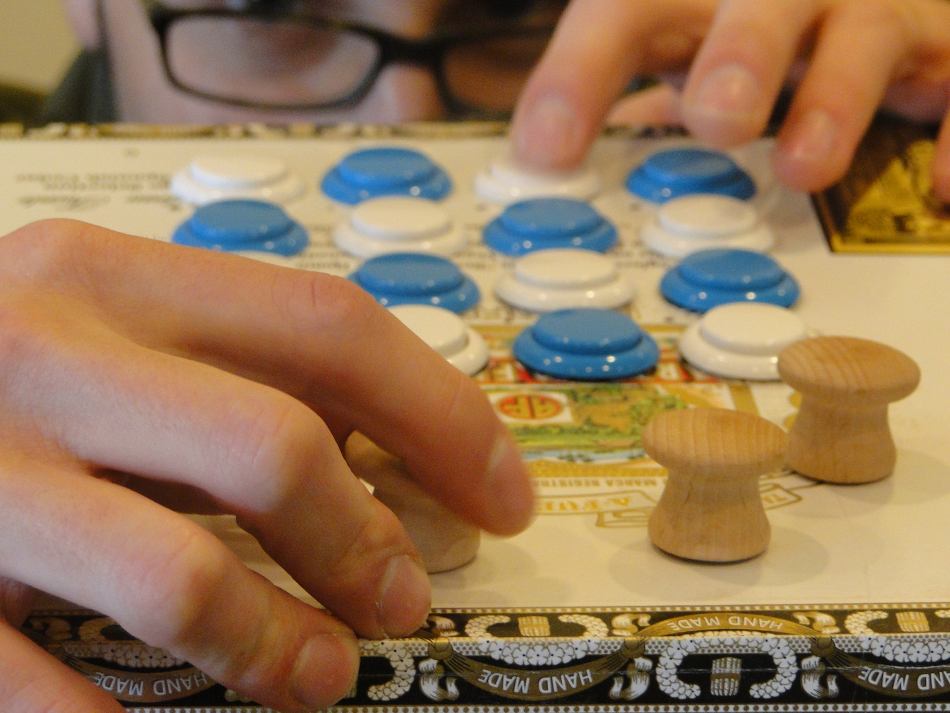
The Midifighter comes with expansion slots for 4 analog and 4 digital controls. Possible analog examples include potentiometers, faders and even a modern game-console joystick. Knobs that have a physical start and end point are called potentiometers or ”pots,” while endless knobs are called encoders. Digital controls examples include switches, rotary encoders or touch strips. For this mod, I choose to add four panel mounting pots for expression. The panel mounting style of pots mean that you can secure them to the top sheet, which is easier for entry-level modders.
The best part about making your own mod is that you can choose exactly what kind of components fit your personal style. At the end of this article we list various online locations where you can purchase components, and the more adventurous may choose to take components from old appliances and boards.
Step 2: The MIDI Silo
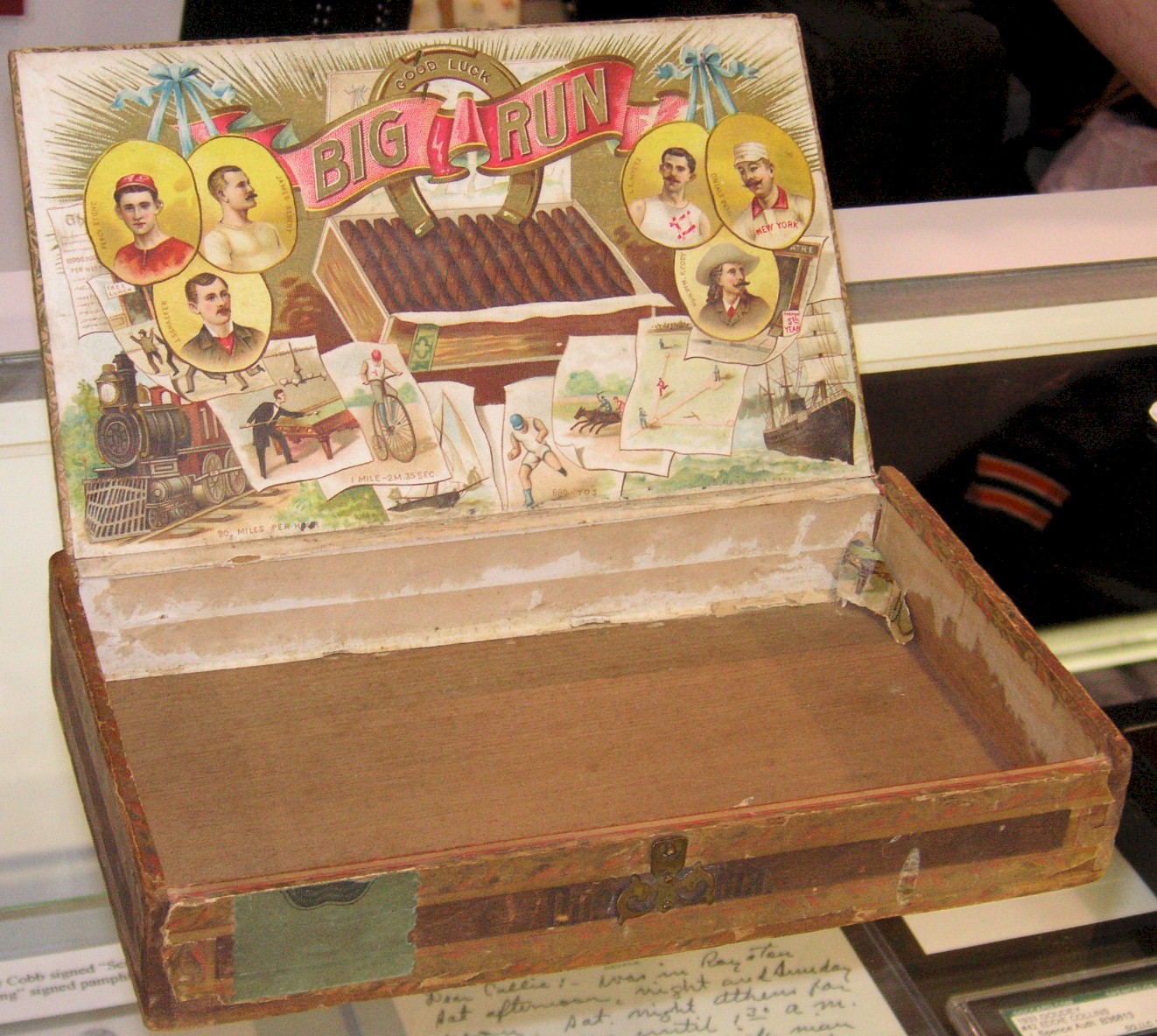
Now that you know what you want in your mod, it’s time to consider how to house it. A good enclosure will secure your new parts, minimize broken connections and maximize its visual appeal. There are many choices in enclosures, but here are a few important factors to take into consideration:
- Will the Midifighter board and components all fit? The PCB is about 5.75″ (14.5cm) square
- Will the material be safe or interfere with the components? Metal, wood and plastic are all good choices, but one should be aware of the operating temperature of the circuit (5 volts) and any chance of flammability.
- Will it attract the adoration of the opposite sex? (Optional and unlikely.)
Step 3: Plotting Trajectory
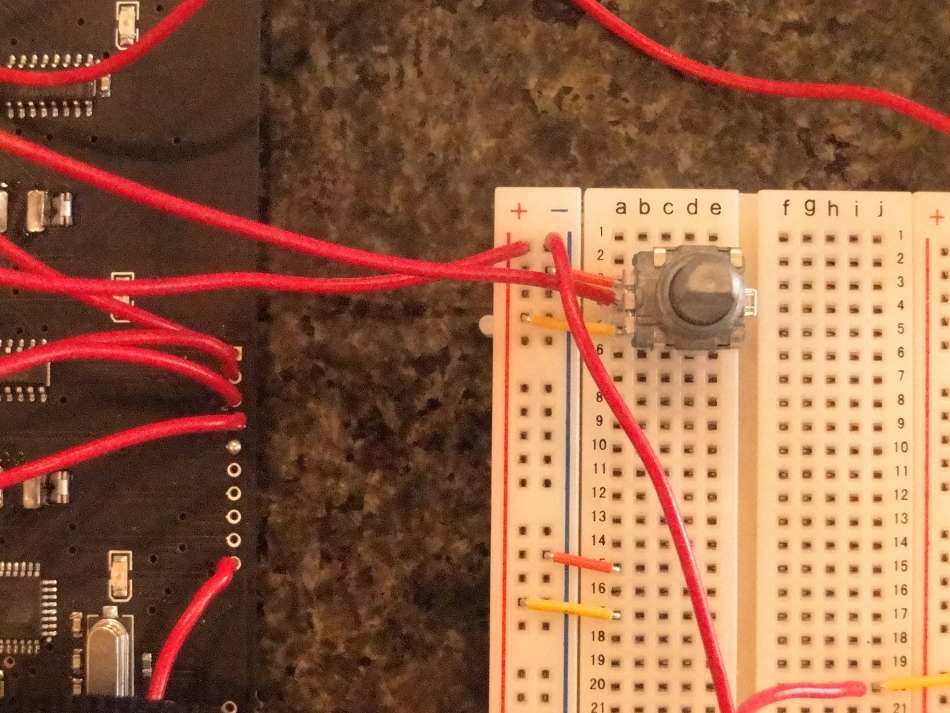
Before you start soldering, it’s a good idea to test out your components and get familiar with the wiring concepts. I recommend you use a breadboard (shown above) to do a mock-up before assembling the controls in the final box.
- Cut about 20, 4″ pieces of your wire and strip both ends of the wires by 1/4″.
- On the underside of the PCB (Midifighter Board), you will see a printed list of inputs on the right side: GRD, D4-D1, A4-A1 and 5v.
- Pull out your breadboard and you will see a negative (-) and positive (+) column on at least one side of the breadboard.
- Connect a wire from the GRD port of the PCB to the 1st row of the negative column on the breadboard.
- Now, connect a wire from 5v on the PCB to the positive column of the breadboard.
Step 4: Arming the warhead
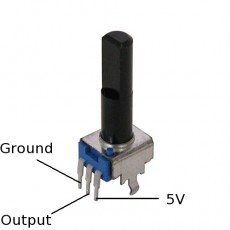
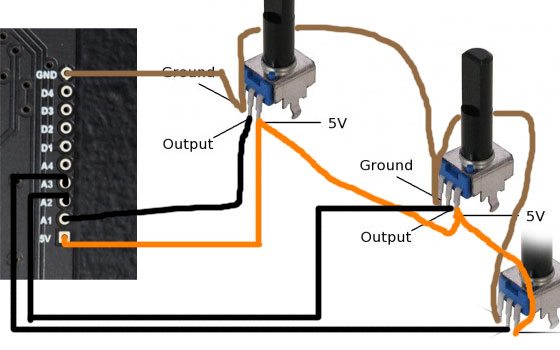
The image left shows the connection points of the pots. Some pots are different, so check the specs to confirm.
- Insert the pots into the breadboard as shown in the photo above.
- Bridge the negative column on the breadboard to the “ground” peg of your pot.
- Bridge the positive column to the “5v” peg of the same pot.
- Insert a wire from the output peg row to one of the analog inputs
- Repeat 1-4 for all pots
Existing Midifighter owners will have to upgrade their firmware to the latest version (see the forum post) to use the analog controls. With the new firmware installed, hold down the top-left button (nearest the USB connector) while plugging in the USB cable to drop the MF into “Menu Mode”. You can then enable MIDI events from the analog inputs using option 7. Remember to exit through the top-level menu to save the settings permanently. Check out the readme to get a more detailed explanation on menu mode and turning analog control on.
If all is well, your new controls should be MIDI mappable. The analog controls appear as MIDI cc 16-19 and can be assigned through your program of choice using MIDI learn; just hit Learn and twist the pot. If they are not yet MIDI mappable, check the polarity and current on the breadboard and pots using a multimeter (see below). If everything is working properly, you are ready to begin installing the components.
Step 5: Dig the Missile Sites
- Download the top plate template of the Midifighter.
- Print this document out on paper and use it as a guide to cut the holes for your arcade buttons.
- Carefully mark the center point of each hole with a sharp object, and then use a 1″ spade bit to drill out the arcade holes and a smaller bit for the light pipes.
- For potentiometers, I used a 3/8″ bit to cut holes for the pots to push through.
Step 6: Installing the Payload
Time to roll up the sleeves and turn up the heat with a soldering iron. If that sounds daunting, don’t worry- there are many good online soldering tutorials.
- Mount all of the pots to the box and snap the arcade buttons into the PCB
- Run one single GRD and one + 5V wire to your first pot. Now bridge two wires from that pot to the next pot’s GRND and +5. In this way all of the pots can share both power and ground plus your wiring stays nice and organized.
- Solder each pots output wires to one of the analog inputs to the PCB.
Insiders Tip: If you see yourself modding your Midifighter more than once, think about getting a set of male and female “headers” , and solder the female ones to your Midifighter PCB expansion port. This will give you the ability to plug and unplug wires instead of soldering directly to the PCB.
The Blueprint
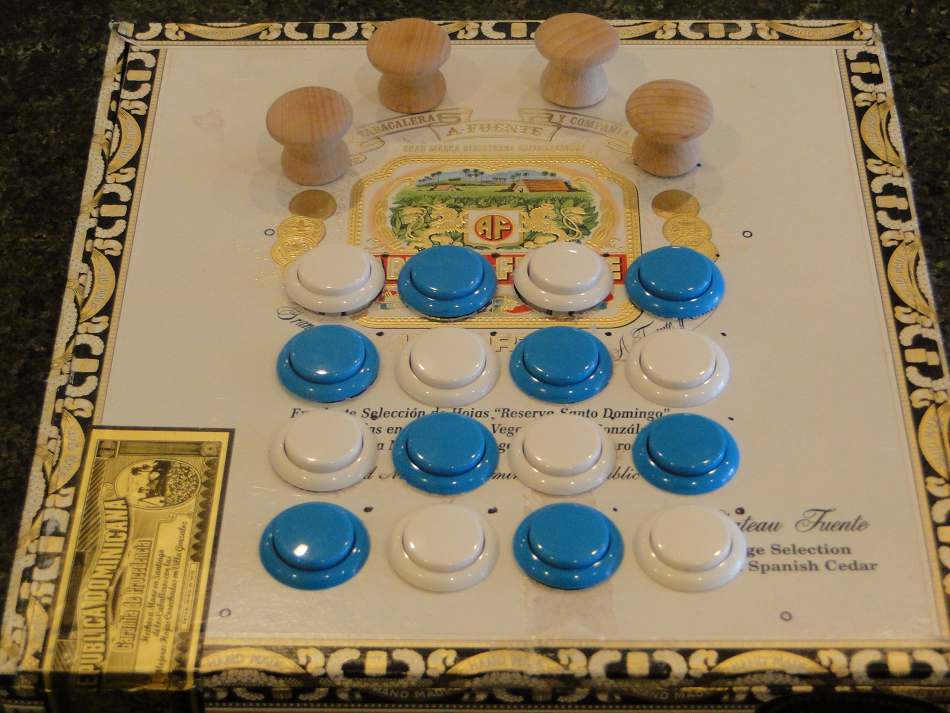
A Midifighter DIY Kit
4 10k pc mount potentiometers — “pots” come in many flavors of resistance or Ohms (from 5k to Mega Ohms), to get a feel for the difference look here
A breadboard –breadboards are typically used for prototyping, but since they do not require soldering and distribute power they can be a good choice for a beginner mod.
At least 4 feet of 24′-28′ gauge wire – gauge determines how much current a wire can carry
A 15-30 watt soldering iron/gun – the modder’s prime weapon. You may find it useful to buy or (make with a coathanger, AYOR!)
Rosin core solder – soldering used to be a two part process: heating solder with flux and then applying. Rosin core has flux built-in.
An electric drill, 1″ and 1/3″ drill bits
A cigar box — found on eBay or local tobacconist
4 wooden drawer handles – undrilled is best for this project
Wire strippers (optional, recommended)
Jumper wire (optional)
Multimeter (optional) – digital multimeters are cheap and useful for checking continuity in your wiring and parts. Make sure they measure voltage, resistance and current and are Class 1, component class.
This is by no means a definitive list, but should get you started in the right direction. In particular, using a breadboard is optional. Ordering parts online is the most cost effective way to go as retail stores inflate prices by as much as 300%. A good source for our European customers can be found here.







February 4th, 2010 at 7:33 pm Quote
FIRST!!
February 4th, 2010 at 7:39 pm Quote
2nd!
February 4th, 2010 at 7:46 pm Quote
Hey, thanks for a great article! Now you got me even more convinced that I should buy a midi-fighter. Also, where can you get the touch strips?
thanks
February 4th, 2010 at 7:47 pm Quote
Bronze!
Cool idea and great theme
February 4th, 2010 at 7:56 pm Quote
dope!
February 4th, 2010 at 8:06 pm Quote
nice…
February 4th, 2010 at 8:38 pm Quote
Just ordered a Midi Fighter kit today. (Had to wait for Paypal to release funding. Bought the buttons a week ago & they just arrived today!) As this is the first piece of gear I’m slapping together myself I got a question on modding. I was wondering if you could wire in 1/4″ jacks instead of knobs or buttons, allowing expression pedals or footswitches to be plugged in. Why should fingers get all the fun? :)
February 4th, 2010 at 8:46 pm Quote
Awesome !!!
Now can you play anything else than salsa on this thing ? ;-)
February 4th, 2010 at 9:22 pm Quote
@jasonmd2020 Yes, you should be able to use 1/4″ jacks which could be then plugged to pedals.
February 4th, 2010 at 11:27 pm Quote
Radzilla Quesadilla
February 4th, 2010 at 11:56 pm Quote
Smoke’em, Build’em, Play’em, Nice, very nice!
February 5th, 2010 at 1:27 am Quote
This looks absolutely rad! I’d been holding out for a MidiFighter SE but seeing a custom enclosure as cool as this I’m half-tempted to go that route instead…
Props to an excellent enclosure though!
February 5th, 2010 at 3:06 am Quote
Oooooo I’ve been planning a custom controller for a while now but got stuck on the enclosure. This has open up lots of new ideas!
February 5th, 2010 at 5:20 am Quote
wow…that’s epic :D put everything into perspective a bit for me too :D
February 5th, 2010 at 6:01 am Quote
you added only the 4 knobs??
are the blue and white buttons, the buttons that are normaly with the diy fighter(different color)??
is it possible to add 4 knobs and 4 buttons or only one of these??
can you tell me where to get some faders??
thank you and sorry for my english…
February 5th, 2010 at 6:02 am Quote
***** 5 stars!
February 5th, 2010 at 7:20 am Quote
great idea! now onto my sardine can FX controller project!
February 5th, 2010 at 9:23 am Quote
Great DIY Project
congrats!
I’m just wondering, I want to make a big controller for 4 decks (eq, transport, loop, 4/8 cuepoint juggling etc) + 2 fully customized FXs, 2 banks of supper FXs routines
As I’m thinking in a big project I was wondering what would be the best plataform to work the thing on?
Arduino?
MIDIBOX?
Midifighter?
Ean,
Can we please have a nice full comparision of all plataforms of DIY MIDI Projects and the best online store to buy parts (with worldwide shipping if possible)?
February 5th, 2010 at 10:16 am Quote
Four Midi Fighters in the same housing? Install a powered USB hub in the box with them so you only have to plug in one cable…
February 5th, 2010 at 10:59 am Quote
See? Told you it was easy. :-)
Using the Midifighter as a general platform – it’s perfectly possible to add more than 4 buttons and 4 analog controls if you are prepared to use extra chips (parallel-to-serial chips and analog multiplexors) and are ready to add code to the firmware.
The 4-buttons and 4-sliders are just the controls built in as standard. Feel free to go further, there’s plenty of program memory and horsepower left in the CPU.
February 5th, 2010 at 12:13 pm Quote
Sweet! Who’s going to be the first to stick a midi fighter in a lazy boy arm chair.
February 5th, 2010 at 1:35 pm Quote
respect!
February 5th, 2010 at 2:55 pm Quote
Dope mod!
February 5th, 2010 at 2:58 pm Quote
Don`t forget the HALE UMC32 platform from Hale Microsystems.
Moldover has created his new Mojo using this controller.
February 5th, 2010 at 4:27 pm Quote
Sickness……. I saw the cigar box and immediately went DOH! Such an obvious, easy solution to a housing. I too now want my self made Midi Fighter thing….doo daa. And there is an added bonus…. The wife cant bitch….cuz i am making it myself….kinda. So this New Bloody Box Thing That Costs So Much Fucking Money…..is not. Haha.
February 5th, 2010 at 5:17 pm Quote
Ean, your writing continues to amaze me. Props on all of your hard work and for inspiring great conversation in the controllerism / DJ community. Side note: I enjoy the creative photography that is on your site. Who takes the photos?
February 5th, 2010 at 7:24 pm Quote
Slick……
February 5th, 2010 at 7:33 pm Quote
Dude. You were totally stoned, weren’t you? :)
February 5th, 2010 at 7:40 pm Quote
Dude, that’s a dominican box, not cuban. don’t give props to cuba and then use a DR box. that’s insulting. castro would lop your hands off. no more scratching EVER.
February 6th, 2010 at 8:45 am Quote
Dude, that’s a dominican box, not cuban. don’t give props to cuba and then use a DR box. that’s insulting. castro would lop your hands off. no more scratching EVER.
SOOOO GOOD
February 6th, 2010 at 9:51 am Quote
@magicyoyo I wrote the article/pictures and will be contributing more. We have a good team!
@Vincius watch this space for a roundup in due course!
@the caper…i kno its not cuban…humbled
There may a CMC 2.0 from all the great feedback and awesome work on the forums. Thanks guys.
February 8th, 2010 at 2:14 pm Quote
That title is pure genius. Love the article too. Very inspiring. :)
February 9th, 2010 at 8:37 am Quote
SHIT YEAH!
that is fucking great! my friend was suggesting I make my enclosure out of a cigar box or lunchbox. i opted not to and I’m glad cause you have a personal connection AND you did a badass job!
February 11th, 2010 at 3:28 am Quote
In the blueprint there is a dominican republic note, It should be a cuban peso or chavito LOL if this is a cuban mod… for the other thing it looks nice.
Will midifighter work with serato itch and vci 300???
February 11th, 2010 at 3:32 am Quote
Somethin like this one:
http://www.google.com/imgres?imgurl=http://www.juanperez.com/cuba/vistas/vistasV/Peso%2520Cubano.jpg&imgrefurl=http://lagacetadepuertoprincipe.blogspot.com/2009/12/decimas-del-peso-cubano-yo-soy-el-peso.html&h=247&w=600&sz=48&tbnid=UMLeOCQ9ZzjM_M:&tbnh=56&tbnw=135&prev=/images%3Fq%3Dpeso%2Bcubano&usg=__RTsCS38GIklPv9vAC2AS8LxWEGU=&ei=HdxzS_uEKcaz4gbSsIjJCg&sa=X&oi=image_result&resnum=5&ct=image&ved=0CBQQ9QEwBA
or this:
http://cubaquelindaescuba.com/resources/Cuba100ConvVerti250.jpg
February 19th, 2010 at 2:31 am Quote
I just have to say this Salsa music did not come from Cuba. Salsa was created in NY. Salsa is a mix of Afro-Caribbean sounds, it does not come from one source in particular.
February 19th, 2010 at 4:09 am Quote
salsa was created in puerto rico not new york or cuba the puerto rican immigrants that move to ny in the 50s implement the sound that was already forge in puerto rico from bands like cortijo y su combo,rolando la serie etc read salsa history first before talk.
February 19th, 2010 at 4:04 pm Quote
Hahahaha always the same argument… Mambo did not exist before salsa??? Where did it came from??? and who was the first mambo singer??? Boriquas gave it name but it existed in cuba several years before
February 19th, 2010 at 4:07 pm Quote
The mambo was not created in the palladium as many ignorants think
March 6th, 2010 at 9:29 pm Quote
HA!!! AWESOME but the cigars arent cuban u dimwit.. hehehe
Theyre Dominican Rep!!!
Man… u ppl rock, awesome stuff, thanks for all of the help; the hints and inspiration and also big up to those amazing sets!!!!