USB Hubs De-Mystified

USB-hub-color

Chances are you have more digital dj gear than you have available USB ports. Between controllers, sound cards, USB lights and ipods- every controllerist needs a lot more usb power than the typical laptop can offer. The logical solution to this common problem is to add a USB hub to your setup but this seemingly straightforward device can introduce a lot of variables and problems.  Should the port be powered? Will it cause latency? Which hubs are good for djing? Will it cause audio drop outs? In this article we will attempt to clear up some of these questions and help you pick the right USB hub for djing.

POWER OR NO POWER?

powerlines
The first thing you will notice about USB hubs is that they come in 2 main types: Powered or non-powered. Powered hubs require an external power supply so they can send a full amount of USB power evenly to all ports. Non-powered hubs simply split the power available on one laptop port between all the devices which means much less juice for everyone on the train.

If you are using basic input devices like mice, keyboards or basic controllers (without any LEDS) then its safe to split a USB port between several items without a power supply. The trouble starts when you introduce large midi controllers like the VCI-100 or sound cards, which demand nearly all of the power available on single port. In these cases, you absolutely need to use a powered USB hub to guarantee that each device has all the juice it needs.

SHARING RECOURCES
USBLego

In addition to making sure each device has enough power, you should also consider the balance of data so 2 devices are not overwhelming a single usb port with too much information.
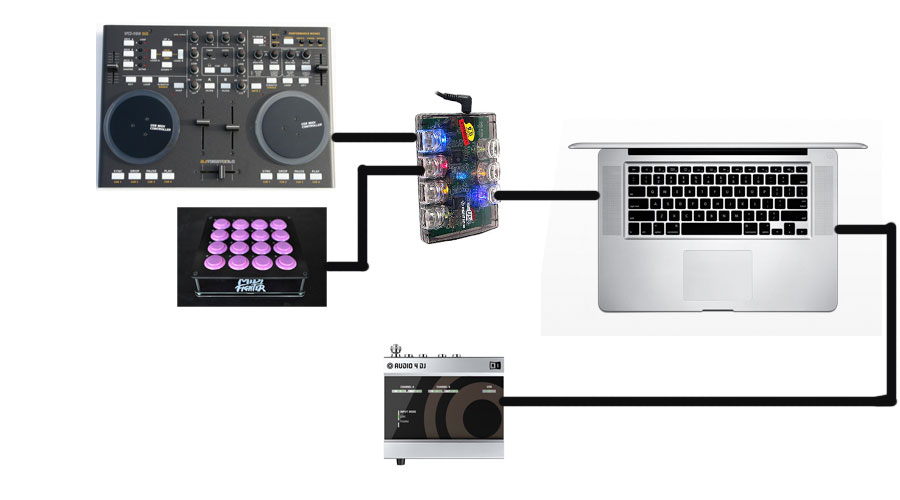
The typical digital dj set up is probably going to look like this:

  • 1 main controller (hi power draw- medium data transfer)
  • 1 secondary controller (hi power draw- low data transfer)
  • 1 sound card (medium power draw- hi data transfer)

Lets assume you only have 2 USB ports available. The following configuration would be a good place to start. If you experience drop outs, try changing things around. In this case the sound card gets it own USB port to maximize data transfer. The controllers are sharing a powered USB hub because power, not data, is the main concern there. You could possibly make this configuration work with a non-powered hub but it really depends on how much power each device requires. The average laptop USB port supplies about 500 milliamps of power so find out the specs on your devices and do the math.
controller-setup

Keep it 2.0

There are 2 USB speeds, USB 1.0 and 2.0. To keep things simple, you just need to keep in mind that USB 2.0 is much faster. Its usually a bad idea to combine USB 1.0 devices (most controllers) and USb 2.0 devices (hard-drives and some sound cards) on the same USB hub because then all the devices transfer at 1.0 speeds.

A FEW RECOMMENDATIONS

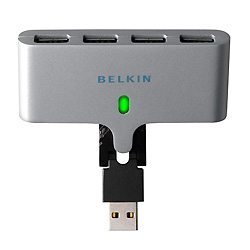
For a simple, non-powered space saving hub we like the Belkin swivel hub which has a built in cable.
STD1_F5U415

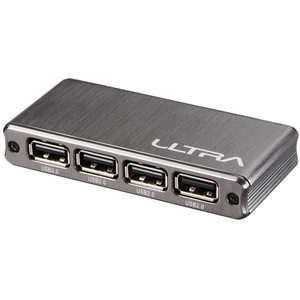
Ultra makes a sleek hi-speed powered hub that looks good and takes up minimal space
ULT40476-main-sp

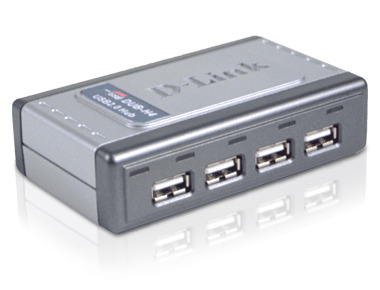
If your looking for a big brand option- the D-link dub h4 appears to be a good option
DUB-H4_right

Want to combine 2.0 and 1.0 devices on one hub? There are a few rare hubs that can do this called “multi TT” hubs. The Belkin Tetra hub is one of them.


DONT DROP OUT

glitch-image

Occasionally USB has its problems. When a device gets confused and sends an audio glitch or disconnects on its own its called a “drop out”. This can happen for any number of reasons. Common causes of drop outs are interference, power issues, lack of bandwidth or CPU capacity.

To Avoid Drop Outs

  • Keep your USB cables away from cell phones, power cables, florescent lighting, cordless mics and speaker wires
  • Make sure you are using a high quality cable that’s as short as possible with proper shielding and ferrite cores (the little cylinders on the ends of some cables). Dj TechTools actually manufactured a USB cable specifically for djs that meets all of these criteria.
  • raise your audio card buffer sizes. If your experiencing audio dropouts, pops and crackles chances are the audio buffer is too low.
  • Turn off the airport (it can cause problems)
  • try a different USB port- apparently not all of them are equal.
  • try a powered USB hub. The actual power supplied by a USB port can vary wildy from laptop to laptop, meaning that you may be under-powering your audio device. Try a powered hub and see if the problem is eliminated.

Looking Forward

The future of USB is looking even better with the introduction of USB 3.0. The speed has been increased to a ballistic 4 Gbit/s and the power rating has been stepped up to 80 percent more than 2.0. Translation- it’s capable of running up to six devices and lighting up even more LEDS on a controller without requiring power supplies.

additional research provided by: Dj Nisus

70 Responses to “USB Hubs De-Mystified”

  1. Jeditekk

    January 25th, 2010 at 2:50 am Quote

    Wow….. just saw a forum post about hubs and quite a few people were inquiring on what to get. Then here I am checking out DJTT and there it is on the front page. Awesome how you guys are always on top of things and just another reason to give props to what you guys at DJTT do. Thanks for making everything else easier for us.

  2. Shahidil

    January 25th, 2010 at 2:59 am Quote

    im using the belkin swivel hub to connect my akai lpd8, nanokontrol, nanokey for cues and my soundcard with the power adaptor plugged in and all i can say is that it works very well indeed recommended nonetheless.

  3. B-Matty

    January 25th, 2010 at 4:27 am Quote

    I run my Serato setup with my MidiFighter and a 25key USB Midi keyboard attached with a little 4 port powered noontec one that works amazingly well for the size.. That said I’m yet to test it in a club environment. Bonus is it works both powered and unpowered.

  4. Shahidil

    January 25th, 2010 at 4:36 am Quote

    the belkin swivel works unpowered as well without any dropouts or anything but to be safe i just plug in the adaptor kekekeke

  5. double dutchdj

    January 25th, 2010 at 4:54 am Quote

    great post! i’ve been looking forward to the day techtools would cover the hub issue , beeing a dvs user i’m stuck with my Usb audio 8, it would be great if N.I released fire wire versions of there soundcard’s so i could free up some space. After having the odd problem with hub drop out i’m so paranoid about hub problems while playinghub out, certainly wouldn’t ever run a soundcard thru a hub. I’m deffinetly going to look in to the above recommendations,, much appreciated!

  6. derjay

    January 25th, 2010 at 4:56 am Quote

    do the recommendations take into account whether the USB hubs actually use a single or dedicated chipsets for each device? – there has been a long standing discussion about the topic in the forum
    keep up the good work

  7. Braindrop

    January 25th, 2010 at 5:29 am Quote

    A powered hub made a huge difference in the reliability of my VCI-300, X-Station and MPD32.

  8. Murat

    January 25th, 2010 at 6:37 am Quote

    MAC: If you click on the apple in the menu bar and choose ‘About This Mac’ and then click on ‘More Info’ you can see all the hardware information of your mac, and of course the USB ports – and how much power each one is capable of delivering. I remember by old G4 Powerbook having issues with one hub and not the other and turns out it was 500mA of difference ;)

  9. deeco

    January 25th, 2010 at 6:52 am Quote

    Funny I was just thinking last night how I may need a new USB hub to meet my needs!

    Thanks!

  10. djs

    January 25th, 2010 at 7:19 am Quote

    Great post, what about some powered hubs then ?

  11. Tamay

    January 25th, 2010 at 7:39 am Quote

    @djs
    DjTT fills those gaps digital DJs need to perform their best, which are not covered by the casual Industry. And in my opinion there are a enough powered and fast USB hubs. There wouldnt be a unique selling proposition for this kind of Product but a Djtt Logo on it ;)

  12. Kurbitur

    January 25th, 2010 at 7:55 am Quote

    Could you make a list of some good powered hubs?

  13. woof

    January 25th, 2010 at 8:09 am Quote

    xcellent as always,

    i have taken part in and been watching the debate on the forums for a while, trying to decide what hub to buy and then today, i flick to the homepage and there is an article on it!

    many thanks!

  14. woof

    January 25th, 2010 at 8:12 am Quote

    only thing is can we get some reccomendations for the UK, cant find the ultra hub over here?

  15. Anonymous

    January 25th, 2010 at 8:44 am Quote

    If an expresscard port is available, I would recommand this over an USB hub. It will save space and an extra cable.

  16. DJ DMuRD

    January 25th, 2010 at 8:53 am Quote

    hey great article, i was just wondering the ultra HUB is there a A/C adapter for the HUB or is it just plug in and i can run a VCI-100 and other controllers on it?

  17. DJTimmy

    January 25th, 2010 at 9:33 am Quote

    It has been a big discussion of the forms, i know i have put some time into researching it.. and now with the addition of midi fighter a lot of djs are using more usb ports than their pc’s can dish out… the biggest problem is not a lot of manufacturers disclose the details of their products. leaving us to resort to contacting and or purchasing a buttload of hubs till we find ones that work. love the article

  18. 2010

    January 25th, 2010 at 9:42 am Quote

    - Keep your USB cables away from cell phones, power cables, florescent lighting, cordless mics and speaker wires -

    why flourecent lighting?…just wondering cuz sometimes partys are all in black light floro’s….

  19. DJSDive

    January 25th, 2010 at 9:59 am Quote

    right now i use a 4 port usb2 expresscard, but alas i am due for an update on my macbook pro and all but the 17″ now only provide an sd card slot. so sooner or later i do have to go with an usb hub. i really wonder why NI, Akai or Vestax havent grabbed the opportunity to sell a USB hub. afaik Stanton is one of the few companies that have integrated a USB hub.

  20. logikal

    January 25th, 2010 at 10:13 am Quote

    I use the D-Link hubs and they work great. Whichever hub you get make sure the ports are laid out vertically not horizontally. Iloks and other devices make take up two slots if not.

  21. Jochen Goerdts

    January 25th, 2010 at 10:44 am Quote

    the commonly used slower usb standard, so called USB Full Speed, is USB 1.1, Not USB 1.0 you stuempers.

  22. Anthony Jacobs

    January 25th, 2010 at 12:29 pm Quote

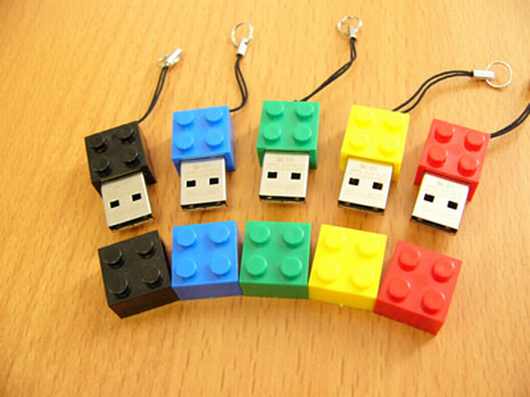
    Nice,,, & out comes the cool LEGO again!!! Man, you cats could do an article on air and still have an appropriate LEGO pic no doubt.

  23. matt haegen

    January 25th, 2010 at 1:02 pm Quote

    How does the Midifighter perform with an unpowered hub? clearly at some point a powered hub is just going to be a necessity however i try to keep the number of things that need to be plugged in to a minimum to reduce setup time and clutter and all that.

  24. DJSDive

    January 25th, 2010 at 1:06 pm Quote

    btw: that new macbook pro better come with usb3, 512gb ssd, support upto 16gb ram and displayport 1.2 … and it better come out no later than july ;)

  25. Dj Lucid

    January 25th, 2010 at 1:48 pm Quote

    I’ve been using a targus 4-port hub for years with three bus-powered midi controllers attached (2 trigger fingers, one xsession pro) and never had a problem without external power even if I add a small midi keyboard. I’ve also done the same with the d-link hub mentioned. That being said, I do carry a power adapter just in case, and carry extra hubs to gigs.

  26. The Reverand

    January 25th, 2010 at 1:59 pm Quote

    When in doubt my rule of thumb is always use a powered hub! And if the device runs Windows Mobile don’t use one!
    Of course sometimes you have no choice, some laptops, Mac laptops are good for this, and even desktop motherboards use hubs internally or on the board and you’ll never know it is that way until you try to connect a device that is particular about how it is connected.

  27. dj professor ben

    January 25th, 2010 at 2:20 pm Quote

    how do you figure out if a device is 1.1 or 2.0? Thanks for the helpful article, this is exactly the problem I ran into last week and posted on the forum.

  28. Jeditekk

    January 25th, 2010 at 3:04 pm Quote

    I use a 4 port Targus hub and run my vci, mf, and a nanokontrol without any glitches. I run my soundcard to a dedicated port on my mac.

  29. Archies'bald

    January 25th, 2010 at 3:52 pm Quote

    Usb 3.0.

    Here’s a link to a test done by Custom PC magazine. They are normally very thorough and fair. (I’ve linked it to page 5 where it tests the transfer rate of mp3 files)

    http://www.bit-tech.net/hardware/2009/12/18/first-look/5

  30. midifidler

    January 25th, 2010 at 4:15 pm Quote

    The midifighter is not designed for use on an unpowered hub, they consume about 200mA

  31. Torrey

    January 25th, 2010 at 4:58 pm Quote

    One thing to keep in mind is that many systems are already using a hub to get the max amount of USB ports on the outside of the system. Hooking a hub up to a USB port that is already coming off a hub is a bad idea. Unfortunately, you have to get diagrams of your system board/laptop to figure it out. (Or dig for the info in manuals, docs, Inet, etc.)

  32. Kundabuffer

    January 25th, 2010 at 5:47 pm Quote

    If an expresscard port is available, I would recommand this over an USB hub. It will save space and an extra cable.

    Does anyone have experience with this solution and if so, any recommended express card USB ports? This seems like a great solution to the powered/not powered issue for those of us with empty expresscard slots sitting there unused.

    -kb

  33. DJ MATTOUT

    January 25th, 2010 at 6:20 pm Quote

    i am actualy using a Kensington Power – AC USB… it has 6 2.0 ports and a split to 2 main computers (not at the same time)..

    it works good.. too bad its an extra stuff that i have to take

  34. And what of it?

    January 25th, 2010 at 6:27 pm Quote

    To Avoid Drop Outs

    Keep your USB cables away from cell phones, power cables, florescent lighting, cordless mics and speaker wires

    ========

    so basically everything in a club. :)

  35. J450N N4M3

    January 25th, 2010 at 7:20 pm Quote

    THANKYOUTHANKYOUTHANKYOU!!!!!! I haven’t even read the article yet but I had to post the HUGEST thank you for posting this. You are my hero!

  36. DFAorDOA

    January 25th, 2010 at 9:36 pm Quote

    I personally went with a Firewire audio card. I’m sure some one would argue over it, but I find that firewire is far more reliable than USB for any of the mac users out there.

  37. Inphidel

    January 25th, 2010 at 9:47 pm Quote

    I have had great luck with this hub

    http://www.amazon.com/gp/product/B000NAXC6Q/ref=pd_lpo_k2_dp_sr_1?pf_rd_p=486539851&pf_rd_s=lpo-top-stripe-1&pf_rd_t=201&pf_rd_i=B000NAXC6G&pf_rd_m=ATVPDKIKX0DER&pf_rd_r=16CJ2E66MCPJNAD7PEAZ

  38. braden

    January 25th, 2010 at 10:04 pm Quote

    so i got a question
    what about the two usb ports on the wired apple keyboards
    anyone know how those work
    thanks for everything guys

  39. woohoo

    January 26th, 2010 at 12:42 am Quote

    great article. do you guys know where i can buy the belkin tetra at a reliable store?

  40. colinfichman

    January 26th, 2010 at 3:15 am Quote

    how was the expresscard hub not mentioned in th article? I use mine for so many different things. Very handy.

  41. antopager

    January 26th, 2010 at 3:44 am Quote

    RE:express card USB ports

    I’ve had so many problems with usb hubs in the past, i’ve actually managed to go through 5 of them, connections came loose they would quite often fail…without too much load. i’ve always used powered usb hubs. (my laptop only has 2 usb ports)

    I found out about express card USB ports…its magic… ive had no issues, no need for additional power supply and it has freed up a direct usb port on my laptop…if u need more usb hubs i would recommend u get this!!!

  42. Lance Blaise

    January 26th, 2010 at 8:13 am Quote

    It should also be noted that when using a MacBook Pro or MacBook, you should plug your hub into the USB port which is closest to power supply port. This is an independent port and doesn’t share power with anything else…

  43. The House

    January 26th, 2010 at 8:55 am Quote

    Where can I get that USB hub at the top of the article? That one looks pretty sweet!

  44. Lance Blaise

    January 26th, 2010 at 11:04 am Quote

    so i got a question
    what about the two usb ports on the wired apple keyboards
    anyone know how those work
    thanks for everything guys

    those are not powered usb ports. they are fine for a mouse… no good for anything that neds any power really. some jump drives won’t even work…

  45. DJ Van Draken

    January 26th, 2010 at 11:07 am Quote

    Cables Unlimited makes a Tetra Transaction Translator hub also. Belkin’s Tetra TT hub is harder to get your hands on at a reasonable price, and the cables unlimited one has a lot of good reviews.

    USB 1.1 transmits data at 12 Megabits (1.5 megabytes) per second. 2.0 is 480 Megabits (60 megabytes) per second. Most devices don’t have enough data to transfer anywhere close to 1.5 megabytes per second, but the ones that do (hard drives, large audio/video devices, etc.) you will definitely notice the difference.

  46. Dirtyonekanobi

    January 26th, 2010 at 1:14 pm Quote

    I just wanted to add, as already stated, that you guys are ALWAYS on point with your stories. With Serato 2.0 around the corner, I was just looking at whether I could get a hub. BOOOM!!! Front page of DJTT. Thanks for what you do, the information in this forum is really priceless…

  47. J450N N4M3

    January 26th, 2010 at 1:35 pm Quote

    so i got a question
    what about the two usb ports on the wired apple keyboards
    anyone know how those work
    thanks for everything guys

    I disagree with the other responder to this question (politely). I just made a “z board” (like you might buy for World of Warcraft) out of corded apple keyboard with the number pad. In the 2 usb ports I attached my APC40 (which is independently powered) and my Xsession Pro mixer. I am having wonderful success with this setup and recommend it highly (go get some Sharpie paint markers and deck out the keyboard proper). I’m not willing to use my soundcard through the keyboard ports but there are several midi controllers out there that utilize the extra port just fine.

  48. midifidler

    January 26th, 2010 at 4:03 pm Quote

    @J450N

    The X-session pro has very few LEDs so I would assume it is it draws well under the 100 mA limit.

    As you state the APC is powered independently.

    All Lance said was that they are not suitable for anything that requires much power (> 100 mA) – he is correct.

  49. Taz

    January 26th, 2010 at 8:00 pm Quote

    Another big brand option is the APC 4 port powered hub.
    http://www.apc.com/products/resource/include/techspec_index.cfm?base_sku=19500SG-1G

  50. furan

    January 26th, 2010 at 8:44 pm Quote

    damn shame they scrapped that spektrus usb project, those embedded lights and matching cables were so sweet! i would buy one forsure, even if it was bank

  51. dj pHnord

    January 26th, 2010 at 9:22 pm Quote

    The Pink floyd graphic is dope btw.

  52. Full Stop

    January 26th, 2010 at 10:01 pm Quote

    one other thing, for your desktop. Odds are there is a free plain old PCI slot in there somewhere that’s not getting used. Spend $25 bucks on a combo USB/Firewire card and you’ll get 4-6 extra USB ports that are right on the PCI bus. I’ve found shocking differences in onboard USB in both laptops and desktops, but that has never failed me. In my home studio I run a ton of USB controllers and a Focusrite Liquid mix off that card and never have any problems.

  53. Poindexter

    January 27th, 2010 at 10:00 am Quote

    This site never ceases to amaze me – I’ve been pondering this exact dilema very recently myself.

  54. Sebas

    January 27th, 2010 at 11:42 am Quote

    I would enjoy a usb hub audio interface with a few outs… something that fit under the vci-100. something to keep the vast amount of cables and boxes down to a minimum. whos on that?

  55. JPF

    January 27th, 2010 at 6:35 pm Quote

    i was looking for it ty =)

  56. Proze

    January 27th, 2010 at 6:57 pm Quote

    Brilliant, major help with running dual EKS Otus and Korg nano series in tandem. You rock DJTT!

  57. Brett

    January 27th, 2010 at 9:20 pm Quote

    I’m still unclear about this: are non-powered hubs appropriate for use with controllers that have their own power supplies? How does this work? And how about this set up: 2 outlet powered controllers and 1 usb powered controller on a non-powered hub? Thanks!

  58. Pete

    January 28th, 2010 at 2:38 am Quote

    What about the mini USB cables that are used in the now so popular “Slim Line” or Nano Controllers (ex Korg/Akai) I find them weak and flimsy, and not stable. DJTT should create a Mini Version of the USB DJ cable.
    3.0 is great news…any idea how soon?
    3.0, again sounds cool, but i was hoping we would be moving toward Firewire in the future, no? Is Firewire better, would it work?
    Finally, will we ever see the day when the bnooth can be free of wires??? Bluetooth Midi? Make it happen DJTT!!!

    7 Port hub vs 4 Port?
    How about Controller with built in Audio I/O? Is it recommended that cable go directly into the laptop..or is a HUB connection ok?

  59. mrstep

    January 28th, 2010 at 10:21 am Quote

    hi guys, when i connect my korg kp3 to this hub (7 port, ac powered) http://www.dlink.com/products/?pid=149
    there is no way to make it work. the same with my hercules rmx.
    i’m the only one so lucky?

  60. Pete

    January 28th, 2010 at 10:42 am Quote

    Kp3 uses mini USB right?
    If so make sure you have the Korg specific USB mini Driver.

    I pasted details from Korg Support below…i recently had this problem and then had to explain it to a friend. I hope this helps. While you are at it …DL any driver/software KORG says you need, just to be on the safe side.

    /15/10 – If you receive an error installing the USB-MIDI Driver In Windows 7

    If you have previously installed KORG USB-MIDI Driver Tools 1.11, you
    may run into the error message “Internal Error. K_coinst.exe” when
    installing KORG USB-MIDI Driver Tools 1.12 on a Windows 7 computer.
    Please follow the instructions below to remedy this.

    1. Download the file and unzip it to any
    location.
    2. Double-click “V111fix.exe”.
    3. Click [Execute]. (This may take a little while to process)
    4. Click [Close] when the process has completed.
    5. Install DrvTools 1.12 for KORG USB-MIDI Driver V1.12.

  61. mrstep

    January 28th, 2010 at 10:52 am Quote

    thx Pete for the quick answer
    KP3 uses a standard usb cable, not a mini one. the drivers are already installed and the hardware works perfectly when connected to the laptop (toshiba satellite a300 running vista)
    i have the same issue with hercules console rmx, latest drivers installed, perfectly working when connected to a laptop usb port, no way to work if connected to hub.
    it happens even when i connect just one of the above so i never tried to connect both of em at the same time
    so actually i’m forced to link rmx and kp3 to laptop, and mouse, external hd and other stuff to hub.
    anyway thanks again for your info, i’ll try em when i’ll finally find the time to install the 7 upgrade

  62. DJ Van Draken

    January 29th, 2010 at 9:20 am Quote

    I recently purchased and reviewed the Cables Unlimited USB-1870 multi-transaction-translator 7 port powered USB hub. Click my name for a link to the full review. It can be found in the January 2010 archive.

  63. Muxx

    January 30th, 2010 at 2:00 pm Quote

    Once USB 3.0 is in full effect it’s really gonna be great. What is it, 10x the transfer rate of USB 2.0?

    A word of advice, don’t buy those $1 hubs you can find on ebay. They may work well just to plug in your flash drive but they drop in and out all the time, at least get something a little bit more expensive ha.

  64. Lo.Definition

    February 2nd, 2010 at 7:27 pm Quote

    Can anyone recommend an express card manufacturer and an approx. price? I am interested in this as I want to stay away from dragging around another power cord to power a usb hub.

    As well, does an express card slot supply more power than a usb slot? Upon talking it over briefly with a phone jockey I was left scratching my head, supposedly the express card supply power “on-demand”. I think this guy was reaching. The Belkin Tetra hub looks interesting as a powered hub option.

  65. soulfonicsource

    February 7th, 2010 at 4:09 am Quote

    Can anybody tell me the name/brand of that top image USB hub with the coloured cables?
    That looks awesome!

  66. a serrano

    February 16th, 2010 at 7:19 pm Quote

    500 milliamps of ‘current’. Power is measured in watts.

  67. clnbdwy

    March 9th, 2010 at 11:35 pm Quote

    Can anybody tell me the name/brand of that top image USB hub with the coloured cables?
    That looks awesome!

    DITTO!

  68. clnbdwy

    March 12th, 2010 at 5:00 pm Quote

    Damn, I emailed Ean and….

    Hey Colin,

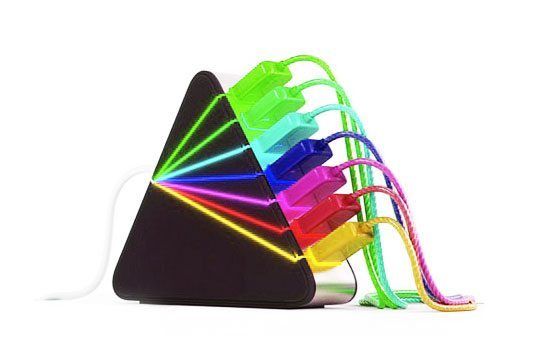
    I am sorry to report that hub is fictitious :) – just a cool graphic.

    Sincerely,
    Ean Golden

Leave a Reply

  1. Quote selected text

First Time?

This site is dedicated to digital djs. We develop performance tools and teach cutting edge techniques that enable creative expression. Visit tutorial videos on youtube, equipment reviews in the blog and a very helpful community in the forum. New articles every Mon, Wed, Fri.
In the Store
 

Categories:
Follow us:
You're going to need Flash 8+ and JavaScript to use this site. How'd you get this far without it?

Dig through the Crates

Readers are Saying

  • munty: I think the MPD would be better suited if you were using it for ad-hoc studio use, or if you’re live set was very...
  • Miss Behave: Hey! I just recently got serato Scratch Live and noticed that the mixer has an input for a foot switch!!! That is...
  • Tonliebe: Thanks a lot Shane, its a great help to me.
  • carlo: All newbie, but you put a lot of work in that-respect
  • Double DutchDj: This is a great post for beginners, it’s sooooo important to build up as many transitions as pos. Not...
Contributing-Writer-Ad