Reading Wave Forms

waveforms

Digital djing provides a wide set of tools that make your job better but one of the clearest benefits is the ability to see each songs waveform. A waveform is the play by play visual representation of the sonic action in a track.  By watching wave forms you get an effective  idea of what is currently happening and what is coming up  so smart mix decisions can easily be made on the fly. In this article we will demonstrate the basics of the waveforms and show how 2 of the top dj systems Traktor and Serato enhance that information to make your job even easier.
Wavepic

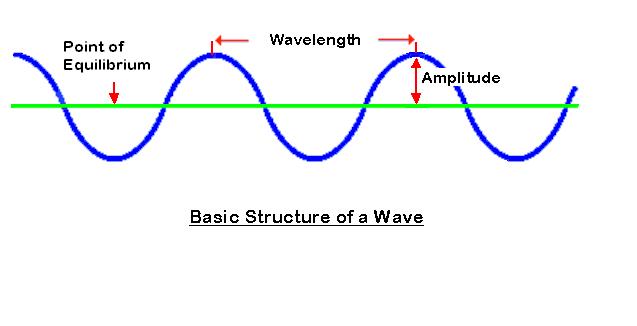
Its really quite amazing that music, something we are so effected by, is really such a simple thing.  The wave form you see above is expressing 2 fundamental things about one single sine wave, one of the most basic forms of sound.

1. Amplitude: How loud the signal is

2. Wavelength: What frequency it is. The wider or longer the the wave length, the lower the frequency.

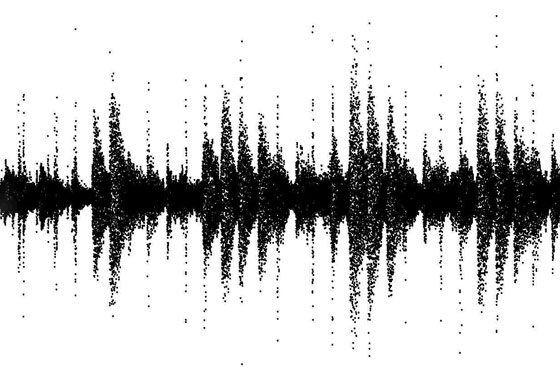
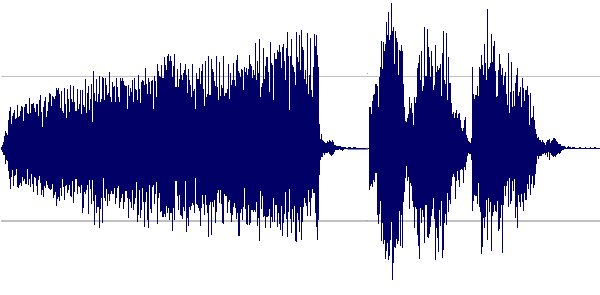
A song is made up of many, many  of these simple waves combined into one sonic image:
waveform_popeye

Its hard to separate the sounds visually from this view alone but with a little eye training you can begin to pick out some important trends and recognize various parts of the songs.

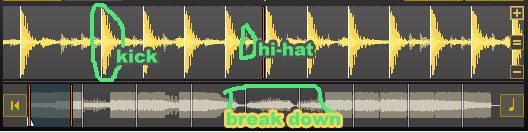
notice that in this first wave form the space between beats is sparse, this suggests minimal instrumentation and a good place to mix.
wave1

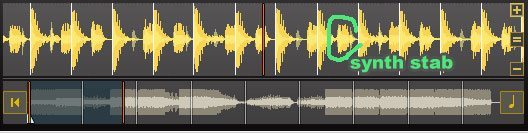
in this section a synth stab is added and the wave starts to get more busy
wave2

now that a vocal is added, the frequency spectrum really starts to fill up.
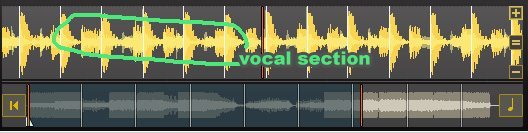
wave3

and here in the break down there is a complete absence of loud transients (beats)
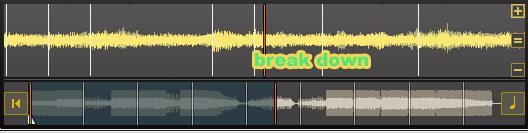
wave4

A HELPING HAND

How a program visualizes the wave forms is entirely up to them so several dj programs enhance the wave form views to make it easier for us to recognize these various parts. You can also customize the wave view to suit your personal tastes. In Traktor you can choose how much of the wave form information is displayed to make the beats more defined and filter out non-rhythmic visuals.

in this image we are showing the same section using beats, beats & highs and beats + envelopes
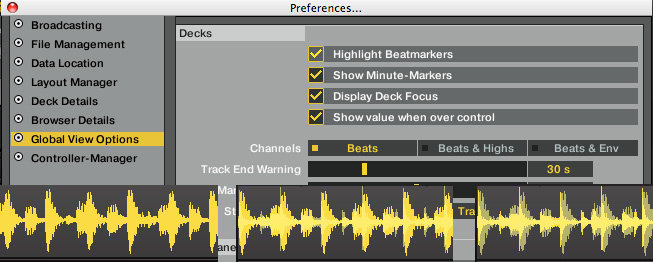
traktor_waveforms

In Serato, they have colorized the wave forms to distinguish parts of the beat structure.

Red = Bass Blue=Treb Green=Mid

color wav

You can alter the wave form view in Serato as well but its less obvious. To zoom in on the wav, simply click the deck and use  + and -.
Another slightly hidden trick; by holding the control button and clicking on a deck you can remove the color coding of the wave form,  and split the view into 3 channels separate waves (hi, mid, lo) for an even more accurate picture into the mix.

Whitewav

31 Responses to “Reading Wave Forms”

  1. Conor D.

    January 5th, 2010 at 11:02 pm Quote

    This is exactly what I needed. Thanks for the awesome article, Ean!

  2. Sasha Solo

    January 5th, 2010 at 11:44 pm Quote

    Love the articles Ean keep em coming! But whats going on with the new tsi for FW 1.3 TPro 1.2.3? Its Jan 2010! And no update? Let us know what the progress is?

    Happy Mixing!

    SS

  3. Stephen of Live Fast

    January 6th, 2010 at 12:26 am Quote

    “Its really quite amazing that music, something we are so effected by, is really such a simple thing.” well said man, haha, just was imaging damn near the same thing listing to music cleanin up my pad..then thought turned into one of those poem like designs where i perfectly describe my (music listing) experience so well i feel i should write it.. then a bad track comes on & it’s gone.

    hah on topic that serado trick looks bad ass

  4. Sine143

    January 6th, 2010 at 4:54 am Quote

    while this is only roughly related… It always truly amazes me when I think of how a speaker replicates sound or music, or how a microphone can record sound. I mean, we put our headphones on, and go about our daily business, but little do we think that everything we are hearing, is produced by 2 cones vibrating. I cant believe how accurate it can be…

  5. dennisj

    January 6th, 2010 at 5:09 am Quote

    i thank you for this site ean, the article and the every comment is so valuable.
    thanks you all.

  6. Double DutchDj

    January 6th, 2010 at 5:17 am Quote

    Cool post, I use dvs but every now and then I put a real vinyl on the deck and the funny thing is, virtually every time I play with a real record I find myself looking at the laptop for the waveform, doh! (plus I often hit a cue to bring the track back to the beginning, sooo stupid) Sometimes I do miss the different shades of black you’d get across real records, at least it used to keep the attention on your decks as looking at the waveform is often what steals my attention away from them. That said, I wouldn’t want to live without them now as they’re such a great tool for learning new tracks quicker.
    ++++
    I love Traktor pro but I much prefer the colorized waveforms in serato, much clearer to understand. I bet my life some one’s going to moan about why you can’t put the waveforms side by side like you can in serato, I understand the benefit but I’m glad Traktor doesn’t do this as it would most probably just steal more of my attention. I played with the Xone Dx at BPM virtually all the day the itch gui has all four waveforms stacked on top of each other, which made it very easy to beat match visually 4 tracks quickly but to mix visually like that you end up having your eye’s glued to the screen.

  7. derjay

    January 6th, 2010 at 5:57 am Quote

    Yeah the visual side is really an improvement that digital jing introduced,however, I noticed too that there is a risk, to concentrate too much on the visualization and ignore the ears….

    By the way can anybody explain what the NI people meant by “envelope” – is that the mids?
    Cheers

  8. n2hf1st

    January 6th, 2010 at 7:20 am Quote

    I believe the envelope bit adds shading to differentiate between lows and highs. Beats focuses on the low end, Beats+Highs adds the top end but without any shading, and Beats+Env shades the highs a lighter color.

  9. hipnotikk

    January 6th, 2010 at 7:31 am Quote

    IIRC, envelope is more like how long the sound is lasting due to decay/release times, reverb, stuff like that. it’s different from the actual “beat” because it’s not as pronounced.

  10. Anthony Jacobs

    January 6th, 2010 at 9:34 am Quote

    Since my tracks are all tagged, keyed and beat-matched proper in Traktor Scratch Pro, if I ever go “It’s all gone Pete Tong” and loose my hearing I’m confident that I’ll still be able to DJ quite well visually.

    Let’s hope it never comes to that,,, BUT I have had to mix a few gigs last year without headphone cuing, and never could have pulled those gigs off without Traktors waveform displays, phase meter and my elaborate tagging system.

    It was quite fun actually… never quite knowing 100% whats on the other side of the X-fader till you open it up & then… NICE!!! =o)

    AJ

    P.S. New up btw, The Overdubber – Orion’s Belting Dubstep Mix:
    http://www.mediafire.com/?tnyjxqy0nue

  11. DJN

    January 6th, 2010 at 10:03 am Quote

    Nice read – good stuff here – brings me back to audio editing in the 90’s when we first started to record digitally. Wish I had this back then would have helped with the trial and error learning. All the tools are the same but look at how far we have come and how they now apply!

  12. Fatlimey

    January 6th, 2010 at 10:34 am Quote

    …everything we are hearing is produced by 2 cones vibrating. I cant believe how accurate it can be…

    Want to know why? Let me introduce you to Nyquist-Shannon’s Sampling Theory: http://en.wikipedia.org/wiki/Nyquist%E2%80%93Shannon_sampling_theorem

  13. silk wolf (ATL)

    January 6th, 2010 at 11:10 am Quote

    I’ve had to mix at several gigs going off of visual only guides. Monitors completely cut off several times and I was forced to rely on my tagging system and markers.. like Anthony mentions above. I also prefer Traktor Pro to Serato. I can’t tell you how often I ask DJ’s who use Serato what the colors mean and they have no idea. It’s distracting to me, but then again I’ve been using Traktor Scratch since the week it came out.. so I suppose it’s a comfort thing.

  14. Ryan Mendoza

    January 6th, 2010 at 12:44 pm Quote

    I’ve had to mix at several gigs going off of visual only guides. Monitors completely cut off several times and I was forced to rely on my tagging system and markers.. like Anthony mentions above. I also prefer Traktor Pro to Serato. I can’t tell you how often I ask DJ’s who use Serato what the colors mean and they have no idea. It’s distracting to me, but then again I’ve been using Traktor Scratch since the week it came out.. so I suppose it’s a comfort thing.

    LOL thats funny how people don’t know what the colours mean. It’s obvious! I guess theres people that don’t really dig into the programs as much and theres geeks like many of us here that go thru the ins and outs of our DVS to know the total functionality.

  15. Sine143

    January 6th, 2010 at 1:20 pm Quote

    Want to know why? Let me introduce you to Nyquist-Shannon’s Sampling Theory: http://en.wikipedia.org/wiki/Nyquist%E2%80%93Shannon_sampling_theorem

    Yeah man, I’ve done some reading into the whole issue… and it still blows my mind. The invention of the loudspeaker is quite pivotal imo.

  16. dj professor ben

    January 6th, 2010 at 4:18 pm Quote

    I believe the envelope bit adds shading to differentiate between lows and highs. Beats focuses on the low end, Beats+Highs adds the top end but without any shading, and Beats+Env shades the highs a lighter color.

    Except it’s all the same color! This annoys me about the Traktor manual too — it claims lows are a different color than highs but they’re all that barfy yellow color. Maybe some bits are a darker shade than others but I certainly can’t tell if that’s the case, and the three example pics above look almost identical to me. There are differences but I’m not sure how those differences would help mixing as a practical matter since they are ever so slight. I know traktor users generally don’t like the serato colored wave forms but I do wish traktor wave forms were at least a bit more expressive.

  17. sine143

    January 6th, 2010 at 4:25 pm Quote

    Except it’s all the same color! This annoys me about the Traktor manual too — it claims lows are a different color than highs but they’re all that barfy yellow color.

    I believe this refers to the full waveform overlay, not the scrolling section. on the other one you can clearly see a difference.

  18. Minotronic

    January 6th, 2010 at 4:43 pm Quote

    … and my elaborate tagging system.]

    Anthony, Tagging is an issue that’s been discussed here before, but everybody has its own system.

    Would you mind sharing your tagging system that works so great for you ?

    Ean, djtechtools is awesome ! Thanks, a lot.

  19. Dj Dennis

    January 6th, 2010 at 10:53 pm Quote

    all the programs with the waveforms, no matter how many times i use them, always remind me of the movie ‘its all gone pete tong’ where the deaf guy ended up making music and mixing solely off of what he could SEE in the waveform…

    i love my Traktor Pro…

    =Dj Dennis

  20. ifizzy142

    January 6th, 2010 at 10:57 pm Quote

    epic article as usual ean! educating the masses like me :)

  21. Colly - www.digital.dj

    January 7th, 2010 at 3:27 am Quote

    The first software DJ program I started using was Virtual DJ – and then later I progressed to Torq. I have to say I preferred the way both of those did it compared to Traktor Pro which I use now. The waveforms for deck A and B were on top of each other giving you a clear idea of where they were in comparison to eachother. You could almost beatmatch just by sight, very handy.

  22. TRIK

    January 7th, 2010 at 5:32 am Quote

    Good Stuff!

  23. Brian T

    January 7th, 2010 at 10:15 am Quote

    Nice write…It made me think of that movie “Pete Tong, Its All Gone” movie from a while back. Great movie!

  24. Tech_god_nics

    January 12th, 2010 at 1:23 pm Quote

    short, sweet, simple. great article

  25. Christopher S

    January 14th, 2010 at 12:02 am Quote

    Article reminded me of Alexander Graham Bells early research into the drawing of sound waves on smoked glass by tracing their vibrations. Both his mother and wife were deaf he would use the image of a word in a sound wave over the smoked class to teach the deaf how to say the word perfectly. http://people.seas.harvard.edu/~jones/cscie129/images/snd_vis/snd_vis.html

  26. digibeach

    January 15th, 2010 at 8:56 am Quote

    Its all gone Pete Tong – haha..yeah you dont want that oversized badger shoveling junk and getting it all over the laptop.

    Im glad Envelopes was discussed- that was important. Great Article

  27. Anthony Jacobs

    January 16th, 2010 at 11:59 am Quote

    @ sine143…

    No kidding eh?! I have my degree in Recording Arts and Sound Engineering and can regurgitate everything they taught me about sound, but I still shake my head in amazement at how it all works… our ears included!

    BTW, I recently recorded my latest dubstep mix without any headphone cueing, relying only on Traktors Waveforms and my knowledge of the tracks (granted I did spend an hour or so in play-list prep before hitting record). Just my macbook, novation controller straight through my laptops audio out into my PA. 100% success I’d say. ;o) http://www.mediafire.com/?tnyjxqy0nue Praise be the Gods of DVS technology!

  28. the Brooklyn Knockout

    January 16th, 2010 at 2:32 pm Quote

    @ sine143…

    No kidding eh?! I have my degree in Recording Arts and Sound Engineering and can regurgitate everything they taught me about sound, but I still shake my head in amazement at how it all works… our ears included!

    BTW, I recently recorded my latest dubstep mix without any headphone cueing, relying only on Traktors Waveforms and my knowledge of the tracks (granted I did spend an hour or so in play-list prep before hitting record). Just my macbook, novation controller straight through my laptops audio out into my PA. 100% success I’d say. ;o) http://www.mediafire.com/?tnyjxqy0nue Praise be the Gods of DVS technology!

    what school did you go to?

Leave a Reply

  1. Quote selected text

First Time?

This site is dedicated to digital djs. We develop performance tools and teach cutting edge techniques that enable creative expression. Visit tutorial videos on youtube, equipment reviews in the blog and a very helpful community in the forum. New articles every Mon, Wed, Fri.
In the Store
 

Categories:
Follow us:
You're going to need Flash 8+ and JavaScript to use this site. How'd you get this far without it?

Dig through the Crates

Readers are Saying

  • Jonny: I notice a post about being with ‘deadmau5′ ‘on that one’. He has little option as the guy...
  • Jack Creamation: Whens the next contest?
  • virtual dj tutorial: just read your post. thank for good info. I’m still learn to you.cheer
  • yc: Oman here, so certainly not as tight about it as Saudi (I do know a few Saudis and I know they’re quite laid back...
  • Riot: Just did five months in Nicaragua and found a bar on the beach to spin at and it was a blast to play to people from all...
Contributing-Writer-Ad