

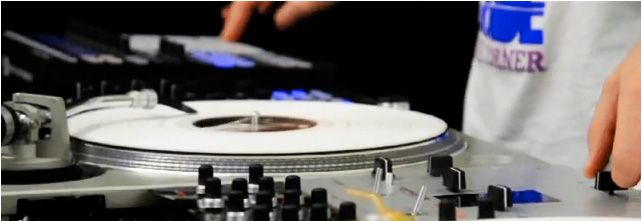
Block Rockin Beats Routine- Samples + Tutorial
NI recently posted some excellent controllerism videos including the one above which features Dj Rafik combining cue point juggles with scratching in a remix routine of Chemical Brother’s “Block Rockin Beats”. For its execution and style alone, the video is worth a view but we want to take it a step further by showing you how to perform the routine yourself and provide the original MP3’s for Traktor Pro.
THE GOODS
To try your hand at this routine your going to need a few things:
- 2 Channel Dj mixer or all in one controller like the VCI-100
- Traktor Pro
- a 4 X 4 grid controller like the Machine or Midi-Fighter
- This Block Rockin Beats mp3 with Cue points for T Pro
- Any break beat in the 127 range- He is using a custom edit of Pon De Floor
- Any controller with a few knobs and faders.
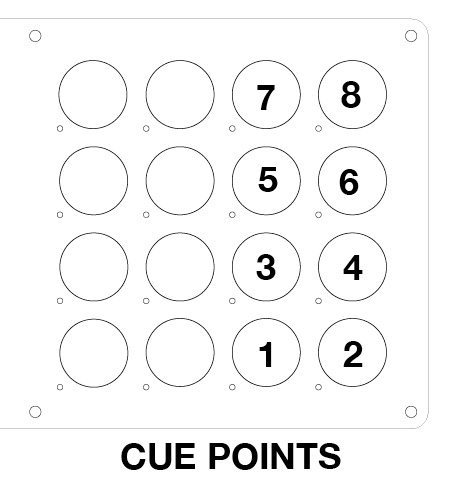
- A mapping for a 16 button controller with the following layout. (machine and midi-fighter TSI forthcoming)
SET-UP
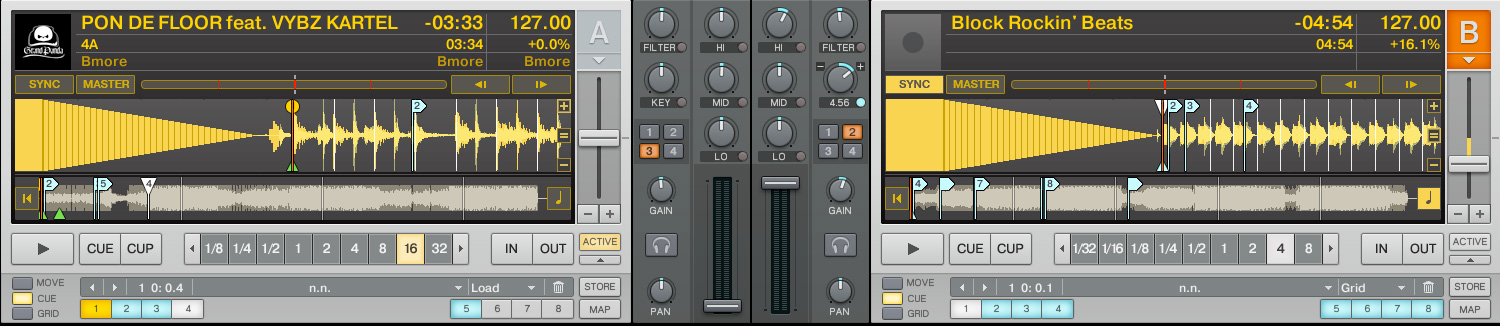
Rafik is using a custom edit of block rockin beats but you can accomplish basically the same thing with the original. Your going to speed up the track to match a break beat as shown above. Engage key lock and pitch up the key of the track to match pon de floor. (approx + 4.5 as shown above)
Part one 0:00-0:17
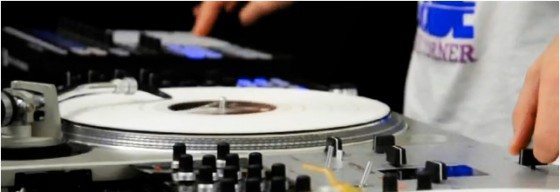
In the first 20 seconds both tracks are freely playing (sample-play, not sample-hold) but only the first note of each cue point should be heard. Use the buttons on your grid controller to jump between the different notes in time with the beat (only the bass line is sampled here). Work in the crossfader on your mixer to control how much sustain each note has. This will allow you to tighten the timing and allow for some negative space between the notes. In the final 2 counts trigger the famous “block rockin beats” vocal sample and cut the cross fader full right so the beat is temporarily silenced.
Controllerist TIP- When you first start learning this routine, slow down both tracks to 90 bpms or lower. Try to figure out the exact order of the notes at this tempo and perfect your timing before moving to a higher bpm.
Part two 0:14-0:30
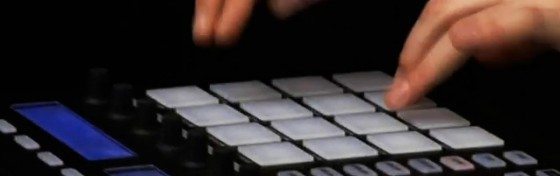
Now he jumps into a straight sample re-triggering without the crossfader. In this section you will alternate between the bassline and drum samples free time, which can be quite challenging to keep in time. Once again, it helps to slow everything down while you learn the routine.
Controllerist Tip: Using two hands will allow you to drum faster between 2 samples. developing all 4 fingers to an equal speed for multi sample playing is the best way but this can take years to get down.
Part three 0:31-0:45

This section allows the full sample to play out and uses a single super knob mapped to 2 FX, a gater and beat-masher, to cut up the sequence. The trick here is that the beatmasher is being turned off by triggering the cue points. The length knob then turns the masher back on when touched, creating a single action in the best sounding range. While clever, this mapping is not terribly realistic in a club setting on a controller that will be used for purposes other than a single performance.
Controllerist Tip: For infinitely more expressive knobs map the beat masher as a direct control and the gater as a relative control so there is variance in how they interact. Map one knob to all 4 controls shown above in yellow. Vary the relative strengths between them for maximum wackiness.
Part two 0:45-end
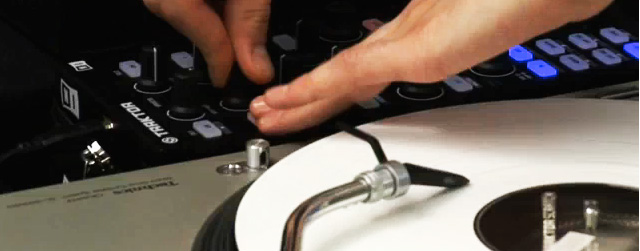
There are 2 custom pieces of prep here that will help you pull off this routine. Much like the beatmasher/off trick these shortcuts enable Rafik to move through the sections without thinking too much about settings.
- do a custom edit of block rockin beats and add your own scratch samples to the end so they can be quickly accessed while scratching.
- store cue points 5 at the down beat of this scratch phrase. Map that cue point to a button near your FX knob and close to the turnable.
While I certainly know my way around a controller, we cant really help explain the scratching part of this performance. For that you may want to visit the guru of scratching, Mr. Qbert himself.
INTERVIEW WITH RAFIK
How long did you practice to develop the juggle routine?
it wasn’t more than 15 minutes for composing and execution. That might sound very quick, but I already had the song chopped up for my dj sets before (All bass notes and a single kick/snare) and it was very intuitive frome there on. Sometimes the best results are very simple. The scratching part and adding the hihat took more planning, it seems a bit ironic maybe.
The second video with the Soulwax Remix of MGMT and the vocal – that one took me a lot longer because i found it quite challenging to use two songs as “sample banks” at the same time and seperate the sounds and pads in my head. First I had the music bit, I later added the Vocal, so there was a bit of an evolution for that one.
Do you think that controllerism and turntablism will combine into one larger performance group in the future?
Not into one group, but I can imagine this: Let’s say turntablism is one martial art, controllerism another one: Some people will eventually end up practicing mixed martial arts. Beware of those dudes! ;-)
I personally value vinyl culture a lot, it would be in my interest to keep it alive. But at the same time I can’t close my eyes to these incredible possibilities we have to be creative with the digital realm. I love experimentating in a zone where I am at least not sure if anyone has ever been there before. However, I really think controllerism and Turntablism are two very different things, each of them in it’s place.
I made these videos in an extreme fashion as a demo to what can be done with an incredible tool like TSP but when I play out, it is primarily about the selection, scratching is a bonus, the controller is a bonus, both extremely powerful.
My honest opinion is that it would also not benefit an event like the DMC world championships to include controllers. I have seen the efforts that were made (since 2003) and I feel it did not work out – explaining this would take too long i guess. Like I said, everything in it’s place.
I hope the focus for ‘controllerism’ will not be on going harder faster better stronger all the time, at least in the big picture. I don’t really want to put things in boxes, but for now I feel like a turntable is still the guitar (no matter if you scratch or ‘just’ play music), the instrument, and the digital world is the effects-kickboard that you may or may not use to enhance your performance.
Speaking for myself, I see both turntablism and controllers as two seperate passions that can both enhance one’s performance as a DJ, because a DJ is what I am in the first place.
Thanks to NI and Rafik for the good videos!








December 20th, 2009 at 4:52 pm Quote
first
December 20th, 2009 at 4:54 pm Quote
SECOND LOLOLOLZZ
December 20th, 2009 at 5:07 pm Quote
Uhhh…Third…btw. great tutorial!
December 20th, 2009 at 5:16 pm Quote
simply loved this video, was blown away by the incorporation of two fine arts, controllerism and turntablism into a single set. Definitely did not expect to see a semi how to on this!!!
btw, Dj Shiftee (former DMC champ) has some great scratching tutorials over on youtube under DubSpot, they are helpful, and quite entertaining to watch.
December 20th, 2009 at 5:21 pm Quote
sorry for the double post, but, couldn’t the beat be played out on the vci’s arcade buttons? would require some mapping wizardry, but it is possible (granted, doing the scratch lines on the vci would not be too fun, but that’s why I happen to be in the market for at least 1 tech, and a better soundcard)
December 20th, 2009 at 5:31 pm Quote
third
December 20th, 2009 at 5:39 pm Quote
good tutorial. this would be great on my setup. dont know if i can include the scratches lol, well i’m positive i cant, i use ableton. thanks ean. cant wait ’til i get my midifighter
December 20th, 2009 at 5:43 pm Quote
the new 3_0 mapping supports 8 cue points on the arcade buttons per deck so yes- it would be possible but you would need to re-arrange the cue point orders.
that mapping should be in beta after christmas
December 20th, 2009 at 5:44 pm Quote
Awesome. Now i wonder why i broke my head for two weeks, about how he does what. :D Could have saved me some headaches knowing this tutorial would come.
December 20th, 2009 at 5:54 pm Quote
since im not using traktor pro, do any of you guys know at what second(s) the samples should be set?
December 20th, 2009 at 6:47 pm Quote
that’s great news. I’ll combo it with my lpd8 and I’ll probably be able to work something cool out (even if its only baby scratches on the vci, with enough use of lfo, gater and the masher it might be workable.
December 21st, 2009 at 1:24 am Quote
Great tutorial, the video by Rafik is really sick, I already posted it on my site for others to marval at…
December 21st, 2009 at 3:01 am Quote
hm i really like this, but I really can’t scratch, so maybe I’m going to put cuepoints on scratch samples, so i’m still doing something
December 21st, 2009 at 3:39 am Quote
Looks like Traktor is seriously going after the Hip-Hop crowd. Somehow I doubt that the Maschine will take over the MPC for Hip-Hop production/performance, though…
December 21st, 2009 at 5:02 am Quote
how much would this kind of setup cost? great vid btw.
December 21st, 2009 at 5:42 am Quote
I mean… the only reason the maschine is even here is cause its a NI promo vid. I mean, that’s one seriously expensive midifighter right there…..
what are the thoughts on incorporating some form of “scratch n pitch” work into a routine similar to this? I mean, it wouldn’t work out as nicely as this, but find that my left hand isn’t to nice on the xfader…
December 21st, 2009 at 6:27 am Quote
I second that. Please let us non-traktor dj´s know where the cues have to be set.
December 21st, 2009 at 7:31 am Quote
Use Your ears.
December 21st, 2009 at 8:05 am Quote
Anyone else remarked that his control-vinyl signal is totally distorted, even when he’s not scratching? Or is it because he’s cue-point juggling at that moment (still don’t see why his signal would distort then…)
December 21st, 2009 at 9:15 am Quote
I will try this at home with my Oxygen keys :P
December 21st, 2009 at 9:22 am Quote
I have Maschine. And while it may not take over the MPC it will def. give it a run for it’s money. The feel of the hardware in my honest opinion is nicer than the MPC. Plus the software is amazing, and you can integrate it seamlessly with Traktor. Another big plus
December 21st, 2009 at 12:15 pm Quote
…
TOOLTABLISM.
sorry for capitals… turntable was ever one “tool” more…
…
December 21st, 2009 at 2:05 pm Quote
SICK!
December 21st, 2009 at 2:07 pm Quote
Tooltablism! thats great
December 21st, 2009 at 3:09 pm Quote
can you guys do that MGMT Kids Soulwax remix routine he did on the second video next? that would be great!! :)
December 21st, 2009 at 8:23 pm Quote
Sick! Sick!
December 22nd, 2009 at 3:35 am Quote
…
Tooltablism:
http://www.youtube.com/watch?v=X85S2YH5xRc
http://www.youtube.com/watch?v=wR7KpHaSXOc
If any one is interested on “tooltablism” concept please drop me a mail
luthier.lab@gmail.com
djtechtools team if you want an article, you are welcome too…
Merry x-mas!
El_Mudo
…
December 22nd, 2009 at 4:52 am Quote
I’m really lookin forward for the Maschine TSI. The template that comes with NI is really kool but I feel the Maschine as a MIDI controller capable of a lot more then it was designed to doo ;P
December 22nd, 2009 at 5:37 am Quote
It’s the bass from the speakers that makes the tables jump. Technics are light tables, if he’d have used a better absorbing turntable, like the Stanton 150, it would show much less bounce in the signal.
December 22nd, 2009 at 7:08 am Quote
Great video. Nice to see so many people responding in nice ways to seeing turntables here.
December 22nd, 2009 at 8:55 am Quote
Are you serious? Just shutup.
December 22nd, 2009 at 9:30 am Quote
…
Of course… turntables are controllers too… DVS could send midi/OSC and some of them are doing it at this moment (Ms Pinky) and inside Ableton Live…
It was a matter of time…
…
December 22nd, 2009 at 9:48 am Quote
d.suct0, you’re welcome ;)
December 22nd, 2009 at 10:25 am Quote
hmm .. thats sooner than i expected and i fear it means i wasnt able to convince you to go to a modular approach .. let alone routing through Bome :-/
anyways still looking forward to what you cooked up!
December 22nd, 2009 at 12:20 pm Quote
Obviously, Maschine and X1 are there because those are both products NI is promoting along with Traktor scratch… duh.
But can anyone see any real reason both are needed here?
December 22nd, 2009 at 12:33 pm Quote
Rafik told us: “Using Maschine is more a matter of the pad’s feel” so I think thats why both controllers are there.
December 22nd, 2009 at 12:46 pm Quote
Ean! When are you guys gonna release the custom TSI for the Maschine?
December 22nd, 2009 at 1:22 pm Quote
insaneeee!!!!
December 22nd, 2009 at 1:49 pm Quote
…
Creativity + Tools = Better Music (and showcases)
Simple.
…
December 22nd, 2009 at 3:48 pm Quote
Great vid! Questioj about the beatmasher+gater mapping. You’re saying to map one knob to the two gater effects and beatmasher, but there’s nothing that turns the gater effects on and off??? Even in the video, the gater never turns on. What’s up with that???
December 22nd, 2009 at 4:24 pm Quote
(Creativity + Tools) x Musicianship = Better Music
December 22nd, 2009 at 5:38 pm Quote
15 minutes for a routine like that?
crazy dope ass guy….
so brilliant…
December 22nd, 2009 at 7:02 pm Quote
Second?
December 23rd, 2009 at 7:46 am Quote
…
halfsemitone +1
…
December 23rd, 2009 at 8:47 am Quote
…
http://www.mspinky.com/phpBB2/viewtopic.php?t=973
Ableton Live Clip Scratching.
…
December 23rd, 2009 at 12:42 pm Quote
wwWWWOOOOoooooo!!!1 amazing sets! great tips. i think his viesws on the tables and controllers was almost dead on except that the ‘guitar’ is any instrument you make ‘your’ guitar. keep it coming guys
December 24th, 2009 at 2:27 am Quote
…
And about MMA… well Tooltablism is JKD for Musical Technique… at last only a word.
It’s time to sharpening swords…
…
December 25th, 2009 at 12:40 pm Quote
I agree, there really isn’t much of a need for him to use both of the devices, as he really only uses 1 knob on the X1? I guess its just due to the fact that he can have a knob nice and close to his TT. I dunno, I havn’t been super impressed with the X1? I guess I’ll have to wait till they are releases, and I can actually feel the buttons.
December 25th, 2009 at 4:40 pm Quote
Dude the buttons/knobs on it feels exactly like the Maschine’s… They are nothing like those cheap Launchpad’s buttons or the APC40’s. Pretty tight! The only thing I’m curious about is those encoders tho :/ I hope they are pretty decent and ain’t fiddly…
December 30th, 2009 at 10:17 pm Quote
on part 3 of this you mentioned ” While clever, this mapping is not terribly realistic in a club setting on a controller that will be used for purposes other than a single performance. ” can you go a little in depth? im not quite sure. thanks!
January 17th, 2010 at 6:09 am Quote
I’m so interested in this Mapping Files, that Rafik uses! Are there any .TSI Files available????
January 17th, 2010 at 11:20 am Quote
Just as a matter of interest.. what latency does this guy have set up coz it seems like he has none with his tight scratching…!
February 5th, 2010 at 4:01 pm Quote
so i tried this without a maschine…. not as easy as i thought
http://www.youtube.com/watch?v=awDEhzjhKwA
May 12th, 2010 at 12:54 pm Quote
He’s hitting the buttons right next to turntable so the needle picks up the noise, even the technics are heavy as tanks. Of course the real problem is the table that isn’t solid enough. You can see the distortion in left deck as well, but a bit less because of the distance. It’s a bit too high noise, but still works like a charm! recalibration while smashing the buttons would probably lower the noise.
May 13th, 2010 at 9:55 am Quote
I think it is a great routine. And a good little article outlining how Rafik put it all together. In this instance, he could easily lose either the X1 or the Maschine and still pull it off, but since he endorses NI, there is no reason for him to not take advantage of both controllers.
May 13th, 2010 at 10:08 am Quote
Oh, and a little P.S. to whoever said that Technics aren’t heavy and that he would have less of an issue with a heavier turntable like the Stanton str8-150, the Technics 1200 MKII weigh in at a hearty 26.5 pounds (12 kg). As has been mentioned above, it is far more likely that the issues is that the table isn’t particularly sturdy (I bet is is just a standard folding table).