Sync External Hardware to Traktor

TraktorHardwareTop

By Nisus

One of the greatest things about digital DJing is the opportunity to incorporate a multitude of performance tools into your sets. Not being limited to the turntables as an interface has opened the door to a wonderful world of controllers full of knobs and faders. While controllers have given us the power to mangle and mix sound, they have also put us back in touch with the instrumentality of live music performance.

DJing is a musical gateway drug. It makes sense that once you get used to using a controller as an instrument, you might want to start using the plethora of sound-producing instruments in a similar way. In this article, I look at integrating actual hardware synths into Traktor. Watch out though; before you know it, you’ll be wanting to play Phrygian dominant scales in your sets like Moldover.

DECKS, EFX AND A 909
TraktorHardware1

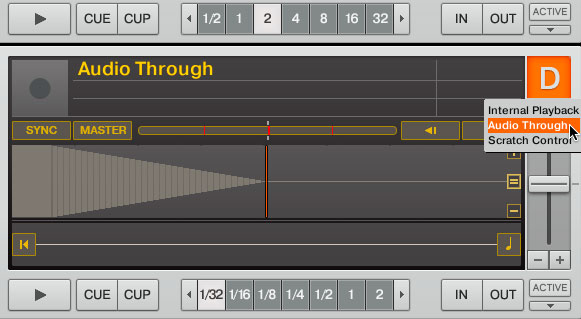
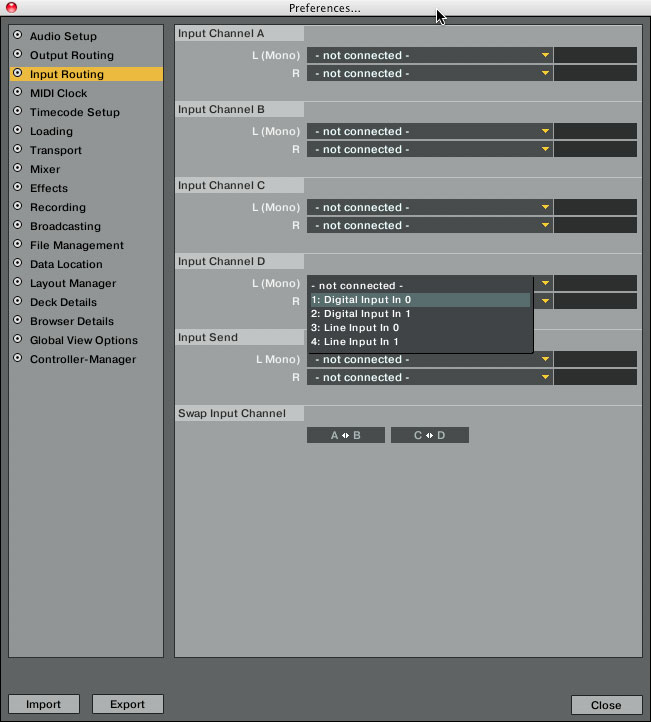
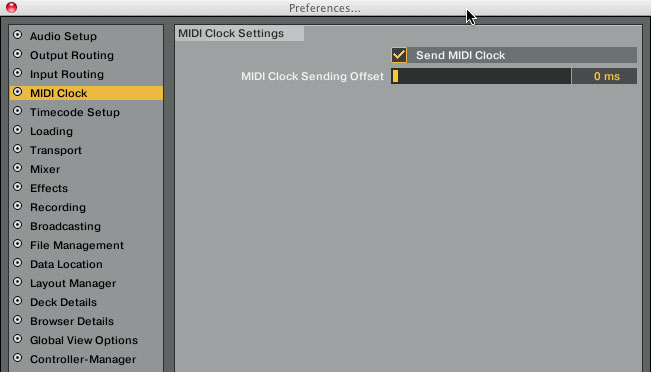
Using Trakor in a four-deck layout is a perfect complement to many four-channel club mixers such as the Pioneer DJM-800 or the Allen & Heath Xone:92. Traktor has the ability to run audio through any of its decks and also send MIDI. Right below the big deck letter is a little drop-down triangle that you can click and select “Audio Through”. In my sets I do this on Deck D. Running audio through a deck gives you access to Traktor’s awesome internal effects, which you’ve hopefully mapped to your controller. Once you have audio through, you need to go into preferences and click on “Input Routing” Input Channel D and select your inputs. In my case I’m using the Audio 8 interface, so I selected Input 7 and 8 for Input Channel D. While you are in preferences, click on “MIDI Clock” and check the box “Send MIDI Clock”. There’s a MIDI Clock Sending Offset field below that, which we’ll go back to in a minute.
TraktorHardware2

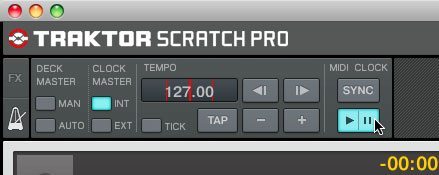
Back in your main layout in the top left corner where your effects section is, there’s a little metronome icon. Clicking on that will show you the Master Clock settings. You will see four buttons: Man, Auto, Int and Ext. Click “Int” and set your tempo. Click the big “Play Pause” button under the MIDI Clock “Sync” button. It should glow a glorious blue. If you haven’t yet, now is the time to plug in your MIDI cable from the MIDI Out on your Audio 8 (or other audio/MIDI interface) into the MIDI In on your piece of hardware. I am also connecting the audio out from my synth to the audio inputs 7 and 8 on my Audio 8 interface, which are assigned to Channel D in Traktor. Somewhere in your hardware synth will be a MIDI Clock setting that allows you to send and receive MIDI Clock data. Find that and set it to external or slave mode.
TraktorHardware4

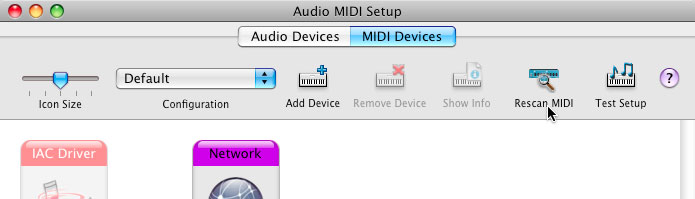
If you are using a Mac, you need to go Applications>Utilities>Audio MIDI Setup. Drag that app to your dock, because it’s nice to have quick access to it. Open the app and click Rescan MIDI. Your device should light up.
TraktorHardware5

On with the fun! Load a track, start it playing and click the MIDI “Sync” button. Your hardware should jump into action and be sending sound through Deck D. Wonderful, right? Your hardware audio input could be a drum machine, a synth or anything with a MIDI port and audio outputs. There are some really great mod kits to add MIDI to your circuit-bent toys, so don’t sleep on the many possible devices you can sync to Traktor.
TraktorHardware3

Now back to the MIDI Clock Sending Offset in the MIDI Clock preferences. Here’s what you do: Click the “Tick” button in the MIDI master clock window. It sends out through channels 7 and 8 by default, so those need to be plugged in or set to your headphones. Open preferences and click “MIDI Clock.” Now comes the part that relies on your O.G. beat-matching DJ skills. You need to align the tick with your synth or drum sounds. I recommend you pick a quick, mid-range sound on your hardware. Slide the MIDI Clock Sending Offset bar until you hear the two tones align in time. Press the Sync button and move the slider; repeat until correct. The end.

This should help you get on your way to incorporating instruments within your DJ sets. You can play along live or you can sequence patterns within your hardware. And this is only the beginning. – Nisus


32 Responses to “Sync External Hardware to Traktor”

  1. Yan

    November 27th, 2009 at 12:35 am Quote

    so i have seen other dj’s use multiple software applications such as ableton and traktor together on seperate computers for example hawtins setup… is this the same way you stay in time? im still confused as to how you would stay in time… r traktor and abelton compatible do u route into channel D like you posted about same way? a good tutorial would be awesome… sorry im such a newb…

    thanks,

    yan

  2. Eduardo

    November 27th, 2009 at 12:54 am Quote

    Hy sorry , but i Cant See the Images of the traktor Hardware!thanks!

  3. Bart EHV

    November 27th, 2009 at 1:28 am Quote

    me neither!

  4. seeMARTINbreak

    November 27th, 2009 at 2:31 am Quote

    wow wWWAAAAYYyy!! over my head. i dont get whats going on here… am i playing some instrment on whatever dack i choose(D) and applying effects onto it?

  5. SP222

    November 27th, 2009 at 2:44 am Quote

    Hey – you’re bascially taking an external instrument, like a drum machine and using MIDI to keep it in time with Traktor.

    Instead of the Audio out of the drum machine going through a desk, it’s going through traktor so you can use the internal effects.

    As you change the tempo in Traktor, the drum machine will also change as it’s following the MIDI signal from Traktor.

    Steve

  6. Dj Lucid

    November 27th, 2009 at 2:48 am Quote

    sweet this is exactly how I run my electribe through.

  7. Anartist

    November 27th, 2009 at 2:48 am Quote

    so i have seen other dj’s use multiple software applications such as ableton and traktor together on seperate computers for example hawtins setup… is this the same way you stay in time? im still confused as to how you would stay in time… r traktor and abelton compatible do u route into channel D like you posted about same way? a good tutorial would be awesome… sorry im such a newb…

    thanks,

    yan

    Yes, I’d like to know more about how Traktor and Ableton can sync together – Or have I missed a post on this subject already?

    Thanks mates.

  8. Double DutchDj

    November 27th, 2009 at 3:00 am Quote

    Nice post! Me and my two dj buddy’s hook up two copy’s of traktor, NI macheane and virtually midi link reason for its synths, we’ve wasted hours having fun and making noise but does any one know how to keep the midi clock working without it activating the other device’s that the midi clocks are being sent too?

  9. Vinicius Hoffmann [Brazil]

    November 27th, 2009 at 5:25 am Quote

    search for bentosan on the forums, he has a link to his walktrough to run traktor + ableton together…

  10. Leefy

    November 27th, 2009 at 7:10 am Quote

    Will we every be able to accept a midi clock in signal.
    That way we would be very easy to able to set up two traktor’s (one being the master).

  11. AO

    November 27th, 2009 at 8:21 am Quote

    Wow, I knew Traktor had midi out, but I didn’t know about the audio in, thanks for this!

    @DoubleDutchDj, do you mean ignoring midi start/stop commands on your external gear? You can usually change this on the gear itself to only accept clock, but not transport controls. Just a guess as I have yet to play w/ Traktor’s midi functions like this.

  12. AO

    November 27th, 2009 at 8:22 am Quote

    @Leefy — yeah, I’d love to have midi in on Traktor. For the Traktor Pro users, is this a feature yet? I have yet to upgrade . . .

  13. AJ ORB/T

    November 27th, 2009 at 8:34 am Quote

    I love it ! +1up

  14. Mr?Softee

    November 27th, 2009 at 9:16 am Quote

    well I do also not completely get what this is all about… wait… where is my cross-fader? ;-)

  15. NM

    November 27th, 2009 at 11:01 am Quote

    Don’t you think that nearly everything this article deals with is absolutely obvious? I mean if you own a drum machine or a sequencer you propably know how to midi-sync them…

    One thing I could add is that you have to be careful when using a xone:4D, as it has its own built-in midi-clock. So when you use the midi-send function in traktor and the 4d’s internal clock together the signals might clash and confuse your sequencer.

  16. KIDHACK

    November 27th, 2009 at 4:34 pm Quote

    so i have seen other dj’s use multiple software applications such as ableton and traktor together on seperate computers for example hawtins setup… is this the same way you stay in time? im still confused as to how you would stay in time… r traktor and abelton compatible do u route into channel D like you posted about same way? a good tutorial would be awesome… sorry im such a newb…

    thanks,

    yan

    Yes, I’d like to know more about how Traktor and Ableton can sync together – Or have I missed a post on this subject already?

    Thanks mates.

    Yes. This is how you would sync Traktor with say Ableton or any other MIDI enabled software or hardware.

    Don’t you think that nearly everything this article deals with is absolutely obvious?

    Kinda a redundant statement. Of course something is obvious to the person that already knows about that something… but to the people that don’t know, this article may enlighten them to the possibility of doing more than just DJing with Traktor and opens to the door to adding live elements to a show. I mean Native Instruments doesn’t really advertise Traktor as anything more than a digital DJ solution, but the fact you can record and route sound through the decks is pretty rad and it’s something a lot of other digital DJ solutions don’t offer.

  17. R3 Bonaire

    November 27th, 2009 at 5:54 pm Quote

    ” i have tried to sync my Roland SP555 to TR-Pro. I have a NI audiokontrol 1 with midi in/out and a VCI 100 SE DJTT. I have the problem that not only the Midi clock is received but also Midi control signals from the PAD’s from the SP555 control the TR Pro functions in a bad way. Like double midi data from VCI and 555.. I went back to manual Input without Midi clock. So i adapt the BPM to the SP555, but beat drift is happening always on the long run. But i would like to see this work auto…….
    Any suggestions…..”
    R3

  18. nateboogee

    November 27th, 2009 at 7:10 pm Quote

    My head is spinning….
    Is there a tutorial video in the works?

  19. Double DutchDj

    November 28th, 2009 at 8:28 am Quote

    @AO cheers for the idea, I’ll be hunting down those options on my midi hardware. Plus Traktor Pro has always been able to receive as well as send midi clock signal, Simply set the clock master to external which allow Traktor to receive midi clock and then press sync, the tempo display should now be heading in the direction of the same bpm as what ever device or software you have set up as the master clock. If your doing this with to copys of Traktor, on the Traktor you want to be the master, set the clock to internal and I find setting the midi sending offset to around 29 will put it in time with Traktor you want slaved, but you may need to play around with the offset to get it perfect, but once it’s spot on it’ll stay locked for as long as you want!
    +++
    Remember any one Trying this with dvs, syncing will not act the same, as a tuntable can not be sync locked. But pressing sync on a deck recieving external midi clock from another copy of traktor will adjust the bpm to the same as other copy of traktor which can be handy as an mixing aid or messing around with fx.

  20. ToS

    November 28th, 2009 at 3:04 pm Quote

    Neat ideas, next tutorial idea: “SYNC your VJ to your sets”

  21. Christian Ludy

    November 29th, 2009 at 10:58 am Quote

    n1ce one, although i knre of this featrure before, i´m now kinda hot to try out mixing on 8 decks … brings back the idea of my conceptual 100 records in an hour mix …

  22. douglas [brazil]

    November 29th, 2009 at 11:34 am Quote

    NICE POST!

  23. I_AM_DJ_A

    November 30th, 2009 at 2:28 pm Quote

    somebody i want to know i have pioneer fxe-500 and audio 8 i can us fxe-500 can play effect on traktor pro or no help me plase thank you everyone

  24. Minuteman

    December 3rd, 2009 at 5:14 pm Quote

    Hi guys,

    Nice article… but could you be more specific about the connections between the different machines… should you prefer midi or usb? How to select which hardware is going to send the MIDI clock?

    I have a A&H Xone 2D which has a midi in/out but which has to be connected to the computer via USB for the MIDI control and the soundcard… never got it to work… what would the ideal setup?

    Any help is welcome,
    Minuteman

  25. regend

    December 11th, 2009 at 1:35 pm Quote

    for the life of me i can’t figure out how to use my KORG padKontrol with Traktor Pro 3.0 Anyone else use it? It works beautifully with Ableton Live. Greatly appreciate the sharing of knowledge.

  26. regend

    December 11th, 2009 at 10:29 pm Quote

    n/m i figured it out!

  27. regend

    December 11th, 2009 at 10:29 pm Quote

    n/m i figured it out!

    thanks

  28. victor

    December 14th, 2009 at 10:45 am Quote

    So… im starting with this.

    I have a electribe sx1 and a lap with traktor pro controled by Hercules RMX.

    To fix the electribe as a slave I need an interfase that accepts audio and midi data, true?

    Can you recomend me an affordable interfase to do it?

  29. Eduardo 'Longylegs' Smith

    January 9th, 2010 at 8:28 am Quote

    Thanks for article, but im still not getting summat right.
    Im trying to sync my Korg EM 1 to traktor.
    1/ midi is set to ext on drum machine
    2/ int. in traktor
    3/ i even set tempo the same on my drum machine
    4/ there s audio coming thru to deck D
    But even with adjusting the offset i cannot for the life of get em sync’d. Its as if i cannot sync both software and hardware even though they are connected.

    Can anyone please help? This is driving me nuts
    Cheers.

  30. Santos

    January 14th, 2010 at 9:19 pm Quote

    what cables do you need to connect my djm 800 to audio 8 (midi wise)

    and if i were to literally to control 4 decks i would need 4 milticore cables and 4 timecoded cd’s right?? or could i use standard RCA’s for the other 2 decks?

    help would be greatly appreciated =]

  31. Nisus

    January 14th, 2010 at 11:02 pm Quote

    @Santos You would need 4 RCAs and a midi cable. I thought about setting up midi to Traktor from the the DJM 800 but after really looking into it I decided the DJM 800 is just not the best way to control Traktor because you would not be benefiting from using it as an external mixer if it was controlling the internal mixer. Sorta like time travel. You could try it though and let me know how it works. -Nisus

  32. Santos

    January 15th, 2010 at 1:12 pm Quote

    @Nisus I would like to use 2 channels on my mixer to control my 2 CDJ 1000’s and the other 2 channels maybe to add internal effects or other things… would that work? and what kind of cable would i need can you send me a link thanks

Leave a Reply

  1. Quote selected text

First Time?

This site is dedicated to digital djs. We develop performance tools and teach cutting edge techniques that enable creative expression. Visit tutorial videos on youtube, equipment reviews in the blog and a very helpful community in the forum. New articles every Mon, Wed, Fri.
In the Store
 

Categories:
Follow us:
You're going to need Flash 8+ and JavaScript to use this site. How'd you get this far without it?

Dig through the Crates

Readers are Saying

  • Jonny: I notice a post about being with ‘deadmau5′ ‘on that one’. He has little option as the guy...
  • Jack Creamation: Whens the next contest?
  • virtual dj tutorial: just read your post. thank for good info. I’m still learn to you.cheer
  • yc: Oman here, so certainly not as tight about it as Saudi (I do know a few Saudis and I know they’re quite laid back...
  • Riot: Just did five months in Nicaragua and found a bar on the beach to spin at and it was a blast to play to people from all...
Contributing-Writer-Ad