

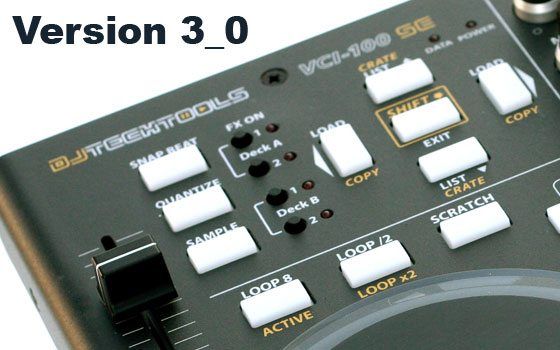
New VCI-100SE 3_0 Mapping
Today we uploaded a minor 2_5 update to our popular VCI-100 mapping. We are also working on a major 3_0 update that will change around core concepts and streamline the controller. If your a VCI-100 owner, you need to read this post and give your feedback on the ideas. If you have other controllers, check out the new concepts and try to incorperate them into your own mappings.
A brief history
Nearly 2 years ago we introduced the VCI-100SE and mapping version 1_0. In it we created many things on the hardware that were not possible in Traktor 3 like bi-polar filters, direct FX select and fader fx. Our goal was to make the fun performance tools in Traktor 3 more accessible and easier to use through smart hardware design.
In Version 2_0 the mapping shifted from simplicity to greater flexibility as Traktor Pro directly incorporated many of our concepts from the SE. The mapping has been a great success but we have found many ways over the past year to make it even better.
Now with Version 3_0 my goal is to combine the best of both versions into a mapping that will be fairly permanent and truly stand the test of time. While many controllers have come out since the SE was first released- ours still remains one of the very best interfaces available today for Traktor Pro. The goal is to keep it that way.
New Concepts
In the performance state its critical to make the distance between inspiration and creation as short as possible. Any and all barriers to creativity must be removed to enable creative flow when deep in the mix. While Traktor Pro contains un-ending creative potential, accessing them in a quick and intuitive way is often difficult. For that reason, its best to have a few utilitarian mix tools ready to go at any time with the push of a button. These include:
- ECHO + Freeze- for the fast transition
- SLICER- for a quick build up
- 8 COUNT SAMPLER- too keep a loop going and free up a deck instantly
- 2-4 PRE SET FX GROUPS- That you know will sound great with no config required
- INSTANT ACCESS TO COMMON FX- with no routing required
All of these utilities are going to be present in the new 3_0 mapping. Generic controllers usually offer 4 buttons and 4 knobs for the Traktor FX section. While this may seem like the right control set to offer, its a pain to use in reality. For example, getting a simple echo requires:
- figure out which fx unit to use
- load the echo
- route the deck you want to that effect
- fine tune the echo settings
- turn on the echo
- find the freeze
- activate freeze
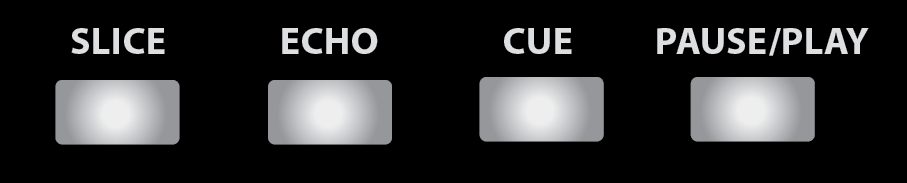
In the new SE mapping every deck will have a echo button which does everything for you in one press. hit play while holding down the echo to freeze the track. Its that simple. We spend hours fine tuning the dozens of commands each button sends, so you dont have to think when a critical part of the mix comes.
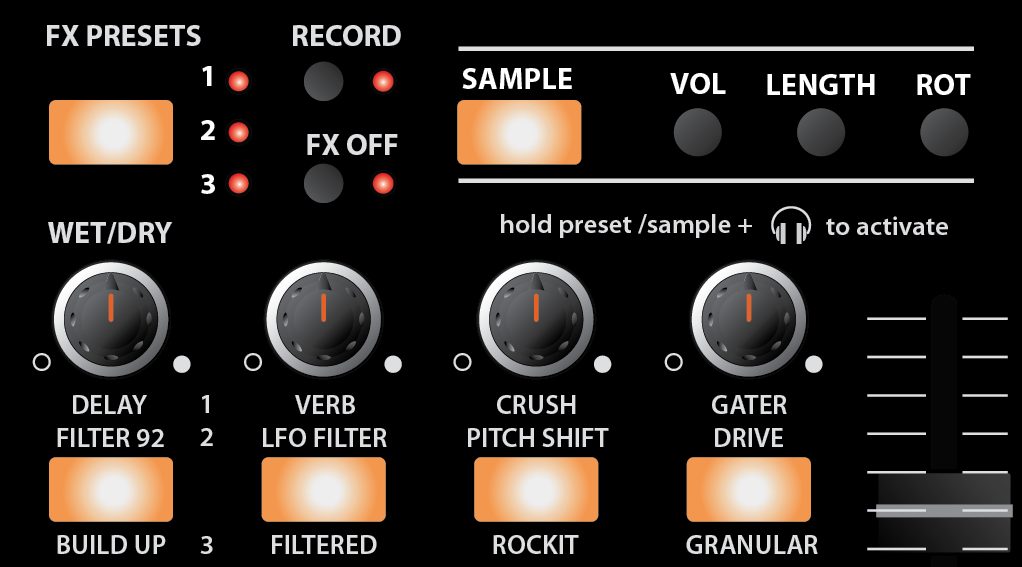
Instead of generic buttons and knobs, we are bringing back single press FX presets. Hold down the preset you want and press the desired decks headphone cue button. This will load, route and set up the FX for that deck. Then just turn on fader FX to rock the FX with large tactile controls or use the 4 knobs above the presets to control them. Along with 8 single FX, we will offer 4 preset groups of 3 FX that sound amazing together in fader FX mode – here is just one example.
Your Turn
Right now these concepts are not final and still need to be proven/tested. Your feedback is going to be critical in deciding what the final 3_0 mapping and brand new overlay will look like.
COMPLETE THIS SURVEY TO PROVIDE YOUR FEEDBACK
next, if you have not already- sign up on the TSI beta list to get the beta TSI’s for this layout.
Overlays
If you already own a VCI-100
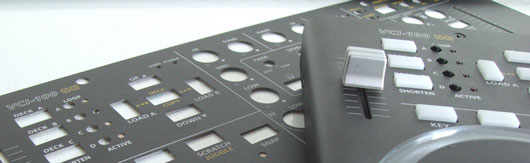
- Just place the new overlay right over the old one. Watch a video on the application here.
If you that want to buy an SE in the next 4 weeks or have purchased one in the last 2.
- we will send you an updated overlay on the house. Just email us your order number.
For those with Arcade Editions
- We will be producing arcade versions of the overlays that fit around the buttons so you can put the new one right on top.
- Arcade versions purchased in the next 4 weeks will also get complimentary overlays.






November 24th, 2009 at 9:46 pm Quote
That sounds very exciting! – I wish I could give feedback, but I don’t have a SE or Arcade yet ;(
Am I correct in thinking a new overlay be required for the new version?
November 24th, 2009 at 10:19 pm Quote
I love the echo button, I actually have my hercules RMX to have preloaded effects in the same manner. A flanger, echo out, and beat slice, each have about 10-12 mappings per button, so that they sound just right with one press.
I will be a proud VCI owner in a couple of days. So i’m jazzed. I’ll test out the new mappings and come back with some feedback.
++++ Ean, will it be easy to remove the old overlay and replace it with the new 3.0 once it comes out? I’d hate to have an outdated overlay, knowing that I just purchased the VCI? ++++
November 24th, 2009 at 10:19 pm Quote
Yes a new overlay will be required for the new version. I rather have the option to turn on effects 1 and 2. Also, is the problem about Juggle and the leds still on the new 2_5?
November 24th, 2009 at 10:28 pm Quote
Ok, now I’m inspired.
I own two SCS.3d controllers. I can see setting up a generic preset and using Trigger mode to load four different effects groups with the buttons (B11-B14) and set the trigger zones (B1-B5) to fire off one-press effects presets.
November 24th, 2009 at 10:33 pm Quote
Great job DJTT!
i guess we should use shift for more operations, like: shift+scratch=turntable stop effect; shift+cue=rewind to load cue(in 1 bar, keeping tempo) …
PS: and again, PLEASE tell NI to implement DECK MONO, i want to fx my mcs. is that so hard?
November 24th, 2009 at 10:41 pm Quote
Stoked on the new 3.0 concept. No complaints here. My survey actually pointed to mostly all the same wants in the final proposed version especially an overhaul on the knob looping section. I personally never use it and prefer tapping to loop/shorten loop/extend loop. 3.0 is simply gonna own!!!! A million thanks 4 all the dedication Ean & team! Can’t wait!!!!
November 24th, 2009 at 10:41 pm Quote
You went in a different direction than I anticipated. In version 3.0, I was hoping you would expand on the 4 deck concept, and by pressing the C/D controls, the effects slot 1-A and slot 2-B would be controlling slot 3-C and 4-D. That way you could have true 4 deck control with 1 VCI, it would be totally glorious (and I imagine a programming nightmare). In this version, slots 1, 2, and 3 are presets and 4 is a sampler. I think this would be a big mistake if enacted, and using a whole effects deck as a sampler is a total waste. Why not just have the sampler function copy the track your playing to another deck (C/D) and drop a 8 bar loop at the same time. Then you could effect the loop however you’d like, and lengthen/shorten it easily.
I like the idea of EQ FX but I never use the preset effects, but would use it all the time if I had the know how to customize it. Maybe if you provided people with an easy way to customize the effects they used, they would use it more. I’m really hoping I’m not the only one who opposes the move back to preset FX, this would be a definite step back! I like being able to customize my effects slots, and if this were in fact enacted on the mapping I would probably just stick to version 2.0. Maybe I’m settled in my ways, maybe I don’t know the power of presets. I just feel like their limiting, and version 2.0 was awesome because you had the autonomy to use your own effects, and I always use the Shift+Scroll function to jump around to different effects. As for the new layout of the 4 buttons on the bottom, I feel like theres a more elegant solution. Why not have fader fx mode turn all 4 buttons into FX presets, juggle mode turn all 4 buttons into cue points, and the default be cue, pause/play, sync, drop. That combines the innovation of 3.0 with the ease of use/autonomy of 2.0. You can still control deck C/D with the space that sync would occupy, and EQ FX would still exist.
November 24th, 2009 at 11:41 pm Quote
This actually looks like a really nice step forward imo.
November 24th, 2009 at 11:44 pm Quote
will the firmware upgrade be needed for full functionality of this mapping? I’m hella intimidated by even such modest/straightforward hardware hackery :((
btw DJTT is insane – rocks my socks ferreal. breakfast hasn’t been the same for over a year now.
November 25th, 2009 at 12:03 am Quote
I like the new ideas but, I use 4 decks most of the time as well as the 4 individual loops. I can’t live without that.
November 25th, 2009 at 12:55 am Quote
This tool is what makes me what makes my sets what inspires me to create. It causes confusion among friends and I am focus. Reading the article made me say that and has me saying yes to all.
November 25th, 2009 at 1:05 am Quote
Hi Ean!
just received the VCI-100 Se Arcade Edition , 2 weeks ago…
I wonder if there will be an overlay for the arcade edition too!!!
oh my god! I have to change the new overlay ohhhhh
I will read the article to know the changes…
November 25th, 2009 at 1:39 am Quote
I’m afraid I agree with Gabriel, I barely use effects but use the dedicated loop controls all the time so I’m probably likely to stick with 2_5
November 25th, 2009 at 1:40 am Quote
I would like to officially suggest a black version of the DIY blank overlay for the DJTT store. We can remember the mappings, or put down some scribble strips.
(And stock some replacement channel faders, since I just snapped something in mine pushing the cap down, and now it jiggles.)
November 25th, 2009 at 1:47 am Quote
Please please keep the yellow labels for the modifier key funktions! I think they look absolutely fantastic with the matte black overlay! Better than red labels!
November 25th, 2009 at 2:04 am Quote
what should i do?
wait for the new mapping and overlays?
or
going on with the old mapping and buy the recent overlay now?
D:
November 25th, 2009 at 2:58 am Quote
sounds interesting! cant wait to test it out and try to remap a few things… yeah
November 25th, 2009 at 3:02 am Quote
oops…. forgot that i dont see a deck C/D mode anymore?
November 25th, 2009 at 3:14 am Quote
great news guys! cain´t wait to test it!
November 25th, 2009 at 3:17 am Quote
So this means my freshyl purchased VCI will soon be out of date?!
:(
I hope you can change the overlays on them easily?
November 25th, 2009 at 3:18 am Quote
i personally think that its time to route things through Bome in order to get a lot more flexibility in terms of LED feedback but more importantly because this will cut down the mapping inside TP alot making it more feasible to do customizations based on personal preferences.
November 25th, 2009 at 4:01 am Quote
hey
No drop button is a bit of a problem for me but I can just add that in as a shift function on the slice or echo buttons.
Can i request though SILVER versions as well as black, i ‘d much prefer to get a silver version with my black knobs to match my macbook pro :)
November 25th, 2009 at 4:36 am Quote
Blank overlay? just take the plates off and add some “scribble strips”
November 25th, 2009 at 4:41 am Quote
Is there some kind of password on the 2.5 zip file, can’t seem to open it?
November 25th, 2009 at 4:46 am Quote
I really use the loop knob section A LOTTTT !
I will really miss this feature if i can’t use it… And i don’t really use effects (only sampler, beatmasher, filter, echo)…
November 25th, 2009 at 4:47 am Quote
When the final 3.0 mappings come out,the overlays for 2.5 will still be available right?
Anyway,great new features. :)
November 25th, 2009 at 5:15 am Quote
Hmmm…
Well first. I like how you’re trying to move things forward. BUT!
There’s always the little annoyances. For me living in the UK I’d have to wait another 3 weeks for a new overlay to get delivered, but there’s nothing you can do about that :p
Then i think i’m going to miss the EQ effects. But maybe the new FX stuff will be so awesome that i wont need those knobs anymore.
The new Slice, Echo etc stuff looks way way way awesome. Can’t wait to try that out.
I’d really really like it if it was possible to pre-order the overlays or something so I have as little wait as possible between getting the TSI and the Overlay delivered.
November 25th, 2009 at 5:52 am Quote
From your Oxygen mapping I’ve learned to use the modifiers for shift sections and to use monster knobs and keys
I have a key called the “deck duplicate” that can duplicate a deck A to C and EQ both decks to come with a dual layered music to apply effects (slicers) to one side or both sides.
November 25th, 2009 at 6:08 am Quote
Hmm… this will defo aim more at controllerism routines and mashing, very exciting and new :)
November 25th, 2009 at 6:48 am Quote
I agree with someone above, if we can get the drop function as a shift + ? button somewhere, I’m fine. Otherwise, I’d miss that button too. Combine that with a way (and a CLEARLY LABLELED) function that will allow a way to save those drops as permanent cues, I’m real happy.
I also like the tap for loop length AND delays/echos. With that, I’m extra happy.
Is the ability to activate a saved loop still on the VCI? If it is, I can’t seem to remember how to do it. And I bet it’s something simple too.
Thanks…I think this is gonna be great. Remember…
1. Tap button for loop length, delay length & echo length; shift + tap to recalculate BPM
2. shift + ? for drop cues & shift + ? to save cues
3. Play button led STAYS lit while deck is playing (not mentioned above but IS mentioned in my survey)
November 25th, 2009 at 7:01 am Quote
By the way, what are the minor bug fixes and improvements in 2_5?
November 25th, 2009 at 7:25 am Quote
awesome stuff, love the new ideas! really getting into the creative potential of Traktor in a very unique way, which is what DJTT’s all about :)
Also just wondering if you’re going to make an Arcade Edition overlay too? I expect you will, but i’d hate to miss out on such an awesome new TSI :)
November 25th, 2009 at 7:31 am Quote
This is not better than 2_5. Only different. I could say why but Im too lazy for that. Maybe Ean can put 2 VCI’s with the different overlays and explain how they differ. I think putting a number there will add a perceived notion that the other one is outdated. Maybe a name like VCI FX can explain differences.
November 25th, 2009 at 8:07 am Quote
I agree with all of this! Presets are far too limiting in my opinion, it would be much better to give people the opportunity to customize them how they want. (slightly off topic – why do you all call it ‘echo’? it’s ‘delay’!)
Having modifiers for the bottom 4 buttons would be much better, that way you can have the best of the old and the new, no need to make a choice that’s going to upset some people no matter what.
November 25th, 2009 at 8:38 am Quote
I liked the EQ knobs as well, I think if they can still be incorporated and have the ability to be changed with a knob on the fly can fix the “limitation” factor that most people are pointing out.
I would also miss the drop cue, although having the echo, slice buttons is nice too. Maybe a shift state, like others have mentioned.
I recommend posting a video on how to remove and upgrade your overlay.
November 25th, 2009 at 8:47 am Quote
New overlay looks awesome.. the blue wasn’t working..could not really see it..cant wait for the final update. Everything DJTT is doing is great. Thanks for the dj sets you have provided cant wait til more come out..one last request can you provide the ideal settings for scratching?
November 25th, 2009 at 8:49 am Quote
Holy crap man! I’m sold on the arcade.
November 25th, 2009 at 8:56 am Quote
Wow, looks nice, i’ gonna try to map some of those presets and the echo to my mpk49, and I’m trying to put a fader fx mode on my reloop digital jockey2 , but I’m actually thinking of purchasing the vci and use it as deck a and b, and use the rdj as c and d, and then use my mpk 49 as a dedicated fx bank, with al those banks of knobs, sliders and velocity sensitive touchpads
November 25th, 2009 at 9:14 am Quote
Does this mean I have to buy a new overlay as soon as I receive my Vci-100 SE I ordered some days ago? Or can you do something about it? Thank you!
Mans P
November 25th, 2009 at 9:58 am Quote
Yes you probably will need a new overlay. If you can cancel that order I’d recommend you do it soon. When i bought my overlay many months ago I made sure it wasn’t gonna be out of date as soon as i got it.
November 25th, 2009 at 10:09 am Quote
I’d love to see a pitchbend knob for a selected deck.. I love to mess with the bitch during build ups, and loop increases increase the pitch. Its and awesome effect and right now i can’t do it with the current TSI :( anyone else hearing me on this point!!!!!!?????
November 25th, 2009 at 10:24 am Quote
I completely agree too i feel that effects are taking over! EFFECTS ARE NOT EVERYTHING! not everyone goes crazy with the effects 24/7 some of us like to add in effects now and then to create and interesting sound but i feel that the whole layering looping thing “richie hawtin” style loops was essential i would cry if that was gone.. I think 2_5 moving to 3_0 could be great but not with so much effects.
Presets are far too limiting in my opinion, it would be much better to give people the opportunity to customize them how they want. (slightly off topic – why do you all call it ‘echo’? it’s ‘delay’!)
Having modifiers for the bottom 4 buttons would be much better, that way you can have the best of the old and the new, no need to make a choice that’s going to upset some people no matter what.
November 25th, 2009 at 10:31 am Quote
This looks awesome….. You guys rock! Keep up the innovation!!…
I love to use decks A and B as my standard turntables with the VCI and decks C and D as more of a sampler with a self-made arcade controller (using the Sparkfun.com MIDI board). I love loops, so all of these easy effects options are appealing as they will make my loops come alive more easily.
I say, Yes please… and keep the innovation going!!!
November 25th, 2009 at 10:37 am Quote
Thanks for all the great feedback guys. Here are some important points in response.
* Firmware 1.3 will be used more heavily used in this mapping. Particularly in the FX section.
* Based on the response, I have no problem keeping the dedicated loop section and reducing the FX preset layers to 2. Then the functions are basically the same as 2_5, we have just added presets ;)
* It sounds like a good idea to put one dedicated FX button in the transport (slice) and then leave the other 3 as-is (drop, cue, pause/play) however while holding down slice- you can engage echo and freeze on the other buttons.
* I have updated the post with answers to all the good overlay questions.
* If you buy a controller in the next 4 weeks we will send you updated overlays on the house
November 25th, 2009 at 10:44 am Quote
But how would you control what FX banks are active on what deck???????? Before it was easy, just the four small buttons on the top left corner of the unit.
November 25th, 2009 at 11:13 am Quote
Will the new overlays be available in silver?
November 25th, 2009 at 11:31 am Quote
Good stuff but I have to say, I still kind of like the Version 2 one. V3 looks to me like you care more about effect usage which is a good thing but if you can have that build in fader mode of the V2 version that would be good for people who still love to mix with instrument sound in a song.
My suggestion here is, You may need to split , I mean the development of Version 2 still keep on going and the V3 also take another path. Just an idea here, may be you already know how to combine all the good stuff in V2 and V3. You guys are GENIUS so, I’m not surprise if you can do that.
November 25th, 2009 at 11:36 am Quote
One more idea, How about we have these :
- Layout + Mapping for Old School mixing!
- Layout + Mapping for Juggle and Sampler ONLY
- Layout + Mapping for Effect ONLY
- Layout + Mapping for Traktor Scratch user who wish to use VCI as a mixer with Turntable/CDJ
This way you could have more product available too :D
In my dream? or Is this already your plan?
November 25th, 2009 at 12:03 pm Quote
Windows users that have had problems with the 2_5 update. We found the error. Some machines dont like file names with ( ) . We removed those characters and re-uploaded a new file to the mapping tab.
Please report any bugs to this forum:
http://www.djtechtools.com/forum/showthread.php?t=9122
November 25th, 2009 at 12:12 pm Quote
I say nix deck c/d support all together and replace those buttons (formerly eq fx) with a modified fader fx. limit the fx banks to two, keep the loops section (even if I didn’t use it that often it was a damned convenient way of doing clever things). hit the button to assign the jogwheel/pitch slider to a beatmasher and the upfader to a bitcrusher/highpass combo.
also, what about beatjump support?
I’d do it like this:
top button on left activates juggle mode
middle button on left controls pattern/modes
button button activates jogload mode (why this isn’t already implemented is beyond me! I programmed it within ten minutes of first getting my vci-100. basically the left jog goes through the crates and the right jog goes through the songs. browser goes to full, and loading is accomplished with the regular load buttons)
shift can be used with the transport controls to beatjump -16, -8, +8, and +16
November 25th, 2009 at 12:17 pm Quote
Ean, you said updated overlays will be on the house for those purchasing the SE units. What about those purchasing the overlays separately? I placed an order for the FW kit and the overlay late last week, had I known this was coming I would’ve waited… :(
November 25th, 2009 at 12:24 pm Quote
I like the idea of EQ FX but I never use the preset effects, but would use it all the time if I had the know how to customize it. Maybe if you provided people with an easy way to customize the effects they used, they would use it more. I’m really hoping I’m not the only one who opposes the move back to preset FX, this would be a definite step back! I like being able to customize my effects slots, and if this were in fact enacted on the mapping I would probably just stick to version 2.0. Maybe I’m settled in my ways, maybe I don’t know the power of presets. I just feel like their limiting, and version 2.0 was awesome because you had the autonomy to use your own effects, and I always use the Shift+Scroll function to jump around to different effects. As for the new layout of the 4 buttons on the bottom, I feel like theres a more elegant solution. Why not have fader fx mode turn all 4 buttons into FX presets, juggle mode turn all 4 buttons into cue points, and the default be cue, pause/play, sync, drop. That combines the innovation of 3.0 with the ease of use/autonomy of 2.0. You can still control deck C/D with the space that sync would occupy, and EQ FX would still exist.
^+1
November 25th, 2009 at 12:37 pm Quote
Bit gutted new overlay and mapping as my overlay just arrived today and now there is a new one………someone could have told me.
November 25th, 2009 at 1:34 pm Quote
i also own a scs3d and the things you have done with the vci 100 are dope! ive started to incorporate those type of mapping styles to my 3d. im still a little bit unsure how you do some of the more advanced mappings but im slowly getting the hang of it. if i get it down to the fullest i will post a tsi file for it.
*bows*
November 25th, 2009 at 2:08 pm Quote
“* It sounds like a good idea to put one dedicated FX button in the transport (slice) and then leave the other 3 as-is (drop, cue, pause/play) however while holding down slice- you can engage echo and freeze on the other buttons.”
MMMM, well for my part at least i quite like the idea of having 2 dedicated effects and being able to do echo on its own and not just once slice is selected. And in any case your only gonna really use DROP a couple of times anyway at the start of the track so it can just be a shift function on the echo or slice.
November 25th, 2009 at 2:15 pm Quote
I think Drop is an important feature as i dont bother going through all of my traks and mapping beat grids to them as this is a pain in the hole and i have too much music and not enough time before the weekend is upon me. instead i beatmatch by dropping a cue point by eye and doin it that way whether its shift or whatever….its gotta be in there somewhere
November 25th, 2009 at 2:26 pm Quote
keep in mind we can lose drop if we change play to pause/play. Then drop is only useful for dropping cue points on the fly.
how about:
Standard = Cue pause/play
SHIFTED= Drop instant play
November 25th, 2009 at 2:49 pm Quote
fair dos i get ya…looks good…..im glad all that fx ‘ASS’ignment has gone they just became wasted buttons when playing out because as mentioned it just adds too much faff in a club environment
November 25th, 2009 at 2:50 pm Quote
When all is decided and 3.0 is a go with the new overlay please post (or even sell an in depth instructional vid in the store) showing all workings & hidden shift features etc. of the release!!! I don’t want to miss any of the features! Thx
November 25th, 2009 at 2:54 pm Quote
Great that the development is still ongoing. Strongly agree with the suggestions below from other posts. In particular absence of 4 deck control. Please bring track preview – absolutely invaluable and key lock control.
Agree with
DJ V1ckz
In version 3.0, I was hoping you would expand on the 4 deck concept, and by pressing the C/D controls, the effects slot 1-A and slot 2-B would be controlling slot 3-C and 4-D.
That way you could have true 4 deck control with 1 VCI!!!!!!!!!!
In this version, slots 1, 2, and 3 are presets and 4 is a sampler. I think this would be a big mistake if enacted, and using a whole effects deck as a sampler is a total waste. Why not just have the sampler function copy the track your playing to another deck (C/D) and drop a 8 bar loop at the same time. Then you could effect the loop however you’d like, and lengthen/shorten it easily.
I like the idea of EQ FX but I never use the preset effects, but would use it all the time if I had the know how to customize it. Maybe if you provided people with an easy way to customize the effects they used, they would use it more. I’m really hoping I’m not the only one who opposes the move back to preset FX, this would be a definite step back! I like being able to customize my effects slots, and if this were in fact enacted on the mapping I would probably just stick to version 2.0. ….I don’t know the power of presets. I just feel like their limiting, and version 2.0 was awesome because you had the autonomy to use your own effects, and I always use the Shift+Scroll function to jump around to different effects. As for the new layout of the 4 buttons on the bottom, I feel like theres a more elegant solution. Why not have fader fx mode turn all 4 buttons into FX presets, juggle mode turn all 4 buttons into cue points, and the default be cue, pause/play, sync, drop. That combines the innovation of 3.0 with the ease of use/autonomy of 2.0. You can still control deck C/D with the space that sync would occupy, and EQ FX would still exist
• DJSDive
November 25th, 2009 at 3:18 am Quote
i personally think that its time to route things through Bome in order to get a lot more flexibility in terms of LED feedback but more importantly because this will cut down the mapping inside TP alot making it more feasible to do customizations based on personal preferences
• I completely agree too i feel that effects are taking over! EFFECTS ARE NOT EVERYTHING! not everyone goes crazy with the effects 24/7 some of us like to add in effects now and then to create and interesting sound but i feel that the whole layering looping thing “richie hawtin” style loops was essential i would cry if that was gone.. I think 2_5 moving to 3_0 could be great but not with so much effects.
Presets are far too limiting in my opinion, it would be much better to give people the opportunity to customize them how they want.
Having modifiers for the bottom 4 buttons would be much better, that way you can have the best of the old and the new, no need to make a choice that’s going to upset some people no matter what.
Thanks again for the work Ean and for listening to the feedback I hope that will continue before final release because there is an oppportunity to build on what is good and perfect it.
November 25th, 2009 at 4:06 pm Quote
I already took the survey this morning, and I’m assuming that my input has been carefully considered, but I’d like to reiterate here.
*IMO the “Drop” function is an imperative. I would be very disappointed to see it go away from the transport controls. Also, there are a lot of us that have gone directly from vinyl, timecode, to VCI-100 and and a Play/Pause CDJ like function would be awkward and counterintuitive. It also really compromises the ability to make edits on the fly, something which I do frequently.
*I cannot speak for everybody, but I would much rather have another FX bank, expanded sampler controls, a smoothie machine, or anything than the current loops section.
November 25th, 2009 at 4:18 pm Quote
Im at the crossroads I use cdjs for live gigs and ableton for mashups and mixes at home.
Have tryed serato it takes too long to set up and I may as well play cds
The new ableton controller looks nice but some basic dj things you cant do with ableton.
traktor looks a possibility.
I sent an email to djtt this week basically asking for advise most of these controllers have tooooo many multi function buttons and when its press shift and this button and so on in a live situation it is far to much to do and nothing gets used.
The best example I can give you is of the pioneer cdj 1000
There are many players that are better made and have far more functions than the cdj1000
The reason the cdj is so popular is simplicity of use one button dedicated to one function no multi function buttons.
I think when this happens with controllers I will buy into it.
This new layout seems a big step in the right direction.
I think an experienced pro dj should be able to look at a software controller and within a matter of minutes should be able to mix and loop and do all the basic things on it.
However I think at the moment this is not always possible and requires reading the manual and practising and when you like to keep things simple this can be very overfacing
Cheers
November 25th, 2009 at 5:36 pm Quote
I have an easy request(i think) Can you label the 4 bottom buttons on the arcade overlay please?
November 25th, 2009 at 5:42 pm Quote
That’s not a bad idea at all…but I bet a ton of work. Sometimes I need different options for the venue I’m doing…and I’m not too good at customizing my own notes.
November 25th, 2009 at 7:11 pm Quote
What about if we just ordered it? I haven’t even got it in the mail yet?
I noticed it said if you purchase one in the NEXT 4 weeks.
I was wondering if there would be a video on how to remove and apply an new overlay? I think this would be a great video seeing how most people would be buying the new overlays and replacing them with the older version.
I’m excited to test out the new mappings.
Keep up the great work DJTT. Loving all the new stuff.
November 25th, 2009 at 8:22 pm Quote
A mode to beat jump using the platters would be nice.
November 26th, 2009 at 12:18 am Quote
ya i just ordered a se vci on sunday night will i be included in the free overlay.
DJTT has inspired me to do so much more
CHEERS
November 26th, 2009 at 1:45 am Quote
I want to quote all the great ideas that i agree with:
*replace the loop features in the fx buttons for the four deks
*give the possibility to reassign personalized effect and modes (adv & chained) like in the 2_5TSI
*turn into preset FX mode in the Fader-mode
*label the transport button also in the arcade edition
Now one my little request:
*I don’t know if is it possible, but for me could be usefull to assign the 3 new “mode” button (shifted) to change the pitch range like in the CDJs..something like Wide pitch, 16% and 8%…or maybe 6%! For normal mixing use 8,6% is great and the plus\minus 100% is great to do some trick or create interesting FX on the fly!
November 26th, 2009 at 2:47 am Quote
try to input some effect that can ZIP the track..like the ZIP on the Pioneer CDJ100 ..and we could use some fine bpm counter so we can fix the bpm on the spot in traktor..
November 26th, 2009 at 3:35 am Quote
YEEEEEEEEEES, big YES.
Thats what i was thinking about. If you have the cdj style cue/play with an extra shifted function its just the BEST system everrrrrrr!
November 26th, 2009 at 3:58 am Quote
This sounds like perfection. I’ve got an EKS OTUS, so I won’t be able to use the .tsi, but would like to try to implement the same concepts into my controller. Ean, would it be rude to ask you to specify exactly what combination of effects you’re using for the presets, and the settings that sound good? Not that I mind experimenting myself but it would be nice to know what you’ve found works the best. The OTUS has a touchpad which seems destined for X/Y control of various filters, but I can’t for the life of me figure out what it takes to make the filter 92 effect sound special.
Thanks for the amazing job you’ve done with the site, without DJTT I would never have figured out how to put my controller spaceship to use!
November 26th, 2009 at 8:58 am Quote
ean! you are so amazing..!
i always thank you to your tsi file and you. i saw new concept picture, it make me exciting! and i hope to meet same design overlay which new concept overlay(especially i like the red line)
November 26th, 2009 at 1:32 pm Quote
i also think the 4 deck loop control is invaluable and should not be replaced by 3 FX presets, although i am open for improvement on the 2 FX settings. And does this mean we won’t be able to set our own custom FX into these slots?
November 26th, 2009 at 3:47 pm Quote
I have to go for the other side of the argument. I personally love the idea of presets as effect take up only a minimal part of my performance. Having pre-set effects that are easy and quick to use, particularly in the middle of a tight mix, would be more or less optimal for me as i usually use effects during transitions and thus need to be able to get my hands of them in minimal time.
However, like others have mentioned i too would like to see a bit better control over loops, particularly quick moving and resizing of them.
About the four deck issue. Well, honestly, how many people actually actively mix with more than two decks, i guess its pretty common to go for three with digital setup since there was no sampler before. At least in my eyes a well focused control over two decks with the possibility to quickly add the two remaining ones where needed for simple loops is the way to go.
About the future. Even though im for the 3.- version i still hope you keep on working at the 2.- as a version that brings the guys who want to do a little more work themselves what they want.
Regards
November 26th, 2009 at 4:07 pm Quote
Dumb question but I don’t own a VCI-100 yet. But what’s the DROP button currently do? Is it CUP by a different name or is it setting a cue point without stopping playback?
November 26th, 2009 at 4:17 pm Quote
Ok, one more selling out for moving to Bome’s. If we use Bome’s to manage the modifiers, then we are no longer limited by the lack of cross logical controller modifiers. As such we could make the entire mapping modular. As in we could provide different mappings for different parts of the VCI. Different preset effect mappings etc.
Well actually thinking about it, we do not necessarily need Bome’s for that (as much as I hate to admit it). We could simply duplicate all the modifier handling in each mapping module we provide. This way the modifiers would become effectively shared across all modules.
So we could offer different mappings for transport mode, juggle mode, fader mode, for the various FX banks and FX modes.
I still maintain that the resulting mappings would be a lot simpler if we use Bome’s since a lot of redundant mappings could be removed. Also we could have a very clear separation: Bome would be used to handle all the different mode’s and send unique MIDI messages for all the modes, meaning that all you have to do in Traktor is to assign actions to MIDI messages without having to fiddle with modifiers at all (and the resulting need for duplicate mappings). Beginners could therefore easily jump into the TSI and customize stuff if our modules do not cover exactly their needs. Mapping wizards could also get their fingers into the guts of it all and hack on the Bome script.
November 26th, 2009 at 4:18 pm Quote
Oh I also wanted to mention the things I have added to your 2.2 mapping, The changelog and mapping can be found on google code for anyone to try it:
http://code.google.com/p/djtt/source/browse/trunk/traktorpro/lsmith/Changelog.txt
Features:
- increased tempo fader rotary sensitivity to 87%
- shift+crossfader selects the deck in focus
- shift+snap sets keylock on the deck in focus
- add support preview support via shift + FX ON buttons: load (Deck A Bank 1), pause/play (Deck A Bank 2), seek forward (Deck B Bank 1) and seek backward (Deck B Bank 2)
- select the move length via shift+fx wet/dry on the deck on focus
- execute moves when “Loops” is selected in FX bank, the shift button is pressed along with the following: Loop On (beatjump back), B On (beatjump
forward), C On (loop back), D On (loop forward)
- enabled “show values when over control” and also enable “show slider values”
while shift is on hold
- added support for reset in advanced fx mode when pressing the B button
- added support to pan via shift+gain
- enable softtakeover everywhere but in the effect selects and tempo control
- added support to toggle between internal master clock with all decks set to sync and auto via shift + quantize
- disabled using the pitch fader in fader fx mode, so that they can work for setting the master tempo when switching to internal master clock via shift + quantize
- added support for iTM DJ: the knobs are just mapped for output, the other buttons are mapped as one would expect (except for cue which acts as auto x-fader left/right and the load which also activates cruise mode)
- added comments to most of the original modifiers
- added support to scroll through the tree with shift + outside of the left jog wheel
- added support to scroll through the list with shift + outside of the right jog wheel
Features requiring Bome’s MIDI Translator:
- fixed juggle button taking things out of juggle mode even if the juggle knob is still active
- added support for juggle 1-8 mode on the deck in focus, when pressing the juggle button when the juggle knob is turned on (this will make the juggle button LED flash), pressing the juggle button again will revert back to normal juggle mode
- added support to toggle layout to show the master clock and recorder or both FX panels via shift + sampler, holding for more than 0.5 seconds makes things behave as a hold
- added support for remapping iTM DJ from channel 1 to channel 10
November 26th, 2009 at 5:36 pm Quote
Yes, that would actually be a good compromise! Although have to say, DONT LIKE THE COULOR TEXT :/.
November 26th, 2009 at 9:37 pm Quote
Ean, upon reviewing the illustrator file. It looks like there are a couple inconsistencies.
You have MODES and CLOCK in that yellow italic but in FX you don’t have a label to match. Honestly I would just eliminate that… the MODES and CLOCK. It seems like a bit much, I would leave the labels white, and use the shift button in an italic or different color, you don’t need both.
With typography as long as there is one change in weight, font, of typeface you don’t need a color change, it’s redundant.
For FX presets type should probably move over a couple picas to the left to line up with the button.
Oh an your C & D should probably be the same typeface without an outline. It seems very random, I know it’s for ease of visibility but you can do that by bolding the typeface or increasing the type size.
Besides that looks pretty sharp. Take these critiques as you will, I’ve been doing design for almost 8 years, and I just notice little things that a normal sane person wouldn’t. But I think for product and packaging design consistency in type is crucial. And the only reason I bring all of this up, is because I care about the DJTT brand and want it to “fix up look sharrrp”
Good job guys. Keep up the good work. Damn I’ve posted up like 3 comments on this posting.
November 26th, 2009 at 10:40 pm Quote
I’m not sure why anyone wouldn’t want to go with fx presets. If you use your own settings, just keep doing that. If you’ve saved your snapshots, very time the effect in the tsi loads, your preferred settings are right there. If you don’t like the effects chosen by DJTT, just change ‘em in the tsi. If you like to dial in your own fx, it doesn’t really matter what the preset is, you’re still going be turning some knobs. So the way I see it is that going with presets only gives dj’s one more quick creativity tool, and takes nothing away.
November 27th, 2009 at 3:45 pm Quote
wow, I am still learning version 2. I am sure Ean and team will make V3 amazing. I am surprised at how many djs I meet that have no idea about Traktor or DJTT. This is the future.
It’s hard to even keep up with Ean, everytime I come to the site there is something new and bad ass!!
November 27th, 2009 at 5:55 pm Quote
I would really like if the pause/play button behaves like a normal CDJ (stops when pressed and then starts again when pressed).
If not, it would be great to get some instructions on how it’s done.
I’ve tried myself, but I cannot seem to get it to work without destroying some other functions while at it.
—
I tried to post this to the forum but all I get is this message:
“you do not have permission to access this page.”
(I never received an activation email)
November 28th, 2009 at 5:15 am Quote
I cant wait, I just upgraded to 1.3 easy as pie, and now I have been rocking the fader fx buttons, but I think this streamlined approach maybe the way to go,
only one question, do I take off the old overlay that I put on top of my silver vci, or just keep putting overlays on top of it
November 28th, 2009 at 8:35 am Quote
But yeah, that would give the buttons much less travel, i would def peel the old one off… but that some havy duty glue….
November 29th, 2009 at 3:35 am Quote
I have a arcade and was wondering what will happen with the slice and echo function as those buttons are replaced with arcade buttons on the arcade so will we get this effect on the update for the arcade unit or not ???
November 29th, 2009 at 6:13 am Quote
here is a first proof of concept without using Bome:
http://code.google.com/p/djtt/source/browse/#svn/trunk/traktorpro/lsmith/modules
i have made an assignment for the transport section for deck A/C for echo-slice-cue-play and echo-drop-cue-play. so if each of the sections would be provided as “modules” people could mix and match. that is one could in theory could have echo-slice-cue-play on the left and echo-drop-cue-play on the right. we would provide modules for the EQ section, for the FX/loop section. of course all modules would have to have more or less the full modifier mapping. to get people started on doing their own modules we could provide the modifier mapping tsi.
with Bome it would obviously mean that the mappings each would be cut in half (duplicate A/C mappings would go away and the modifers as well) and of course the same mapping could be used for A/B/C/D in traktor. we would send the same midi messages for each deck via a separate virtual midi controller.
as a result people could mix and match even more. like with the above modules they could also do echo-slice-cue-play on the top and echo-drop-cue-play on the bottom. the biggest benefit would be that in traktor no modifiers would be needed at all. all people need to do is install bome, load our script and fire up traktor. load the modules, assign the midi ports and set the device targets. customizations would be alot easier.
November 29th, 2009 at 4:26 pm Quote
I honestly won’t be able to say what I think of the new mapping ideas until I get a chance to try them out (i.e. – the beta version), at which point I will give my opinion of them, and if I still prefer the older version, I will just continue to use the version that pleases me. I have no problems with not being up-to-date, personally.
Besides, I don’t use the mappings as you make them, anyway. I always make a few modifications to the transport controls to make them behave like my old CD players. I tried adapting myself to the stock TSIs, but I just couldn’t wrap my head around the button behaviour in tight situations…so I reverted to my old habits.
I’ll be waiting for the beta before I can give any feedback about what I think. There are many features of my current TSIs I never use, or haven’t graduated to using, yet, because I’m still learning. I have LOTS of learning to do before I’ll even come close to needing most of the features you mentioned above.
November 29th, 2009 at 4:35 pm Quote
@DJSDive – I REALLY like that idea. Separate TDI files for each section, which you import into your current scheme and join-up alongside the current controls, so instead of only getting one entire feature-set, one could effectively pick individual behaviours for individual sections of the VCI. Separate packs for each individual deck (A/C, B/D), including separate varieties of FX packs, separate transport control packs, separate mixer-section packs, separate loop-behaviour packs. I can see how awesome and flexible that idea would be.
I’m in for that. It sounds great.
November 29th, 2009 at 6:17 pm Quote
I was wondering if there was a way to reverse the deck A buttons (slice, echo, cue, and play/pause) to where the play/pause button was away from the fader. I have had a few instances where I was juggling and I hit the pause button on deck A, killing the track in mid mix. The arcade buttons are just so sensitive the slightest bump activates them.
November 29th, 2009 at 9:29 pm Quote
Just would like to say looks good but I’m rooting for keeping the looping section and anything that makes C&D more accessible.
Personally I haven’t really used the sampler yet. I prefer to use one of the decks looped. More possibilities.
Oh, and why is Delay labeled Echo. It’s just confusing.
I agree with above. Also I would LOOOVE a creamy version, with black lettering. Easier to read in the dark…
November 30th, 2009 at 1:56 am Quote
i like the concept of the new version but i purchased the “old” overlay last month and dont want to spend the moeny again. that sucks…
November 30th, 2009 at 7:22 am Quote
I know you prolly have a deal with vestax, but is there a chance you will ever release a TSI for the Xponent?
December 1st, 2009 at 12:36 am Quote
Hi Ean
Thanks for the excellent job on the SE mappings. I mostly like the direction it’s taking and I think it’s a definitely a requirement for live performance to make it as simple to use as possible and focus on limiting the risk of making a mistakes during a live mix. FX presets are an excellent example of making it simple and powerful for live performance.
As we’re entering the third release of the VCI-SE mapping, we need to solve the problem Digital Vinyl System (DVS) users encounter with the jog wheel of the VCI.
It’s currently very annoying for live use to have the accidental touch of our VCI’s jog killing your mix when having timecode control enabled. It also often requires manual reset of the timecode control by disable/enable through Traktor’s user-interface.
There are two ways that can be taken to solve this:
1/ Universal mapping – Work around the conflict between timecode control and jog wheel control:
As suggested in one of my forum postings, considering the fact that the VCI’s jog wheel is touch sensitive. The best way would be to tell Traktor to disable timecode control on the touch of the jog wheel and re-enable it when you remove your finger.
According to my findings as well as discussions in the forums, this doesn’t seem to be possible without requesting the help of Native Instruments’ team or using extra software to generate custom midi-messages. Native intstruments needs to make it possible for the timecode control mode to be controlled though a midi message. Maybe they just need to be told that.
2/ DVS usage Specific mapping branch – Dedicate two decks as jog-wheel controlled and two decks as timecode controlled
The DVS oriented mapping would dedicate deck C and D to DVS control by changing the behavior of the jog wheels so as to not be in conflict with DVS. The remaining A and B decks would keep the standard behavior for scratching with the VCI’s jog-wheels.
Further customization for DVS users can of course be brought as a differentiator to this specific branch.
I guess the Internal/External mixer debate is now outdated considering the fact Traktor can now internally equalize and crossfade decks in both modes. It’s however important to keep compatibility for both modes. I don’t know if it’s a usual way to use it but I could achieve a DVS set-up without external mixer and I guess that can be very useful in some cases.
Conclusion/
The second way is definitely the simplest technically, though it would require you some extra maintenance of two mapping branches.
As I know you’ve already worked with Native Instruments, I think it’s worth trying to check-out the problem with their teams and find harmony between jog-wheel and timecode control on the same deck. That would also officially make of the DVS/VCI-SE set-up the best of both worlds.
Alexandros
December 1st, 2009 at 7:55 am Quote
Standard = Cue pause/play
SHIFTED= Drop instant play
I like!
I still would like to see a shifted command to save cues. I think there may be one now but I THINK it may be too complex (I’m assuming that’s why I don’t remember the command). If that shifted command for saving a dropped cue can be worked into those transport buttons, I’d love it.
December 1st, 2009 at 7:13 pm Quote
I think something that needs to be added is an easy play/pause when in juggle mode.
I find it difficult to juggle 2 tracks and reach over to the juggle button to turn on play pause.
Perhaps a touch of the jog wheel as a play/pause would be nice. I think an old mapping had it this way, and I believe the reason behind removing it is to be able to go into fader effect mode. But if there was some way to be able to use those jogs and play pauses, they would make juggle mode much more intuitive then having to hold the down the specific cue point and reach over to hit the jugggle mode light as a play/pause
December 3rd, 2009 at 4:07 am Quote
Hi everybody,
i cannot really say something about the new mapping, since i just have ordered my vci and are not familiar with the concepts in practice. So hard to judge right now…
BUT one word on the overlays:
Many people are complaining about the black overlays in dark environment. My simple advice would be to make the new overlays with uv reactive print. I guess many (including me) would be very happy with this…
Greetings
December 3rd, 2009 at 4:12 am Quote
Another thing i forgot:
Please also button labeling for the arcade buttons on arcade overlays :)
Greets
December 3rd, 2009 at 7:28 pm Quote
EAN – Can you make BLACK or Colored jog wheel overlays for the people that have the original silver model?
December 3rd, 2009 at 7:31 pm Quote
Great IDEA “UKNALL” what if you made overlays that had Illuminating labels like a watch dial……..
December 3rd, 2009 at 11:33 pm Quote
One Function That I Would REALLY Like That Doesn’t Seem To Be In 2.5,[b]Auto-Focus a Deck As It Gets Loaded[/b].
December 4th, 2009 at 2:03 am Quote
I would already be happy if the complete labeling, also borders around the buttons would be uv reactive, so the lettering could be recognized much better in dark environments…
The other fancy stuff like themes (watch dial or other things you could imagine) i would personally not need. I like it simple and functional :)
Greets
December 5th, 2009 at 2:49 pm Quote
Any idea on the approximate release date of this update???
December 9th, 2009 at 10:19 pm Quote
i now have 2 overlays stacked…can you put a 3rd on top ??
do you and or can you remove the old ones?
December 10th, 2009 at 6:57 am Quote
any release date for this yet?
December 11th, 2009 at 9:48 am Quote
I really like the new layout and can’t wait for it to come out. What if you kept the EQ FX section by activating it when you press shift plus the headphone cue.
December 12th, 2009 at 1:53 am Quote
Ok.. I guess its time to give my 2 cents on this subject… With the current version I am using (2.2 I belive) I love the way it is setup but the improvements proposed for 3.0 sound awesome. I love the idea of having a button dedicated to the delay/echo function (and the idea of having it labeled echo actually makes sense to me, from the way I understand it, it creates the “freeze echo” effect where u get the actual “echo” to the song not a delay)
What I would like to see changed would be a way to assign any effect to any deck at any time, for the simple fact that some people like to use diff effects for diff songs… presets to me are a great idea if we can customize them easily… one of the problems for me and i think for many are that we are all not midi masters… I am “forced” to use the layouts as they come b/c I have no clue how to customize my layouts… From the picture shown I cannot use the beatmasher by itself (if i can I dont know how) and it is by far my favorite effect… I also do not want to use an effect on the two decks at the same time b/c i use the effects during a mix (granted there is probably a way to do it i’m just not seein it yet, lol)
I am assuming when I hit the echo button, effect bank 1 or 2 is changed to and advanced delay bank… If it could become a chained bank after i hit it again that would be awesome… I absolutely love fader fx mode (so much fun to use, and I can be quick with the effect, no need to push the button than push it again)
I love taking the juggle and fader fx mode activation away from the tiny little knobs… was kind of a pain… makes things so much easier…
For those of us who use an external mixer the actual cross-fader is completely useless… maybe if there are two seperate .tsi’s (one for internal mixing and one for external) u could find something to do with the cross-fader)
Last but certainly not least (and I do apologize for the length of this post) I would greatly appreciate a detailed video (on youtube preferably) on the different functions with the new .tsi… trying to keep up with the improvements are quite hard for some of us… and personally i miss things all the time so a video would be great…
Once again I do apologize for the length of this post but at least I got a few ideas out there… If I think of anything else I will post it and it wont be as long lol…
December 16th, 2009 at 6:10 am Quote
I DONT KNOW,, I MIGHT WANNA STAY WITH THE 2-5 TSI FOR AWHILE FOLKS :)
December 17th, 2009 at 11:13 am Quote
Perfect, exactly what I was missing when I just got my arcade controller.
December 20th, 2009 at 4:24 pm Quote
New mapping is looking really good! I agree that editing of the presets needs to be well documented for the users that are not so Midi map minded, even if its just a basic tutorial and well commented mappings to point the way.
December 20th, 2009 at 6:23 pm Quote
Its a shame the loop control section seems to be missing as far as being able to crank the loop length with a knob as that can be quite fun, I guess we can map it as a shifted function as we please though.
December 25th, 2009 at 8:45 am Quote
Can anyone give a rough ETA of this finalized 3.0?
Once 3.0 is released will the VCI’s come printed with new 3.0 on the casing instead of an overlay?
I gonna hold off buying one till this 3.0 comes through, plus I only have $400 AUD saved so far and need $680!
Haha ; )
Thanks guys!
December 29th, 2009 at 4:58 am Quote
I’m looking forward to v 3.0 too and will purchase the overlays once released – does anyone know when this version will be out???
December 29th, 2009 at 6:41 pm Quote
very soon. The overlays will be ready in 1-2 weeks and the midi mapping will be available just after January 1. Its really turned out very well!
January 4th, 2010 at 2:01 pm Quote
Lately I have been changing how I use the FX in traktor and I can’t wait for version 3 mapping. Seems so much more how this kind of thing should be implemented. Great job as always Ean. Thank you!
January 5th, 2010 at 4:37 pm Quote
Nah 4 me sounds like an obsession with effects rather than improving the 4 deck control. Pre-set FX, no thanks, don’t see any advantage compared to setting your own FX the current mapping easily allows + no drop function ouch! However u never know until you try it, although first impressions are big shame and disappointment.
January 6th, 2010 at 7:03 pm Quote
Hi Ian,
Thanks for the info – will be ordering the overlays as soon as they become available. Any chance of posting up some you-tube tutorials to go through all functions. I’m new to DJing and the VCI 100 so easily confused by all the functions – any help would be great!
Thanks, Paul
January 8th, 2010 at 3:08 am Quote
A number of people have mentioned adding the ability to have an A/B deck to C/D deck button so that the VCI can utilize all four decks with one controller.
To me this is the most important feature that could be added. Please give this some thought as I would be the happiest person in the world if I could switch between both sets of decks from one vci controller. You guys are amazing.
Cheers,
Joe
January 8th, 2010 at 2:25 pm Quote
this is already possible and will be continued with the next version :)
January 9th, 2010 at 1:30 am Quote
Thats what I thought. On the current mapping when I switch between them it kinda bugs out a little. Will only show a portion of the mixer and isn’t stable when it switches, kinda jumps back and forth arbitrarily. I am running firmware 1.2 (I just ordered the firmware 1.3 chip upgrade from you guys) and was wondering if this issue will go away once I upgrade.
If it isn’t the reason I wonder if I am doing something wrong. Thanks for the help Ean as your mapping controls have increased my ability to interact with the VCI exponentially. This was the only problem I was having and it just happens to be the feature I was most interested in utilizing. Thanks!
January 11th, 2010 at 6:39 am Quote
Isn’t the mapping overdue?
January 11th, 2010 at 6:00 pm Quote
Has it been released yet? I’m on the Beta list but is there a new subscription or something?
I’m thiniking I have missed it given what Ean posted earlier.
January 12th, 2010 at 10:09 pm Quote
Hey guys, I have been really getting into your mapping but there is one thing I can’t figure out how to toggle.
Whenever I alter a parameter in Traktor with my mouse than change it later with my controller the parameter jumps to the point that the controller is in. This is a problem that wasn’t there in the original mapping of the VCI.
In the original mapping of the VCI if you changed a parameter with your mouse, then wanted to change it with your controller it would only be recognized once it reached current settings in traktor avoiding a harsh jump in volume, eq, or any other parameter.
Common Example for me of issue:
In four deck mode:
Lets say I have tracks playing in decks A&B. I switch over to deck D to bring in a loop. I am now controlling deck D and bring the volume fader down to an acceptable level for the mix of the sample I just brought in. The problem arises once I switch back to deck B and want to turn the volume up a lil, it jumps down to the setting from deck D that was much lower and screws up the mix with a jarring change in levels.
How can I make this like the original mapping that when adjusting the volume knob it wouldn’t have done anything until it reached the current level of deck B.
Please help!!!! This has been really killing my buzz with this program and mapping and can’t figure out what is the cause. Thanks.
January 13th, 2010 at 4:52 pm Quote
Hi chopper,
me and others forum mebers would gladly help you – just come over to the forums and look for the category to post your question….
but what you are looking for is the “soft takeover” function.
And yes, it was in some mapping but i never needed it…
January 13th, 2010 at 9:03 pm Quote
Thanks Leon, appreciate the response. Sorry for the incorrect posting. You guys are awesome.
January 23rd, 2010 at 2:33 am Quote
I’ve been following this for awhile now as I plan on buying a VCI-100SE. And it’s at the point now where I am going to wait for the 3.0 mapping to go live.
The one thing I ask is for UV reactive text on the overlay. That’s my one really big gripe at the moment on my buddy’s. Without a light shining on it, it’s really quite difficult to read in the dark.
Other than that, the changes really sound intuitive and I can’t wait to get my hands on one.
January 27th, 2010 at 8:06 pm Quote
This mapping is now available to the public!
http://www.djtechtools.com/forum/showthread.php?t=10733