Using White Noise in a DJ Set

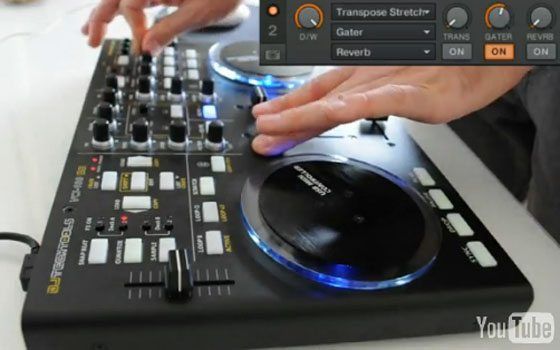
After we posted our popular “What’s In Your DJ Bag?” video featuring MSTRKRFT, some of you asked why Jessie Keeler kept white noise CDs in his bag along with his Serato CDs. Here, Ean shows you some ways to mix white noise over a track, including crossfading and effects tips.

Download the white noise sample used in the video.

25 Responses to “Using White Noise in a DJ Set”

  1. djerikt

    November 11th, 2009 at 5:18 pm Quote

    fun! thanks for the vid (FIRST!)

  2. Thump and Hustle

    November 11th, 2009 at 5:31 pm Quote

    Nice one!

  3. Anonymous

    November 11th, 2009 at 5:58 pm Quote

    could we get a link to that file?

  4. DOWN|3E4T

    November 11th, 2009 at 6:00 pm Quote

    Thank you sir for that splendid demonstration. I figure that might of been the use but I did even think about using the effects to further shape the sound. I really need to spend some times really exploring the possibility of the effects in tracktor pro beyond the obvious.

    Thanks Again Ean!

  5. kilbto

    November 11th, 2009 at 6:31 pm Quote

    good show chaps!
    thanks for the holiday post! :D

  6. little robot

    November 11th, 2009 at 6:35 pm Quote

    Here’s a site for some white noise.

    http://whitenoisemp3s.com/free-white-noise

    Cheers

  7. Priscilla

    November 11th, 2009 at 8:00 pm Quote

    Cool video. Simple technique that brings a lot to the table.

  8. Lock Mess

    November 11th, 2009 at 9:03 pm Quote

    Great to see a old trick done in a new way!

  9. PCDJ - CASH

    November 11th, 2009 at 10:53 pm Quote

    Wow, why did I not think of something like that. Thats pretty cool.

  10. Ian

    November 12th, 2009 at 12:38 am Quote

    You can elaborate on this technique even further with other wave shapes too!
    Think, sine, pink noise, sawtooth, etc.
    This would be the basis of a variety of synthesizers!
    With some pitch shifting/time stretching you can get al sorts of tones and sounds. Throw on a gater, and it rocks.
    I usually plug this little iPod touch app into one of my decks:
    http://www.apptism.com/apps/oscillator

    It gives you
    - Four waveforms. (i.e. sine wave, square wave, saw wave and white noise.)

    That you can fiddle with.
    Infinite fun.
    But be careful, this thing’ll peak your gear in second if you aren’t careful.

  11. klachick

    November 12th, 2009 at 2:04 am Quote

    I still don’t understand why he needs white noise cds and don’t uses white noise tracks in Serato

  12. Mr.Nicklebe

    November 12th, 2009 at 2:34 am Quote

    You can make white noise by just turning on the moullahand drive or whatever that effect is called. Then you can use the gater on it like Ean’s doing here. I do it just for laughs :P

    Just turn on an effects unit on an empty deck, crank up the drive. Hey presto no need for an mp3 I think? Maybe I’m missing something and the white noise mp3 has advantages.

    Either way this is a really quick way to chuck in some temporary noise.

  13. Ean Golden

    November 12th, 2009 at 3:10 am Quote

    I still don’t understand why he needs white noise cds and don’t uses white noise tracks in Serato

    so you can have 2 decks playing in serato and add white noise on top via cd players. An always on source of samples.

    You can make white noise by just turning on the moullahand drive or whatever that effect is called. Then you can use the gater on it like Ean’s doing here. I do it just for laughs :P

    Just turn on an effects unit on an empty deck, crank up the drive. Hey presto no need for an mp3 I think? Maybe I’m missing something and the white noise mp3 has advantages.

    Either way this is a really quick way to chuck in some temporary noise.

    yes- this is an easy way to get white noise but it does have its disadvantages. A loud source file like the one in this post is more workable in the deck because of the signal flow.

  14. DjFlex(Rus)

    November 12th, 2009 at 4:00 am Quote

    Nice idea!!!!

  15. Cutta Boi

    November 12th, 2009 at 4:38 am Quote

    Great Stuff, Respect!

  16. Flafius

    November 12th, 2009 at 5:42 am Quote

    Great tutorial!

    Trying it now, using Behringer BCR 2000!

    Thanks a lot Ean!

  17. eel

    November 12th, 2009 at 8:09 am Quote

    Thanks a lot had fun with this

  18. JESSER

    November 12th, 2009 at 1:34 pm Quote

    sa sert a rien du tout, astuce debile !

  19. Anonymous

    November 12th, 2009 at 1:38 pm Quote

    What’s that USB cable used on the VCI? It doesn’t look like the regular DJTT one.

  20. Ean Golden

    November 12th, 2009 at 9:55 pm Quote

    What’s that USB cable used on the VCI? It doesn’t look like the regular DJTT one.

    good eyes!
    they were so popular that we sold completely out and I could not find one for this video :)
    we are getting a new batch in at the end of november.

  21. Anonymous

    November 12th, 2009 at 11:30 pm Quote

    great video, inspires me to try some new stuff in traktor.

  22. BopH

    November 13th, 2009 at 4:16 am Quote

    If you just turn up the Noise setting on the Gate FX then you don’t even need the white noise sample.

  23. Mr. Nice Guy

    November 13th, 2009 at 9:42 am Quote

    Wehre i get the TSI File???? Maybe my TSI File is old. I cust want the same TSI like Ean Golden.

  24. dj professor ben

    November 16th, 2009 at 9:45 am Quote

    Mr Nice Guy: http://www.djtechtools.com/midi-map/

  25. Glitch fxxx

    December 17th, 2009 at 4:22 am Quote

    check this quck video of me using white noise :)
    http://www.youtube.com/watch?v=Cwm3CLM272E

    damn i love using white noise

Leave a Reply

  1. Quote selected text

First Time?

This site is dedicated to digital djs. We develop performance tools and teach cutting edge techniques that enable creative expression. Visit tutorial videos on youtube, equipment reviews in the blog and a very helpful community in the forum. New articles every Mon, Wed, Fri.
In the Store
 

Categories:
Follow us:
You're going to need Flash 8+ and JavaScript to use this site. How'd you get this far without it?

Dig through the Crates

Readers are Saying

  • munty: I think the MPD would be better suited if you were using it for ad-hoc studio use, or if you’re live set was very...
  • Miss Behave: Hey! I just recently got serato Scratch Live and noticed that the mixer has an input for a foot switch!!! That is...
  • Tonliebe: Thanks a lot Shane, its a great help to me.
  • carlo: All newbie, but you put a lot of work in that-respect
  • Double DutchDj: This is a great post for beginners, it’s sooooo important to build up as many transitions as pos. Not...
Contributing-Writer-Ad