DJing with In-Ear Monitors
This week’s “What’s in Your DJ Bag?” video with MSTRKRFT sparked some discussion on the importance of preserving your hearing as a working DJ. You can go the route of wearing professionally-made ear plugs underneath your headphones, but a growing number of digital DJs are adopting in-ear monitors (aka earphones, earbuds), which they use to monitor the master mix reliably and consistently from venue to venue. DJing with in-ears can provide excellent sound isolation from the many unwanted noises around you, as well as allow you to mix at a lower volume to protect your hearing.
Read on for a description of some trusted in-ear monitor models, as well as an interview with Bay Area veteran club-hopper DJ Solomon on his experience mixing with in-ear monitors over the last 2+ years.
STICK IT IN YOUR EAR
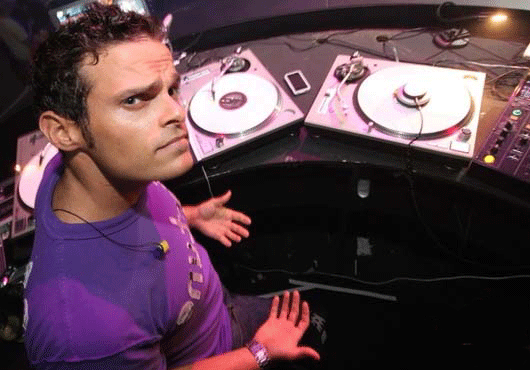
DJ Solomon has been rocking parties since middle school and holds down more than a dozen residencies across California and Nevada, including 10 years as the in-house DJ for the Golden State Warriors NBA team. He uses Serato Scratch Live with the Rane TTM 57SL mixer, and for the last couple years, he’s DJed exclusively with in-ear monitors.
Usually when using in-ear monitors, you’re listening to the master mix rather than the pre-fade mix, and you keep the in-ears in the whole time, so you don’t defeat the purpose of protecting your hearing.
DO YOU EVER REVERT BACK TO THE PRE-FADE MIX WHEN USING IN-EARS?
Occasionally, but for the most part I use the assistance of waveforms. In Serato, you can see if the transients are ahead or behind, and I use that as a visual reference most often. It’s definitely an option with the 57SL mixer to go back and re-check the pre-fade. You can switch from Master Cue to Program 1 and 2 Cue, with a fader between them.
But for the most part, I set up the programs, and once it’s locked in, you can hear it so much better with a master in-ear mix in both ears, versus all the echo in the club, shitty monitors that may not be properly positioned and headphones blasting in your ears. Once you get used to it, there’s no question in my mind that it’s the superior method.
HAS YOUR HEARING BENEFITTED FROM USING IN-EARS?
Absolutely. Your hearing doesn’t ever get any better. Cumulatively, it only gets worse. But i think I’ve definitely lessened the negative results of playing and DJing in loud environments 3-5 nights a week. I don’t know if I’ve arrested it, but I’ve definitely slowed down my hearing degradation quite a bit.
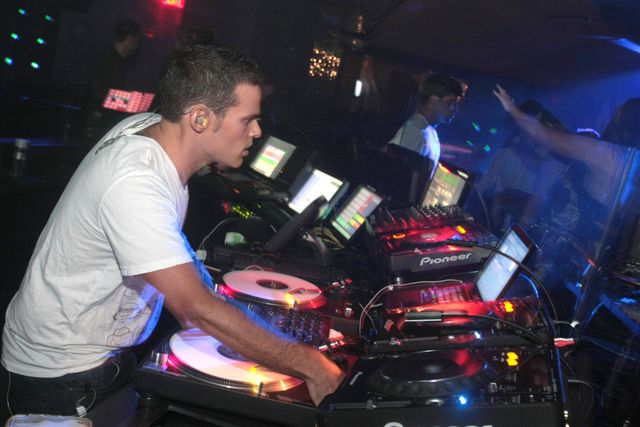
I keep them as quiet as I’m comfortable with. I’m constantly reminding myself to turn it back down, because in-ears are just like any other monitoring source; you’ll tend to turn it up throughout the night.
Technically you can do a lot more damage with in-ears than with cans. Be very careful of checking the volume before you plug into a club mixer. If somebody else had the headphone level at 5, 6 or even 8-10, and you plug your earphones in, you could blow your ears out in one fell swoop. If you just plug straight into the mixer, you can’t really go above 1 before it’s just ear-piercingly loud. So I use an 1/8-inch headphone extension cable that I bought at Radio Shack for $10. It’s got a volume attenuator on it that I use to turn the level down, so I can use a broader range on the headphone volume on the mixer.
DO YOU PREFER THE FOAM OR RUBBER EAR PIECES FOR THE IN-EARS?
The foam has the best noise isolation, which is probably the most important factor. I use the big, yellow foam from the Etymotic ER•4 headphones. I have big ear canals, so the bigger the foam, the better. I tried getting molds done twice, and I found that I couldn’t get nearly enough isolation, so I went back to the foam.
ARE THERE DRAWBACKS TO USING IN-EAR MONITORS?
I guess it’s a little harder to plug your headphones in and use them as a mic in an emergency, which I think we’ve all done. Other than that, not much.
DO YOU HAVE ADVICE FOR DJS MAKING THE TRANSITIONS TO IN-EAR MONITORS?
Don’t be afraid to use the display technology in Serato or whatever else you’re using to help as a guide. You don’t want to rely only on that, but if it’s there in front of you on the screen, don’t be afraid to use it.
MIXING LIKE THAT, DO YOU HAVE TO KNOW YOUR RECORDS EVEN BETTER?
It depends on the DJ. There’s many DJs nowadays who don’t even know how to mix without waveforms, which is kind of sad, but it’s the state of mixing today. I know Ean’s been using in-ears and is feeling totally confident with it, which is good because I was a little worried the Serato-style waveforms were a bit of a requirement. But he’s been able to do it [with Traktor's unaligned waveforms].
When mixing out of a record or CD when transitioning DJs, it’s not too much harder if you have a bit of skill in terms of recognizing songs and beats. You can always pull one ear out, and that’s as close to old-school headphones as you can get. You don’t want to do that a lot, because then you’re exposing yourself to really loud environments.
The best thing to do is play around at home and get used to it. If you’re really comfortable at home, it’s going to be exactly the same at the club, because you are not reliant on the monitors anymore. I know from travelling to DJ booths all over the country and world a lot of monitor setups are really difficult to mix with. If you have your own monitoring system, any place in the world — if you’re familiar with the mixer’s headphone setup — will be just like home.
IN-EAR MONITOR RECOMMENDATIONS
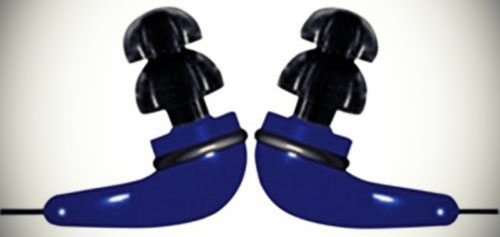
Entry Level: Future Sonics Atrio ($199 US retail)
“They’re only about 150 bucks and they sound amazing for the price,” Solomon says. “They did kind of fall apart on me, which you sort of expect it for that price point. But I used to use those Sony V700DJ headphones, and they’d break every 9 months, so it’s pretty comparable. With in-ears, you have to be really careful with crimping wires; that’s how most of those earphones go bad.”
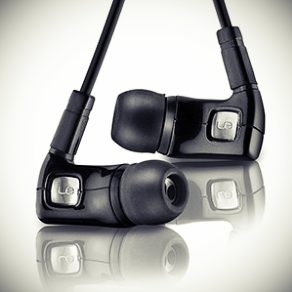
Mid-range: Ultimate Ears SuperFi 5pro ($249 US retail)
These earphones provide excellent sound isolation when using the foam ear pieces and give you an impressive mixture of sound quality and durability at this price point. The wires are meant to bend around your ear lobe to help secure the fit and make it easier to pop them in and out of your ears.
High-End: Shure E5c ($549 US retail)
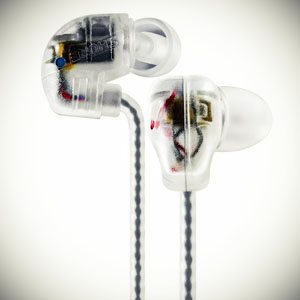
“I’ve been using the E5 for about 9 months, and they’re a total workhorse,” Solomon said. “They’re really doing great. Their wires are pretty heavy duty.They’re really well -wrapped in a rubbery plastic, which I think helps the durability.”
Note: Unfortunately, Shure has discontinued the E5c, although some are still available for sale online. Shure has replaced them with the SE530 Earphones ($549), which we have not tried.


October 23rd, 2009 at 12:40 am Quote
Interesting, been thinking of going this route.
October 23rd, 2009 at 12:54 am Quote
I had a pair of Elacin molded ear plugs a few years ago but I struggled to perform up to the standard I was used to, as I play everything & have to be vocal on the mic during the night I really found it hard to speak on the mic without it feeling/sounding weird.
It was like I was talking with cotton wool in my ears, or as if I was underwater, so after a few weeks I ditched them. I tried taking the plugs out when I was talking and putting them back in after but this was a lot of hassle.
I really want to use some sort of ear protection as often get tinnitus at the end of a night (luckily so far it goes), but playing out 5 nights a week is damaging my ears so need to find a solution.
anyone else with this problem? any solutions welcome!
October 23rd, 2009 at 2:16 am Quote
Yeah I need to do something. Especially since at my 2 night a week residency I dont have monitors and one set of speakers is directly behind the booth. fml. plus, if you have to take requests, you just have to smile and nod because everyone expects djing to have huge headphones on and with these in-ears, everyone will think you are actually listening to them when they request boys 2 men!
October 23rd, 2009 at 3:28 am Quote
Why can’t one do a pre fade mix in the ears with these? Surely you would just switch to cue, pre fade, switch back to master and bob’s your uncle.
October 23rd, 2009 at 4:28 am Quote
I’m sorry I’m not getting the point here at all
I’m sure I’m missing out something, but for me the need for monitors is purely to help the prelistening of the mix, avoiding the echo of the club when you’re preparing the mix. If I understand properly, in this scenario you’re not prelistening the mix at all, but basing it only on waveforms (and/or sync I guess). So what’s the need for monitors all along? If you’re not prelistening the mix, couldn’t you simply go without earphones and without monitors?
(I’m sure I’m missing something massive here)
October 23rd, 2009 at 5:01 am Quote
The point is instead of using one ear to prelisten and the other one to hear what is currently playing, you always feed the mixed version of what you are cueing up and what is playing in the club. Alternatively you only listen to what is being precued, but you drop this left an right separation of whatever you are monitoring that you have when you put on headphones on just one ear.
Other topic, are wireless headsets totally out of the question? I really hate cables .. especially the damage they can do to your setup when moving around.
October 23rd, 2009 at 5:18 am Quote
Clear, thanks
So then, why is it so important to look at waveforms for mixing? Should be able to mix by listening as usual, shouldn’t I?
October 23rd, 2009 at 5:19 am Quote
The previous comment was mine, sorry
October 23rd, 2009 at 6:20 am Quote
So if I understand this correctly, you listen to a mix of the master channel and the track you are cueing up on both ears? I’ve tried this sometimes with normal (closed) headphones before, when I didn’t have monitor speakers, but that doesn’t work well enough for me. I usually make very long mixes, so the bpms need to match very precisely. And I just can’t seperate the different tracks well enough if both come in on both ears.
I’ve also tried (if the mixer had the option) to separate master and cue on left and right on the headphones, but that didn’t work for me either. I’d get really disoriented.
October 23rd, 2009 at 6:26 am Quote
The Serato waveform also visualizes more about the audio signal as far as I know. for example you can see better in the waveform the different volume on the different frequency ranges:
http://www.serato.com/videos/2065
Since they also have the waveforms running right next to each other you can effectively beat match visually, but like the article states this is not really required .. its just helpful.
Anyways, I am just speculating here, especially since I never used Serato.
October 23rd, 2009 at 6:26 am Quote
Those are some nice backwards playing turntables by the way…
October 23rd, 2009 at 7:27 am Quote
Great post. Laidback Luke (a pretty popular Dutch House DJ) has been using in-ears for quite some time now. In fact, he re-tweeted this post on his twitter (@laidbackluke). I will have to try this method of “monitoring.” The advent of Traktor, beatgrids, and the sync button has undoubtedly lessened the need to have a well positioned and clean sounding monitor to ride the mix in. My only concern with this method is that when you are “monitoring” straight out of the master cue, you can’t hear the relative volume levels of each channel as you bring the mix in. I mix using mainly just the volume faders (eq’ing as necessary) and no cross fader, so I want to hear what the audience hears as I bring the mix in (not just both tracks playing at the same volume in the cue).
October 23rd, 2009 at 7:53 am Quote
“There’s many DJs nowadays who don’t even know how to mix without waveforms, which is kind of sad, but it’s the state of mixing today.”
Err… that’s a bit of a backwards statement isn’t it? Before SSL/Traktor/FS etc came along, what did DJs do? They used just their ears. I used to use Torq at home, but I’ve totally gone off the idea of using a computer for DJing- laptops are distracting; they take your focus away from the crowd, and depending on where you put your laptop, it can also be a physical barrier which I feel cuts you off from your audience.
Anyway…
I use in-ear monitors (currently Ultimate Ears Super-fi 5s) with custom moulds done. Prior to these I used to mix purely through traditional cans. It’s pretty easy to monitor this way; on a DJM800 I have the master cue on, and the individual channels that i’m mixing at the time. Then I can use the cue/master knob to adjust which I want to hear more of. As I bring the next track in, it’ll gradually increase in volume thru the headphones (since I’m hearing it thru master as well as cue). Once it’s all the way in, I turn the cue/master knob all the way to master so the sound coming thru my IEMs is the same as what the audience can hear. Quite often, I’ll only listen to the cued track for the first couple of seconds before I start fading it in. It’s electronic music, it’s not going to drift out of time.
Really happy with IEMs, getting full custom triple driver ones soon, with wireless pack (so I can jump around everywhere and still hear it all). My only issues are usually a result of a poorly setup venue (MC plugged into DJ mixer not desk, previous DJ cranking trims and master set too low).
October 23rd, 2009 at 8:01 am Quote
I used Shure E3’s with custom molded ear buds, I had them made when I got my ear plugs done.
It took some getting used too at first, the sound was great, but I did have a few issues with them.
First, was as soon as you get hot they have a tendency to slide out of your ear.
The custom buds are a harder rubber and much different then my ear plugs with a softer rubber.
Second, I did feel a bit of a disconnection with the room, I found I was always popping one in and out.
Third, the thin cable used for ear buds have a quarter of the lifespan of a good set of headphones.
As you can guess I’m back to headphones and I have a few pairs depending on what I’m doing (I’m also in a Band).
All in all I spent some good money on custom buds and now they just sit on a self in my studio.
October 23rd, 2009 at 8:01 am Quote
“DJ Solomon said when using in-ear monitors, you’re listening to the master mix rather than the pre-fade mix, and you keep the in-ears in the whole time, so you don’t defeat the purpose of protecting your hearing.
Dj Solomon said he keep them as quiet as I’m comfortable with. I’m constantly reminding myself to turn it back down, because in-ears are just like any other monitoring source; you’ll tend to turn it up throughout the night.”
I think the ear monitor are a good idea if you depend on a monitor to mix.
I love mixin and I don’t want to stop. I will take any measure to make sure I slow down my hearing loss. When I found out I could have Traktor sync my track I went out and bought a copy.
Everyone I mix with said I’m cheating and I can’t mix. I tell them I know how to mix and I’m more creative because I’m not spending all my time getting tracks to sync.
October 23rd, 2009 at 8:26 am Quote
When I visit the Serato forums everyone there is always bashing the “auto sync” button which I totally never understand….all the visual aids you have on Serato, it’s not like you need to learn beat mixing the way you used to…people just need to face the truth – for the most part, the people paying to hear the kick ass music you are playing don’t really care HOW it gets to their ears…Serato, Traktor, conventional TT’s, CDJ’s, whatever, it’s the music and the mix that matters, not the method….
October 23rd, 2009 at 9:26 am Quote
Whoa! Looks like I’ll be pulling out my Shure’s this weekend!
October 23rd, 2009 at 9:38 am Quote
Monitors are only one solution. Etymotic also make custom fitted attenuators, earplugs you wear that will lower the volume of everything unformly across the frequency range by 9, 15, or 25 db. You can choose the “button” you plug into the custom molded plug depending on the situation. You are then free to use headphones as usual but with more protection from high volumes. Everything is just turned down a few notches.
October 23rd, 2009 at 10:23 am Quote
I use M-audio’s IE-20X.. love them…
October 23rd, 2009 at 11:24 am Quote
so this guy doesnt cue up his next track with his ears? he uses the waveforms instead?
October 23rd, 2009 at 12:09 pm Quote
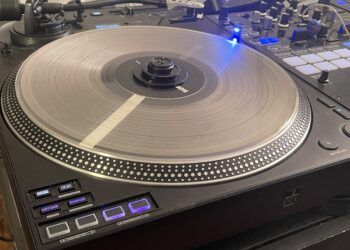
What is that puck-shaped thing stuck to the top of the third deck?
October 23rd, 2009 at 12:20 pm Quote
i’ve gone this route and have not looked back. i’m definitely not as fast as i would be with regular headphones but definitely prefer in ears..
October 23rd, 2009 at 12:41 pm Quote
Correct me if I’m wrong, but for those of you that are familiar with Bento Sans smart mixer in Ableton, in ear monitors sound like the way to go because your prefade mix IS your master mix. Correct? Not to mention cans make my ears sweaty, lol. I may be sold just on that alone!
October 23rd, 2009 at 2:06 pm Quote
I think it’s a single headphone.
October 23rd, 2009 at 5:52 pm Quote
I like htis i dea ive used ear buds on mobile rigs before and they work ok as u dont have monitors with ya and this seems rihght on point. I might get my shure 310s a go and also my 210s to see how they perform.I also have some denon in ear ones, i dont know if id like to go as far as spending 00 bucks on some in ear ones though i have etymotic attenuators alredy
October 23rd, 2009 at 7:13 pm Quote
What about the longevity and hygiene of the foam? You’re not supposed to re-use disposable foam earplugs because they harbor bacteria like silly, so is it really a good idea to keep using the foam monitors? Is there a good way to keep them clean?
October 23rd, 2009 at 8:00 pm Quote
October 24th, 2009 at 10:15 am Quote
Really relevant topic, appreciate the coverage! I own custom-made plugs, and this reminded me once more to use them in the club more often (even when wearing them underneath the headphones).
October 24th, 2009 at 2:07 pm Quote
I have used the Shure E2c’s for a while now and flip flop between headphones and the Shure’s…..If only them made in ears with a coiled cord….:)
October 25th, 2009 at 1:38 am Quote
I recently saw Wolfgang Gartner and surprisingly he too was using in-ear monitors.
October 25th, 2009 at 8:32 am Quote
here is a pretty good review as well if anyone is interested…
http://scratchlive.net/forum/discussion/124347/#2223056
October 25th, 2009 at 2:28 pm Quote
I have been using IEMs for a few years and at nowhere near the price examples shown. I get great background noise reduction and clarity of what I am listening to.
ps: In regards to the quote… “They did kind of fall apart on me, which you sort of expect it for that price point.”
I don’t know about you guys, but no product like that, priced at $199 should be expected to fall apart.
October 25th, 2009 at 4:27 pm Quote
Fantastic article!
October 25th, 2009 at 8:10 pm Quote
Awesome, I never take my cans off unless I’m playing with a mixer that doesn’t have the master cue (like the old Rane MP2016) so this would be a natural transition for me… finally something good came out of not having money for monitors when I learned to mix haha.
October 26th, 2009 at 12:57 am Quote
TIP: I have custom molds built to suit my ears and they fit very nice. I advise these. The canalphones are westone UM-1… I am very happy with them. I don’t have to replace the tips and can easily clean the tips if needed.
October 26th, 2009 at 6:18 am Quote
I started out with a cheap pair of headphones and had no issues but then I decided to take a jump into some entry level earphones (Shure SE115’s) and I wouldn’t switch back. I usually keep only one in all the time and use it to monitor my mix. When I want to cue up my next track I start by turning the cue/mix knob to 80% of just the cued track. then if I like it I put it to the 50% mark and match them up and then got 100% mix and bring the track in with the Vol fader. But I get judged all the time for using earphones because it’s not the “dj image.”
Earphones get a big thumbs up form me!!
October 27th, 2009 at 5:08 pm Quote
Hi Folks,
I saw this artikel about in ears. I use them with a little mixer. I put one channel on the record out of the mixer, and the other one just in the headphone out. I mix with the little extra mixer the main signal over my in ears, then I put the headphone mix on and pan it to my favorite pre monitor ear. I my case, left. If you do this right, you have absoluty the best mixing experience there is. Don’t put it to load, then you can feel and hear the bass. I’m using a custom moulded soft silicon twin driver in-ear monitor system. The only negativity is the price. But new ears are much expensiver……
For more info just mail me on music@djdnl.com
October 28th, 2009 at 2:26 pm Quote
When you try the Earphone you never go back !
December 7th, 2009 at 1:34 pm Quote
sounds like a cool idea….although I’m sticking with my HD-25’s for now
December 17th, 2009 at 11:42 pm Quote
the picture is reversed and the “hockey puck” is one ear of the sony dj headphones. I guess he uses that somewhere. I have used in ears before when i have had a major delay with an outdoor gig when i am set up front of house. i only had the ec2’s with a dnx-100. i liked the cue/master mon mix in my mixer, but never knew how loud it was in the house. great for ear protection though