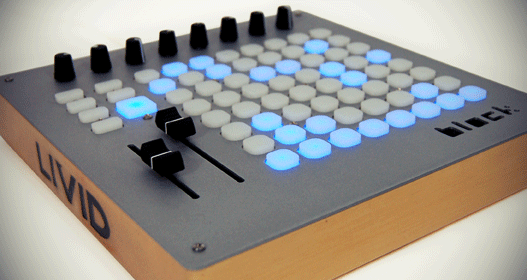
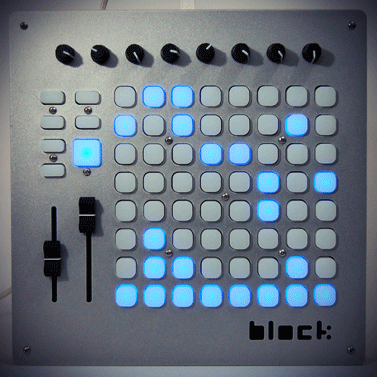
If the invasion of the pad grid controllers weren’t already underway with the introduction of the Novation Lauchpad for Ableton Live earlier this month, it’s definitely in full swing now with the introduction of the Livid Instruments Block this week. The mostly open-source Block gives you an 8-by-8 button pad grid, a row of 8 knobs, 2 faders and 7 function buttons — all of which are fully MIDI-assignable. We spoke to the head of Livid, Jay Smith, to get some questions answered and find out where he thinks Block fits in with the mild deluge of pad grid controllers now on the market.
NEW BLOCK ON THE… UM… BLOCK
Livid’s Block is a USB-powered, class-compliant controller, so no drivers are required for plug-and-play operability and bi-directional communication between the device and a Mac, Windows or Linux computer. Its 64 grid buttons and 7 additional function buttons are all LED backlit. Block’s brain is the same as Livid’s flagship Ohm 64 controller, so every control is completely MIDI programmable; you can use Block immediately with any software that supports MIDI learn. Livid is also working on an OSC version of Block’s firmware, but is not finished yet.
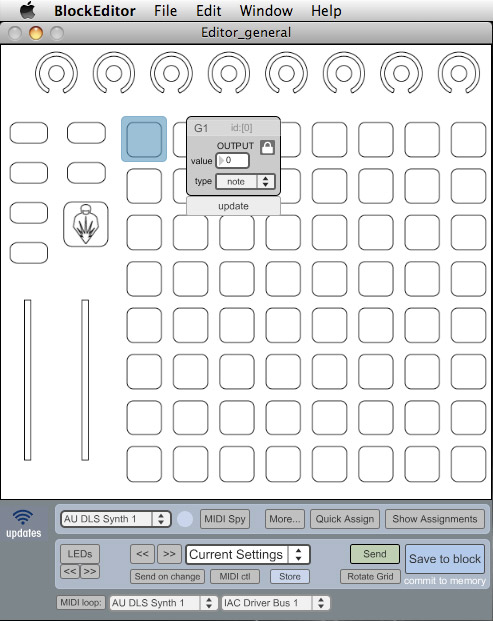 Block also comes with Livid BlockEditor software, which you can use to create and store control surface presets and switch between multiple presets on the fly during a live performance. In addition, Livid makes several free utility programs available for its controllers: an FM synth, a sampler, sequencer. The FM synth turns the pad grid into a step sequencer that plays the synth sounds. The utilities are all stand-alone programs (the sample is also a VST plug-in) that can be used with other controllers, and their source code is available to open as a Max/MSP patch. Also, soon to come Livid will have some Max for Live patches for its controllers.
“The software is all open source,” said Jay Smith of Livid Instruments. “You can download our source code and modify it in any way you want for personal use. If you’re going to redistribute it, we require that you post the changes you make.The hardware is not open source, but it’s ‘open minded,’ which means it has some open source parts, but some parts for legal reasons are not.”
Ableton Live users looking for a pad-grid controller may be concerned that Block wasn’t created with Ableton’s help to directly integrate with Live. However, Livid does have a solution available from NativeKontrol.com, which sells presets for Livid’s Ohm 64 for $25-35US and will also create similar presets for Block, according to Smith. “Their presets really extend the possibilities of using these controllers with Live further than any controller by itself,” Smith said. “You get all kinds of cool access to Live that you can’t get any other way.” These videos demonstrate NativeKontrol’s Livid controller presets.
KEY FACTS
• 3 lbs (1.36 kg)
• 10.25” (26cm)-by-10.25” (26cm)-by 1.5” (3.8cm)
• $399 US
• Available November 1, 2009
THE NUTS AND BOLTS
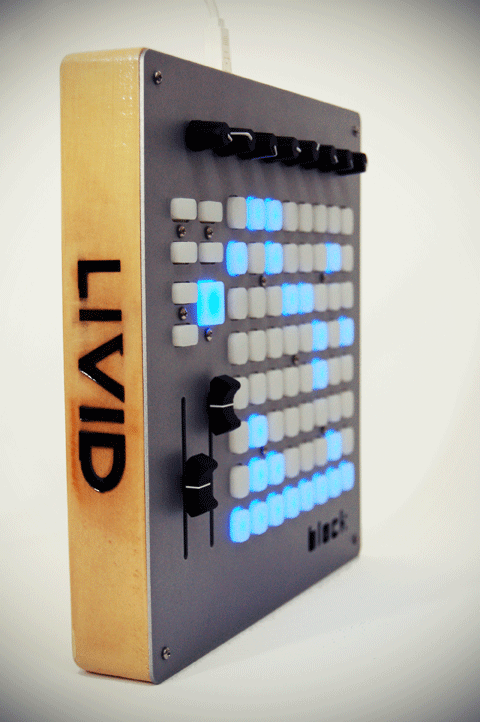 Livid handcrafts its all of its controllers in its Austin, Texas workshop. The Block is made with an anodized aluminum faceplate and a casing made from Indonesian jelutong wood. “It’s really nice wood,” Smith said. “It’s easy to mill, and it’s a hardwood but still really lightweight. Jelutong is considered a renewable wood, because it grows really fast.” As part of Livid’s overall concern for conducting environmentally sustainable business practices, the company uses VOC (volatile organic compound)-free finishes, re-uses as many controller parts as it can and has a controller recycling/refurbishing program. “For a decent price, we’ll take your old controller and modify it into a new controller,” Smith said.
But speaking of price, there is no question that the Block’s hand-crafted design and the small, DIY nature of Livid mean that you pay a bit of a premium for the Block, when comparing it the Akai APC40, which has more controls and out-of-the-box Ableton Live integration for the same retail price. And the recently released Launchpad, while not including knobs and faders, does feature out-of-the-box Ableton Live integration for retail price of $199.
 However, Smith is taking the unexpected competition from the Launchpad in stride. “I’m not really worried about it,” he said. “If anything, it kind of solidifies the market for things like this. So I think it’s good and it’s bad. It’s good becuase it raises the awareness. I think about 2% of the potential user base knows about us, but a lot more know about Novation.”
When asked why he thought people would opt for the Block over the Launchpad, Smith replied, “that control surface is very different than ours. It’s kind of a cheap plastic, small control surface. It does have things like multi-colored LEDs, but when you get multi-colored LEDs with bus power, I know people who have seen it and it’s really hard to see the LEDs with the room lights on. It has no faders or knobs, and it doesn’t really have a quality instrument feel. We set out to make solid instrument controllers, not just plastic devices.”
Stay tuned to DJ TechTools for reviews of the Block, Launchpad and the APC40.