DJ TechTools
  • Blog
    • DJ Gear
      • DIY Projects
      • Gear Reviews
      • New Products
      • Controllerism
    • Techniques + Tips
      • Beginner DJ
      • Advanced DJ
      • Producer
      • Finger Drummer
    • News + Culture
      • Editorials + Opinions
      • Artist Interviews
      • Performances + Routines
      • How I Play
    • DJ Software Tutorials
      • Serato Tips
        • Traktor Tips
      • CDJ Tips
      • Ableton Live Tips
  • Store
    • Run by real DJs, not a corporation
    • DJ Controllers
      • Midi Fighter Twister
      • Midi Fighter Spectra
      • Midi Fighter 64
      • View All
    • Accessories
      • Chroma USB Drive for DJs
      • Chroma Caps
      • Chroma Cables Audio
      • Chroma Cables USB-A
      • Chroma Cables: USB-C
      • DJTT Gift Card
      • Midi Fighter T-Shirt
      • Keyboard Covers
      • Earplugs by V-Moda
    • Production Gear
    • Soundcards & Mixers
  • Community
    • Popular Forums
      • General Discussion
      • Buy & Sell
      • Reviews
      • Mixes
      • Music Production
      • Show Your Setup
      • Off Topic
    • Handy Links
      • New Posts
      • Private Messages
      • Register
      • Search
    • Midi Maps
      • Traktor
      • Ableton
      • Serato DJ
      • Midi Fighter 3D
      • Midi Fighter Twister
      • Midi Fighter Spectra
  • Midi Fighter
  • Chroma
No Result
View All Result
DJ TechTools
  • Blog
    • DJ Gear
      • DIY Projects
      • Gear Reviews
      • New Products
      • Controllerism
    • Techniques + Tips
      • Beginner DJ
      • Advanced DJ
      • Producer
      • Finger Drummer
    • News + Culture
      • Editorials + Opinions
      • Artist Interviews
      • Performances + Routines
      • How I Play
    • DJ Software Tutorials
      • Serato Tips
        • Traktor Tips
      • CDJ Tips
      • Ableton Live Tips
  • Store
    • Run by real DJs, not a corporation
    • DJ Controllers
      • Midi Fighter Twister
      • Midi Fighter Spectra
      • Midi Fighter 64
      • View All
    • Accessories
      • Chroma USB Drive for DJs
      • Chroma Caps
      • Chroma Cables Audio
      • Chroma Cables USB-A
      • Chroma Cables: USB-C
      • DJTT Gift Card
      • Midi Fighter T-Shirt
      • Keyboard Covers
      • Earplugs by V-Moda
    • Production Gear
    • Soundcards & Mixers
  • Community
    • Popular Forums
      • General Discussion
      • Buy & Sell
      • Reviews
      • Mixes
      • Music Production
      • Show Your Setup
      • Off Topic
    • Handy Links
      • New Posts
      • Private Messages
      • Register
      • Search
    • Midi Maps
      • Traktor
      • Ableton
      • Serato DJ
      • Midi Fighter 3D
      • Midi Fighter Twister
      • Midi Fighter Spectra
  • Midi Fighter
  • Chroma
No Result
View All Result
DJ TechTools

Oxygen 8 Mapping for Traktor Pro 1.2

Ean Golden by Ean Golden
October 13, 2009
in Controllerism, DJ Equipment / Accessories, Traktor Tips
Reading Time: 4 mins read
0
Oxygen 8 Mapping for Traktor Pro 1.2
160
VIEWS
Post on FacebookTweet thisUpvote on Reddit

The iterative process is an amazing thing. Over time, smart people, organisms and populations gradually figure out the best way of doing things. Minor improvements collect to form something that is perfectly suited for its purpose. This Oxygen 8 mapping is exactly such a creation. It has been carefully tuned over the past 5 years, resulting in what I think is probably one of my most refined mappings to date. So without further ado — and with great pride — I give it over to you.

A BIT OF CONTEXT
OXYGEN-8-Overhead
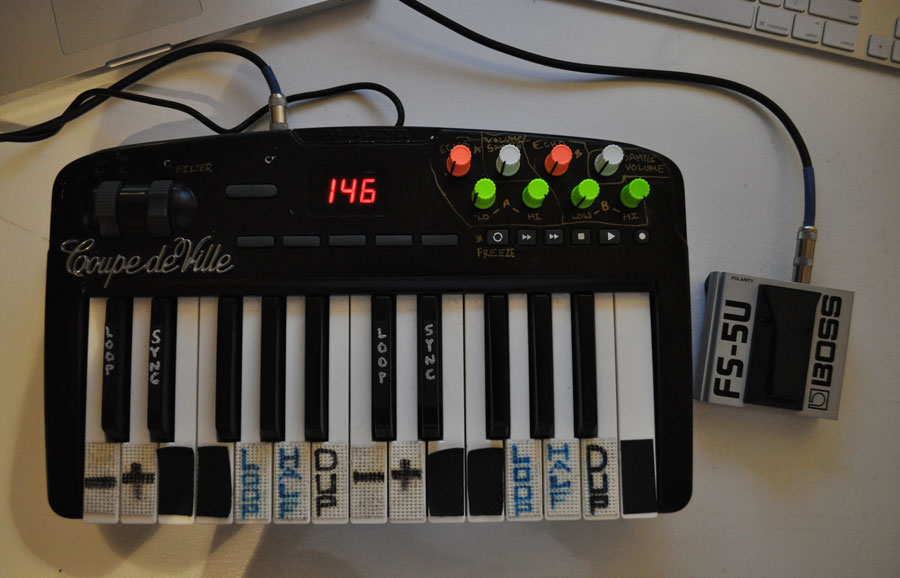
The VCI-100 Arcade is pure fun, with a wide array of exciting tools that are a joy to play with. This mapping comes from an entirely different place and was designed with a more utilitarian and minimal purpose in mind. It is the result of many, many sweaty hours in large dance clubs where locked-in mixing, error-proof design and totally intuitive control are essential. Over the years I found that there are only a few key things I regularly do during a 4-hour dance set, so this mapping has been continually refined to do the mix essentials really well, and everything else was eliminated in the name of simplicity. This mapping has been designed to compliment an analog DJ mixer — not replace it — so you will need an external mixer to fully utilize its potential.

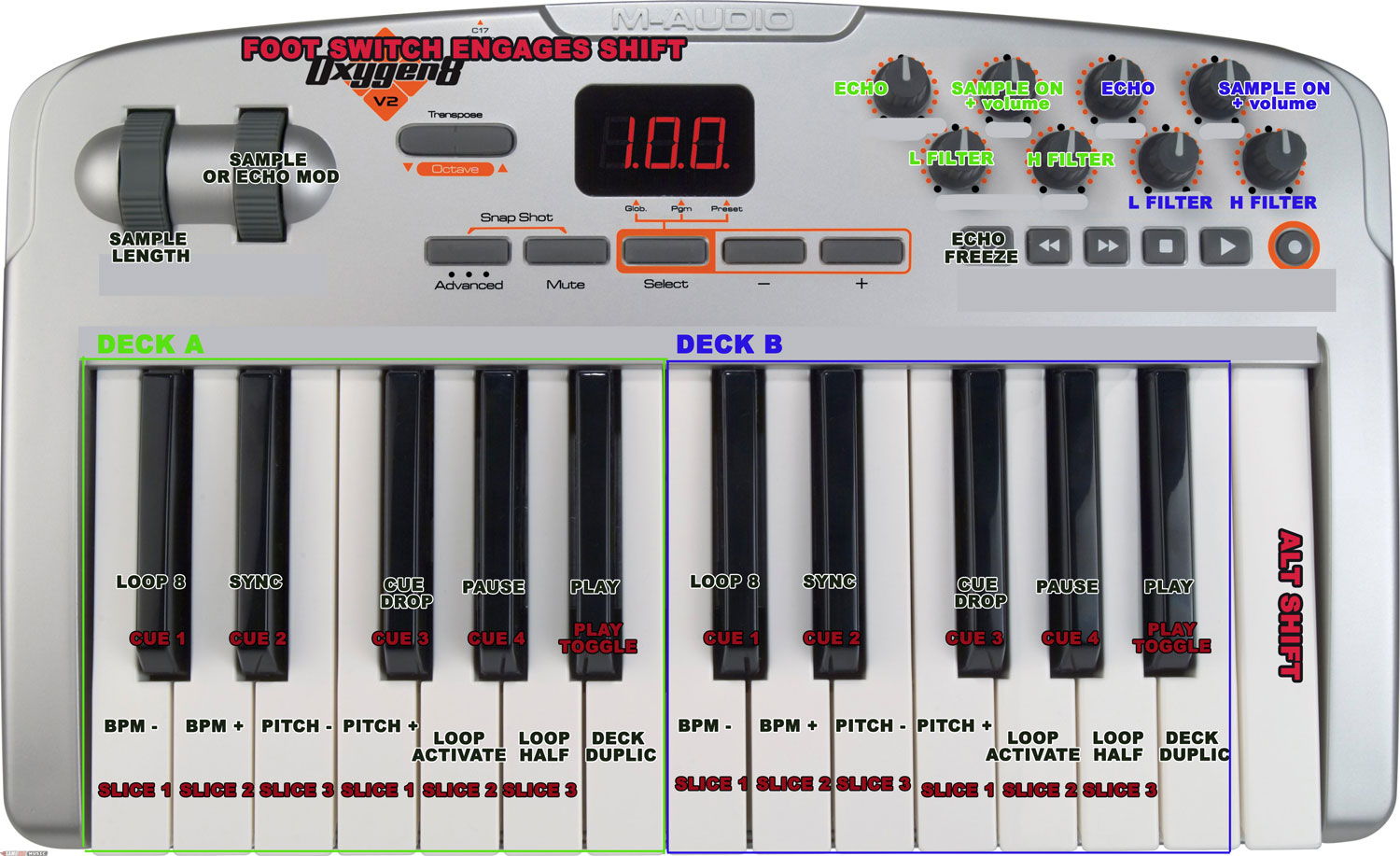
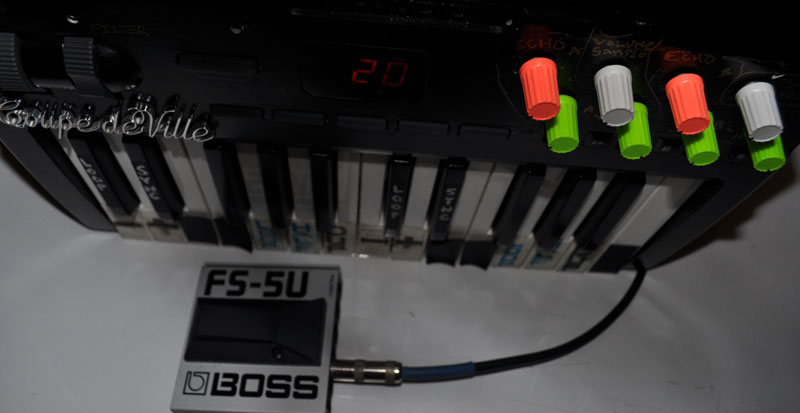
A foot peddle such as the one shown in the photo — a  Boss FS-5U (which I HIGHLY recommend over anything else) — is essential to getting the most out the controller. The keys all act as standard transport controls normally, but when the foot peddle is engaged everything converts into a dynamic cue-point chord heaven.

Boss_midifootswitch

THE SIMPLE STUFF

OXYGEN-8-Mapping_TechTools

One example of a totally idiot proof and perfect control is a dedicated Echo knob per deck. It does everything for you, including select, assign and turn up an echo on that deck, all in one twist. The 2 deck-focused samplers work the same way. Turn them on, and the mapping does all the work for you. Even though this is a 2-deck layout, the sampler makes a very easy-to-use third deck and sounds great all the time. The filters have been dumbed down even further, moving the normal bi-polar filter found on 1 knob to 2 knobs for more distance in each frequency range.

Some people love the keys; others may hate them. I say give it a try, and you may be pleasantly surprised. The precision of having your right hand locked into 2 decks at all time with tactile control over all deck parameters is amazing.  The natural key layout makes it easy to memorize function by hand and finger position, allowing you to really lock into the mix, close your eyes, forget about the computer and play music again.

COMING SOON
footswitch

Depending on the number of people interested in this mapping, the following may be created soon:

1) A complete walkthrough video
2) A matching overlay
3) A customized Oxygen 8 controller in black with funky knobs, old car emblems and the tactile key grips (they are amazing)

GET THE FILES

Download the Oxygen 8 Mapping here! 

Report any bugs or suggestions here

SYSTEM REQUIREMENTS:

  • MAC or WIN
  • Traktor Pro 1.2 or later
  • Oxygen 8 V2 or other 2-octave keyboards.

Installation Steps

  1. Download the Enigma Software from M-Audio
  2. Under File> import preset bank- Import the .XML file contained in this folder
  3. Select the DJ TechTools custom mapping in Enigma and click the UP arrow to send that data to the controller. (it must be on and connected)
  4. Turn the controller off and on to re-initiate
  5. Preset 1-9 are the same and #10 is GM MIDI
  6. Import the TSI file into traktor pro 1.2 or later

Tags: midi controlleroxygen 8 mappingTipsTraktor Pro
Share1Tweet1Share
Previous Post

From Digital Store to the Dance Floor: How To Prepare Your Tracks for Traktor

Next Post

Inside the Livid Instruments Block Controller

Related Posts

A screenshot of the 2.91 version of the Midi Fighter Utility software in Dark Mode
Midi Fighter

Midi Fighter Utility 2.91 Is Out; Our Biggest Update in Years

June 1, 2026
Use your Midi Fighter Twister as an Audio-Reactive Visualizer
Ableton Live Tips

Use your Midi Fighter Twister as an Audio-Reactive Visualizer

June 23, 2025
Midi Fighter Twister controlling Traktor Pro 4 Stem decks
DJ Techniques / Tips

Ean’s powerful Midi Fighter Twister mapping for Traktor Pro 4’s Stems + Pattern Player

July 17, 2024
Load More
Next Post
Inside the Livid Instruments Block Controller

Inside the Livid Instruments Block Controller

Want to reach DJTT's audience here?

Shoot an email to advertising@djtechtools.com

DJTT ads
DJTT newsletter
Midi Fighter
Chat with us
  • ABOUT DJTT
  • CONTACT
  • PRIVACY
  • MIDI FIGHTER HELP
  • ABOUT DJTT
  • JOBS
  • CONTACT US
  • ADVERTISE
  • PRIVACY POLICY
  • ACCESSIBILITY STATEMENT

© 2024 DJ Techtools all rights reserved by DJ TechTools on all content unless otherwise noted.

No Result
View All Result
  • Blog
    • DJ Gear
      • DIY Projects
      • Gear Reviews
      • New Products
      • Controllerism
    • Techniques + Tips
      • Beginner DJ
      • Advanced DJ
      • Producer
      • Finger Drummer
    • News + Culture
      • Editorials + Opinions
      • Artist Interviews
      • Performances + Routines
      • How I Play
    • DJ Software Tutorials
      • Serato Tips
      • CDJ Tips
      • Ableton Live Tips
  • Store
    • Run by real DJs, not a corporation
    • DJ Controllers
      • Midi Fighter Twister
      • Midi Fighter Spectra
      • Midi Fighter 64
      • View All
    • Accessories
      • Chroma USB Drive for DJs
      • Chroma Caps
      • Chroma Cables Audio
      • Chroma Cables USB-A
      • Chroma Cables: USB-C
      • DJTT Gift Card
      • Midi Fighter T-Shirt
      • Keyboard Covers
      • Earplugs by V-Moda
    • Production Gear
    • Soundcards & Mixers
  • Community
    • Popular Forums
      • General Discussion
      • Buy & Sell
      • Reviews
      • Mixes
      • Music Production
      • Show Your Setup
      • Off Topic
    • Handy Links
      • New Posts
      • Private Messages
      • Register
      • Search
    • Midi Maps
      • Traktor
      • Ableton
      • Serato DJ
      • Midi Fighter 3D
      • Midi Fighter Twister
      • Midi Fighter Spectra
  • Midi Fighter
  • Chroma

© 2024 DJ Techtools all rights reserved by DJ TechTools on all content unless otherwise noted.

This website uses cookies. By continuing to use this website you are giving consent to cookies being used. Visit our Privacy and Cookie Policy.