From Digital Store to the Dance Floor: How To Prepare Your Tracks for Traktor
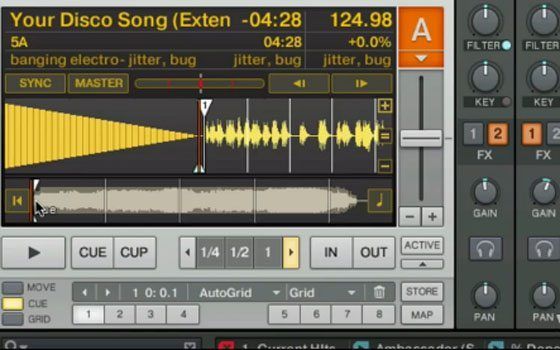
One of the most important things digital DJs can do is to create a good system of organization for their music. Coming up with a regular set of steps that you follow for each new song will help make your sets seamless, reduce stress in the booth and eliminate missing tracks. Here is a video that covers all of the basic steps I personally follow to get new tracks ready for the dance floor.



October 12th, 2009 at 2:42 am Quote
Great. It’s nice to get some pointers and to see that your own system is closely related to this one. I can also really recommend MixenInKey, the numbering system is easy to get going with if you don’t know that much music theory but it will make your transitions harmonic and sounding very nicely :)
October 12th, 2009 at 3:40 am Quote
Great tips ;) thx Ean…
I don’t know if it’s important, ’cause I don’t have MIK… but we can see your VIP code when you’re showing MIK prefs…
Cheers
October 12th, 2009 at 4:48 am Quote
Thx Ean, I like this video a lot. It tells me you (a professional digital dj) also have not found a better way to do it than me. I do have some remarks:
- I use a free program to detect Keys (and write to ID3 tag), I don’t remember the name and since I’m currently at work I can’t look it up. I must admit it does not have a very user friendly user interface, but it works.
- There is a seperate field in Traktor for Key (where I let this program write it’s info to) This way I can sort both on key and on artist.
Since I am not a mac user (yet) and I do not like itunes I am currently in the process of developping a (windows based) open source application that will replace my traktor library.
It is called DjMusicSorter (Google it) and has the following features:
- physically sorting your files between a “normal music collection folder” and a “dj music collection folder”.
- clean up tags & filenames & filepaths
- spot duplicate files
- quickly search based on numerous criterea.
- integration with the dj program “Traktor” from Native Instruments
- link remixes of the same song together (used for updating their “played” status)
It does not yet have a function version. But I’m working each night to get this the above mentioned functionality to work.
October 12th, 2009 at 4:50 am Quote
pretty sure you mean rapid evolution.. i use it too…
we are waitin for the tsi for the oxygen ;)
October 12th, 2009 at 5:31 am Quote
Funny that, I was only complaining the other about how badly I manage my music collection since I made the switch to digital. This should really help me get super organised for the club. Thanks man.
October 12th, 2009 at 5:56 am Quote
Nice video – thanks! I made the ?mistake? of importing my entire itunes collection into traktor, buit I am only locking stuff I am going to play. I am curious why you don’t round out the BPM to a whole number. That’s something I got from the Traktor Bible. So far its worked pretty well.
October 12th, 2009 at 6:04 am Quote
yep that’s the program I was referring to.
October 12th, 2009 at 8:02 am Quote
appreciate the effort, but imho letting itunes copy files to its own super-dumb library folders is really a stupid advice.
October 12th, 2009 at 9:28 am Quote
Nice video but I don’t like Itunes. Is there a similar tutorial out there that uses pc software like MediaMonkey?
October 12th, 2009 at 9:31 am Quote
I love the Voulesrandom.com album name displayed, revealing the “blog purchase” ;)
The info is great as always!
October 12th, 2009 at 9:48 am Quote
The “traktor library as a subset of your itunes library” is a great tip, wish you gave it a while ago ;-) I came out of a one year retirement last week end, took me a whole week to get a list of “playable” tracks from my 10000+ tracks iTunes library.
Problem with MIK is that it cannot tag the aac track, which is, frankly, very annoying. I also think it fits more into the key tag than in front of any other tag.
Regarding the keywords in comment, I wish traktor/iTunes had a tag functions, similar to what you can do with blog entries.
Finally, I think putting directly cue points for the main parts of the song is a must do, the “I’ll do it later” paradygm almost never works in that case.
October 12th, 2009 at 9:49 am Quote
+1
here is a link:
http://www.mixshare.com/software.html
The site also has a great intro to harmonic mixing
October 12th, 2009 at 10:21 am Quote
I don’t want to sound like a jerk but where is the tsi. I’m soo jazzed about it.
This vid was great though, it was one of the main things I wanted to see from ean.
Good job.
October 12th, 2009 at 11:01 am Quote
Nice vid. Question: does Mixed-in-Key have an option where it can tag the files with the actual music key (e.g. F) instead of those 5A/6B/etc. sorts of tags? I like to have the actual keys rather than the MIK shorthand, and I wouldn’t want to manually change the tags.
October 12th, 2009 at 12:03 pm Quote
major disapointment… wheres the oct 12 promised oxygen 8 tsi??
Cause this lightweight beginner article isnt it…. content on this site is taking a dive.
October 12th, 2009 at 12:11 pm Quote
ean great video,do you think u can make one showing how to use some of these methods using serato scratch live?
October 12th, 2009 at 12:22 pm Quote
Oxygen 8 Mapping is coming on wed- I had to re-work the entire thing for traktor 1.2.1
October 12th, 2009 at 12:48 pm Quote
Super disapointed…Wheres the forum promised oxygen 8 tsi? Cause this lightweight advice video isnt it. Contents going south.
October 12th, 2009 at 12:50 pm Quote
awesome dude! suspense is certainly being built! :)
however, you’ve redeemed yourself, because this video is seriously useful! (indeed, it made me take the final step, and actually purchasing MIK, which i’ve ben deliberating over for some time now!) Cheers bro
October 12th, 2009 at 1:00 pm Quote
Excited again. I don’t think Ean or the team have to do anything. It’s just actually cool that they share their knowledge. I’ll gladly wait.
Thanks Ean.
October 12th, 2009 at 1:04 pm Quote
use the free (and imho better/more advanced) alternative: rapid evolution
( http://www.mixshare.com/software.html )
it can do both: with keycodes or with actual keys
read the on site wiki, it explanes why the key codes are somewhat limited: if you know music theory (which the site explanes) and have the actual keys there are more possibilities than with the keycodes and the circle of fifths alone
October 12th, 2009 at 1:29 pm Quote
your welcome- I have spent 5 years developing this oxygen 8 mapping so its a bit of important thing to me and it needs to be just right before getting released. Lots of things happening in our office right now so sometimes amazing, free mappings take a little longer than expected.
October 12th, 2009 at 5:52 pm Quote
Ean – Might want to try again on obscuring your key. ;)
Mr Whiskers – MixedInKey has a tutorial that tells you the code to key conversion if you’re interested. The reason it uses codes is because it makes it simpler to use the “rules” when mixing things back and forth. (Mix up one, down one, A to B, etc. Instead of Emin to Gmaj) You can find the same chart at http://www.harmonic-mixing.com/HowTo.aspx
October 12th, 2009 at 10:36 pm Quote
awesome video. i think i’m gonna opt for RE instead though, being broke as a joke.
also that cozza frenzy remix fuckin bangs, saw BN drop it live last week in nash vegas
October 12th, 2009 at 11:10 pm Quote
Hi Ean,
Thanks again for all your informative articles/video. I’m just wondering about platinum notes which is also from the makers of mixinkey. Have you used it? If so why isn’t it part of your workflow. There seems to be a split in opinion on the internet some swear by it others want refunds. What is your opinion?
October 12th, 2009 at 11:16 pm Quote
Nice video ,,,
But Nicer Pimpt Vci 100 in the tutorial …. Hihihh
October 13th, 2009 at 12:12 am Quote
MIK would be great if they had AAC support (coming in the next release) and played nicely with others http://ifnotwhynot.me/mixed-in-key-not-playing-nice
October 13th, 2009 at 2:26 am Quote
hate and love: i hate iTunes….i love Mixing In Key…….
i am a switcher…..
i use MUSORG (a huge freeware for renaming and tag every file)…..i have only one music folder (NO SUBFOLDER) in an external hard disk 2,5 and a Profire 610 firewire…..
….i prepare my playlists strictly in Traktor (only harmonic mixing)……
i have not a single track missed or not tagged…….
Musorg – Free ID3 Tag Editor For Mac OX
http://wickedstyle.neural.it/it/2009/08/musorg_free_id3_tag_editor_for.phtml
Essential Softwares – Mixed In Key 4.0
http://wickedstyle.neural.it/it/2008/10/essential_softwares_mixed_in_k.phtml
….with my new macbook pro 2,8 GH (from july to now) i have not NEVER a single crash…….
October 13th, 2009 at 2:27 am Quote
id love to see a tutorial on how to actually get rapid evolution to work the way its supposed to. the wiki and forums are pretty devoid of any step by step tutorials for traktor.
sadly, they only have a sticky for ssl on their forums
October 13th, 2009 at 5:26 am Quote
I’ve started organizing my 30gb music library some weeks ago and this tips are awesome to me.
It would be nice a Tutorial showing how is the sound of a harmonic mixing versus a not-harmonic mixing.
Like this post:
http://www.djtechtools.com/2009/01/26/phrasing-the-perfect-mix/#more-1105
Thanks!
October 13th, 2009 at 7:16 am Quote
Posted that on another entry, makes sense to have posted here.
I work on Mac, and use Traktor and fantastic RapidEvolution. If of any interest, here’s how I proceed to keep my music organized.
I use musicexporter a small freeware app to transfer my playlists (I pers. like to have my music primarily sorted out by month or weeks, date of inclusion does the trick) from iTunes to RapidEvolution, then in RE, I detect key and bpm, this is perfectly done in batch processing, it’s quite quick actually.
You do no need musicexporter, and can import tracks one by one, it is very easy with RE, I use musicexpoter for batch task.
As I am not very good with tags, I manually enter BPM and Key in the ALBUM column of iTUnes (I don’t really need the album info), like 128.5 8A.
Furthermore, in iTunes, I can create – for harmonic mixing – some smart folders with “Album containing… 1A, 2A, 3A, 4A, etc… and have folders by key (for 1A and 2A, also include a condition that is “not containing 11A; 12A) otherwise you get 1A and 11A in the same folder).
Obviously, you can create folders for a particular mixing set, and then open directly in Traktor.
That’s a very simple and quick process that works great for me.
(Ean, can’t write something in DJTT without saying thanks again, I probably wouldn’t be a bedroom dj – which makes me very happy- if not for djtt! Keep up the good job).
October 13th, 2009 at 10:09 am Quote
I wish Traktor would let you display comments or even better a Key Code field in the Deck info section. That way I could easily look at the deck playing, see which key its in and quickly determine what other tracks might work in my playlists…
I currently can only do this by re-purposing the “Label” field because that’s one of the few tags that Traktor allows to be displayed in the deck.
October 13th, 2009 at 10:28 am Quote
b33son since TP 1.2 you can display both the comment and comment2 field in the deck infos.
October 13th, 2009 at 2:11 pm Quote
you know, your comment has bothered the shit out of me since i read it.
the content on this site is great. youre just acting like an impatient little 5 year old.
im sorry did mommy not hug you enough? did someone hurt your feel bads? show me on the doll where the man touched you as a child.
this is the best, hands down, dj site on the net and because people dont bow down and drop everything to “please you” in my mind, shows even more how ean has good judgement.
i hope he never comes out with that mapping now. in fact, ill paypal him 20 bucks not to just to piss you off.
October 13th, 2009 at 3:10 pm Quote
October 13th, 2009 at 3:12 pm Quote
i’ve been considering putting a lot of my tracks through a gain software to make sure they are all basically at the same volume (as disussed in other DJTT blog entries). Any reason this isn’t part of your process?
i’d be interested in any cons before i jump in…
October 13th, 2009 at 4:45 pm Quote
Hi all! What you do if your file is WAV or FLAC? with iTunes! Convert to APPLE Lossless (m4a)?
Tnx
October 13th, 2009 at 11:26 pm Quote
Hi kelsey7k:
Someone else may be able to give you some cons for doing that, but I personally think that it doesn’t hurt. Mixed In Key’s Platinum Notes program (mentioned earlier in the comments) does in fact normalize your tracks, which I’ve found to be very helpful specifically with ’80s songs and other older tracks from eras when people weren’t compressing the shit out of everything when they mastered it in order to make it as loud as possible.
Whether or not you like how loud everything is made these days, when DJing I’d rather have things as close to equally loud as possible.
However, normalizing everything won’t mean that you can stop paying attention to the levels of each track. Normalizing a track still keeps its dynamic differences intact; it just makes the track as loud as possible without distorting. If you really wanted everything to be similarly loud, you’d have to compress tracks, which can potentially ruin a track by messing with the feel of the dynamics changes.
Also, even if you compressed everything, different songs can have different “apparent levels,” which means that if a song has stronger frequencies that are most sensitive to the human ear (certain mid- and high-frequencies) it can seem much louder to people, even if the decibel reading is the same as other tracks. (If you’re familiar with the British artist the Go! Team, a lot of their stuff has louder ‘apparent levels.’)
Sorry for the long-winded answer, but my point is that the more prep work you do, the better. However, you can’t let your prep work substitute for your ear or allow you to get lazy when performing. Good luck!
October 14th, 2009 at 3:20 am Quote
VITALIC!
October 14th, 2009 at 7:08 am Quote
No! I’d just omit the iTunes step!
In fact, I don’t understand why so many professional Djs use iTunes to manage their music collection (even Ean does so as his video shows us).
All what iTunes can do, can also be done in Traktor (apart from the ’smart playlists’). In order not to be confused by too many tracks, you can put your music collection a little bit deeper in the Traktor database (e.g. as a ‘music archive’). The playlists for yours DJ sets can be placed on the ’surface’ of the database, e.g. in the crates (favorites).
So you can forget all the iTunes / Traktor compatibility issues and use WAVE and FLAC formats which provide imho a clearly better sound quality. I was fully convinced to move from MP3 to FLAC after reading this very interesting article (‘MP3 vs AAC vs FLAC vs CD’ at http://stereophile.com/features/308mp3cd/).
October 14th, 2009 at 7:12 am Quote
EDIT:
The correct link of ‘MP3 vs AAC vs FLAC vs CD’ is:
http://stereophile.com/features/308mp3cd/
October 14th, 2009 at 1:45 pm Quote
markkus
thanks for the input!!!
i think i’ll try it with a set of songs and see how i like it.
appreciate it!!
October 14th, 2009 at 2:10 pm Quote
just what i needed. Thanx Ean!
October 14th, 2009 at 4:10 pm Quote
If you are thinking about Platinum Notes, I would only use it after I rip old vinyl into .wav. Then send it through Platinum Notes to 320mp3. Digital files bought right off the internet shouldn’t require running through gain software. Besides programs coming out these days already recognize the gain and adjust when you load it into the deck for uniformity.
PEACE
October 17th, 2009 at 2:34 pm Quote
i wouldn’t call this advice ’stupid’ but subjective. personally, i let itunes manage my files location so i don’t need to waste extra time putting files into folders. and i have even the ‘keep itunes music collection organized’ option checked. the only thing you need to keep in mind is to have healthy tags in your files, then your collection is automagically tidy.
i would consider more ’stupid’ to waste time renaming files, sorting them into folders, etc…
October 18th, 2009 at 7:07 am Quote
Wow thanks for eye opener. An amazing read definately.
November 8th, 2009 at 4:35 pm Quote
Thanks for the awesome video! It was really helpful to see someone else’s process. Have you had any trouble with iTunes ratings not showing up in the Traktor library? I can’t get mine to update.
November 12th, 2009 at 9:56 am Quote
Great video Ean… Hey I noticed at the end of the video a Prince tennis racquet bag hanging on the door. Just curious, do you play?
December 8th, 2009 at 3:41 am Quote
Ean, great tips and very helpful however I’ve come across one small problem.
Sometimes when I add a song to iTunes and update the genre and then add a comment,
traktor won’t show my comments about the track even though they are there in iTunes.
Also I sort my tracks into genre playlists then import these playlists, is there anyway to make sure traktor always updates these playlists when I’ve updated them in iTunes?
December 10th, 2009 at 2:32 am Quote
Ean, any chance you’d share your GENRE categories? Even just the list would be a handy referrence.
At the moment, I set all the genre info for my DJ collection in Traktor, in a custom format.
I label each track individually for the qualities it has. One track could have elements of several genres. The tag could read “80s – indie – electro – hip hop – old school” or “house – electro – rock” or some variation of that. Then when I’m searching for my next track I can not only use BPM and key but also a more subtle set of genre categories. This particularly useful for mixing tracks across genres that share traits.
I developed this system from the realization that the best tracks often exhibit traits of genres outside the one they were created under. My style benefits from knowing not only what a track genre is supposed to be but also what genres it actually “sounds” like.
January 19th, 2010 at 2:32 pm Quote
Nice video, but how would I update the playlist in TSP after modifiying it in iTunes. the current process is rally frustrating where if I have a playlist in TSP, I import it and it creates another version of it, then i have to delete the older on and rename the new one.. In the previous versions, they used to have the option to update the playlist from iTunes and that worked really well. wonder when that will come back, if it will ever.
Regards,
djSameer
February 2nd, 2010 at 10:07 am Quote
Ean how can i make my iTunes looks like your? Show BPM and Key of the song? I have iMac
June 15th, 2010 at 1:59 pm Quote
I love the idea about sorting in Itunes first. One question regarding file paths- is the version of any given song that is copied by itunes the only version you keep? (Backup excepted?) I don’t know why, but I find myself somewhat mistrustful of itunes, and irritated by their file naming system.
Great stuff, Ean and team. Keep it all coming.