iTunes Power Tips, Part 4: New Smart Playlists

iTunes4SmartPlaylists

By Mike Charles

Apple recently rolled out iTunes 9, which included a slew of new features–none of which seemed to be of particular interest to DJ Tech Tools. However, Apple quietly updated my all-time favorite feature, the Smart Playlist, to include a powerful new option: nested conditions. This really excited the nerd in me, and I’d like to show you how this new option will help Smart Playlist-using DJs.

NOW WITH EVEN MORE SMARTS

Smart Playlists in iTunes 9 now include, the ability to create nested conditions in your Smart Playlist. In the past, every statement in your Smart Playlist’s conditions was either an “and” statement or an “or” statement. The only possible way to create an “and + or” condition was to build a playlist, and then build a second Smart Playlist off the first playlist. Clear as mud, right? Let’s walk through an example that will show you why you should care about this new feature.

Let’s say we want a playlist that includes all of our best-rated breakbeat tracks. The criteria are:

  • All tracks with a Rating of 4 or 5 stars

and:

  • All tracks where the Genre contains “breaks”

or:

  • All tracks where the Grouping contains “breaks”

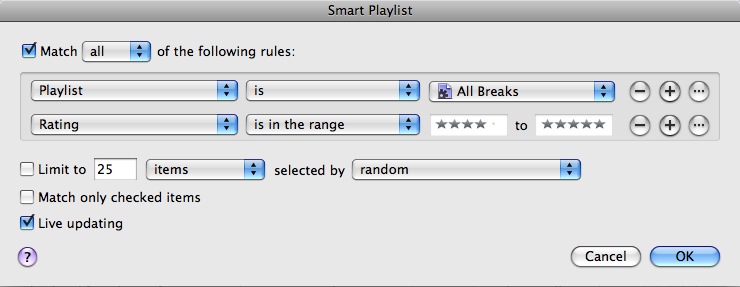
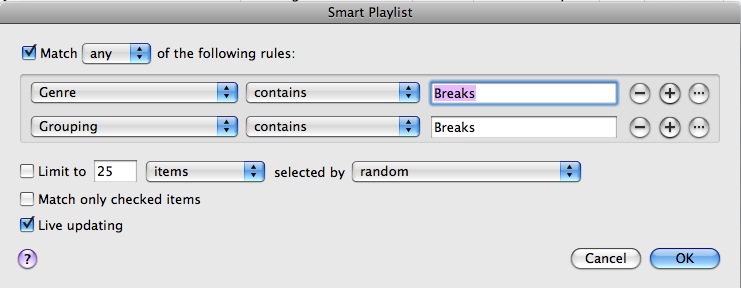
What we need to do here is locate any track where the Rating is in the 4 to 5 range and either the Genre or Grouping fields contain the word “breaks.” In old-school iTunes, we would have needed two separate Smart Playlists: one playlist to find any track that had a genre or grouping of “breaks,” and a second playlist that found all tracks rated 4 or 5 in the first playlist. That would have looked something like this:

Playlist 1, named All Breaks
Mike Charles 2

Playlist 2, referencing Playlist 1

Mike Charles 3

Now with iTunes 9 we can accomplish the same task with a single playlist. Create a Smart Playlist and tell it to look for all tracks with a rating of 4 to 5.
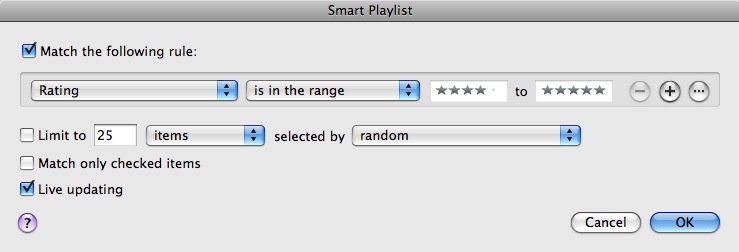
Mike Charles 4

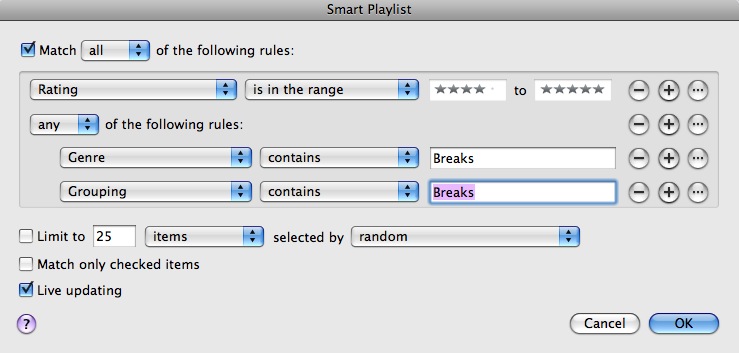
Next click the new Ellipsis [...] button. This creates a second level of conditions under the first level, effectively eliminating the need for multiple playlists to accomplish a single task. At this second level we have two criteria:

Genre – contains – Breaks

or

Grouping – contains – Breaks

Use the Plus Sign button to add more than one condition, and be sure to change the matching criteria at this second level to “any” instead of “all.” It should now look like this:
Mike Charles 5

Now we have a playlist that finds all tracks with a range of 4 to 5 and either the Genre or Grouping fields contain the word “Breaks,” and we did it in one step instead of two. At first glance it seems like a minor update, but I’m positive that fans of my iTunes Power Tips series are happy to welcome this new tool to the arsenal.

ANOTHER MIKE CHARLES PSA

This PSA goes back to how it all began, with tagging. Tag early and tag often, because without good tags none of this will work. If by chance you missed any of the previous portions of this series, check ‘em out now.

iTunes Power Tips Part 1

iTunes Power Tips Part 2

iTunes Power Tips Part 3

21 Responses to “iTunes Power Tips, Part 4: New Smart Playlists”

  1. Double DutchDj

    September 28th, 2009 at 3:25 am Quote

    Nice one Mike, I’ve been using smart playlist’s since you first brought them to my attention in your previous post’s and now I really couldn’t imagine a time without them. I’ve only been a computer based dj for a year now and I really don’t think itune’s would play such a major part in my dj’n if it wasn’t for your post’s and this recent update has addressed my only issue with smart playlists.

    Fingers crossed for continued improvements with Traktor and itunes integration.

    Would love to see an article on why Traktor still struggle’s reading some id3 tags different to itunes and how to remedy it.

  2. Vinicius Hoffmann [Brazil]

    September 28th, 2009 at 5:54 am Quote

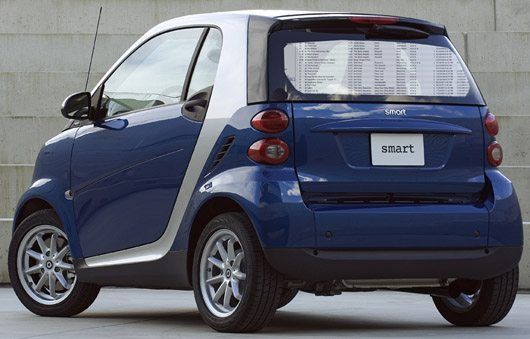
    Nice article and nice picture of the smart car
    I love the blue version :D

  3. mpetersen3

    September 28th, 2009 at 7:12 am Quote

    Nice, nested conditions is excellent, as I was having overlap issues when things with the same qualifying words overlapped and had to fix it in a rudimentary way, this is so much better, now I can put indie dance and indie rock back in their places!

  4. kilbot

    September 28th, 2009 at 8:46 am Quote

    great information! i’ve enjoyed all of your articles regarding music management with itunes, and always come away knowing useful things that i hadn’t before known.

  5. Ean Golden

    September 28th, 2009 at 9:02 am Quote

    Thanks for sharing Mike- that is indeed a big improvement and will make music management way easier!

  6. Anonymous

    September 28th, 2009 at 12:42 pm Quote

    Fingers crossed for continued improvements with Traktor and itunes integration.

    Would love to see an article on why Traktor still struggle’s reading some id3 tags different to itunes and how to remedy it.

    Thanks for sharing Mike- that is indeed a big improvement and will make music management way easier!

    That’ what I want, a smart integration between these apps.
    and thanks for sharing your knowledgement

  7. DJ Cubed

    September 28th, 2009 at 4:46 pm Quote

    Another relevant and insightful post. I’m considering making DJTechTools my homepage at this point.

  8. djeklypse

    September 28th, 2009 at 5:01 pm Quote

    haha along with skratchworx and gizmodo, djtechtools is my coffee-reading material! Great tips Ean. . .how is the tks for the oxy8 coming along?? :D:D

  9. Mike Charles

    September 28th, 2009 at 5:16 pm Quote

    haha along with skratchworx and gizmodo, djtechtools is my coffee-reading material! Great tips Ean. . .how is the tks for the oxy8 coming along?? :D:D

    Thats good company to be in. We appreciate the compliment.

  10. Anonymous

    September 28th, 2009 at 5:54 pm Quote

    Sup Ean;

    Its been over a year now, since it was mentioned that DJTT would be eventually providing a VCI-300 TSI (and possible overlay)?

    http://www.djtechtools.com/forum/showthread.php?t=7414

    Is there any truth to this? Its been ages, and for me and im sure many others, it just not financially feasible to purchase (what seems to me) to be an inferior product for the same amount of money (ie STOCK (silver-yuck) VCI-100 + sound card + firmware + overlay + hope of finding black buttons etc + ripping the unit apart (or paying u to do it) and the time it takes as opposed to a nice shiney new clean looking black unit with more room to breath (what 3 or 4 buttons less than vci-100?) built-in sound + better buttons/faders + hi-precision and larger platters, and with any luck a nice little FX add/on expansion coming) (imagine the possibilities!). Now as much as i understand the VCI-100 following, Its high time for some VCI-300 mods bro! :)

    I’m sure i am not the only one who would be perfectly be willing to order and purchase a 100% working custom DJTT TSI and overlay… for a reasonable price, it it were available, and who knows some ppl may even consider some button modded SE versions even. :)

    So will there be any news on this soon? Is there any truth to what has been said about a DJTT VCI-300 TSI (and overlay?) coming “soon”?

  11. ean golden rox!

    September 28th, 2009 at 6:00 pm Quote

    btw there is something wrong with forum search (doesnt seem to work regardless of wether im logged in or not)
    and how come my posts keep getting deleted?
    VCI-300 TSI? Is there one coming or not? please? :)

    Or are VCI-300 posts and forum searches ignored my default? lol.

  12. ean golden rox!

    September 28th, 2009 at 6:03 pm Quote

    ignore the question about post getting deleted. seems to have magically re-appeared :)

  13. DJTT ftw! (rekindled mah spirit!)

    September 28th, 2009 at 6:22 pm Quote

    http://djlogic.es/?p=3770

    i would still pay for one if all the led’s worked and it came with an nice overlay! :)

  14. Zac Kyoti

    September 29th, 2009 at 1:26 am Quote

    Excellent catch, Mike! I hadn’t seen this yet, and it is just what I’ve been hoping for. It’s good to know I can do away with all my multiple lists now. I’ll be using this for sure.

  15. Jim

    September 29th, 2009 at 6:13 am Quote

    I saw this when my itunes updated and wondered how long ’til you guys wrote an updated article.

    Good work

  16. jay.soul

    September 30th, 2009 at 5:00 am Quote

    thanks for this example. i just found the feature yesterday in iT9 but couldn’t make it work rightaway (mostly the nested and the all/any option). now i know :) great.

  17. B33SON

    October 6th, 2009 at 1:46 pm Quote

    Wow. These new playlists are really smart. I made a playlist with the condition “Genre=’Dead’” and it automatically selected all my DnB tracks. So rad. Thanks Apple!

Leave a Reply

  1. Quote selected text

First Time?

This site is dedicated to digital djs. We develop performance tools and teach cutting edge techniques that enable creative expression. Visit tutorial videos on youtube, equipment reviews in the blog and a very helpful community in the forum. New articles every Mon, Wed, Fri.
In the Store
 

Categories:
Follow us:
You're going to need Flash 8+ and JavaScript to use this site. How'd you get this far without it?

Dig through the Crates

Readers are Saying

  • Bob: I’m trying to get my head around production at the minute so these articles are always welcome. The subject, of big...
  • Dilby: @samms: sorry to burst your bubble brother but there is no “right way to make basslines”, no “best...
  • Tito: I don’t get the idea about the obsession about being superstar dj. If you do really mix well tracks then you are a...
  • Holotropik: I for one am glad production is finally taking back focus from the Mix tape/DJ set. Pushing things in a musical...
  • Lovebump: Great article, looking forward to the next installment. I’ve been producing for about 3 years now, Ableton is...

RSS Hot Topics in the Forum

  • Drum practice programs/online training
    i have a maschine at home and have been working on learning how to use it. My biggest problem is drumming i have a extensive musical background and... […]
  • Promo mix advice
    Yoo so I'm about to start handing some cd's out, wondering what you guys think about track selection. I usually play mostly electro (boys noize rec,... […]
  • Fierce Ruling Diva - Rubb It In remix I made
    remixed the remix http://soundcloud.com/streetfighta1/fierce-ruling-diva-rubb-it-in-bart-b-more-remix-streetfighta-kmh-edit […]
  • mapping loops in duo
    I have been having an issue with mapping looping controls to buttons (on a nanokontrol). I would like to have it set up so the is a loop -, a loop... […]
  • Getting into Bootloader mode for firmware update
    This is a quick tutorial on how to get your midifighter into bootloader mode if the four corners method does not work. The four corner method... […]