How to set up Traktor Pro
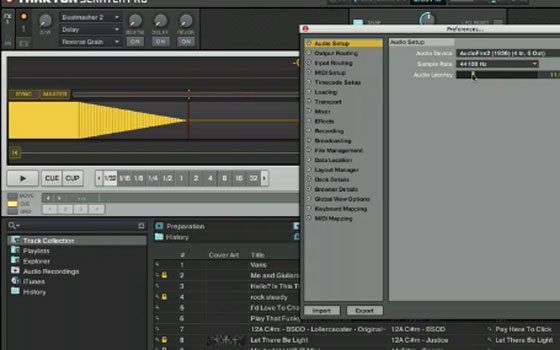
This video will walk new djs through the steps required to get going with Traktor Pro and a midi controller including setting up a sound card for headphone listening and connecting a controller for the first time.

August 17th, 2009 at 7:14 am Quote
Nice strait forward video :) We will definitely be linking lots of people to this video in the forums ! *runs off to go and add it into the FAQ page.
Our FAQ – http://www.djtechtools.com/forum/showthread.php?t=3545
Recommended reading for beginner all the way though to advanced users
August 17th, 2009 at 9:11 am Quote
does audio dj 4 has 3 stereo outs.. 2 from the back and 1 from front (headphones) ?
August 17th, 2009 at 11:33 am Quote
Would be nice to add annotations with links to those videos you talk about at the end. Just for faster searching :)
August 17th, 2009 at 3:02 pm Quote
I hope you people are getting payed by Vestax and NI. You are doing such a wonderfull promotion job.
August 17th, 2009 at 5:18 pm Quote
No offense, bro… But you’ve got some girl’s hands.
:]
August 17th, 2009 at 5:54 pm Quote
no, it has 2 stereo pair of outputs. the headphone is the same as one of the rear RCA outputs.
well you know me, red goes really well with my vci-100. I hope its obvious those are not my hands! kinda hard to shoot the video and unpack at the same time, so I got some help from a friend with a fresh coat of red.
August 17th, 2009 at 7:30 pm Quote
does it seem a little weird that the traktor prefs window shows audio fire 2 device, but you are actually using the audio4 interface?
August 18th, 2009 at 2:11 am Quote
Great vid, defs going to be linking my friends interested in starting up to it. . .now I know this is a bit off topic, but how’s that oxygen 8 TKS coming?
August 18th, 2009 at 8:48 am Quote
Ean wasn’t using the Audio 4 DJ as his sound card in Traktor Pro though, he only showed it to demonstrate what an external soundcard will look like if it offers a socket for headphones.
The Audiofire is the card he physically had plugged into his computer for use with Traktor.
August 18th, 2009 at 7:15 pm Quote
Very good tutorial. Wish I had it when I got my
vci-110se a month ago.Good lookin’out DDTT!
August 18th, 2009 at 7:43 pm Quote
amazing timing on this video – bought a VCI last week and am getting TPRO this weekend coming up. can’t wait. i had to watch this at work so i’ll watch agin with audio at home tonite.
is there a very basic mapping instruction video yet? tsi/tks instructional video?
btw – whats the dif between tks and tsi?
August 18th, 2009 at 7:50 pm Quote
answered my own question re: tks tsi – i saw there are two vids that walk through it in the midi map section – that will probably answer all those questions right?
i want to second the comment on Vestax and NI owing much respect and appreciation to DJTT for helping their products improve.
August 18th, 2009 at 8:33 pm Quote
Have we got a VCI-300 MIDI Map for Traktor Pro? I can’t seem to find one anywhere.
August 19th, 2009 at 10:53 pm Quote
Hai People,
I was wondering wether creating a manual beatgrid is saved in the mp3 tag. Or that it’s just traktor pro that remembers the ‘new’ bpm?
So if I export all my mp3 files and load them again in TSP, will it be able to read the new bpm form the mp3 tag?
Thanks!
October 22nd, 2009 at 5:54 pm Quote
February 9th, 2010 at 11:46 pm Quote
I have bought the Vestax VCI 100, Traxtor 3LE and the Audio 4 DJ.
I have a macbook. I am having trouble with the computer recognizing the VCI 100.
I watched the video on setting up the vci with Traxtor but did not update to TraxtorPpro. Do I have to use traxtor Pro with the VCI 100 and if that is the case why do they bundle it with only Traxtor 3LE if they know it will not work with LE and needs updating immediately.
cheers
Billy (South Australia)
February 9th, 2010 at 11:51 pm Quote
I am also having trouble with the Audio 4 DJ. I have opened the preferences in Traxtor 3LE and set the sound card to the audio 4DJ. I have set the monitor output to out pair 3/4 for pre listening to the track through the headphones and have set the Output master to channel pair 1/2.
However the speaker and the headphones are still playing the same thing when I run both decks.
I am very frustrated. I just want to start mixing.
cheers
Billy (South Australia)
June 7th, 2010 at 9:47 pm Quote
thanks for clearing up those werent your hands!lol