
Inside Timecode- Understanding the Basics pt 2

Timecode Vinyl

The better you understand the technology we dj with, the more empowered you are to fix problems and improve performance. Last week we published an article on fixing common timecode problems. This week we will take you deeper inside timecode technology and show how a computer can accurately track a record’s position.

Traktor Scratch’s timecode vinyl and timecode CDs contain an audio signal constructed from two sinus waves with a frequency of 2 KHz. Serato Scratch and many other competitors have frequencies of 1khz. This signal is analogue and can be brought into to the computer through any audio interface.  Once in the computer, the timecode decoder extracts three different types of information from the incoming signal:

  • Playback speed of the timecode vinyl or timecode CD, respectively,
  • Playback direction (forward, backwards) and
  • Current playback position on the timecode vinyl or on the timecode CD.

Playback Speed

The detection of the current playback speed isn’t too complicated because the decoder knows the original frequency of the timecode signal. If playback is slowe, then the frequency of the incoming timecode signal will be lower than the original frequency. If the rotation speed of the turntables or CD player is higher than 100%, then the frequency increases. The timecode decoder analyzes the frequency of the incoming signal and uses the difference between the original and the incoming frequency to calculate the current speed. Traktor can then match the playback speed of the deck to the playback speed of the timecode medium.
mastertempo*Good To Know* Because Traktor uses the frequency to calculate the speed you must never activate the Master Tempo feature available on many CDJ players, because the Master Tempo function corrects the tone pitch. This is not wanted when using timecode.

If you are using turntables, which always flutter, the BPM display on a timecode controlled deck is never stable; dont worry- the program is not broken, this simply reflects the flutter of the turntables.

Playback Direction

For forward playback the frequency information is already sufficient but it is not enough to determine whether the timecode medium is moving forward or backwards. This information is absolutely necessary when scratching or manual beat matching. To detect the playback direction the timecode signal is constructed from two sinus waves, one for the left and another one for the right channel. The phases of both waves are slightly shifted. This can be seen in the following figure which simulates this (let’s assume the upper wave is for the left and the lower one for the right channel).
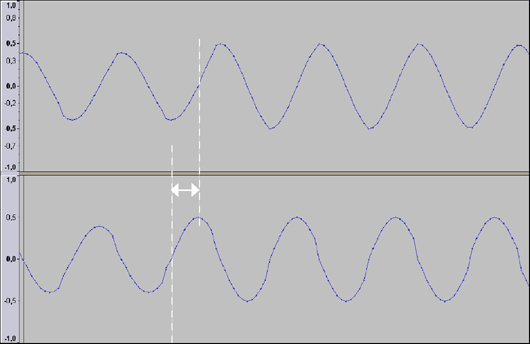
Phase Shift between Left and Right Channel

Because of the phase shifting the right channel is a bit ahead of the left channel. When the right channel meets the zero line, then the values of the amplitude of the left channel are negative. When the playback direction is reversed and the right channel reaches the zero line, then the values of the amplitude of the left channel are positive.

*Good To Know* This is also the reason why Traktor always needs the timecode signal of the left and the right channel to function properly. If one channel is missing (maybe because one cable is not connected or because the contacts of the cartridge are black or dirty) only forward playback will be possible. This mode is called emergency mode. More practical information about the left/right channel topic can be found in this tutorial where timecode configuration is covered.

Current Playback Position

This brings us to the third and last question, how does Traktor recognize the current playback position. Unfortunately we will never know the answer because it is one Native Instruments best kept secrets. If you have a very close look at a piece of timecode vinyl you will see little data packages as small boxes, where the position information is hidden.Timecode Vinyl

Rainer G. Haselier is the author of the “Traktor Pro Bible“.  Dj TechTools readers may use the following discount code to get 15% off the book in the CreateSpace e-store:  SWBLQERF

29 Responses to “Inside Timecode- Understanding the Basics pt 2”

  1. mpetersen3

    August 3rd, 2009 at 4:11 am Quote

    couldn’t traktor use AM modulation, and combine a 2k frequency with a chirp signal that varies its frequency throughout the length of the vinyl, and thus by taking the instantaneously varying frequency (not the 2k carrier freq btw) at any time you could interpolate to find the position? Thus this combination of amplitude and frequency modulation could yield both relative and absolute position data.

  2. NoBody

    August 3rd, 2009 at 4:44 am Quote

    Sinus waves? Is that anything like the classic sine wave?

  3. BentoSan

    August 3rd, 2009 at 5:08 am Quote

    Sinus waves and Sine Waves are one and the same

  4. compact

    August 3rd, 2009 at 5:10 am Quote

    sinus=sine

    both are sinus shaped!

  5. compact

    August 3rd, 2009 at 5:11 am Quote

    btw.

    serato uses a kind of white noise against the other competitors sine´s…

  6. Dj Nvidia

    August 3rd, 2009 at 5:40 am Quote

    Good to know,

    but I doubt I will be using a time-code anytime soon…

  7. NoBody

    August 3rd, 2009 at 5:55 am Quote

    I was kidding above… there is no such thing as a sinus wave.

  8. algorithmdetroit

    August 3rd, 2009 at 6:25 am Quote

    well what about Torq’s timecode. There is no way to adjust these w\variables onscreen,if so—– how?

  9. Tomek

    August 3rd, 2009 at 12:09 pm Quote

    Honestly, I am getting quite frustrated why on earth I bought this book if almost all useful tutorials/know how is just given away for free on the internet …

  10. DaScratcher

    August 3rd, 2009 at 12:22 pm Quote

    Coming from a signal processing background, I agree with “mpetersen3″. As, both playback position and direction of rotation can very easily be detected if one uses a slowly increasing sine wave frequency. I believe all timecodes use the same principle. To make this less obvious they would have inserted one more on right or left channel or inserted a modified whitenoise. The extra signal maybe wholly unnecessary or just there for other signal processing and calibration requirements. The key to know this is process the frequency at a decent sampling rate (>/= 48 Khz) and bit rate (>/=16 bit) to capture the small change in frequency. I like to see “Rainer G. Haselier” and others arguments to this.

    Traktor uses a higher frequency and it soundcard has a better spec than most. Technically this means better results than Torq and Serato.

  11. Mudo

    August 3rd, 2009 at 2:38 pm Quote


    Torq and Ms. Pinky have another system to calibrate. Visit ms. pinky forums for details.

    About 2kz and 1kz it is hardware dependant and “as everybody” could notice higher frecuencies not are the best in al “manipulation” scenarios.

    Ask about scratching with serato vs traktor. Traktor has twice “references” than serato but it is ok for mixing (estable decoding scenario) when you make an scratch… the wistle and the decoding algorithm have the clues for true control.

    Of course Serato is more stable but they doesn’t want video, fx and midi… (in the beggining, now they are working in the same direction as traktor).

    All of these math are the “true” reasons behind SL3 update.

    People are waiting “improvements” from Serato which justify the update.

    look at Hz and stay alert.

  12. ko1N

    August 3rd, 2009 at 4:30 pm Quote

    The position is encoded in the frequency signal as is. A 2khz sound is basically just an really fast alternation between a positive and negative signal from the needle (it’s 2000 times per second, because it’s 2khz xD).
    You may now just look at a high peak value as a 1 and at a low peak value as a 0. The position is then encoded into these 1s and 0s. Basically it’s just an integer value encoded in binary format in both channels together. An integer consists of 4 bytes which equals 32 bits.
    So as you may see it’s kinda hard to reveil the timecode from a dirty signal that is natural when using vinyls (caused by dirt, abused vinyl, noise from the PA, etc.).
    This just explains why it takes the software a few milliseconds to get the correct position when changing the needle (or why it doesn’t recognize the position at all).
    Each manufacturer uses his own algorithms for error checking to prevent such bad detections (cause one single missing bit may make the timecode unreadable, even if the speed and direction are tracked correctly – These are much more failsave)!

    Hope this explains it a bit in depth…

    Here is additional reading material:
    http://en.wikipedia.org/wiki/Final_Scratch#Finding_position

    Best regards, Koin

  13. tobamai

    August 3rd, 2009 at 7:10 pm Quote

    Heh, “best kept secret”? Position is based on timestamps. That’s why a needle drop in a DVS is never instant. Different DVS’s will encode a timestamp in different ways, Traktor’s sure looks to me like it’s based on an AM bit signal like MPetersen3 suggested. Either way, if you’ve written a book you should do the research in public patents to provide accurate information instead of claiming it’s a secret. ;)

  14. mpetersen3

    August 3rd, 2009 at 7:54 pm Quote

    ahh yea koin, that would make much more sense, but the only thing I would think would be that this method would work less well with wear than using a varying sinusoid and interpolation, I am not saying that they aren’t using this, merely that I am surprised a bit that they are, as wear would cause necessary replacement (which I guess they don’t mind).

  15. ko1N

    August 3rd, 2009 at 8:49 pm Quote

    I think they use harder wax for the vinyls…
    At least my records didn’t wear that much. Anyways, you need to replace timecodes after heavy use (especially the beginning of the timecode breaks kinda fast due to much cueing).
    But as I mentioned it’s possible that most manufacturers use some automated error-checking and correction on the timecode signal (as they do with the sine curves – but this is based on audio filters imo). They may use parity based approaches to correct their timecode or some other error correcting algorithm (see http://en.wikipedia.org/wiki/Error_detection_and_correction#Error_detection_schemes)...

    And anyways, they can interpret the timecode value based on the formerly read timecode value (if you dont lift the needle). So if one time value doesn’t fit to another one it’s very possible that one of them had an error…

    Best regards Koin

  16. Chris combe

    August 3rd, 2009 at 11:22 pm Quote

    very good article and very useful, especially the master tempo button, I learnt that one the hard way :)

  17. ToS

    August 4th, 2009 at 3:15 am Quote

    Good article. Even better comments. Tnx all.
    Question: does traktor-scratch-engine(the one that makes digital mp3 sound like wax) sounds same with DVS and (very)high resolution jog-dial?

    2KHz DVS on the outermost rim (12″) has a resolution of:
    45RPM – 2500 per turn
    33RPM – 4000 per turn
    Well, something is wrong with my math but I can’t get what.

  18. Mudo

    August 4th, 2009 at 10:39 am Quote

    Look at NS7

  19. ko1N

    August 4th, 2009 at 7:53 pm Quote

    The resolution of the Timecode is independent of the RPM (At least if you count for a length, not for a certain time)

  20. Max

    August 5th, 2009 at 2:09 am Quote

    Dear Djtechtools/Ean.

    I Have some timecode problems with my new traktor, I got traktor scratch one week ago and the very first time I manage to use the timecode vinyls with no probem, then I change the Tsi because I wanted to use a midi controller vci-100 and worked ok, then the next day, I wanted to use the the timecode cds and I did pretty much the same I did when I use the turntables the first time and it didn’t work, the I try the vinyls again and it did not work either, I follow the instructions step by step, I changed the input on the audio 8 dj, have pretty much tried every logical step to make it work and I’m still no able to make the work, can you please help me solve this problem??

    I have a white macboook, 2.2ghz, 2gb, using os x 10.5.7

    Thanks and keepup the great work

    Max

  21. Rainer G. Haselier

    August 5th, 2009 at 9:27 am Quote

    Thanks for all follow-ups and for sharing your knowledge by giving more detailed technical information than I did. The main goal of this part was giving a little bit of technical background to help soling calibration and cabling issues. However, I will improve the section about the position information in an upcoming update of the Traktor Bible.

    Rainer

  22. Lewis Fisher

    August 11th, 2009 at 12:02 am Quote

    Dear Djtechtools/Ean.

    I Have some timecode problems with my new traktor, I got traktor scratch one week ago and the very first time I manage to use the timecode vinyls with no probem, then I change the Tsi because I wanted to use a midi controller vci-100 and worked ok, then the next day, I wanted to use the the timecode cds and I did pretty much the same I did when I use the turntables the first time and it didn’t work, the I try the vinyls again and it did not work either, I follow the instructions step by step, I changed the input on the audio 8 dj, have pretty much tried every logical step to make it work and I’m still no able to make the work, can you please help me solve this problem??

    I have a white macboook, 2.2ghz, 2gb, using os x 10.5.7

    Thanks and keepup the great work

    Max

    check all the preferences that the audio 8 is the soundcard and external sound box is highlighted , also that deck A + B have scratch control selected and the turntable symbols are highlighted underneath the wave display.

    i use both scratch and midi control every week gigging and it can be a pain in the arse setting up for scratch in a dark dj booth especially when you have the length of a track to set up.

    always best off saving a default .tsi file yourself that you know that works in case of any problems with settings.

  23. Dave Ramana

    August 12th, 2009 at 3:27 am Quote

    Rainer,
    Once again, EXCELLENT information. Truly a GURU.

  24. Oli D

    August 13th, 2009 at 11:27 am Quote

    Rainer,
    Once again, EXCELLENT information. Truly a GURU.

  25. Oli D

    August 13th, 2009 at 11:31 am Quote

    Don’t suppose there’s a guide to the same level as these tailored specifically for serato users is there?

    Thanks,

    Oli

  26. BentoSan

    August 14th, 2009 at 4:17 am Quote

    Don’t suppose there’s a guide to the same level as these tailored specifically for serato users is there?

    Thanks,

    Oli

    We dont have one on the site, but alot of these same principles also apply to Serato.

  27. BentoSan

    August 14th, 2009 at 5:03 am Quote

    Theres an interesting wiki link someone just pointed me to for understanding how Absolute Vinyl Positioning works:
    http://en.wikipedia.org/wiki/Final_Scratch#Finding_position

    Read the section titled “Finding position”

  28. Engineer

    September 14th, 2009 at 11:26 pm Quote

    About the position, Traktor uses 23 bits (contrary to Serato which uses 20 bits). Then it’s based on Linear Feeback Shift Register.

  29. eldiablo

    October 1st, 2009 at 1:03 pm Quote

    I have a problem and if anybody could help I will appreciate very much! Here we go: > > I buy traktor scratch pro with the audio 8 and 2 “cdj”… the news reloop rmp-3 … I made everything like the manual , I see very videos tutorial like the cable installation and setup definitions …its all equal and correct but when I play music with the cds and time codes the music seems fine, correspond with the commands , the tempo are fine, the music plays , stops , the pitch fine , etc… it calibrates fine, but sometimes in the scope view of the time cope appears one error ( CD SKIPPING ) and the music fails a little , it breaks, with my vinyl plays fine and internal mode too, cds are fine they are brand new , and all connections fine , and don’t have enable any function in cdj like key lock or other… there aren’t vibrations, it happens in both cdj with different time code cds… could you help me? Thank you

Leave a Reply

  1. Quote selected text

First Time?

This site is dedicated to digital djs. We develop performance tools and teach cutting edge techniques that enable creative expression. Visit tutorial videos on youtube, equipment reviews in the blog and a very helpful community in the forum. New articles every Mon, Wed, Fri.
In the Store
 

Categories:
Follow us:
You're going to need Flash 8+ and JavaScript to use this site. How'd you get this far without it?

Dig through the Crates

Readers are Saying

  • Jonny: I notice a post about being with ‘deadmau5′ ‘on that one’. He has little option as the guy...
  • Jack Creamation: Whens the next contest?
  • virtual dj tutorial: just read your post. thank for good info. I’m still learn to you.cheer
  • yc: Oman here, so certainly not as tight about it as Saudi (I do know a few Saudis and I know they’re quite laid back...
  • Riot: Just did five months in Nicaragua and found a bar on the beach to spin at and it was a blast to play to people from all...
Contributing-Writer-Ad