DJ TechTools
  • Blog
    • DJ Gear
      • DIY Projects
      • Gear Reviews
      • New Products
      • Controllerism
    • Techniques + Tips
      • Beginner DJ
      • Advanced DJ
      • Producer
      • Finger Drummer
    • News + Culture
      • Editorials + Opinions
      • Artist Interviews
      • Performances + Routines
      • How I Play
    • DJ Software Tutorials
      • Serato Tips
        • Traktor Tips
      • CDJ Tips
      • Ableton Live Tips
  • Store
    • Run by real DJs, not a corporation
    • DJ Controllers
      • Midi Fighter Twister
      • Midi Fighter Spectra
      • Midi Fighter 64
      • View All
    • Accessories
      • Chroma USB Drive for DJs
      • Chroma Caps
      • Chroma Cables Audio
      • Chroma Cables USB-A
      • Chroma Cables: USB-C
      • DJTT Gift Card
      • Midi Fighter T-Shirt
      • Keyboard Covers
      • Earplugs by V-Moda
    • Production Gear
    • Soundcards & Mixers
  • Community
    • Popular Forums
      • General Discussion
      • Buy & Sell
      • Reviews
      • Mixes
      • Music Production
      • Show Your Setup
      • Off Topic
    • Handy Links
      • New Posts
      • Private Messages
      • Register
      • Search
    • Midi Maps
      • Traktor
      • Ableton
      • Serato DJ
      • Midi Fighter 3D
      • Midi Fighter Twister
      • Midi Fighter Spectra
  • Midi Fighter
  • Chroma
No Result
View All Result
DJ TechTools
  • Blog
    • DJ Gear
      • DIY Projects
      • Gear Reviews
      • New Products
      • Controllerism
    • Techniques + Tips
      • Beginner DJ
      • Advanced DJ
      • Producer
      • Finger Drummer
    • News + Culture
      • Editorials + Opinions
      • Artist Interviews
      • Performances + Routines
      • How I Play
    • DJ Software Tutorials
      • Serato Tips
        • Traktor Tips
      • CDJ Tips
      • Ableton Live Tips
  • Store
    • Run by real DJs, not a corporation
    • DJ Controllers
      • Midi Fighter Twister
      • Midi Fighter Spectra
      • Midi Fighter 64
      • View All
    • Accessories
      • Chroma USB Drive for DJs
      • Chroma Caps
      • Chroma Cables Audio
      • Chroma Cables USB-A
      • Chroma Cables: USB-C
      • DJTT Gift Card
      • Midi Fighter T-Shirt
      • Keyboard Covers
      • Earplugs by V-Moda
    • Production Gear
    • Soundcards & Mixers
  • Community
    • Popular Forums
      • General Discussion
      • Buy & Sell
      • Reviews
      • Mixes
      • Music Production
      • Show Your Setup
      • Off Topic
    • Handy Links
      • New Posts
      • Private Messages
      • Register
      • Search
    • Midi Maps
      • Traktor
      • Ableton
      • Serato DJ
      • Midi Fighter 3D
      • Midi Fighter Twister
      • Midi Fighter Spectra
  • Midi Fighter
  • Chroma
No Result
View All Result
DJ TechTools

Streamline Your Laptop (Windows)

Monika.mhz by Monika.mhz
July 15, 2009
in Advanced DJ Tips
Reading Time: 4 mins read
0
Streamline Your Laptop (Windows)
190
VIEWS
Post on FacebookTweet thisUpvote on Reddit

By Monika.mhz

DJs who use PCs know that sometimes all the other software we use on our laptops gets in the way of what really matters, the Music!

I’m a laptop guru by trade and I get asked all the time by fellow DJs and performers alike, “Monika, how can I make my laptop better suited for DJing?”  Here are a few short tricks and tweaks that can speed up your performance and optimize your machine for performance!  Most of these have been floating around for a while, but I thought it would be a great idea to go over this again since the question is always on the lips of learning Digital Djs.

WARNING: Perform all these tweaks at your own risk!  And remember to backup everything (including your registry) before playing with fire!

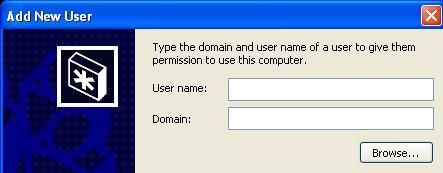
Make a new account
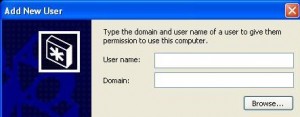
Creating a new user account is pretty straight forward in most versions of windows.  Navigate to the control panel and open the “user accounts” option in either XP or Vista and create yourself a “DJ” User account.  This will help distinguish your DJ rig from the space where you visit DJTechTools.

Create a Hardware Profile
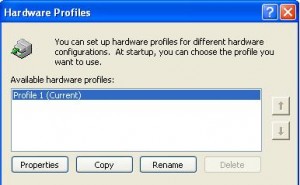
Copy your current hardware profile rename it to “DJ Only” and while you’re running the new profile reduce as many devices as possible, turning off everything from the CD-Rom to the Wireless card.  Reduce those DPC latencies.  You can check what helps your latency with the DPC Latency Checker. Additionally in the new hardware profile/account you can reduce the amount of services running.  Navigate to #run > services.msc and you can eliminate any unnecessary services (like network services).  This will help assure that the maximum amount of resources is dedicated to your software.  REMEMBER: Hardware profiles are chosen at start-up!  So you will have to reboot if you want to switch!

Performance
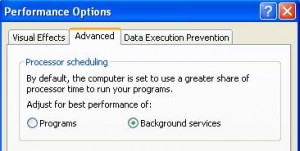
Be sure set your computer to focus on background services.  This may seem counter intuitive, but experience has shown that you will see less audio dropouts and raised MIDI performance in this case.

Eliminate rogue software
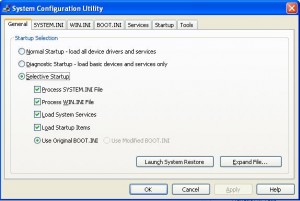
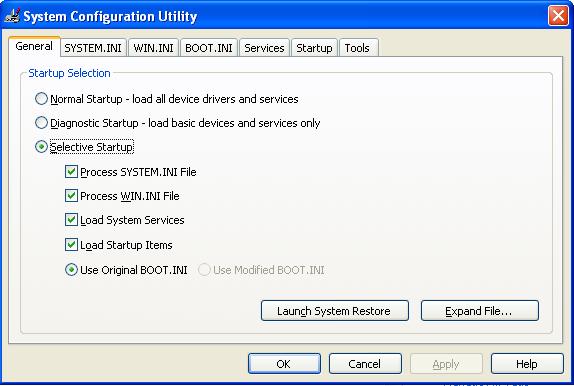
Once you are in your newly modified DJ account you can start customizing even further.  Run msconfig and eliminate any non-essential processes starting up.  The extremely geek literate may want to use Microsoft’s autoruns.exe to take it to the next level running only your DJ software and csrss.exe.

Kiss Explorer.exe Goodbye!
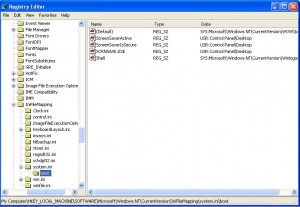
Finally for the ultra hardcore we have the tweak to end all tweaks.  Making your chosen software into the new Windows shell for your DJ account!  Remember, edit the registry at your own risk, and don’t blame me if your laptop blows up in your face.

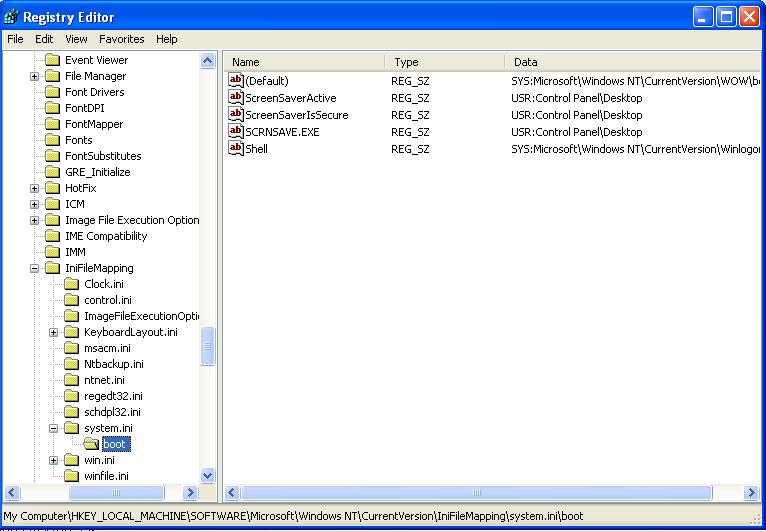
  1. Open the registry by going to START -> Run and then typing “regedit” and clicking “OK”.
  2. Navigate to “HKEY_LOCAL_MACHINE\SOFTWARE\Microsoft\Windows NT\CurrentVersion\IniFileMapping\system.ini\boot”
  3. Find the String named Shell and change its value from: “SYS:Microsoft\Windows NT\CurrentVersion\Winlogon”  to: “USR:Software\Microsoft\Windows NT\CurrentVersion\Winlogon”.

This tells Windows to look in the User key for the shell rather than the Machine key. If you don’t set this Windows becomes confused and Windows will see both Traktor/Serato and Explorer as your shell.

  1. Next, go to “HKEY_CURRENT_USER\Software\Microsoft\Windows NT\CurrentVersion\Winlogon”.   (Be sure you’re logged into your newly made DJ account!!!)
  2. Either find or create a string named “Shell” with a value containing your Software’s EXE (for example, “C:\program files\Rane\Serato\Serato.exe”). This sets Serato as your username’s shell.

At this point your DJ Software is set up as your shell. In order to continue using Explorer as your file manager you must complete these steps:

  1. Navigate to “HKEY_CURRENT_USER\Software\Microsoft\Windows\CurrentVersion\Explorer” and create a DWORD with the name DesktopProcess and a value of 1.
  2. Navigate to “HKEY_CURRENT_USER\Software\Microsoft\Windows\CurrentVersion\Explorer\Advanced” and, again, create a DWORD with the name DesktopProcess and a value of 1.

And that’s it!  Tear up the dancefloor with your new LEAN DJ account!

Tags: advanced tipsDj softwarehow toTipstweakswindows
Share2Tweet1Share
Previous Post

Serato gets Multi Decked

Next Post

Kid Mods VCI

Related Posts

A Prime 4+ and a Kontrol S3 intercut against eachother over a black background
Breaking News

InMusic just bought Native Instruments. So what now for Traktor?

May 8, 2026
Ableton launches Live 12 Suite rent-to-own plan – and it’s not a subscription
Ableton

Ableton launches Live 12 Suite rent-to-own plan – and it’s not a subscription

October 1, 2025
Rekordox Spotify
Breaking News

Spotify (finally) slides into Rekordbox, Serato, and Algoriddim djay (again) – for better or worse?

September 24, 2025
Load More
Next Post
Kid Mods VCI

Kid Mods VCI

Want to reach DJTT's audience here?

Shoot an email to advertising@djtechtools.com

DJTT ads
DJTT newsletter
Midi Fighter
Chat with us
  • ABOUT DJTT
  • CONTACT
  • PRIVACY
  • MIDI FIGHTER HELP
  • ABOUT DJTT
  • JOBS
  • CONTACT US
  • ADVERTISE
  • PRIVACY POLICY
  • ACCESSIBILITY STATEMENT

© 2024 DJ Techtools all rights reserved by DJ TechTools on all content unless otherwise noted.

No Result
View All Result
  • Blog
    • DJ Gear
      • DIY Projects
      • Gear Reviews
      • New Products
      • Controllerism
    • Techniques + Tips
      • Beginner DJ
      • Advanced DJ
      • Producer
      • Finger Drummer
    • News + Culture
      • Editorials + Opinions
      • Artist Interviews
      • Performances + Routines
      • How I Play
    • DJ Software Tutorials
      • Serato Tips
      • CDJ Tips
      • Ableton Live Tips
  • Store
    • Run by real DJs, not a corporation
    • DJ Controllers
      • Midi Fighter Twister
      • Midi Fighter Spectra
      • Midi Fighter 64
      • View All
    • Accessories
      • Chroma USB Drive for DJs
      • Chroma Caps
      • Chroma Cables Audio
      • Chroma Cables USB-A
      • Chroma Cables: USB-C
      • DJTT Gift Card
      • Midi Fighter T-Shirt
      • Keyboard Covers
      • Earplugs by V-Moda
    • Production Gear
    • Soundcards & Mixers
  • Community
    • Popular Forums
      • General Discussion
      • Buy & Sell
      • Reviews
      • Mixes
      • Music Production
      • Show Your Setup
      • Off Topic
    • Handy Links
      • New Posts
      • Private Messages
      • Register
      • Search
    • Midi Maps
      • Traktor
      • Ableton
      • Serato DJ
      • Midi Fighter 3D
      • Midi Fighter Twister
      • Midi Fighter Spectra
  • Midi Fighter
  • Chroma

© 2024 DJ Techtools all rights reserved by DJ TechTools on all content unless otherwise noted.

This website uses cookies. By continuing to use this website you are giving consent to cookies being used. Visit our Privacy and Cookie Policy.