

Serato gets Multi Decked

About 3 months ago the boys over in Auckland took a small step forward with their ubiquitously conservative software, Serato Scratch. Along with a host of bug fixes and tweaks version 1.9 added 6 samplers, and the ability to record directly into those samplers from a MIC. While the demand for more air horn and cowbell never seems to let up, 6 simple samplers stopped just short of something great and I was happy to open my big mouth and tell them so. “Hey guys, just support deck duplication to the samplers and you have opened up a whole new world!” One step at a time, I was told by the 7 foot tall zen dj master known as Sam at Serato. Well, I am happy to report they took that extra step with a brand new beta version and made their nice little samplers into something more- 6 additional decks.
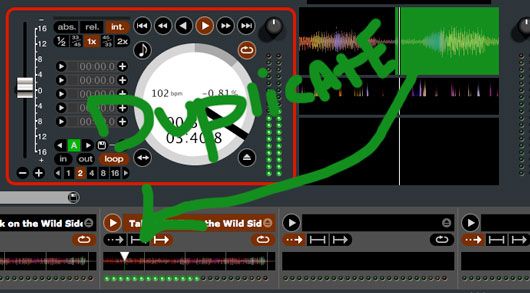
Deck Duplicate
Serato Scratch version 1.9.1 (Public Beta) adds in time duplication of either deck into a sampler. With deck duplicate to a sampler, you effectively now have 8 decks in Serato. Admittedly you cant do much with the extra 6 decks besides play loops but its super easy to:
Beat match 2 loops
Dump one into a sampler (loop continues to run in time)
free up deck and beat match another loop
dump that into a new sampler
rinse and repeat….
So assuming that your loops and beat matching is rock solid, you could quickly build up a nice little layer of sounds or just work between 2 real and 1 virtual deck for extended mixes. Effectively using this technique is going to require some hot keys at a minimum and ideally a midi controller with faders for volume control. Each samplers audio is sent out over the same channel as a decks 1 and 2 or the master output so audio adjustments must be done with a midi controller or the mouse.
Full Deck Features
As one of our eagle eyed readers pointed out there is a tiny expansion button that allows you to reveal a host of additional features on these samplers.
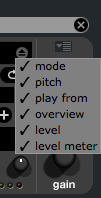
With everything checked you get nearly full deck control over each of the samplers!
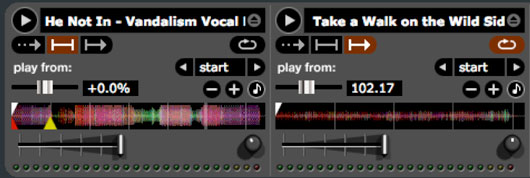
The functions are:
- Volume
- Gain
- +/- 8% pitch
- Play
- Play Modes (Sample and Hold, Sample direct play, Sample Play/Pause)
- Pitch bend
- KeyLock
- Loop On/off
- Which cue point to start from
A Small Hitch
The only problem we can find is that there are no midi or hotkey commands for duplicating decks into each sampler. To accomplish this in the current beta (that may change) you need to drag and drop a deck with the mouse- hardly a performance oriented method. Those small inconveniences aside, this new feature marks the start of Scratch Live’s transition away from a simple 2 deck interface. I suspect that while the features will be welcome they may wield a dangerous double sword. As die hard Serato users start to get a taste of the possibilities in controllersim they may get worked up and want more, more more!
Serato Scratch Version 1.9.1 with the new SP6 sampler is available as a public beta.




July 12th, 2009 at 11:14 pm Quote
Not a bad step forward.
July 12th, 2009 at 11:17 pm Quote
Cool, with some MIDI bindings for per sampler volume and the ability to swap a track from deck to sampler and back again this could be a very big feature for SSL. Hopefully they aren’t too many updates away from a release where 2 decks and 6 hotloops is really workable on the fly. Kudos to Serato.
July 13th, 2009 at 3:36 am Quote
When, OH, WHEN will ITCH get SSL’s features?!?!?
Wah.
-KLH
July 13th, 2009 at 4:55 am Quote
Wow great article!
I must agree this feature is a huge step for Serato! But I wish they would implement an effects system. When they do that is when I’ll invest in the switch.
As for right now the only serato product that has me interested is the NS7. And that only uses Itch.
But here’s a real thought to ponder… Why won’t NI incorporate a sampler system in their software? It seems simple, they would place a small sampler bank in the middle of the two effects banks. Yea it would make MIDI mapping the VCI-100 a little more difficult but that would definetly make the Traktor software far more superior and give NI the competitive edge.
What do you all think?
Is that a simple request?
Would that make Traktor the best DVS out there, hands down?
(also when will Vestax come out with their answer to the NS7?)
July 13th, 2009 at 6:57 am Quote
Traktor definitely needs simple sample banks, the beatmasher is cool, but having a bank dedicated to it would be perfect
July 13th, 2009 at 7:29 am Quote
NI probably think: Use damn hardware samplers, leave us alone. We can’t even straight out thiese “accidental fetures”.
BTW: Who remembers Monthy Python and “Knights that say NI!”
July 13th, 2009 at 7:37 am Quote
I recently received the newsletter from Serato.
I still use the 1.8.4 version as the 1.9 version reported too many bugs.
As I have never heard anything about this bug fixing and its results I will not change to any newer versions.
Playing with 1.8.4 gives me already a lot of pleasure infecting other people to switch from cd to Serato ( traktor sucks, containing too many cheat functions) and I would like to keep it that way :-)
July 13th, 2009 at 8:01 am Quote
Cheat functions?? LMFAO!
call it what you want to
It’s what each person does with the software/equipment
If it offers too much for you… Too bad
But back to the topic this is a great step toward for ssl
Now if they would allow seperate volume and hot keys… YEAH
July 13th, 2009 at 10:07 am Quote
…
If Serato implement those features… what the hell they will ADD with ABLETON PARTNERSHIP?
xDDDDD
Vinyl control is coming…
TOOLtablism is (here) coming…
Vestax has a prototype like SCS.1d but holy crap (more than stanton, imagine! lol)
Serato SSL 2.0 and ITCH will share audio/midi conections with Ableton Live (look at live feed, sampler banks, midi out when you attach Serato in Ableton at Betatest version…)
Too many coincidences, too many necessities but How serato users will react?
Before winter you will see…
wait.
…
July 13th, 2009 at 10:36 am Quote
wt…? they deleted the audio adjustments for each channel?? aaah please tell them to stop that!
July 13th, 2009 at 11:43 am Quote
Hi
If you are not a windows user… I would recommend two SCS 3D for midi control… I have windows and I use Nanopad.. it’s cheap and very reliable
July 13th, 2009 at 6:20 pm Quote
There is still seperate volume control (and gain knobs) for each sample bank!
Volume control is in the form of horizontal up-faders under each bank, not sure how the article author missed that.
And i think the “cheats” that Antoine is referring to is the auto-sync functions which take all the skill out of beat matching.
But at the same time that opens the doors for more complex looping/effects, because you’re not constantly trying to keep everything in synce, freeing you up to do other things.
Its all preference really. I LOVE the feel of turntables and having complete “analogue” control over my mix, i dont do much “controllerism”, and most places i play already have serato, and if im lucky, a DJM-800 for effects already installed, so Serato is perfect for me.
July 13th, 2009 at 6:25 pm Quote
I recently got serato sl3 very nice product.. fucking tight.. for a two deck player.. I haven’t played with the sampler I’m still waiting on the 1.9.1 final version to see what u can control.. which would be everything from pitch to I think even cue points.. so I’m just waiting to see how it’s gonna look.. I think its gonna be crazy if u can use the samplers with video… with the ableton partnership I just can’t wait to see what they got going..
July 13th, 2009 at 6:36 pm Quote
Like most DJs I am at a fork int he road. Old vs. new. Controllerism has some out there routines, but what about the old standards with vynil? I would love to get to the point where I display the best of both worlds in a well rounded performance.
July 13th, 2009 at 7:17 pm Quote
Awesome update Ean. For non-controllerists, if not for the hardware requirement Serato cwuld replace Traktor with this update. Any news about the Ableton partnership… But anyday Traktor rules, GOD knows (maybe Ean) what gonna come up from Traktor’s hat.
July 13th, 2009 at 9:25 pm Quote
[i]We are now… no longer the Knights Who Say NI.
We are now the Knights Who Say Ecky-ecky-ecky-ecky-pikang-zoom-boing-mumble-mumble.[/i]
July 14th, 2009 at 1:12 am Quote
i´m doin this with vdj since years ;) so its not so innovative after all
July 14th, 2009 at 1:13 am Quote
^^thats me
July 14th, 2009 at 6:51 pm Quote
^^thats me
like the picture above shows no adjustments, so you mean its “under” the shown banks?
thanks for your answer
July 14th, 2009 at 6:57 pm Quote
July 14th, 2009 at 6:58 pm Quote
whoops sorry for my terrible formatting above… still haven’t had my coffee for the day.
July 14th, 2009 at 7:41 pm Quote
thanks for pointing that out OCD. Serato may want to make that a little clearer as we completely missed the drop down option and there is no manual for the new features. Post has been updated with the correct info about all the features.
July 14th, 2009 at 8:02 pm Quote
“- The SP-6 functionality has been expanded. In the top right corner of the SP-6 there is a new button – the Sample Player Display Menu. Clicking on this will popup a menu with the list of available controls:”
Its the first bullet point in the “release notes and download” thread on the 1.9.1 beta Serato forums.
:)
(p.s. im not trying to be a jerk, i promise. just trying to be helpful on one of my fav dj sites!)
July 15th, 2009 at 6:09 am Quote
How does one get the focus red oval that is around the deck? I see no option or is this just a Photoshop thing?
July 15th, 2009 at 5:53 pm Quote
The red focus ring is a function of Rane TTM-57SL mixer, and highlights which deck the built in effects are effecting.
You’ll only get that (and the software effects) when using the TTM57, unfortunately. If you se and SL-1, SL-3 etc, you wont see these things.
July 16th, 2009 at 2:12 pm Quote
Last night I found a solution for the DaScratch error with Serato:
1: Error: MIDI device ‘DaRouter Virtual Out’ cannot be used:
Error opening virtual MIDI OUT device ‘DaRouter Virtual Out’:
invalid parameter
Download and install Bome’s 1.7 trial version and run Bome before you open DaRouter (it is a buggy software, I hate it), let both of them running and then open Serato.
I have two SCS.3D so I mapped each SCS3D, for three samplers, to control everything “OCD” had highlighted. Three SCS3D could be better but the buggy DaRouter allows only two. BTW, my NanoPad is now configured to do all the cue point control.
But the major problem is this…
There is no way to do a headphone cue when you do pitch bend. “OCD” if this is possible in other ways please let us know.
To deck duplicate you have to drag it from the rotating decks you see on the screen and not from the moving waveform as seen in the picture (I did this stupid mistake when I first used it).
“Ean Golden” Please suggest if there is a better MIDI controller in the market to do all this very easy.
July 16th, 2009 at 8:17 pm Quote
If you have an SL-3, you can map the samplers output to an AUX OUT as opposed to deck 1 or 2’s output, allowing you to route the samplers audio through a 3rd channel on your mixer. This is only possible with the Rane SL-3 hardware.
I’ve been using the nanoKONTROL for sampler MIDI control which works great.
July 16th, 2009 at 8:31 pm Quote
Thanks OCD, I am struck with SL-1, looks like no hopes for me… BTW folks I think the Akai LPD8 would be a better MIDI controller for the samplers…
Checkout: http://www.skratchworx.com/news3/comments.php?id=1266
July 17th, 2009 at 1:49 pm Quote
July 20th, 2009 at 5:40 pm Quote
Yeah, for my uses, I think the Serato setup now makes more sense than what I have in Traktor Pro. This way I can prepare samples with ease and even create new ones on the fly. Having to first assemble a sample track for Traktor Pro is quite tedious compared to this.
July 23rd, 2009 at 7:59 pm Quote
One of the main reasons why I didn’t make the switch either including the fxs, butlet me tell you, all of the features you are asking are included in “M-Audio Torq” software. I’ve been using a lot lately on my gigs and let me tell you all this features really rock, not saying serato is bad at all, but it lacks features compared to other ones, unless the video feature now, nut I use Numark’s virtual vinyl for vid anyways… try torq, I think you’ll love it, + the midi learn funcionts in torq are really really easy
September 3rd, 2009 at 2:11 pm Quote
December 29th, 2009 at 7:01 pm Quote
News for every one!!!!
Hot Keys for the 6 sampler decks: Z X C V B N.
z/x/c control deck 1/2/3 and v/b/n goes for 4/5/6!!! Enjoy!!!!
I often use those almost like a built in midi. Just load your favorite loops from a track and have fun!!!!
Also wiked for all those airhorn, gunshots, lasers and others!!!! Just don’t press the wrong one at the wrong time!
Love this site! Stumbled upon it 3 days ago and only left the page to plug in serato or pass out!!!! LOL!!! Lots of good info.
Thanks guys.