Mix Different BPMs Seamlessly

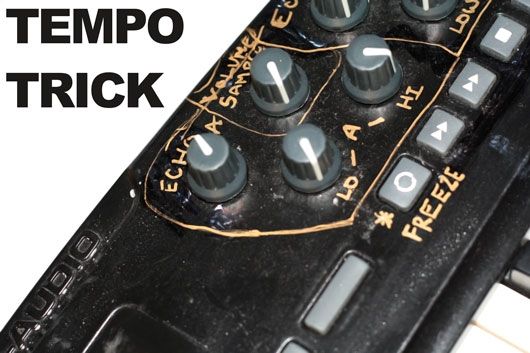
Here is one technique I use at almost every gig to make big tempo jumps. Its not the only way but if you use Traktor then its a trick that should absolutely be in your bag. Next time we will look at shifting the tempos of micro loops to create a similar effect.



July 7th, 2009 at 7:15 pm Quote
could you change the video to public?
July 7th, 2009 at 7:36 pm Quote
CANT WAIT FOR THE OXYGEN 8 MIDI MAP! Thanks alot! Can i hook both my VCI and my Oxygen 8 together in PRO? Thanks!
July 7th, 2009 at 7:42 pm Quote
nice 1, any possible way u can do a video to explain the modifier amd macros in traktor pro, it will make lots of people understand the midi functionality of traktor properly and perhaps make them discover the creative side hidden in them
July 7th, 2009 at 7:50 pm Quote
July 7th, 2009 at 8:11 pm Quote
How do you have the camelot notation in the track header? It won’t let me select ‘comment’ as one the tags I view.
July 7th, 2009 at 9:18 pm Quote
Nice variation on the “Echo Out” Ean!
Very similar to something I do with hardware on the Pioneer mixers.
July 7th, 2009 at 9:18 pm Quote
I had the same problem when I switched from Traktor 3 to Pro. Traktor 3 only allows you put the “Comment” section of the tag in the track header while Pro allows you to put the “Key” section of the tag in the header. I use Mixed in Key and that has an option write the camelot notation to the “Key” part of the tag so that when you async your collection, Traktor will display the the camelot notation to the header.
Nice technique Ean, although I feel like you would have to limit the number of times you do this in one set. However, if you are trying to do one or two big breakdowns throughout the night, this would be an excellent and dramatic segway into a hip hop jammer. I’ve managed a similar technique a few times with the filter and the delay together on the VCI.
July 7th, 2009 at 10:23 pm Quote
That’s rad Ean!
I wasn’t that impressed until the tempo started speeding back up, can’t wait to try this out. Thanks a lot!
MONSTA
July 7th, 2009 at 11:25 pm Quote
I have mixed in key set to add the Key number in front of the artist name, it makes it easy to sort lists and put that data in the header. Try it out!
July 8th, 2009 at 12:31 am Quote
Great Ean! I was wondering if you would be working on a midi map for the novation 25 SL? If you do please let me know! I would love to see what other possibilities I might get out of it… Cheers!
July 8th, 2009 at 3:42 am Quote
Mine only displays the actual key, not the Camelot notation. I have my stuff tagged in the key field as well but instead of displaying 1A it says Fminor and so forth.
I think Ean has his tagged in the artist field, but if anyone knows how to get the Camelot notion to appear in pro without writing to the artist field please post. Thanks
Nice technique Ean, it will come in handy for my next gig. I would like to see some other techniques for transitioning between two radically different BPMs. I always like adding new tricks into my arsenal.
July 8th, 2009 at 3:42 am Quote
July 8th, 2009 at 4:20 am Quote
love this trick since i was trying the same technique using the delay and filter but wasn’t getting nice results. tried this one and its awesome! thanks alot.
“I would like to see some other techniques for transitioning between two radically different BPMs. I always like adding new tricks into my arsenal.”
#2 here
July 8th, 2009 at 6:21 am Quote
That’s it, I’m buying Traktor Pro.
July 8th, 2009 at 7:21 am Quote
In Pro when you go to the ID3 edit menu, you don’t need to select one of the options from the drop menu… you can type in whatever you want into the field; ie the camelot notation. If that is too much work, (going through each track individually) Mixed in Key v3 has the option to “Store Key Result (Example 10A)”. If you select this option, it will write the camelot notation to the key field of each track in batch mode. After doing that and setting one of the header parameters in Pro to display the key, the end result should look something like this…
http://img129.imageshack.us/img129/7909/scrnm.jpg
Hope this helps!
July 8th, 2009 at 7:23 am Quote
Fantastic !! I was just going to buy a Keyboard, this arrives just in time =)
July 8th, 2009 at 8:24 am Quote
There is a dedicated thread on the forums for harmonic mixing talk, a lot of your guys questions on this has been answered already in the post. Check it out, good reading material :) http://www.djtechtools.com/2007/12/16/are-you-mixing-in-key/
Back on topic – This freeze trick is really neat little trick <3 I wish traktors fx section had the ability to being of being post or pre fader, that would enable us to do many more tricks like this.
July 8th, 2009 at 8:44 am Quote
cool..I have an old M-Audio here Oxygen.
Ean you are going back to the basics and letting the 100 rest?
July 8th, 2009 at 10:12 am Quote
i use this trick myself often too, but i didnt know that the delay sync to deck B by stopping A, thanks for this !!!
greets from germany
July 8th, 2009 at 1:50 pm Quote
Hey Ean, good stuff once again!
You once promised us a Traktor layout for the Novation Remote SL MKII, is there anything in plans ?
The SLMKII has very cool controls well engineered LED feedback and would be an awesome FX and cue trigger device when paired with a DVS or with the VCI.
Regards.
July 8th, 2009 at 5:06 pm Quote
Not giving up on the VCI-100, we just have what I feel is a very complete mapping so now its time to move on and do the same thing for other controllers. The Oxygen 8 and NOvation 25Sl are next on the list and will be coming soon (with overlays too!)
July 8th, 2009 at 5:45 pm Quote
…
Really cool tutorial!
Keep playing Ean…
…
July 8th, 2009 at 8:18 pm Quote
how do you program or select the “freeze” button. sorry, not so good with midi mapping. i’ve tried scrolling thru the various effects but haven’t had much luck setting this up on my vci-100 se.
thanks for the help.
July 9th, 2009 at 3:53 am Quote
Great post, Ean. Love the site, check it often; you seem to have converted me from a 12″ guy to a CPU junkie that’s into MIDI parameters and controllers haha.
In terms of delay effects, I like adding some reverb or iceverb/reverb chain to create a bigger sound, almost like a white noise and cue into a deep bass. Gives the audience that little hold-out effect.
Keep it up!
July 9th, 2009 at 7:04 am Quote
Hey Ean, I have been doing that trick since I had my dns1000s I have a had lots of wanna be DJs slate me for doing it, but they dont understand that you cant mix 90bpm into 130bpm and I think its a entertaining way to do it and can throw the crowed, its good to know I am not alone on that one, been throwing in the pitched up thing as well great on a vocal.
July 9th, 2009 at 9:46 am Quote
Hey ean, i’m so glad there’s someone else out there using an oxygen 8! I really fancy moving onto a Novation 25 SL or something – but I need to get one thing straight 1st.. Its kinda macro buttons – how you can load pre-programmed FX into a slot for a specific routine.. (like the dedicated delay knob you have there which sets it to advanced delay effect) Once I get the hang of that there’s no limits! I’d love your thoughts! (by the way.. I’ve posted up a video with my mapping of the oxygen 8 in response to this one – I hope you don’t mind!)
Cheers
Belch
July 9th, 2009 at 2:37 pm Quote
thank you so much ean!
i’ll be using this little trick all the time! :D
July 9th, 2009 at 4:30 pm Quote
Ever since I read your article on using an oxygen i picked one up and have been digital ever since. I’ve since bought and played around a little with Traktor, but have not yet been able to justify dropping VDJ (which is set up exactly how I like it)…….until now.
Awesome tip Ean, much appreciated!
-djeklypse
July 9th, 2009 at 8:09 pm Quote
Thx for the video.
Minor detail .. something seems b0rked with your wp category:
“Published by Ean Golden on July 7, 2009 in 3.”
July 9th, 2009 at 8:50 pm Quote
Adapted that for my unused effect knobs on the Faderfox DX2. Had the idea since I saw some guy using a footcontroller in combination with a DJM 909, he repeated the sound manually with the vinyl and just turned on the echo…
July 10th, 2009 at 9:25 am Quote
I like this trick. One thing though, when I stop the first deck the “master” status doesn’t automatically change to the other deck. Any ideas how to set that up?
July 10th, 2009 at 5:52 pm Quote
Check out this article:
http://www.djtechtools.com/2009/06/29/traktor_pro_sync_tutorial/
its about how your master clock is configured. You want it on Auto
July 11th, 2009 at 8:45 pm Quote
very cool, makes me want to start working with traktorpro! Someday soon…
nice use of The Twelves, Ean- one of the hottest acts in dance music right now imo.
July 13th, 2009 at 5:00 pm Quote
Awesome trick.
With the Oxygen 8, I have decided to buy one, but what would you recommend using to mark the buttons etc until DJTT produce an overlay?
July 14th, 2009 at 3:36 am Quote
Great trick, Ean. One question: when you pause the old track after freezing it, its echo changes pitch along with tempo. Is there a way to stop the pitch change but keep the tempo change?
July 15th, 2009 at 4:55 am Quote
A black sharpie would work very well
Sorry- I dont think thats possible.
July 27th, 2009 at 2:59 pm Quote
I’m missing the TSI for the oxygen 8. How is the progress on that?
August 10th, 2009 at 8:30 pm Quote
Any word on the TSI for the oxygen 8?
I just got one :o)
August 11th, 2009 at 3:17 pm Quote
Just picked up an Oxygen 8 to mess around with. TSI coming out soon? Thanks.
August 11th, 2009 at 5:09 pm Quote
I swear I am working on it this week. The Mapping is done- I just need to create the tutorial video :) I am shooting for a release next monday.
August 22nd, 2009 at 2:16 am Quote
what is the tsi to activate the advanced effects function in this video with just a knob turn?
August 23rd, 2009 at 10:54 pm Quote
boom. Thankyou Mr. Golden :) be sure to holla when you’re done :) (since its next next monday tomorrow…)
August 23rd, 2009 at 10:55 pm Quote
November 25th, 2009 at 2:09 pm Quote
Is there any relatively simple way to do this in Ableton Live 8?
December 4th, 2009 at 10:13 am Quote
how can I map the freeze button?
December 24th, 2009 at 11:47 pm Quote
Hey Ean,
Wow great mix! Large changes in tempo has been something that has really bugged me for a long time, and really deters me from playing my slower tempo songs. i can’t believe how seamlessly that worked.
I know that there is an oxygen 8 tsi file on here but i was wondering if it would be possible to do an individual write up about how you set up your super knob effect? Sorry if that is an amateurish question but i am very keen to incorporate a small midi keyboard into my setup similar to yours except i’m using Traktor Scratch Pro and have my own different ideas for hot cues, but i would like to try doing this effect so a step by step guide on setting this up on it’s own would be greatly appreciated. Thanks!
hes got secular joy.. hes a peculiar boy..
December 25th, 2009 at 12:17 am Quote
Also, i notice at the start of the video you said “there are many ways to mix between two radically different tempos..” would this topic be worthy of a second post in the future outlining some of these? Its just that until i saw this post the only way i knew to do large tempo jumps was what i call a “jump-start cut” i doubt that’s the correct term but i’m sure you know what i mean. to be honest these often have varying degrees of success, and i feel this is an area i would love to be able to improve my skill set to not feel so limited in choosing songs when i play.
Cheers!