Traktor Sync- Revealed

Traktor Pro contains a very powerful synchronization engine but sometimes it feels like this super computer might have a mind of its own. Between mysterious button states and behavior that seems to change from track to track, it leaves you wondering, what does the SYNC button do and how can I be more in control of it? Well, we have the answers for you. Read on to learn the mystery of SYNC!

Master Tempo
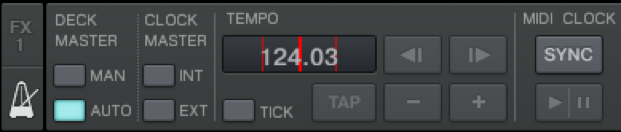
Each Traktor deck contains a Sync button and when that button is switched on the deck is automatically synchronised to the master tempo source. The master tempo source can either be one of the other decks or the master clock; which source is used as the tempo reference depends on the current Master Clock mode.
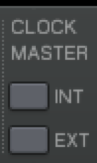
In these modes the Master Clock itself serves as tempo reference. The master tempo can then be raised, lowered or even bent and all tracks synced to that clock will follow it. This behavior is what you might be used to in Ableton Live. INT mode tracks the tempo you set and EXT tracks an external source like a sequencer.

In Master Clock modes Deck Master Auto and Deck Master Manual one of the decks acts as tempo reference. When you use Deck Master Auto Traktor decides which deck is the best master tempo deck. In mode Deck Master Manual you appoint the master tempo deck by clicking the Master button.

Sync States

The Sync button in the decks can have one of the following three states:

  • = OFF The deck does not follow the tempo of the master deck or of the master clock, i.e. Traktor won’t synchronise the deck to the master deck. When the Sync button is clicked Traktor will sync this deck to the master tempo.
  • Sync Button On = On The deck with SYNC engaged automatically follows the tempo and the phase of either the master tempo deck or the master clock. For example, when you use the pitch fader on the master tempo deck to change the tempo, then Traktor adapts the tempo of all decks that have the Sync button on.  Syncing the phase matches the beatgrid of the deck to the beatgrid of the master tempo. Normally the Sync button stays on when it is clicked. When the button doesn’t stay on then Traktor cannot permanently sync the deck to the master tempo source, either because the track in the current deck or the one in the master tempo deck doesn’t have a beatmarker, or because of the deck operation mode is set to Scratch Control, i.e. a timecode medium is used. In this case the tempo has been synced but the phase is not.
  • = Waiting The third state of the Sync button is officially called “intermediate”, but I prefer to call it “waiting”, because the deck is waiting for a state to be switched back to the On state. When the state is set to Waiting then the deck is currently in a state that prohibits a permanent synchronisation to the master tempo source. This can be due to several reasons:
    • The deck is current tempo master, i.e. the Master button for this deck is On. A deck cannot or it doesn’t need to be synchronised to itself; it is synchronous to itself by definition.
    • A loop is active in the deck and the loop length is shorter than 1 beat; loops that a shorter than 1 beat can never be played back beat synchronous.
    • There is no beatmarker in either the track the deck itself or in the track serving as tempo master. Traktor can only synchronise the deck permanently if all loaded tracks have a beatmarker.
    • Synchronising the deck tempo would result in a BPM that is outside of the selected pitch fader range (configured on dialog Preferences/Transport).

If the deck state changes during your set, it may be because another deck has been selected as tempo master, or because the short loop was deactivated, or because the loop length has been changed to a value greater or equal to 1 beat then Traktor automatically changes the sync state back from Waiting to On.

Syncing and Timecode

When the deck operation mode is set to Scratch Control (i.e. you are spinning with timecode vinyl/CD) and if the selected timecode tracking mode is either the absolute or the relative mode, than you can use the Sync button to trigger a temporary synchronisation, but the button won’t stay on. In Scratch Control mode the timecode signal is in control over the deck tempo. If the button would stay on than Traktor would be in control of the tempo and this would not make sense. Its either fish or meat, so either the Traktor clock and its synchronisation mechanism or the timecode signal is in control.

If you were in absolute mode when you click Sync, then the tracking mode is changed to relative mode. From a conceptual point of view this is similar to the situation described in the first part of this paragraph. Once you click Sync then the timecode signal isn’t completely controlling the deck anymore; and this means you have left absolute mode, thus relative mode is the only mode that fits the scenario.

Syncing and MIDI

There are three MIDI commands relevant for synchronization:

  • Tempo | Sync Triggers a tempo and a phase synchronization of the deck selected in list Assignment. When the deck currently is operating in Scratch Control mode, then the first button toggle command initiates a phase synchronization and the second one a tempo synchronisation. Additionally, the tracking mode will be changed to relative mode if that mode wasn’t already active.
  • Tempo | Phase Sync Triggers a phase (but not a tempo) synchronisation of the deck selected in list Assignment. The tempo of the deck won’t change. If the deck operation mode is set to Scratch Control and if the current tracking mode was absolute mode, than this command switches to relative mode.
  • Tempo | Set to Master Appoints the deck selected in list Assignment as Master Deck. This command is only available when either clock mode Deck Master Manual or Deck Master Auto is selected.

Rainer G. Haselier is the author of the “Traktor Pro Bible“, the practically oriented compendium covering all aspects of digital DJing with Traktor Pro and Traktor Scratch Pro. Dj TechTools readers are invited to use the following discount code to get 15% off the book! SWBLQERF

Editors Note: If you are interested in the philisophical debate on this technology check out our article  “To Sync or Not to Sync”
46 Responses to “Traktor Sync- Revealed”

  1. Mike

    June 29th, 2009 at 9:17 am Quote

    Cheers for this, I was beginning to think that the sync button had it’s own mind and that I REALLY must’ve pissed him off :-)

  2. BentoSan

    June 29th, 2009 at 9:36 am Quote

    Interested in getting one of those copies of the traktor bible for myself actually!

    Nice write up Rainer :)

  3. Anonymous

    June 29th, 2009 at 10:31 am Quote

    HAHAHAHAHAH I just want to see what the shipping cost would be and its 100eur. ??????

  4. Rainer G. Haselier

    June 29th, 2009 at 10:54 am Quote

    HAHAHAHAHAH I just want to see what the shipping cost would be and its 100eur. ??????

    That’s is strange. Shpping costs from the UniBook-Store is something between 5 and 10 Euro to most european countries and even to Australia. From which country are you?

  5. dixHuit

    June 29th, 2009 at 11:19 am Quote

    Very handy post. Cheers.

  6. 2NiNe

    June 29th, 2009 at 11:52 am Quote

    I’m curious about one thing – does it work even when Traktor determines track BPM badly? ‘Coz that’s really pain in the ass, it happens alot that Traktor scans BPM incorrectly and I can’t get it right even with TAPping (it actually turns to more accurate value, but still too far from the correct BPM). Any tips how to deal with this?

  7. Rainer G. Haselier

    June 29th, 2009 at 11:57 am Quote

    I’m curious about one thing – does it work even when Traktor determines track BPM badly?

    The Sync button will stay permanent On only if the track has a beatmarker.
    When the track has no beatmarker (gridmarker) you can use the Sync button to trigger a one time synchronisation.

    The TAP button in the current Traktor version is almost disfunctional.

    The correct BPM detection depends a lot on the music genre and the default settings for the BPM detection range. A lot more information and tutorials about beatgridding can be found either in the PDF tutorial avaialable on http://www.traktorbible.com and of course in the Traktor Pro Bible.

  8. 2NiNe

    June 29th, 2009 at 12:18 pm Quote

    Thanks for quick response, although beatgridding is almost impossible for me (I have a HUUUUGE collection of dnb tracks), I’ll check out the Traktor Bible for sure! Hope they will fix the TAP function as soon as possible, there is a LOT of Traktor owners who are pissed of that.
    By the way, I never used the TAP in old 3.x Traktor versions, does it work correctly there?

  9. Rainer G. Haselier

    June 29th, 2009 at 12:30 pm Quote

    Thanks for quick response, although beatgridding is almost impossible for me (I have a HUUUUGE collection of dnb tracks)

    Try to set the BPM Detection Range on Preferences/File Management to 150-190. This setting works better for DnB than the default setting.

    The TAP button in T3 works better and correctly. Yes, and the TAP button behavior should be fixed in the upcoming Traktor update.

  10. Mr Bitches

    June 29th, 2009 at 2:09 pm Quote

    Use your ears. IMO

  11. Anonymous

    June 29th, 2009 at 3:47 pm Quote

    HAHAHAHAHAH I just want to see what the shipping cost would be and its 100eur. ??????

    That’s is strange. Shpping costs from the UniBook-Store is something between 5 and 10 Euro to most european countries and even to Australia. From which country are you?

    Of course only for Serbia is 100euro.

  12. Mr Bitches

    June 29th, 2009 at 3:51 pm Quote

    SYNC , IMO , seems to be a shortcut or beginners tool to learn the ART of DJing. I understand that art has many facets, and Unfortunally SYNC has become one of those facets. Using our ears is more of a challenge and provides a skill usefull for when your laptop crashes and you are forced to use CDs or Vinyl. CDJs and Turntables dont have a sync. So if you have no practice using your ears. Its gonna be trainwreck city and you probably wont get anoter gig at that particular venue.

    In many social setting with many djs around. Ask what they think about the sync? chances are 9 times out of 10 the dj will say “Why? Just use your ears.”

  13. Mr Bitches

    June 29th, 2009 at 3:56 pm Quote

    I’m curious about one thing – does it work even when Traktor determines track BPM badly? ‘Coz that’s really pain in the ass, it happens alot that Traktor scans BPM incorrectly and I can’t get it right even with TAPping (it actually turns to more accurate value, but still too far from the correct BPM). Any tips how to deal with this?

    Ean has a beatgrid tutorial out somewhere. Fine tune the beatgrids for the most acurate BPMs

  14. 2NiNe

    June 29th, 2009 at 4:28 pm Quote

    Sorry for being too offensive, but I can’t understand, why do I have to write my reason for EVERY SINGLE PERSON again and again. As i wrote before, my track collection is just too big (and by too big I mean REALLY REALLY big) to make beatgrids for every track.
    Anyway, I don’t use syncing, but I do look at BPM meters when matching beats (actually I was more curious about the TAP function than how the SYNC works). You may say that it’s lame and I should mix it just by ear, but I have two good reasons:
    1) I use loops much and when the BPM isn’t determined correctly, the loops are too all wrong.
    2) According to BPM meter I can match beats really quickly (with no other syncing I remind!) and then I have more space for other stuff like playing with effects etc.
    Got it? :)

  15. djeklypse

    June 29th, 2009 at 4:44 pm Quote

    SYNC , IMO , seems to be a shortcut or beginners tool to learn the ART of DJing. I understand that art has many facets, and Unfortunally SYNC has become one of those facets. Using our ears is more of a challenge and provides a skill usefull for when your laptop crashes and you are forced to use CDs or Vinyl.

    Most digital DJs would be more inclined to have a third source with a premixed set than have to worry about plugging and unplugging two sets of TTs / CDJs in the chance the laptop fails. This allows them more time than the in-between mixing tracks to ensure that everything is configured correctly and attempt to fix whatever caused the original crash. Furthermore, it allows the digital DJ to provide something more akin to their particular style, instead of the straight mix-in-mix out that a CDJ set up lends itself to.

    As a DJ who can do both, who started on TTs and is as comfortable on vinyl as I am on midi driven Serato / VDJ / Traktor (although I’m still learning the ins and outs of traktor) your comments sound more like the whinings of a luddite being left behind than anything else. Guess what? The crowd doesn’t care if the tempos are matched with a pitchfader or a button, so you shouldn’t either.

  16. Mr Bitches

    June 29th, 2009 at 5:02 pm Quote

    Sorry for being too offensive, but I can’t understand, why do I have to write my reason for EVERY SINGLE PERSON again and again. As i wrote before, my track collection is just too big (and by too big I mean REALLY REALLY big) to make beatgrids for every track.
    Anyway, I don’t use syncing, but I do look at BPM meters when matching beats (actually I was more curious about the TAP function than how the SYNC works). You may say that it’s lame and I should mix it just by ear, but I have two good reasons:
    1) I use loops much and when the BPM isn’t determined correctly, the loops are too all wrong.
    2) According to BPM meter I can match beats really quickly (with no other syncing I remind!) and then I have more space for other stuff like playing with effects etc.
    Got it? :)

    My comment on using your ears is not at all directed at you. Its directed at the article.

    And I dont care how big your library is. It doesnt change the fact that finetuning your beatgrids will make for more accurate BPMs and thus cleaner loops.

    I didnt say beatgrid them all. i simply stated Ean has a beatgrid tutorial out somewhere. Fine tune the beatgrids for the most acurate BPMs
    Just beatgrid the ones you plan on looping or just beatgrid the ones you are playing that night. The is no practical need to beatgrid them all in one sitting. You cant play them all in one gig.

    I got over 100 gigs of misic and I only beatgrid The tracks I am using for the next gig. I know I will probally never get to them all. But the ones I use more than others are all set and ready to go. I like to have accurate BPMs so I can pick traks in the same range.

    Put your Ego aside

    My only comment directed to you 2NINE is directing you to a FANTASTIC tutorial by ean. and this one.

    But its nice to know you are an ear user. Soon we will be a rare breed. The Quantized world is fast approaching

  17. Ean Golden

    June 29th, 2009 at 5:06 pm Quote

    Lets try and keep our comments on Topic and not get into a discussion about if SYNC is good or not. That discussion has happened many times in other articles. This article is about how that function actaully works for those who want to use it sometimes.

    In fact, this is really good information for those that want to match phase by ear (like me) because you can use this tool to match the BPM perfectly and then do the important phase part by ear. Without understanding that its possible to separate the two functions you might miss out on a important feature.

    Here is our video tutorial on how to set a good beatgrid:

    http://www.djtechtools.com/2009/03/02/create-great-beatgrids-in-traktor-pro/

  18. 2NiNe

    June 29th, 2009 at 5:20 pm Quote

    By every single person I don’t mean just ppl here, this is common problem in almost every forum where are ppl too lazy to read a few posts above the reply form.
    By the way, I don’t plan all my sets to every last minute, I have usually some pre-planned parts in sets (if I can call it planning), but I also often mix random tracks that just pop into my mind when the music plays and that’s the dangerous part.

    Maybe I took it too personally, dunno why, think I shouldnt when I don’t use SYNC anyway xD

    It’s a shame that my very first post on this blog ends by a flame, therefor this is my last post in this discussion. Long live and prosper to all of you.

  19. Fatlimey

    June 29th, 2009 at 5:32 pm Quote

    As i wrote before, my track collection is just too big (and by too big I mean REALLY REALLY big) to make beatgrids for every track.

    Do you play every song in your collection every time? No, you’l play 20-40 tracks in a set. Just grid those 40 tracks. Next time, grid another 20. Pretty soon your collection will be more valuable to you and easier to use.

    This argument “Dude, I have too much music to ever get organized” is a bit of a cop out. Do the work. Get the benefits.

  20. Mr Bitches

    June 29th, 2009 at 5:33 pm Quote

    SYNC , IMO , seems to be a shortcut or beginners tool to learn the ART of DJing. .

    As a DJ who can do both, who started on TTs and is as comfortable on vinyl as I am on midi driven Serato / VDJ / Traktor (although I’m still learning the ins and outs of traktor) your comments sound more like the whinings of a luddite being left behind than anything else. Guess what? The crowd doesn’t care if the tempos are matched with a pitchfader or a button, so you shouldn’t either.

    I too am VERY comfortable with both. And I also ALWAYS have a mix running just incase of a crash. And I have had to play that 3rd channel to give me time to troubleshoot.

    Simply put using SYNC takes less skill than beatmatching bt ear.
    What if Shaq had a button to push to make all of his freethrows?

    Use SYNC all you want. I choose not too to keep my beatmatching skills up to par.
    My question to u is
    What do ou do if the laptop is a Total failure and you have no choice but to use cds or vinyl?
    what then?
    Just let the pre mix play all night? (thats not really djing thats plaing a mix)

    You say u are comfortable with both so you should have no problem with it. But what about dedicated SYNC users?

    If they cant match beats without it, then they will do poorer with cds or Vinyl.

    and your right the crowed just wants to dance. So make them dance any way possible.

    And I care because I have booked digital djs that have had laptop failure Then trainwrecked his own records all night. I never booked him again. If his laptop worked I would have never even noticed and wouldnt have cared. as long as the music plays with no gaps and few wrecks. It doesnt matter what your doing back there.

    a luddite? thats obsurd!

    If that were the case i wouldn’t even be on this site posting.

    I totally embrace technology and love that I can carry my VCI 100 everywhere and play on the fly. Its awseome. I guess I failed to mention that I too am a digital dj.
    (that doesnt use sync)

  21. DJ BOW-tanic

    June 29th, 2009 at 8:57 pm Quote

    come on guys…

    ??? why should i use a car when i can walk to wherever i want?
    !!! because you get there more comfortable, faster and hence are able to do interesting things in this extra time.

    ??? why should i use sync as long as i can sync by ears?
    !!! because you play more comfortable, faster and hence are able to do interesting things in this extra time.

    got it?

    now back 2 the topic:
    the sync function in tpro is not usable for me. especially now that i have read in this article that it is not me, who didn’t understand its behaviour. in fact it is just as bad as i suspected. although i do not have any idea, why the (good!) old concept has been discontinued (like many others in this new “version”).

    in t3 it was possible to play (and sync and rephase) any track spontaneously without even thinking about beatgrid (and if sync didn’t work perfectly i could of course sync by ears as i did over 20 years now with vinyl & cds – just if you wanted to ask). now i have to first beatgrid every track to play it in sync, and even then it doesn’t allow me to parallely pitch synced but out of phase tracks.

    i often do very quick sets with on the fly selected tracks, up to 4 songs or phrases at a time, throwing in requested ones i sometimes never played before. doing this i don’t even have time to set cue points while “spinning”, let alone grids. in t3 this is no problem at all. its better functionality leads to a very special performance, that the crowd really notices (possible because of the ability to sync with a button and to still phasematch by ears).

    i passionately miss this feature in tpro. if you hit sync you always reset the phase offset and ruin the mix. parallel out of phase pitching is impossible. that is one (and probably the most important) of a few points why i still stick to t3.

    and lastly: thanks ean for this never boring blog – i really appreciate it!

    stay synced and free ;-)

  22. Rainer G. Haselier

    June 29th, 2009 at 9:24 pm Quote

    Yes, I agree in some points with DJ BOW-tanic. T3 was way smarter in synchronsing tracks even when they had no beatgrid. On the other hand: with a bit of exercising most of the 4/4 tracks can be beatgridded in 2-5 seconds. Let’s assume someone is bying 50 tracks a week (which is a lot on my opinion) beatgridding would take 50 x 5 seconds = 250 seconds, a bit more than 4 minutes. For me this isn’t a big deal.

    What is really more annoying is the missing Tempo Slave Mode that T3 offered and that isn’t avialable anymore (yet). As far as I understood from the various discussions with the NI guys on the NI Traktor forum they are aware that this is a serious problem. Let’s hope that this insight will lead to action and to a change in the behavior of the Master Clock modes in Traktor.

    Peace!

  23. Nocturne

    June 30th, 2009 at 12:22 am Quote

    sweet article :D i mix a lot of tracks that are both dnb(87bpm) and dubstep(70bpm) traktor is lacking in the ‘multiple grid’ department. say i grid my track at 89bpm, the beats fall out of sync when the tracks tempo drops to 70bpm. itd be cool if you could put 2 different tempo grids on a track (one could be visually represented as a different colour). and choose which to sync to. is this do-able?

  24. NZ

    June 30th, 2009 at 12:24 am Quote

    I wish Traktor could have another Sync+Timecode feature:
    the track stays in Sync if the pitch is near zero(+- 0,3 for example).
    So u could use your turntable to find a cue, to backspin, to have stoping effect etc
    everything except speed control

    or we could use a pitchfader as filter contoller))

  25. chuck

    June 30th, 2009 at 4:55 am Quote

    I wish Traktor could have another Sync+Timecode feature:
    the track stays in Sync if the pitch is near zero(+- 0,3 for example).
    So u could use your turntable to find a cue, to backspin, to have stoping effect etc
    everything except speed control

    or we could use a pitchfader as filter contoller))

    sweet article :D i mix a lot of tracks that are both dnb(87bpm) and dubstep(70bpm) traktor is lacking in the ‘multiple grid’ department. say i grid my track at 89bpm, the beats fall out of sync when the tracks tempo drops to 70bpm. itd be cool if you could put 2 different tempo grids on a track (one could be visually represented as a different colour). and choose which to sync to. is this do-able?

  26. chuck

    June 30th, 2009 at 4:58 am Quote

    guess you could try cutting the bpm in half and mix from there. or multiply it by 2. this is what i usually do with tracks that are far apart in terms of speed. as far as i know you could only throw 1 beat grid per track.

  27. Nocturne

    June 30th, 2009 at 5:12 am Quote

    guess you could try cutting the bpm in half and mix from there. or multiply it by 2. this is what i usually do with tracks that are far apart in terms of speed. as far as i know you could only throw 1 beat grid per track.

    its moer a problem beat losing its grid as its internal bpm changes, not the bpm of another track. these tracks have both tempos in them, and traktor cant represent 2 different tempos in 1 track

  28. DJ BOW-tanic

    June 30th, 2009 at 8:08 am Quote

    as far as i know you could only throw 1 beat grid per track.

    don’t really know if it’s exactly the same with tpro, but in t3 i use a tempo named cue point to remind me of the different tempo zones in a track. if one of these points is reached i (manually) write the new value in the bpm field (only when slave mode is deactivated!). now i can (automatically) sync the next track to this tempo, even without a new beatgrid.

    if i need more cue points i can use some fixed loop in points for that. in tpro cue & loop in points are the same, so similar behaviour should be possible. and the beatgrid is what you define as it anyway and traktor just follows the lines.

    Let’s assume someone is bying 50 tracks a week (which is a lot on my opinion) beatgridding would take 50 x 5 seconds = 250 seconds, a bit more than 4 minutes. For me this isn’t a big deal.

    ;-) hm, okay. so let’s assume because i play very different venues with very different styles i get around 500 new tracks every ordinary week (some provided, some bought, some “found”, most of them completely useless). preparing them all doesn’t make sense (try calculating). preparing some of them is okay for me. i warp them in ableton live, shorten them or add some extra beats.

    but the need to beatgrid is a big deal for me. especially because i didn’t have to do this in t3. a new system should try to ease my workflow. tpro let’s me do more to achieve the same as i did in t3 without doing extra tasks. and it does not even sync right all the time, when beatgrids are set. a simple song like “4 minutes” is with a perfect beatgrid still out of phase to a straight beat. how sad.

    and yes: what i really meant was not the sync in t3, it was the lovely master/slave-functionality. sorry if this caused confusion.

  29. Dj Ataru

    July 1st, 2009 at 12:27 am Quote

    and yes: what i really meant was not the sync in t3, it was the lovely master/slave-functionality. sorry if this caused confusion.

    Amen! I have followed the NI forums and have seen nothing but complaints about the Tempo/Sync system as being far inferior to Traktor 3. I sure do hope they allow a master/slave functionality.

  30. ondra

    July 1st, 2009 at 11:02 am Quote

    the discount code is valid for US only i suppose :-/

  31. anjay

    July 1st, 2009 at 11:26 am Quote

    Where do you enter the discount code.

  32. ondra

    July 1st, 2009 at 11:49 am Quote

    Where do you enter the discount code.

    http://i43.tinypic.com/2lkuyro.png – bottom right

  33. elefanc

    July 1st, 2009 at 4:07 pm Quote

    On the other hand: with a bit of exercising most of the 4/4 tracks can be beatgridded in 2-5 seconds. Let’s assume someone is bying 50 tracks a week (which is a lot on my opinion) beatgridding would take 50 x 5 seconds = 250 seconds, a bit more than 4 minutes. For me this isn’t a big deal.

    I can’t understand how you could mahe a complete and correct beatgrid like in your last case of your tuto in 5 seconds.
    Sorry for me if it takes only one min i’m happy.

    E.

  34. ToS

    July 5th, 2009 at 2:36 am Quote

    I just have to write this:
    I feel sorry to everyone that has paid to NI to be their beta testers.
    I also feel sorry for those T3 users that have been left without updates.

  35. dj mutley

    July 7th, 2009 at 4:11 am Quote

    I just have to write this:
    I feel sorry to everyone that has paid to NI to be their beta testers.
    I also feel sorry for those T3 users that have been left without updates.

    kudos ………………. rainer

  36. JohnDP

    July 7th, 2009 at 8:32 am Quote

    I have a precise question regarding Sync.

    All my tracks are cue marked with the LOAD marker, it allows me to have the Cue at the beginning of the track ready to go. Reading this article I albeit realised that by using LOAD instead of GRID markers I cannot have the whole Master Tempo sync as with the LOAD marker, the sync is just a one-time action which I have to restart.

    My target is to have tracks loaded on CUE, so the feature of LOAD, but at the same time be able to move/nudge the Master Tempo and have all tracks synced.

    Can somebody suggest something? Ideally I would not mind using GRID markers and be able to load the tracks on the downbeat with the GRID marker, is that possible?

    Thanks.

  37. Rainer G. Haselier

    July 10th, 2009 at 1:08 pm Quote

    Can somebody suggest something? Ideally I would not mind using GRID markers and be able to load the tracks on the downbeat with the GRID marker, is that possible?

    You can have a LOAD marker and BEAT marker at the same position of the track, this should solve your issue.

    Rainer

  38. Anonymous

    July 12th, 2009 at 6:36 pm Quote

    @Rainer. thanks for your comment, how to I do that?

  39. Rainer G. Haselier

    July 13th, 2009 at 8:03 am Quote

    @Rainer. thanks for your comment, how to I do that?

    You can do that by setting a beatmarker and a loadmarker at the same position of the track. Use the Cue view of the Advanced Deck Panel and create the Load and Grid Cue Points there.

  40. Anonymous

    July 14th, 2009 at 6:49 pm Quote

    Real Dj’s need no “sync”!

  41. ToS

    July 14th, 2009 at 11:45 pm Quote

    Real Dj’s need no “sync”!

    Good thing we are not “real DJs”.

  42. TeeJay

    July 16th, 2009 at 11:41 am Quote

    I use SYNC for decks 3 & 4 to Sync mostly acapellas but also tracks to my main timecoded mix on decks 1 and 2. This allows me to quickly have the extra layers the same speed as what im mixing but still allows me to be creative activating 3 and 4 with my midi controller.

  43. TeeJay

    July 16th, 2009 at 11:42 am Quote

    I use SYNC for decks 3 & 4 to Sync mostly acapellas but also tracks to my main timecoded mix on decks 1 and 2. This allows me to quickly have the extra layers the same speed as what im mixing but still allows me to be creative activating 3 and 4 with my midi controller.

  44. chris

    October 11th, 2009 at 11:53 am Quote

    Whats better for sync’ing then. Clock master or deck master?
    Been usinf serato for the past two years so this is all new to me.

  45. Mikee

    December 13th, 2009 at 5:16 pm Quote

    so if one’s using external mode / scrach control (timecoded cds in cdjs)
    can the sync button still be used??

  46. MehdiVancouver

    December 24th, 2009 at 2:15 am Quote

    Is the book any good with the new VCI_3 mapping?

Leave a Reply

  1. Quote selected text

First Time?

This site is dedicated to digital djs. We develop performance tools and teach cutting edge techniques that enable creative expression. Visit tutorial videos on youtube, equipment reviews in the blog and a very helpful community in the forum. New articles every Mon, Wed, Fri.
In the Store
 

Categories:
Follow us:
You're going to need Flash 8+ and JavaScript to use this site. How'd you get this far without it?

Dig through the Crates

Readers are Saying

  • Vinicius Hoffmann: the pool must require an e-mail to confirm the vote and to send the winner to us.
  • Vinicius Hoffmann: [quote comment="27056"][quote comment="27052"]soo…..this is a popularity contest? i was REALLY excited...
  • ManDingo: ManDingo wants to know when the MidiFighters with the joystick will be availabe. please let him know so that he may...
  • RCUS: @dj broken record: I am almost 100% sure DJTT wouldn’t limit it to a Traktor only contest so don’t let that...
  • dj broken record: a question – is traktor the required software? what about torq?