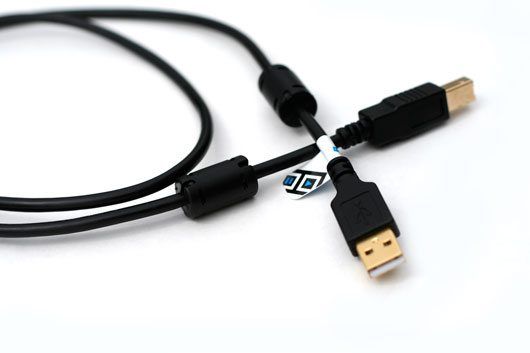
If your anything like me then you probably think that all USB cables are created equal. Just grab any old cable out of the giant pile, throw it into your dj bag and no worries right? Well thats what I thought until I started showing up to gigs and finding that certain cables would not work with my sound card at all.

After a little digging into the matter, it turns out many pro sound cards require cables that meet the 2.0 specification. Even if a cable is certified high speed, then it still may be missing a few essential features that will ensure safe and reliable connections every time. After a bit of research, we wrote this article that covers the essential features your main USB cable should always have. Amazingly, there are relatively few vendors out there that sell these cables so Dj TechTools created some to include with our VCI-100 controllers. They are a now available in the store for only 14.99 with free woldwide shipping. There is nothing worse than stepping into a booth only to discover your only USB cable is not working and radio shack closed 1 hour ago. So do yourself a favor, check your cables out and if they are not up to spec then it might be time to upgrade.

THE SPECS

3.5 ft long: A shorter cable picks up less interference and keeps your set-up tidy.
hi-speed 2.0 certified cable:
The best data transfer rate available
fully shielded:
Protects against interference from club lights and other electrical sources
correctly grounded:
at one end only to combat ground loops.
embedded lines: in the cable as twisted pairs.
gold connectors: connection points stay strong longer.
2 Ferrite Chokes: stop interference resulting in reduced noise and drop outs
  • gfocus

    But aren’t gold-plated cables humbug? Or did it just appeal to the ghetto-fabolous-bling-style u got going on?

    Anyways, keep the store growing! Make it a digital dj’s hightech wonderland.

  • DiGiTaLFX

    Or, you could just label up the cable that comes with a product when you buy it so that a) you know it meets the manufacturers approval and b) you can work out what goes where on you hub!

  • midifidler

    [quote comment=""]Or, you could just label up the cable that comes with a product when you buy it so that a) you know it meets the manufacturers approval and b) you can work out what goes where on you hub![/quote]

    Actually many devices, like the VCI-100 are suplied with substandard cables, DJ booths are not the most electrically clean environments.

    [quote comment-""]But aren’t gold-plated cables humbug? [/quote]

    Gold plating is necessary to ensure the plug continues to operate reliably after regular use, it has nothing to do with it being more conductive.

  • Sarasin

    Is there a way to test the cables you have to see if they meet the requirement?

    Software?

  • http://blog.gianpaj.com GianPaJ

    [quote comment=""]Is there a way to test the cables you have to see if they meet the requirement?

    Software?[/quote]
    Yeah. is there?
    for mac if possible.
    I’m using the original USB cable provided with the NI A8DJ so i guess i can’t find a better onw right?

  • http://www.djpat.nl Pat

    I have a Lacie flat USB cable. I use that with my VCI-300. It must be an OK cable but is there a way to test your cable like Sarasin said?

  • fleater

    Is it the 1st of April?

  • DJ Phaidon

    Any plans on getting high quality firewire 400 and 800 cables on the site? More and more controllers and sound cards are using them these days.

  • DJ Ataru

    [quote comment=""]Any plans on getting high quality firewire 400 and 800 cables on the site? More and more controllers and sound cards are using them these days.[/quote]

    What DJ Phaidon said. I bought one that works but the connector is flaky and I did knock it out of my Macbook Pro once.

  • http://www.eangolden.com Ean Golden

    [quote comment="19685"]Is there a way to test the cables you have to see if they meet the requirement? Software?[/quote]

    You want to read the article we wrote on USB cables
    http://www.djtechtools.com/2009/03/06/gosh-darn-those-pesky-cables/

    There is no software check (that I am aware of) but you can check the cable for the following:

    Is your cable 2.0 hi-speed certified?
    Does it have shielding?
    Are there ferrites on both ends to block out noise?

    [quote comment="19686"]
    I’m using the original USB cable provided with the NI A8DJ so i guess i can’t find a better now right?[/quote]

    That cable is certainly high speed as the NI sound cards require a 2.0 bus but they dont have shielding and many not have a ferrite or proper braiding. Generally speaking, the USB cable included in gear meets minimum specs but are also usually the least expensive version available.
    [quote comment="19693"]Is it the 1st of April?[/quote]
    Nope- June 19 and I am dead serious. We made a short hi-quality cable that will work well for djs, how does that sound like a joke?

  • Sarasin

    It also has a lot to do with them magnets inside the plastic casing on either end of the cable in the pic AFAIK.

    They clear out all the noise.

    You can get them seperately, but if the cable itself sucks….it ain;t gonna help ya!

    :)

  • Sarasin

    Ahh….just saw Ean’s post.

    Ferrites!

    :)

  • Anonymous

    Tech specs, please, otherwise this sounds like monster cables.

    From wiki:
    The USB 2.0 specification requires cable delay to be less than 5.2 ns per meter (192000 km/s, which is [b]close to the maximum achievable speed for standard copper cable)[/b].[16] This allows for a 5 meter cable.
    USB 1.1 maximum cable length is 3 metres (9.8 ft).[17]
    http://en.wikipedia.org/wiki/USB

    Looks like you can’t be any faster than copper but you COULD be slower.

  • Fatlimey

    [quote comment=""]Tech specs, please, otherwise this sounds like monster cables.[/quote]

    OK, the DJTT cables features:

    1. They are shielded, and the shielding is correctly grounded at one end only to combat ground loops.
    2, They have the correct lines embedded in the cable as twisted pairs.
    3, They have ferrites on both ends.
    4. They are shorter than most standard USB cables to combat cable mess.

    Essentially they are the ideal USB cable for Digital DJ use. If you are unsure about the providence of your current cables and not certain that they meet the USB2.0 spec or have all these features, get some of ours. If you are happy with your cables and have had no problems, good for you.
    If you’ve ever had USB dropouts in the field, try a set of DJTT USB cables, it might just solve your problem. Others have had good results from using ferrites, we just make it simple to get all the features in one go.

    This is not Monster Cable bullshit, this is based on actual Electrical Engineering and understanding the USB2.0 specs!

  • djeklypse

    “This is not Monster Cable bullshit, this is based on actual Electrical Engineering and understanding the USB2.0 specs!”

    +1. Except most of the issues can be equally easily explained with gr 12 physics. Bottom line: If you’re not using a decent card for your sound card; upgrade now. 15 bucks? Worth not wasting my time at futureshop.

    Good look Ean + DJTT crew, keep up the good work!

  • seemartinbreak

    im using the cable that came with my vci 300 and it says 2.0
    are those good quality?
    its says here that these are included with your vci 100se right??
    does that mean they come with the same high quality 2.0 gold cables??
    cause i oredered a vci but got an email that said they werent and went ahead and ordered one of these bad boy cables

  • BentoSan

    [quote comment="19706"]im using the cable that came with my vci 300 and it says 2.0
    are those good quality?
    its says here that these are included with your vci 100se right??
    does that mean they come with the same high quality 2.0 gold cables??
    cause i oredered a vci but got an email that said they werent and went ahead and ordered one of these bad boy cables[/quote]

    Yes if it says on the cable and it says its 2.0 that means thats its a good cable :)

  • http://www.eangolden.com Ean Golden

    [quote comment=""]do these high quality 2.0 gold cables come with your vci’s?[/quote]
    They sure do, just shoot us an email to orders at djtechtools.com and we will sort you out.

  • Seemartinbreak

    [quote comment=""][quote comment=""]do these high quality 2.0 gold cables come with your vci’s?[/quote]
    They sure do, just shoot us an email to orders at djtechtools.com and we will sort you out.[/quote]

    LOL thanks Ean! Don’t worry that’s all I needed to know
    I Got the cable I ordered earlier today
    And I guess I’ll have two for my set up with the one I’ll get with my vci
    BTW did those arrive on Wednesday and ship today as planned??
    I’m really looking foward to tearing some beats appart with it!

  • http://tos.network.in.rs ToS

    Interestingly I have a small story about firewire cables.

    I bought my Firebox a few months ago. And I saw that it was good.
    The presonus shipped a 6-6 FW400 cable with it. And you can feel that it is good.
    But my laptop(HP, TI chipset) has 4-pin output and thus I need to use 4-6 pin cable. I had to buy one.
    I bought one, it was not Bandridge(which is a top of the line here in Serbia I guess). And It was good.
    Then I borrowed the soundcard to my friend who had a Dell laptop (probably TI chipset) and all hell broke loose. Crackles and pops have appeared in the sound, the port near the firebox power input never synced, even on my laptop it started beeing pop-y and crackly. We tried everything(cound not test the card with original 6-6 pin cable since there was no FW pci cards in the vicinity), and at the end, the focus was down to the simple 4-6 pin chinese-crap-cable.
    Testing it for problems was simple: for digital data transfers, making the cables loop ( http://www.markertek.com/Cable-Management-Protection/Hook-and-Loop-Cable-Ties/The-Rip-Tie-Company/productImage/75X75/DV-DV-75.JPG ) is a big no-no. And that is the perfect way to test your cable shielding.
    So I started with two loops and lest the sound runining, almost no pops. As I was adding new loops the sound was becoming more glitchy and crappy.
    the next day I bought a dolar more expensive cable and everyone is happy now.

    The problematic cable had transparent insulation and tru that, if you look really close you could see the loosely braided shielding which was the source of the problem.
    Ow and please note, MAudio Fast track pro is just crap and no cables will help a power consuption issue that it has. Ok, maybe my cable mod with additional capacitors on the power line. (sorry for typos, bit drunk I am)

  • freecoholic

    On saturday my DJTT cables were delivered (very fast delivery). After a few tests with your cable connected on my Audio 4 DJ i must say, that are no longer any dropouts or crackles during playback. Thanks Ean Golden for these nice cables :)

  • http://www.disconova.com/utu/ Markku Uttula

    [quote comment=""]After a few tests with your cable connected on my Audio 4 DJ i must say, that are no longer any dropouts or crackles during playback. Thanks Ean Golden for these nice cables :)[/quote]

    …and my performance has more than doubled. Not to mention that the girls in the clubs find me irresistible now that I have my cables. Oh – wait, sorry… that was due to my “three wolf”-shirt.

    Sorry again, just passing through…

  • Cliff Massey

    [quote comment=""][quote comment=""]Oh – wait, sorry… that was due to my “three wolf”-shirt.
    [/quote]

    Actually, my DjTT shirt pulls in the girls at gigs.

  • http://www.eangolden.com Ean Golden

    [quote comment="19732"]On saturday my DJTT cables were delivered (very fast delivery). After a few tests with your cable connected on my Audio 4 DJ i must say, that are no longer any dropouts or crackles during playback. Thanks Ean Golden for these nice cables :)[/quote]

    That’s great news- glad that they made such a big difference. Do you mind sharing what cable you had used before that was causing problems?

  • http://network.in.rs ToS

    I am also glad to hear that it solves problems. It is always sad to have unresolvable problem with your audio interface.

    I guess DJTT did this time a great service to all of the community.

  • http://higherbeats.de Alan D.

    hey guys,
    i can say, alone the ferrites, the number 2 makes those cables the number one choise for me!!!!
    i use torq with the conectiv (soundcard) an there ferrites are nessesary!!!!
    i have no cables with 2 ferrites, so i will buy a cable.
    lets calulate feet in cm first ;-)

  • http://higherbeats.de Alan D.

    ahh ;-)
    3.5 ft = 106.68 cm

  • mr_coops
  • RCUS

    Thanks for the links to the ferrites mr_coop! One question to anyone who has the answer, are the ferrites one-size fits all?

    these ones appear to look correct for most of my cables: http://www.radioshack.com/product/index.jsp?productId=3012599&tab=summary

    not 100% sure though if these will fit? For my remote zero SL I bought a 6ft. belkin high speed gold plated cable with no ferrites. I also have a Nanopad that comes with a VERY thin USB cable that has only one ferrite. If the ferrite is slipping around i’m thinking thats not a good thing. I’m thinking you want the ferrite to clamp on securely right?

    also, i am using a 7 port powered HUB. the cable that connects the HUB to my PC does not have ferrites either. does it need them?

    i might get a DJTT cable once my APC arrives, but that 3.5 foot limitation is killing me in my studio. is 6ft really that much of a game changer?

    and lastly, TOTALLY OT, but I saw a guy name DJ Solomon playing at Prive’ in Las Vegas two weekends ago, and he was rocking the DJTT logo on his MAC. This guy killed it and I just wanted to give him props for making a great night for my birthday celebration! Samantha Ronson was the “headliner” for the night, but it should’ve been DJ Solomon.

  • http://djremike.com DJ ReMike

    [quote comment=""]Thanks for the links to the ferrites mr_coop! One question to anyone who has the answer, are the ferrites one-size fits all?

    these ones appear to look correct for most of my cables: http://www.radioshack.com/product/index.jsp?productId=3012599&tab=summary

    not 100% sure though if these will fit? For my remote zero SL I bought a 6ft. belkin high speed gold plated cable with no ferrites. I also have a Nanopad that comes with a VERY thin USB cable that has only one ferrite. If the ferrite is slipping around i’m thinking thats not a good thing. I’m thinking you want the ferrite to clamp on securely right?

    also, i am using a 7 port powered HUB. the cable that connects the HUB to my PC does not have ferrites either. does it need them?

    i might get a DJTT cable once my APC arrives, but that 3.5 foot limitation is killing me in my studio. is 6ft really that much of a game changer?

    and lastly, TOTALLY OT, but I saw a guy name DJ Solomon playing at Prive’ in Las Vegas two weekends ago, and he was rocking the DJTT logo on his MAC. This guy killed it and I just wanted to give him props for making a great night for my birthday celebration! Samantha Ronson was the “headliner” for the night, but it should’ve been DJ Solomon.[/quote]

    could i plug said usb cable into my xponent? or not…

  • http://www.eangolden.com Ean Golden

    [quote comment=""]For anyone in uk, u could get something similar
    http://www.maplin.co.uk/module.aspx?moduleno=9726/quote

    [quote comment="19763"]

    One question to anyone who has the answer, are the ferrites one-size fits all?

    these ones appear to look correct for most of my cables: http://www.radioshack.com/product/index.jsp?productId=3012599&tab=summary

    [/quote]

    Those clip on ferrites will work but they are kind of annoying. Typically heavy, bulky and some of them do slide around. Personally I am not a fan but they will work. I think you do need them at each end for 2 way communication.

  • kilbot

    i went ahead and ordered two! it’s easy and straightforward here. i went to some local places and none of their cables had ferrites, and the cables with gold connectors were all like $25 – $35 range. also none were shorter than 6′, which is overkill for me. they’d be all swingin all over the place tripping people up! hah
    plus this beats sifting through pages upon pages of online stores

  • http://www.myspace.com/bentosan BentoSan

    The ferrites are put on each end of the cable because it cancels out the antenae effect on both sides of the cable. For instance if you only have a ferite on the controller end then then your computer can still affect an anetnea effect. Sorry for not mentioning this the previous article i did !

  • RCUS

    Ean, are the cables that DJTT is selling only one type for the end that connects to your controller? Trying to see if they are compatible with a Korg Nanopad and also an Akai APC40?

  • http://www.myspace.com/bentosan BentoSan

    [quote comment=""]Ean, are the cables that DJTT is selling only one type for the end that connects to your controller? Trying to see if they are compatible with a Korg Nanopad and also an Akai APC40?[/quote]

    Currently they are only availible with an A type connector on one end and a B type connector on the other end. We may make A type to A type connectors availible down the track but currently there are no immediate plans for this – this is however something that we will take into consideration.

  • Anonymous

    [quote post="1486"]That’s great news- glad that they made such a big difference. Do you mind sharing what cable you had used before that was causing problems?[/quote]

    Before i used the standard Audio 4 DJ USB cabel from the NI package with only one ferrite choke.

  • opto

    this is the biggest pile of bull ever, u have a stake in these cables! save ur money people!

  • http://www.eangolden.com Ean Golden

    [quote comment="19853"][quote post="1486"]That’s great news- glad that they made such a big difference. Do you mind sharing what cable you had used before that was causing problems?[/quote]

    Before i used the standard Audio 4 DJ USB cabel from the NI package with only one ferrite choke.[/quote]

    Thanks for sharing- its interesting that our cable out performed the one that came with the Audio 4 Dj. I need to check in to that.

    [quote] u have a stake in these cables[/quote]

    Yes- we manufactured them for our readers which is clearly stated in the article. Instead of selling space to advertisers, Dj TT chooses to make useful products that help our community instead. in this way we can pay the bills and keep running this site without compromising the site or our editorial integrity.

  • http://www.muloka.com/ Louis Muloka

    Any plans for a USB male to Mini-B cable?

  • sensorama

    The cable supplied with my NI Audio4 wast top quality. i used to have a lot of problems with crackling sound and choppy playback. Bought a €10 goldplated USB 2.0 certified cable yesterday and now everything works as it should.

    I would never had thought that the problem was the cable. Ive reinstalled my OS twice without success to fix the lag problems.

    Thanx for the advice.

  • kal

    Hey there, i just bought the cable like 2 sec ago, the i wonderd, will these cable any benefit to my M audio Xponent? it it is just a VCI thing? Thanx

  • http://www.eangolden.com Ean Golden

    [quote comment=""]Hey there, i just bought the cable like 2 sec ago, the i wonderd, will these cable any benefit to my M audio Xponent? it it is just a VCI thing? Thanx[/quote]

    Sound cards get the most serious benefits from these cables but all controllers can use the improved wiring and reliability

    [quote comment="20180"]Any plans for a USB male to Mini-B cable?[/quote]
    Not right now but we will certainly keep that in mind!

  • Bart Koopman

    Shame, just checked the store and they are sold out… will they come back any time soon?

    I’ve always been using a Belkin Pure AV Blue Series USB cable (very hard to get now as its discontinued and replaced by an even more expencive cable), but I dislike it rigidness and its something like 6ft which is way to long indeed… These specs are exactly what I’ve always been looking for but never was able to find, well I’ll try to check back regulary if they are in stock again, certainly worth their money imo.

  • kal

    Hey Ian, i like this cable, just arrived today, but for me i think its too short, where can i find a longer version of this one? Cheerss

  • http://www.eangolden.com Ean Golden

    [quote comment="20761"]Shame, just checked the store and they are sold out… will they come back any time soon? These specs are exactly what I’ve always been looking for but never was able to find, well I’ll try to check back regulary if they are in stock again, certainly worth their money imo.[/quote]

    Sorry, they indeed sold out much faster than we expected. Another batch is on order and we should have them back in stock within a few weeks.

    [quote comment="20775"]Hey Ian, i like this cable, just arrived today, but for me i think its too short, where can i find a longer version of this one? Cheerss[/quote]

    We are working on a new version that may be ready for the next batch that is a little bit longer.

  • JuanSOLO

    [quote comment="20775"]

    We are working on a new version that may be ready for the next batch that is a little bit longer.[/quote]

    Is there a chance of getting them shorter? 1.5 or 2′???

    That would rock!

  • Bart Koopman

    Any update over the availability? the store mentions 30th of Sept but still no luck :(

  • Ean Golden

    [quote comment=""]Any update over the availability? the store mentions 30th of Sept but still no luck :([/quote]

    we are getting close- about 1-2 weeks now.

  • Bart Koopman

    Waiting soo makes me wanne make smart remarks… But I won’t, I promise I won’t ;o)

  • http://www.beatmatched.org/ altair

    Still not available? I’ve been waiting on these for months now.

  • Bart Koopman

    /me hopes Santa will come by soon ;o)

  • http://www.pssl.com andrex

    This was a very interesting article because I have owned my controllers such as the VCI-100, VCI-300, XONE 4D and experienced drop-outs with all of them. I didn’t realize until now that I’ve used the same USB cables or non USB 2.0 and non-high speed compliant cables until I read this article. I currently am using the VCI-100 and the drop-outs are extremely minimal but curious to see if this problem will be eliminated with the USB cable you guys are selling.

    I do have one question though… What are your thoughts on the Monster Digital USB cable, see link (http://www.monstercable.com/productdisplay.asp?pin=2906)

    It claims to exceed USB 2.0 standards and has it’s own shielding technology. Is this just as good of a cable as yours or is it over-kill / marketing hype?

  • Bart Koopman

    Very happy, they are back in stock and were delivered really fast (considering it was around x-mas and it being international delivery, I didn’t expect them that soon).

    Andrex: compared to the monstercables you mentioned, these are way cheaper and do the job just as well. The monstercables are twice as long, hence they increased the thickness of the cable to reduce possible power loss. For the rest its a bit irrelevant, USB 2.0 will never be faster because of a cable (slower because of bad cables however is a possiblity). Also the monstercable is missing the ferrite chokes, and these help a lot on reducing failure or errors when used in clubs where theres a lot of other wires lying around too. I’d take these over the monstercables just because of that (havn’t tested the monstercables, but they seem to mention they have extra shielding which might indeed be as good as the ferrite chokes of course).

    My standard USB cable was fine at home, but in different situations I have noticed a few strange stange errors which these cables seem to have solved so far (knock on wood ;o).

  • Mauri Moore

    I’ve purchased 3 Usb cables …. only 4 days & I have them (Spain )
    Thanks very much .
    Best regards from Mallorca :
    Dj Mauri

  • http://www.myspace.com/djbreezee Djbreezee

    just got a USB cable today and used with xone 4d. I can tell the different, sound quality is imazing.. love the cable and thanks to djtechtools..

    Dj breezee

  • Geco

    quality is the best :) now my traktor and maschine with ableton running just like i always dreamed :) THANKS DJ TT :)

  • http://twitter.com/dubblife Dubblife

    I got my USB cable from you guys last week, and its awesome. Im running my VCI 300 with it and Ive noticed a raise in quality from the stock USB cable when I plugged my VCI 300 into my monitor speakers. Thanks for the hookup guys. You really do us DJs/producers a BIG favor.

  • http://kingdomnubia.com dahJah

    How bout making the cables in other colours? :)

  • http://www.djtechtools.com/2009/03/06/gosh-darn-those-pesky-cables/ DJ TechTools  |  Gosh darn those pesky cables

    [...] The USB cables are now on sale – Click here for more info or here to buy a cable from our store. // [...]

First Time?

This site is dedicated to digital djs. We develop performance tools and teach cutting edge techniques that enable creative expression. Visit tutorial videos on youtube, equipment reviews in the blog and a very helpful community in the forum. New articles every Mon, Wed, Fri.
Subscribe with one million others

Featured Article

DJ TechTools Traktor Kontrol S4 Mapping

The long awaited Traktor S4 Mapping is here and totally FREE. Continue reading for a full video and the download link.

Categories:

RSS DJ TechTools Forums

  • Using S2 with Ext. Mixer
    Currently Im using a ddm4000, (yeah i know. not the best, but hey its affordable) And im very seriously considering buying a S2. I would love to use... […]
  • RIP Whitney Houston
    http://abcnews.go.com/Entertainment/wireStory/whitney-houston-superstar-records-films-dies-15565063 http://www.youtube.com/watch?v=q_bP1SiZltg […]
  • Konvection 16: Dark Progressive Techno and Electronica
    A 100 minute progressive journey through techno heaven and hell. I love putting this kind of mix together; taking the time to choose the right tracks... […]
  • Audio/Recording in Ableton
    Hey guys Just got a copy of Ableton, have it installed, now trying to hook it up to my studio monitors with my Audio 8 sound card. In... […]
  • How to do a remix
    Hey guys just wondering how a remix is done? Do u have to get all the individual parts separate like the kick etc? thanks […]