

Cue Point Chords
When I first started experimenting with cue point juggling last year it was a blast but playing the same sample a million times can get a little stale. This led me to explore various ways of working with cue points and FX to create a richer palette of sounds. The results of that exploration became a new concept that could be called cue point chords. The fundamental idea is very simple but can be applied to a wide range of samples for amazing results. Check out the video above for a demo and read on for the technical stuff.
Cue Point Chords:
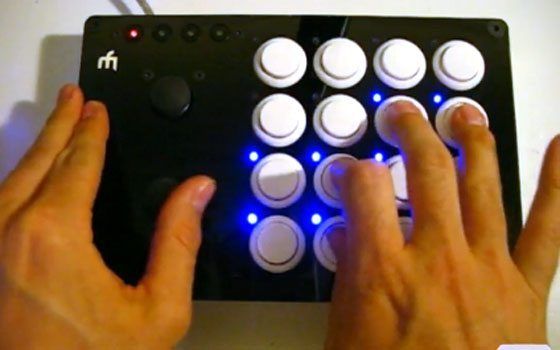
The key to cue point chords is a setting up a group of buttons so they have a spacial relationship to each other. Ideally, you should have a controller with at least 3 rows of buttons, and 4 columns. The controller should also have a close button spacing so you can press up to 4 buttons at the same time. Obviously, a nice grid of arcade buttons is basically perfect but you could implement the basic concept with other controllers.
- The first row (root note) triggers cue points
- The 2nd row divides the root note into musical values depending on which note is played, using the beatmasher or other time effects
- The third row adds a musical color to the sound using different FX per button
Playing various combos of these rows with the same 4 root notes results in a wide variety of chord shapes and sounds that are easy to remember and fun to play. More on this subject including a tutorial and mappings soon!
more info on the midifighter






May 20th, 2009 at 10:46 pm Quote
says I need to be on your friends list before the video will play…
please fix, I have also requested to be added to your friend on youtube.
May 20th, 2009 at 10:47 pm Quote
Hi There..
I can’t seam to get the video working, I get a message that stats that it is a privat video, and I have to accept the sender as a friend. Do any of you know how that is?
May 20th, 2009 at 10:55 pm Quote
Thanks for the heads up- the privacy settings were wrong somehow but its viewable by all now so everyone can check out the vid.
May 20th, 2009 at 11:02 pm Quote
Thanks alot..
Nice video, it seams like at cool device.
BTW, sorry for the 2. post :-(
May 20th, 2009 at 11:19 pm Quote
Looks nice, excited, creativity is definitely the life of this site, have been doing a lot of cue sampling so this makes it even better and is really practical for me.
Thanks
May 20th, 2009 at 11:25 pm Quote
cool! any chance there will be a mapping for the padkontrol?
May 21st, 2009 at 12:19 am Quote
Might you find it a little more comfortable to trigger the samples as chords if you put them on the top row? I’m just sayin’, like!
May 21st, 2009 at 12:47 am Quote
what controller is that? and do u know if it’s possible to do this with torq?
May 21st, 2009 at 1:05 am Quote
+1 for Serato with its new sample player?
I’m curious about the controller as well. Probably another bit of awesome customization Ean has made. I would love to buy one if possible.
May 21st, 2009 at 1:12 am Quote
It’s Midifidler’s Midifighter. Not a commercially available controller. (not yet, hint, hint!)
May 21st, 2009 at 1:14 am Quote
Ean Golden IS the digital revolution.
May 21st, 2009 at 1:15 am Quote
ps. oops didnt mean to quote that
May 21st, 2009 at 1:40 am Quote
WOW! Nice routine…I need to get my hands on a midifighter…. Midifidler where do i mail you the cash?
May 21st, 2009 at 1:56 am Quote
next to traktor in live, I think this demo pushes the controllerist scene in a positive light. maybe the idea is simple, I think that speaks to the nature of the audio manipulation and also that the nature of the demo itself, without complicated talking or words (like this long winded compliment), really drives the artistic points home. good job ean. now get midifighter to let to sell that controller in your store and it’s on like donkey kong
May 21st, 2009 at 3:21 am Quote
Impossible for Torq and Serato.
Torq doesn’t have a deep enough level of midi assignment to make it practical… or maybe it does thinking about it but it’s not at easy or deep as Traktor.
Serato doesn’t have any effects so all your doing is beat/cue-juggling which is nothing new or interesting.
May 21st, 2009 at 3:41 am Quote
fun stuff. Will pick one up when available. Please put me on the wish list for a midifighter.
Curios about the controller, the first two rows in particular. It appears that when a single button is triggered the whole row of LED are enabled. The last two rows only individual LED are enabled. Could you explain a little?
May 21st, 2009 at 4:07 am Quote
You da man! This is fantastic. I can’t wait to wire up something similar. Where would a guy go about getting a nice case like that? My cardboard skills are not holding up these days. :)
May 21st, 2009 at 5:35 am Quote
Dope stuff.
Midifighter is awesome. <3 mine :] Kudos to Midifidler on the builds.
May 21st, 2009 at 7:00 am Quote
I’m really feeling the musicality this brings to the routine. Sounds awesome
May 21st, 2009 at 8:26 am Quote
+1 for that!
May 21st, 2009 at 8:51 am Quote
Well, you didnt hear from me ;) ;), but you may be able to get a midi fighter soon. We created a sign up list for those that are interested here:
http://eepurl.com/bo7p
sure- that is a limitation of the midi output in traktor :)
I wish I could light each button when pressing a cue point but there is not a midi out command for that.
not quite sure what you mean, but I found putting the root note at the bottom was the most expressive and ergonomic.
May 21st, 2009 at 9:16 am Quote
Really impressive.
I can’t wait to have one of those midi fighters as well :-)
May 21st, 2009 at 9:44 am Quote
May 21st, 2009 at 10:51 am Quote
now that i think about it grizu ur right! us torq users would just have to use the transpose +/- buttons with a snapshot. but how?
im horibble with making snapshots, because i’m a begginer with torq. can u email me the snapshot file? that way i can just put in the right folder and its there. thanks
my email is djremike(at)yahoo.com
May 21st, 2009 at 1:05 pm Quote
It seems that pretty much all of your controllerism routines require very specific MIDI assignments. How do you manage that, especially in a live performance?
May 21st, 2009 at 4:39 pm Quote
For me it works like this:
The Midi-mapping stays the same, no difference if you’re just playing some tracks like a normal dj-set or if you feel like doing a little routine and showcase. all you have to do is prepare your tracks (set cuepoints, that can also be done on the fly) and find the right Midi-mapping for your combination of soft- and hardware.
There’s only one point which might give you some limitations and that’s your mind. You can’t do what you can’t imagine and what you don’t think about.
Just play around, make mistakes (they are necessary to learn and understand) and have fun.
May 21st, 2009 at 4:46 pm Quote
Sweet demo, Ean. When I first heard you talking about Cue Point Chords a few weeks ago I thought you’d actually map the cue trigger and key adjustment together in order to play something like ‘mary had a little lamb’. Of course, my expectations have been exceeded. :D
Can’t wait to try this out when i get my 2nd nanopad.
May 22nd, 2009 at 1:36 am Quote
How did you configure the expression joysticks? what software did you use?
May 22nd, 2009 at 5:12 am Quote
snapshots on torq might be a good idea with sampler and cue points.. it is possible… not to the extent of traktor where u map everything to one button like this.. very fu@#$@ impressive!!!! nice..
May 22nd, 2009 at 5:45 am Quote
this a really cool technique, great idea Ean !
May 22nd, 2009 at 6:11 am Quote
Actually configuring the joysticks would require nothing more than the internal midi mapping abilities that are in traktor, just map it to control fx knobs 1 and 2 or 2 and 3 or whatever combination of parameters.
May 22nd, 2009 at 6:12 am Quote
Oh and the midifighter looks beautifully simple, now I want one!
May 22nd, 2009 at 10:02 am Quote
couldnt i use something like a midi translator to map more than one thing to one button for torq (if snapshots aren’t working for me)
May 22nd, 2009 at 12:51 pm Quote
@Torq users:
4 Cuepoints in a track where you put together the four samples you’d like to use is no problem.
4 samples in the sampleslot, also very easy
triggering a sample or a cuepoint and add an effect is only a snapshot. you can midimap a snapshot to shortcuts on your keyboard or a midicontroller pretty easy.
But as I’ve seen in the video it looks like Ean has one button to play the “sample” and to add the effect he is pushing two buttons at the same time. So we don’t even need to care about snapshots. Just map to the on/off button of the effectslot in Torq is needed.
Mapping the joystick of the Midifighter could be tricky, but should be working for effectparameters of Torg.
May 24th, 2009 at 11:19 pm Quote
…
The Led behaviour is correct or it is a non well diodized matrix?
Thanks
…
May 25th, 2009 at 12:12 am Quote
Im not really sure what your asking here as LEDs are diodes and they are arranged in a matrix formation but it uses a Ti TLC 5924 to control the LEDs, they are all driven on individual channels.
May 25th, 2009 at 10:38 am Quote
sick !
May 25th, 2009 at 11:29 am Quote
Funny thing how one simple controller like midifighter can be used so well wiht come creativity thrown at it.
This is the true potential of traktor midi mapping and midi itself, it is all still simple but it rocks.
Anyone interested in building something like this from a USB keyboard(no joystick offcourse) let me know in forums. I have IDEAS…
May 25th, 2009 at 4:15 pm Quote
…
Hi,
I asked about leds because when you push the second file button all the leds are glow up. I noticed it wrong or is it?
It seems like when you push any button in the grid all the (ghost button asociated) leds were lighted up…
I’m just curious…
…
May 25th, 2009 at 4:27 pm Quote
its a traktor thing- not the controller. For those values I can only send midi data to all buttons per row because they are essentially controlling the same thing.
May 26th, 2009 at 4:34 pm Quote
…
Thanks!
…
May 27th, 2009 at 11:21 am Quote
can i get the tsi for that. i have a controller that is very similar to that & i can change what i need. i just want to see how the midi settings are. thank you
May 31st, 2009 at 1:49 pm Quote
the controller looks like an awesome rocksolid unit…. im still building my midibox unit, wanted to have cuepoints, more beatjumping options and also some more rotaty controls to pair up with the vci-100, I dont want to chop up my vestax, too sexy to mess with it.
May 31st, 2009 at 1:51 pm Quote
Ow, midibox-er. Greetings mate.
June 1st, 2009 at 9:38 am Quote
ditto p1554nt!