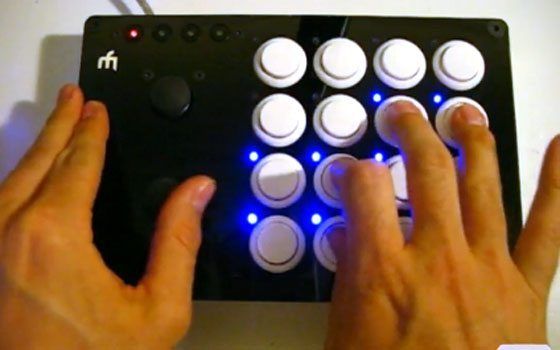
Save your Laptop

***News flash**** Laptops are not designed for use in dj booths.

There are many things that can go wrong with your laptop and chances are if you dj for long enough then almost all of them will. Here is a short list of some of my personal laptop follies.

  • Yes- someone has poured a drink on it
  • Yes- a man was thrown on the dj booth sending the lappy to the floor
  • Yes- its overheated to the point of damage
  • Yes- liquid has inched its way under the case

While there is not much you can do about many of these problems there is something that you can do about a few, namely overheating and liquids.

Solution 1: Lift it up
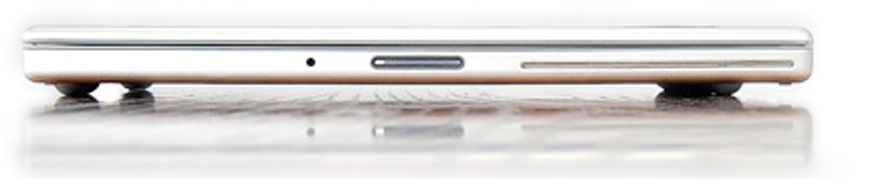
Check out the LapTop lifts (pictured above) which might solve your overheating and liquid problems all in one inexpensive solution. I am wondering if they are high enough to clear the turntable spindle?

Solution 2: Coat the Keys
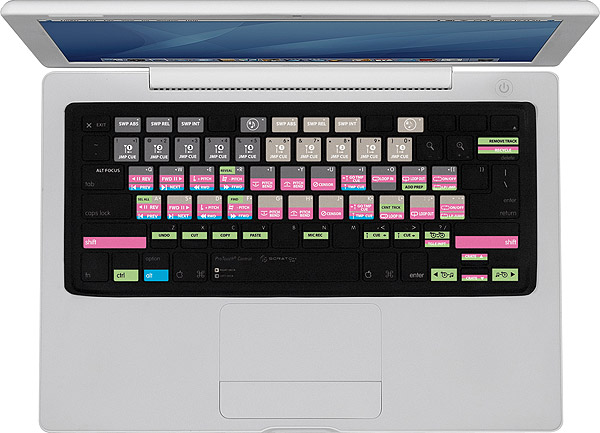
Get yourself a protective keyboard cover to guard against drunk trainspotters leaning over your precious investment with a $5 long island ice tea. There are also some multi colored non branded versions.

Solution 3: Go Old School
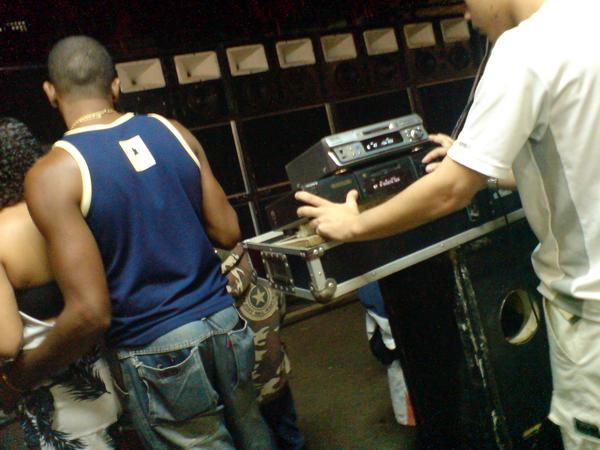
Trade your laptop in for a set of mini discs as we are pretty sure they are impervious to all damage except possibly nuclear. Plus I saw the guy above spinning on a pair of minidiscs in a Brazilian Favella and he basically kicked ass.

Solution 4: Build a Stand
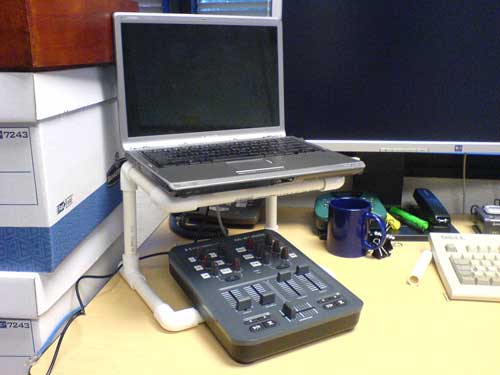
cheapo-stand.jpg

Check out this great article on building your own laptop stand from the extensive TechTools archives.

Solution 5: Lock It up


Also from the archives comes an older but very valuable article on even more ways to keep your laptop safe on the road and at home.

52 Responses to “Save your Laptop”

  1. Anonymous

    May 18th, 2009 at 12:36 am Quote

    My PC makes a good drinks holder

  2. Dudu P

    May 18th, 2009 at 12:44 am Quote

    Hey, Ean, instead of that sticky LapTop Lifts, may I recommend Bluelounge’s Cool Feet:

    http://www.bluelounge.com/coolfeet.php

    I’ve been using them for a while. they are easily removable, without leaving any goo, and they really stick well, even on a Macbook Air with it’s curvy shape.

  3. Dj Redex

    May 18th, 2009 at 1:02 am Quote

    Instead of laptop lifts, why not just use a laptop stand?

    They’ll give you at least 6 inches off the table. More than enough room to avoid a spill.

  4. iwaiwa

    May 18th, 2009 at 4:20 am Quote

    This Antec “Notebook Cooler To Go” has worked out real well for me

    http://www.antec.com/Believe_it/product.php?id=NzM=

    It adds about 2 extra inches (height) to the back of the laptop, improving the ergonomic angle and has a powerful USB fan to keep the laptop cool (temperature).

    If liquid spills under the laptop, it won’t hit the critical openings/vents on the bottom of the laptop.

    (Also, I always bring a spare laptop to gigs — just in case)

  5. Dj Nvidia

    May 18th, 2009 at 4:48 am Quote

    Yo,

    I highly recommend this laptop stand:
    http://www.matias.ca/ifold/

    It may seem a little wobble at first glance, and when you first put ur laptop on it, your heart may skip a beat (not knowing if it will hold), but put your fears to rest, because this thing is ROCK-SOLID.

    I love it and it acts as both a cooling-pad and stand, plus I use keyboard cover with it too…..

  6. Caesar

    May 18th, 2009 at 6:45 am Quote

    Use a milk crate!

    http://www1.istockphoto.com/file_thumbview_approve/1468821/2/istockphoto_1468821_red_milk_crate_to_sit_on.jpg

  7. Lukas

    May 18th, 2009 at 7:53 am Quote

    So let’s work on a Traktor Pro keyboard mapping and get it adopted by magma! I have been doing a bit of work towards making my keyboard mapping, especially in the browser, more OSX friendly. So things behave a bit more like in the finder. However I do not yet have my VCI-100, so once I do, I will revisit my keyboard mappings to see if I can stream line things even more.

  8. moomin

    May 18th, 2009 at 8:12 am Quote

    I jus chucked cup of coffee at mine 2mins b4 I read this haha!
    you can buy covers for mac book keyboards, think even with traktor layouts on em! but alas they dont exist for pc’s! :(

    As for mini discs they aren’t bulletproof as you may thinks, i have few in draw that are all seized up with stickey drink, which reminds me… they have some really rare old house tunes on em! If i can clean them up & find someone with a player I got some sweet tunes!

    If your really woried by a toubghbook!

  9. Osoner

    May 18th, 2009 at 9:00 am Quote

    So let’s work on a Traktor Pro keyboard mapping and get it adopted by magma! e.

    I would kill for one of those for pc ! Anyone has a good keyboard mapping ?

    Great article Ean =)

  10. jimmymac

    May 18th, 2009 at 9:14 am Quote

    Why not use a macmini with seperate portable monitor instead?
    This is what i am considering

  11. Anonymous

    May 18th, 2009 at 10:52 am Quote

    KB covers do really simple clear or coloured peel back rubber covers for both MB and MBPros.

    http://www.kbcovers.com/servlet/Categories?category=Clear+%26+Colors

    Just means you don’t HAVE to get a serato one!

  12. gfocus

    May 18th, 2009 at 11:01 am Quote

    To round this article up… 5 short tips: 2 of which were ads, 2 were links to older posts and 1 was a joke (at least I hope so). I don’t feel so much for DJTT lately. On the upside, spending less time on the internets means more time with my VCI.

  13. Ean Golden

    May 18th, 2009 at 1:46 pm Quote

    To round this article up… 5 short tips: 2 of which were ads, 2 were links to older posts and 1 was a joke (at least I hope so). I don’t feel so much for DJTT lately. On the upside, spending less time on the internets means more time with my VCI.

    Just to clarify:

    Mini Disc was a joke
    the other 2 were not ads but product recommendations (we DONT do ads)
    and the past articles are valuable stuff that are relevant again.

    For what its worth:

    I spend up to 12 hours a day, 6 days a week developing new dj Technology and creating useful content for this site which no one pays a dime for.

    Yes, we have been a little slower on the really deep articles lately but if you knew what I am working on then you would understand why that is. The articles will pick back up again in a few weeks when I am not on the road anymore but in the mean time cut me some slack- or donate some cash so we can hire writers. Or even better, help out and become one of our contributing writers.

  14. Alex Byrne

    May 18th, 2009 at 1:52 pm Quote

    I would imagine DJTT is just busy with the new overlays making the tutorial vid and what not.

    To round this article up… 5 short tips: 2 of which were ads, 2 were links to older posts and 1 was a joke (at least I hope so). I don’t feel so much for DJTT lately. On the upside, spending less time on the internets means more time with my VCI.

  15. DJLp

    May 18th, 2009 at 2:00 pm Quote

    gfocus (and I say this with all sincerity) whatever your level is, everyone is not on it. If this is stuff you already know or has no value to you…that’s ok. On another note, there are younger DJ’s, newer DJ’s to the digital world, worldwide bloggers etc that don’t know what you know.

    All I’m saying is don’t spoil it for them. And being one of the members since Day 1, I can tell you that should you have any needs for info, tips or product suggestions, this is a great resource. If you don’t see it, mention it. Again, if you’re 100% in the game with no need of anything, share your knowledge. That’s what the site is all about.

    Again, that’s not to talk down to you or “get you straight,” it’s just to say that there are people on this site from experts to beginners and all are welcome.

  16. djeklypse

    May 18th, 2009 at 2:00 pm Quote

    gfocus. . .unacceptable. How many other pro DJs do you know take the time to give away their hard earned tips, tricks, and professional opinions for free? Rest assured Ean, the rest of us appreciate your hard work!!

    djeklypse

  17. Ean Golden

    May 18th, 2009 at 2:47 pm Quote

    I would imagine DJTT is just busy with the new overlays making the tutorial vid and what not.

    that is exactly right- we were up until 3am on sunday trying to finish the SE tutorial video that was supposed to go live of monday. It didn’t get done in time so instead I had to come up with a new article for today and this was what I managed to pull out of my very tired ass.

  18. DvlsAdvct

    May 18th, 2009 at 2:48 pm Quote

    We love you Ean!

  19. the eel

    May 18th, 2009 at 3:06 pm Quote

    the site rocks!

  20. deeco

    May 18th, 2009 at 3:34 pm Quote

    http://www.griffintechnology.com/products/elevator

    That’s the stand I have…bonus..it’s comes apart into 3 peices…great for teardown and easily fits in my laptop bag. As for keyboard mapping for traktor…mine takes care of browser, loading tracks, changing effects (fx 1 chaines, fx 2 advanced), selecting decks, looping, traversing through a song, syncing, auditioning, and queue’s 5-8.

    If interested, I’ll post the mapping…

  21. Lukas

    May 18th, 2009 at 3:50 pm Quote

    One thing I am not sure yet is if I want a different keyboard mapping for stuff I might do on the go, like beat gridding and playlist management, and another one live performing. Both beat gridding and playlist management might need to be done in a live setup as well, and it might just be confusing to have different layouts. Anyways, first I need to see how different my needs will be in a live setup (where I will have VCI-100), compared to how things are now.

    At any rate, sure we should start collaborating on keyboard mappings. I think however that for windows and mac we probably want different mappings. In order to visualize the mappings we can use:
    http://www.traktorbible.com/en/tsiviewer.aspx

  22. Vinicius Hoffmann [Brazil]

    May 18th, 2009 at 4:51 pm Quote

    Keep up with your good work Ean, I like all your articles, deep or not deep…
    Maybe for you guys these laptop gadgets are old stuff alredy, but here in Brazil, high tech technology and gadgets come always with a big delay. Its nice for us to see what will come in the local market. Thats why is important to us articles like these…

  23. Vinicius Hoffmann [Brazil]

    May 18th, 2009 at 4:52 pm Quote

    Keep up with your good work Ean, I like all your articles, deep or not deep…
    Maybe for you guys these laptop gadgets are old stuff alredy, but here in Brazil, high tech technology and gadgets come always with a big delay. Its nice for us to see what will come in the local market. Thats why is important to us articles like these…

  24. B33SON

    May 18th, 2009 at 5:34 pm Quote

    Is that Le Castle Vania in the picture?

  25. mpetersen3

    May 18th, 2009 at 6:14 pm Quote

    Is that Le Castle Vania in the picture?

    yes lol, kinda funny to use here.

  26. sm00sh

    May 18th, 2009 at 7:25 pm Quote

    Felix Cartal recently spilled a drink on his macbook while spinning in San Diego. Shut down his whole set as he had it all prepared in Live. He should have known to bring the mini disc back up.

  27. ss714ss

    May 18th, 2009 at 10:18 pm Quote

    KEEP DOING YOUR THING EAN!!!

    Don’t worry bout this cry baby’s even if it’s not a tutorial u guys still give us great advice… can’t wait for all those future projects u guys might be working on… keep up the good work…

  28. Rolf Siebelink

    May 18th, 2009 at 11:00 pm Quote

    I like Stanton’s Uberstand because of the build quality and seperate room for audio interfaces:
    http://dancemusic.about.com/od/djgear/fr/StantonUberstan.htm

  29. ToS

    May 19th, 2009 at 12:56 am Quote

    Good advice just by naming few possible mistakes.

  30. duerr

    May 19th, 2009 at 2:07 am Quote

    this is a helpful article… laptop damage at gigs is a very real danger we all face and sits at the back of every digital djs mind during performances. Implementing a few of these tips will not only keep your laptop safe but give the dj a bit of peace of mind to focus on the real business at hand ; the music.

  31. ivan

    May 19th, 2009 at 2:25 am Quote

    yo ean love the site man i appreciate everything you put out. for real.

  32. mpetersen3

    May 19th, 2009 at 5:36 am Quote

    quote comment=”18236″]
    that is exactly right- we were up until 3am on sunday trying to finish the SE tutorial video that was supposed to go live of monday. It didn’t get done in time so instead I had to come up with a new article for today and this was what I managed to pull out of my very tired ass.

    That is like shitting a golden egg, you should be shitting gold records (I love the remix of Dance btw, one of my favorites)

  33. djerikt

    May 19th, 2009 at 5:52 am Quote

    the website rocks Ean, thanks for all of the info distributed for free! I also use the Griffin Elevator. Its great for shock and bounce buffering, but it doesnt fit that well into my stuffed UDG bag currently (cause I still need to back a book of cd’s for the CDJ-1000mk3’s at the club….)

    Seems like Girl Talk isn’t particularly keen on saving his laptop. Greg recomends ‘plastic wrap’ as the best laptop cover availible.

    http://web.stlawu.edu/ace/girltalk%20dj.jpg

    http://media.createdigitalmedia.net/cdmu/images/2008/12/girltalk1.jpg

  34. gfocus

    May 19th, 2009 at 6:51 am Quote

    ean, don’t get me wrong. i love you for what you do. if it weren’t for your work i’ve never would’ve picked up DJing again. you give digital djs / controllerists all over the world a great deal of confidence – thank you.

    that being said, one should be able to give bad critique on an article without being labeled as hater, smartass or crybaby.

  35. DJ CZO

    May 19th, 2009 at 8:06 am Quote

    Hey Ean,

    U are the reason why I’m a DJ. I now have my own night at a club every month and I’m DJing the nicest newest bar on campus tomorrow. Thanks to your development of digital dj technology i was able to overcome the barriers in becoming a dj and i can follow my passion and share it with others.

    Please realize that we are complaining because we are not getting enough of you. Lol we are needy lil DJs.

    But seriously thank you for everything you do and I can’t wait for the SE video. Quality from beginning to end.

    THANKS EAN!!!

    ps. Yall should youtube urselves making a mix with ur digital dj setup to keep us busy until new massive ean updates.

  36. Ean Golden

    May 19th, 2009 at 9:30 am Quote

    ean, don’t get me wrong. i love you for what you do. if it weren’t for your work i’ve never would’ve picked up DJing again. you give digital djs / controllerists all over the world a great deal of confidence – thank you.

    that being said, one should be able to give bad critique on an article without being labeled as hater

    Thanks for all the support guys. I am literally working the equivalent of 3 jobs right now and sometimes it can get a little overwhelming. So positive feedback makes the long hours worth while. Next year this time, we are going to be doing amazing things but its just taking a lot of work to get there.

    Thanks for the props GFocus, and to be honest I agree with you. This is a community, not a dictatorship- so I want people to feel free to criticize my work or mistakes we make as thats how we all get better. Just please dont do it on Mondays ;)

  37. Danny Livewire

    May 19th, 2009 at 4:13 pm Quote

    LOL… Nice! … your using a pic of my boy Dylan aka Le Castle Vania!!!

    Right now I’m nursing a hurt m-audio sound card that barely works now ($400 investment) because of stupid party people @ gigs….

    And PS…. Golden, don’t let the peanut gallery get to you.

    After many years of being a DJ, I have learned, it’s not what you use…. It’s how you use it… Even old school analogue tapes have been known to rock crowds much more efficiently than high-schoolers who push play on their iMacs.

    You have raised the bar on the quality of skill for laptop DJs. Keep it up! I hope to see you one day performing at a gig. ;-)

  38. Coagulated

    May 19th, 2009 at 11:37 pm Quote

    I appreciate everything you do Ean. Youre the reason im pursuing DJ’ing. Keep up all the awesome stuff you do for the community because it really makes a difference to most of us.

  39. Karlos Santos

    May 20th, 2009 at 12:32 am Quote

    Apple Mac + Beer = New logic Board
    £700 Ouch. I learnt the hard way..!

  40. locky

    May 20th, 2009 at 2:36 pm Quote

    Useful advice here, thanks Ean.

    Just to follow this up, does anyone have any experience of insurance for their laptops? Does in-store insurance cover these kind of things?

    I mean, is accidental damage as straight forward as it sounds or do they get funny if its in a public place / night club

    Any horror stories of insurance peeps not paying out or any guidance there?

    Locky

  41. daltonb

    May 20th, 2009 at 3:50 pm Quote

    Useful advice here, thanks Ean.

    Just to follow this up, does anyone have any experience of insurance for their laptops? Does in-store insurance cover these kind of things?

    I mean, is accidental damage as straight forward as it sounds or do they get funny if its in a public place / night club

    Any horror stories of insurance peeps not paying out or any guidance there?

    Locky

  42. JesC

    May 20th, 2009 at 7:32 pm Quote

    I had a invisibleSHIELD put on my macbook & I have a clear coat cover on my keyboard. & I always have my macbook on a laptop stand.

    http://www.zagg.com/invisibleshield/laptop/

    Plus I carry my vci-100 in a ata style case so if someone spills a drink on gear is always elevated.

  43. DJ Phaidon

    May 20th, 2009 at 7:59 pm Quote

    I had a invisibleSHIELD put on my macbook

    The invisibleSHIELD is amazing. Got one on the Iphone. I would completely wrap myself in it if it were healthy and possible. Should get one for my Imac screen.

  44. DJ Phaidon

    May 20th, 2009 at 8:00 pm Quote

    I had a invisibleSHIELD put on my macbook

    The invisibleSHIELD is amazing. Got one on the Iphone. I would completely wrap myself in it if it were healthy and possible. Should get one for my Imac screen.

  45. voltcontrol

    May 21st, 2009 at 8:18 am Quote

    You can really nice, reliable (+very portable) laptopstands here in Europe for about 20 Euros, so diy’ing a stand or another solution isn’t worthwhile imo.

  46. voltcontrol

    May 21st, 2009 at 8:19 am Quote

    (typo..)

  47. Price Em'

    May 21st, 2009 at 8:24 am Quote

    I bought a stand from apple. Its called the elevator. I love it and swear by it. I use it all the time. It’s like having miniature/portable desk for your computer. It doesn’t slide thanks to the grip pads covering the top and bottom. Well worth every cent. It comes apart and is put together in an easy 3 pieces.

  48. dj c mac

    May 22nd, 2009 at 1:15 pm Quote

    i have some simple rules no drinks near the equipment sometimes you got to be a policeman and let people know they are in your space constant vigil is key. also i like to keep people out of my booth, reduces the risk of accidents. when doing a gig being professional is being responsible. take a proactive approach. we had a saying in the infantry,
    “stay alert,stay alive” if your aware of whats going on around you, you’ll be able to avoid 99% of the human error kind of mishaps. now those software and ocassional equipment breakdowns are going to happen be prepared and have a back-up plan. also part of being a professional.

  49. dj c mac

    May 22nd, 2009 at 2:44 pm Quote

    by the way this site is one of the best for info keep up the good work ean!

  50. MJmac

    May 28th, 2009 at 11:04 am Quote

    by the way this site is one of the best for info keep up the good work ean!

    Oh yeah forgot to mention that i use the stanton uber stand… bit expensive but its well made and does the cooling & elevating job very well!

  51. twisted

    August 23rd, 2009 at 2:23 am Quote

    why not just have a lcd monitor with wireless keyboard and mouse? makes for a slim pc! then just hide it away

  52. Vjack- DJ Equipment

    August 27th, 2009 at 1:21 am Quote

    Hi,

    why delete my info???????????

Leave a Reply

  1. Quote selected text

First Time?

This site is dedicated to digital djs. We develop performance tools and teach cutting edge techniques that enable creative expression. Visit tutorial videos on youtube, equipment reviews in the blog and a very helpful community in the forum. New articles every Mon, Wed, Fri.
In the Store
 

Categories:
Follow us:
You're going to need Flash 8+ and JavaScript to use this site. How'd you get this far without it?

Dig through the Crates

Readers are Saying

  • Double DutchDj: Right, here’s why the zero 4 is simply the best for what I want, firstly I can control Traktors Clock...
  • PlanetDJ.com: [quote comment="30788"]What happened to the Stanton 680? They were the industry or club standard… now...
  • azunderg: Do I download the firmware upgrade software directly from renesas or do you have link to it?
  • Anonymous: [quote comment="34512"]Too bad soo many entries do have other songs then listed. I thought it would be a great...
  • Dude: I’ve owned most of these products, and the AKAI LPD8 is by far my favourite. I use 2 LPD8s, though an LPD8 coupled...

RSS Hot Topics in the Forum

  • Hercules RMX Traktor DUO Mapping PLZ (MacBook Pro)
    I cant find a mapping for my hercules and plus i dont if the buttons are suppose to light up? HELP? :confused: […]
  • mac mini with dual monitors..
    hello everybody! i plan to sell my tower pc and to buy a mac mini. i really want two monitors because of vsts beeing inside my arrangement view... […]
  • Beatgridding help on a track.
    Dear all, Can someone give me some tips on beatgridding whith traktor this track : Image:... […]
  • Drugs
    I once joked that cause I was pill'n on ADHD meds all threwout my childhood I was simply graduating to the extra strength stuff with adulthood (with... […]
  • Track Selection Question
    This is a question i've had for a while and with Ean's posting recently about the "time line of the dance floor" it seems like a good time to ask. If... […]