
Korg Nano Multi Pad Mod
The NanoPAD by Korg is an easy choice for extra midi control with its compact form and low price. Lately, with lots of performance videos popping up its seems just about everyone has picked up a nano pad or 2!
The only limitation of the NanoPad, besides its slightly shoddy construction which tends to break is that there are only 2 virtual knobs. This little modification is useful for everyone that would like to get more analogue control out of the pad. By using Bome’s midi translator and the free files bellow, you can enhance the abilities of the touch-pad and instead control 26 knobs with scene set 3 and another 26 with scene set 4.
The Bomes Basics
In short, the Korg NanoPAD touch-pad has an X and Y axis (direction of touch), which can each be assigned to one cc message. Add 4 scene sets and you can control a maximum of 8 knobs, but that requires cycling through the scene-sets, which is not very realistic in a performance.
Each button on the Korg Nano pad can be set up to act like a shift controller so when the first button is held down the X/Y pad is controlling 2 completely new faders. Add all 12 buttons and you can have 24 virtual faders on just one scene. Label each button for a specific task and suddenly you have 24 very dedicated faders for different tasks.
In this Bomes translation I have set this up on Scene 3 and 4, leaving scene one for normal use.
For the usage with Traktor you only need the live scene data as you can assign the cc code in the midi preferences. However, for the usage with Torq (and some other dj software where you assign midi knobs by right-clicking and learn function) I’ve created another NanoPAD setup, where you can press a button to assign the cc message and not the touch pad.
Getting Started
first download the zip file containing the required info
For Traktor and dj programs which offer a midi preferences windows
1. Load the Korg Kontrol Editor.
2. Load the Korg Live File (NanoPad Live.nanopad_data and NanoPad Live.nanopad_set from the zip file) and save it (consult your NanoPAD instructions).
3. Read Nano Live CC Codes.pdf, or check the image below and assign the knobs in your DAW or DJ Program to the corresponding cc code.
4. Download Bome’s MidiTranslator
5. Load the bmtp file from the zip file below.
6. Setup your DJ-Application to use Bome’sMidiTranslator as your MidiController.
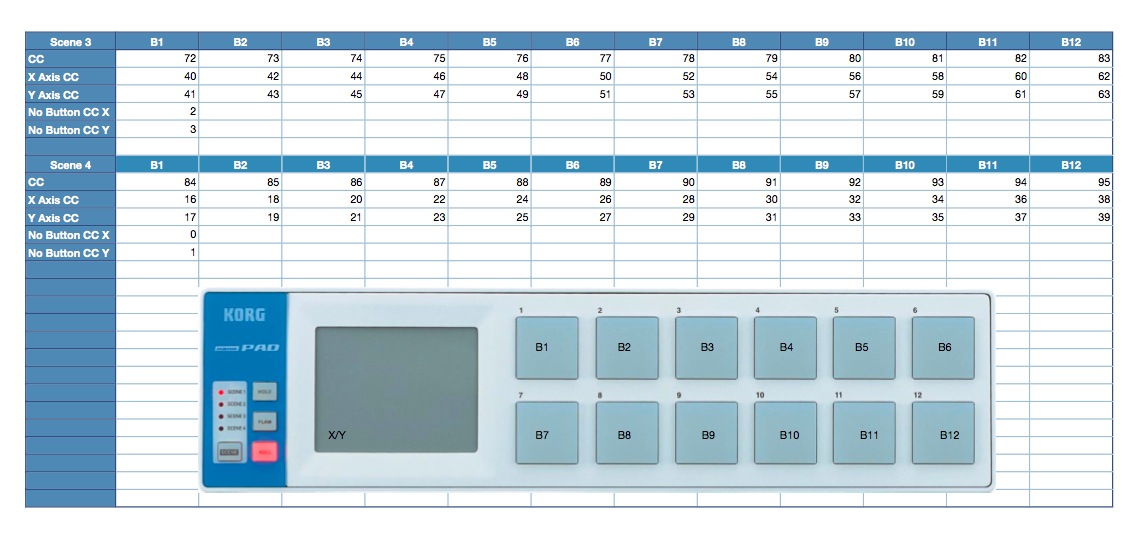
For Torq and right click learning programs
1. Load the Korg Kontrol Editor.
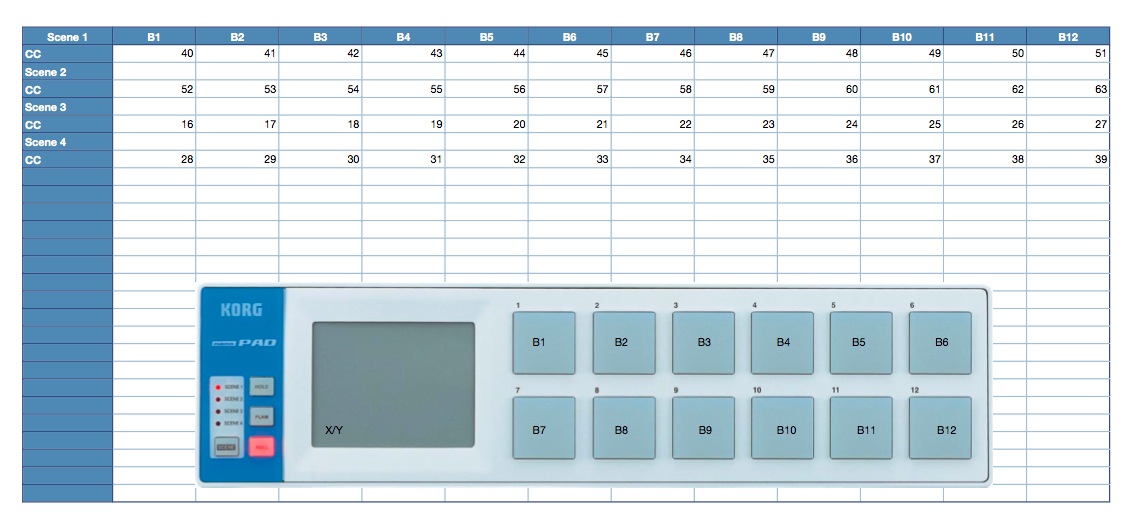
2. Read the setup pdf (Nano Setup CC Codes.pdf) and compare it with the live pdf (Nano Live CC Codes.pdf), to know what button represents which touchpad combo later.
3. Load the Korg Setup File (NanoPad Setup.nanopad_data and NanoPad Setup.nanopad_set from the zip file) and save it (consult your NanoPAD instructions).
4. Assign the knobs inside the DAW-/DJ-Application by pressing the button for each knob.
5. Load the Korg Live File (NanoPad Live.nanopad_data and NanoPad Live.nanopad_set from the zip file) and save it (consult your NanoPAD instructions).
6. Download Bome’s MidiTranslator.
7. Load the bmtp file from the zip file below.
8. Setup your DJ-Application to use Bome’sMidiTranslator as your MidiController.
have a lot of fun :)


May 15th, 2009 at 11:18 am Quote
Don’t know wehther it is relevant, but what about emulating 4+ faders on the X-Y pads: you can have translator that checks the cc value for the x axis and based on ranges of the x control number (0<=x<32,32<=x<64,64<=x<96,96<=x<=127), you change the cc number of the y control.
May 15th, 2009 at 11:28 am Quote
you can modify the bome setup file the way you would like to use it. i just gave you a kick start with my settings. its probably a good idea to start a forum thread about mods like this…
May 15th, 2009 at 11:34 am Quote
Ah, Bios, you are smart, That is nice idea but the size of the pad is so small that usability of dividing it to 4 strips would be questionable.
Anyone with synaptics laptop touchpad (not Dell and Mac) can test that behaviour with
http://www.livelab.dk/touchpad2midi.php
and see that not everything is peachy. But that is just my experience.
Still good idea tho.
May 15th, 2009 at 2:06 pm Quote
Was just thinking, essentially you are using miditranslator to assign the 12 pads to act as shift keys for the touchpad. Not sure about Torq and the rest, but with Traktor you can easily do this with the midi mod keys in it’s own midi setup without having to introduce another piece of software. Of course you only get 8 mod keys in traktor, not the full 12, but it’s been enough for me on any application so far.
May 15th, 2009 at 2:09 pm Quote
this would only work with traktor tho. the bome mod send unique cc messages, which can be used for every program, including ableton, logic etc…
May 15th, 2009 at 2:44 pm Quote
I’ve been using the XY-Pad for quite a while now but I always have to press quite firmly (*a lot* more than on a laptop’s touch pad) and wonder if that’s normal or a defect? (I also checked if there are any setting for that but touching intensity does not seem to be measured). Any hints?
May 15th, 2009 at 2:45 pm Quote
K… I am new to Nanopad (infact haven’t used it yet)…So, help me understand….
1. Should I need Bome’s Midi Translator or player… The first one costs 88 $ or else works only for 20 mins…
2. “Setup your DJ-Application to use Bome’sMidiTranslator as your MidiController” should Bome MTP need to be running in the background for this…
3. or else its just needs to be checked in the midi preferences…
please explain… Thanxs for the posting
May 15th, 2009 at 2:48 pm Quote
if youre a windows user you only need the bome midi player. its free.
yes you have to run bome midi player in the back
it wont show up in the midi prefs if its not running
May 15th, 2009 at 2:50 pm Quote
http://www.djtechtools.com/forum/showthread.php?t=5140
discuss in the forum…
May 15th, 2009 at 5:04 pm Quote
My NanoPad is the same way. When I first got it, it took me a few minutes to realize that you have to press the pad on the NanoPad much much harder than the touch sensitive trackpad on our laptops. The way the NanoPad pad works is quite a disappointment as I thought it **would** work with the same feel as a laptop trackpad.
So no, I don’t think your’s is defective, it’s just “how it is”…
May 15th, 2009 at 5:09 pm Quote
o/t i replaced 3 of the four red leds and added green yellow and orange to help me w the pages,now when in the dark i know what page im on
May 15th, 2009 at 5:20 pm Quote
What I do with Traktor Pro and my NanoPad is assign a modifier to toggle my own ‘NanoPad Advanced Effect Mode’ to ‘on’ on my NanoPad. Then I use the pads to assign Advanced Effects (9) and then the other 3 pads are for ‘Advanced Effect On’, ‘Parameter 1 On’ and ‘Parameter 2 On’. The pad controls the two right knobs in Advanced Effects. I then use a fader on my DDM4000 to control the wet/dry. This way I can stay on Scene 1 on my pad. When the toggle is off, Scene 1 is used as cues and play transport. When toggle is on, it’s ‘Advanced Effect Mode’.
This is just one way you can use the pad. I have other modifiers and buttons and sliders set up on my DDM4000 to control Chained Effects and Advanced Effects and combinations of the two. Lots o’ button mashing/knob twisting/pad pressing fun………
May 15th, 2009 at 7:15 pm Quote
Hi!
Nice to know that somebody else is doing it too. I love my nanopad and I wrote code on Bome translator to control my Ableton Live set. I do it all with one scene on the nanopad, but I managed to control 3 faders with each “shift” or button. What I do is splitting the pad in 3 columns, the column is defined by the x coordinates and the y controls the fader value. I like my nanopad because I am always moving and playing from club to club, so carrying big equipment is no good for my back, the lighter the better.
Somebody commented that the pad is not too sensible. I like that too, because you may accidentally touch the pad and send the wrong value.
If somebody wants to talk or trade configurations for this get in touch.
Joaquin
http://www.myspace.com/djjoaquinjimenez
jjsauma@gmail.com
May 16th, 2009 at 7:32 pm Quote
Live somehow wont recognize bome’s miditranslator!
what should i do?
May 17th, 2009 at 6:02 pm Quote
It feels like a Korg KaossPad, only a little less give, which is just what I expected. Honestly if they used a laptop trackpad I bet they would break quick. I don’t know about the rest of you, but I mash down on that trackpad and do quick little pops and taps on it much more then a laptop trackpad. These feel like they can take it, and haven’t had a problem with the one on my PadKontrol yet.
May 17th, 2009 at 6:52 pm Quote
Hmm, still waiting for a reply, really want to try this out!
May 17th, 2009 at 8:17 pm Quote
Laptop touchpads are not easily broken by hitting as modern synaptics detect capctiy and not pressure which does not expose detection surface to external influences.
May 22nd, 2009 at 10:06 pm Quote
could we also have a youtube vid of some of u guys?
so the limited imagination and language barrier is broker here for me ;-)
thx in advance
May 22nd, 2009 at 10:07 pm Quote
i mean:
X/Y pad,all 12 buttons and having 24 virtual faders…
May 23rd, 2009 at 12:40 am Quote
Found a way through this, miditranslator doesn’t have a virtual midi port so i used midi yoke to fix this!
May 25th, 2009 at 1:07 am Quote
Hi DJ Techies
I got two Nanopads (I like dedicated controls) and I want one for Deck A-Deck C-FX1 , and other for Deck B-Deck D-FX2. How should I start. What are the things I need. Please give Basic information first. Thanks
May 25th, 2009 at 9:59 am Quote
A very smart tip !
September 1st, 2009 at 7:39 pm Quote
.tsi of nano control for traktor pro ??? pleaseeeeeee
December 22nd, 2009 at 5:24 am Quote
Hey i like to make the button and the x/y work together , how is that possable ?
ill give you as example
B1= select deck1
B7= select deck2
X fader deck1/2
y volume up/down
i like to hold down B1 then use x to fade to B2 while using Y to for the up down ,
is this possable ?
please email me if you have a VDJ , and use your nano for it ( i dont use Tracktor yet ( not enough $$$$$)
January 5th, 2010 at 12:02 pm Quote
i think i have a dodgy nanopad,i hit the buttons to control a switch and sometimes the switch stays on other times it it will only stay on if i hold it down,same with cue points,sometimes it will play from the cue points other times it will only play if i keep button held down,is this my nano or are there some settings somewhere i need to change,
p.s love the website