

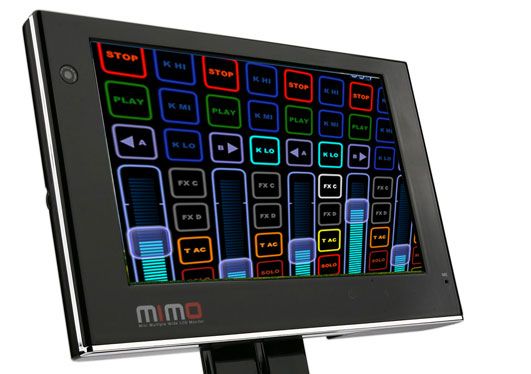
The $250 Lemur

The DIY spirit is alive in the world today and now where is that more evident than here on Dj TechTools where many, many readers are busting out the old soldering iron and creating their own Dj controllers. For those without mad electrical skills, the Lemur concept offers the possibility to create your own virtual controller in just a few minutes. Sadly the hefty price tag puts it out of most people reach but fortunately, we have found a way for you to create your own touch controller for under $250!
Touch on a Budget
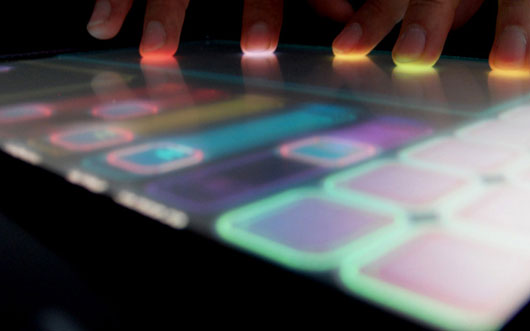
Sure, tablet computers are an easy way to get mono touch capacity but that requires the purchase of a new laptop. Everyone is looking for an inexpensive accessory controller to add to their existing setup. The key would be a touch sensitive LCD display that would be small, portable and USB powered. Viola, let me introduce you to the NanoVision Mimo touted as the worlds first USB powered touch screen.
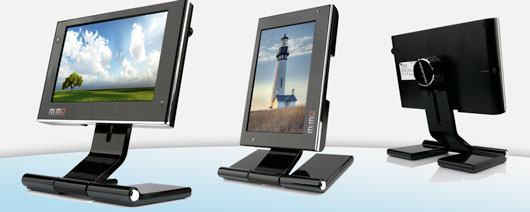
- Completely powered by one USB cable
- LED back lit 7 inch display.
- Touchscreen interface
- ‘Swivel’ mode to alternate between landscape and portrait angles
- +/- $200
available here and here
Lemur Look alike
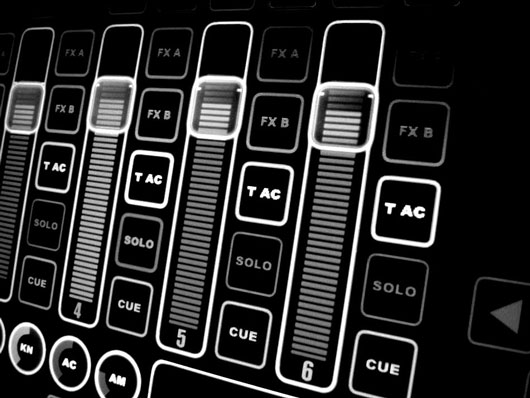
Add some configurable software like the $30 mono touch live and you have a lemur like interface for under $250!





March 29th, 2009 at 8:46 pm Quote
Bummer, this software necessary does not directly work on OSX:
“Remember you can use MonotouchLive with tablets PCs or Touchscreen PC, MAC runing Bootcamp, or can use PC for take control of MAC OSX using the cross plataform MIDI over lan tool: Music Lab Midioverlan CP (http://www.musiclab.com/products/rpl_info.htm) five stars !! aplication : )
So either you need to run your entire setup on windows, or at least run windows on something (I presume it could also be a virtual machine, but thats going to put a lot of strain on your main machine).
Wishing for a solution for OSX is probably going to have to wait until Snow Leopard since that is going to bring some more touch API’s.
March 29th, 2009 at 8:57 pm Quote
I should also note that a couple of people do not like the level of “detail” that the monotouch developers put in taking a “hint” from the Lemur guys:
http://createdigitalmusic.com/2006/09/11/tacky-rip-off-of-lemur-touch-interface-in-software/
March 29th, 2009 at 9:09 pm Quote
OK, I realize I am borderline spamming here. But this got me excited. So I put out a shout out to the itouchmidi.com guys .. seems like they have a lot of the required expertise around the OSX API’s:
http://itouchmidi.com/?q=node/257
Feel free to +1 :)
March 29th, 2009 at 10:31 pm Quote
Lukas:
I +1′d your post at itouchmidi.
Hope they make a native OSX software for us!
Ean:
Great work on this article.
Although making a custom midi controller from scratch would be awesome fun & cool, it seems like something like this is a much better option. Quick, easy, affordable & dynamic.
Ehssan
March 29th, 2009 at 11:52 pm Quote
i was looking for info similar to this yesterday…. i got a sudden desire to build something while im off work with a fractured arm
March 29th, 2009 at 11:57 pm Quote
i was looking down the track of a perspex screen overlay and ir led’s for true multitouch
March 30th, 2009 at 1:18 am Quote
That’s not multitouch though, is it? With a name like “monotouch” it doesn’t seem likely…
March 30th, 2009 at 1:29 am Quote
not a multi-touch interface, but it would serve quite a few neat functions that could make a setup cleaner and more intuitive.
March 30th, 2009 at 2:55 am Quote
Needs native OSX. Cool for the $$ even if no “multi”-touch
March 30th, 2009 at 7:17 am Quote
It will be possible to do it multitouch when snow leopard and windows 7 come out. both will offer the necessary APIs.
March 30th, 2009 at 1:05 pm Quote
Software is not the problem with multi touch, hardware is.
So if that MIMO screen supports multitouch than all you need is some specific communication API (which windows does not provide, I know it is a problem). But world has TUIO-OSC protocol that many applications speak.
Or this: http://blogs.msdn.com/multipoint/archive/2009/03/23/multipoint-sdk-version-1-1-release.aspx
Screen beeing powered by USB is not actually a good thing with laptop users. On a side note monitor D-SUB connector also supplies 5V 500mA. And every laptop has one and it would not spend one USB connector in vain.
March 30th, 2009 at 1:21 pm Quote
You can use your screen like a touch screen using a Wiimote and a infrared LED… its simply and very very cheap xD And it works in MAC!!
March 30th, 2009 at 1:27 pm Quote
Check this url: http://johnnylee.net/projects/wii/
March 30th, 2009 at 2:28 pm Quote
…
http://www.magictouch.com/
http://www.axiotron.com/
Leave the imagine fly…
…
March 31st, 2009 at 4:03 am Quote
I love it. I’d buy it but I too have a mac… I guess we’ll have to wait.
March 31st, 2009 at 4:05 am Quote
well that’s a brilliant solution for the ‘multi-touch’ v. ‘mono-touch’ issue. But the problem still exists for MAC OSX users: there’s no software to control ableton using the touchscreen!
I’m thinking that making a custom arcade controller might be the better option no?
March 31st, 2009 at 4:09 am Quote
I used to have no reason to doubt that Mac’s sh*t all over PC’s..until this article cme along
April 3rd, 2009 at 5:53 pm Quote
I totally found this thing for way cheaper…though including shipping, it might come out to $250.
Read: http://www.cartft.com/catalog/il/1036. According to today’s exchange rates, the price of 119.95 EUR comes out to approximately 161.12 USD before taxes and shipping. Also, this one might not be touchscreen…but I thought I’d mention it anyway.
-ATP
April 3rd, 2009 at 6:01 pm Quote
…ok, I’m unobservant. These comments should have temp. passwords for self-deletion to cover idiocy.
Anyway, the one I linked has no touchscreen. This one has touch, microphone, webcam, but is not available until May 15: http://www.cartft.com/catalog/il/1037. At 159.95 EUR, exchange rates bring it to 214.93 USD before shipping and taxes. It’s cutting close to that $250, but in the end might still be slightly cheaper.
Now I leave this topic alone.
-ATP
April 7th, 2009 at 7:03 pm Quote
If you are on windows it seems there is yet another option if you have a tablet (or probably just any touch screen):
http://www.livelab.dk/tablet2midi.php
April 8th, 2009 at 4:45 pm Quote
DONDE PUEDO COMPRAR UNA DE ESTAS PANTALLAS AKA EN EL ECUADOR
April 10th, 2009 at 8:40 am Quote
check this out: http://createdigitalmusic.com/tag/usine/
April 11th, 2009 at 9:01 am Quote
Usine is Windows only!!! ARGGGG!!!
But it looks a little over the top for a midi controller anyway.
April 14th, 2009 at 2:45 pm Quote
Things are getting interesting:
http://www.geocities.com/mixage/#ITMTouchBridge
April 15th, 2009 at 9:50 am Quote
April 15th, 2009 at 9:52 am Quote
Will this work for Traktor Pro?
May 1st, 2009 at 2:30 pm Quote
Please read.
http://www.monotouchlive.com/index.php?option=com_content&task=view&id=22&Itemid=54
May 2nd, 2009 at 12:13 am Quote
link is dead- plus it might help to provide some more info than just please read and an URL. This looks like spam
May 2nd, 2009 at 2:38 pm Quote
go to http://www.monotouchlive.com and then go to the MTL Controversy tab if that link doesn’t work. there is also a new article on the create digital music page about this as well.
i have been demoinng MTL with a tabletpc that i recently bought used. It is really fun and i’m really excited to see what the new version brings about.
May 2nd, 2009 at 5:26 pm Quote
Thankyou Peter Kirn
http://createdigitalmusic.com/2009/05/01/monotouchlive-the-lemur-imitation-and-hopes-for-an-older-wiser-cdm/
http://www.monotouchlive.com/index.php?option=com_content&task=view&id=22&Itemid=54
Best regards.
May 4th, 2009 at 8:22 am Quote
PLEASE READ:
I sugest to anyone plain do what this tutorial indicate dont buy 7″ touchscreen, the minimum size for use with my software with finger is 12″ not 7″ !!
7″ touchscreen only can be usefull with PEN not with finger, my software need like minimum screen 12″
Pablo Martin
May 4th, 2009 at 6:04 pm Quote
Just FYI. It seems that CDM’s article wasn’t based on a full understanding of the situation. It also seems that my comment on the above article was then taken to keyofgrey.com. I assume that the CDM article also moved through the web without my help as well, but I do feel bad for having added to the distribution of an “overreaction”.
So my apologies Pablo. I just posted the article because it seemed relevant. Obviously I did not have the means to verify its content.
May 4th, 2009 at 6:19 pm Quote
Lukas all is ok. Thankyou for apologize.
Now with new CDM article all be more clear.
Best regards.
June 3rd, 2009 at 10:56 pm Quote
ok .. not quite the real thing .. but its cheap and its multi touch:
http://sethsandler.com/multitouch/mtmini/
January 26th, 2010 at 7:19 am Quote
Interesting Post!