DJ TechTools
  • Blog
    • DJ Gear
      • DIY Projects
      • Gear Reviews
      • New Products
      • Controllerism
    • Techniques + Tips
      • Beginner DJ
      • Advanced DJ
      • Producer
      • Finger Drummer
    • News + Culture
      • Editorials + Opinions
      • Artist Interviews
      • Performances + Routines
      • How I Play
    • DJ Software Tutorials
      • Serato Tips
        • Traktor Tips
      • CDJ Tips
      • Ableton Live Tips
  • Store
    • Run by real DJs, not a corporation
    • DJ Controllers
      • Midi Fighter Twister
      • Midi Fighter Spectra
      • Midi Fighter 64
      • View All
    • Accessories
      • Chroma USB Drive for DJs
      • Chroma Caps
      • Chroma Cables Audio
      • Chroma Cables USB-A
      • Chroma Cables: USB-C
      • DJTT Gift Card
      • Midi Fighter T-Shirt
      • Keyboard Covers
      • Earplugs by V-Moda
    • Production Gear
    • Soundcards & Mixers
  • Community
    • Popular Forums
      • General Discussion
      • Buy & Sell
      • Reviews
      • Mixes
      • Music Production
      • Show Your Setup
      • Off Topic
    • Handy Links
      • New Posts
      • Private Messages
      • Register
      • Search
    • Midi Maps
      • Traktor
      • Ableton
      • Serato DJ
      • Midi Fighter 3D
      • Midi Fighter Twister
      • Midi Fighter Spectra
  • Midi Fighter
  • Chroma
No Result
View All Result
DJ TechTools
  • Blog
    • DJ Gear
      • DIY Projects
      • Gear Reviews
      • New Products
      • Controllerism
    • Techniques + Tips
      • Beginner DJ
      • Advanced DJ
      • Producer
      • Finger Drummer
    • News + Culture
      • Editorials + Opinions
      • Artist Interviews
      • Performances + Routines
      • How I Play
    • DJ Software Tutorials
      • Serato Tips
        • Traktor Tips
      • CDJ Tips
      • Ableton Live Tips
  • Store
    • Run by real DJs, not a corporation
    • DJ Controllers
      • Midi Fighter Twister
      • Midi Fighter Spectra
      • Midi Fighter 64
      • View All
    • Accessories
      • Chroma USB Drive for DJs
      • Chroma Caps
      • Chroma Cables Audio
      • Chroma Cables USB-A
      • Chroma Cables: USB-C
      • DJTT Gift Card
      • Midi Fighter T-Shirt
      • Keyboard Covers
      • Earplugs by V-Moda
    • Production Gear
    • Soundcards & Mixers
  • Community
    • Popular Forums
      • General Discussion
      • Buy & Sell
      • Reviews
      • Mixes
      • Music Production
      • Show Your Setup
      • Off Topic
    • Handy Links
      • New Posts
      • Private Messages
      • Register
      • Search
    • Midi Maps
      • Traktor
      • Ableton
      • Serato DJ
      • Midi Fighter 3D
      • Midi Fighter Twister
      • Midi Fighter Spectra
  • Midi Fighter
  • Chroma
No Result
View All Result
DJ TechTools

Gosh darn those pesky cables

BentoSan by BentoSan
March 6, 2009
in Advanced DJ Tips, Controllerism, DIY Project Tutorials, DJ Controllers, DJ Equipment / Accessories, Editorials and Opinions
Reading Time: 4 mins read
0
Gosh darn those pesky cables
86
VIEWS
Post on FacebookTweet thisUpvote on Reddit

Has your DJ equipment ever stopped working and your left scratching your head wondering why? Did you drop $500 on a midi controller and still get irregular performance? Well, don’t throw in the towel just yet, chances are that it is probably a problem with the cable connecting your equipment to your computer. We have had many reported instances of gear dropping out in the forums and in particular the VCI-100. While Vestax did a great job with the quality of the VCI-100 they skimped on the quality one area, the USB cable.

Lets take a look at what goes into choosing  a cable that you can rely on.

Shorter is sometimes better

First thing to take into consideration is the length of your cable. The USB standard allows for up to 5 meters but shorter is usually much better. We recommend the maximum length of your cable only being a meter long, this will reduce the amount of noise that the cable will pick up that could potentially disrupt the connection from your gear to your computer. Shorter cables also reduce the chance of the cable acting like an antenna and picking up RF interference.

Ferrite Faucet?
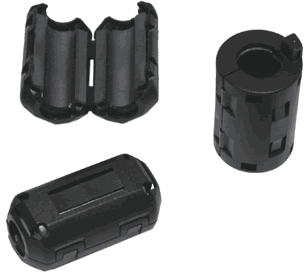
You should make sure your new cable has a ferrite, which filter out electromagnetic noise common in a DJ booth and help to ensure the connection isn’t interrupted by any outside noise. This extra electromagnetic noise will be transferred into heat by the ferrite so it does not effect your controllers connection. Ferrite’s block high frequency  interference, like noise from motherboards or UHF signals from nearby analog video, but do nothing for low frequency interference like monster bass bins.

If you can find an old cable that your not using anymore that has a ferrite (shown in the picture) then you could take it off  and use it on your cable to help combat interference.

Brands are not all bad

Another important thing to look out for when buying a cable is this logo, it will appear on the packaging of the cable and will assure you that the USB cable follows the USB specifications. This is important, because without it a manufacturer could easily easily skimp on the quality of the cable and give you a seriously inferior product. One requirement a cable must pass to be hi-speed certified is that it contain twisted power-lines. This process helps to prevent interference being fed directly into your USB device which will cause all manors of havoc including drop outs or even a total disconnection. If you are wondering if the cables that you already own are hi-speed USB certified cables you can just check the connector for the same logo – if your cable doesn’t have this logo you might want to hold off buying a new controller and perhaps just get nice cable instead.

Another important difference between hi-speed USB and good old 1.1 is the copper shielding of the cables. USB data lines are supposed to have a characteristic impedance of 90 Ohms and shielding has a significant impact on maintaining a stable connection. Hi-Speed USB cables also specify twisting of the cables in much the same way that balanced mic leads work. The signal is sent down two parallel wires and any interference from speakers or audio gear will add the same amount to both wires. At the other, one signal is inverted and added to the other, meaning the interference gets canceled out leaving the true signal. No professional audio engineer works with anything other than balanced cables and neither should you.

Handy Tips

While you are using the cables you should also be weary of not to wrap them around any metal objects , especially iron, steel fixtures (like a laptop stand) or nearby scaffolding. Coiling wire around an iron core might create an Inductor which will mess with the current in your wire, but only changing current (like data!). Velcro ties are a great for an easy way to keep your cables nice and tidy without causing any issues with your precious controller.

Several of the users in the forum (including myself) have had dropout issues with the VCI-100 and a number of us have achieved a big difference by dumping the USB cable that came with our units originally. After numerous drop outs and problems I jumped up to a proper USB cable that meets the specs above and I am happy to report that since doing this my VCI-100 hasn’t dropped out a single time.

A big thank goes out to Midifidler and Fatlimey, who are our resident hardware and USB experts.  Without their help this article would have never been possible.

Hold On..

Where can I get one of these things? Well, The handy team at TechTools is searching for the perfect USB cable as we speak and hopefully there will be something available in the store soon!

Edit: The USB cables are now on sale – Click here to read about them, or simply buy one from our store!

Tags: Connection problemcontrollerDrop outsHIgh speed USBmidiTips
Share1Tweet1Share
Previous Post

VCI-100SE Mapping Update

Next Post

Traktor Echo Trick: Pitched-Up Drum Fills

Related Posts

This is the DDJ-GRV6 by AlphaTheta: a 4-channel controller with the ability to live remix drum loops
Breaking News

This is the DDJ-GRV6 by AlphaTheta: a 4-channel controller with the ability to live remix drum loops

October 8, 2024
This is the DDJ-FLX10, with new Track Separation and Mix Point Link features for mashups and more
DJ Gear

This is the DDJ-FLX10, with new Track Separation and Mix Point Link features for mashups and more

March 23, 2023
Meet the Koala sampler app: a mobile production powerhouse, now with stems
DJ Gear

Meet the Koala sampler app: a mobile production powerhouse, now with stems

February 7, 2023
Load More
Next Post
Traktor Echo Trick: Pitched-Up Drum Fills

Traktor Echo Trick: Pitched-Up Drum Fills

Want to reach DJTT's audience here?

Shoot an email to advertising@djtechtools.com

DJTT ads
DJTT newsletter
Midi Fighter
Chat with us
  • ABOUT DJTT
  • CONTACT
  • PRIVACY
  • MIDI FIGHTER HELP
  • ABOUT DJTT
  • JOBS
  • CONTACT US
  • ADVERTISE
  • PRIVACY POLICY
  • ACCESSIBILITY STATEMENT

© 2024 DJ Techtools all rights reserved by DJ TechTools on all content unless otherwise noted.

No Result
View All Result
  • Blog
    • DJ Gear
      • DIY Projects
      • Gear Reviews
      • New Products
      • Controllerism
    • Techniques + Tips
      • Beginner DJ
      • Advanced DJ
      • Producer
      • Finger Drummer
    • News + Culture
      • Editorials + Opinions
      • Artist Interviews
      • Performances + Routines
      • How I Play
    • DJ Software Tutorials
      • Serato Tips
      • CDJ Tips
      • Ableton Live Tips
  • Store
    • Run by real DJs, not a corporation
    • DJ Controllers
      • Midi Fighter Twister
      • Midi Fighter Spectra
      • Midi Fighter 64
      • View All
    • Accessories
      • Chroma USB Drive for DJs
      • Chroma Caps
      • Chroma Cables Audio
      • Chroma Cables USB-A
      • Chroma Cables: USB-C
      • DJTT Gift Card
      • Midi Fighter T-Shirt
      • Keyboard Covers
      • Earplugs by V-Moda
    • Production Gear
    • Soundcards & Mixers
  • Community
    • Popular Forums
      • General Discussion
      • Buy & Sell
      • Reviews
      • Mixes
      • Music Production
      • Show Your Setup
      • Off Topic
    • Handy Links
      • New Posts
      • Private Messages
      • Register
      • Search
    • Midi Maps
      • Traktor
      • Ableton
      • Serato DJ
      • Midi Fighter 3D
      • Midi Fighter Twister
      • Midi Fighter Spectra
  • Midi Fighter
  • Chroma

© 2024 DJ Techtools all rights reserved by DJ TechTools on all content unless otherwise noted.

This website uses cookies. By continuing to use this website you are giving consent to cookies being used. Visit our Privacy and Cookie Policy.