

VCI-100SE Mapping Update

You may already know that we have a beta list which receives monthly updates of our VCI-100 mapping but I would like to point out the new dedicated mapping page that is now public and can be accessed from the top of the blog. This will be the central place to get information about and download the current beta or public version of our mappings for officially supported controllers. I bring this up because the new beta version 1_7 has several cool midi functions you may want to use on your own controllers.
Easy, Intuitive Loops
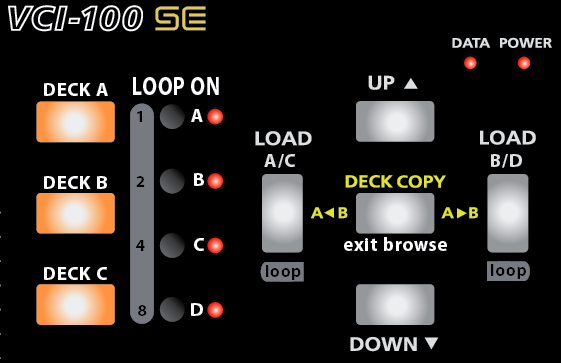
Setting a loop on the SE is easy, just click one of the 4 black buttons to set a 16 count loop. The LED will illuminate indicating that a loop is on and clicking the button again will turn it off. The 3 buttons on the left are shift buttons allowing more loop control over each deck. Holding down shift and the Load < button for example will shorten selected decks loop. You can now use shift plus the 4 small buttons to directly set specific loop lengths of 1,2,4, and 8 beats.
you may also notice that you can now exit browser mode by just pressing the middle button. Finally!
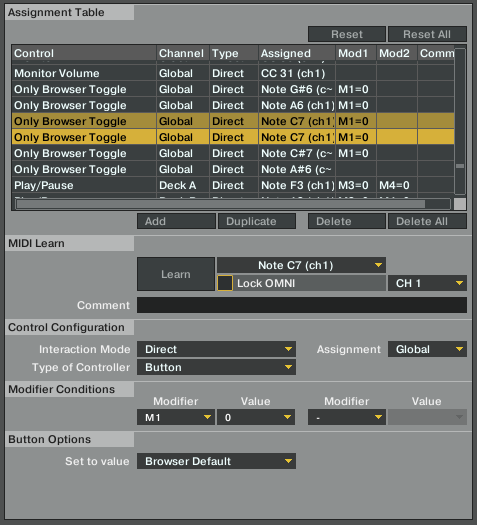
The loop buttons are accomplished through modifiers which have been covered in previous articles. The exit browse mode is a very simple but elusive mapping trick. Just assign any button in the following manner:
500% Better FX section
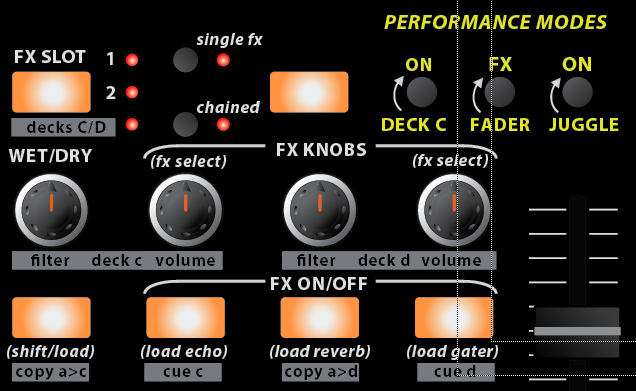
This vastly improved fx section gets a lot of control out of a small space but everything is very intuitive and easy to remember. Here are a few of the main points:
- Directly select a specific effect (advanced) or a group of effects (chained) by holding the load button and one of the buttons on the right at the same time. The load button can also be used with the knobs to scroll through the fx. The chained effects load in preset groups which work with together offer some very cool sounds. You can customize these groups in the midi editor. Using the FX buttons to load effects presets makes a lot of sense, and I encourage you to try it yourself.
- Get Deck C/D control on the third page. The Copy A to C buttons makes your life easy by copying deck a to c and also swapping the volume levels so your deck is fully transferred. The button increases the volume of the target deck to %100 and the source to 0 so if you have a fast computer the deck swap will occur with no changes in sound.
- The FX controls naturally match the traktor layout with wet dry on the left and the 3 parameter knobs on the right.
Hands on Sampler
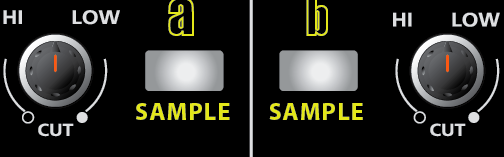
Since you no longer need to turn filters on, those buttons now engage sampler mode which is what I am using in this video demonstration. Each button, loads a beatmasher effect and starts sampling the selected deck instantly so you can record yourself juggling beats or sample a track for loop playback and effect control. These are the only buttons that are still up in the air, so if you have any ideas or suggestions for what they might become please let me know!
Get your Quantize beat Jumps on
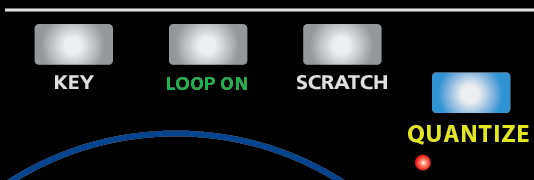
Snap is so 2008. now Quantize is all the rage, so we killed snap and put quantize in its place. This enables quantizing your beatjumps and juggles very nicely so you cant possibly screw up a song drop. While I personally dont like to use it for performance because it quantizes to a whole count, its perfect for re-triggering the start of a song.
Download the mappings yourself
Visit our new official midi mapping page and download the current public version or sign up on the beta list. Also check out the full graphics downloads which show all the functions of both versions.
*Important Note* The new TSI file will only work with the latest update of Traktor Pro, which is 1.1, so make sure you are up to date and running that version. If your not, then the file wont import or may import and not show any values.




March 4th, 2009 at 12:39 pm Quote
Gonna download the tsi right away!
And Fab with da Midi Map Tap :)
March 4th, 2009 at 12:56 pm Quote
For some reason I got a 404 error when trying to go to the new mapping page…
March 4th, 2009 at 2:10 pm Quote
Has anyone received the tsi files via email?
I havent and I also cant get onto the mapping page.
March 4th, 2009 at 2:14 pm Quote
I personally like to have access to both snap and quantize- both are useful in their own way. Also i think the use of the word “BeatJumps” is a little misleading, it should really say “CueJumps”.
Other than those minor things i think its looking very good ! Well done Ean :)
March 4th, 2009 at 2:15 pm Quote
No, havent recieved an email, although I normally do.
The Midi Map Tap works for me, using IE. But the tap disaperes when Im in the “Store” or “Forum” tap.
March 4th, 2009 at 2:23 pm Quote
Hey Guys, Just sent that email with the TSI link to the beta list now so it should be waiting for you. The Midi Map tab has to be coded into the store and forum by hand so that will take a few days to update.
All the links are good now- one was not complete and had a 404 error.
March 4th, 2009 at 3:06 pm Quote
Thanks Ean! I can’t wait to give the new mapping a spin. Also looking forward to the next shipment of firmware kits since this batch disappeared in the 2 hours it took me to check my email :-)
March 4th, 2009 at 3:29 pm Quote
let’s go to the practice room again, let us a break to install these improvements in our brains too… 8-)
Just a thing, how i can pre-listen the effects before launching them to the crowd?
March 4th, 2009 at 5:39 pm Quote
You have done it again….I think the FX banks are so much more intuitive now, thanks man
March 4th, 2009 at 5:40 pm Quote
Nice one Ean,
I too didn’t read my email fast enough and missed out on the 20 much in demand firmware kits. Looking forward to downloading and playing with the new .tsi
Will there be a new overlay when the final .tsi is launched?
Cheers
JLB
March 4th, 2009 at 5:49 pm Quote
Great, I got the email.
When can we expect new layouts? I’m really impatient:)
March 4th, 2009 at 5:50 pm Quote
I mean overlays:D
March 4th, 2009 at 6:17 pm Quote
Great job Ean..Love the new look of the overlays!
Thanks !!
March 4th, 2009 at 6:20 pm Quote
I get an error when i try to import the new settings into pro ,,, something about unknown version so has been ignored … any ideas anyone?
March 4th, 2009 at 6:48 pm Quote
The tsi dosent work for me. When i import, there are no Notes assigned, so the tsi is actualli empty…
March 4th, 2009 at 6:50 pm Quote
very well done Ean and DJ TT! I was taking my vci up and down, waiting for the updates but right now it is down at my house. Later I will test it. Thanks!
March 4th, 2009 at 7:07 pm Quote
You need to be using the latest version of Traktor Pro version 1.1 (which I recommend anyway) This TSI was created in that version so early ones will not be able to open it.
March 4th, 2009 at 7:32 pm Quote
The FX section makes a whole lot of sense now. I love the C/D controls, fx load, fantastic!
The Quantize: personally, I have it almost always on. I use the SNAP on/off alot more, so I’ll be modifying that :)
ps. grraphically speaking, if this is the actual overlay image, I don’t see why there is a big yellow a & b, and why quantize & sample are a bigger font size, it doesn’t make sense. Just a suggestion.
Thanks for the TSI!
March 4th, 2009 at 7:35 pm Quote
one more thing: the loops are killer!
March 4th, 2009 at 11:18 pm Quote
Ean,
Can we use this mapping if we’re still using 3.4 instead of Pro?? I don’t want to lose the recording ability of 3.4.
Thanks,
Mark
March 5th, 2009 at 1:08 am Quote
It would be really good if you could release a 1.0.2 tsi for everyone who is using the currently stable build of traktor.
March 5th, 2009 at 1:29 am Quote
The previous filter buttons could be used to select which fx unit is active for each deck, ie. left one for decks A&C right one for decks B&D. If the knob is to the left all the way, then the deck is assigned to fx unit 1, if it is to the left then it is on fx unit 2. If it is anywhere else then it is on both sets of fx. Or you could set the anywhere else (center) to be what they would normally be on (ie. fx 1 for left knob and fx 2 for right knob) and have the knob so that when it is rotated to the inside it is both and when it is rotated to the outside it is the opposite fx unit.
March 5th, 2009 at 7:58 am Quote
are you saying that 1.0.2 is more stable than 1.1? As far as I can tell the latest version is the best so far, and it would also be a huge amount of time to duplicate everything in the TSI as it would all have to be done again.
this sounds like someone else modified our TSI– that functionality was never in this file. Are you suggesting it?
no this mapping is pro only-
March 5th, 2009 at 9:30 am Quote
many Thanks Ean upgraded to 1.1.1 now and all working fine. A couple of questions though…
1> Is it right that the quantize button only stays on when you hold it or is this a bug?
2> as there is a bug with the 4th effect button on FW 1.2 is it possible to remap those effects nobs so that as soon as you start to turn them they turn on and when you turn them back down they turn off ? This was how you had it working in advanced mode on 1_6 tsi. I’m not nessaserrily saying can you do it to your fw just asking how i can go about doing it myself to test to see if it works better for us on 1.2 ?
Many Thanks Ean… frikkin great work your pullin off here. Just when you think it can’t possibly get any better.
Gav aka MisterMoleyMole
March 5th, 2009 at 9:37 am Quote
Ps … how do you go about tweaking what effects load when you use the load buttons ? can this be pointed out in the mapping so that we can tweak ourselves?
Many Many Many Many Thanks
G
March 5th, 2009 at 2:06 pm Quote
So i just want to say thanks for all the hard work! I just started using my VCI with my brand new Xone 3D and if you guys hadnt done all the hard work, of mapping and such i would be lost.
On a seperate note i was watching a video on your site, and noticed that your buttons light up blue. and white i think. While mine light up green and orange. Is this a firware issue or a hardware issue. or is yours super custom.
also, im hoping to post a video of this crazy Xone VCI Tracktor Ableton Idea I Have. hopefully itll be crazy.
Thanks!
March 5th, 2009 at 9:05 pm Quote
sooo damn sweet, all the love from lil’ denmark ;]
March 6th, 2009 at 2:05 am Quote
GREAT! just got my VCI-100 with a traktor pro upgrade! everything here is SO helpful.
March 6th, 2009 at 1:09 pm Quote
I am loving the new FX section. I hated having to touch my touchpad to change which effects I wanted.
I am so glad I upgraded to 1.3 firmware now (although I did have to buy 3 different cables to do so).
Good work! There isnt one other site/forum/community online I have cam across that has anything on this one!
A huge thank from sunny Scotland!!!
March 7th, 2009 at 1:06 pm Quote
March 7th, 2009 at 9:02 pm Quote
Thanks for all the help with the VCI Ean – you are a god-send to all of us who want to spend our time on the music and less on configuring Midi controllers. That said, any chance that we can convince you to link your template for the Remote SL? The set-up you had for it in your vlog looked awesome, and there are not many alternative pre-made templates out there. Any help will be much appreciated :)
Thanks again!
March 13th, 2009 at 2:00 pm Quote
Hi All,
Is it just me who screwed up my midi file or Do the deck A-B-C-D buttons on the top left no longer light up when a track is playing?
I found that feature very usefull, esp. when you got loops running on C D or trying to decide where to load in browser mode.
Ean, I trust your instinct, so I have to ask: is there a reason why you are not using the soft-takeover feature?
Also, suggestion: I have my gains set to knob/relative (110%). Since traktor sets my gains automatically, I just use the knobs to give it a little boost if I need to.
Thanks again for this update, the fx section & looping are both lots of fun.
March 16th, 2009 at 6:25 pm Quote
great suggestion on the gain.
yes- we removed that play indicator because you can now exit browser mode.
I dont use soft take over because it compromises the quality of A and B so its not worth using.
March 17th, 2009 at 4:05 am Quote
Could you go into a little bit more detail as to what you mean by this? Thanks!
March 18th, 2009 at 5:49 pm Quote
March 28th, 2009 at 2:49 am Quote
March 28th, 2009 at 2:51 am Quote
I have Traktor pro and when i try to import the TSI files a “Warning:error while parsing setting file on import” message came on… i have the Vci100 arcade edition ..what am i doing wrong?