

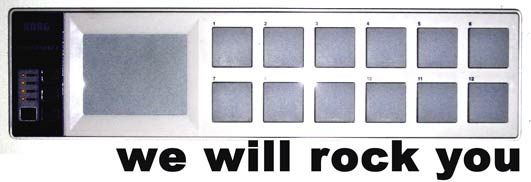
Korg Nano Juggle Routine Tutorial
Its amazing how the simplest of things capture peoples imagination. The Korg Nano demo that I posted on you tube, featuring an off the cuff remix of we will rock you, is on the way to be one of our top videos. While it was a relatively simple routine I created in a few minutes to show off the nano, many of you have asked what exactly I was doing. Check out the video above for a breakdown and then download the TSI and mp3 files after the break.
Download The TSI
korg nano juggle traktorpro 1.1 tsi
This file was created with the new Traktor Pro 1.1 update so you need to have that version installed to load it. In order to re-create the fx sounds you need to be running a chained effect on deck B with the following effects loaded in this order, drive then gater.
*Correction, as opposed to earlier stated you want to put the Gater First and then the mullholland drive after it. I forgot how I created the original effect and folks in the comments corrected me that the gater creates its own white noise and I used the drive effect to distort and turn up that noise so it is audible and gritty.

Create Your Own Version
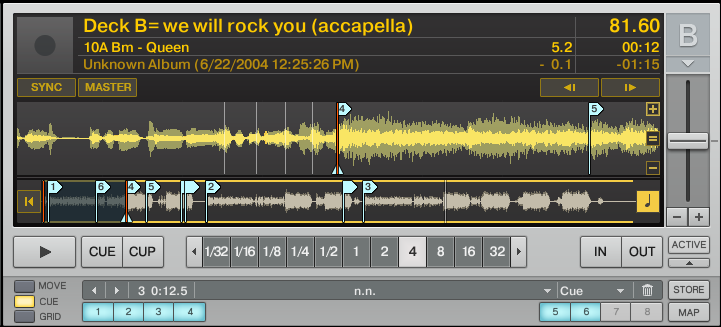
download the mp3 files I used in the videos with the cue points set here:
We Will Rock You Remix Folder.Zip
Just load the files and the effects to start jamming out. To make it really fun, I want you to upload your own versions of the remix and add it as a video response to the tutorial video. The version with the most views with get a free T-shirt from Dj TechTools.





February 23rd, 2009 at 7:13 am Quote
oh god you noob the video is upside down
February 23rd, 2009 at 8:46 am Quote
Awesome, thanks for giving me another reason to buy a NanoPad. At least it’s only a hundred bucks.
February 23rd, 2009 at 9:22 am Quote
Finally something pleasant to the ear, altough it is just a demo.
Tnx for publishing mp3s, now we can all play.
February 23rd, 2009 at 9:22 am Quote
Hey Ean, just a quick correction: in chained mode the Mulholland Drive will only produces sound when something is fed into it. The white noise you’re playing with is built into the gate effect, you can turn it down (or off) in advanced mode.
Not to say the Mulholland drive can’t be rigged to produce sound without input, you just can’t change the parameters you need in chained mode.
February 23rd, 2009 at 1:37 pm Quote
DJTT will rock you !!
February 23rd, 2009 at 1:38 pm Quote
Also yeah i beleive Tobamai is right, the white noise is produced by the gater.
February 23rd, 2009 at 2:01 pm Quote
WOW IT IS LIKE MY PRAYERS HAVE BEEN ANSWERED THANK YOU EAN I AM GOING FRIGGIN BALLISTIC lol sorry for the all caps I am super excited, and can’t wait to check this in a bit as I am at work.
February 23rd, 2009 at 3:30 pm Quote
it’s actually around $50.
February 23rd, 2009 at 5:30 pm Quote
Great stuff Ean. It’s pieces like this that keep me checking your site regularly.
February 23rd, 2009 at 6:56 pm Quote
Yo yo yo, wow…I have been trying to mimic that song on my Vestax VCI-100 and it never sounded quite right, but thanks to the tutorial, I know what I have to do…thanks again
February 23rd, 2009 at 7:01 pm Quote
Thanks for pointing that out- I didnt exactly reproduce what I originally did and could not figure out why the gate effect was low in volume this time. In that video I placed the driver AFTER the gater to bring out that white noise. Post corrected.
February 23rd, 2009 at 7:18 pm Quote
That loptop sticker is really nice especially i got black mac pro
cant wait until they are in the store
Djtechtools is my favorite web site
thank you djtechtools
February 23rd, 2009 at 8:05 pm Quote
I picked mine up for 50 at guitarcenter.
February 23rd, 2009 at 8:43 pm Quote
Still waiting for my black nanopad… hurry up DJDeals.com!
February 24th, 2009 at 12:46 am Quote
Yeah, I went onto Ebay and looked at the prices right after I posted that. I probably should have checked that before I posted.
February 24th, 2009 at 7:03 am Quote
Hey Ean,
I have tracktor scratch pro for some reason the tsi won’t work it says something about Acessory information has unknown version therefore it is ignored. Is there a fix for this? I’ve never gotten this error before.
If that doesn’t work could someone tell me how to map the cues. I’ve tried cup play and cue. But I don’t know how to tell it which cue to load upon the trigger being hit.
Thanks. Sorry if this is basic stuff. I’m still learning.
February 24th, 2009 at 7:33 am Quote
oh nm. i got the hotcues to work. I am still confused as to how Ean mapped the effects.
Any tips?
February 24th, 2009 at 10:10 pm Quote
Apparently, you have to update to the newest version of Traktor.
February 24th, 2009 at 10:16 pm Quote
Sorry Guys but TSI files created in the new 1.1 version of Traktor are not compatible with earlier versions so you will need to upgrade.
February 25th, 2009 at 1:57 am Quote
Thanks Ean you came through for the masses! Love the TSI its leading to great things!
February 25th, 2009 at 11:16 am Quote
Hi Ean,
Juggling with buttons works perfectly but not the effects pad area. :(
Are you using default nanopad set (mapping) at Korg Kontrol Editor?
Some weeks ago I tried Scooby’s mapping that included both the TSI and nanopad set, I think I correctly restored default config set.
Thanks for the tutorial,
February 26th, 2009 at 1:09 am Quote
This is awesome, thanks so much.
I have a little question, im trying to set it up , the cue points work great but I have a little problem mapping the Fx to the pad,for what I see in the video you control the dry and wet moving left and right, right? the problem I have is when I lift my finger from the pad the dry and wet parameter goes back to the middle so the fx stays on… I tried different ways of setting up the mapping but none of them work, can you maybe help me with that?
Thanks a lot in advance.
February 27th, 2009 at 4:31 pm Quote
…
Hi Ean,
I love this approarch… this is the way for APC40 with some Faders and Xfader… (and velocity)
Do you play with Live or only play traktor?
…
February 27th, 2009 at 11:15 pm Quote
cool article, got me thinking about my old DM2, remember those? These use this same idea of sample mixing with FX, these old units are not as nice looking as the nanopads and are quite a bit larger but seeing your mix brought it all back to me…
I’ve now dug out my old dm2, download midi yoke and dm2midi and will be putting together some kind of mapping for this very style of mixing ;)
I did a little modding of the dm2, took out the rubber mats, exposing the plastic buttons. Lots of scroos but got them off. I did this, as didn’t get the response off the buttons with the rubber mat in place.
still may get me a nanopad, they look cool and are so small, can fit long side my VCI…
February 28th, 2009 at 2:53 pm Quote
wowzers – that was incredible, much love.
March 3rd, 2009 at 6:34 am Quote
you need to make sure the controller is set to “spring left” instead of centering. So the value always returns to zero instead of 64 (as it is now for you) I think the default is spring to left upon release
March 3rd, 2009 at 1:52 pm Quote
Hm.. does not work for me. I got my NanoPad today, installed the Kontrol Software and imported the tsi.
Pitchbend seems to be mapped for the x-axis but the y-axis mapping in traktor is empty.
also on/off button does not work when i press the pad.
what am i doing wrong? (standard mapping of the nanopad)
March 3rd, 2009 at 1:59 pm Quote
and yes i tried to set the empty controls with CC1 (ch1) or omni, but it didn’t work either.
March 3rd, 2009 at 2:47 pm Quote
sorry, i cannot delete posts or edit them. :( it works now sometimes, at least if i touch the pad at its bottom border, then i can use the x-side (pitchbend) but it wont work in the middle of the pad.
y axis works sometimes too, again preferably at the border (right border) i can hear some very hushed noises and only sometimes. d’uh
again sorry for annoying you people, wish i could delete my first two posts here.
March 5th, 2009 at 10:32 pm Quote
hi ean,
we are inspired by techtools!
am now spreading the vestax word,like a religion!
is there any chance,u could show us a similar routine with ableton and the nano,or post a link if u know of one,
coz as soon as everyone see’s your vid,they wanna see it done!!
mind u,its my first controller and it only came out of the box 2 days ago,
keep up the good work.
peace&thank’s
March 10th, 2009 at 4:01 pm Quote
thanks for 20 minutes of fun….
greets doc
March 16th, 2009 at 2:12 pm Quote
I’m having the same problem as Charpu. My gater knob always goes back to halfway and the effect stays on after i release my finger. i can’ figure out how to set the controller to “spring left”. is that a setting in traktor or on the nanopad? thanx for any help.
March 16th, 2009 at 8:07 pm Quote
Is it possible to use the VCI-100SE & the NanoPad together? I’m unable to load both mapping simultaneously- seems like it’s one, or the other…
(also.. does anyone else have any trouble getting the control disc to activate “cue point #5″ in juggle mode? I only get the buttons… no wheel- giving me control over only 4 cuepoints.)
thanks for any answers..
March 25th, 2009 at 9:57 am Quote
Download TraktorTools 1.0 you can merge tsi files, so it should work. I haven’t tried it though, as I don’t have either of these controllers, YET!
http://www.traktorbible.com/pages/download.aspx?ID=tt101
Check here for more info: http://www.native-instruments.com/forum/showthread.php?t=82168
March 26th, 2009 at 6:23 pm Quote
Hi,
awesome videos – inspired me to get the nano pad!
I have a question – excuse me if this is v ignorant – how do you toggle one of the pads for looping play?
Many thanks in advance.
Dom
April 4th, 2009 at 6:20 am Quote
This is such an awesome site! Keep it up!
April 17th, 2009 at 8:56 pm Quote
I have just purchased a KORG Nano Pad but am completely new to this, are you able to post or send me a walkthrough on how to set up the nano pad for cue juggling as i donot have a clue at the moment on where to start.
April 27th, 2009 at 9:44 am Quote
I can’t get that X-Y pad effect working. I’ve got a plain installed version of Traktor scratch pro 1.1 . When i press the x-y pad its giving no sound at all. Only when I assign the effect to deck 2, but then it will reproduce the sound constantly. Can anyone tell me how I should set up the effect “chained mode” correctly?
May 4th, 2009 at 1:18 pm Quote
Try using the Korg nano pad software to return the midi messages sent by their default value. Then reopen the .tsi file in Traktor pro and make sure Traktor loads all the availible options. It sounds like your X-Y pad isnt sending the right midi data.
May 11th, 2009 at 3:58 am Quote
So i’m having a really rough time understanding hot cues and how to set my hot cues, would somebody please explain this to me?
September 8th, 2009 at 1:19 pm Quote
hey,
so i downloaded the tsi file to this while i was using the demo version and it all worked fine, then i got the full version and all the songs id cued to the nano pad said they werent able to be accessed as did the mapping because it said Acessory information has unknown version therefore it is ignored. But im pretty sure i have the lastest version of traktor pro.
Thoughts?
September 8th, 2009 at 5:02 pm Quote
make sure you have the latest version of traktor- there were some incompatibility problems with versions around 1.1
October 21st, 2009 at 8:18 am Quote
Hello there… your tutorial is amazing… I have a simple question… I need know how you configure your NANO MIDI controller in other words… how you adjust all parameters in the Traktor. That information is relevant if we want make a new configuration with our Nano controller.
October 29th, 2009 at 7:19 pm Quote
Hi, I just got a nanopad, but whenever I play something in traktor, it lowers the tempo as long as it is plugged in, it also skips a bunch of beats, making it unplayable. When I record and listen back to it, it sounds fine. If anyone could offer any help, it would be greatly appreciated.
November 12th, 2009 at 12:10 pm Quote
So I uploaded this tsi into the new 1.2.2 and although it sows all the commands in the new midi device & is receiving midi signal It is not jumping to the cues. Any suggestions?
December 2nd, 2009 at 5:30 pm Quote
hey how do ypu get the pause play thing to work, im new to this…
March 19th, 2010 at 6:11 pm Quote
If anyone is having conflicts between controllers, as I did (some of the midi notes are doubled between the controllers causing 2 mapped controls to activate at once…. D: )yo can recitify that by downloading the Korg Kontrol editor. http://www.korg.com/SupportResults.aspx?productid=415 . There is both pc and osx versions. Once it is installed click on the “global” button. This opens the global settings editor. Change the “global midi channel” to 2 or 3 or whatever you wish as long as it isnt 1. Click “write” etc… and youre done. Now you need to open Traktor and remap all your nanopad controls by using the learn function and activating each button per your program.
Hope that makes sense!